
In just the first half of 2022, cyber crime affected a staggering 53.35 million US citizens. And the cost to businesses was equally eye-opening – with data breaches costing companies an average of $4.35 million in 2022.
Simply put, a cyber attack is a deliberate, malicious attempt to compromise, disrupt, or gain unauthorized access to a website, computer system, or network. Attackers exploit vulnerabilities in a website’s code, passwords, or security setup (or, simply, the failings of human behavior) to carry out a range of malicious activities.
Below, we’ll walk you through the six different types of website attacks you need to know about, plus our top tips on how to keep your website secure. With the full rundown of common website attacks – including SQL injection, cross-site scripting, DDoS, plus attacks involving malware, phishing, and passwords – your business will be both forewarned and forearmed. So read on!
Common Types of Cyber Attacks on Websites
We’ve rounded up the most common types of cyber attacks on websites below. Because knowledge is power – and the more you know about the types of website attacks out there, the better you can set your site up to protect against them.
1. SQL Injection Attack
An SQL injection attack is when an aggressor inserts malicious SQL (Structured Query Language) code into a database query.
SQL injection attacks take advantage of poor input validation, or improper construction of SQL queries in an application, to gain access to a website’s sensitive information. And that’s not all: SQL injection attacks can enable the hacker to modify or delete data, escalate their own user privileges, and execute arbitrary commands on the underlying server.
2. Cross-Site Scripting (XSS)
A cross-site scripting (XSS) attack involves an aggressor injecting malicious scripts – typically JavaScript code – into web pages visible to other users. As for the specific sites of the attack, well – it could be anything from your website’s URLs or form inputs to its user-generated content.
If successful, an XSS attack can perform a whole host of damaging actions. It could steal sensitive information (such as login credentials or personal data), or manipulate the content of your website’s pages – redirecting customers from your website to malicious ones.
The worst part about an XSS attack? That it can compromise the interaction and experience your customers have with your website – and, accordingly, their perceptions about your business and brand.
3. DDoS Attacks
A Distributed Denial of Service (DDoS) attack happens when an attacker overwhelms a server with a flood of illegitimate traffic in an attempt to disrupt the normal functioning of a computer network, service, or website.
By exhausting the target’s resources – bandwidth, processing power, memory – the perpetrator renders its victim’s system or service unavailable to legitimate users. This leaves them unable to access, or interact with, the website.
4. Malware Attack
A malware attack involves the attempt to compromise or disrupt a computer system, network, or device by deploying harmful software called malware.
The goals of a malware attack can be multiple and many: including stealing sensitive information, causing damage to a website’s infrastructure and reputation, and gaining control over a compromised system.
Malware (mal meaning “bad”; ware referring to the software) comes in a range of forms:
- Viruses: self-replicating programs that attach themselves to legitimate files or programs, and spread by infecting other files.
- Worms: standalone programs that replicate themselves across networks – exploiting vulnerabilities in operating systems or applications.
- Trojans: deceptive programs masquerading as legitimate software – but carrying a malicious payload of the thoroughly illegitimate.
- Ransomware: a type of malware that encrypts files on the victim’s system, making them inaccessible until the attacker receives a ransom.
- Spyware: monitors and collects information about its victim’s activities online – tracking keystrokes, screenshots, and browsing habits – without their consent.
5. Phishing Attack
Phishing attacks use deceptive techniques to trick individuals into divulging sensitive information: such as usernames, passwords, credit card numbers, or other personal details.
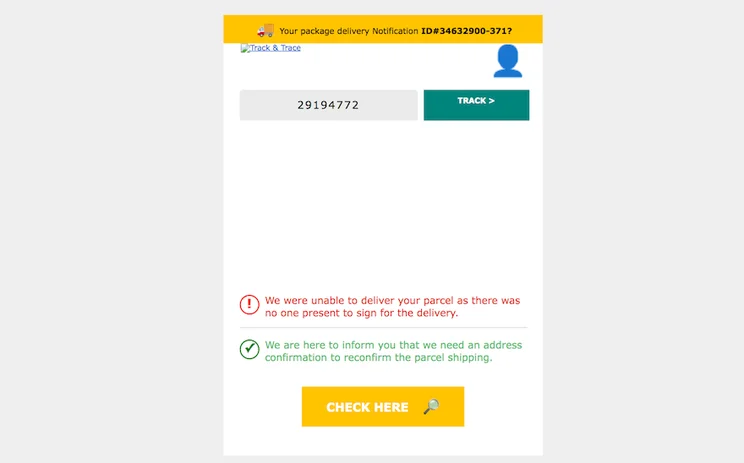
Phishing attacks are most commonly delivered through fraudulent emails, instant messages, or websites impersonating legitimate entities – like banks, postal services, or social media platforms. An email may claim, for instance, that your Facebook account has been hacked, and that you need to click the within to reset the password.
When you click that link, however, it takes you not to Facebook, but to a basic landing page – perhaps designed to mimic Facebook’s look and feel – with a form for you to enter your login details. Once you do this, you give away your credentials to the thief – who can then gain full access to, and control over, your Facebook account.
6. Password Attack
If a phishing attack is an attempt to gain access to your accounts via deception, a password attack uses brute force. It doesn’t trick or talk its way inside – but simply kicks the door down.
A password attack is when an unauthorized individual tries to gain access to an account or system by systematically trying different passwords until they find the right one. Password attacks prey on flimsy or easily guessed passwords (Password1234, anyone?), and mercilessly exploit weaknesses in password security.
Top Tips for Protecting Your Website
Of course, simply knowing about the different types of website attacks isn’t enough. You need to put processes in place to prevent them from occurring – or at least be able to deal with them if and when they do.
Here’s how to protect your business, brand image, and bottom line from common website attacks:
- Keep your software up to date: regularly renew your website’s software, including its content management systems (CMS), plugins, themes, and frameworks.
- Use strong and unique passwords: enforce password complexities – both within your business and for your website’s users – and provide guidance on how to create secure passwords. Be sure, too, to implement multi-factor authentication (MFA) for an extra layer of reassurance.
- Educate your customers about phishing: by informing your users of what phishing is – and what it looks like – you leave them less vulnerable to these types of website attacks. So reassure your users that you’ll never email or text them to ask for their personal details, remind them to be cautious with links and attachments, and provide advice on how to report phishing attempts should they arise.
- Monitor your website traffic and logs: by staying on top of your website traffic’s patterns, you can identify trends – such as spikes in traffic, repeated login attempts, or other unexpected system behavior – that could indicate suspicious activities afoot.
- Implement web application firewalls: these filter out malicious traffic, and can protect your website against XSS, DDoS, and SQL injection attacks.
- Harness SSL/TLS encryption: SSL certificates enable secure HTTPS connections for your website. This helps safeguard any sensitive data bouncing around between you and your users – preventing eavesdropping and tampering.
For more leading tips on how to secure your website, our comprehensive guide will help. You can even check out our website security checklist for easy steps to check off!
Types of Website Attacks: Our Final Thoughts
Reading about the different types of website attacks out there, it’s easy to get a little scared. On the vast, “Wild West” frontier of the internet, it can feel, at times, like a hacker is waiting in every shadow; a fraudster lurking just around the next corner, out of sight.
But don’t sweat it. Because, as we’ve seen, there are plenty of things you can do to prevent these common website attacks from winning their war against your website – and building strong, scalable, and sustainable defenses to safeguard and secure your business’s online presence.
That’s it from us – but why not stick around for some more musings? Make our guide to ecommerce security your next port of call to dive deeper into the topic.


0 comments