Wix Has Introduced an AI Text Creator for Its Editor

We may receive a commission from our partners if you click on a link and purchase a product or service on their website. Learn more

headshot of Sam Jagger
Written By
Published on March 23, 2023

Wix has recently launched an AI text feature within its editor to allow users to generate text-based content for their sites.
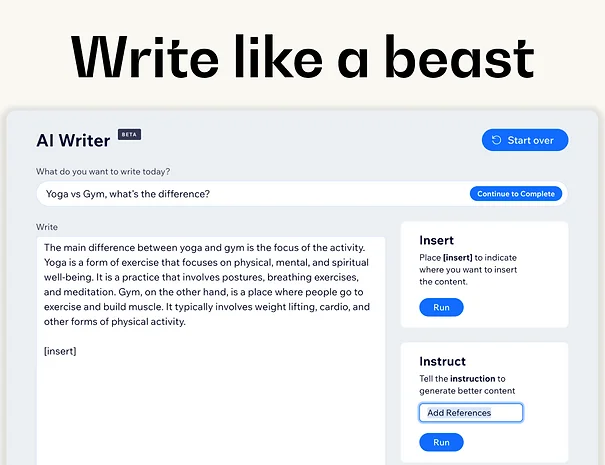
A screenshot of Wix's AI text feature with text box and then then an insert and instruct box
Source: Wix

The AI Text Creator runs off of ChatGPT 3 by OpenAI and promises that

“creators will no longer struggle with content in order to complete their sites”.

Wix states in its update that the AI Text Creator is very user-friendly, and can be used to create anything from catchy titles to detailed text. For Wix users, this means less need to worry about writing for the web.

This update comes off the heels of the explosion of ChatGPT as a tool in many online sectors. As of February 2023, it’s reported that ChatGPT now has over 100 million active users around the globe – a record-breaking adoption rate within the tech industry!

However, the open usage of AI tools like ChatGPT has not come without their complaints. Many see it as a major industry disruptor, a potential threat to an entire industry of online content writers. Others see it as a savior, massively improving the workflow of online marketing and SEO.

OpenAI recently announced the launch of ChatGPT 4, the newest iteration of their AI tool, able to answer queries and create content in only a few seconds. Its developers claim it works at a ‘human level’ and gains the ability to understand images as well as text.

On its current trajectory, Wix users can expect this technology to be more prevalent as it becomes more accessible and handy to the users.

Written By

headshot of Sam Jagger

Hi, I’m Sam:

Samuel Jagger is a Senior Writer at Website Builder Expert, specializing in AI integration and web design theory. He has created editorial content for the publication since 2022 and has covered topics ranging from website design, ecommerce, digital marketing, and more. He’s written articles for apps like UXPin on web design in the modern age, as well as answered over 100 user comments on the site. Sam has also created his own websites, such as this Strikingly demo you can view here. He also writes and stars in the official WBE TikToks, sharing helpful website tips and commenting on the latest in website design news.

Previously, Samuel worked as a Freelance Blog Writer for The MIZU Hub and as a Digital Content Creator for Europa Music Management, working with musical artists like Purple Disco Machine, David Penn, and Monolink. Samuel has a Master of Arts in Creative Writing and a Bachelor of Arts in Film Practices from Newcastle University, where he graduated with honors and distinction.

Samuel is passionate about writing, visual media, and the creative arts. He is always looking for new avenues to funnel his creativity and align his skills with projects that interest him. You can find him and keep up to date with what he’s up to on his LinkedIn.

More about

2 comments

Your email address will not be published. Required fields are marked *

  • Rob

    That's very nice, but how do you turn it off? How do remove the AI icon if you don't want it?

    1 reply

    • Lucy Carney
      Lucy Carney

      Hi Rob,
      Thanks for your comment! Using Wix's AI Text Creator is optional! To use it, you click on any text component, then click on Create AI Text - so, if you don't want to use it, you don't have to, simply use the text components as usual without selecting "Create AI Text" and you can carry on as normal. In terms of removing the feature/icon if you don't want to use it, I'm afraid I don't know how you would do this - similar to how you can't remove other Wix features you don't use, they're still there but it's up to you whether you want to use them or not. I hope this has helped, rest assured you don't have to use AI if you don't want to!
      Have a great day,
      Lucy