How To Build a Website in 2026: My Guide for Beginners

We may receive a commission from our partners if you click on a link and purchase a product or service on their website. Learn more

Headshot of Emma Ryan
Written By
Headshot of Ollie Simpson
Reviewed By
Updated on April 17, 2026

You can build a website in 11 steps: determine your goal, choose a domain, select a website builder (like Wix or Shopify), personalize a template and site structure, and optimize for SEO.

Our in-house experts spent over 300 hours testing and evaluating 12 leading builders, meaning I can recommend the best platforms for your needs. However, ensuring that your site is unique, functional, and attractive requires more careful thought and planning, too.

I’ve reviewed this page to ensure the features and pricing mentioned are all accurate, as of April 2026. I’ve also added additional mentions of AI and vibe coding as alternative paths when building a website from scratch.

Short on time? Our YouTube video covers the top six steps to build a great website:

Define your website’s primary goal first to determine its necessary functions and design. There are a million and one reasons to create a site, but some common examples are:

  • To sell products to customers
  • To share your expertise through long-form blog content
  • To present your professional work to a wider audience

Use Your Goals to Shape Your Site

Your main goal, or goals, will determine the type of website you should build which could be anything from a blog to a portfolio to an ecommerce site. Before you get started, it’s best to outline the following details:

  • The necessary functions of your website – think about what you want to share with visitors and what features your site will need to do this. This may mean needing an AI chatbot to answer customer queries, a categorized blogging page to share information, or a powerful inventory management system to maintain your product stock.
  • Your brand identity – your website’s tone of voice, color scheme, font choice, and unique selling point will help it stand out and bring consistency across your site’s design.
  • Market research – see what your competitors are doing, identify gaps in the market, and recognize opportunities to connect with your target audience in a unique way.

Deciding your website goals will not only help you choose the correct platform and template for your site’s needs, but it will also give you clear direction for your design and content from the start, reducing the amount of major adjustments you’ll have to make after your site is live.

To choose a domain name, pick a unique, short address without numbers that reflects your brand identity. Here are a few things to consider:

  • Make it unique and relevant to your website, business, or brand so repeat visitors and customers can easily find your site again
  • Keep it short and easy to spell so it’s simple to type in the search bar
  • Avoid numbers to reduce confusion when reading or typing (numbers can also be harder to remember!)
  • Choose a domain name that you’ll stick to long-term – changing a name, especially for an established business, requires a lot of time and effort

A domain name is your unique website address (e.g., websitebuilderexpert.com) that identifies your site to users and search engines.

Where To Buy a Domain Name

You can get a domain name through either a website builder or domain registrar:

  1. Website builders like Wix and Squarespace package a custom domain name with the first year of your annual subscription. Domains purchased through website builders can also be transferred to another platform if you choose to migrate.
  2. Domain registrars provide the competitive prices and wide variations for users who aren’t eligible for free domains. A .com domain name typically costs $10 to $20 per year through registrars like GoDaddy.
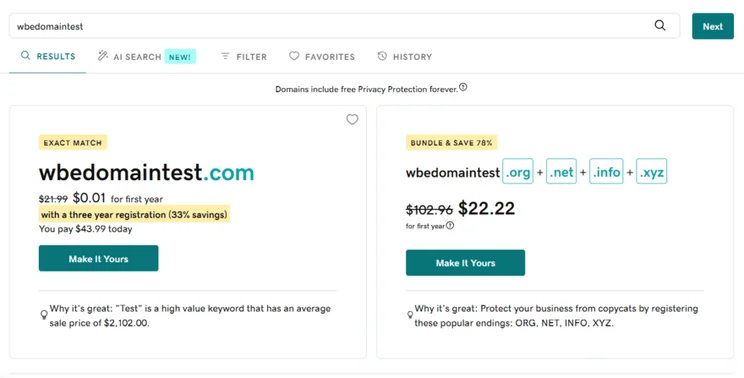
Screen showing discounted domain registration deals with price comparison and savings highlighted on GoDaddy
I used GoDaddy's domain checker to see pricing and available names. Source: Website Builder Expert
Quote

Choose a short, memorable domain name that represents what your brand does. A concise name is not only easier for potential visitors to remember and recall, but it’s also simple to type into a browser. No need to forcibly add a keyword in your domain name either – this is not a ranking factor! Prioritize what makes sense for your audience and what aligns with your brand identity.

I would also recommend opting for a recognized Generic Top Level Domain (gTLD) such as .com, .ai, .org, or .co. gTLDs are not tied to any country and can be used worldwide. This is the ideal choice if your audience spans across more than just one country, or you plan to expand internationally in the future.

Headshot of Caitlin Hathaway
Caitlin Hathaway Content Strategist

Use a website builder to build and manage a site without any coding skills. Choose a website builder based on your specific needs, such as Shopify for ecommerce or Wix for branding and marketing. There are plenty of options out there, so take the time to choose the right fit.
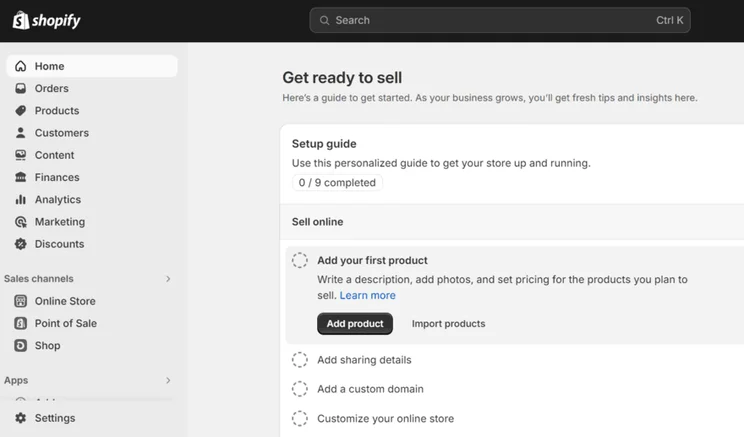
Screenshot of the Shopify dashboard showing the "Get ready to sell" setup guide with steps to add products and customize online store.
I had no trouble adding products and setting up an online store with Shopify. Source: Website Builder Expert

Of course, if you want to get into the nitty gritty when building your website, you can also choose to build with a CMS, like WordPress, and organize your web hosting yourself. While a CMS gives you total creative control, it’s not as accessible or intuitive to use as a website builder, so I’d only recommend this route if you have prior building experience.

To help you pick, let’s take a look at our top website builder recommendations from our most recent round of testing:

0 of 0
Overall Rating
Best For
Cheapest plan
Free plan or free trial
Number of templates
AI website builder
Wix logo black 2025
Squarespace logo black background
hostinger logo
shopify
GoDaddy logo

Wix

Squarespace

Hostinger

Shopify

GoDaddy

4.8
4.5
4.2
4.2
4.1

Best overall website builder

Easiest website builder

Cheapest starting prices

Top sales features

Quickest setup experience

$11.99

$2.99/month

$5 Shopify Starter plan

$1/month for 3 months

Free plan

14-day free trial

14-day free trial

3-day free trial

Free plan

2,000+

190+

300+

1,000+

200+

check
check
check
check
check

Wix is our top-rated website builder overall, with over 2,000 stunning templates, impressive built-in website features, and a beginner-friendly drag-and-drop editor.

That said, if you’re looking to build an online store, Shopify’s ecommerce features are unparalleled. And, for a simple editing experience, Squarespace is the easiest website builder I’ve tested.

Building With AI

Many website builders now offer a quick and easy way to build a website with AI. You can start up a conversation with GoDaddy Airo, or use other popular solutions, such as Squarespace’s Blueprint AI or Wix’s AI website builder.

An AI website builder is a great way to save time and energy, whether you use it to create pages or write content. When I’ve tested these AI builders, I can get a website up and running in just a few minutes (though it’s best to spend some time customizing them to suit your brand). But be wary of overdoing it! AI-generated websites won’t be as unique as something you can craft manually.
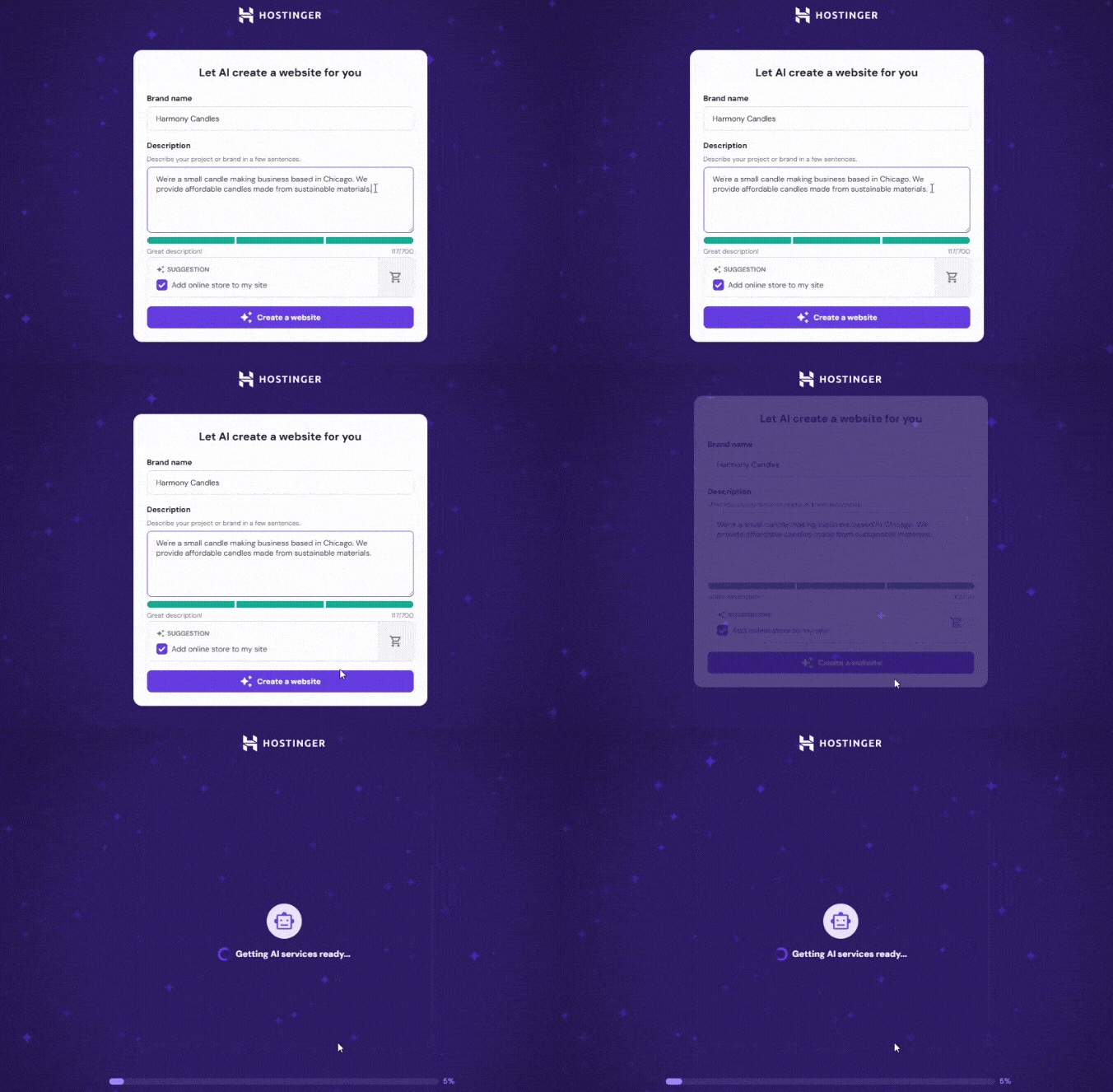
Hostinger setup page with text describing a candle business called harmony candles
Hostinger asked me for my business name and a brief description before it could generate a custom template for me. Source: Website Builder Expert

How Much Does It Cost To Build a Website?

Premium website builder plans typically cost between $2.99 and $29 per month as of April 2026. Wix and GoDaddy offer free website builder plans, while Shopify and Squarespace provide free trials, which will lower the cost of building a website at the beginning of your journey.

If you’re looking for a cheap website builderHostinger came out on top as the best value for money option. It offers an affordable entry point to building a website with its $2.99 per month Premium Website Builder plan.

Customize your website by choosing a template that matches your industry and then adjusting colors, fonts, and images to fit your brand identity.

Wix offers over 2,000 free templates to pick between and allows you to filter template libraries by industry, such as “Blog” or “Wellness.” While Wix and Squarespace’s templates are free, some platforms, like Shopify, charge a one-time payment.
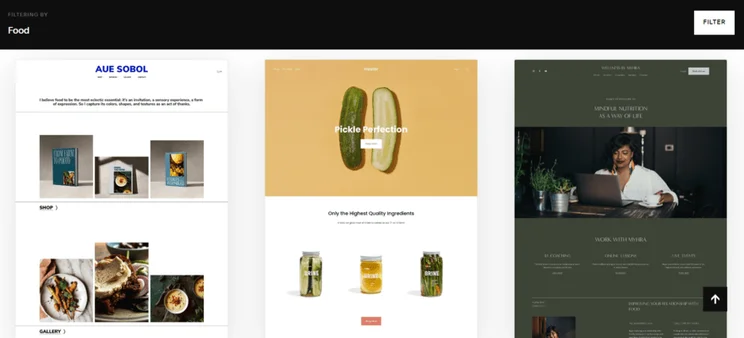
Squarespace's template library showing a preview of three "food" templates
I could filter Squarespace's template library by industry or website type, such as "Food". Source: Website Builder Expert

Builders like Wix and Squarespace offer an intuitive and beginner-friendly drag-and-drop editor, whereas the sections-based editor on Shopify and GoDaddy is creatively restrictive but simple.

I recommend using the free trials and plans available from website builders to play around in the editor first – see which editor style works best for you.
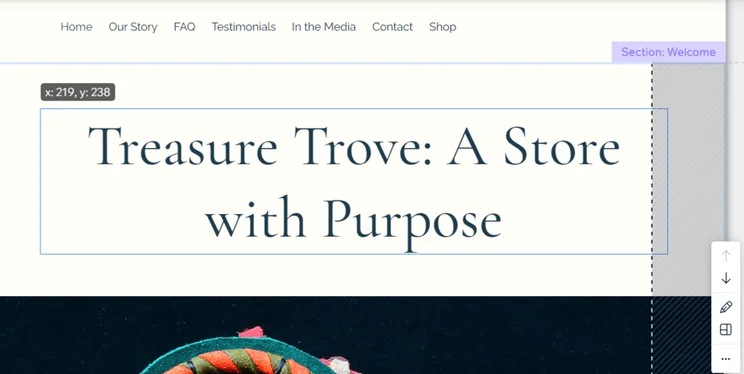
Wix's drag-and-drop editor in use, moving a text box on the homepage
I found Wix's drag-and-drop editor incredibly easy to use. Source: Website Builder Expert

When customizing your site, draw ideas and inspiration from the brand identity you determined in step one. The important things to consider are:

  • Color schemechoose the same color palette across design elements to pull the site together and keep things looking intentional
  • Font type – I recommend picking a font type that aligns with your website goals or business type (e.g. a trendy, modern font for an artist website or something more classic and professional for a real estate website)
  • Visuals – add your eye-catching images and graphics to break up the text
  • Content – make sure to replace any default template text with your own copy

If you need a helping hand, I recommend choosing a website builder like Wix which offers an AI Theme Assistant tool. You can ask for advice when it comes to designing your website, such as choosing a new font type.
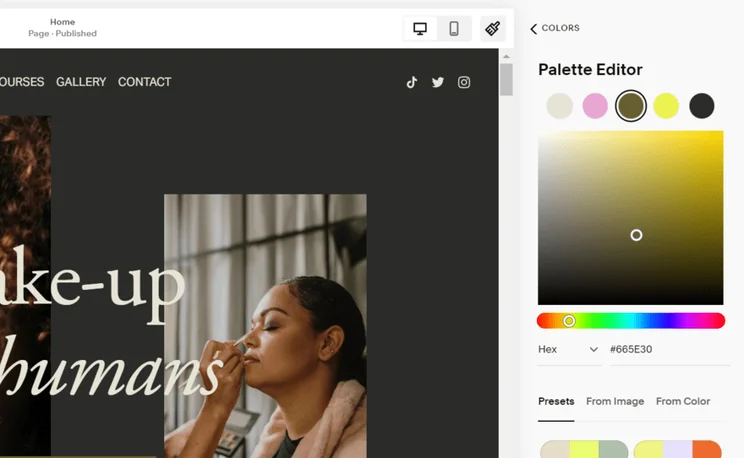
Squarespace's color palette editor, showing the existing website palette and options to choose from presets or upload an image to style from
I loved using Squarespace's color palette editor, especially since I could upload an image and have a palette generated based on those colors. Source: Website Builder Expert

You can structure your site logically by prioritizing usability, creating a simple navigation bar for key pages, and utilizing breadcrumbs to help crawlers index your content. This is important because:

  • It’ll be easier for your visitors to find what they’re looking for and take action
  • A clear site structure allows search engine crawlers to index pages more efficiently, which directly improves organic search visibility

There are two main parts of your website’s navigation to consider: your navigation bar and footer.

1. What Should Be Included in a Website Navigation Menu?

Your website’s navigation bar, or menu, helps visitors move around your site by directing them to separate pages. A navigation bar should be kept simple by only including links to the most important pages, such as the contact page or your site’s shop.

plant shop chicago navigation bar
This is a great example of a simple and clear navigation bar. Whether I wanted to shop, book a workshop, or learn more through blog posts, the menu made it instantly easy to reach these pages. Source: Website Builder Expert

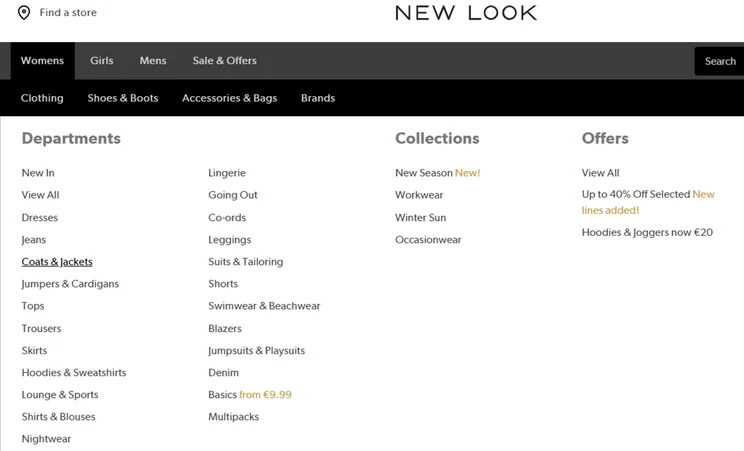
This said, the complexity of your navigation will vary depending on your site type. For instance, a clothing shop with lots of categories will need a more complex navigation menu, containing multiple options, than a personal blog. Visiting competitor pages can be a good way to gain inspiration and gauge how you should structure your navigation.

Navigation bar on New Look's website showing different product categories
Navigation bars ensure your visitors have the smoothest experience. For sites with large and varied inventories, I found more detailed navigation bars with multiple tiers to be the most efficient way to navigate. Source: Website Builder Expert

2. What Should Be Includes in a Website Footer?

Most website builders also let you customize your site’s footer, meaning you can display the information that’s important to your site, such as a business address, social media links, or a newsletter sign-up form at the bottom of each page, making it easy to find at all times.

A lot of templates come with pages built-in already, so the work is somewhat done for you. For example, when I tested Wix, I could add pages from the editor using the “Pages & Menu” button in the sidebar.
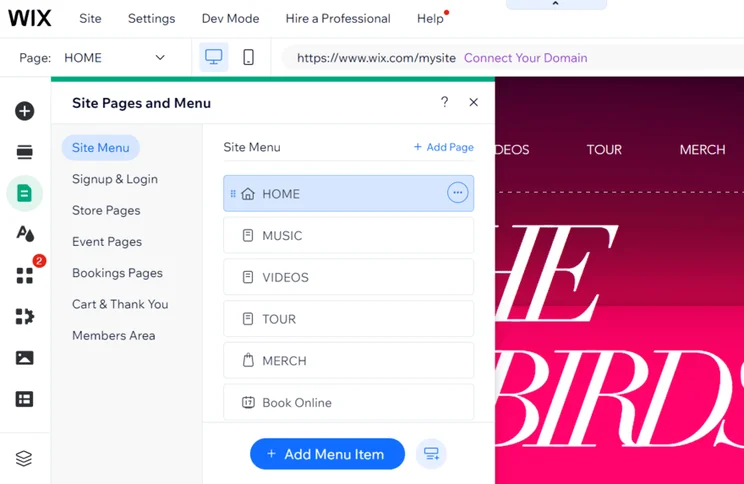
Screenshot of preset pages on a Wix website with the option to add new pages
With Wix, I could view my site's pages in the editor sidebar and easily add more. Source: Website Builder Expert

Regardless of your template or builder, it’s important to know what pages to include when building your website:

  • Homepage – this is the heart of your website and should engage your visitors appropriately, sharing key information and branding so that people know the purpose of your site right away
  • About page – use this page to tell your story, mission, and goals, whether that’s for an individual or business
  • Shop and product pages (if you’re creating an online store) – naturally, an online store should feature pages for shopping so make sure to include plenty of product images and information to help drive sales
  • Contact page – help website visitors connect with you or your business through a contact form, social media links, and general contact information (such as an email address or your store’s opening hours)
  • Blog page – a blog is the perfect place for you to share engaging content, build an online community, and showcase your expertise in the market
  • Some bonus extras could include a FAQ page, customer review page, membership area, or booking page to take appointments – these can be great pages to further customer relationships and build trust in your website

While I’d argue that every website should have a homepage, about page, and contact page, the rest is up to you and your website’s needs. If you’re building a portfolio website, you’ll want to add a portfolio or gallery page to showcase your work so potential clients can see what you’ve been up to.

The level of website functionality you need will depend on the type of website you intend to build. For example, you’ll need ecommerce tools if you’re looking to sell products or services, but a simple blog won’t need these features at all.

The features and tools you add to your site will also vary depending on your chosen website builder. Wix includes a lot of powerful features built into the platform, such as email marketing and internationalization tools. Shopify, on the other hand, relies heavily on third-party apps to add functionality.

Adding Ecommerce Features

For online stores, we recommend choosing a dedicated ecommerce website builder, like Shopify. You’ll want a platform that offers intuitive product management tools and important features, including:

  • Lots of payment options to give your customers choice at checkout
  • Multichannel selling so you can reach and sell to customers across social media and online marketplaces
  • Ecommerce-focused marketing tools, such as Shopify’s 3D scanner to dynamically present your products or email marketing features to engage with customers
  • Security measures, such as SSL certificates and fraud detection, to keep your business and customer data safe from malicious threats or attacks
  • Shipping methods that suit your business – for example, Shopify offers real-time shipping rates and label printing

Enhancing Your Site With Apps & Plugins

A lot of website builders offer third-party apps and plugins that you can install to add additional functionality to your site. Some are free to use, such as Wix’s own Wix Bookings app, while others can cost extra on top of your subscription, such as Mailchimp for advanced email marketing tools.

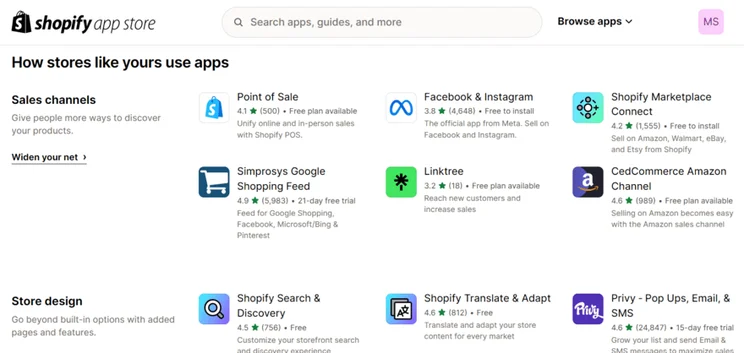
Shopify app market showing apps for sales channels and store design
I could browse over 8,000 apps in Shopify's app store. Source: Website Builder Expert

The next step is to optimize your website content and design. This will help improve your website’s user experience, boost visibility across search engines, and build brand awareness.

Consider these factors when optimizing your content:

  • Search engine optimization (SEO) – boost your website’s visibility and traffic by optimizing your site for search engines and AI Overviews, through SEO basics and best practices, such as keyword research, image alt text, and more
  • Content hierarchy – place important information in prime locations on your pages so visitors don’t need to scroll or search around for it
  • Publish content regularly – build up your authority and expertise in your niche by sharing relevant and valuable content with your readers, such as blog posts
  • Consider all devices – according to Statista, almost 59% of website traffic comes from mobile devices instead of desktops, so make sure your website looks and works well for all screen types
  • Optimize your visuals – compress any images or videos to prevent slowing down your pages and frustrating your website visitors, but don’t compromise on quality
  • Assess the user journey – review the navigation and desired user journey to make sure the experience is smooth and intuitive

The final stage of building a website is to review your work and push it live! You don’t want to publish your website blind – even an experienced builder is bound to make an error along the way, whether it’s an element that needs moving or a line of copy that needs editing.

Before you publish, you need to make sure everything’s working and looks the way you want it. Go back through the steps above for final checks:

  • Is your site’s purpose clear to visitors?
  • Do all of the buttons and links work?
  • Have you checked your content for errors or spelling mistakes?
  • Is it easy to navigate?
  • Has everything been optimized for SEO?
  • Does your site run and load quickly?

Luckily, many website builders include a preview button in the editor so you can see how visitors will percieve your site. Lots of builders, like Wix, also offer a toggle to change between mobile and desktop views.
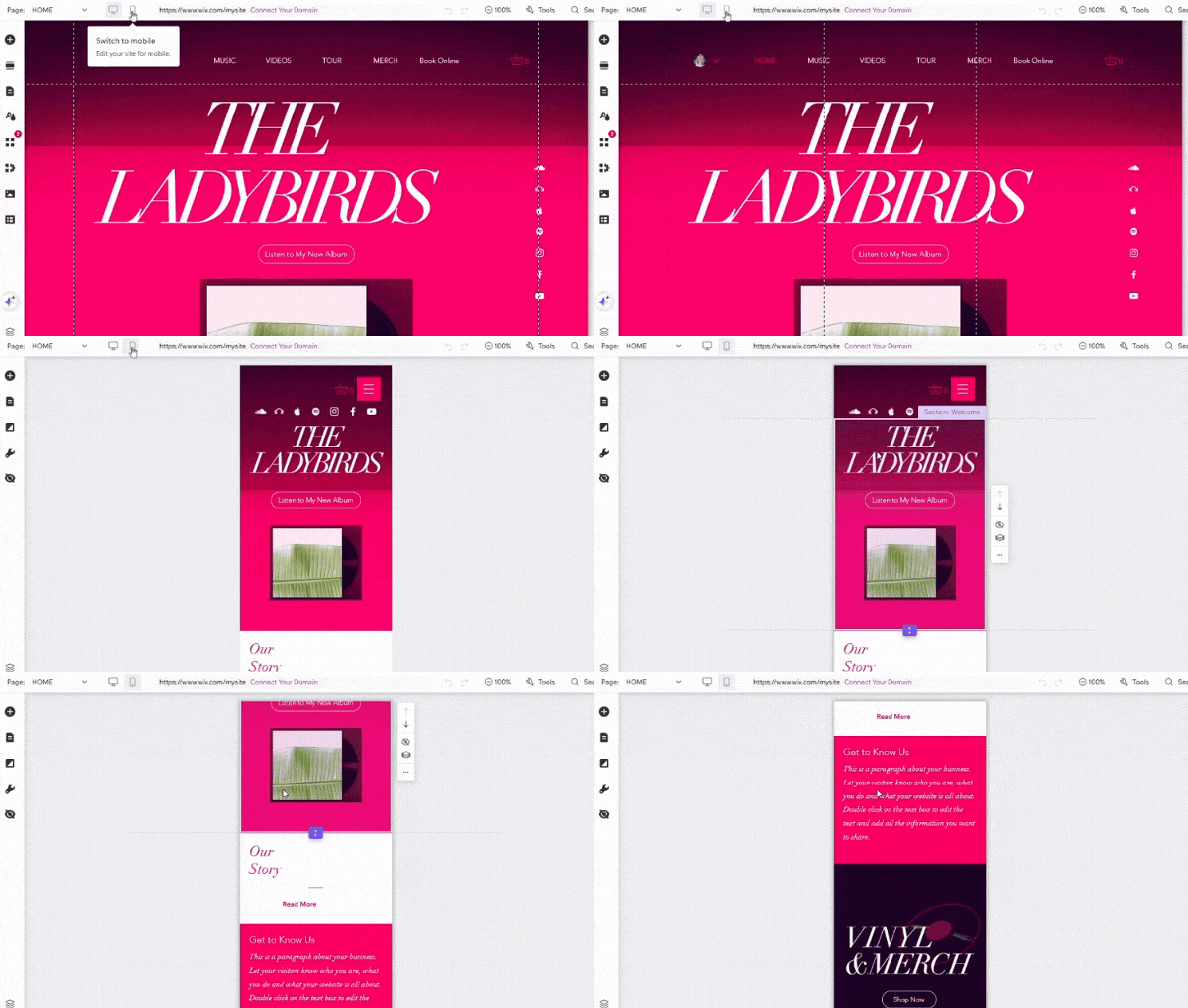
Gif showing Wix's editor go from desktop to mobile view for a music website
I toggled between desktop and mobile view when building my test website with Wix. Source: Website Builder Expert

Promoting your website on multiple channels will help you to reach widely and secure your website’s visibility.

Utilize Social Media

When used effectively, social media channels can provide a considerable amount of website traffic and help you to reach a wider audience. Other benefits of sharing content between your website and social media include:

  • Build brand trust
  • Improve customer relationships
  • Boost awareness around new products, content, and business updates

Send Email Newsletters

Email newsletters can be created with your website builder or a third party platform like Mailchimp. They’re extremely versatile and direct, and you’ll be able to share your most pressing website news to your most valued customers. Just make sure your emails are engaging, to the point, and include clear links to the website pages you’re promoting.

Monitor website performance using built-in analytics or Google Analytics to identify engagement adjustments. Analyzing your website regularly will lead you to make data-informed decisions to effectively optimize the user journey and reach your goals.

For example, you might find that people regularly visit your “About” page. This could become outdated as your business evolves, so editing the page is an easy way to keep things fresh.

How Often Should I Update My Site?

A good rule of thumb is to keep an eye on how your pages rank in the search results for your key search terms. When they drop, it’s a good time to make changes.

If you’ve followed these 11 steps so far, that means you’ve successfully built and published a website. Congrats! To recap, once you’ve figured out your site’s purpose, chosen your domain name, and picked an appropriate website builder, the rest of the building process is all about customizing and optimizing.

And, as I’ve already mentioned, make sure to review and regularly check your website to spot areas for improvement. There isn’t a finish line when building a website – while you can get your site up and running quickly, be prepared to dedicate your time and energy to keeping content up to date.

Written By

Headshot of Emma Ryan

Emma is Deputy Editor of MVF’s B2B brands, specializing in website builders, ecommerce, marketing, and vibe coding. Emma combines her wealth of knowledge and years of hands-on testing with a passion for helping small businesses and website owners navigate the highs and lows of being online. Her work has been featured in Newsweek, Digiday, TechRound, and Industry Today.

More about

Reviewed By

Headshot of Ollie Simpson

After three years of refining his skills in data analysis, Oliver transitioned to a role as a researcher to help understand reader preferences, decision making factors, pain points, and needs when it comes to building an online presence.

Oliver’s professional journey started out as a researcher in law enforcement, where he developed strong analytical abilities. He later moved into operations, which strengthened his understanding of quantitative data.

Now, Oliver blends his quantitative analysis skills with qualitative research to explore both audience preferences and product nuances.

In his three years at Website Builder Expert, Oliver has used his skills to provide up to date, unbiased insights into the products we review, to help ensure the best possible recommendations for readers. Oliver regularly assesses and iterates our website builder research methodology, staying on top of industry trends, digging into platform features and UX, and prioritizing areas that matter most to business owners. This provides web builder and ecommerce rankings you can trust.

In 2025 alone, Oliver’s conducted over 100 hours of data collection across website builder and ecommerce testing, and investigated 283 individual areas in the ecommerce methodology. He’s overseen 54 individual user tests of website builders, to assess how easy they are to use, and compiled the data into clear ratings for each builder.

You’ll find Oliver’s research referenced across all of our key pages; our content team use it to determine the ranking orders of pages such as the Best Website Builders of 2025, or comparisons like Wix vs Squarespace. We don’t decide who “wins” on personal preference; Oliver’s thorough research clearly outlines which platforms are best for different user needs.

Equipped with a UX design diploma, Oliver translates complex research findings into actionable insights that facilitate informed decision-making.

More about

250 comments

Your email address will not be published. Required fields are marked *

  • Heniic

    computer viruses spyware

    a major earthworms, as an example, have the ability to manipulate home surveillance weaknesses to pass through itself conveniently with other individual computers outcome structures. A trojan viruses equine (only 'Trojan') Is a course which usually would seem innocuous nonetheless covers wicked functions. Zeus (as well as its derivatives instance Gameover Zeus) Is one particualr trojan viruses, capable of being used to carrry out and about rather a few hateful and even arrestable functions. malware potentially injure a computer system all round performance or data file. various get evident to the pc gamer, but many own device, undetected by the consumer. the herpes virus is possibly designed to replicate it's site.

    adware is a form of computer virus and that is produced to acquire details about your task on your hard disk. malware are capable of doing most adulterous roles, from the providing banner campaigns to help obtaining your own loan company sign in points out nearly windscreen images of the sites you appointment or perhaps recording the car keys you punch in. adware is additionally self applied replicating.

    most likely, the herpes simplex virus would occur on your desktop in the form of a trojan viruses, it is able to do it again by themself initially getting to another home computer (a nice worm) and as well be developed as a piece of spyware. viruses and malware are kinds of or spyware, that also offers rootkits, fraudulent spyware not to mention scareware.

    Macros throughout the approach posts (word that's developing, excel spreadsheets and many more). Thousands of the latest infection can be found seen on a daily basis, [url=https://twitter.com/asiamescam]asiame scam[/url] mention absolutely from your different types of recent and in addition existing ones. they all have some features or perhaps even 'signatures' within set up web-based safeguard laptop or computer software brands you can recognise folks in addition,yet construct convenient update versions.

    best the web safeguards product auto-magically retrievals many improvements (quite often known as 'definitions') yearly, your sincerity are web have given those annual subscription (with the got goods). this should be sure insurance policy coverage next to even the particular computer virus perils.

    site surveillance software program scans available for infection in a number of different ways:

    it's works inbound electronic mail in hooked worms.

    It monitors computer files as is also open or created to make sure they are not contaminated.

    the is effective routine tests throughout the types of file on your laptop.

    just a few broad wellbeing utility usually works usb affixed gadgets (such as of storage space twigs, outdoor hardrives, MP3 gamers), as they are joining. lots of as well features believe world wide web.

    planet reliability software tool doesn't keep you against:different types being cheated quite possibly villain hobby via the www absolutely not initiated by a virus.

  • Hensjm

    It does not matter what you like to do, so long as you're captivated with it. You might be sporting your rattiest sweatpants, those which can be a single wash cycle away from falling apart, and it doesn't matter. That's the stuff that makes you who you might be. You've met a lady who might, fairly presumably, be the one. If you're mildly jealous about how much fun a girl has when she's with longtime man pals, that is most likely regular. These events provide a chance to fulfill potential matches in individual whereas participating in fun actions. What number of steps have you taken while pacing around the room before the call even goes by? It isn't even a real date. A group date additionally gives you a chance to gauge your individual personality. We additionally counsel that the couple comply with the three-to-5-hour time-frame for most of their dates, and don't have any multiple very lengthy date during every go to.

    The process is a bit like playing a sport-- the more you apply, the higher you get at it. You have to gear yourself up for the experience, no question -- however the trick is to not psych your self out in the process. You'll be able to determine that “going on a date” is a “win” so that the date doesn’t need to go effectively for you to win your game. Instead, give you a game plan for deflecting unwelcome comments or conversation threads heading into dangerous territory -- principally any sentence that starts with, "His final girlfriend …" Redirect the conversation by pocket-dialing your buddy's cell phone or interrupting with a subject that's sure to push his buttons (politics or sports often work). Tell her you'd wish to call her again tomorrow evening, or perhaps bring up the soccer game this weekend. He is not the man who works at my side day and night, who places up with all my quirks and brings me espresso every morning. Boundaries can appear like allocating particular times for on-line dating actions to prevent it from consuming your day or leaving you feeling burnout and exhausted.

    Or it may be an enormous purpose, like asking her to the homecoming dance. In case your purpose for the decision did not include asking her out, you then each might end up feeling not sure of where issues stand once you dangle up. How many times do you dial the quantity, only to hang up at the last minute? You'll wish to convey your girlfriend to the place the place you'd normally grasp together with your buds, like a local sports activities bar. When you strategy it from a place of curiosity, it'll solely cause the other [url=https://www.slideshare.net/asiadearreview]asiame.com scam[/url] person to respect your emotional intelligence and maturity. As for the very best place to carry everybody together? Whether you're new to online relationship or have been using it for some time, I can enable you to overcome your courting challenges and obtain your relationship targets. Plus people absolutely will need to have some private area and personal time. If every particular person knows what the other is and isn’t able to or interested in, I’d hope there’s much less space to harm or confuse one another. Thanks all for attending our first - but I do hope - annual Daily Planet Charity Ball.

    Everyone does coffee for the first date. Whether it is date nights or easy walks, these shared experiences strengthen connections. Authenticity is enticing. Share tales from your life; they enrich conversations and create connections. Share a story about a couple of your friends. Just ensure you limit it to a couple of psychological bullet points so you remember why you referred to as halfway by means of the conversation. It might make relationship and mating so much simpler, that’s for certain. We acknowledge it typically feels extra comfortable to textual content than name, but until you have really spent a lot of time together, stick to talking in particular person or on the cellphone. Plus, you'll be a lot more attention-grabbing to her if you speak about something you really are into. Everyone may use some dating tips, but there are other ideas that are even more specifically geared for senior citizens. By removing stress and expectations, members often find themselves more relaxed and open. What in the event that they find a stalker cabinet crammed with Clark footage and needled Lois dolls? Inside this e-book you'll find out useful dating tips, enhance your relationship communication, and achieve your relationship goals and how to get and the way to keep a man.

  • BMW X5 M50d xDrive şanzıman

    This is a topic that's close to my heart... Best wishes!
    Exactly where are your contact details though?

  • 📊 + 169.01 USDC >> graph.org/BALANCE-3682444-USD-04-21-3?hs=bb1f8f91dae8be7f0e09bf31f82eb6a7& 📊

    koci1d

  • Kids Spa Parties

    I am always looking for new information about this kind of significant
    subject matter, and am especially happy the moment I actually find websites which have been well-written and
    well-researched. Thanks for providing this good data, and I glimpse
    forward to reading more out of the weblog in the long term future.

  • Cristeta

    Very useful guide, clear steps and helpful tips.
    We're needing to build a website for our non-profit organization, where we can manage membership and events, with the ability to renew and pay for membership, book and pay for events and post event photos. What website builder would you suggest?

    1 reply

    • Holly Choules
      Holly Choules

      Hi Cristeta,

      Thanks for commenting!

      For your non-profit website, I think Squarespace is a good fit.

      With this builder you can set up subscription tiers and create a Member's Area for your subscribers. You can also offer your event as a "service product" that enables people to pay for an event online. Lastly, for photos, you can display them on "Gallery sections" on your website to showcase past events.

      I hope that this helps!

      Best,
      Holly

  • Sol

    Thank you for this valuable information. Exploring the idea of creating a website for my daughter's photography gig with the option to upload photos for clients to view and order as needed. Do you have a suggestion on which website builder would be ideal for this?

    1 reply

    • Emma Ryan
      Emma Ryan

      Hi Sol,

      Thanks for the lovely comment! That sounds like an exciting website project. Based on our testing this year, I'd suggest Hostinger or GoDaddy. Both are very affordable options, especially if you're looking to sell photos online, and they're really simple to build with. That said, Wix is our top choice overall, offering the best features for photographers, such as photo editing capabilities, watermarking, and ecommerce functionality.

      I'd recommend reading through our list of the best photography website builders for 2025 to help you make your decision. We've listed key features and pricing there as well.

      I hope that helps - and good luck with the website! Let us know if you have any other questions.

      Very best,
      Emma

  • Edris

    The system is good but for people who can't afford the domain it's hard for them to make a website and earn a living I am speaking from experience

    1 reply

    • Annie Angus
      Annie Angus

      Hi Edris,
      Thanks for your message - totally agree that the costs of building a website can quickly add up. I'd recommend checking out our article on the cheapest website builders. Plus, if you're able to pay annually, rather than monthly, many builders will offer a considerable signup discount and a free domain for a year.
      Hope this helps, best of luck!
      Annie

  • Sheri

    I already pay for a domain name, and my website would be for professional editorial services. I've already composed ALL the content (8 sections home/landing, services, blog, portfolio, testimonials, about, and contact; blog section has a few blogs also already written), so I wouldn't need AI for that. What I would need is design flexibility and help, also SEO meta data help. I was almost convinced by Hostinger (like their price), but I'm not finding a template that matches my vision, and I am not sure exactly WHAT the AI can do in terms of customizing the design (or not) the way I envision it, were I to start from scratch (without template), only with the AI builder. Recommendations?

    1 reply

    • Annie Angus
      Annie Angus

      Hi Sheri,

      Thanks for your comment. Wix ticks a lot of your boxes! It has plenty of stylish and unique templates that you'll have full creative control over. Plus, some of the best SEO tools and lots of help and guidance online. Wix pricing is more expensive than Hostinger, but it has a free plan that you can try out for as long as you like before committing.

      If you're interested in the AI side of things, our list of the best AI website builders will show you what you can achieve.

      Thanks again,
      Annie

  • Abdelhakim

    Hi,
    Does a domain need to be paid?

    1 reply

    • Emma Ryan
      Emma Ryan

      Hi Abdelhakim,

      Thanks for the comment! A lot of website builders, such as Wix, include a custom domain name for the first year if you sign up to a premium plan. After that, you'll need to pay for your domain name which can cost around $10-$20 per year. Other website builders, such as Shopify, make you pay for your domain name immediately so it's an additional cost to consider. You can read our guide on getting a domain name for more information. I hope that helps!

      Very best,
      Emma

  • Andy

    Excellent article/guide. Call me impressed. Thx :)

    1 reply

    • Emma Ryan
      Emma Ryan

      Hi Andy,

      Thanks so much for the kind comment! We're glad to hear you found the article useful.

      Very best,
      Emma

  • Dylan

    I found this article to be absolutely amazing. The processes to getting a stunning website were mentioned perfectly. Keep up the good work. I'll implement this myself on some aspects of Dylan Webs

    1 reply

    • Samuel Jagger
      Samuel Jagger

      Hi Dylan! Thank you for your feedback, we're really glad you enjoyed it and thought it was great! All the best - Sam

  • Gerald

    Thank you for your clear, direct, well-targeted intro. Very useful.

    1 reply

    • Samuel Jagger
      Samuel Jagger

      Hi Gerald! Thank you for your comment. We love hearing that you've enjoyed our article. All the best - Sam

  • Lou

    The article is very informative but I have a different question for you. I belong to a Genealogy Society and we have a web page and domain name that is maintained by a person that moved to another state and no longer wants to maintain the site. I believe Godaddy is the builder. How can we either move the page from this person to someone else or build a new page with our present domain name? What would be the best builder for a new site for our purposes (Genealogy)? We are a 501 3c. Any advice would be appreciated.

    1 reply

    • Jordan Glover
      Jordan Glover

      Hi Lou,
      Thanks for commenting. I'll do my best to help you! In terms of having someone else manage the page, as long as you have the login to the GoDaddy account, you should still be able to access it, regardless of whether it's in your name or not. If the person who used to maintain the site is willing to share this information with you, you should be able to continue as you were. Then, when it comes to changing your domain name, you could just renew it under the details of the person who will be taking over in the future. If, however, you don't have this information, it's easy to start a new website and then attach a new domain name. Although I'm not sure exactly what you would be looking to include on a Genealogy site, I'd suggest giving Wix a try. It's the most diverse out of the builders we recommend, which means it can be used for a number of different industries. You might also want to take a look at our article, How to Change a Domain Name, just in case this is something you need to do in the future, too!
      I hope this has helped!
      Jordan

  • Peter

    Thanks for this beautiful info. Infact, I'm really happy I found a content fully and well explanatory like yours.

    I want to build a website whereby people can find professionals (lawyers, engineers, or artisans etc )
    nearest to them. The professionals can upload their professions with bios, contacts, work experience and certificates and clients can also patronize them based on their location.

    And 2)
    I'm an Electrical Engineer and electric appliance technician. I want create a website to monetize my knowledge and experience.

    Any advice on which builder to use.

    1 reply

    • Lucy Carney
      Lucy Carney

      Hi Peter,
      Thanks for your comment! I'm so glad you enjoy our content, I hope you find it useful! For your first website, I would probably recommend WordPress because it sounds quite complex and custom in terms of client and professional interactions with the site and the search criteria you want to apply. For your second point, if you just want a website to showcase your experience, monetise, or allow customers to book services with you etc then a builder such as Wix would be perfectly suitable.
      I really hope this has helped, and best of luck with your projects!
      Cheers, Lucy

  • Martin

    Wonderful article! Can you suggest to me also a good website builder for my car rental business? Thanks!

    1 reply

    • Emma Ryan
      Emma Ryan

      Hi Martin,
      Thank you for the comment! Wix is our top website builder overall, but it doesn't have any built-in rental services to utilize. You'd have to build them from scratch yourself! We'd recommend Shopify for larger businesses - Shopify also has a number of high-quality apps that will help you transform your website into a great online rental store. We hope that helps!
      Very best,
      Emma

  • Nick

    Thank you very much for this complete and good article. My consideration is, that I have no interest in coding nor do I have a business that is in that direction. I want to start a Recruitment site with excellent SEO and inbound functionality but do not want to spend lots of money hiring people to help me (Fiverr or Upwork etc) I want to be able to do the most stuff myself and let experts do the more significant changes in the page if you know what I mean. That's why I'm in a dilemma. What to choose, Web builder or WP...hmmmm...

    1 reply

    • Lucy Carney
      Lucy Carney

      Hi Nick,
      Thanks for your comment! I'm so glad you enjoyed the article. Thanks for sharing your dilemma with us! Based on what you've shared here, I would recommend a website builder - they come with less of a learning curve and less technical upkeep (for example, you don't need to find hosting to get started), and you'll be able to run it yourself without much time investment. Wix and Squarespace are our top recommended builders, they're both great for SEO, and neither require any coding.
      If in doubt, I recommend trying a website builder first for free and seeing how you get on.
      I hope this helps your decision making, best of luck with your recruitment site!
      Best, Lucy

  • Andrea

    Hi! First of all, thank you so much for the information! I'm hoping you can give me a suggestion. I am planning to create a website that will be heavy on listing resources for those who are dealing with legal issues and are in marginalized communities. I will want it to act like an e-commerce site but without the purchase option. For example if one attorney is licensed in Georgia and Florida, and specializes in family law and medical malpractice, I want to be able to have the attorney come up each category/location without having to type it 4 times. I hope this makes sense. Sort of like a muuuuuuuch smaller scale site along the lines of realtor.com where you can search and filter, and click on results for more details, but no cart. Would I get an e-commerce site and disable the commerce capability? Or is there a way to do this on a standard site? I really appreciate your help!

    1 reply

    • Jacqueline Renouard
      Jacqueline Renouard

      Hi Andrea,
      Thanks so much for the comment we're glad the article was informative! That is a really wonderful question, from our understanding many builders could effectively build a website similar to realtor.com, for example the Wix website builder has templates for real estate that you could tweak via images to look more geared towards law. However this search filter is something that you might need a web designer for one that is more suited to your specific needs. But Wix eCommerce also does offer a simple search box that you can add to your store that you can take a look at here. We hope that helps you with your website and get in touch if you have any other questions!
      Warmly,
      Jacqueline

  • Nikita

    Hello, thank you for this article - really great intro. I am launching a new business and would like to build a comprehensive website with the following features enabled: - database of service providers (100-200), - review functionality from customers (once signed in), community forum (via sign up/sign in process), information, blogs, e-commerce platform (approx 10 products). Would you recommend a website builder or something more customised from WordPress. Eventually I would like this in both a website and app format.

    1 reply

    • Jacqueline Renouard
      Jacqueline Renouard

      Hi Nikita,
      Thanks for reaching out to us! Taking a quick look we would recommend either Wix or Squarespace depending on what your business needs. We have a page dedicated to going over the 11 best website builders. We go through and discuss their capabilities for blogs, ecommerce functions, and more. After giving that a read you should have a better idea of the perfect builder for your needs, let us know how it's going!
      Warmly,
      Jacqueline

  • Ammuna

    I want to sell my outfits that I fixed and made it look better

    1 reply

    • Jacqueline Renouard
      Jacqueline Renouard

      Hi Ammuna,
      Amazing, that sounds really great. If you're looking for extra advice here are two articles that may help. The first one is How to Start an Online Clothing Store, the second is How to Start a Thrift Store.
      Hope that helps,
      Jacqueline

  • Kubest

    Pls can u teach me how to build a website

    1 reply

    • Jordan Glover
      Jordan Glover

      Hi Kubest,
      I can try to give you a helping hand! The article above outlines the main ways of building a website, but we also have a series of specific guides that you might find helpful. If you're not sure where to start, I'd recommend choosing a website builder to create your website. Our top rated platforms are Wix and Squarespace. We can show you how to use these step by step in our guides on How to Use Wix and How to Use Squarespace. If there's a particular element of building your website that you're finding tricky, let me know and I can try to help you out!
      Regards,
      Jordan

  • Kay Cee

    Great insight; I have played with WordPress and Wix. Now I am more serious and closer to opening my own business, and I am researching sites. I have experience creating a site using HTML, but it is a lot of work. Currently, I have too many things demanding my attention. Thanks for the article

    1 reply

    • Zara Choudhry
      Zara Choudhry

      Hi Kay,
      Thank you for sending through your comment! We're so pleased to hear that you enjoyed the article! People do tend to find website builders simpler to use, without it taking away much creative freedom!
      All the best,
      Zara

  • Carlene

    Great article! Very helpful, I am brand spanking new to the internet and its possibilities, I feel like this article gave me a lot of great information, thank you very much for the launch pad! I know more than I did 20 minutes ago and right now, that's a life time.

    1 reply

    • Jordan Glover
      Jordan Glover

      Hi Carlene,
      Thanks for commenting! I'm so glad we could help you. Please give us a shout if you have any questions!
      Regards,
      Jordan

      1 reply

      • Dena

        I want to create a standard website for my self

  • Ewan Dewar

    The sort of website I’m looking for is one that can offer a variety of sections.

    1 reply

    • Jordan Glover
      Jordan Glover

      Hi Ewan,
      Thanks for commenting. All of the website builders we recommend come with lots of different section options. Wix, for example, allows you to include everything from a basic contact form to customer testimonials and booking calendars along with many other additions. Anything you can't find in the editor can be added as an app. If you let me know what sort of website you're looking to build, I can try and point you in the direction of the website builder we'd recommend for that particular purpose. Alternatively, if you'd rather build your website with WordPress, you can add whatever sections you like thanks to the fact that it gives you almost complete creative control.
      I hope this helps!
      Jordan

  • Chelsea

    Hi for my university assignment I need to create a website and I have chosen to do a riding school. Could you give me advice on anything I may need to include or consider when designing the website. Thank you

    1 reply

    • Zara Choudhry
      Zara Choudhry

      Hi Chelsea,

      Thanks so much for your question - that sounds like a great assignment! Because you have chosen a riding school website, we definitely have some tips that'll hopefully help. So, you could include key website pages such as Pricing, About Us, Bookings, and Riding Programs. These are pages will make it super easy for any visitor to navigate your website, so it's great for user experience! For more info on how to get your website looking awesome, make sure to check out this article on how to design a website in 8 easy steps!

      Good luck with your assignment, we're sure you'll do a great job!

      All the best,
      Zara

  • Saira Rafiq

    How can I build website

    1 reply

    • Lucy Carney
      Lucy Carney

      Hi Saira,
      So the first step is to choose whether you want to use WordPress or a website builder. WordPress is totally customizable and very powerful, but takes more technical upkeep. A website builder such as Wix is very easy to use, but gives you less control. Once you've decided this, you can follow the steps in the guide above to build your website. In a very short summary, you need to sign up to a plan (either WordPress hosting or a website builder), choose a domain name, customize a template, add content, install apps or plugins, then publish! Our guide has a lot more detail though, so I hope you find it useful!
      Best, Lucy

  • Floyd

    I would like to build a native American artwork on a web how do I go about doing that instead of going through all the steps can you just connect me right away

    1 reply

    • Lucy Carney
      Lucy Carney

      Hi Floyd,
      What an awesome website to build! Sadly, we can't create your site for you - we just show you how! If you want a more specific set of steps, check out our How to Sell Art Online guide. I hope it helps, all the best - Lucy

  • fred

    ok it takes 5 minutes to set up a wordpress site but what good is that, you need to build a website that will be successful, just wacking up a wp site without research and picking a domain wont work

    1 reply

    • Lucy Carney
      Lucy Carney

      Hi Fred!
      I'm sorry you didn't feel like our guide covered this in enough detail - I recommend checking out our specific guide on How to Make a WordPress Website for a more in-depth look at setting up a WordPress website. We also have separate guides on SEO, marketing, domain names, writing for the web, hosting, and more! It's super important to us that we give our readers the guides to make their websites successful. Feel free to have an explore and let us know if you have any other questions.
      Thanks so much for reading and sharing your thoughts!
      Best, Lucy

  • stanislav.bielov
    stanislav.bielov

    Nice article!

  • Geoff

    Hi, just to echo other's comments about how helpful this website is, this subject is the closest I ever want to get to a minefield! At the moment my head is spinning like a mad satellite but I do feel far better placed now to proceed in the near future. Thanks again.

  • Danny

    All this are helpful but , I want to build a website where people can be visiting with my purpose and I'll get paid but I don't know the one to use

    1 reply

    • Lucy Carney
      Lucy Carney

      Hi Danny,
      I'm not 100% clear on exactly what type of site you're looking to build, but if you want to get paid through your site you might want to check out our list of the best ecommerce website builders instead!
      Hope this helps, thanks so much for reading!
      Lucy

  • ashley

    Hi Lucy,
    i'm looking to possibly build a site to start affiliate marketing. I'm totally new to this area and don't have the £100's or even £1000's that these companies want to start you off .
    would you recommend Wordpress for this sort of thing?

    1 reply

    • Lucy Carney
      Lucy Carney

      Hi Ashley,
      Thanks so much for your comment!
      I think you'd find this guide helpful, it's about how to make money with affiliate marketing! And yes, I would recommend WordPress.org as it's great for blogging and is also very customizable, and scalable too. (We recommend Bluehost hosting for WordPress, which starts at $2.95 per month, so very affordable. Here's our Bluehost review if you want to check it out.)
      Hope this helps, best of luck moving forward!
      Lucy

  • Natalia

    Reading all the information on this website has cleared all confusion I had about building websites. Amazing, straightforward, easy to read website that really compares website building tools. I will use the information on this site to help build my website. Thank you for this!

  • Sanam

    This is by far the most comprehensive single write-up about building websites quickly that I have come across on the internet. Each option is really well summarized and the included comparisons make decision making even easier. Thanks for this :)

  • Niamh

    Hi Lucy, I'm looking to start a new blog but all of the information about what hosting to choose is sending me loopy.
    I had bad experience with Hostgator last year and my blog didn't work out well. I loved that you said that Bluehost is really good for WordPress sites, and is recommended by WordPress as a really good host too. After reading your it is helping me make a good decision I think. But, Im now looking at Siteground and Dreamhost too, because the article here likes Siteground and it sounds really cool. I would love get started with my blog and think I might be overthinking the whole thing a bit too much. From a professional, it's Bluehost? Thanks for your help

    1 reply

    • Lucy Carney
      Lucy Carney

      Hi Niamh,
      Thanks for reaching out! That's so exciting that you're starting a new blog, and I totally understand feeling overwhelmed with all the hosting options. It's good that you're taking it seriously as hosting is super important - but yes, I would recommend Bluehost for your WordPress blog. It's been recommended by WordPress since 2005, and it outperformed both SiteGround and DreamHost in our research.
      Bluehost has a 30-day money back guarantee too, so you can try it without worrying.
      You can read our Bluehost Review if you'd like more information!
      I hope that helps, and best of luck with your blog!
      Best, Lucy

  • william

    Hi, I am not a tech guy, but I have a lot of time with me to learn, I want to save some money and build a website from scratch, I am looking to have 2 websites, one like group on, whith barcodes that scans to phones with companies discounts, and the other one like a freelance job site where I get a commission if someone gets hired or does a job through my website, do you think I can use wordpress for those 2 types of websites. Thank you

    1 reply

    • Lucy Carney
      Lucy Carney

      Hi William,
      Thank for reaching out!
      Yes WordPress is totally customizable, so you would be able to create both those websites using WordPress.org. WordPress is great if you have time to learn your way around, so it sounds ideal for your situation! Themes, hosting, and plugin costs can add up so bear that in mind while trying to keep costs low.
      Best of luck with your projects!
      Lucy

  • Osi mac

    Hi,
    Thanks a lot. I write short stories and I'm thinking of creating a website to reach out to readers.
    Would wordpress be the best option?

    1 reply

    • Lucy Carney
      Lucy Carney

      Hi Osi,

      Thanks for your comment! That's great you want to create a website to reach your readers - WordPress is certainly the most powerful platform, and is perfect if you want a totally customizable website. However, it's important to know that it also comes with more ongoing maintenance and can be a bit technical depending on how you approach it. So if you have time and technical confidence, then yes it would be a perfect choice! If you want something super quick and easy though, then you're better off with a website builder.

      If you want some alternatives to explore, I can also recommend Wix, which offers tons of creative freedom along with template designs specifically designed for writers like you! We have a Wix vs WordPress comparison if you want to see them compared side-by-side.

      Another alternative is Weebly, which has great SEO tools to help your website get found in Google. Here's our Weebly Review if you want to learn more!

      I hope this helps, and best of luck with your website!
      Lucy

  • mike

    Just a question. Does wordPress or any of the other site builders allow for one to includes one's own backend coding (like in php) ? and if so are there any limitations?

    1 reply

    • Lucy Carney
      Lucy Carney

      Hi Mike!
      Thanks for your question, I'm happy to help out. WordPress is the best option if you want to carry out backend coding - it gives you total control and customization over your website. Some website builders do let you code (such as Squarespace, for example). You can add custom code to WordPress using a plugin - there's more limitations on this with website builders, although carrying on with the Squarespace example, you can still add custom code, code injection, etc. You can add client-side code into Squarespace sites, but not server-side code. So if you want more coding freedom I would recommend WordPress!
      I hope that's helped answer your question! Best - Lucy

  • John

    I didn't see where you answered the question, "What if I eventually want to sell my website?"
    If you use a site like Wix, then Wix owns part of your site.
    If you use Word Press, you can sell your entire website, because it's yours.

    Is all of that correct?

    1 reply

    • Lucy Carney
      Lucy Carney

      Hi John,
      thanks for your comment!
      You can create Wix websites and sell them to clients, but the site will remain on the Wix platform. If you know from day one that you plan on selling your site, then yes WordPress is the better option.
      If you've grown your Wix site and eventually realize you want to sell, you're not trapped - your best option is probably to migrate your Wix site to WordPress and then sell it.
      I hope this has helped, and thanks for reading!
      Best, Lucy

  • Mark

    This is an excellent article. Its informative and helpful. Thank you

  • Charles

    Wonderful education for a novice.Great source of information.Thnks

  • Paul

    Hi,

    Are there any web forums dedicated to building websites? I am not a technical person, but I have a clear sense of what I want, and I can't so far find it. I tried One.com but find it clunky and unpredictable to edit, and I tried Word Press but it was horrible. I'm looking for a forum where I can post what it is that I need and see if anyone can recommend a builder that will be suited to that purpose.

    Thanks for any suggestions!

    1 reply

    • Hannah Whitfield
      Hannah Whitfield

      Hi Paul,

      I totally feel your pain here! It can be so hard to know where to start. You might find our website builder comparison chart a good place to start, or you can take our short quiz for a personal recommendation. The comments under our articles should also hopefully prove helpful. Other than that, we often find Reddit a good place to engage with a lot of like-minded people, so I'd suggest taking a look there.

      Thanks,

      Hannah

  • Matrix Sniper

    this is a nice post. i like the post very much.

  • Heroheto

    Excellent article with all information. Thank you man for giving help in starting a professional website

    1 reply

    • Charlie Carmichael
      Charlie Carmichael

      Hi there,

      No problem at all, we're glad you found the article so helpful. Best of luck building your website!

      Charlie

  • Francis

    Hey, if you are setting up a website, you should try to integrate it with INDEMANDLY. It's so really simple tech software that is going to make customer interaction so much easier. Think Pure Chat, but on steroids.

  • Ben

    Hey definitely a great write-up and tutorial. Will recommend to friends. Love the way each option is explained thoroughly. Not a massive fan of Wix though. I have never tried it personally that's why I really can't say a bad thing about it. I do prefer BlueHost and Wordpress more.
    Thanks

    1 reply

    • Lucy Carney
      Lucy Carney

      Hi Ben,
      Thanks so much for the great feedback, so glad you enjoyed reading the article! Please do share it on if you think your friends will find it useful too. It's true Wix isn't for everybody, but it did do extremely well in our research (which is why it's our best all-round website builder)! WordPress is another great option and I'm glad you're happy with them - Bluehost is certainly a great choice of provider for your WordPress site!
      If you were looking at changing or setting up another site why not check out our comparison chart or our article on the best Wix alternatives? I've included the links in case you find them interesting.
      Thanks for reading,
      Lucy

  • Caroline

    This is nice article, thank you!, I also have a simple article on how to create a website

  • Shrutika

    This is a wonderful article. It is clear, informative and helpful! :)
    Thank you !

  • ASHOK KUMAR

    Nice Blog, thanks for guiding.

  • Kevin

    Thank you for this helpful post, it definitely will help me. I also got a membership, 3 dollars a month, from Hostgator where we can choose a domain and unlimited emails and all these good stuff. Thank you again!

  • 9series @ Creative Design Company

    Great post you had shared here.
    Thanks for this informative info shared here.

  • Merbin Russel

    Hey, I read your article, it is very cool!

  • Paul Dean

    Very helpful! I've put a lot of thought into whether or not I wanted to go online with my business. It could turn into quite a handful, but I've decided it's worth a shot! So with your tips bookmarked, here I go! Thanks!

  • f9store

    Thanks for sharing this article it really helps me lot

  • Amanda

    I read the whole thing and loved it but I'm up to the last step! I've published my website and nothing's happening! I need to register it with google or something? How do I make it come up when I search for key words?

  • Bharat Bhushan

    Excellent article!

    After surfing the Internet and reading many websites on how to create a website, I can honestly say that it is the most complete and easy to understand, for a complete beginner!

    Your step by step guide is comprehensive and very informative and has given me the confidence to move forward and try to set up my own commercial website ...

    A big thank you!

  • Gabriel

    Hi!

    I just create a free site on WIX and bought a domain on NameCheap. Now I want to connect both of them but without upgrading my account on Wix.

    I understand there is a coding way to make my domain redirect to the WIX site, is this possible?

    Thank you,
    Gabriel

    1 reply

    • Fred Isaac
      Fred Isaac

      Hi Gabriel, Wix has this article on redirecting from one URL to another - https://support.wix.com/en/article/setting-up-301-redirects-from-one-url-to-another. It might be useful!

  • Natasha

    Great Article and the only one that gives a step by step guide.

    This might be a silly question but I keep reading about buying a hosting space on the internet and you haven't mentioned that at all. Is that same as buying a domain?
    Does it mean that if i get one of the website builder plans with the domain included, then I dont need to go anywhere else?

    1 reply

    • Fred Isaac
      Fred Isaac

      Hi Natasha, not a silly question at all! Online store builders like Shopify will include hosting as part of your plan. So that's all taken care of.

  • Perry

    Great article!

    Having trawled the internet and read quite a few websites on how to build a website, I can honestly say this is the most comprehensive and easy to understand - to a complete novice!

    Your step-by-step guide is thorough and very informative and has given me the confidence to go ahead and try to set up my own business website ...

    A big THANK YOU!

    1 reply

    • Fred Isaac
      Fred Isaac

      Hi Perry, that's great to hear - thank you for the comment! Good luck with your business.

  • Ramiz Syed

    Awesome explanation, you have covered all deep details helpful post for beginners and individuals how to want to create a website on WordPress for free.

    1 reply

    • Fred Isaac
      Fred Isaac

      Thanks Ramiz!

  • shubham

    Exactly what I am looking for. Thanks! amazing article. I will try this on my next holiday break!

    1 reply

    • Natasha Willett
      Natasha Willett

      Hi Shubham,
      Glad to hear you found the article interesting, all the best creating.
      Natasha.

  • Liew Yean Choon

    This is AWESOME! I always like step-by-step tutorial and this one is really comprehensive. I hope I found this article when I first building my own website. (Sorry for bad English)

    You really did a great job, especially step 3! Most articles I found did not explain how to choose the right plan.

    As I am from Malaysia, due to the currency, the monthly payment of Wix in USD is quite expensive for me.

    I strongly recommend new starters to follow exactly all the steps above to get familiar with building websites. After having some basic knowledge, you may start to learn some basic coding skills or switch to a one-time-payment customization tools available on the internet to save cost.

    1 reply

    • Fred Isaac
      Fred Isaac

      Hi Liew,

      Glad to hear you found the piece helpful - thank you for the comment!

  • HANG

    Thanks to her you’re finding the content helpful.
    I can recommend to you a website design application without use code.

  • Ali Hassan

    Nice Article

    1 reply

    • Fred Isaac
      Fred Isaac

      Thanks Ali - glad you found it useful!

  • Fred Isaac
    Fred Isaac

    Great to her you're finding the content helpful! Thank you for the comment.

  • Mike

    Thank's for sharing such a nice info.

  • Lauren

    This is very helpful. I do have a question though. Once you publish your website, will you be able to easily edit it? Especially since I have new stock coming in every season, I’d like to be able to change the images and text as needed.

    1 reply

    • Fred Isaac
      Fred Isaac

      Hi Lauren,

      Yes, you will be able to hear into your store's editor and update stock, descriptions and images in real-time. A top ecommerce store builder will make this very intuitive and easy to do. Any questions, just shout.

      Thank you for your comment,

      Fred

  • Duke

    Thank you so much, this is very helpful info for me to create my plan. :3

    1 reply

    • Fred Isaac
      Fred Isaac

      Hi Duke,

      Thanks very much for the feedback, great to hear you found the post useful.

      Good look with your website.

      Fred

  • Danny

    Thanks so much for this awesome article :)

    I had literally no experience in building a website when I started using Weebly and I was surprised at how easy it was to make!

    I'm interested in looking into other platforms now that I'm up and running, particularly Wordpress? But I'll probably be sticking with Weebly for a long time until I'm ready, it really was super easy to use.

    Thanks again :)

    1 reply

    • Tom Watts
      Tom Watts

      Hello Danny,

      I definitely agree with your thoughts on Weebly, it really is a very easy-to-use platform if you're new to website building.

      Weebly have made a great effort to ensure the platform (and especially their editor) are as user friendly as possible, which really does make it easier to build a great-looking site without any technical skills!

      If you feel like your technical skills are up to the challenge then WordPress is definitely worth trying out. Give it a test and see how you get on.

      Thanks for reading,
      - Tom

  • caseybella

    thanks for sharing the informative post about website designing it's really helpful.

  • wbs

    Great article. You know starting a website is the EASY part -- the DESIGN and format is the difficult part. People just dont trust websites with the typical, standard design templates. People trust Facebook, and Google, and twitter.

    1 reply

    • Tom Watts
      Tom Watts

      Hi wbs,

      Getting started is definitely the easy part - no doubt about that!

      And I take your point that it can be challenging to make a design that you're 100% happy with.

      So, I guess we're pretty lucky that website builders like Wix and Squarespace offer such eye-catching templates that we can edit to our liking or use as jumping off point! (Our 3-step guide can help you pick the right template too..)

      Not having to work with a blank canvas certainly makes things much easier and gets the creative juices flowing.

      I think the best thing we (as amateur designers!) can take from sites like Facebook, Twitter, etc is the simplicity of their design.

      Your users want to find what they need quickly and easily, so the key lesson is to keep designs eye-catching but user-friendly (oh and don't forget the importance of color on a website!).

      Thanks for joining the conversation,

      - Tom

  • William

    What a great read, you make something that is complicated sound so easy, thank you kindly for such an interesting article!

    I have a question though, if i just want to start a website all about me, about telling folks that my journey through ill health has been uplifting, like a blog, can i do that?

    Kind Regards Billy.

    1 reply

    • Tom Watts
      Tom Watts

      Hi Billy,

      Great to hear you found the article so helpful!

      There's no reason at all why you can't use a website builder to create a website for yourself, even a blog style site.

      I'd recommend having a look at our website builder comparison chart as this is a good jumping off point and will give you some ideas of where to start.

      Off the top of my head, I know that Wix launched a new version of their blogging tool, which is really easy to use and can be integrated as part of a wider site (thankfully Wix is also super easy to use so it's great for newcomers to web design like yourself!)

      Hope that helps,
      - Tom

  • BIMA

    thank you its really informative article.

  • dionne

    Great article! For someone who is non-technical it can be quite mind blowing understanding the hosting and security around a website.

    1 reply

    • Tom Watts
      Tom Watts

      Hi Dionne,

      Glad to hear you found the discussion so useful.

      Getting your head around hosting and security is definitely one of the trickier aspects of setting up a website, I agree!

      It took me a while before I knew what to look for. Hopefully you feel more confident about the topic now :)

      Thanks for reading.
      - Tom

  • Alex

    Wix is pretty much the best platform for beginners and the sites you create are very beautiful.

    1 reply

    • Tom Watts
      Tom Watts

      Hi Alex,

      I totally agree with you - Wix really is the most versatile and easiest to use website builder around!

      I've been really impressed with some of the Wix websites I've seen really and with new advancements like Wix Code I think they are only going to get better.

      Thanks for reading,
      - Tom

  • tipbonda

    Everything is very clear. It was definitely informative.
    Your website is very helpful. Thanks for sharing!

  • Jamie Rockers

    Actually being a blogger myself I am looking for answers to typical issues that everyone faces. On the same way I came up on this page. I think you could help me clear up some confusions. As your explanation skills are top notch. I'll surely go through your website for further leads. Thank you

    1 reply

    • Tom Watts
      Tom Watts

      Hello Jamie,

      It's really good to hear you found our content so helpful - it's always reassuring to hear!

      Hope you find the answers you need. If not , drop us a comment and we'll try and get back to you.

      Thanks,
      - Tom

  • Mohan

    Great post! I am actually getting ready to across this information, is very helpful my friend. Also great blog here with all of the valuable information you have Keep up the good work you are doing here.

    1 reply

    • Tom Watts
      Tom Watts

      Hi Mohan,

      Great to hear the discussion has proven useful.

      Please feel free to share our website with others by clicking on the social sharing buttons to the left of this page. We really appreciate it!

      thanks for reading,
      - Tom

  • HARVEY

    Hi, I don't need all the bells and whistles...all I need is a single, static page so that I can describe what i do and to give my prospective customer my contact details...that is all.

    Any ideas please?

    1 reply

    • Tom Watts
      Tom Watts

      Hi HARVEY,

      I recommend looking at Wix and Weebly as both are very easy to use. You won't have any trouble getting to grips with them as they been designed to be user-friendly.

      You'll have no trouble creating a simple one-page website with either one.

      As a heads up, Weebly has a smaller selection of templates, but they are generally simpler and more basic templates, so this might save you some time.

      And remember, just because all the bells and whistles are available, doesn't mean you necessarily have to use them!

      I've linked to our Weebly + Wix reviews for you.

      Hope that helps,
      - Tom

  • Christopher

    hello, I can't find an answer for this anywhere ...maybe I'm just asking a wrong question...but I just created a website.....and trying to figure out how to have DESKTOP SHORTCUT ICON of my OWN website that I just created....so when someone visits my site and decide to keep it on their desktop....I want them to have my own designed icon to their desktop of my own website.

    maybe you can help?

    thank you!

    1 reply

    • Tom Watts
      Tom Watts

      Hello Christopher,

      Users can save your website to their desktop by going into their internet browser (e.g. Chrome), navigating to settings and then manually creating a desktop icon that they can use.

      This process typically uses the website 'Favicon' as the default image for the desktop icon. Your favicon is the small image that appears in the tab next to your web page title at the top of a browser. For example, Wix's is a small version of the Wix logo, Gmail has a red and white envelope, while our site has a tiny WBE logo in a navy circle.

      You may need to do some research into how you can change your website's favicon, but if you do then this is how you can have a degree of control over how the desktop icon looks.

      I hgope that makes sense?

      - Tom

  • Akintayo

    This is a great write up Jeremy. Thanks for going through all the effort to put it up.

    1 reply

    • Tom Watts
      Tom Watts

      Great to hear you found it useful Akintayo!

      - Tom

  • Abby Rice

    This a great article and there are a lot of good tips

  • ify

    Hi, nice article. I want to build a website for a makeup brand in which people can get in touch with different makeup artist in in my area.. please which web builder is best for sure.
    Thanks and God bless.

    1 reply

    • Tom Watts
      Tom Watts

      Hi ify,

      The best advice I could offer is to give the free trials a go on Wix, Weebly and Squarespace and see how you get on with each builder. This will give you a chance to explore their functionalities and see how feasible your ideas are.

      Squarespace is highly regarded as a portfolio website builder and that sounds like it may be something in line with your ambitions (e.g. showcasing make up examples).

      Hope that helps,
      - Tom

  • Mike

    Thanks for the time you put into this. Has been very helpful along side the hours that I have already put in myself scouring and trialling sites.

    Any recommendations for sites where they assist in interactive map building such as the magicseaweed.com site. I can build a location map and embed it onto my site (that I am building at the moment through Wix) but it's very limited and I cannot link it to a specific page or location on my website pages. I would also like to create a service where subscribers can access more information on the website than non subscribers. Any thoughts on the best site to use?

    1 reply

    • Tom Watts
      Tom Watts

      Hi Mike,

      Interactive map building is something I have very little experience with - I haven't ventured much beyond embedding google maps in iframes such as yourself.

      I would suggest browsing the app market and 3rd party plugins available on builders like Wix and Weebly, who both offer a huge amount of additional features. It would surprise me if there wasn't a plugin that could help get you on your way.

      Similarly, you can also find membership area functionality through these app markets. I believe Wix also offers the ability to add member areas and logins though its editor too.

      Hope that points you in the right direction,
      - Tom

  • Rudra Goyal

    Thank you for giving the details, it is a good site to know about hosting

  • Caroline

    Nice article

  • Nicholas Ford

    Great Article.... Thanks for sharing valuable article.

  • TomN

    Hi Jeremy
    I have a desire to make an easy solution for my users who can make their own website / theme for wordpress.
    A plugin that allows my users, through frontend on my site, to choose between menu, (text / grib layout - blog styles, magazin) photo slide, footer, etc. - so they can make there style theme

    Do you know if there is a plugin that can this? (So I upload the different layouts examples that they can choose from)?

    1 reply

    • Jeremy
      Jeremy

      Hi TomN,

      Thanks for reading and joining the discussion.

      What you are looking to build is beyond the scope of our discussions here. It is possible but you'll either need to be very proficient with coding or have a healthy budget to hire a capable developer to assist you with your efforts. The reason is that the project you have seems like a very customized project.

      -Jeremy

  • Esther epelle

    Good day, my name is Esther. please i need your help. i want to build or create a website without using HTML, CSS, or JAVASCRIPT. i want to try the drag buttons.please help me .

    1 reply

    • Jeremy
      Jeremy

      Hi Esther,

      Check out the list of drag and drop website builders on this page. You don't need to know how to write or edit any codes and you can still build a good looking and functional website.

      Hope this helps!

      Jeremy

  • JP

    Hi Jeremy.

    Superb article, which I would also use to describe the other articles and reviews you have created for building a web site.

    I've understand that Shopify is your primary recommendation for an ECommerce site. I'd like to see the capability of various vendors availing of our site's services to post and sell their products. Can Shopify handle this as well?

    Thanks for helping a lot of people! Wishing you more success.

    JP

    1 reply

    • Jeremy
      Jeremy

      Hey JP,

      I don't think Shopify has the capability for third party users to post products and sell them like a marketplace (such as eBay).

      I believe there are marketplace builders out there that enable you to create a marketplace. Try Googling for it and I'm sure a few will pop up?

      Jeremy

  • Sri

    Hi Jeremy,
    It's a fantastic article. I admire you the way you articulated this.

    I am planning to build a website. It would be more like, subscribers can post a question and the reply to this question feed will comprise an attachment that needs to send to a specific mail id.

    Could you please suggest me which website builder suits most for this use case?

    Thanks,
    Sri

    1 reply

    • Jeremy
      Jeremy

      Hey Sri,

      It sounds to me that you're looking to build a forum of some sort. Wix's app market offers a forum function (free) where you can build an online community.

      Take a look at our guide on Wix's app market. Search for "Forum" when you get to Wix's app market page.

      Jeremy

  • Clara R. Scribner

    Hi,

    I love your writting. Your post is very much helpful and informative. Keep up the good work and present us your best.

    Regards
    Clara

    1 reply

    • Jeremy
      Jeremy

      Thank you , Clara. That means a lot!

      Jeremy

  • Jeremy
    Jeremy

    Hi Chris,

    We actually used WordPress to build this website. Our website is focused on blogging and so we used the best, most flexible platform for this purchase.

    Having said that, we've heavily customized this websites since we're now proficient with coding. If it was 6 years ago, we wouldn't be able to do what we are doing now.

    We started making websites in 6 - 7 years ago and didn't know anything about coding. It took us a few years to become more proficient with coding, with a lot of practice. So during the first few years, we relied on code-free, drag and drop website builders for all of our projects. They were great since we didn't need to be technical at all, and we were able to build businesses.

    So if you want to build something similar to our website, I'd suggest you learn how to code and practice a lot. Eventually you'll get there!

    Hope this explains things a bit!

    Jeremy

  • A S

    Hi Jeremy,

    Great article. From your experience, how do most small businesses that are looking to build their online presence? Do they purchase a domain name or start with a website builder?

    Thanks!

    1 reply

    • Jeremy
      Jeremy

      Hi A S,

      Picking and purchasing a domain name and start building your website go hand in hand.

      What usually happens is that you test out a few different website builders to see which one you enjoy working with and has the tools that you are looking for.

      During that time, you can also start your search for your domain name. This is usually your business' name or brand name. We have a domain name guide here.

      Once you settle with a website builder and decide to upgrade to a paid plan, you can then connect your domain name to the website. Each website builder will have tutorials on how to do that.

      Hope this helps!

      Jeremy

      1 reply

      • Stu Buckingham

        I agree with Jeremy. The purchase of the website should really go hand-in-hand with the business startup or company formation. Many startups think it doesn't really matter to get that best domain name, whether it is an exact match keyword, or a brandable name keyword, until after they've started up the business. This is so backwards thinking. Your domain name should be an integral part of your business and development plan, if any significant part of your business is going to come from your online presence.

        Taken to the extreme, if you are an online marketer, you don't want you domain name to be AppleTurnover.com, because your business premises are in Apple Street. and your company domain is Apple Online Marketing Agents, and AppleTurnover.com (which is anyway surely taken) was the closest name available. It needs careful planning. Of course depending on the size of your business.

        rgds
        stu

  • Richard Newcomb

    Hey Jeremy,

    Awesome article. I especially like the flow and the logical approach that you took to educate people. This is the article I point clients to, to get them up to speed before starting projects. I think it's important for them to know how their products work. While they aren't making their own sites, it definitely still fits the bill.

    Also, I'm curious as to what you think about WooCommerce these days. I didn't seem them on the list in the other article you wrote "Best Ecommerce Software".

    Anyways, I've been sending my clients here for a while now and just want to give you a shout out at a job well done!

    If you are able to send me an email, I do have a question I'd like to ask if you have the time.

    1 reply

    • Jeremy
      Jeremy

      Hello Richard,

      Thanks for your comment and for your support!

      WooCommerce is a solid ecommerce tool (they were purchased by WordPress last year, I believe). They're flexible and you can bolt on a lot of different tools, but the downside for a "typical" business person is that to use WooCommerce (and WordPress) well, they'll need to invest more time into learning and managing the tools, or hire someone knowledgeable for help.

      A lot of new small businesses just don't have the mental bandwidth and time to learn the in's and out's of operating a WordPress site efficiently and effectively.

      The article you mentioned focuses more on hosted ecommerce builders, versus platform where you need to get your own hosting services (and there more technically and administratively challenging for users).

      We did highlight WooCommerce briefly in this guide where we dig into the differences between hosted and non-hosted ecommerce platforms.

      Jeremy

      1 reply

      • Richard Newcomb

        Ah, now it makes sense. Totally understand how that doesn't fit now.

        I also like how you phrased "mental bandwidth". That definitely seems to be the case with most businesses that I work with, especially startups. The other thing you mentioned that I really like is "typical" businesses. I think that all too often when people think businesses corporate America comes to mind. Most businesses are normal people running shops and trying to stay afloat in a digital sea.

        So, I wrote something on a similar topic, and I don't want to spam you with a link or anything like that. I was actually looking for feedback on it. If you're interested at all, shoot me an email. GREAT job on this site. It's obvious that you all dropped a lot of time and effort into your site and articles. Bravo!

  • S.M.Farroq Hossain,MBA

    It is great. I think I should continue in it.

  • Theo

    Powerful work !!!
    Thanks you for this . I want to start but don't know great things. Do you think weebly can provide all the support I need ?
    Thanks Jeremy ?

    1 reply

    • Jeremy
      Jeremy

      Hey Theo,

      Generally speaking, Weebly is a solid website building platform. You don't need how to code, their probably one of the most user-friendly web builders, and their support is good.

      Best way to decide is to sign up for a free account and start testing their tools. You're not obligated to subscribe to a premium paid plan at all. You can upgrade whenever you want to, and only if you find them being to provide the tools and services that you need.

      Jeremy

  • chris

    Good article - but to make my choice easier, i must say this web site is awesome. What website builder did you build this site on Jeremy? Because all other website templates from the builders that i see operate nowhere near as good as this site. This site looks great in all devices, it runs quick - looks really professional and has so many features that i see. It just works well. The others look good on the surface but when you realy start to see how they look (changing browser window) and how they run and load this web site is light years ahead. So which website builder did you use for this site? This would be my choice for sure.

  • Noah

    Hi Jeremy,

    nice info... But how do i create a website where i can merge/pair/match people (interactive website).. ?

    1 reply

    • Jeremy
      Jeremy

      Noah,

      If you are trying to create a site that has matching functions, sort of like a dating site, I suspect those types of functions are proprietary so they custom coded those features from scratch. I'm not aware of any website builders that can cater to that.

      Jeremy

  • Jeremy
    Jeremy

    Hi Richard,

    Thanks for your comment. Making websites is just like any new skill - it always "feel" more difficult than it really is! With the right tools, it's really not as challenging as most people think.

    Good luck with building your website!

    Jeremy

  • Richard

    Thanks website holder. Getting started just feels a whole lot easier now!

    Richard

  • Elaine

    I am still a little confused but this was helpful and has given me some ideas to look into before I get started. So thank you

    1 reply

    • Jeremy
      Jeremy

      Hello Elaine,

      Also take a look at our website building checklist to get a deeper dive into what you need to build your first website. That might be helpful to you as well.

      Jeremy

  • Kakkoiikun

    Weebly is a nice website :3

    1 reply

    • Jeremy
      Jeremy

      Hello Kakkoiikun,

      Yup, they are. Weebly is very user-friendly and is suitable for users of all skill levels! Thanks for sharing your thoughts with us.

      Jeremy

  • Fabiola

    All my questions were answered in this page. Thank you !

  • Magnus

    Much appreciated sir! I was searching for instructions and even just information on how to divert from old fashioned career paths into using the internet as a business thus having unconventional income sources and making a living that way. My standing ovation!

    1 reply

  • Miguelle Manalo

    Nice Article bro.
    I was just wondering if you have any idea on how to make my own Email address on my own website without using Gmail. My webhost provided me 5 email services and I don't have any idea how to make it work.
    I'm just using an FTP named FileZilla to access and edit my website. I'm also just a student and willing to learn more about these things.
    Thank you!

    1 reply

    • Jeremy
      Jeremy

      Miguelle,

      Depending on which hosting service you are using, they should have full tutorials to show you how to get it setup. I think you probably need to verify that you own the domain name first, then the rest should be pretty procedural? Check their tutorials or contact their support team for exact steps.

      Jeremy

      1 reply

      • Miguelle Manalo

        I see. Thank you very much for the article and the reply. It was really a great help to help me proceed with my next step. I hope you can help many people like me who are willing to learn. Thanks again.

  • Shannin

    Great Article jeremy! VERY informative!!

    I'm working on making a job-board type of site.

    Where users can post jobs and and possible create profiles to frequently post job vacancies.

    The applicants should be able to filter through and search for jobs, so some sort of filteration system would be useful.

    If possible, I'd like for the job posters and the people searching for jobs to be able to create a profile on the website.

    What web-builder would you suggest?

    So far word press with cetains plug-ins seems to be the best bet but I'd appreciate your advice on this.

    Thank You

    1 reply

    • Jeremy
      Jeremy

      Hi there Shannin,

      What you're looking to create is a bit too advanced for the website builders we suggested above. You'll probably need a more specialized website builder (perhaps search for a "marketplace website builder"?) or have one custom built for you. If you decide on the latter, take a look at our guide on how to hire a website developer.

      Jeremy

  • terus berjuang

    articles were excellent and very helpful. thank you

  • Damien H

    Excellent article...very helpful

    1 reply

    • Jeremy
      Jeremy

      Glad you enjoyed our discussions here!

      Jeremy

  • Jeremy
    Jeremy

    Hello Vivy,

    If you are a beginner and don't want to climb a steep curve to learn the technicalities of managing a hosting company, then consider taking a look at drag & drop website builders.

    These website builders manage all the hosting and technical aspects of operating a website for you. And, their platform allow you to drag and drop your content when making your pages so you don't have to know how to code.

    I'd suggest testing out Wix and Weebly to start. Both are code free and have free plans for you to test. They don't have a time limit on their free plans so don't worry about upgrading until you are satisfied with them.

    But if you really want to use a hosting company (for instance, you want to use WordPress.org), then someone like Bluehost is pretty good, in general.

    Thanks,

    Jeremy

    1 reply

    • Vivy

      Thanks for your informative reply. Yes, I would like to try a hosting company, since WordPress is kinda what I'm aiming for. Yet, did some research and wish to start from a free hosting site. Found some options online, such as 000webhost, googiehost, freehostia, hostinger, etc.
      Any tips for choosing the best one?

      Thanks in advance!

      2 replies

      • MissPolla

        Hello Vivy,
        I was in the same situation some time ago, so I tested the free hosting providers, the ones you mentioned above and even a few more. Took some time, yet saved me money.
        If you want to start from free plan, my favorite was Hostinger. I believe it will match your requests: the cPanel is "(very!) user friendly" - you'll be able to install WordPress with only a click of a button and it also provides many great plugins, don't be afrait to experiment!
        Since you're a beginner, having customer support is a great bonus and theirs will definitely help if you have any issues (sure helped me), don't be shy to contact them.
        Good luck with your blog! Hope I could help.

      • Jeremy
        Jeremy

        Hey Vivy,

        I haven't used any of those hosting services before so I can't quite comment. I've used Bluehost and WP Engine.

        WP Engine is more expensive, but they're good. They're a hosting service that is dedicated to WordPress users, so their support people are quite knowledgeable about WP in general. I've had excellent experiences with them.

        Jeremy

  • Vivy

    Hey, Jeremy, thanks for an informative article.

    I'm planing to start my own blog but choosing the right hosting provider gets me a bit confused... I'm still a beginner at this, so would prefer something that would offer a free plan, at least for testing purposes. A (very!) user friendly interface is obviously a must...
    Could you please share some hosting companies that match my requests or at least point me in the right direction where to find them?

    Many thanks.

  • Amanda May

    Hi Jeremy,

    just one more question... does squarespace offer an email platform option?

    Many thanks in advance.

    1 reply

    • Jeremy
      Jeremy

      Hey Amanda,

      Yes. Squarespace has partnered up with Google Apps to offer you the ability to create custom email addresses. The interface is the same as Gmail, which we like as it's user-friendly, reliable and secure.

      If you sign up to annual Business or higher plans, you get a custom email address for free for your first year. After the first year, you will pay about $4 per month for the email address.

      If you sign up to Squarespace's Personal plan, you won't get a free custom email but you can definitely pay $4 per month for this.

      In our view it's a pretty reasonable price so you can brand your email and business (or whatever you are building) properly. Looks so much more professional than just using a generic Gmail address.

      Jeremy

  • Amanda May

    Hi Jeremy,
    I've done so much "research" into making my own website and have to be honest, feel rather overwhelmed! I'm wanting to create a website that will allow regular blogs, resources and ultimately to sell consulting services. I'd like to be able to upload clients videos/pics and also sell ebooks. I'm mindful of good seo but also safe storage of customers personal details.
    Longer term, if I wanted to move my website, and all its info, can I transfer this information to another host?

    Many thanks for any help.

    1 reply

    • Jeremy
      Jeremy

      Hello Amanda,

      I'd suggest you take a look at Squarespace.

      With Squarespace, you can create blogs, sell services, upload images / videos, sell digital products (ebooks).

      They also allow you to export most of your content into WordPress (a very powerful and popular website builder) later if you want that option.

      The benefit of using Squarespace now is that you can build a website without knowing how to edit codes. You can literally have your site up in quite a short period of time. With WordPress, it's much more advanced and technical so it's not as user-friendly compared to Squarespace. You can see our comparison between them here.

      So Squarespace is much easier to get setup and will give you what you need. Once you're established and want a much more advanced platform down the road, WordPress is worth considering.

      Jeremy

      1 reply

      • Amanda May

        Hi Jeremy,
        That's awesome!

        Really appreciate your honest feedback!

  • Jenny

    Creating a website is like making a coffee now. With the help of awesome online website building sites like wix, it is very convenient to just drag and drop elements...and create a basic site within hours.
    For a bloggers, wordpress is the best option, but they have to learn a bit about wordpress first.

    After creating website, especially a blogging one, there are some necessaries like a good hosting like godaddy.com, social share plugin (I recommend social share plugins by social9.com), cdn service for protection against attracts (cloudflare.com).

    1 reply

    • Jeremy
      Jeremy

      Thanks for sharing your opinion, Jenny. It's helpful to our readers!

      Jeremy

  • Sujoy

    I've used Wix & Weebly for my work and both the platforms are perfectly awesome to create a good website. To manage my work I've used calendar templates to schedule my activities in a much better way. It is recommeded to use a Weebly and visit getcalendartemplates.com to download free calendars, they provides free calendars in PDF, Excel, and Word format.

    1 reply

    • Jonian

      Weebly is not the best website builder. Yes, it’s convenient and has intuitive interface but their web templates aren’t good. Compare them with free templates from Wix or with paid ones from Squarespace – they are really worthy and beautiful web templates. Weebly doesn’t have such. I think that many believe that Weebly is the best website builder because everybody talk about it and not just because it’s the best. It’s like about IKEA furniture – many like it but I wouldn’t say that it’s the best. You could better try to work with another platform.

      1 reply

      • Jeremy
        Jeremy

        I have to agree with Jonian here.

        Weebly is a wonderful website builder as it is so easy and intuitive to use. However, their template designs are not as good as those offered by Wix or Squarespace.

        Jeremy

  • Rob

    Hi Jeremy! Thank you for giving me a very straightforward and transparent approach to making your own website. My daughter is a visual artist, and she will be applying to art schools in the next year. A website is necessary for her to show her work (all still paintings) to prospective art school admissions councilors and staff. What would be a good builder to use to "bring to life" her paintings and present them in a simple, tasteful and uncluttered way? And at this time, she is not going to use this site to sell her work, just present it to schools.

    1 reply

  • Yo Paulie

    Top article Jeremy !

    I own a cosmetics company, pre start up and I am looking at a web presence. I want to keep costs down but quality very high due to the nature of my business, lipbalm. Can I run my own video ad on a homepage of any of the drag and drop site s? I will be creating one for initial social media marketing campaigns)

    I want it to start playing as soon as someone lands on the homepage. And are they mobile / cell friendly ?

    Thanks
    Paul

    1 reply

  • Kayla

    Hi Jeremy!

    Thank you so much for posting this! I found this to be very helpful!!

    So I do have a few questions though...

    First off, I am wanting to build a website that advertises a service I offer, displays images in two separate galleries, can be involved with a separate calander that can be accessed from my phone and be up to date on available times to schedule an appointment, and, most importantly, can have a payment option to prepay for my service to secure a time slot with a possible escrow type function to be able to add payments onto the set appointments.

    Does this make any sense? If it does, does this sound possible? Which website builder would you recommend to have access to these functions? I am just starting out so cost is also a factor, although I am willing to pay a reasonable amount of money to get this set up and to maintain it.

    Thank you in advance!!

    1 reply

    • Jeremy
      Jeremy

      Hey Kayla,

      Have a look at Wix. They have a booking system that allows your customers to book and prepay for appointments.

      Jeremy

  • Joe

    Thanks for the article Jermey. I was looking into making a site that serves dual functions. I wanted to create an entertainment news site that also functions as an online business. I purchased a subscription with godaddy for an online shop, but the templates are pretty bland and the customization is dreadful. Is there a site you could recommend for something like that?

    1 reply

    • Jeremy
      Jeremy

      Hey Joe,

      If you want an ecommerce store, I'd definitely suggest you check out Shopify. I'm not entirely sure you want to layout your news articles, but if it's in a form of blog posts, then Shopify will work.

      Jeremy

  • kevin bryan

    hello there the website on how to create a website is all good but do i have to pay a monthly fee to create a website were i can talk to people or just broadcast myself on youtube to tell everyone what my site is made for so they can talk back to me i think i have a pretty good idea on that subject but getting started there seems to be a lot of buttons to push like findind domain name finding a host

    1 reply

    • Jeremy
      Jeremy

      Kevin,

      With website builders like Wix or Weebly, you can use them for free and there isn't a time limit. However, with the free plans, you won't be able to connect your own domain name to the website, and you will be limited to certain functions. But you can definitely publish a website.

      Further, all hosting services are provided by the website builders listed above. So you don't have to get your own hosting services.

      Jeremy

  • Jeremy
    Jeremy

    Thanks, Mutua!

  • Vincent Walter

    How possible is it to create a 100% totally free website for calls. I mean a website for making calls. Can someone throw a little light on this please?

    1 reply

    • Jeremy
      Jeremy

      Hey Vincent,

      Could you elaborate a bit more by what you mean by "calls"? You mean you want to be able to use a website to make phone calls? Or maybe something like Skype where you can log into the app and make phone calls?

      Jeremy

  • Mart

    Hi Jeremy,
    This is the most informative article on web design that I have come across. And I have read quite a number!
    I had a question though. I don't know anything about html/css or any code for web design, and I need to include a searchable database in a website I'm to create. Any ideas/tips on doing this on a WYSIWYG website builder?

    Thank you very much

    1 reply

    • Jeremy
      Jeremy

      Hello Mart,

      I don't think WYSIWIG website builders have any built in searchable databases - at least not the ones I've used before anyway.

      I "think" I've seen an external widget that you can use and plug it into a website. Have you tried searching for one?

      If there isn't any, I'd imagine you'd have to have one custom built to work the way you want it to.

      One "hack" you might want to consider is to use the website builder's search bar tool. So you would insert all your data into your website as pages, and let people use the sitewide search bar to find what they're looking for. It's not an elegant solution, but worth considering or testing.

      Jeremy

  • Sara

    Great article, Keep sharing with us.

    1 reply

    • Jeremy
      Jeremy

      Thank you for reading, Sara!

      Jeremy

  • Joe

    Hi Jeremy,

    What do you recommend for someone who sells Domain Names?
    I am looking for a site builder that can sell Intellectual Property like domain names.
    Thanks

    1 reply

    • Jeremy
      Jeremy

      Hi Joe,

      I'm not entirely sure to be perfectly honest. I'd imagine you would have to have the ability to host the domain name, help your customers connect the domain names to their websites, etc.

      The website builders mentioned above are probably not equipped for the unique requirements that a domain name registrar need in order to run its business properly. I'd imagine a lot of the functions will be pretty customized.

      Jeremy

  • pete

    Hi Jeremy,
    I'm looking to build a site that my paying subscribers can log in and post pics and embed links to other site. Do any drAG and drop sites offer such a template or or am I looking at a whole different animal. If you have or know of a possible option it would be much appreciated.

    Thanks

    1 reply

    • Jeremy
      Jeremy

      Hello Pete,

      It sounds to me that you are looking to build a community type website? Unfortunately the drag and drop web builders above won't be able to do this. Take a look at Ning. I heard that it's pretty good and easy to use, though I don't have any experiences with them.

      Jeremy

  • Lewis Martin

    Hello,

    I used BigCommerce to build the website, tenbrookeleanne.com, for my girlfriend's brick and mortar boutique. I do not know any code and before making this website, I knew nothing about ecommerce.

    The customer service for BigCommerce is awesome! Even though they are a WYSIWYG drag and drop site builder, they helped me customize my website by editing the code for me. They changed the background for my chosen (free) template and added an instagram social button even though it wasn't in the template.

    When making the website I had a ton of questions and they were always happy to help, now I very rarely have to call support. The BigCommerce University and question forums are very resourceful at well.

    I would highly recommend BigCommerce to anyone who is looking to make an ecommerce site.

    My only complaint about BigCommerce is that they do not have a native solution to integrate with the brick and mortar store POS to keep the inventory up to date (though they say they are/have been working on it). I have to use an expensive and less than satisfactory third party software for the two platforms to communicate with each other.

    1 reply

    • Jeremy
      Jeremy

      Thanks for sharing your experiences with BigCommerce with us! That's awesome and I'm glad you're having a great time and getting great support from their team!

      I also heard that they are working on their own native Point of Sale system. I'm not entirely sure when it will be released, but hopefully soon. Shopify has their own POS system, which integrates smoothly with an online store built with their software.

      For those who are curious about BigCommerce, take a look at this discussion here.

      Thanks again for sharing and adding to this discussion!

      Jeremy

  • scanf solutions

    I am very happy to find out this post regarding making build a website. You have given deep information about 'domain name, hosting, security. I really appreciate your efforts.

  • Xylvia

    Hey, I find this article really helpful. Thanks! I am planning to build a video streaming website on which I can upload my movies for people to watch at little cost. Which builder or solution you would recommend? Thx!

    1 reply

    • Jeremy
      Jeremy

      Hey Xylvia,

      The website builders that we suggested above aren't built specifically to stream videos for a price (sort of like Netflix).

      However, that's not to say it's not possible with a few simple workarounds. What you can do is set up a membership access only area (Wix and Weebly has this feature). You'll have to manually insert a payment button of some sort (such as using PayPal). Once your customer pays you, you can then email them links to pages that are "locked" behind the membership gateway, so they can access the videos.

      It's a bit manual and not as smooth as multi-billion dollar companies like Netflix, but it will work in concept.

      Alternatively, take a look at Sentry Login, which is a membership widget that works with Wix, Squarespace and Weebly. With Sentry, I think you can unlock a membership area once your customer pays. So it connects the payment system with the membership access system for you, which streamlines the process so you don't have to manually grant access to pages.

      Another thing you should consider is how big are the videos you want to upload. While you can upload pretty large movie / video files into the website builders, there are certain reasonable limits. For instance, if you're going to have 1,000 people viewing your HD movie that's 3 GB large all at the same time, that might be problematic.

      A workaround might be to get your own hosting solution for such large videos, then embed the videos into your membership only pages.

      It goes without saying that make sure you have distribution rights for the movies! But I'm not a lawyer, so best to consult proper advice in that regards!

      Jeremy

  • Abhishek Mukherjee

    Jeremy,

    I believe this article is really helpful to cross the initial mental hurdle of making a website. I do also want to build a website. But before getting started few questions are coming into my mind.

    Brief about my planned website:
    A website strictly user login based. User can upload audio, video, image and text files or may be youtube/soundcloud links. Those uploaded files should be played or displayed on the website UI only. Users can view/like/share other users' uploaded files or can download on basis of permission given during upload.

    Now my questions:
    1. Is this really possible to build this kind of website though the online website builders?
    if yes, then:
    2. Which builder will be best suited for my requirements?
    3. Who will give me this amount of cloud storage? How much will it cost?
    4. How do I write decision making codes inside?
    5. How do I maintain database and run query on database?
    6. How can I get money from my website (without advertisements)? Who will pay me money and how?

    See, I am an IT professional (though not working in web development domain). I have no issue in writing codes, but I was wondering if I could do it with shorter timespan and lesser amount of maintenance effort. That's why I was going through your blog.

    Lastly, if you really believe that it is quite impossible to build this kind of website online, please suggest me what should be the best way to build it from scratch. What framework should I use (I know Java and Python both)? But in that case also, one question still remains: how can I earn from this kind of website?

    Thanking you in advance.

    1 reply

    • Jeremy
      Jeremy

      Hello Abhishek,

      Based on what you're looking for, it sounds to me that you're looking to build a community type website (something like Facebook). The website builders we discuss here aren't equipped to do that. Take a look at Ning. I personally haven't used them before, but I read somewhere in the past that they're decent.

      Jeremy

  • KJ

    Hi! I was wondering, if you built a website using one of the above i. Wix, weebly, word press etc nd it gained lots of traffic, enough to sell, who actually owns the site to be able to sell it?

    1 reply

    • Jeremy
      Jeremy

      Hey KJ,

      You can definitely sell websites that you built. I've seen people sell websites built on WordPress, Weebly, Wix, etc. A key component of the sale, in addition to the actual webpages, is the domain name. People buy and sell domain names all the time!

      Jeremy

  • Glenn

    I am really enjoying this post. Thanks a lot!

    I am a second year computer science student. I want to build a simple website. How do I get it done. What free builder would you recommend for me? I'd also like to do a trier for the small organization I work with. Please educate me. Am ready to learn. Thanks

    1 reply

    • Jeremy
      Jeremy

      Hi Glenn,

      The 3 top drag & drop website builders that I'd recommend that you check out include Wix, Squarespace and Weebly.

      You can take a look at the side-by-side comparison chart so you get a birdseye view of the key differences.

      Also check out this guide on how to pick a good website builder. It's a good place to get started!

      Good luck!

      Jeremy

      1 reply

      • Maxigoody

        Wix is nice but one of the Cons noticed is the inability of the user to build a free site using a tablet device. As for WordPress, I think I am beginning to love it with my new site as I am trying to experiment with it.

        You are doing a great job man. Keep it up.

  • Kate

    Hi Jeremy,

    Thanks for your article.

    I have a question I am hoping you can help me with. The original site I started was a free blog through wordpress website.
    I then decided to go towards an actual site with a blog attached, I made the switch to Hostgator. During this switch Hostgator took our domain name and is requesting $700 to get it back even though we paid the yearly fee. They are now saying they will not release our domain name until May.
    Does this seem correct?
    Thanks
    Kate

    1 reply

    • Jeremy
      Jeremy

      Hello Kate,

      Based on your comment, that doesn't sound right at all! Did you give you a very detailed and sensible reason of why they are requesting the $700?

      Normally, domain names cost about $12 - $15 to renew on an annual basis. You can see more discussions about domain names that we've put together here.

      You should definitely demand a reasonable and detailed explanation.

      Good luck with that.

      Jeremy

  • Xander

    I would like to know whether you can use this drop and drag websites to make money by putting ads on your website. (I know it is difficult to make a lot of money through ads on websites).
    Thanks in advance!
    Xander

    1 reply

    • Jeremy
      Jeremy

      Yes you can, Xander.

      I think you just have to place images / banners, and link them to the end product providers who you are advertising for. Or you can insert Google Adsense as well, to earn marketing commissions.

      Jeremy

  • Kahil Raja

    Superb article! Don't know if you can help here; My dad is a vegetable farmer and he sells his products to a small group of organic customers. I wonder if you could recommend a website builder so his customers can view the veggies available, rate them and even purchase online. Only thing I think it would be best if they would have to log in to get their individual pricing. Any idea? Thanks already. BTW I don't necessarily need the easiest builder, I do some tech work; just a professional looking, free solution with our own domain cause my Dad won't spend a dime on this until I make him see the benefits.

    1 reply

    • Jeremy
      Jeremy

      Hi Kahil,

      I think it will be challenging to find a free website builder that will allow you to connect your own domain name to the website. All of the good website builders I know of, such as Wix or Weebly, even though they allow you to build websites for free, they do require you to upgrade to at least their lowest plan before you can connect your own domain to the website.

      I suppose this is just a trade off - they can brand their names on your free website, in return for allowing you to build a website for free.

      If you want the ability for each customer to log in to view his/her own specific / individual pricing, it's not a feature that most website builders have.

      Builders such as Wix and Weebly has membership functions, but they just protect pages behind a membership gateway, where all members can access the same pages. So you can't set pages up that each member has his/her own unique pages, if you know what I mean.

      If you want that function, I think you'll have to use a more powerful membership software. Perhaps WordPress has a plugin for that, but I'm not familiar with one.

      Jeremy

  • Emma

    A nice article! And yes, it is written in a simplest way yet being very informative. I have already tried some site builders but they were not easy to use. I want to create a simple website, just a pair of pages about my family. I want my friends could view videos and photos of the family celebrations. It'll be good to create the site free of charge. I choose between Weebly and mobirise. They are both free site builders as I know. Can you recommend what builder is easier?

    1 reply

    • Jeremy
      Jeremy

      Emma,

      I personally think Weebly is a very easy website builder to use already. But you can also check out Wix as well as they are a pure drag and drop website builder, and you don't need to know how to code to build a good looking website.

      Jeremy

  • Leon

    Hi Jeremy, lots of good info on here. I am looking at building a website with the intention of pay per click or affiliate marketing. can you suggest which website builder would be the best to use for this endeavour of mine.

    1 reply

    • Jeremy
      Jeremy

      Hi Leon,

      I think Wix, Squarespace or Weebly are potential candidates.

      I also heard that some affiliate marketing sites use WordPress. But with WordPress, it is much more technical challenging than drag and drop website builders. But WP does offer more flexibility, if you know how to use it proficiently (with a bit of coding knowledge).

      Give the ones I suggested a try. They're free to test, before you commit to upgrading to one of their paid plans. That's the best way to get a sense of what works well for you!

      Jeremy

  • Grant

    Hi Jeremy, found your website VERY informative! Thank you. Since many web hosts (e.g., godaddy) have their own site builders, do you have any recommendation? I would seem easier to register and build site with them, plus you get email accounts for employees to use. Any thought? Thanks in advance!

    1 reply

    • Jeremy
      Jeremy

      Hey Grant,

      Glad you're finding our discussions helpful! GoDaddy is a pretty good website builder and we've discussed it in more details here.

      In general, while using website builders with hosts does give you access to a broader range of services, at times, their support teams may not be the best in terms of answering very specific website builder related questions.

      For instance, Weebly offers really good website building services, and you can reach them by going to Weebly.com. You can also use Weebly through hosts such as Bluehost.

      Both will work and enable you to build your website, but when it comes to support, if you are using Weebly through Weebly.com directly, you get Weebly's direct customer / technical support team.

      If you reach out for help through Bluehost, you get Bluehost's support team. We have a much deeper discussion about this specific scenario here.

      While some of the website builders don't provide you with email accounts, you can also easily sign up for Google Business App's email services for a few dollars a month. This way, you can take advantage of having your own custom domain email addresses, a familiar Gmail interface, and also that your email is stored on Google's servers which is probably a lot safer / reliable / accessible.

      - Jeremy

  • Laura

    I own a small business and am looking to redesign our website. Thanks for all your comparisons of the website builders! I currently use Mailchimp to send out weekly emails to my customers. Do you know if any of these website builder sites allow you to create an email list? Then use a template to create an email (like Mailchimp) and send it out to all your subscribers. Ideally there would be a tab on your website people can click on to enter their email address…..They would then get your emails. Thanks for any feedback :)

    1 reply

    • Jeremy
      Jeremy

      Hi Laura,

      If you are using Mailchimp (we use Aweber ourselves), you don't need the website builder to be integrated with Mailchimp at all,unless you run an ecommerce store (I'll address this below). Newsletter services allow you to create a sign up box, then provides you with some codes where you can copy and paste these codes into your website.

      All website builders have a tool that allows you to embed codes into wherever you want on your webpages. Once you publish your website, then the sign up box will show up.

      If you are operating an online store, you can integrate Mailchimp with websites built with Squarespace, Shopify or Bigcommerce. This way, after your customer buys from you, they are automatically invited to join your newsletter so you can continue to share news with them, or even promote other products to them.

      Hope this helps!

      - Jeremy

  • vivek nikathithara

    I am using wix for building my e-commerce site in India, but after spending so much time building it i realized that it doesn't support Indian Rupee. So i am just stuck at this and don't know what else to do. My question is that, is there any other payment option that can be added to my site so that my customers can choose different payment options ( even if that means a third party payment gateway).??

    1 reply

    • Jeremy & Connie
      Jeremy & Connie

      Hi Vivek,

      Wix actually doesn't control what currencies you can use as it is up to the transaction services provider such as PayPal. So if you use PayPal, Shopify App or Ecwid App that you can find in Wix's app market (see our review), I'm pretty sure you will be able to find some transaction options in Rupees.

      - Jeremy

  • Latisha Slaughter

    Hello Jeremy and Connie,

    I really have to first say, Thank You for all of your time and energy that you put into providing us, with informative and helpful education!

    I am starting an online business in women's clothing, So I am extremely into design. Shopify seems to be a strong interest for me but, I do not know too much about codes. So does Shopify have alot of codes? and do you think this would be too much of a challenge for a beginner of codes?

    1 reply

    • Jeremy & Connie
      Jeremy & Connie

      Hi Latisha,

      Shopify is great for those who are not super technical as they are much easier to use compared to other e-commerce platforms. This is not to say that you can make unlimited number of customizations to the themes without ever touching codes, as some levels of modifications does require touching some codes.

      But if you just choose a theme, and work within the capability of the theme with Shopify's tools, then you can get a really good store up and running fairly quickly. But if there is a certain look / feel / feature that you want to achieve that is outside the design of the theme, then you may have to code it yourself, or hire a Shopify expert to do so.

      Hope this gives you a bit more guidance!

      - Jeremy

      1 reply

      • Latisha Slaughter

        Wow, What a great response! You have answered my question for me and what you said really helps me make a great decision. Thanks a bunch for the awesome guidance and I look forward to following your work.

  • David

    I'm having trouble finding the right fast website builder with ready-made goodlooking templates and high-quality free stock images; time is really an issue for me these days; what do you guys think about IMcreator.com?

    1 reply

    • Jeremy & Connie
      Jeremy & Connie

      Hey David,

      I think that IM Creator is a pretty good website builder, especially if you want to build a very basic website really quickly. Their tools are not he most comprehensive, but in a way that reduces confusion and allows you to focus on the basics which work really well in way.

      If you haven't seen our review on IM Creator yet, check it out. You can also take a look at our website builder comparison chart here to get a high level overview of who are some of the leading platforms available today.

      If you want great looking templates, definitely take a look at Squarespace.

      As for great quality stock images, see our resources guide here.

      Hope this helps!

      - Jeremy

  • Joel

    Hi,

    I'm trying to build a website for my engineering consultancy business. I'm really new to all this website building thing. Looked at a few reviews on your site as well.
    Could you guide me a bit more?

    1 reply

  • Gertrudes M

    I want to create a website where can I post the restaurant and retirement home business of my hubby. I would like to edit the website at least monthly depending on our promotional activities. No payment option needed yet but a simple information for local customers and travelers as well. We want our website displays when people searched from their phone while on their travel since our place is in between 2 big cities.

    I trust you, and since I described my main objective which one do you highly recommend?

    1 reply

    • Jeremy & Connie
      Jeremy & Connie

      Hi Gertrudes,

      I think if you want to build a simpler website, then Squarespace, Weebly and Wix are good candidates for you to test and see which one suits you better.

      Weebly has the lowest learning curve, then Wix and Squarespace. But from a design perspective, I think Squarespace will give you the most professional and beautiful looking website.

      All of them are mobile device friendly and so your visitors will be able to find more information about your website through their mobile devices.

      I think the best way forward is to sign up for them for free, then invest some time to play around with their tools and see for yourself which one you prefer. It's a very personal choice when it comes to which builder interface you prefer, so investing a bit of time in testing them out is well worth it.

      - Jeremy