




How Much Should a Website Cost in 2026?

We may receive a commission from our partners if you click on a link and purchase a product or service on their website. Learn more

Headshot of Emma Ryan
Written By
natasha_willett
Reviewed By
Updated on December 5, 2025
Advertisement
We may receive a commission from our partners if you click a link and purchase a product or service. This does not impact our ratings, which are determined by years of hands-on testing and expert research.
1 Best free plan
Wix
See Pricing Visit Wix

$0

  • Upgrade for no ads
  • 2,000+ templates
  • Best features of any builder tested
Our top builder
2 Cheapest paid plans  
Hostinger
See Pricing Visit Hostinger

From $11.99

$2.99/mo

  • 7-day free trial
  • Suite of AI tools
  • Very user-friendly
Great Deal
3 Affordable upgrades
GoDaddy
See Pricing Visit GoDaddy

From $9.99

  • Free plan available
  • AI social media tools
  • Speedy setup
4 Exclusive WBE discount
Squarespace
See Pricing Visit Squarespace
  • 14-day free trial
  • Quality templates
  • Acuity Scheduling tool
Easiest to use
5 Best ecommerce plans
Shopify
See Pricing Visit Shopify

Starting from $29

$1/month for 3 months

  • 3-day free trial
  • Unmatched sales features
  • Good scalability

Using a website builder is the cheapest way to build a website, with most costing around $10-$30 per month. However, there are plenty of other paths, such as WordPress or hiring a web designer.

I’ve tested builders for years, so I know that cost and affordability are important factors, especially for small businesses. But, depending on your site or business needs, a website can cost you nothing to build or thousands of dollars. This guide will break down pricing, hidden fees, and ways to save money when creating your website.

I’ve reviewed the page to ensure the pricing and recommendations are accurate, as of December 2025. I’ve also made the costs involved with each method much clearer for readers scanning through the guide.

The cost of your website can range anywhere between $2.99 per month to an upfront fee of $5,000, depending on how you create it:

Website Cost Overview

  1. Website builder – Approx. $1.99 to $299 per month
  2. WordPress – Approx. $11 to $1,000 upfront (+ ongoing costs)
  3. Web designer – Approx. $1,000 to $5,000 upfront (+ ongoing costs)

The right website building route for you will depend on your budget, amount of free time, and level of technical expertise:

Website builders are the best option in most cases because of their user-friendly editors, built-in features (such as hosting and security), and responsive customer support.

Building with WordPress comes with additional costs, such as plugins and hosting, and choosing to hire a web designer can be a very costly process.

If you’re still undecided on what route to take, check out our YouTube deep dive below:

  • 💰 Typical costs: $2.99 to $299 per month
  • 💻 Our recommendation: Wix, Hostinger, and GoDaddy
  • ✅ Free website builders: Yes

A website builder is the most affordable way to create and manage a website. The best value for money options are Wix and GoDaddy, which start at $17 and $9.99 per month respectively, when billed annually.

In 2025, we spent over 300 hours testing and reviewing the best website builders. And part of this research process involves analyzing pricing plans to check the costs involved with getting online. Here’s the need-to-know pricing information for our top builders:

0 of 0
Overall Rating
Today's best price
Free plan or free trial
AI website builder
Recommended for
Wix logo black 2025
hostinger logo
GoDaddy logo
Squarespace logo black background
shopify

Wix

Hostinger

GoDaddy

Squarespace

Shopify

4.8
4.2
4.1
4.5
4.2

$11.99

$2.99/month

Free plan

14-day free trial

Free plan

14-day free trial

3-day free trial

check
check
check
check
check

Businesses promoting their online presence

Freelancers and budget-conscious users

Tech novices and side hustlers

Creatives, portfolios and service-based businesses

Online stores

Quote
How much does building an online store cost?

Our top ecommerce website builders cost between $16 and $299 per month (billed annually). These plans are definitely pricier than general website builder plans, but that’s to be expected, since you’re unlocking additional sales tools and business support for your online store.

Adding ecommerce functionality usually means upgrading to a more expensive plan, but some website builders, such as Shopify and Squarespace, let you sell on any plan. 

Headshot of Emma Ryan
Emma Ryan Lead Writer

Can You Build a Website for Free?

You can build a website for free with select website builders, such as Wix. This can be valuable for anyone on a tight budget, but I recommend upgrading to a premium plan as soon as possible.

Free website builder plans usually come with drawbacks, such as:

  • Ads on your website
  • No custom domain name
  • Low storage space
  • Limited features
  • No ecommerce functionality

You can use a free website builder to see if a platform is the right fit for you. It’s great for testing out the editor and features, or improving your website building skills without any financial pressure. But, you’ll want to upgrade to unlock advanced tools.

Free Wix website for a wedding, showing a free banner ad at the top of the homepage
My free test website with Wix had quite an obvious banner ad at the top of the homepage. Source: Website Builder Expert
  • 💰 Typical costs: $1 – $200+ per month
  • 💻 Our recommendation: Bluehost for WordPress
  • ✅ Free web hosting: No

Hosting providers can charge anywhere between $1 and $25 per month for basic shared hosting. You’ll only have to pay for hosting separately if you choose to build a website with WordPress, whereas website builders include it in your monthly subscription price.
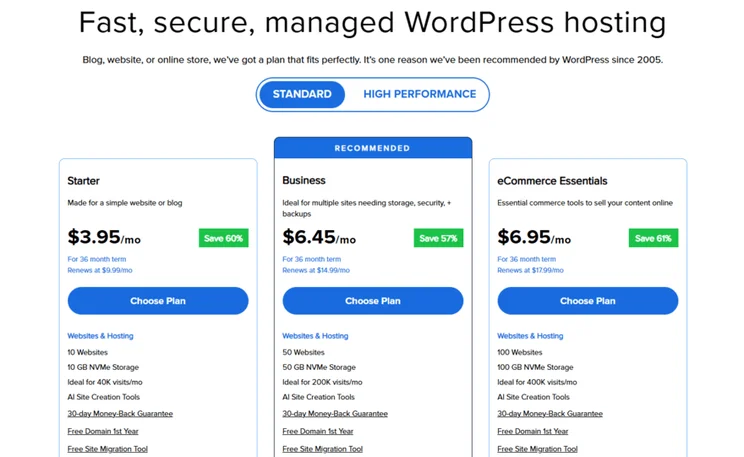
Bluehost WordPress hosting plans, fees, and features
Bluehost's WordPress hosting plans are pretty cheap and they're recommended by WordPress directly. Source: Website Builder Expert

Of the web hosting providers we’ve tested, Bluehost is our top-rated choice, with pricing starting from $3.95 per month. It’s even recommended by WordPress, and you can upgrade to more advanced hosting types, such as VPS or dedicated hosting, for better resources at a higher price.

The downside to building your site with WordPress is having to pay for these essentials separately. Along with hosting, you’ll need to source security, templates, plugins, and more, which can increase your upfront costs dramatically.

  • 💰 Typical costs: $1,000 – $5,000+ upfront
  • 💻 Our recommendation: Freelancers and design agencies
  • ✅ Free web designers: No

Hiring a web designer to do the heavy lifting for you will typically cost around $50 to $200 per hour, making this the most expensive method of building a website. However, knowing what to budget for a designer can be difficult, since their fees and time required are variable.
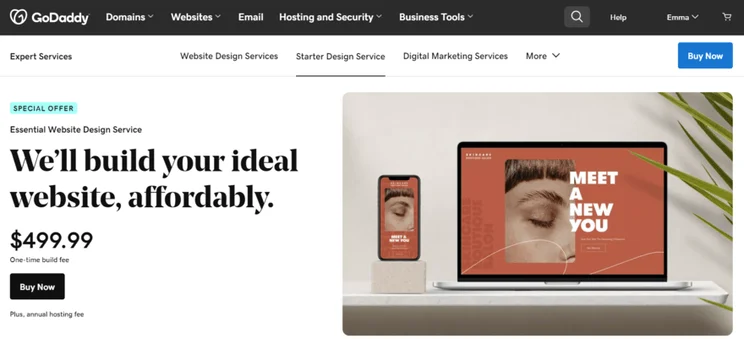
GoDaddy's Essential Web Design Service homepage showing the price and a button to "buy now"
I could pay a one-time fee to get GoDaddy's design team to build my website for me. Source: Website Builder Expert

However, this is the hardest price to estimate because it varies depending on a designer’s rates – it could set you back a few hundred dollars upfront, with additional fees for ongoing maintenance.

Here are a few key pros and cons to the method:

Pros

✔️ Good for complex or large websites

✔️ Helps you prioritize other work

✔️ Get a completely custom website

✔️ No need to learn website building skills

✔️ Pay for what you need

Cons

❌ Expensive to hire and costs can vary

❌ Could pay and get a poorly-designed website

❌ Not necessary for personal or small sites

❌ Takes time to get your site live

❌ Lack of creative control

Do You Need a Web Designer?

If you’re not confident with building a website but don’t have the budget to spend on a professional designer, you could consider using an AI website builder instead to handle the design work for you. We’ve weighed up the pros and cons of building a website with AI vs hiring a freelancer, so you can see which is the best option for your business.

  • 💰 Typical costs: $10 – $20 for one year
  • 💻 Our recommendation: GoDaddy, Squarespace, Wix, Shopify, Hostinger
  • ✅ Free domains: Sometimes included with website builder packages

Buying a custom domain name for your website is a great way to build brand awareness. Some website builders include a custom domain name for free (usually for the first year of your plan), but you’ll eventually need to pay to keep your name registered.

A standard .com domain name can cost around $10 to $20 per year.
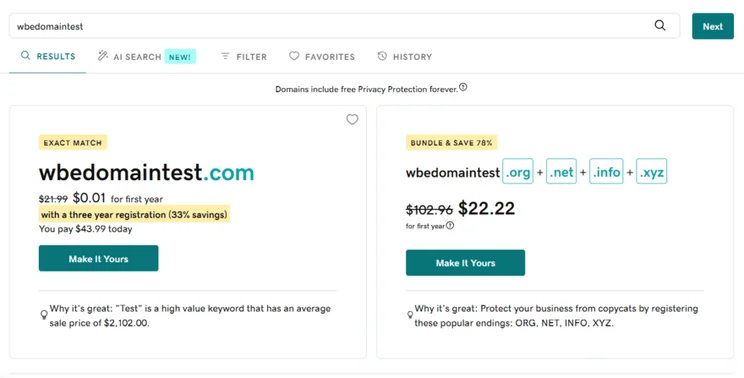
Screen showing discounted domain registration deals with price comparison and savings highlighted on GoDaddy
I used GoDaddy's domain checker to see pricing and available names. Source: Website Builder Expert

The cost of a domain name varies depending on your registrar, such as GoDaddy or NameCheap, the TLD (meaning the .com part of the address), and how popular the domain name is.

There are plenty of additional fees to consider when figuring out how much a website should cost. When browsing website builder plans, see if the following features are included, or make a note if you’ll have to pay extra:

  • Templates – For example, the majority of Shopify’s templates have a one-time fee, ranging between $100 and $500
  • Apps – Squarespace’s Acuity Scheduling tool costs extra to use (starting from $16/mo)
  • Security – An SSL certificate and fraud detection tools will be added costs if you use WordPress
  • Content – You’ll need to hire a professional if you don’t feel confident writing or producing your own content
  • SEO – SEO experts can help you optimize your website for a fee (but it’s best if you rely on your website builder’s built-in SEO tools)
  • Maintenance – You might need to pay extra for tools to track your website’s performance

Shopify premium template called "Blockshop" showing template details and the option to try it out
Shopify's premium templates can be viewed before purchase and I appreciated being able to try the different preset options when browsing. Source: Website Builder Expert

You need to spend your time and money wisely to get the best results, but you don’t need a huge budget to create a professional website.

Here are my top tips to help you save money when building your site:

  • Think about present needs first (you can upgrade down the line!)
  • Use a cheap website builder
  • Don’t pay for extra features you don’t need
  • Choose a free template
  • Use available resources and guides to upskill
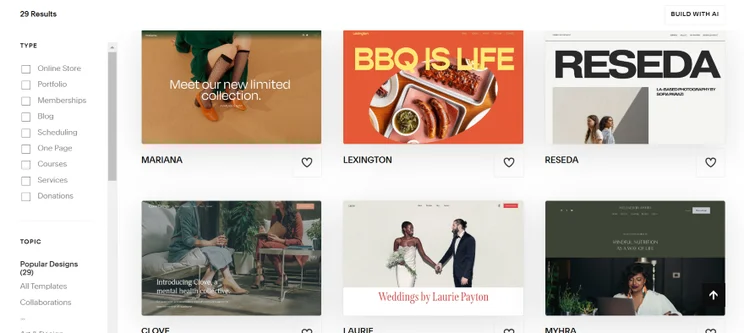
Some builders, like Squarespace, allowed me to choose from a range of professional templates for free. Source: Website Builder Expert

Below, I’ve summarized the costs we’ve discussed already and the different paths you can take when building your website:

  • Website builders – $0 and $299 per month
  • WordPress – $11 and $1,000+ upfront
  • Web designers – $1,000 and $5,000+ upfront (vary in price)

With these costs involved, using a website builder is the most affordable and beginner-friendly option. The costs are minimal, depending on your chosen plan, and everything’s bundled under one price tag to keep things simple.

Written By

Headshot of Emma Ryan

Emma is Deputy Editor of MVF’s B2B brands, specializing in website builders, ecommerce, marketing, and vibe coding. Emma combines her wealth of knowledge and years of hands-on testing with a passion for helping small businesses and website owners navigate the highs and lows of being online. Her work has been featured in Newsweek, Digiday, TechRound, and Industry Today.

More about

Reviewed By

natasha_willett

Natasha brings her expert credentials – a BSc, Ma, and MMRS – to Website Builder Expert. Natasha has qualifications in Advanced Statistical Analysis, MRS certificate in Market Research, Brand, Finding the Story in the Data, and Big Data: Measuring and Predicting Human Behaviour. These have allowed her to carefully analyze over 64 providers across website builders, ecommerce web builders, and hosting.

Natasha began building websites when studying sports science, originally using Weebly to create websites to help students learn in a more interactive way. During her first week at Website Builder Expert, she realized that website builders would become important in giving business owners full control over their websites. She began creating a rigorous methodology of research that centered around testing providers and products against a large set of mixed criteria turned into quantitative findings, comparing value for money, design, ease of use, and more. All to provide the most honest and objective insights rather than just looking at their claimed features.

In five years at Website Builder Expert, Natasha has attended multiple expos in her field, including ESOMAR, MRS, eCommerce Expo, Ad World, Digital Customer Engagement Summit, and IMRG, just to name a few. Natasha has also worked alongside website builders directly to share her research with them, so that they might improve their products for users.

She’s clocked an impressive 9,600 hours of product research and testing, pulling data from multiple sources and providing the Website Builder Expert team with the scores and product details they need to give you the best recommendations to succeed online.

More about

Popular topics

226 comments

Your email address will not be published. Required fields are marked *

  • Rick

    Thanks for all the good information.

    1 reply

    • Samuel Jagger
      Samuel Jagger

      Hi Rick! Thank you for your comment, we're so glad you enjoyed the article! All the best - Sam

  • Steve Bouboulis

    Great breakdown on website costs Lucy!

    This article demystifies the budgeting process for new site owners.

    Appreciate the clear examples and actionable tips.

    Super helpful for anyone in the planning phase.

    Thanks for sharing!

    1 reply

    • Lucy Carney
      Lucy Carney

      Hi Steve,
      Thanks for your comment, I'm so glad you enjoyed the article! Best of luck with your online projects!
      Have a great day,
      Lucy

  • Adam

    What if you just want to combine two pages. I want to transfer stuff from a WordPress page to my Wix page. How would i go about finding a person for that. I get lost on WordPress

    1 reply

    • Lucy Carney
      Lucy Carney

      Hi Adam,
      Yes, it's very possible to move content from WordPress to Wix. If it's blog content you want to move, then this Wix guide may be helpful. Because they're different platforms there will be a certain amount of manual work that needs to be done, to copy it all across. There are migration services out there, such as Cart2Cart, but I recommend doing some research to see which one best suits your needs.
      Best of luck with your transfer!
      Lucy

  • Art

    One of the most thorough articles on website building encountered. Y'all ask all the right Q's, share realistic expectations with most used options for building w/ avg pricing structutes. You truly present a complete picture for the task at hand, with multiple options for the would-be site holder to consider with realistic expectations.

    Thank you for covering this subject matter ss hou have; much appreciated.

    Best to you and all your endeavors now and in the future.

    Sincerely

    Art Paul

    1 reply

    • Samuel Jagger
      Samuel Jagger

      Hi Art! Thank you so much this comment! This made our day at the office. We're so glad our work resonated with you, and promise to bring you even more in the future. All the best - Sam

  • Stephanie

    This article was everything I was looking for and more! It gives me comfort that we made the right decision to hire a web designer for our website.

    1 reply

    • Emma Ryan
      Emma Ryan

      Hi Stephanie,
      Thanks for the lovely comment! We're glad to hear you enjoyed the article.
      Very best,
      Emma

  • Duane

    WOW, Lucy!
    This was a great, complete and concise article. I really helped me sell the concept of a website to my conservative HOA committee. Thank you.

    1 reply

    • Samuel Jagger
      Samuel Jagger

      Hi Duane! Thank you for your comment! We love hearing from success stories, and well done navigating your HOA committee! All the best - Sam

  • sabuj baidhya

    Hi, Really great post and very helpful.

    1 reply

    • Jordan Glover
      Jordan Glover

      Hi Sabuj,
      Thanks for commenting. We're glad our article could help you!
      Regards,
      Jordan

  • Robert

    Hello! I would like to build a website with a website builder but don't know how to go about doing it. Do you have to create everything for the website before you publish it or can you make changes afterwards if needed? Can I take my time creating the website or does it all need to be done at once?

    1 reply

    • Jacqueline Renouard
      Jacqueline Renouard

      Hi Robert,
      These are all great questions, thanks for reaching out! The beauty of a web builder is yes, you can test out your creativity before publishing it and some of them even offer free plans or trials so you don't need to commit to it right away. You can absolutely make changes to your website once it's live too! My recommendation from what you've told me already, is to have fun with the Wix website builder as it's absolutely free (no credit card details needed, just your email) and that's a beginner friendly one to try, and you can take all the time you need on it. And if you love the website you've built you can then decide if you want to spend on a plan that will take away the ads on it. Hope that's helped, let us know how you get on!
      Warmly,
      Jacqueline

  • Shubham

    Really helpful content. I am now in a better position to decide which is the best option for me.

    1 reply

    • Emma Ryan
      Emma Ryan

      Hi Shubham,
      Thank you so much for the lovely comment! We're so happy to hear that, and we wish you luck on your website journey!
      All the best,
      Emma

  • Jess

    This was very helpful. I used it as a guide for my online web design business. Thank you! :)

    1 reply

    • Samuel Jagger
      Samuel Jagger

      Hi Jess! Thank you for your comment! We're so glad our guide helped you with your online business! All the best - Sam

  • Theodore

    It was quite helpful for me. Thank you very much for the information

    1 reply

    • Emma Ryan
      Emma Ryan

      Hi Theodore,
      Thank you for the comment - we're so happy to hear we could help!
      Very best,
      Emma

  • Simi

    Thank you so much for describing everything in such an easy way. It was very helpful for me.

    1 reply

    • Jacqueline Renouard
      Jacqueline Renouard

      Hi Simi,
      And thank you for being so lovely and reminding us why we do what we do! We're so glad our cost breakdown helped and we wish you every success. If you ever have questions along the journey Simi, do get in touch and we'll be happy to help.
      Warmly,
      Jacqueline

  • Robert

    Very helpful article on producing a website! More details than I had imagined. What wasn't covered is in some ways the most important aspect of web building and that is SEO and/or social media presence. How do I get eyeballs on my website? I have already developed my website in Weebly at Fat Cow and it looks pretty good. The content is on climate change and energy use so would be hard for even the best designer to improve on content, although they might improve on presentation. So my question: is it worth it to go to all the trouble to learn WordPress, then still not get any more views? Blue Host offers to do just that AND get more views through various means for $2000. That seems fairly inexpensive, but I have nothing to compare that with. It would be nice to know if there are other services out there that optimize your presence online.
    Thanks,
    Robert

    1 reply

    • Jacqueline Renouard
      Jacqueline Renouard

      Hi Robert,
      Thanks for reaching out to us! This is a fantastic question and a rather complex one to be totally honest with you. Getting traffic to your website is a time consuming process but let's see if we can break it down for you. There are ways you can try to get more traffic to your website via Weebly (not the greatest for SEO - but okay). To get more traffic you need to shape content that firstly - visitors will want and need. Then you can use social media strategies to get people to head to your website, or you can create email marketing campaigns, or work with influencers... there's a lot of marketing route's to take and you can check out our article on Digital Marketing Tips for more details. If you want your website optimized for SEO then out of those two options WordPress.com is what we would recommend but if you want more details on The Best Website Builders for SEO then check out that article! (Spoiler alert! Wix is the best for SEO) If you read through those and still have questions then don't hesitate to drop us another comment, have a great day!
      Warmly,
      Jacqueline

  • Ken

    Thank you for this article. It's extremely helpful! The more deeply I delve into the construction of my website, the more I realize how clearly and usefully you've laid out this information.

    1 reply

    • Emma Ryan
      Emma Ryan

      Hi Ken,
      Thank you for the comment! We're so happy to hear that the article helped you.
      Very best,
      Emma

  • Ricky Matp Paisip Narewec

    Thanks for sharing, it really helps some of us, startups to see the cost of running our website that way.

    1 reply

    • Jacqueline Renouard
      Jacqueline Renouard

      Hi Ricky,
      Thank you for such a kind comment! That's why we put time into our research and care in our work - to help startups and businesses get the best information we can get them! We're glad to hear that you got the right information on the cost of running your website and wish you the very best!
      Warmly,
      Jacqueline

  • Shivam Mehta

    Thank you for sharing amazing blog on website development cost. We have been developing websites and software's from long time but we still had little confusion on how exactly evaluate web development cost.

    1 reply

    • Jordan Glover
      Jordan Glover

      Hi Shivam,
      I'm glad we could help!
      Regards,
      Jordan

  • James

    I live in an HOA in Pennysylvania. I just saw an estimate of our web site costs. It's $5,000.00 per year. This seems very high to me. It's not that elaborate, and I wonder if this price is too high. I plan to possibly be on a finance committee to looks at the costs in more detail, but would like to know if this is too much. The site is pepoa.org Thank you. My twitter handle is @jpclyons

    1 reply

    • Jordan Glover
      Jordan Glover

      Hi James,
      Thanks for your comment. It's difficult to say whether this cost is too high as I don't know all the ins and outs of your website like you do. However, when using an external designer or developer, it's not uncommon for costs to begin at as much as $5000! It will depend exactly on what you need your website to do and whether you can create it yourself. If you need to hire outside help to achieve your desired result, it will cost more. It is possible to build and maintain a website for much less than this, but you'll need to be prepared to invest in other ways, mainly time and effort.
      I hope this helps!
      Jordan

  • Abel

    Its really helpful. Thanks!

  • Francis Owusu

    I need urgent guide to create a business website

    1 reply

  • Naveen K Singh

    Hi,
    It is useful article. I am using my website built using WIX.COM. I want to ask...whether I would be able to write content in my native language..like Hindi.

    1 reply

    • Jordan Glover
      Jordan Glover

      Hi Naveen,
      Thanks for your question. Yes, you can. You have control over your content on Wix, so you can write in whichever language you like! You can also change your site's overall language through the Language and Region Settings in your Dashboard.
      Thanks,
      Jordan

  • Ashwin

    Very good article!

  • John Platt

    Extremely interesting article, thank you. With the various costs, are these US$ amounts
    Cheers
    John

    1 reply

    • Hannah Whitfield
      Hannah Whitfield

      Hi John, so glad you found it useful! And yes, all costs are in USD. Thanks, Hannah

  • Richard

    What planet are you from that SEO costs $90 upfront?!?!??! That's an insult to SEO professionals around the world.
    You can built a website for thousands of dollars. BUT NOONE CARES, if user can't find if or if Google can't see it!!!

    1 reply

    • Hannah Whitfield
      Hannah Whitfield

      Hi Richard,

      This $0-$90 relates to SEO plugins or apps that you may want to install from the get-go to support your SEO strategy, and isn't intended to reflect the cost of hiring additional support for this later on (which, you're totally correct, would cost a considerable amount more!). Hope this clears up any confusion!

      Thanks,

      Hannah

  • Simon

    How do you go about building a site that you want to design but you don’t have the tec skills to do it? I want my personality Artistic design in the site not someone else’s. Iv tried working with a website builder designer and found it so frustrating, as they want to put their Unwanted touches In it. You have to pay upfront so you end up with a site that you payed for and don’t want. So i just turned it off

    1 reply

    • Hannah Whitfield
      Hannah Whitfield

      Hi Simon,

      Thanks for your comment! Have you tried having a go yourself with a website builder? Wix in particular gives a lot of creative freedom while being beginner-friendly, so you should be able to achieve your vision. Let us know how you get on!

      Thanks,

      Hannah

  • Dan Barraclough
    Dan Barraclough

    Hi Christian,

    That's a great question. WordPress.org is ideal for websites that require regular updating, such as news and blog sites. This version of WordPress (i.e. not WordPress.com) is a CMS and offers plenty of creative freedom. You can see how to create a website using WordPress here. We hope this helps!

  • Melody

    Very informative, thank you!

  • Nicholas Otieno

    great advice. thanks!

  • John Moran

    This article saved me some money! I took the time after reading this to really educate myself (key here is i had the time or at least i made the time) on the different options to create a website. I found weebly (I clicked on the how to chose a website builder) because it basically allowed me to build out my carpet cleaning website which i wanted to be real basic for almost nothing. honestly i basically just youtubed the process and was able to build my site by myself in about a week. i should mention that i have a small crew and operate this business usually 70+ hrs a week. I probably only really put in about 15-20 hours to get it all done! It ain't perfect but i'm glad i read up on this because i've had countless people try to 'sell' me and almost always would qoute in the thousands, which i just couldn't justify. The way i see it is i made $100/hr by doing it myself! Thanks for taking the time to break it all down it helped me decide to go it on my own.

    1 reply

    • Cheri Hampton-Farmer

      Thanks for sharing your experience. I am launching a new business online and don't want to spend much until I know I will gain some return on investment. I will check out the You Tube videos and allocate 15-20 hours to study up on it.

  • Krishna Yadav

    Wow.. very well written. Website design companies definitely going to learn a lot from this.
    Thanks for great post..

  • Angelina

    Great but very lengthy blog!! As you correctly said that website cost not only depends on the look f website, but there are many internal factors that need to be taken care of.

    Thank you.

  • FW

    Thanks for sharing this. Extreme useful! This is the best article I've come across.

  • Soni Gonzales

    Wow. Great insights. I learn a lot from this article. Thank you so much. Keep up the good writing.

    1 reply

    • Hannah Whitfield
      Hannah Whitfield

      Hi Soni, thanks for your comment! Glad you found this helpful. Thanks, Hannah

  • Lisa

    Very informative and well written article. I use both Joomla and WordPress for our clients. I believe Joomla is worth mentioning even though it’s a smaller percentage of sites. As a designer / developer I find it far easier to work with and organize information that WordPress and I need less extensions/plugins which streamlines the sites and better performance. A better rounded article would not bias towards a certain software.

    1 reply

    • Hannah Whitfield
      Hannah Whitfield

      Hi Lisa,

      Thanks for your comment, and for sharing your experience of working with Joomla. There are a number of great softwares you can use to build a website - we've just focused on WordPress for this article as it's so popular, and in our view one the better CMSs. But that's why it's so great when people take the time to share their experience with our readers - so thank you for taking the time to do just that!

      Best,

      Hannah

  • sam

    Hi,
    Thanks for all the valuable information. Just have two questions.
    First - What is the value of a website that Google will never see and potential customers will never find.
    Second - What would be the value of a simple HTML site that's on the first page of Google search results and bringing customers. I am not a web developer to start with, my customer built his own site using Wix and the site is not doing nothing. I built him small simple HTML site that's bringing an average of 9 customers a day "That's customers who took the time to fill the contact us form asking for products and services" Now i don't know how much i should charge for the site.

    1 reply

    • Hannah Whitfield
      Hannah Whitfield

      Hi Sam,

      Thanks for your comment, and for raising the question of SEO, which is something we get asked about a lot. Historically I think it's fair to say that website builder SEO has been quite poor, but it has really come along in recent years. People have really wised up to SEO as a topic in general, and I think website builders came to realise that they needed to improve in this area, or they would lose out to the competition. Wix recently ran a competition called the 'Wix SEO Battle', showing it's now confident to put its money where its mouth is in this area. You can read a bit more about our thoughts on Wix and Squarespace's respective SEO capabilities here: Wix SEO Review Squarespace SEO Review.

      Hope this helps!

      Hannah

  • Tracey

    Wonderful information. Just what I needed

  • Mark

    Your entire website (& all of the advice I've found here so far) is EXCELLENT. I've been debating about exactly how to begin my own project and you all have definitely clarify a LOT of the questions that have been bouncing around in my mind. Keep up the great work and THANK YOU for helping springboard people past the 'idea' stage and on to the 'action' stage of pursuing their dreams!

  • Reginald

    Great post! Thank you for this. My partner and I have a Design company, and I've been looking for a listing of the costs, so we can determine what we should be charging our customers. You've given us an awesome guide to follow, to be fair to our prospects.

  • CeeCee

    I've been researching how I can start my own custom resume writing business from home. I've done a lot of good reading over the months that has been very informative and helpful. However, I got very overwhelmed with all of the information out there concerning how to create your own website. I use to believe it was a matter of finding a good website building program and that would be the end of it. I was so wrong. There was so much I was missing. So I set out to find ONE website that could provide me with everything I needed to know about creating my website. At first I thought such a place didn't exist on the internet and I thought I would have to find multiple sites and weed through all of the information and pick and choose what I needed while disregarding the rest. I was so overwhelmed by this. I had many many sticky notes open on my computer desk top trying to keep track of all the things I was learning from site to site. Until today!!! I found WebsiteBuilderExpert.com and there it was!!! Everything I needed all right there in front of me. Granted. Its a lot of information to decipher and to learn. But, with this website, I stood a chance to successfully learn what to do to build my website. I honestly can't believe I found it all in one place. Great job WebsiteBuilderExperts!

    1 reply

    • Hannah Whitfield
      Hannah Whitfield

      Hi CeeCee,

      Thank you so much for your kind words! Hope you're getting on well with setting up your business - do come back and show us once it's up and running.

      Thanks,

      Hannah

  • Alison

    Great article, really helpful, thank you.

  • yordi

    Such a piece of good information when it comes to learning purposes.

    Very well detailed and specific knowledge.

  • Alahnhu Aahkbaru

    Awesome! Thanks, Connie :)

  • Nicky

    Very thorough. Thanks.

  • Christian

    Hey, I really enjoyed the article. Do you have an opinion on how a website for a news company should be designed? A friend and I are thinking about starting our own media company, and we are currently exploring website options, and whether or not it should be custom built. I would assume that news websites are somewhat different from typical websites as they require constant updating (in the form of articles).

  • Adams

    The best best post I enjoy spending my time to come across. Keep the good work

  • Jeff Toler

    Hi Connie,

    I found your post to be remarkably well researched and written. As a designer and front-end developer, the issue of justifying my services is not so easy since the advent of drag and drop solutions. Most people are only able to think of saving money; or they think they would like to do it themselves. But in reality, the only way to offset money is with the investment of time.

    I may provide this link (or at least reference it) with some of the prospects I am reaching who hesitate to spend the money a good, serviceable website will ultimately cost.

    Issues like SEO optimization, security, page load speed, and stability are essential if a website is to provide the environment for information, sales leads and legitimacy. No matter what solution we can talk about a useful website is going to cost time and money.

    My prospects are entrepreneurs and small business owners. I have found they don't have time to build a website themselves... and with few exceptions, they shouldn't if they want successful results.

    Thanks!

    Jeff

    1 reply

    • Dan Barraclough
      Dan Barraclough

      Hi Jeff,

      That's great to hear, thanks so much for your comments. Please feel free to share the article with your clients!

      Dan

  • Rupali

    This was great info! Thanks!

  • Deborah Ann Farooq

    Thank you so much. This is just what I needed to know in getting a website done and saving money as a new author of my first book . Thank you for pointing out the sites for a beginner like weebly, and wix, and squarespace . I had been told by a designer of websites that I didn't want to use these sites. Because of cost . But I had looked into it and thought that one of those sites is a better choice for me at just starting out. And I don't want to spend over 2000.00. To get a site and then 100. A month for the certifcate. I am so glad I saw this online. Thank you for taking the time to wrote this post ,

    1 reply

    • Hannah Whitfield
      Hannah Whitfield

      Hi Deborah,

      Thanks so much for your comment, and congratulations on the book! So glad you found this useful, and were able to save some money by using a website builder.

      All the best,

      Hannah

  • Shruti

    This blog is very helpful especially for people like me who are just starting up with their business life. No matter what your business, I strongly believe one should not hesitate on spending money on your business website. Your website represents your entire business and helps you to generate leads and eventually sales. Nowadays there are many cheap affordable web designing services to help out small as well as large scale businesses with their websites.

  • Ken

    Excellent post. May require your services in future.

    1 reply

    • Charlie Carmichael
      Charlie Carmichael

      Hi Ken,

      Thanks for your comment. We're glad you enjoyed the article, feel free to check out any of our other articles onsite should you need any further information.

      Charlie

  • Modupe Ehirim

    This guide is really helpful.

    I was looking for a resource to guide our decision re: hiring a website developer.

    This helped me to understand all the not so obvious factors.

    Thanks

    1 reply

    • Lucy Carney
      Lucy Carney

      Hi Modupe,
      Thanks so much for your positive comments, I'm so glad you enjoyed the article and found it useful! Hopefully the rest of the site will have some useful resources for you too. Thanks for reading,
      Lucy

  • Luis

    This was soo good! Thank you very much!

    1 reply

    • Lucy Carney
      Lucy Carney

      Hi Luis,
      Thanks so much for the comment, I'm glad you found it helpful!
      Thanks for reading -
      Lucy

  • Hemraj

    Very nice and knowledgeable content.

  • Vafa

    Thank you! This was a helpful summary.

  • Barbara Bell

    Very informative.

  • Mary

    Very informative!

    Thank you.

  • Levi

    Hi!

    awesome content

    Regards,
    Levi

  • Nathalie Greyford

    This is amazing, looking forward to seeing a more relevant article like this.

  • Aleksandra Bessalitskykh

    Thank you so much for this essential guide. It really explained everything in detail about what a website costs. You helped me to determine what type of website is right for me and its approximate сost.

    1 reply

    • Natasha Willett
      Natasha Willett

      Hey Aleksandra,
      Welcome to the community! Great to hear you enjoy and found are article of use.
      Natasha

  • NayAllDay

    awesome article. Very informative.

  • Isaac Ishimwe

    I found this article very useful. Thank you for being so precise in your explanation of everything.

    Best,
    Isaac

  • Yoluanda

    Really good article! Useful information.

  • Kerry A. Thompson

    Thanks for providing the detailed research into features and costs for this article. Website Builder Experts' comparison chart was what helped me to decide a few years ago to choose Squarespace and Weebly as my preferred website builders for helping new businesses create their first websites. As you say, my clients hire me for my graphic design and copywriting skills as well as SEO and other related technical knowledge, not for my coding skills. I appreciate all the information provided here and will share it with my potential clients too.

  • Brennon

    I have a question. I work for a organization that is looking into creating a website from either wix or squarespace. We would like the function to be able to donate to our cause via our website. Do you know if either of these websites allow this?

    Thanks

    1 reply

    • Fred Isaac
      Fred Isaac

      Hi Brennon, thank you for getting in touch. I believe both Squarespace and Wix have the functionality to add 'donate' buttons, so you should be fine. For ease of use, I'd go with Wix. Hope this helps.

  • Maggs

    move a logo?

  • sebabu

    Its one of the best blog I have read on website development, Your content is very original and practically applicable. KEEP UP THE GOOD WORK!!

  • Ferdinand

    This really puts me in the right direction, thanks so much. However, can drag and drop builders be used for e-commerce websites, where card payments have to be implemented? Thank you.

    1 reply

    • Fred Isaac
      Fred Isaac

      Hi Ferdinand, yes they can! With Wix, for example, you need to integrate the Wix Stores app to add ecommerce functionality. For online stores, though, Shopify is the best on the market at the moment.

  • Rick Riggs

    I found this article very useful. Thank you for being so precise in your explanation of everything.

    Rick Riggs

  • faith

    Thanks, I found this helpful. Am a web developer

  • Charles Braun

    Great article! Very informative.

    I love how you discuss several options for building a website. Most articles only talk about how much it costs when building with an agency. There is typically no consideration for site builders and DIYers.

    1 reply

    • Fred Isaac
      Fred Isaac

      Thanks for the comment Charles, glad you found our piece useful.

  • Njofie Wilson

    Dear Connie, thank you very much for this useful information. It is of so much help to me.
    Keep up the great work and God bless you.

    1 reply

    • Fred Isaac
      Fred Isaac

      Thanks for the comment Njofie!

  • GENE WARD

    Your site is excellent! I'm an artist/designer, also, singer/songwriter, and I have time.
    Keep up the good work.

    1 reply

    • Fred Isaac
      Fred Isaac

      Thanks for the comment Gene!

  • benjamin

    Very helpful information, thanks ! Wow, there's more than meets the eye and your details inspire me to carefully choose the path to developing my website.

  • Elina Mackay

    Hello Jeremy

    I refer to your comment -
    • Most Customizable – Wix and Squarespace (If you know how to modify codes, Weebly is best)

    Does Wix new addition of code compare in any way with Weebly and if so how?

    Thank you regards Elle:)

    1 reply

    • Fred Isaac
      Fred Isaac

      Hi Elina,

      Wix Code is certainly a top-quality tool and does catapult Wix up there with the best when it comes to customization. Have a read of our summary https://www.websitebuilderexpert.com/website-builders/wix-code-overview/ and let us know what you think! Thank you for the comment.

  • IM Creative

    Connie, thank you for this awesome breakdown! Extremely helpful & informative, I share this to many people who inquire my services.

    1 reply

    • Natasha Willett
      Natasha Willett

      Great to hear you’re finding the content helpful! Thank you for the comment.

  • Cayte

    Connie, this was fantastic. Thank you.

    1 reply

    • Fred Isaac
      Fred Isaac

      Cheers Cayte, hope it helped you get your head around how much a website should cost.

  • Debbie

    Wow, what a great information! Thank you for a super article.

  • Thabo

    Thanks the information was very helpful for my assignment, and now i'm even considering setting up a website for myself.

  • Janet Fletcher

    great article...thank you.

  • Nelson Martin

    thanks for the clear explanations

  • Hannah

    Super helpful post!! Thanks for all this info. You've saved me a lot of time.

    1 reply

    • Fred Isaac
      Fred Isaac

      Hi Hannah,

      Good to hear it helped you!

      Fred

  • Junwei

    Thank you for your easy to understand break down. I was having trouble looking for a low cost and the differences between the different methods and so forth for over a year now.

    1 reply

    • Fred Isaac
      Fred Isaac

      Hi Junwei,

      Really pleased we could help clear up any confusion you were having.

      All the best on your website-building journey.

      Fred

  • Paul Campeau

    I found this whole episode excellent. As a novice it was very understandable. One of the best that I have ever read on the subject.
    Thank you
    Paul

    1 reply

    • Fred Isaac
      Fred Isaac

      Hi Paul,

      Great to hear we've helped you on your way and that you found our content interesting.

      Fred

  • Tony

    Very helpful. Giving thanks that I have found this website. Saved me time and money!

  • Miranda

    Great information. What about keeping the company from steeling your idea while using they're websit building like drag and drop template? Should you and how could you patent your website idea?

    1 reply

    • Tom Watts
      Tom Watts

      Hi Miranda,

      In all honesty, I've never even considered this!

      However, it would be worth looking into who owns what on a platform by platform basis.

      For example, if you have a free account with Wix then Wix owns that website and the content on it.

      However, if you pay for a premium account and register a personal domain and connect this to your website, then you are the legal owner of that website's content, etc. as outlined here.

      If your idea is really groundbreaking or novel, then it's best to also look at whether the website building platform can actually accomplish what you hope to achieve. If not, it might require hiring a coder or web developer to help you realize your vision.

      Hope that helps,
      - Tom

  • Tom Watts
    Tom Watts

    Hi Chris,

    Glad the discussion has proved useful for you.

    Feel free to share if you like - you never know who else might benefit!

    Thanks for reading,
    - Tom

  • Chris

    Awesome! Thanks!

  • Tom Watts
    Tom Watts

    Hi there,

    Thanks for the kind feedback - glad you found the discussion so helpful!

    - Tom

  • mala

    Wow! A super helpful article and such kind and thoughtful responses to readers' questions. You guys are the real deal. Will I share? You bet!!

    I'm starting a self-employment program next week and I'm sure my fellow 'future entrepreneurs' will be helped tremendously by your website and expertise.

    So in case I didn't express it clearly enough .... Thank you!
    Mala

    1 reply

    • Tom Watts
      Tom Watts

      Hello Mala,

      Thank you for your kind words -it's great to know our articles can be so helpful.

      Feel free to give us a share on your social channels if you think friends and family could benefit too!

      Thanks for reading,
      - Tom

  • Ssharma

    Extremely helpful article....!!!!
    I am so glad that I found this article in my search of how to create a website. I am just a beginner, not to mention with no technical skills, who was looking for some helpful tips on how to process this further for small/single individual business. And this article is nothing more that I could have asked for in this process.

    Everything in this article has been articulated in a very layman term for easy to comprehend and it answers so many things for a non-tech savvy person

    Thank you very much....!!!!

    2 replies

    • Jo Kraina

      We created a website on Squarespace. Designed and developed it, Did our own photography. Wrote our own contact. The webhosting company then moved our site from Squarespace to their platform. Then they said it cost them $3500 to design/develop the site using an expensive platform, Magento. However they're using a Free version of Magento. Is this odd?

    • Tom Watts
      Tom Watts

      Hello Ssharma,

      It's great to read such positive feedback and to hear that you found the discussion so helpful!

      Please feel free to share if you think other non-tech savvy individuals might benefit too - it's a nice way to pay it forward!

      Best of luck with your website building,

      - Tom

  • Carl

    Hi Jeremy, i am actually trying to get a hosting ... i have some concerns about SEO features offered by the hosting providers.

    things like below:
    - Search Engine Jumpstart
    - SiteLock Security - Find
    - SSL Certificate
    - Malware scan removal

    Do you think for a very starting point of a business, we would need to apply for those features? i think they are some plugins for SEO if im not wrong ... do you have any idea please?

    thank you and keep up the good work always.

    1 reply

    • Tom Watts
      Tom Watts

      Hello Carl,

      Thanks for joining the discussion - you're definitely asking the right questions! It's always worth knowing what you're paying for before committing cash to something.

      Bearing in mind you're coming from the perspective of a small business, let's run through each in turn:

      1) Search Engine Jumpstart - It's supposed to help you rank faster, but I'm too clear on the specifics of how it does this. Not 100% necessary because as long as you are focused on your target audience, create great, relevant content regularly (maybe via a blog!), and add meta tags and descriptions to images and webpages (descriptions used to sort your website by search engines - like a blurb on a book) then you should be ok. Just ensure your products and pages are all tagged up correctly!

      2) SiteLock Security - Can be handy if you are concerned about malware or phishing scams. SiteLock helps to protect you from these sort of attacks and can give your visitors peace of mind, knowing they are safe on your site - doubly important for businesses hoping to make a sale.

      3) SSL Certificate - An SSL Certicate is necessary to secure websites that collect, host and transmit sensitive or personal data (e.g. credit card numbers!), it is essential for any website selling products or taking payments to have. It also helps users trust your website more as they can feel safe that their data is protected.

      4) Malware scan removal - I believe this is similar to SiteLock Security and helps to further protect your website from malicious attacks. Again, it's worth being a little over-zealous if you are running an ecommerce website just because it not only protects your livelihood, but protects your customers too and ensures their data is safe. Building trust is important and all four of these add-ons can help you to do this, because no-one wants to re-visit a website that gave them a virus (even if it's by accident!).

      It definitely depends on your budget and situation, but I would say that options 2) and 3) are the more important add-ons to consider.

      Hope that helps,
      - Tom

      1 reply

      • Carl

        thank you bro...

  • Ingrid Blay

    This was very interesting and beneficial for the first timer. Thanks for all the information. I'd be spending more time researching all my options now that I know what they are. Thanks again!

    1 reply

    • Tom Watts
      Tom Watts

      Hi Ingrid,

      It's really good to know that you found the discussion and information so beneficial, it really justifies the work that goes on behind the scenes!

      Feel free to share on your social channels if you think others might benefit too - it's a nice way to pay it forward :)

      Best of luck with your site building + Thanks for reading,
      - Tom

  • William Penoyar

    Very helpful tutorial on Website design considerations for the "newbie" like me.

    1 reply

    • Tom Watts
      Tom Watts

      Hello William,

      Good to know you found the discussion helpful.

      We were newbies once upon a time too and wish we had easy-to-follow guides back then! It's reassuring to know we can help non-techy individuals with our content :)

      Thanks for reading
      - Tom

  • Kim Grentz

    Great article- super helpful, thank you!

    I am looking to start a community web page in which there will be community resources, events, a blog, video and audio, advertising, several "hubs" in which different sub-groups of the community can network, and more. I have used Weebly to create a practice website and enjoyed the experience very much. My question is, does it seem practical to start off using Weebly for a community website? What would happen if my traffic increased quicker rather than slower? Would it crash bc I'm on a shared hosting plan? Also, I learned about Host Gator this week and like the idea of unlimited domain names and unlimited bandwidth- is this something that can be used in conjunction with Weebly, or would that be only if I chose Wordpress?

    Thanks in advance for your feedback!

    1 reply

    • Tom Watts
      Tom Watts

      Hello Kim,

      It's a very good question and I think it's good sign that you're considering this now before jumping straight in!

      Weebly would definitely be an interesting platform to try and grow a community on. You shouldn't have too much trouble adding forums to develop your sub-communities, while media and content uploading is super simple through Weebly's editor - which I think you'll be familiar with having used the platform already.

      Practicality-wise, it does depend on how fast you expect to grow. Unless you're subscribing to Weebly's more expensive premium plans then you may struggle for bandwidth if you grow too quickly. Similarly if you intend on introducing membership features, then you're limited to 100 members unless you subscribe to the most expensive plan, which is something worth considering.

      On the HostGator front, I understand that it is possible to connect Weebly with HostGator, but whether the HostGator unlimited bandwidth is applied on top of the Weebly plan you're subscribed to - I'm not clear on. The HostGator website has some support documents about connecting a Weebly website to HostGator, so it could be worth having a poke around to see what you find.

      Hope that helps,
      - Tom

  • Carl

    Hi Jeremy,
    very good content and clear concepts.
    I actually have a quick question. Let say you have a customer that wants a website, but shows one that is similar to what he wants to have ..

    meaning, client visited a particular website and he liked it. then wants to have his website to look very similar not to say the same.

    Do you know what tools or different ways we can use to figure out or identify what themes and template was used to build that website the client want to use as example? that is a common situation where the client has some preferences some sites they visited before.

    thanks for comment.

    1 reply

    • Tom Watts
      Tom Watts

      Hi Carl,

      Thanks for the feedback - it's always reassuring to know that our content makes sense to people working in the industry!

      Regarding your question though, I think it's always going to be hard identifying the exact theme as many sites are built to spec and are heavily customized form the ground up.

      The best thing I can suggest for you to do, would be to pull out the common elements of the sites your client likes and then try to find an template/theme that has all if not most of these elements - it's not an ideal solution, but should help your recreate something similar to the original if not identical.

      Hope that helps,
      - Tom

      1 reply

      • Carl

        thanks for your comment ... it's a common situation some times

  • Peter Miles

    I loved this article! Answered most of my novice questions but was wondering what happens when my business grows (if you don't think it will the you shouldn't start) and the chosen platform doesn't embrace some features I need to then incorporate into my website. Wix, Weebly and Squarespace are all proprietary systems so probably can't "take it with you". Building a site with Wordpress would be transferable and upgradable although involving a steeper learning curve a greater initial input. Completely rebuilding the site would be difficult, expensive and perhaps ruin a site that has been working successfully, which is why your business has grown.
    Wiredelta seems to be a good compromise for this reason but a bit more expensive in the first place, what are your thoughts?

    1 reply

    • Tom Watts
      Tom Watts

      Hello Peter,

      Thanks for joining the discussion.

      I think you're on the money with regards to Wix, etc as while they are great platforms to start a small business or a personal website on, they aren't overly equipped to handle an ecommerce website that experiences rapid growth.

      For this, I would point you towards Shopify or BigCommerce (I've linked to our in-depth reviews), which are dedicated ecommerce platforms that are perfectly suited to small, medium or large, enterprise-level businesses. These two specialized platforms are perfect for growing businesses and should negate the need for site redesigns as you expand.

      Hope that gives you some food for thought,
      - Tom

      1 reply

      • John

        Greetings,

        Thanks for all the priceless education Team WBE. Your website is like a SWEBOK V3 endorsed compendium.

        I believe building a "drag and drop" website for a business with massive growth potential on shopify's "free ecommerce template" won't be exactly as the analysis you have kindly made here with respect to (wix, squarespace & weebly) ?

        I think the process and cost analysis would be different ?
        Because our team is about building a #DIY ecommerce website on Shopify.

        Thanks once more Team WBE a.k.a Team Genius :)

        1 reply

        • Tom Watts
          Tom Watts

          Hi John,

          I think you're right that different websites would have different costs.

          In this discussion we've tried to cover as many bases as possible with our experience.

          It would be a crazy long article if we'd tried to cost out every single type of website possible (plus a nightmare to read!).

          For more information on Shopify and building an ecommerce website I'd suggest having a look at our:
          - Shopify pricing guide
          - In-depth Shopify review

          Hopefully they provide you some more information about Shopify and its associated prices,

          Thanks for reading,
          - Tom

  • Sofía

    Hey,
    you gave such a helpful article. thanks for sharing this information with us.

    1 reply

    • Tom Watts
      Tom Watts

      Hi Sofia,

      Good to know you found the discussion helpful, I hope the information proves useful.

      Thanks for reading,
      - Tom

  • Jaclyn

    Gaad - I wish I had found this before starting down the road of redesigning our high school sports team website. What a PITA it has been! I used an online Design website to narrow my web page design down, chose the winning design and then discovered the designer doesn't code and I'm at my budget limit. Do the drag and drop website builders you mention above, include the codes to move from one page on the website to another? We would also like to offer online registration - are any of them better for taking payment? I am beyond frustrated with the process - a coding, website building professional I am not. Ugh!

    1 reply

    • Tom Watts
      Tom Watts

      Hello Jaclyn,

      Sounds like you've found yourself in a bit of a sticky situation!

      I believe that the website builder route could be a solution for you as you should be able to create anything you need within the platform's drag and drop editor, especially a platform like Wix.

      You mentioned the codes to move from page to page, but I'm not too clear on what you're referring to. Do you mean clickable navigation links that will take a user to the 'Contact' page if they click the 'Contact' link in a menu? If so, it's simple enough to create these navigation links in platforms like Wix, Weebly and Squarespace.

      Likewise, on each of these platforms you can create membership areas that encourage users to register, but I don't think you can charge for this (e.g. create a paid membership area) at this exact moment in time.

      Thankfully you dont need to know any coding in order to create a stunning website with a website builder! They are pretty easy to pick up and the simplicity of the design should help to ease your concerns a bit.

      Hope that helps,
      - Tom

  • EB

    What an awesome article! Finally someone to answer all my questions in ONE place in terms that are understandable. Thank you!

    1 reply

    • Tom Watts
      Tom Watts

      Hi EB,

      Great to know you found the discussion so useful!

      Feel free to give us a social share if you think others might benefit too.

      Thanks for reading,
      -Tom

  • Eva B

    Great article. One thing I didn't see mentioned was that wix is limited in functionality. If you want to build something such as a booking app or forms app to accept customer responses, wix has free ad-ons/plugins you can use but you get what you pay for. Upgrading to the paid version can be very expensive, some charging like $20 a month for a basic submission form. So depending on the kind of features you need on your site, using website builders sounds great at first (they are so easy and look great) but in the end could be more expensive in the long run if you have to pay for 3rd party plugins.

    1 reply

    • Tom Watts
      Tom Watts

      Hi Eva,

      Thanks for your feedback and for joining the discussion.

      I think you're onto something there, as you definitely get what you pay for with Wix and website builders in general. And it does make sense from a business point of view that as you invest more into the company, you're rewarded with access to more and better tools.

      Sometimes though, it can be as much about the return on investment than it is about the initial cost. Consider the value that you will receive in return for a paid feature (such as Wix's booking app). If the paid app enables you to power a business, then it just might be well worth it. Building a website that can power your business effectively might take additional financial investment. So in this case, $20 per month for an important tool / plugin to build a business is worth considering.

      It's worth doing your research before committing to 3rd party apps that may be more expensive than other platform-native plugins. You've got to look after yourself out there as it is all too easy to be stung!

      Thanks for contributing,
      - Tom

  • Miari

    I found this article extremely helpful, especially as a resource for me to articulate how I might be of service to my clients as well as what I am willing/able to do for them or what they would need to do for themselves.

    1 reply

    • Tom Watts
      Tom Watts

      Hi Miari,

      Great to hear you found the discussion so helpful.

      Feel free to share on your social channels - every mention helps the site and you never know who else may find it handy!

      Thanks for reading
      - Tom

  • Mya

    Thank you so much, completely informative!

  • Yvonne

    GREAT ARTICLE!!! How is this model impacted if you're looking to redeploy an existing site with 146 pages and 18 components ranging from specific entitlement and access to an event registration and management module?

    1 reply

    • Tom Watts
      Tom Watts

      Hi Yvonne,,

      That's a very specific situation!

      While I can't give you an exact figure, I can tell you that the price will be pushed up by including bespoke and custom functionality such as event registration management modules.

      Likewise, cost will also be affected by the complexity of the design you are after and the amount of content this will affect across your site, which at 146 pages isn't small (but also not huge!).

      Your best bet would be to do some more research online and try to get some competitive quotes that you could compare and weigh up.

      Hope that helps,
      - Tom

  • Andres Cabada

    Fantastic information! I have been completely enlightened.

    1 reply

    • Tom Watts
      Tom Watts

      Hi Andres,

      Thanks for your feedback, it's always appreciated!

      Feel free to use the social buttons above to give us a share if you like - we really appreciate it and you never know who else might read and benefit.

      Best
      - Tom

  • May Thomas

    Thanks for the informative article, very useful to see it all laid out like that. We're currently exploring options to update our company website and this article is one of many we've given a thorough read through!

    Weighing up the options, I must say that personally when I go on websites I expect a good user experience, I usually visit sites on my mobile first, and I've heard that Wix isn't viewable on mobiles. Lots of builders don't seem to be very fliexible or let you "think out the box" either so there is that, but then again lots of companies seem to give all sorts of prices for custom websites so it's important to do research.

    1 reply

    • Tom Watts
      Tom Watts

      Hi May

      Wix fully supports mobile-friendly websites and even provides a specific mobile editor to help you optimise your site for smaller screens.

      If you're unsure which website builder to choose, the best place to start would be with our comparison chart where you can compare the essentials of the top website builder brands.

      Hope it helps,
      - Tom

  • Zengo

    Great points. However I missed the part where you explain the factors such as UI and UX that custom designed websites stand out from the crowd. A good designer would surely create and develop the website to be user centric (create personas) and scope before the mockup. Using drag and drop builders ir WirdPress templates do not constitute great design. They are templates that is it. Potential clients need to be aware that when they get a WP template and modify the template they risk losing their content in the next update. WP is great because it creates repeat work for designers at a $100 hr later. I personally like straight HTML,CSS, JQuery built websites, (PHP) is not easy to deal with (server side) plus server side makes the site slower and prone to security issues. WP is attacked constantly. For a 5 page site go with custom HTML, CSS and add FlatFile blog. Minimize database and have simple blog for articles. Virtually no maintanance required.

    1 reply

    • Tom Watts
      Tom Watts

      Hi Zengo

      Thanks for sharing your thoughts with the discussion.

      You make a good point that UX and UI are both super important to modern website design, however I would whole-heartedly disagree that you need to hire a designer or developer to implement a good user-centric flow.

      So long as you have done your research and understand the guiding principles of UX and UI design, then there is no reason why you can't drag and drop elements into a website in such a way that they conform to UX/UI best principles.

      I appreciate for some websites it may be necessary to develop custom navigation, structures and design, but so long as users can find what they are looking for easily enough without any distractions then that would constitute good UX to me!

      Thanks,
      - Tom

  • sir. enock

    very informative, thumbs up

  • sammy

    Nice article. As a technologist, I'd like to give a bit of advice. Your media presence speaks VOLUMES about your company. Don't cheap out on the web / mobile / social media portions of your business. The first thing I always do is check out a company's web page. If it's hard to navigate or is unfinished or never has current info on it, I wonder how serious the company actually is about engaging customers. Look at a website like you would look at any other mandatory business expense. Get the real domain name for your company with matching email address. Make everything as professional as possible. It will pay you back in the end.

  • Gen

    Thanks for this analysis, Connie! Super helpful for those of us starting businesses without any tech expertise. Cheers!

  • Jeremy
    Jeremy

    Hi there,

    You're right. Their free plan does come with an advertisement. No such thing as a free lunch, right? We cover that point in our dedicated reviews for each drag and drop website builder.

    Jeremy

  • Linda H

    Just want to say thanks for some great info! Hoping to create a website for our small firm at the lowest cost possible. Now I know where to spend and where not to spend. Thanks again!!

    2 replies

    • Bertin Dcruz

      Hi Linda,
      I can help you with your website

    • Jeremy
      Jeremy

      Thanks Linda! Good luck building your website!

      Jeremy

  • Mathieu Powell

    Good article on the options available to small business to create websites.

  • Kyle G

    This information is GOLD! I don't leave replies often but I am working on a business plan for my MBA and needed information on creating a website for my financial analysis, you have covered everything I need and more! - THANK YOU!!

    1 reply

    • Jeremy
      Jeremy

      Thanks, Kyle! Glad our analyses are helpful for your business plan. Please do share our guide with others, if appropriate! I'd really appreciate it.

      Jeremy

  • Veronica

    Thanks for a very helpful article.
    I'm wondering how often the prices change? Last month when I started to look at this the price of one of the Wix plans was $6.25 and now the same plan changed to $8.50, I just went away on holiday for a couple of weeks! Was it a once only sale price or does this sort of thing happen often?

    1 reply

    • Jeremy
      Jeremy

      Hi Veronica,

      I suspect that might be the case. Wix does have sales once in a while. The recent one was around Valentines Day in February, so I suspect that's what you saw.

      Sometimes, some businesses adjust their prices periodically (and temporarily) to test which price points work best for their customers and for their business. So if you just happened to visit the pricing page that day when they are testing lower price points, then you'll be getting a good deal!

      Jeremy

  • Geraldine Brophy

    Very helpful site. thank you for your expertise. As a very small business owner (I am it; a one woman jewelry designer just starting) financial expenditures are critical until I can boost revenue and I need an online presence to boost revenue. Catch 22. So your research and information was very helpful to me and for now I may use Wix to get up and running ( I have NO technical expertise) and if need be consider upgrading down the road.

    2 replies

    • Steve Ball

      Going down the website route might not be the best way for you to generate sales, I would suggest you would do better initially working with facebook, facebook groups and facebook ads for starting some basic pay-per-click you can really drill down into your target market on facebook ads. Something you can't do with Google ads facebook is great for business to consumer website. One of the things people forget about is traffic, the cost of building the website is going to be high because I assume that you would need a shopping cart solution. Pay for click is the only way you would get traffic to your site, its expensive and a lot of big players out there will keep you off the top spot. Don't spend any money on a website until you can really afford to.

    • Jeremy
      Jeremy

      Hi Geraldine,

      Thanks for your comment and I'm glad you found this discussion helpful.

      I like your approach, as well. Definitely try to establish that the business model works and can product profits before investing in more sophisticated tools. Too many bells and whistles doesn't make a business work (most of the time). Just start selling and generating cash flow and the other more advanced items will come later!

      Good luck!

      Jeremy

  • Karen Merryman

    I like your article in the way that it spells out how to cost a website, but as a professional developer, I find that it is biased toward WordPress, which although it is a popular tool, is not the only, or even necessarily the best tool for every website.

    1 reply

    • Jeremy
      Jeremy

      Hey Karen,

      Thanks for your feedback. I actually think it's a pretty balanced discussion as it covers the costs of custom websites, websites built with WordPress and drag & drop website builders.

      I'll review the guide again and see how I can improve it. But thank you for commenting and I appreciate your feedback!

      Jeremy

  • Jorge

    Wow! Thanks for this awesome article! This is extremely powerful information. I guess I kinda jumped right into the deepend and believe I am a website designer. I'm currently building a product website for a customer and way undershot the amount of money I should have charged.

    I only charged $300 for this website that currently has over 50 pages with over 200 items so far. I'm using WordPress and have had to modify some of the PHP with a huge emphasis on adding functionality to making quotes and such. This has been a nightmare so far and I will continue to finish this project for chump change as I have already committed.

    I'm in no way an expert yet but am learning everyday. Your information is gold to me and I appreciate you taking the time out of your life to make an article to help people like me. I will learn from this mistake of losing 1000s of dollars and will develop a questionnaire for my next clients. I can't believe I'm making a website that I should be charging so much for... I guess we live and we learn.

    Thanks again and I know you will be successful with your amazing insights. Thanks and have a great day!

    1 reply

    • Jeremy
      Jeremy

      Thanks for your comment, Jorge.

      Pricing your design contract is always challenging but hopefully you'll get better with making a more accurate estimate as you gain more experience!

      Our website cost guide can definitely help you by providing you with some reference points. Glad you're enjoying our discussions here!

      Jeremy

  • Anna

    Great article! I just recently learned the basics of setting up a website and hosting then got an offer to do it for a small business, I'm a newbie though and had no idea how much to charge. So thank you, I'll be reading your other posts as I still have so much to learn about.

    1 reply

    • Jeremy
      Jeremy

      Glad you found this website costing guide helpful, Anna. Good luck with your website!

      Jeremy

  • Tiffany

    Thank you so much! you helped me get past a big roadblock standing in the way of launching my business. I really appreciate the way you were open about all the platforms and I was able to make a decision and move forward. Thanks for your thorough assessment!

    1 reply

    • Jeremy
      Jeremy

      Thanks for your feedback, Tiffany. I'm glad to hear that you found this cost guide helpful to you. Good luck with building your website!

      Jeremy

  • Liza Moore

    Connie,
    Thank you for your thorough and descriptive analysis. I feel much more confident in how well I am informed on the subject!

  • praveen kumar

    HI to All ,

    thanks for u giving lot of information and please can u provide me the link where i can find the drag and drop tutorials of wix,weebly,sqarespace.

    Thanks a lot

    praveen

    1 reply

    • Jeremy
      Jeremy

      Hi Praveen,

      I know Weebly and Squarespace do have recorded webinars demonstrating how to build a website from scratch. Perhaps you can go to YouTube and do a search. I think you'll find some examples / case studies there, show you how to use these platforms to build a website.

      Jeremy

  • Kyle

    Very clear and helpful guide. Thanks for making it!

    1 reply

    • Jeremy
      Jeremy

      You're very welcome, Kyle.

      Jeremy

  • Eddie C

    Great Article - I'll refer future clients here to become more familiar with the costs of building a website. Our firm will charge between $600 for a 3 pager WordPress to over $5500 for Multipage WordPress. And unless the customer needs an SSL Certificate for ecommerce, paying more that $60 for a WordPress, or HTML5/BootStrap theme is not warranted. Again, great article.

    1 reply

    • Jeremy
      Jeremy

      Thank you Eddie. I appreciate your comment and endorsement!

      Jeremy

  • Don Becker

    Very helpful.

    1 reply

    • Jeremy
      Jeremy

      Thanks, Don.

  • William

    This was excellent information. I have created a website in the past and while feature rich it did not meet my audience need so I'm now focusing on what is needed vs want. I am not clear about one item in the cost section. Question:What does "Average Cost of Content Population: $500 – $2,000" entail?

    1 reply

    • Jeremy
      Jeremy

      Hey William,

      This includes hiring someone to help you set up your pages, insert your content (text, images, videos, etc.), linking between pages, making sure your layout looks good, etc.

      You can definitely do it yourself if you have a small number of pages. But if you have a lot of content, and you have limited time, hiring someone to help you do that is an option.

      Jeremy

  • Andrew

    Thanks alot, its a great guide.

    1 reply

    • Jeremy
      Jeremy

      Thanks, Andrew. Hope you found our cost estimates helpful!

      Jeremy

  • John H.

    Hi,
    I have a situation that may or may not be unique. I would like to offer e-purchasing, but I need to control how many items are sold. For example, if I only have 3 widgets, I need to stop selling them at that point so that a fourth customer can't buy one. Is this a common setting in e-purchasing?
    Thanks fro all the great info!
    John

    1 reply

    • Jeremy
      Jeremy

      Hello John,

      I'm not sure if I fully understand your question but I'll try to answer it anyway.

      All capable ecommerce website builders (like these ones here) have the ability for you to set how many units of your product you have in stock. So if you only have say 10 items for a specific product, you can configure that in your setup.

      So on your product page, it can show that you only have 10 items in stock, and once the 10th unit is sold, it will show that your product is "out of stock" so your next customer won't be able to purchase it.

      Does that answer your question?

      Jeremy

  • Peter Arnold

    Hi Jeremy:

    Your site is loaded with helpful information - much appreciated!

    Question? - For their annual costs, can you build “as many sites as you like” (like XSitePro used to allow) -OR- is it a “new cost” for each site you wish to build?

    Many thanks! / Peter A.

    1 reply

    • Jeremy
      Jeremy

      Hey Peter,

      I'm not entirely sure about other website builders, but the ones that I've built a lot of websites with (including Wix, Squarespace, Weebly, Jimdo, etc), you have to pay on a per website basis.

      So you can sign up to an account with Wix (for instance), and you can build 20 websites with that single account. But you upgrade each website on their own, standalone basis.

      So you can't put 100 websites on a premium plan for only $10 - $20 per month. However, you can build as many "free" websites as you want to. But these "free" websites, you can't use your own custom domain name, and you won't have access to all the tools.

      Hope this clarifies things.

      Jeremy

      1 reply

      • Peter Arnold

        Ok, many thanks Jeremy.

        This is what I thought - but before, I couldn't find a clear answer on this.

        So, as I understand it now (using WIX as an example) ...

        -- For the FREE Account - as many sites as we wish - but with obvious limitations;

        -- For the PREMIUM Accounts - "each site" has a yearly cost - but we get the "bells & whistles" that go with them.

        Much appreciated / Peter A.

        1 reply

        • Jeremy
          Jeremy

          You got it!

          So you can log into Wix with your log in credentials, then pick which website you want to edit.

          Jeremy

  • Peter Arnold

    Jeremy - EXCELLENT article - a ton of great info - much appreciated!

    My situation - As a Business & Financial Consultant, I want anything I create (in the way of Online Sites) to be professional.

    -- XSitePro - I used to use the XSP Sitebuilder software (loved its simplicity - but sadly, they went out of business). I built about 150 Web "Pages" (not multi-page "Websites") using XSP - partly because their (once only) cost of about $200 enabled users to build "as many" single Web Pages (or multi-page Websites) as they wanted (even 'thousands'), at no additional cost - ever. However, not thast they're out of business, there's no more service or support (which for me, is a disaster).

    -- Site Sell's SBI - I also experimented briefly (years ago) with SBI - but found the learning curve to be quite high there (for me) - but they seem to have a huge fan base.

    -- Wordpress - Then, I moved to WP, but had a Webmaster build my Web Pages there for me. I am not a "technical" person - I don't understand a cPanel, etc (although I do know some basic HTML coding). However, I am able to do basic "edits" my WP Web Pages (via the Thrive Content Builder he put in there for me). But I find WP (other than doing occasional "edits") to be far too technical for me - and much too costly to keep hiring a Webmaster to build (and service!) these for me when something goes wrong, with a Plugin, or something else.

    -- GoDaddy - Previously, I had also built (5) 'Website Tonight' multi-page Websites (by myself :>) using GoDaddy'd Sitebuilder - but it was "tough" for me! I am about to let these sites lapse, despite their recent efforts to improve their (archaic) Sitebuilder (although I do like their 24/7 phone support - and I have all my Domain Names with them [about 175].

    ----------------

    -- Wix / Weebly - Then, I came across "your" website (superb material here!) - and now, I'm thinking I should perhaps go with either Wix or Weebly - but ...

    (2) QUICK QUESTIONS?

    1)- With these popular Sitebuilders (Wix / Weebly), can you build simple, "single page" Web Pages (like I had done with XSP - almost like building PDFs, but with much more flexibility on images, hyperlinks, etc) -OR- are they designed more for "multi-page" Websites?

    2)- For their annual costs, can you build "as many sites as you like" (like XSP) -OR- is it a "new cost" for each site you wish to build (or some other option, such as so much "bandwidth" giver per package you buy)?

    I look forward to your answers and/or guidance on this, when your schedule permits..

    Many thanks, Jeremy!

    Peter Arnold, CLU, CFC / Canada

  • Steve M

    Thanks. This was helpful to organize a presentation. When people ask what does a website cost, many expect a simple numerical answer. Hope you don't mind a share or two.
    Good job!

  • Rick

    Thanks for the great rundown. Can you post ads of different sizes on Wix, Weebly or Squarespace?

    1 reply

    • Jeremy
      Jeremy

      Hey Rick,

      You sure can. At a very basic level, you can insert an image / ad banner just like any images, then link these ad images to wherever you want. You can technically insert images of various sizes into your website.

      Hope this helps!

      Jeremy

  • Rita

    This was so incredibly helpful!! So much good information, and broken down into plain English. The whole idea of creating my own website with WordPress was causing me so much aggravation and anxiety. I thought I "should" go with them. But now I can make a fully informed decision.
    So much gratitude!!

    1 reply

    • Jeremy
      Jeremy

      Thanks Rita! Glad our discussion here is helpful to you.

      Jeremy

  • Richard E Tucker

    this is an awesome write up, and I loved the "how much does a car cost" analogy! In terms of my own experience I found plenty of awesome web developers via Odesk for no more than $20/hr - I also did a fixed price job to contain costs, that said, it was still about $1,000 for a custom design.

    1 reply

    • Jeremy
      Jeremy

      Hi Richard,

      Thanks for sharing your experiences with all of us.

      For $20 per hour, I'm guessing you are working with developers from developing countries?

      Did you start with a pre-made template and have them alter / customize it to your needs?

      What's your experience in finding them on oDesk (did you have to sift through a lot of bids)?

      And how was your overall experiences in managing them?

      Would you do anything differently after your experience?

      Sorry for all the questions, but we're always interested in hearing others' stories! I think this will also help our readers as well!

      Jeremy

      1 reply

      • Richard E Tucker

        hi Jeremy,

        Yes, the developer was from a developing country. The chap I used was in Bangladesh, and he was excellent.

        I used a pre-made template, then specified all the changes I wanted in detail. This was put into the oDesk job that I listed. I asked for a fixed price quote.

        I got about 20 bids in less than 2 days.

        As part of evaluating the bids I asked people what they thought would be the hardest part of the job. While I had no idea what would be hardest, the responses I got quickly let me get a feel for who had thought it through and who had not. While I asked for fixed price, I also asked how many hours they were expecting to do the job in - the hourly rates varied from $5/hr to $100/hr (the top end rates where from developers in the UK and US). The job I awarded equated to about $20/hr.

        I then released the job in stages (oDesk has a feature to do this) - the first stage was only about $100 worth. The completion of the first stage let me confirm that the developer was on the right track, it also let him know he was on the right track too! I then released the rest of the job in 2 more stages (so 3 in total). This approach let us both be comfortable on the progress/ quality.

        In terms of managing him: I had to give lots of feedback (which probably drove my developer crazy). I did this by taking screenshots and then annotating where I wasn't happy. We did the odd Skype IM chat and also Teamviewer session too.

        I wouldn't do anything differently - its about the 10th job I've done like this and I took learnings from the past: describe your job in detail, get fixed price, release in increments, and be prepared to change developers if the first release stage does not workout.

        Oh, perhaps one last thought, I used a CMS that had very low market share (I'll spare the CMS the bad press). The CMS while it great on paper, had a huge number of bugs. So probably a key learning I had was don't use a CMS that isn't mature - and in my book, "number of active users" is directly correlated to a mature CMS (the one I picked has about 0.1% market share of CMS platforms).

        1 reply

        • Jeremy
          Jeremy

          Hi Richard,

          Thanks so much for sharing your experiences with all of our readers! I'm sure your data points will be extremely helpful to everybody - especially those who are building websites for the first time.

          We do share similar experiences. One of the key things after a few years and having the benefit of using developers from a developing country and also from a developed country, is the quality and caliber of the work.

          When we used some developers from India, while they were decent and cheaper, we had to do a lot of handholding and provide a lot more guidance on what we want and what we don't want. We also had to spend a lot more time on testing and "bug hunting".

          In our own experience, the team we hired were more "do-ers" than "thinkers". So while they're definitely cheaper, we had to spend more energy and time to manage the work and push the project forward.

          With our developer from a developed country, it was a lot more hands off as he helped us do a lot of the "thinking". He made suggestions on how certain things could be better off if we approached them from different angles. So he acted like an advisor and provided a lot of value-adding advice based on his experiences working on other projects.

          The quality of the codes was much higher (we were able to assess this as we learned much more about coding at that point), and he was proactive in driving the project forward instead of "sitting around waiting for instructions".

          So in our own experiences, it's a bit of "you pay for what you get" type of situation. When we paid less in monetary terms, we paid more in our own energy and time.

          Anyway, that's just our own experiences and I'm sure others will have different stories to tell!

          Jeremy

          1 reply

          • jimiam

            So what is your cost to build a website? Did I miss it somewhere?

            1 reply

            • Natasha Willett
              Natasha Willett

              Hi Jimiam,

              We are a comparison site rather than developers. The cost of the websites that we review can be found on here on our comparison chart.
              All the best with creating your site.
              Natasha