

DreamHost is a great web host for local US businesses, with fast server response times and flexible hosting plans. For a 36-month term, you can get shared hosting for just $1.99 per month, and, beyond this, DreamHost can scale with your business easily, thanks to its VPS and dedicated hosting options.
In this review, I’ll dive into DreamHost’s key hosting features and pricing, providing an overview of what’s included in your package and what you’ll need to pay extra for.
- DreamHost has the fastest US server response time we’ve tested, with an average result of 0.12s, making it our top choice for local US businesses
- Starting prices range from $1.99 to $749, depending on the hosting type and subscription length
- DreamHost offers a competitive 100% uptime guarantee, along with compensation if that promise isn’t met
- All plans include automated daily backups, NVMe storage, unlimited SSL, and WordPress support
DreamHost Review: My Quick Verdict
DreamHost is the best web host we’ve tested for US businesses and website owners because of its two US-based servers, 100% uptime guarantee, built-in security, and affordable plans across subscription lengths.
Its fast loading times and uptime compensation scheme are its key strengths and both minimize the risk for SMBs looking for a reliable web host.
For an overall look at DreamHost, use the table below to see its key features:
|
Best for
|
Starting from
|
Renewal price
|
Types of hosting
|
Money-back guarantee
|
Number of sites
|
Storage space
|
Uptime guarantee
|
Server locations
|
US server response time
|
SSL certificate
|
Email accounts
|
WordPress migration
|
Automated backups
|
24/7 support
|
|
|---|---|---|---|---|---|---|---|---|---|---|---|---|---|---|---|
|
Best for local businesses |
|||||||||||||||
|
$1.99 |
|||||||||||||||
|
From $7.99 per month |
|||||||||||||||
|
Shared, WordPress, VPS, dedicated |
|||||||||||||||
|
30 days |
|||||||||||||||
|
1 – Unlimited |
|||||||||||||||
|
25 – 1,920GB NVMe |
|||||||||||||||
|
100% |
|||||||||||||||
|
USA, Netherlands, Singapore |
|||||||||||||||
|
0.12s |
|||||||||||||||
|
Unlimited free SSL |
|||||||||||||||
|
20 – 60 (free for 3 months) |
|||||||||||||||
|
Free |
|||||||||||||||
|
Daily |
|||||||||||||||
|
Live chat, email |
|||||||||||||||
| Visit DreamHost |
- We tested 8 leading web hosting providers in 2026
- Our research focuses on 5 core categories: performance, market analysis, price, features, and support
- We use human experts to write our reviews and recommendations
How Much Does DreamHost Cost?
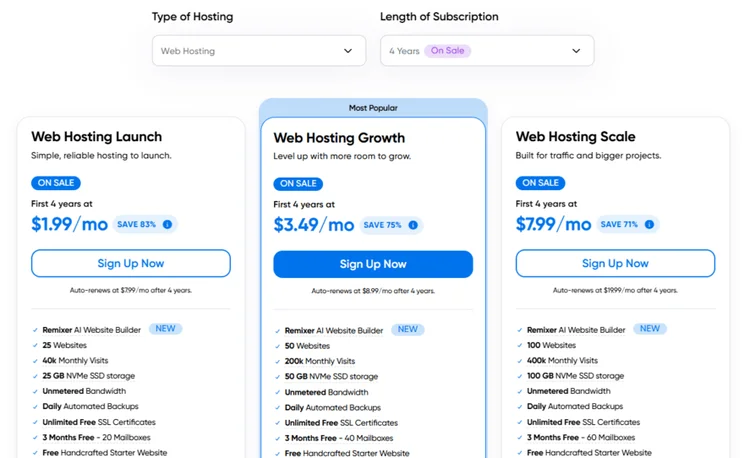
DreamHost’s pricing starts at $1.99 per month for its Web Hosting Launch shared hosting plan. This deal is only available with the longest subscription length of 48 months. However, you can still get a very cheap deal with DreamHost’s advertised 12-month plans, starting at $2.89 per month. These affordable starting prices make DreamHost a relatively risk-free choice.
Introductory prices and renewal fees can be seen below for DreamHost’s different hosting types:
| Cheapest plan | Shared (Web Hosting Launch) | WordPress (WordPress Hosting Launch) | VPS (VPS Business) | Dedicated (Standard 16) |
| Starting price (48-month term) | $1.99 per month | $1.99 per month | / | / |
| Renewal price (48-month term) | $7.99 per month | $7.99 per month | / | / |
| Starting price (36-month term) | / | / | $10 per month | / |
| Renewal price (36-month term) | / | / | $24 per month | / |
| Starting price (12-month term) | $2.89 per month | $2.89 per month | $13.75 per month | $165 per month |
| Renewal price (12-month term) | $10.99 per month | $10.99 per month | $31.99 per month | $165 per month |
DreamHost’s shared and WordPress hosting plans are available for four-year, two-year, yearly, and monthly subscriptions.
There’s no four-year option for DreamHost’s VPS or dedicated hosting plans. For VPS, the 36-month term is the cheapest option, whereas dedicated hosting is only available for yearly or monthly plans.
DreamHost is one of the more transparent web hosts when it comes to extra costs.
- Pay for the features you need – does your business need email or additional security scans?
- Choose a subscription length that works for you – most of the time, I’ll suggest opting for the longest subscription for the best deal, but DreamHost keeps costs pretty low across the board (though it’s still cheaper to pay for multiple years than monthly)
- Prepare for renewal fees – DreamHost’s cheapest Web Hosting Launch plan increases in price by 300% once the introductory deal ends, so factor this into your long-term budget plans
What Features Do You Get With DreamHost?
DreamHost’s hosting plans come with a lot of built-in features, such as security and SSL certificates, meaning you don’t need to worry about extra costs at checkout. Every plan includes AI business tools for strategy and content creation, a traffic dashboard, and specialized WordPress support.
| Hosting type | Shared | WordPress | VPS | Dedicated |
| Websites | 25 – 100 | 1 – 100 | Unlimited | Unlimited |
| Storage | 25 – 100GB NVMe | 15 – 100GB NVMe | 60 – 360GB NVMe | 480 – 1,920GB NVMe |
| Monthly visits | 40k – 400k | 40 – 400k | Unlimited | Unlimited |
| CPU cores | / | / | 2 – 6 | 6 – 12 |
| RAM | / | / | 2 – 12GB | 16 – 128GB |
From the cheapest DreamHost plan (Web Hosting Launch for $1.99/mo), you’ll get the following features:
- Custom control panel
- Remixer AI website builder
- Unmetered bandwidth
- Free domain name for the 1st year
- Email (20 to 60 mailboxes, but you’ll need to pay after the three-month free trial ends)
- Unlimited free SSL
- Built-in analytics
- AI error log analyzer
- AI business tools, including content creation support
- Specialized WordPress tools, including automatic updates, free migration, WP-CLI and SSH
How Does DreamHost Keep Your Site Secure?
DreamHost ensures critical security measures, such as domain privacy and daily backups, are included with your hosting plan from the get go. Every plan comes with:
- Free SSL via Let’s Encrypt
- DDoS protection
- WHOIS domain privacy
- Web application firewall
- Daily backups
- Malware scanning
For additional security and protection, you can pay extra for DreamHost’s DreamShield. This costs $3 per month, on top of your hosting subscription. DreamShield provides an extra layer of protection, with daily malware scans, security scan reports, suspicious login detection, email alerts, and more.
Will Your DreamHost Site Perform Well?
DreamHost surpasses its competitors with its 100% uptime guarantee – something none of our other top web hosts can offer. While no provider can truly guarantee 100% uptime, DreamHost provides a high degree of financial security for small businesses by promising compensation for any downtime. You’ll be credited a full day of service per hour of downtime.DreamHost also has the fastest US server response time we’ve tested, at 0.12s. In comparison, Hostinger has an average speed of 0.33s and Bluehost has an average speed of 0.62s. However, with only two non-US servers (in Amsterdam and Singapore), DreamHost is less ideal for international audiences.
How To Contact DreamHost for Support
DreamHost only has a couple of 24/7 contact options: live chat and email. Unfortunately, for businesses who want to talk to a human, there’s no 24/7 phone support.
DreamHost does operate a callback system, but where any outage could cost your business over $3,000 per hour, the reliance on chat-only support will seriously impact high-revenue, high-traffic brands. Plus, the callback will cost you – a one-time only call is $9.95.
DreamHost vs Other Web Hosts
If you’re not sure that DreamHost is the right fit for you, compare our top web hosts below:
- Choose Bluehost for WordPress websites – DreamHost is no longer recommended by WordPress.org, whereas Bluehost has been endorsed by the CMS for over two decades
- Choose Hostinger for long-term value – Hostinger’s introductory prices keep your costs low for up to four years (from $1.99 per month)
- Choose IONOS for international audiences – IONOS has 10 data centers located around the world, from the US to Germany, and its server response times are some of the fastest we’ve tested
- Choose GoDaddy if you’re a beginner – GoDaddy bundles everything into a single account for convenience and ease, including its website builder and domain management
DreamHost Review: Our Final Thoughts
Sitting in our top three web hosts for 2026, DreamHost is a great option for local businesses given its US server locations, built-in features (such as unlimited SSL and daily backups), and affordable subscriptions. You’ll get a lot for your money, from power to speed, making DreamHost a valuable choice for SMBs.
While DreamHost falls short slightly for international markets, US-based businesses will be well-supported with its scalable hosting plans.


1 reply