

Google first introduced the Top Quality Store badge in May 2023, replacing the previous Trusted Store badge. The badge appears alongside business and product information in search results, and Google is currently testing adding the badge to websites directly.
But, how can your business earn a Top Quality Store badge? What are the benefits? Is it easy to display to customers? I’ll walk you through everything you need to know about Google’s Top Quality Store badge below.
The Top Quality Store badge awards businesses with a visual stamp of approval and recognition for their hard work. If your business meets certain requirements and standards, in areas such as user ratings and delivery, then you’ll be automatically considered (if you’re signed up to the Google Merchant Center). The badge appears in Google product listings and signals to customers that your business provides quality shopping experiences. This, in turn, can help build brand trust, attract new customers to your store, and boost sales.
Earning a Top Quality Store Badge
Select online stores can achieve a Top Quality Store badge if they provide a positive customer experience and meet the eligibility criteria:
- You must have a Google Merchant Center account – Google updated the Merchant Center in September 2024, adding new AI features and insights
- Your business must operate in Australia, Canada, India, Japan, New Zealand, the United Kingdom, or the US
- Your business must achieve an overall quality score of “Exceptional” from Google
Google will automatically monitor your business once you’ve enrolled, with a particular focus on the delivery, returns, browsing, and purchase experience. Your business will be awarded a score for each of these categories, from “Low” to “Exceptional” – from here, Google can generate an overall quality score for your store.
Your business will need to rank as “Exceptional” overall – not in every category – to earn the Top Quality Store badge.
Benefits of Achieving a Top Quality Store Badge
If your business meets Google’s criteria, there are plenty of benefits that come with securing a Top Quality Store badge. For example:
- Attract more customers and traffic to your store – The badge lends your business authority and lets customers know they can expect a high-quality experience
- Improve brand trust – The badge gives customers confidence when choosing to shop with your business
- Boost product rankings in Google Shopping – Google puts Top Quality Store products front and center with greater positions on Google Shopping pages
Adding the Badge to Your Website
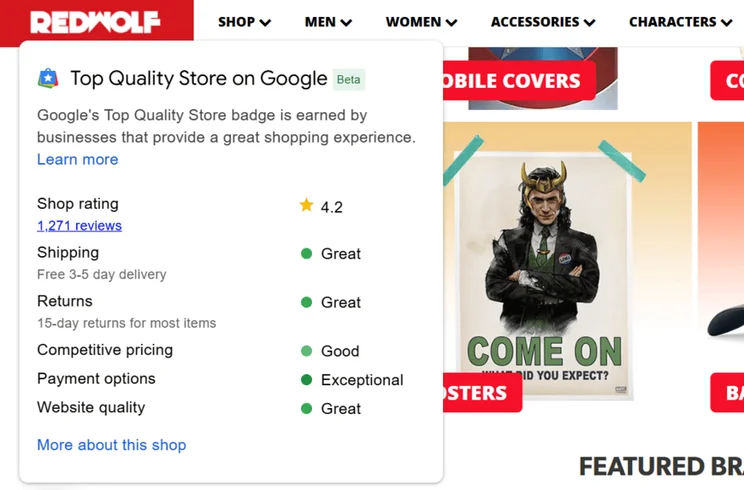
Google is currently testing the ability to add the Top Quality Store badge to your website directly – this is available to all businesses with a badge currently. The badge can be set to appear on any page, either in the bottom right or left of the screen, no matter the device.
I recommend adding the Top Quality Store badge to product pages and high-traffic pages. Customers are more likely to see the badge, and it might give them the gentle nudge they need to complete a purchase.
The new feature means customers will see the reassuring badge when browsing your site, and not just in search results. To add the Top Quality Store badge, you’ll need to edit your site’s HTML. I recommend following the instructions in the provided Google tutorial to complete the setup.
It does require some coding knowledge, but the guidance from Google is fairly straightforward to follow.
But, don’t worry if you drop down in the rankings! Google will automatically remove the badge from your site until you re-earn the “Exceptional” score. The badge will then reappear on your site, without you needing to lift a finger.





0 comments