
- Pixpa introduces customizable product pages for online stores
- The feature is available from Pixpa’s cheapest plan
Pixpa, a website builder with a focus on creatives, has added customizable product pages to its suite of features. This gives business owners the ability to personalize and design their product pages to better showcase products to customers.
Every Pixpa plan includes ecommerce functionality as a built-in feature, meaning you can access customizable product pages for an affordable price. Pixpa’s plans range from $4.80 to $15 per month (billed yearly) – one of the cheapest website builders on the market.
The feature includes various design options for your product pages:
- Layout structure – show off your products by tweaking your page’s layout and adding elements like a lightbox or social links
- Product text – edit your product page’s font style to match your brand identity
- Information – change how you want to display product information on the page so customers get the details they need right away
- Related products – display related products to encourage more sales
- Navigation – edit your page’s breadcrumb navigation, from structure to font type, to improve the overall customer experience
We highly recommend making the most out of this new feature since it’s a great way to showcase and sell your products online. You can customize your product pages in a way that drives more sales and aligns with your business strategy.
How To Customize Your Pixpa Product Pages
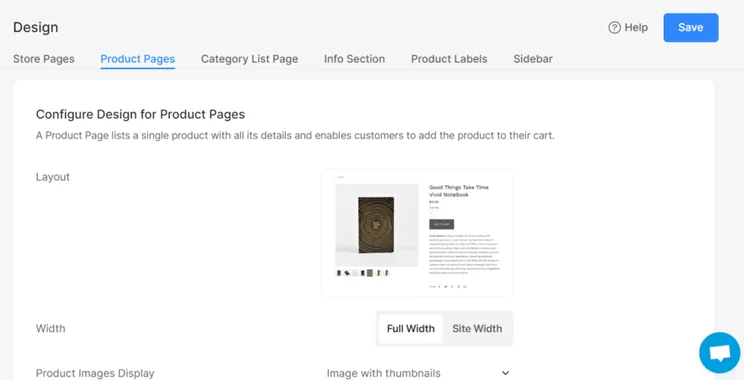
Customizing your product pages with Pixpa couldn’t be easier. All you need to do is click on “Store” in the sidebar and then select “Design” from the presented options. You’ll then see a navigation bar – choose “Product pages” to start customizing.
From there, simply work your way through the form based on your customization needs. The design page is split into a few sections: Configure Design for Product Pages, Text, Related Products, and Breadcrumb Navigation.


0 comments