
- Switch users to translated storefronts automatically
- Website redirect based on the visitor’s browser language
Shopify, our top-rated ecommerce website builder, revealed a new store feature in January to support businesses with markets around the world. You can now automatically redirect visitors to translated storefronts, depending on their personal browser’s language settings.
Shopify supports over 100 languages for localization – if it’s available, you can add it to your store and set up the translated versions of your website. This is incredibly useful for businesses targeting multiple markets since you can engage with your audience in their preferred language.
How To Add Translated Storefronts
Shopify already had redirection in place for visitor geolocation, but your website will now recognize a visitor’s default browser language and send them to the relevant storefront. For example, if your website has a .com domain and your website visitor is based in the US as well but has their language set to French, they’ll be redirected to your .com/fr domain if it’s set up. They can then view your entire site in French.
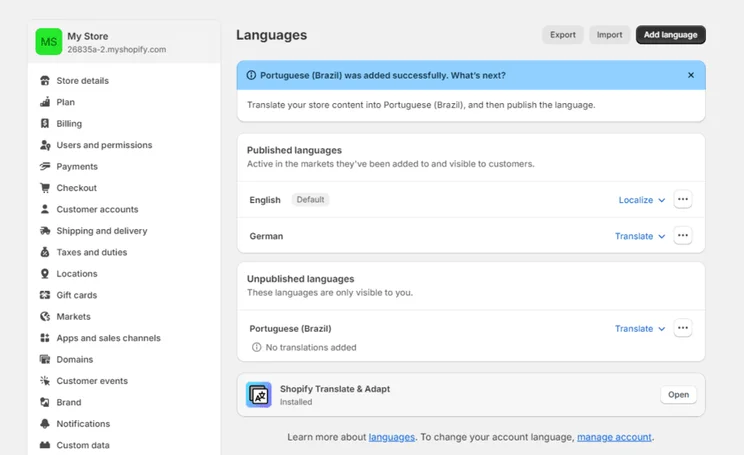
So, how do you set up a translated storefront? First, go to your “Settings” and find the “Language” category. Set up your desired languages and assign them to the appropriate region. Then you can use Shopify’s “Translate & Adapt” feature to add translations before publishing the changes. Automatic redirects will only work when the language is published.
For more tips on preparing your website for a global market, check out our guides on selling products internationally and international SEO best practices.


0 comments