

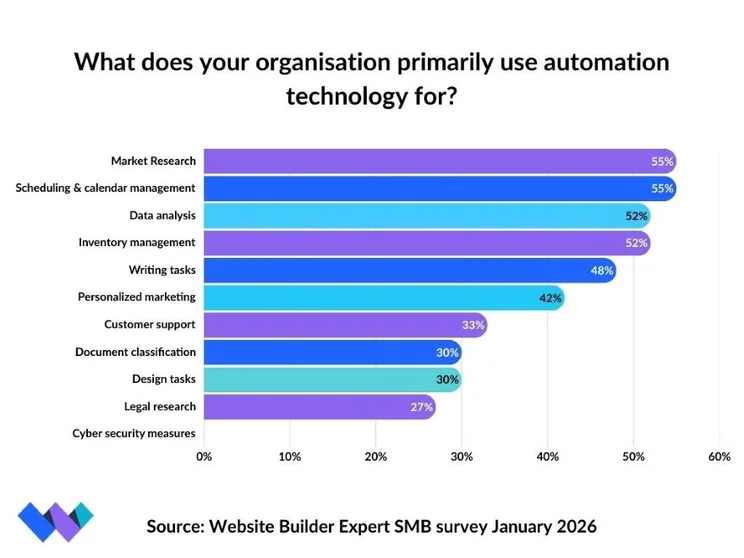
In our most recent survey, SMBs revealed the tasks that they’re automating as part of their 2026 pricing strategy, which combats rising operational costs. Results showed that the most popular artificial intelligence examples in business included market research (55% of SMBs), as well as scheduling and calendar management (55% of SMBs).
Below, I’ll highlight the ways that SMBs are using workplace AI tools to get ahead, giving you inspiration on how you can integrate AI within your own work processes. I’ll also reveal the tasks that you shouldn’t be automating due to technical restrictions and safety concerns.
To collect these survey findings, our in-house research team spoke to 322 small to medium-sized businesses in the US. We surveyed them on key topics relating to their current financial situation, which included:
- Their financial focus in 2026
- Their operating expenses
- How they’re reacting to external challenges like tariffs
- The strategies they’re using to combat financial challenges
AI Automation as a Solution to Rising Operating Expenses
In 2026, 10% of SMBs are using automation to manage rising operation costs, such as high taxes and regulatory fees or the price of general supplies and administrative expenses.
By following in the footsteps of these SMBs and harnessing workplace AI, your business could save money as well. When done right, automation can speed up repetitive tasks, increase efficiency, and free up your staff’s time so they can work on more pressing, lucrative matters.
According to our January 2026 survey:
- 13% of SMBs said they were spending over 41% of monthly revenue on operating expenses
- We saw a 5% rise in SMBs spending 26%-40% of their monthly revenue on operating expenses (between November 2025 to January 2026)
So, with operating costs steadily increasing, this is an ideal time to be strategic with AI and see where it could help you save cash.
SMBs Are Replacing These Manual Tasks With AI
Our survey revealed the manual tasks that SMBs are primarily using automation. The top four results were:
- Market research (55% of SMBs)
- Scheduling and calendar management (55% of SMBs)
- Data analysis (52% of SMBs)
- Inventory management (52% of SMBs)
- Writing tasks (48% of SMBs)
- Personalised marketing (42% of SMBs)
But should your business be replacing these tasks with AI, too? If you’re curious about how automations can help your business, the table below offers some futher pointers to help you decide what you’d like to achieve with AI:
| Task | How AI can help | Popular AI tools for this task | Top tip! |
| Market research | • Collect survey results • Monitor competitor channels • Predict trends based on data • Conduct social media listening • Create visual reports of findings | • ChatGPT • Claude • GWI Spark | Don’t just monitor what your competitors are doing, but track what they aren’t doing. Ask the AI to look for common customer frustrations that you can capitalize from. |
| Scheduling and calendar management | • Sync staff calendars • Block out time • Book appointments or meetings • Project management • Content scheduling | • Calendly • Motion • Clockwise (app) | Remember to set blocks of time for your “focus hours.” This ensures that the AI won’t book meetings or appointments during these hours. |
| Data analysis | • Analyze data • Clean up data • Visualize data with graphs, charts, etc • Create reports | • ChatGPT • Claude • Gemini • Julius AI • Polymer Search | Most AI data analysis tools enable you to ask questions to gather deeper insights (e.g. “what’s the most surprising piece of data you’ve found in this chart?”) |
| Inventory management | • Monitor stock levels in real time • Forecast sales based on consumer demand • Spot irregularities in inventory levels | • StockIQ • Netstock • Logility | If you’re dipping your toes into inventory management automation, start with your “best sellers” first. You can add the rest of your inventory once you’re happy with the tools you’re using. |
| Writing tasks | • Draft blog posts • Create social media captions • Write email templates • Generate product descriptions | • Jasper.ai • Copymatic • BrandWell • Describely | Responsible AI use is key to building trust. Don’t publish AI-generated content if you haven’t edited it yourself first and made sure that all information is accurate. |
| Personalized marketing | • Tailor messaging to different audiences • Offer product recommendations • Offer dynamic pricing • Target ads | • ActiveCampaign • Klaviyo • MailChimp | If you want your newsletters to reach more of your audience, you can use AI tools to send your emails when your customers are most active. |
When you’re using AI small business tools, never forget the human element. Though AI tools look impressive, they can still make mistakes – many of them, in fact. As a business, it’s important to continually review the output of your AI tools, look out for mistakes or inaccuracies, and make refinements if necessary.
Tasks You Shouldn’t Give To Your AI Workplace Assistant
Based on our survey, there are some tasks that SMBs aren’t automating as much:
- Cyber security measures (0% of SMBs)
- Legal research (27% of SMBs)
- Design tasks (30% of SMBs)
- Document classification (30% of SMBs)
The tasks listed above tend to be more high-risk, involve sensitive customer information, or require human oversight. For instance, it would be unwise for your business to have AI oversee your website’s security entirely, since errors could put customer data at risk and lead to reputational or financial damage.
Practically, this means you should only automate tasks that have a low penalty for error. You can edit an AI-generated typo in a few seconds, but a security breach or legal issue could take your business months to resolve, or even inflict damage you can’t recover from. Lean on human expertise for these critical tasks instead.
Which Tasks Will Your Business Automate Next?
Before you automate key tasks in 2026, remember to:
- Assess your requirements (Ask yourself, “what tasks do I need streamlined?”)
- Check your budget
- Compare tools on the market, looking at scope, pricing, and ease-of-use
- Consider your team’s needs and if they’ll require onboarding and training
Though AI workplace assistants and tools can benefit your business in the long-run, you’ll need to spend time and money setting up and getting your entire team acquainted with these changes. So, don’t skip the planning stage when integrating AI with your business for best results.
💡 Want to see more key studies from our survey? Read our guide to 3 customer service trends in 2026.


0 comments