

Weebly and Shopify are two very different platforms. We compare the ecommerce website builders to help you decide which one is best for you.
Shopify is an ecommerce platform that’s designed solely to help entrepreneurs build online stores. Weebly, on the other hand, is a website builder – it does have ecommerce capability via Square Online, but its core focus is non-ecommerce sites.
Because of their different target markets, Weebly is best for small businesses and portfolios, while Shopify is better for bigger ecommerce businesses. This article will use our in-depth research to drill down into the differences between Weebly and Shopify, to help you find the best option for you.
Weebly vs Shopify: Pros and Cons
Weebly Pros and Cons
- Best website builder for small businesses, with strong marketing and SEO tools, including blogging features
- Simple, stylish, customizable templates that are free to use – and you can change your design at any time
- Feature-rich, with plenty of built-in tools and a large app store for extra functionality
- Drag-and-drop customization is limited – you hit a glass ceiling pretty quickly unless you can edit your theme using code
- No ADI option – Weebly doesn’t have Artificial Design Intelligence, so it can’t create a tailored site for you; you have to build it manually
- No core ecommerce functionality – you can build an online store, but you’ll actually be using Square Online, not Weebly (Square bought Weebly in 2018)
Shopify Pros and Cons
- Best ecommerce features that we’ve tested – in our ecommerce research, participants also awarded it the highest customer satisfaction score
- Powerful inventory system means Shopify can handle extremely large and complex product catalogs and high order volumes
- Multichannel selling capabilities allow you to easily sell across various channels such as Facebook, Instagram, Amazon to maximize your sales
- Only good for online stores – if you need a non-ecommerce website, Shopify isn’t for you; its whole purpose is to build online stores
- Large reliance on apps for features, – and these can quickly add up on top of your monthly subscription
- It charges transaction fees unless you use its own in-house payment gateway Shopify Payments
Find out more
- Learn more about Weebly’s strengths and weaknesses in our detailed Weebly Review
- Discover more about Shopify in our full Shopify Review
Pricing and Value for Money

Weebly is the more affordable option than Shopify
Weebly has a free plan that you can try out for as long as you like, and its starter plan only costs $6 per month (billed annually). In comparison, Shopify’s cheapest plan starts at $29 per month.
You get a lot for your money with Shopify if you’re running an online store – it scored 3.5 stars out of 5 in our research for value for money. Weebly offers better value for money because of all the features it includes in its budget-friendly plans – it came out on top with 4.1 stars out of 5!
Weebly vs Shopify: Monthly Pricing Side-by-Side Comparison
Weebly Pricing: Closer Look
Weebly has four plans in total:
- Free: $0 per month
- Personal: $9 per month
- Professional: $16 per month
- Performance: $29 per month
These prices are even cheaper if you choose to pay annually – the Personal plan drops to just $6 per month on an annual subscription, for example.
So, what do you get for your money on each of Weebly’s plans? Compare key features in the table below:
| Free | Personal | Professional | Performance | |
| Advert-free | ❌ | ❌ | ✔️ | ✔️ |
| Free domain | ❌ | ❌ | ✔️ | ✔️ |
| Unlimited storage | ❌ | ❌ | ✔️ | ✔️ |
| Ecommerce features (via Square Online) | ✔️ | ✔️ | ✔️ | ✔️ |
| SEO | ✔️ | ✔️ | ✔️ | ✔️ |
| Pop-up notifications | ❌ | ✔️ | ✔️ | ✔️ |
We recommend the Professional plan, because it’s the cheapest plan that removes adverts from your site and unlocks unlimited storage and a free domain. You also get advanced site analytics and phone support. In short, it offers better value for money than Weebly’s cheaper plans.
Shopify Pricing: Closer Look
Shopify has three plans and a 14-day free trial so you can try them out risk-free:
- Basic Shopify: $29 per month
- Shopify: $79 per month
- Advanced Shopify: $299 per month
You can save 10% if you choose an annual plan, and save 20% if you choose a two-year plan – you have to pay these subscriptions upfront, but you save long-term with these discounts.
Compare Shopify’s key features in the table below:
| Basic | Grow | Advanced | |
| Advert-free | ✔️ | ✔️ | ✔️ |
| Free custom domain | ❌ | ❌ | ❌ |
| Unlimited bandwidth | ✔️ | ✔️ | ✔️ |
| Abandoned cart recovery | ✔️ | ✔️ | ✔️ |
| Sell unlimited products | ✔️ | ✔️ | ✔️ |
| Multichannel selling | ✔️ | ✔️ | ✔️ |
| Third party calculated shipping rates | ❌ | ❌ | ✔️ |
We recommend starting out on the Basic Shopify plan, as it has everything a small online store could need, from abandoned cart recovery to gift cards.
Shopify’s plans are designed for supporting online stores, which is why its key features are all tailored to ecommerce. This is perfect if you’re building an online store, but you’ll struggle to get value for your money if you’re building anything else.
Find out more
- Find the best Weebly plan for your needs in our Weebly Pricing Review
- Is Shopify worth your money? Find out in our Shopify Pricing Review
Ease of Use

Shopify is easier to use
Our users enjoyed Shopify’s structured way of helping you build your online store. Weebly’s drag-and-drop editing tools are nice and simple to get to grips with, making it suitable for beginners of all abilities. Neither Weebly nor Shopify require coding skills to use, so you can jump straight in.
Onboarding
Shopify’s onboarding is more in-depth than Weebly’s. This is because building an online store is more difficult than building a simple website, so Shopify has had to step up to guide its users through creating their store.
That’s not to say Weebly’s onboarding is bad. On the contrary, it leads you through the process, from choosing your theme, to in-editor support that shows you how to carry out different tasks:

Building and Running Your Website
Weebly and Shopify were pretty evenly matched when it came to our ease of use testing. Our users found both platforms easy to get to grips with, and neither require any tech experience to get started with.Weebly won points in our ease of use testing with its simple drag-and-drop editing and easy customization tools. In contrast, Shopify is more clunky to use, splitting its building tools between a backend and frontend editor.
However, Shopify’s more complex setup makes the actual running of your online store easier, because you can keep track of your inventory and orders in the backend while managing your storefront design separately.
If you need a simple website then you’ll find Weebly’s straightforward editor provides an easy way of creating and updating your site. If you need an online store, you’ll find Shopify’s builder is designed to make your life as easy as possible when tracking multiple orders.
Website Design
Weebly is better than Shopify when it comes to website design, but it’s close.
Weebly scored 3.8 stars out of 5, and Shopify was close behind with 3.7 stars. While Shopify has more designs than Weebly, sheer quantity wasn’t enough to steal a win in this round – Shopify’s designs are all for online stores, so it was Weebly’s variety of theme designs that nudged it into the lead here.
Template Choice
Weebly has around 50 themes to choose from, covering various industries such as business, portfolio, and blogs. Its designs are all free to use, whether you’re on the free plan or using a paid subscription.
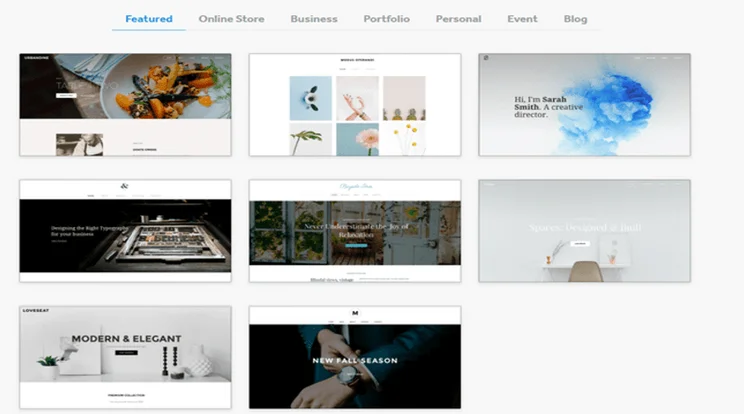
Weebly has a small but stylish range of themes, which you can filter by industry to find relevant designs.

We like the use of large image backgrounds, but wish Weebly’s designs were a little more exciting.

Weebly’s themes are easy to customize using drag-and-drop editing tools. All it takes is a click (and drag) of your mouse!
We like Weebly’s designs, but we weren’t blown away by them. They’re smart, neat, and stylish, but they’re not about to knock your socks off. We like the use of large image backgrounds and grid layouts, but would love a few new or exciting designs.
Shopify’s choice of templates is more impressive. It has 74 themes in its library – most themes come with multiple design options, so there’s plenty of styles to choose from. You can view information about each theme, including:
- Features included in the design
- User reviews and ratings
- Different style previews
- Examples of stores using the theme
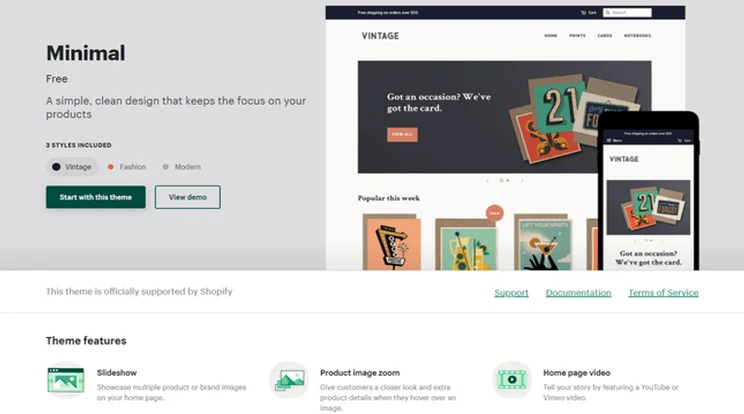
Shopify provides tons of information about each of its themes – you can preview different styles, read about the features included, and even compare user reviews.
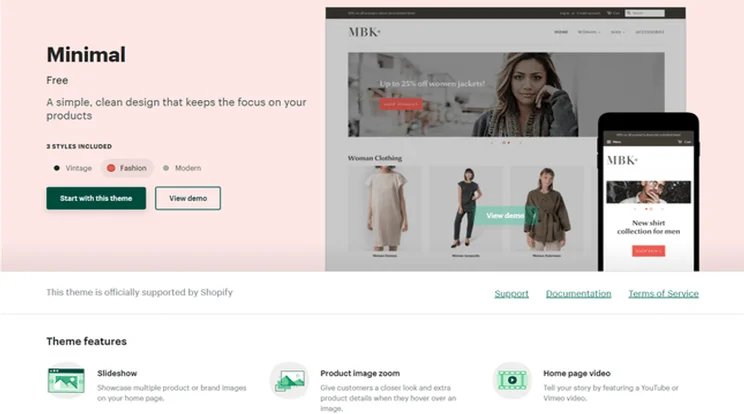
You can preview different style options for the same theme, to find the look that best suits your store’s branding.
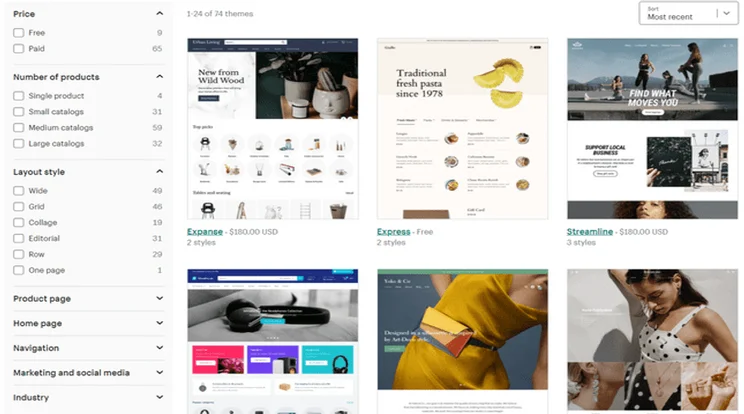
Shopify has a large library of themes – you can filter by industry, layout style, features, price, and more.
All Shopify’s themes are designed for online stores – while some may feature a blog, primarily they’re meant for selling products.
Shopify has nine free themes at the time of writing, and 65 paid themes – premium designs range in price from $100 to $180 one-off payment.
Customization
Weebly uses drag-and-drop editing tools, which is a super easy way to customize your theme. Simply click on the elements (such as text boxes) you want to add or move, and drop them where you want them on your page. This is exactly how visitors will see your design once it’s live – there’s no back and forth between a backend and a frontend preview.
In contrast, Shopify’s editor has more of a divide. You enter product information in the backend, which populates your storefront. You can customize your storefront design, but it’s not as free as Weebly’s drag-and-drop editor, and certainly not as easy! Shopify’s editor is clunky and your design options are a lot more limited.
Marketing Features
Weebly offers better marketing features
Weebly just beats Shopify for its marketing features – Shopify scored 4.1 stars out of 5 in our research compared to Weebly’s 4.2 stars, so it was pretty close. However, Weebly’s impressive blogging and SEO features were enough to claim a win in this category.
Weebly is the standout winner for marketing features – we were impressed by its thorough but beginner-friendly SEO guides, its comprehensive blogging tools, and its built-in email marketing suite Weebly Promote. Shopify was a close runner-up with its large range of marketing integrations and international selling options.
Shopify has more third-party marketing apps if you want a really tailored marketing strategy, but Weebly has superior blogging tools – you’ll find features that Shopify doesn’t provide, including:
- Archive feature
- Social bookmarking
- Search feature
In addition to these features, Weebly offers unlimited storage at a much lower price, and provides a free domain to users on the Professional plan and above.
Ecommerce Features
Shopify has better ecommerce features
Shopify beats Weebly when it comes to ecommerce features. Or, we should say Shopify beats Square Online in this category, because this is the platform that Weebly uses for its ecommerce offering. Shopify’s powerful features are scalable no matter what size store you run, and it includes advanced tools such as abandoned cart recovery on its cheapest plan.
If you’re building an online store and want the best ecommerce features going, then Shopify is the best choice for you. It scored a whopping 4.7 stars out of 5 in our research, meaning it has the best sales features out of any builder we tested, not just the best in this comparison.
Good to know…
In this section, we’re actually talking about Square Online rather than Weebly. Square acquired Weebly back in 2018 and merged their products to create Square Online, which is the ecommerce focussed part of Weebly.
We know it sounds overly-complicated, but don’t worry too much about the exact difference. It’s a rather disjointed setup, and we wish the customer journey was more streamlined to avoid such confusion. Just know that if you go to Weebly’s website and choose to build an online store, you’ll be taken to the Square Online builder – they’re just different sides of the same product.
Square Online offers simple ecommerce features that are great for sellers wanting to get online quickly. Some neat features include curbside pickup and text alerts for customers. Unsurprisingly it also rocks a seamless integration with Square POS.
Despite all those cool features, Shopify still wins this round. It offers incredibly powerful features, including:
- Multichannel integrations
- Hundreds of payment options
- Customizable checkout page
- Abandoned cart recovery on its cheapest plan
- Dropshipping
- Customizable invoices
What stood out to us during testing was Shopify’s advanced inventory system, which was easy to navigate despite being designed to support a large number of products. This combination of power and usability is where Shopify really shone.
Square Online is best for small brick-and-mortar businesses who want a simple online store that syncs with their POS system. If you want a powerful online store with long-term growth goals and a large product catalog then Shopify is your best go-to.
Apps and Integrations
Shopify has a huge app store
Despite Weebly’s large app store, Shopify’s is bigger and better, meaning it wins the apps and integrations round. These apps can quickly add up, however, so we recommend keeping an eye on your budget when browsing Shopify’s app store.
Weebly usually wins the apps and integrations round in head-to-heads with other platforms – it has a well-stocked app store with nearly 400 apps in total. However, Shopify is no usual competitor – it blows Weebly’s app store out the water with over 5,000 apps in total!
With that many apps to choose from, you may wonder how you’d ever find what you’re looking for. Luckily, in Shopify’s app store you can filter by category, price, popularity, or use the search bar to find a specific app.
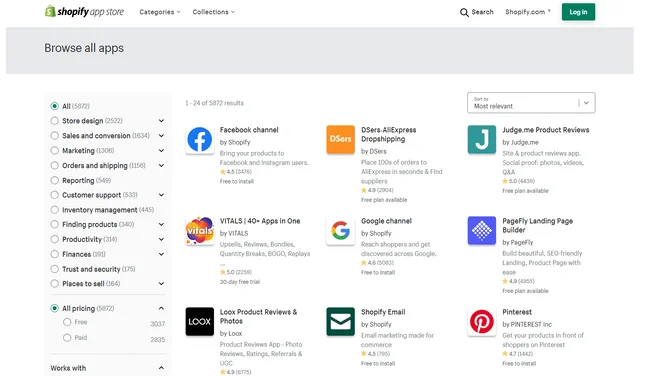
Weebly has nearly 60 free apps available, while just over 3,000 of Shopify’s apps have a free version, meaning over half of Shopify’s apps in total can be used for free.
App prices vary with both Weebly and Shopify. In general, Weebly’s apps tend to be on the cheaper side than Shopify’s, varying between $3 and $300+ per month. Shopify’s premium apps have a wider price range, from as little as $3 per month all the way up to $1,500 per month.
Performance and Security
It’s a tie!
Both Shopify and Weebly run updates and security measures for you, so you don’t need to worry about your site becoming outdated like you do with WordPress, for example. Weebly and Shopify also provide free SSL certificates on all their plans.
You can’t really fault Weebly or Shopify for their security efforts. Both automatically include free SSL certificates on all their plans, so any data passing between your site and your visitors – such as login credentials or payment details – is encrypted. Even Weebly’s free plan includes SSL security!
In addition to this, Shopify and Weebly also let you create password protected pages, so only authorized visitors can view your site.
Website builders are usually pretty cagey about their exact security measures, to make it harder for the bad guys to break through their protections. But we know that both Weebly and Shopify have defences in place, including protection against DDoS attacks.
You can view Weebly’s performance to check its uptime and current status – at the time of writing Weebly’s published sites had an uptime of 99.61% uptime over the past 90 days. Shopify doesn’t provide this data, but claims that it has maintained 99.99% uptime for the past 90 days.
Switching Process
Shopify offers an easier switching process
Shopify makes it easier to move an existing site from your current platform than Weebly does, so it wins this round. With Weebly your only real choice is to start again from scratch, whereas Shopify does have a migrating option using its Store Importer app.
Weebly doesn’t have a particularly effective way of migrating or switching your existing website to Weebly. Instead, you’ll have to begin again from scratch and copy and paste content over where you can.
In contrast, Shopify has a Store Importer app, which you can use to import your products, customers, and order data to a Shopify store.
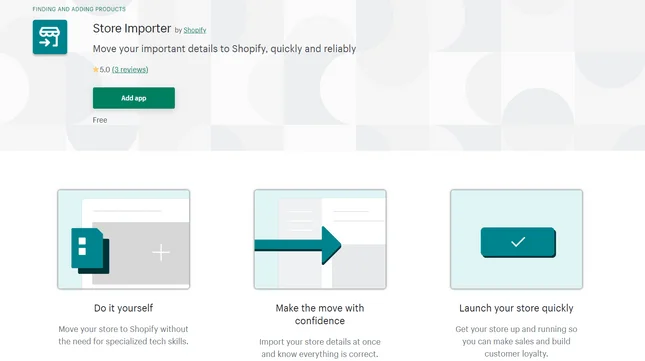
Shopify has guides on migrating from:
- WooCommerce
- Squarespace
- Etsy
- BigCommerce
- Big Cartel
- PrestaShop
In all cases you’ll need to export your store data before you can import it to Shopify.Find out more:
- See how Shopify compares against another ecommerce platform built for big stores in our Shopify vs WooCommerce article.
Help and Support
Shopify offers better support
Weebly lost marks because it limits its support options on cheaper plans, which restricts those on lower plans from asking for help directly. Shopify provides support no matter which plan you choose.
Weebly scored 3.5 stars out of 5 for its help and support in our research, while Shopify scored 4.1 stars. The downside to Weebly is that it only offers phone support on its Professional plan and above, which means customers on the free and Personal plans only get access to email and Help Center support.
Below you can compare the types of support available with Weebly and Shopify:
One feature worth mentioning is that Weebly doesn’t have a personal restore option, meaning you have to wait for Weebly’s support team to restore your site for you. With Shopify, we recommend installing the Rewind app, which starts from $3 per month and lets you easily recover your site if anything goes wrong.
Weebly vs Shopify: Summary
We’ve explored the ins and outs of Weebly and Shopify, and although they’ve both won their fair share of rounds, the overall winner is Shopify. It scored 4.7 stars in our research, whereas Weebly scored 4.3 – it was close behind, but in the end Shopify triumphed.
However, does this mean Shopify is right for you? Let’s have a quick recap before taking a look at which builder is best for your needs:
You Should Use Weebly If…
- You have less than 10 products to sell
- You need a blog
- You need a portfolio
- You’re on a budget
- You want drag-and-drop customization
You Should Use Shopify If…
- You’re building an online store
- You’re migrating your store from another platform
- You want great support options
- You have a large product portfolio with lots of variants
- You want customization via apps


1 reply
1 reply