


- Why Do We Recommend Hostinger?
- How Much Does Hostinger Cost?
- My Experience Using Hostinger
- What Are Hostinger's Key Website Features?
- Does Hostinger Provide AI Support?
- Is Hostinger Good for Selling Online?
- What Security Features Does Hostinger Provide?
- What Customer Support Options Does Hostinger Offer?
- How Does Hostinger Compare to Competitors?
- How We Test Website Builders
- Verdict: Is Hostinger Right for Your Business?
- FAQs
Hostinger’s website builder is ideal for solopreneurs and new businesses because of its cheap introductory deals and time-saving AI tools.
Ranking as one of our top five website builders after 300 hours of independent testing, Hostinger’s fast loading speeds, affordable plans, and built-in functionality, such as its integration with Printful, make it a great option for beginners starting a website in 2026.
- Hostinger is very affordable, with intro offers starting at $2.99 per month for a 48-month term (renewing at $10.99 per month after the discount period ends)
- You’ll need the Business Website Builder plan to sell online, which costs $3.99 per month and charges no transaction fees
- Hostinger has an intuitive drag-and-drop editor, which is great for beginners
- With only one ecommerce plan that has a 1,000 product limit and a 50GB storage cap, there’s limited room for businesses to grow
- Hostinger has a growing suite of AI tools to support with time-consuming tasks, such as inventory management and content creation
How do we know that Hostinger is great for AI enthusiasts, or that it has top-tier blogging tools? I’ve tested Hostinger thoroughly, so I have dozens of hours of hands-on experience with its tools and interface.
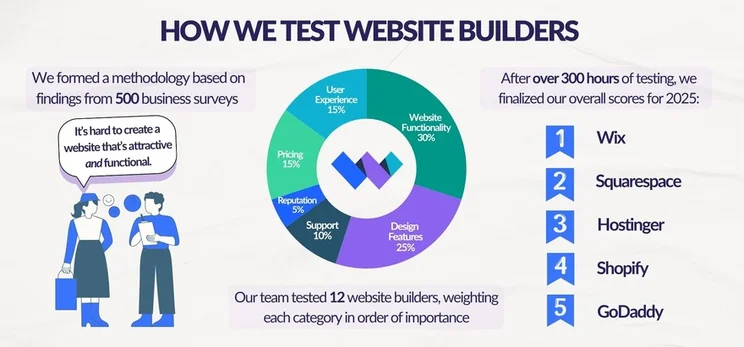
To fairly compare Hostinger with other website builders, our research team has carried out over 300 hours of data collection and analysis to confirm Hostinger’s position across six core areas: website functionality (30%), design features (25%), pricing (15%), user experience (15%), help and support (10%), and reputation (5%).
You can jump to our methodology section to read more about Website Builder Expert’s testing process.
I’ve updated this page to reflect Hostinger’s new pricing for its website builders, following the end of its New Year sale.
Why Do We Recommend Hostinger?
Hostinger excels when it comes to user-friendly AI tools and cheap plans, but the platform is let down by its lack of an app market and limited growth options. Take a look at Hostinger’s key benefits and drawbacks below:
✔️ What Hostinger Does Well
- Fast website building – Hostinger’s AI website builder created a website for me in under 20 seconds, meaning I could start editing and adding content quickly
- Easy drag-and-drop editor – this is ideal for beginners, and the smart grid helps you keep elements aligned without restricting you creatively
- Suite of AI tools – available on the Business plan, you can get AI support with content creation, image generation, analytics, and more
- Affordability – Hostinger’s premium plans are the cheapest on the market, and you can sell online for just $3.99 per month, making it ideal for budget-conscious SMBs
- 24/7 live chat support – get in touch with Hostinger whenever you need a hand, or chat with its AI assistant Kodee
❌ What Hostinger Could Improve
- Lack of third-party apps – Hostinger doesn’t have an app market, so you can’t add extra functionality or tools easily
- Limited scalability – with only two plans available, Hostinger’s 50GB storage space limit and 1,000 products cap will restrict growing businesses
- Steep renewal prices – despite low-cost introductory deals, Hostinger’s cheapest plan increases in price by 268% when it’s time to renew (from $2.99/mo to $10.99/mo)
How Much Does Hostinger Cost?
Hostinger’s pricing ranges from $2.99 to $3.99 per month (for a 48-month term), making it one of the cheapest website builders we’ve tested. Because of its affordability, I highly recommend choosing Hostinger if you’re on a budget.
| Plan | Premium Website Builder | Business Website Builder |
| Monthly price (48-month term) | $2.99 | $3.99 |
| Renewal price (48-month term) | $10.99/mo | $16.99/mo |
| Monthly price (24-month term) | $3.49 | $4.49 |
| Monthly price (12-month term) | $3.99 | $4.99 |
| Monthly price | $11.99 | $18.99 |
Paying a few dollars per month looks appealing, but make sure to budget for the entire upfront cost. For example, you’ll need to pay $143.52 (plus taxes) for the Premium Website Builder plan, if you choose a 48-month term.Hostinger’s renewal fees stay the same no matter which contract length you choose, so you’ll get the best deal by paying for a longer term upfront.
Does Hostinger Have a Free Plan?
Unfortunately, Hostinger doesn’t offer a free plan. Instead, there’s a 14-day free trial and a 30-day money-back guarantee. This should give you enough time to play around with the AI website builder and basic features.
My Experience Using Hostinger
Hostinger makes the building process quick and simple with its AI website builder, design tools, and drag-and-drop editor. In fact, it’s the second easiest website builder I’ve tested, sitting just behind Squarespace.
How Do You Use Hostinger’s AI Website Builder?
Hostinger’s AI website builder asks for a prompt – this is where I could describe my website or business. From testing, I found no word limit, and I even had the option to use AI to improve the description with the click of a button.
Alternatively, I could select from some preset prompts, such as “Create an online store” or “Launch a restaurant website.”
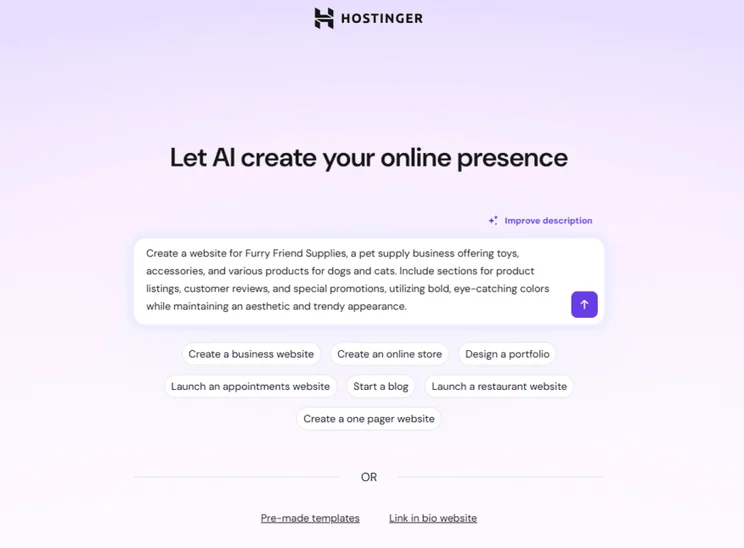
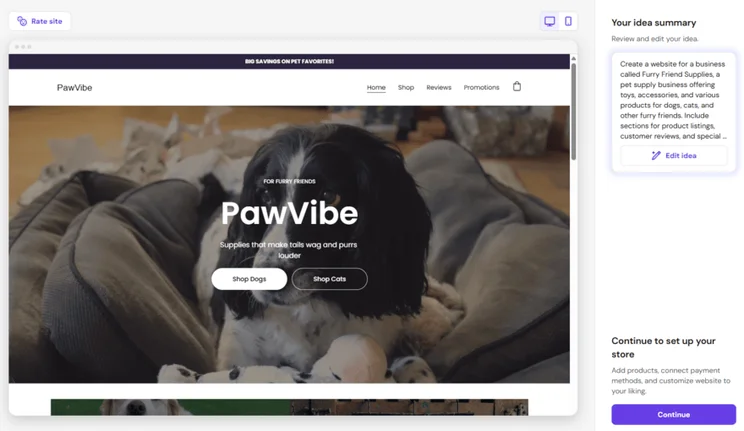
It took Hostinger’s AI website builder 19 seconds to generate my custom template, based on my prompt information. The result included key elements, such as a shop, promotion banner, and newsletter signup box, but it didn’t register the business name provided by me (Furry Friend Supplies), so Hostinger generated its own name (PawVibe).
I could then edit the idea further (and view previously generated templates), or continue to the editor.
Choosing a Hostinger Template
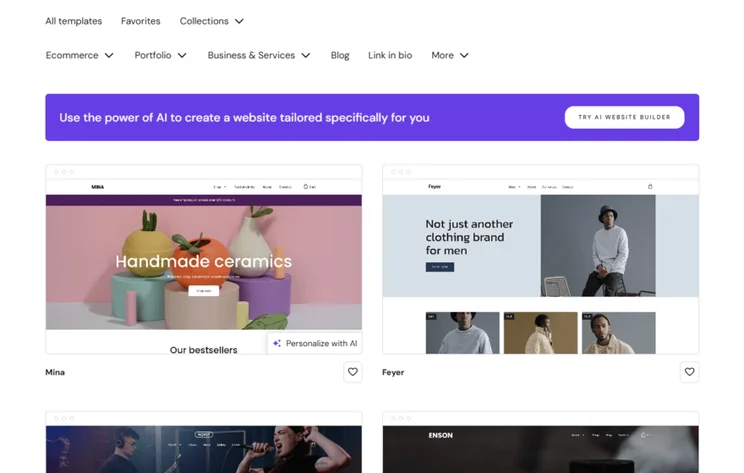
When you launch the AI website builder, you’re also given the option to start with a pre-made template. Our analysis shows Hostinger provides 321 templates across seven primary categories, including “Ecommerce” and “Blog”:
- Collections (blank templates, coming soon, landing page, popular templates, modern, and simple)
- Ecommerce (with a specific category for fashion businesses)
- Portfolio (with specific categories for photography and resume)
- Business & Services (with 34 subcategories for different businesses, such as “Barber shop,” “Electrician,” and “Catering”)
- Blog
- Link in bio
- More (this encompasses additional template types for creatives, education, community, events, and health & wellness)
Editing My Website
After Hostinger’s AI builder generates a template (or you choose your own), you’ll be taken to your account dashboard where you start to manage your store. To edit your site’s design, simply click “Edit website” in the top right corner.
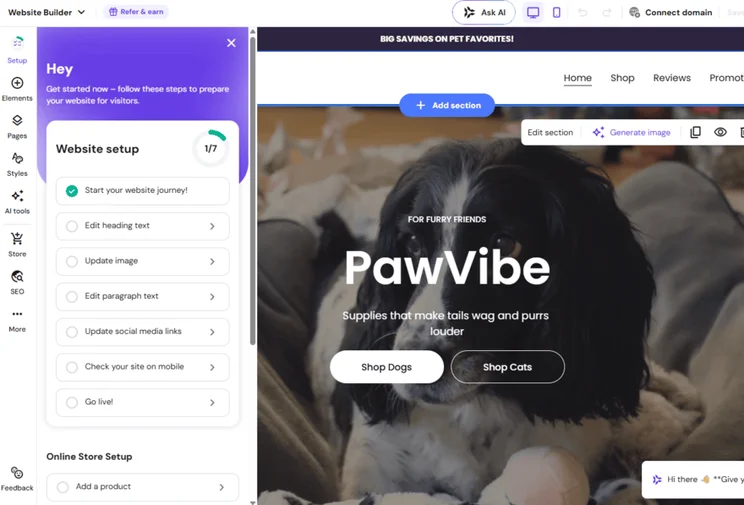
Once in the editor, Hostinger provides a 13-step setup checklist, which guides you through creating your website, setting up your online store, and adding finishing touches to your design.
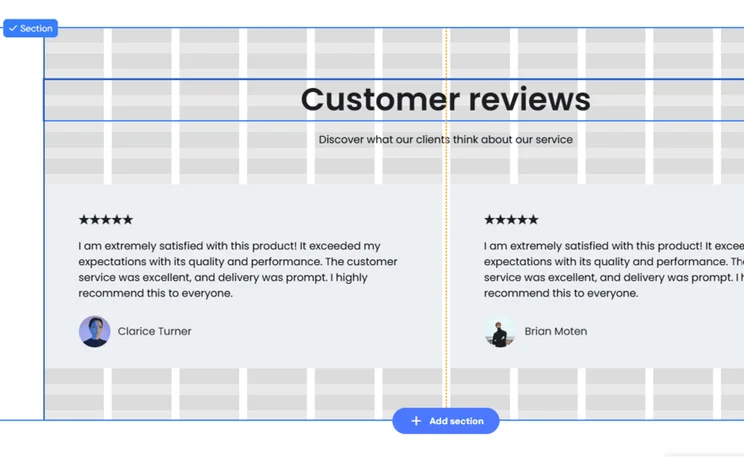
And, Hostinger’s beginner-friendly drag-and-drop editor meant that I had no trouble adding new sections or moving elements on the page. The grid overlay helped me align elements and snap boxes together neatly, but I could move beyond its boundaries if I wanted to, giving me total control.
What Are Hostinger's Key Website Features?
Hostinger offers a lightweight feature set focused on blogging, SEO, and email marketing, making it less robust than Wix’s feature-rich plans. For example, Hostinger only introduced email marketing to the platform in June 2025.
I’ve outlined the key features from Hostinger in the table:
| Feature | Available tools | Pricing |
| Blogging | AI blog post generator, blog editor, categories, blog-specific SEO, blog analytics, QR codes, comments, social media sharing, Google AdSense integration | AI tools only available on $3.99/mo Business plan |
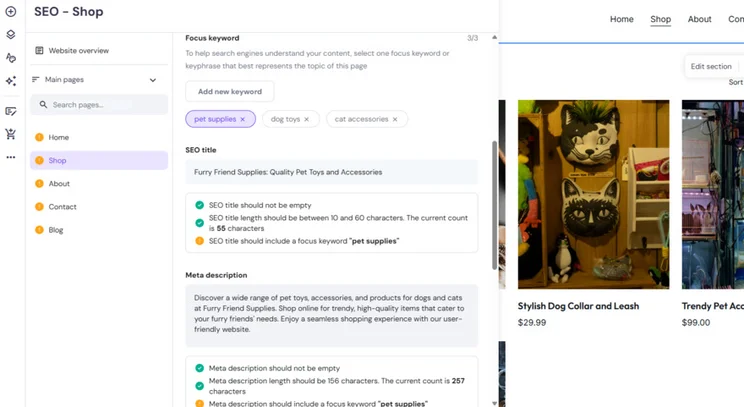
| SEO | AI SEO assistant, meta titles and descriptions, image alt text, custom URLs, keyword support, mobile-friendly designs, Google Search Console and Google Analytics support | AI tools only available on $3.99/mo Business plan |
| Email marketing | Hostinger Reach (AI-powered email marketing that includes scheduling, AI email templates, campaign ideas, automations, unlimited audience segments, and more) | Free for 1 year (up to 200 emails per month to 100 subscribers) – upgrading starts from $1.99/mo (up to 3,500 emails per month to 500 subscribers) |
Does Hostinger Provide AI Support?
Hostinger ranks as a top-rated AI website builder due to its intuitive tools, such as AI-powered email marketing and logo generation.
The following AI tools are available on the cheapest Premium Website Builder plan:
- AI website builder
- Hostinger Horizons (15-30 credits, depending on your website builder plan)
- Hostinger Reach (for email marketing)
- Logo Maker
- Attention heatmap
However, the majority of Hostinger’s suite of AI tools are gated behind the Business Website Builder plan:
- AI Image Generator
- AI Writer
- AI Page Generator
- AI Section Generator
- AI Blog Generator
- AI Product Details Generator
- AI SEO Assistant
Some of Hostinger’s AI tools run on a credit system, such as the AI Logo Maker, meaning you’ll have to purchase access to the tool once you reach your credit limit.You can top up your credits in your account via the “More services” tab, then click “AI.” 50 extra credits cost $4.99, 100 credits cost $7.99, 200 credits cost $13.99, and 400 credits cost $23.99.
Is Hostinger Good for Selling Online?
With a 1,000 product cap and native Printful integration, Hostinger is specifically designed for casual and low-inventory sellers.
Its single budget-friendly ecommerce plan starts at $3.99 per month and removes transaction fees, helping you maximize your profits more than Wix or Shopify (which both cost $29+ per month for ecommerce).
On Hostinger’s Business Website Builder plan, you’ll unlock the following sales tools:
- Sell up to 1,000 products
- Print on demand via Printful – sell custom merch without needing to produce, stock, or ship inventory
- Accept appointments and bookings – manage your business availability in your Hostinger dashboard
- 100+ payment methods – these include major credit and debit cards, as well as PayPal, Apple Pay, and Google Pay
- 0% transaction fees – Hostinger won’t charge you fees, but third-party payment providers may still charge a transaction fee
- Customizable checkout options
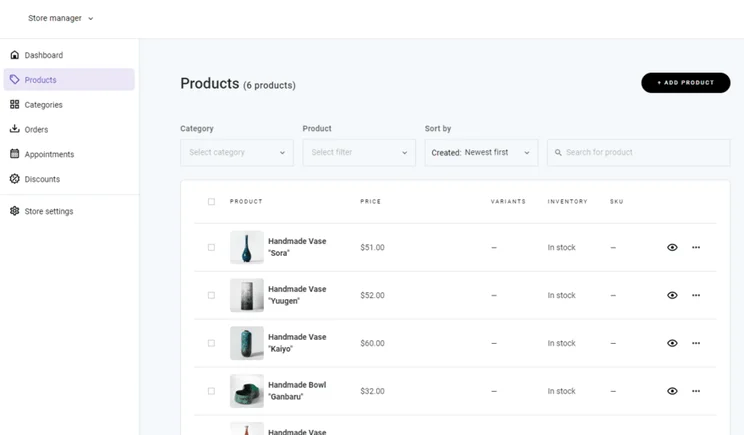
- Order and inventory management
- Shipping options – set up zones, different shipping methods, and generate shipping labels with Hostinger’s Shippo integration
- Abandoned cart recovery
While Hostinger is a good option for selling on a low budget, its ecommerce features are only suitable for smaller sellers. For instance, the 1,000 product limit, inability to sell subscriptions or product bundles, and lack of advanced sales and marketing features can quickly limit businesses with larger inventories.
For ecommerce stores serious about growth, I recommend a dedicated ecommerce website builder, like Shopify, which provides powerful tools, third-party apps, and a robust product backend.

What Security Features Does Hostinger Provide?
Every Hostinger website includes a free SSL certificate, automatic weekly backups, 24/7 server monitoring, advanced fraud detection for stores, and a Cloudflare DNS firewall to protect your site from attacks.
What Customer Support Options Does Hostinger Offer?
Hostinger’s primary channels for customer support are its AI assistant, Kodee, and its 24/7 live chat service. Unfortunately, Hostinger doesn’t offer any phone or email support.
Here are the available support channels:
- 24/7 live chat
- AI assistant, Kodee – when testing, I got a useful response to my query in five seconds
- Social media (specifically LinkedIn, Facebook, Instagram, X, and YouTube)
- Knowledge Base (featuring article guides)
- Tutorials (featuring webinars and video guides)
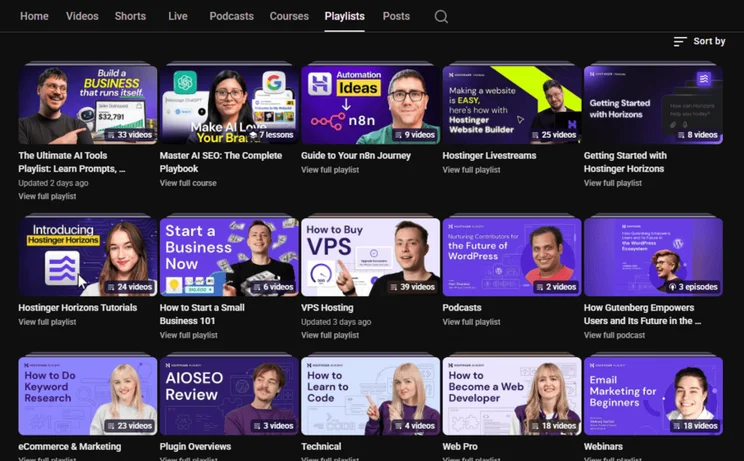
- Hostinger Academy (YouTube channel)
How Does Hostinger Compare to Competitors?
Hostinger takes the third spot in our list of the best website builders because of its easy building process, AI tools, and cheap introductory deals. But Hostinger isn’t as scalable as Wix, it lacks the template quality of Squarespace, it can’t match Shopify’s sales features, and GoDaddy’s simplified onboarding is quicker.
Compare Hostinger’s top competitors in the table below:
| Website builder | Pricing (billed annually) | Why do we recommend it? |
| $0 – $159/mo |
Our top-rated website builder for 2026 2,000+ free templates Drag-and-drop editor Built-in AI features, including an AI assistant |
|
| $16 – $99/mo |
Easier to use than Hostinger Drag-and-drop editor Stunning templates Acuity Scheduling tool for service-based businesses |
|
| $29 – $299/mo |
Best ecommerce website builder Quality sales features, including agentic commerce Sell unlimited products Shopify Sidekick |
|
| $9.99 – $20.99/mo |
Great value for money Speedy onboarding process Social media support |
How We Test Website Builders
Our research process encompasses six core categories, which are weighted according to their level of importance to website owners:
What features are included with my website builder? – 30%
- We look at the quality and quantity of website features available to users, such as SEO and email marketing
Can I build a professional-looking website? – 25%
- This category covers template options and aesthetic capabilities
How easy is the platform to use? – 15%
- We carry out 50 independent tests to determine how easy each builder is to use and navigate
Is the website builder good value for money? – 15%
- We take a look at pricing plans, free plan or trial options, and the features locked behind paywalls
Can I contact the platform if I run into an issue? – 10%
- We review a website builder’s support channels and responsiveness
What’s the builder’s reputation like? – 5%
- This category examines how a website builder performs across the market and against its competitors
We then award a rating out of five for a builder’s performance in each category (with the six categories totaling 207 individual testing areas). When combined, this is the builder’s overall score. Hostinger earned an overall score of 4.2 out of 5 in our latest testing, ranking third among the 12 analzyed builders.
Verdict: Is Hostinger Right for Your Business?
Hostinger is a great starting point for budget-conscious and beginner builders because of its AI tools, drag-and-drop editor, and affordable plans.
Of course, Hostinger has its drawbacks, namely its limited features, lack of scalability, and absence of an app store. Despite this, I found it very easy to set up a website with Hostinger thanks to its intuitive interface, and you can get a sense if the builder is right for your needs during the 14-day free trial.
FAQs
If you build your website with Hostinger, you can’t simply transfer it to another website builder. You can manually copy and paste content to your new site, but you’ll need to rebuild your website from scratch, according to your new platform’s tools and infrastructure.
Hostinger’s website builder has a 14-day free trial only – there’s no free plan. During the free trial period, you won’t be able to push your site live or sell products. Once the free trial ends, you’ll need to upgrade to one of Hostinger’s premium plans.
While you can build a website with both Hostinger’s website builder and Hostinger Horizons, the two processes are very different. With Hostinger’s website builder, you can use AI and the drag-and-drop editor to design a website, without needing to interact with code at all.
Hostinger Horizons is the platform’s vibe coding tool – you provide a prompt and AI will generate your web app, tool, or website for you. There’s more back-and-forth with your prompts as you work to refine the output, and some coding knowledge can be useful to help manipulate the tool.


1 reply