
- #1. Supercharge Your SEO
- #2. Start Blogging
- #3. Create Videos
- #4. Invest in Paid Marketing
- #5. Pitch for Guest Blogs
- #6. Advertise on Social Media
- #7. Post on Reddit
- #8. Update Your Email Signature
- #9. Use Email Marketing
- #10. Choose the Right Web Host
- #11. Leverage Online Advertising Networks
- #12. Collaborate with Other Websites
- #13. Implement Local SEO Strategies
- Summary: How to Promote Your Website
So, you’ve finally taken the plunge and decided to create your own website, congrats! But the hard work doesn’t stop there, of course – no matter how you built your site, once your website is up and running, you need to think about how to promote it and grow your online presence.
If you’re running a local business site or an ecommerce store, you’ll want to reach as many potential customers as possible. If you’re running a blog, you’ll want to attract the maximum number of dedicated readers. And if you’re curating a personal portfolio, you’ll want every potential client to be able to access your work.
If you want to know how to promote your website, look no further! We have 13 insider tips which we’ve broken down below. Let’s dive in!
I’ve refreshed the information on this page to reflect the most up to date guidance on areas such as SEO and Google Business Profiles. I’ve also added tips and to do lists that show you the best website promotion tools and how to use them.
#1. Supercharge Your SEO
With so many tactics on offer, learning how to promote your website can be overwhelming at times. However, we’d recommend starting with search engine optimization (SEO). It covers all of the changes you can make to your website so that it ranks higher in search engine results pages (SERPs).
The higher your website sits in Google’s rankings, the more traffic it will get – the first five organic results (i.e. non ads) alone account for 67.60% of all the clicks in a Google search!
SEO website builders will provide SEO guidance as you create your site, but we have some useful SEO tips that you can implement on your own. There are over 200 factors that can affect the ranking of your website, but we’re going to cover the easiest and most effective ones:
Optimize Images
Optimizing your images will make your site more attractive to search engines. You can do this by adding image alt tags, which are descriptions that clearly tell search engine crawlers exactly what each image on your site depicts.
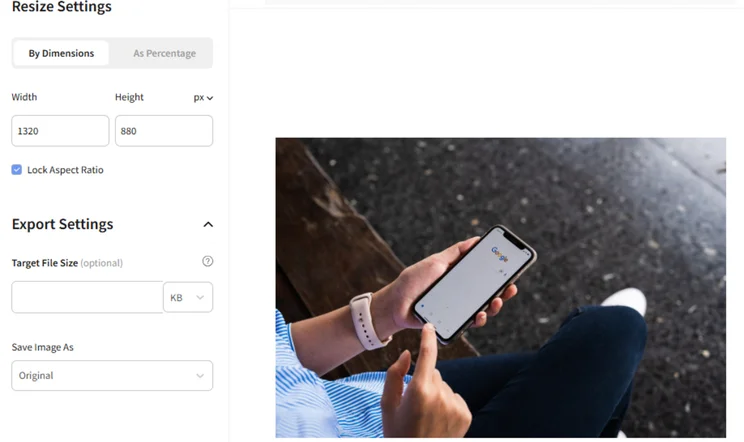
It’s important that you always compress your images to reduce the file size before you upload them, which makes it easier for your pages to load quickly. We recommend using Image Resizer, a free tool.
Customize Page Titles and Meta Descriptions
Page titles and meta descriptions are what form the “snippet” you see in Google search results:

When writing meta descriptions and meta titles, you should aim for them to be short and relevant – they’re the first impression many people will get of your page, and you’ll want them to draw in potential visitors! For example, that “…” you see in the example title should be avoided. For your meta title, aim for between 30 and 60 characters. Your meta description can be longer – anywhere between 120 and 160 characters.
You should also aim to include a keyword in your page titles (we’ll show you how to do this soon!). A keyword is the word or phrase people search on Google that you want your page to rank for.
For example, if you want your page to rank for the keyword “workout tips,” then you’ll want to include that phrase in your page title, e.g. “Our Top 5 Workout Tips.”
Using targeted keywords is one of the most effective ways to promote your website, hugely affecting your website’s rankings, which in turn will have a huge effect on traffic.
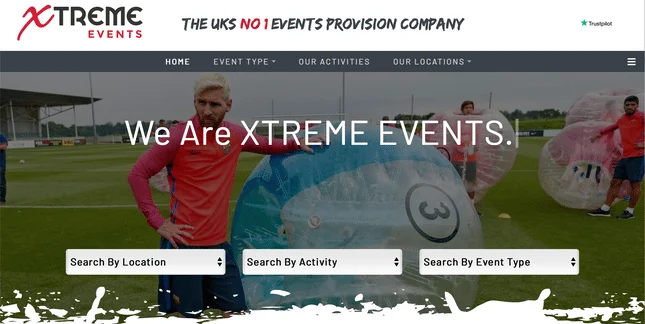
Emma Kowalski, a marketing planner for the website Xtreme Events, explains how SEO has increased her company’s audience over time:
“Through pushing more efforts into SEO over the past year, we have seen our traffic increase by 103% year-on-year! This has largely been around an in-depth content strategy, sorting out cannibalization issues on the site, and expanding into new areas.”
Jargon Buster – CannibalizationIn SEO, cannibalization happens when multiple pages on your site are ranking for the same keywords. When this happens, your pages are basically competing against each other, which is not productive! To stop this from happening, simply run a Ctrl+F search through the competing page for the target keyword, and delete what you find.
Simplify URLs
Short and sweet URLs are superb for SEO – they make it easier for search engines and users to understand what the page is about. You want to make sure it accurately represents your page in as few words as possible, while still including your keywords. To shorten yours, remove any stop words, such as “and,” “a,” “of,” and “the” from your title. We also recommend separating the words of your URL with hyphens to create a simpler reading experience.
Keyword research is a great SEO tool when you’re just figuring out how to advertise your website. We’ll cover it in the next section, because it can help you decide which topics to cover on your blog.
Top Tip: When you change your URL, you risk breaking any backlinks you’ve built up, which can seriously damage your site’s SEO. If you need to change them, keep your edited URLs working by setting up redirects. To avoid having to change your URL, you need to make sure it’s evergreen (it will be relevant to your site visitors for a long period of time). This means it shouldn’t include numbers, such as dates or years, or any language that will need changing unless absolutely necessary.
#2. Start Blogging
Most website builders also serve as blogging platforms and will let you add a blog page to your site at the click of a button, which you can update regularly with posts and photos.
Starting a blog is an excellent way to promote your website. It adds a human interest element to your brand, and shows that your site is constantly being refreshed with new information.
What would a person who visits your site want to read about? This is where keyword research comes into play. Free online tools, such as Google Trends and Answer the Public, which show you the search volume of different keywords over time.
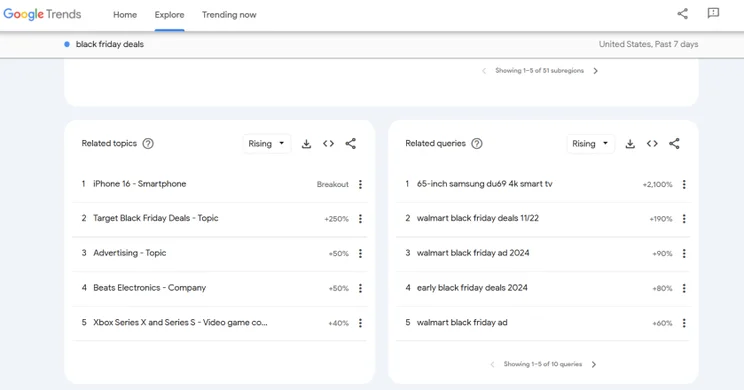
This information should be used to inform the keywords you target with your blog posts!
For example, if you sell makeup online, you could blog about the latest beauty trends. In that case, you’d want to use keywords like “popular makeup” or “new makeup.” Don’t forget to promote your blog on social media too, to make the most of current trends!
Top Tip: If you struggle to put pen to paper – or finger to keyboard – drafting into an AI blog writer can be a great starting point. Just make sure you shape and finetune this content afterwards to give your unique take. Skipping this step is a common blogging mistake!
#3. Create Videos
This goes hand-in-hand with blog posting as a way to personify your website promotion efforts. As long as your videos contain a link to your website, you can post them on forums, attach them to emails, and share them on social media.
To make an explanatory video about your business or niche, you can use free tools like Lumen5. Or, you can create a more unique video using a smart phone with an awesome camera, a microphone, natural lighting, and your own friends or colleagues as actors.
Video Content To Post
The videos you publish online should extend and enhance what you currently offer your target audience. For example, if you sell DIY kits or buildable products, how-to videos would give your customers an easier way to digest instructions.
Or, you could share your expertise with deep dive reviews, comparisons, and opinions. Take our YouTube channel’s videos for example: We love talking about website builders – why don’t you record yourself discussing your much-loved niche and brand new website? It could make excellent content for posting on social media or Reddit (more on that later).

You could also create short-form videos to tease website content and encourage page visits – think business updates, flash website sales, or quick tips. Just be sure to mix these in with longer videos – the YouTube algorithm pushes videos with higher watch time!
Top Tip: If you’re stuck for ideas, YouTube Studio’s AI-powered “Inspiration” tab can help with multiple parts of the process, like generating initial content ideas, brainstorming script outlines, and creating headers and thumbnails. And, in 2025, YouTube Shorts also upgraded its AI features with tools to help you generate unique clips for this type of content in under 60 seconds!
If you’re worried about videos slowing down your site speed, there’s an easy fix for that. You can upload the videos to platforms like YouTube or Wistia, and then embed them on your site.
By uploading to a third party and embedding, rather than uploading directly to your site, you ensure that the “weight” of the videos falls on the third party instead.
These videos can sit on your “About Us” page, your landing page, or anywhere else on your site! Showing pictures and videos of yourself and your team is the best way to build a connection with your audience. Just don’t forget to optimize your videos before uploading to give the best user experience!
To do list:
- Brainstorm content ideas that would be valuable to your target audience and relevant to your business
- Read our YouTube algorithm tips to help you create and publish successful content
- Create your first video, either on Lumen5 or a cellphone with a high-quality camera
- Upload your videos to YouTube, remembering to link out to relevant website pages in your video and description.
- Promote your videos by sharing them on relevant social channels – this is also a great way to repurpose them and bulk out your content calendar!
#4. Invest in Paid Marketing
You can’t always rely purely on organic marketing to promote your website – sometimes your efforts will need a cash injection.
With paid marketing, you can promote your web pages by using platforms like Google Ads or Facebook for Business to target users on search engines and social media. Paid advertising takes a few forms, which include:
- PPC (pay-per-click) – you pay the platform (typically Google or a social media platform) for each time a user clicks on your link
- CPM (cost-per-mille) – you pay for every 1,000 views your video gains
We’ll walk you through how to kick start and monitor your first paid marketing campaign.
Step 1: Set a Target
Setting a clear goal will help you assess the success of your marketing efforts, and will ultimately help you stay on track.
Let’s say you want to gain 1,000 subscribers within a month for your movie streaming service, and you have $2,000 to spend on paid marketing. That means you’re aiming to spend $2 per email sign-up.
The average CPC (cost-per-click) on Google Ads is $2.69, i.e. the amount you’ll need to pay Google each time a user clicks your promoted link.
So, as long as your website visitors sign up every time they click your promoted links and visit your website (better make sure your checkout page is persuasive!), then you stand a good chance of reaching your target of 1,000 subscribers with a $2,000 budget.
If you’re selling a one-off product rather than a subscription, you need to calculate the average cost per customer and make sure it fits within your budget. Let’s say you spent $100 on marketing last year, and acquired 100 customers in the same timeframe – your customer acquisition cost would be $1.
Step 2: Target Your Audience
Also known as demographic targeting, this tactic ensures your website is promoted to the right user at the right time.
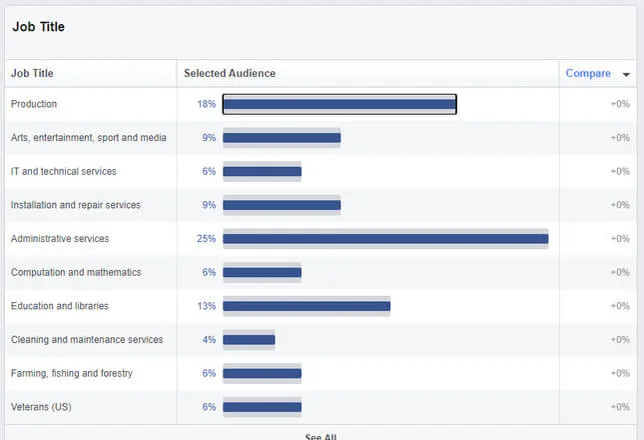
To reach your target audience with ads on Google, you’ll need to input your demographics on Google Ads by selecting user characteristics such as gender, age, location, income band, and more. For paid advertising on Facebook, you’ll need to use the ‘Audience Insights’ option, which is free to use.
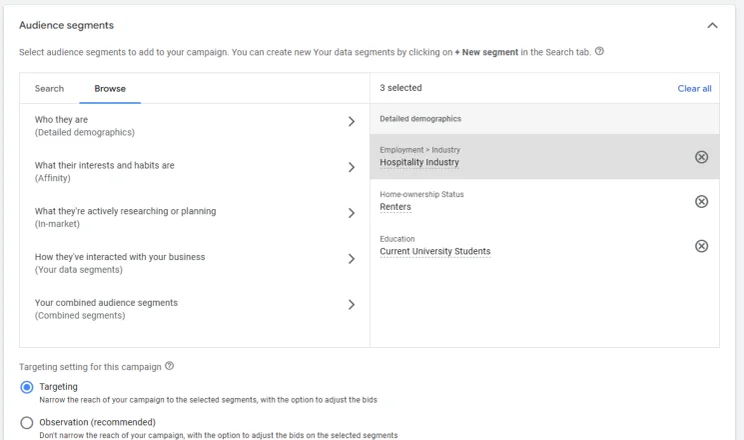
With Google Ads, once you’ve logged in (it’s free), all you have to do to set your demographic, like the image above, is press these buttons:
- Search Campaign
- Audiences
- Audience Segments
Use either the “Search” or “Browse” tabs to fill out your target audience details. We’d recommend the browse tab because it suggests areas to focus on through prompts, like in the example above.
Et voilà! You can now set your target audience, and have your content reach the perfect potential customers.
Step 3: Choose Platforms
To reach the greatest number of valuable customers, you’ll want to target different users on a variety of platforms.
For instance, Instagram and YouTube are great for video ads, while Twitter and Facebook are best suited to sponsored posts, where you pay the platform to promote your advert on user’s timelines.
For a quick overview of your options, the most common types of paid marketing ads include:
- Sponsored posts – pay to have your content appear in users’ feeds or timelines, even if they don’t follow your account
- Mobile ads – adverts that are designed to fit on mobile screens
- Video ads – advertising through a video format
- Display ads – typically seen as banner ads on websites, apps, or videos
- Promoted listings – paying to have your web pages appear higher on the SERPs
| Platform | YouTube | |||||
| Best for | Sponsored posts Mobile ads | Sponsored posts Mobile ads Video ads | Sponsored posts | Sponsored posts | Promoted listings Display ads Mobile ads | Video ads Display ads |
Step 4: Experiment and Optimize
The beauty of paid advertising is that the fun never stops! You should always edit and optimize your campaigns to keep those profit margins looking happy. Using Facebook’s Audience Insights or Google Ads, you can refine your ads to reach new audiences if you feel you’re not getting the results you want.
To do list:
- Calculate your marketing budget
- Sign up to tools like Google Ads and Facebook for Business
- Create display ads to promote your site on search engines and social media
#5. Pitch for Guest Blogs
Guest blogging means authoring posts for other websites. Doing so gets you exposure to new audiences, but it’s also a massive SEO benefit because it generates backlinks from the guest site back to your site.
Backlinks are great for SEO because they indicate to search engines that other websites view yours as an authority on relevant topics.
How To Promote Your Website With Guest Blogging
To get started with guest blogging, you need to send out pitches to relevant, quality websites.
You’ll want to search for websites that you would read yourself, and then pitch to sites that are:
- Within your niche
- Have a similar readership to your own
- Deemed trustworthy
How To Write a Guest Blog Pitch
Once you’ve chosen a site that you’d like to write for, you’ll want to pitch the editor via email or social media.
Before you begin writing your pitch, it’s best to research the website and its editors, and read as much of the website’s content as you can, to show that you understand the writing style they’ll be looking for.
Then, you’ll want to brainstorm around three topic ideas to send to the editor. Each topic idea should be presented with a title, and a summary blurb of about 100-200 words.
You’ll want to give editors more than one option to choose from! Use high-volume keywords and gaps in the site’s existing content to inform your decisions. Once you have three top-notch headlines and summaries, you’re ready to pitch!
To do list:
- Search for other reputable websites that fall within your niche
- Research the tone of voice for each website
- Write up to 200 words pitching your idea, explaining how it would benefit their site
#6. Advertise on Social Media
When utilized properly, you can rapidly grow your business with social media. In fact, over five billion people use these platforms, so don’t underestimate the power of building up a following on platforms like Facebook, Instagram, and X (formerly Twitter).
It can be overwhelming to try to gain visibility on platforms with so many other users doing the same, but a detailed social media strategy will help with this. The best way to promote your website on social media is by finding and following other pages within your niche.
If you’re running a website showcasing nature photography, then follow artists or collectors you’re a fan of, or users who are involved with similar projects to your own.
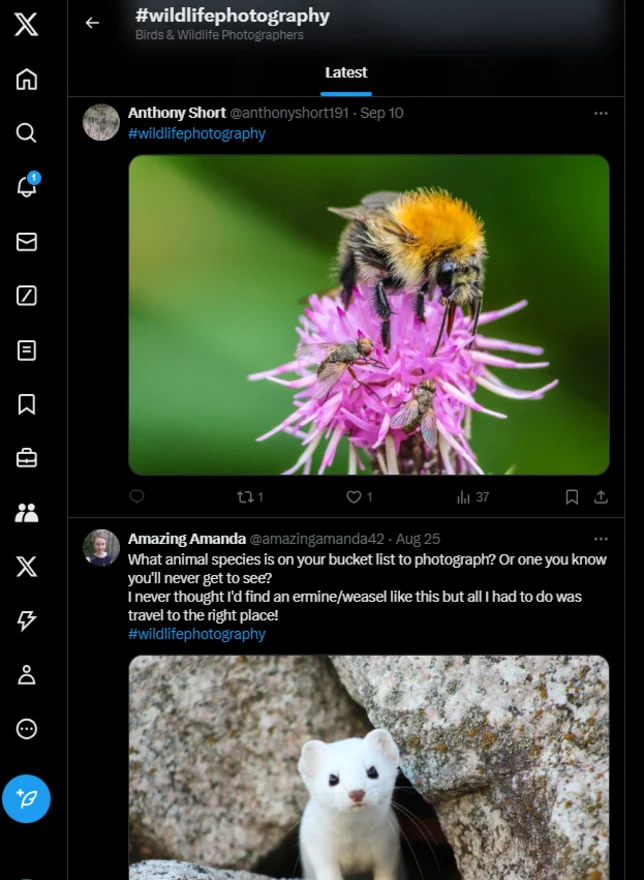
Once you’ve followed these pages, make sure you interact with their posts – send an encouraging comment, repost what you like, and ask questions.
This is a great way to gain exposure to other artists’ followers, and the odds are high that they’ll be interested in what you have to offer. The same goes for a website in any other niche!
Once you’ve started growing an audience, social media can also help you keep that audience engaged. Respond to comments and messages, and ask questions or run polls on social platforms to make sure your viewers know that they have a say.
You can also advertise on TikTok, Instagram, and many other social media platforms, which is a great option if you’re willing to spend some money.
#7. Post on Reddit
No journey of website promotion is complete without a trip to Reddit. A fountain of knowledge, memes, and conversation, Reddit currently has over 101 million active users each day. Plus, Reddit is the trusted recommendations platform for prospective buyers, so promoting your products on there will increase your chances of sales!
To post successfully on Reddit – that is, to get users to click your links and check out your new site – you’ll need to find out where users are talking about your niche, and gently promote your website without sounding too pushy.
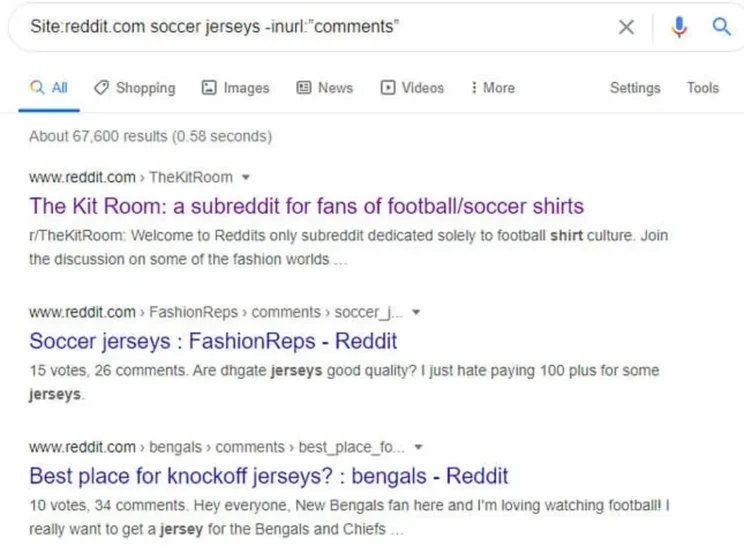
To find out where users are talking about your niche area on Reddit, use the site search function on Google, which will take you to a discussion known as a ‘subreddit’. Simply type this into the Google bar:
Site:reddit.com <your niche> -inurl:”comments”
Once you’ve found the holy ground that is Reddit comments, you should start integrating and interacting with the users to build trust. Let’s say your new website sells new and old soccer jerseys – you would type in the following text in the image below, and click the search results:
React to their posts, study the type of content they’re posting so you know how to promote your website successfully (e.g. are they posting memes, TikToks, or YouTube clips?), and add valuable insights that will demonstrate your knowledge of your niche topic.
When you’ve established yourself as a reputable Redditor, you can start to subtly advertise your website. There’s nothing worse than shameless plugging, so you should only introduce your new website when it could genuinely help or interest the Reddit community.
To do list:
- Site search Reddit to find users talking about your niche
- Gently promote your website by demonstrating the value of your website
- Add insights to help Reddit users
#8. Update Your Email Signature
Considering 2024 had 4.48 billion email users, it goes without saying you should be using email to promote your website. By simply personalizing your signature with links to your website, sending emails to your mailing list represents a quick and easy way to get your new website out there.
You should also include your business logo, and links to the social accounts that you created (remember Step 6?). Editing your signature can be done easily through your chosen email provider, making it one of the easiest methods of online promotion.
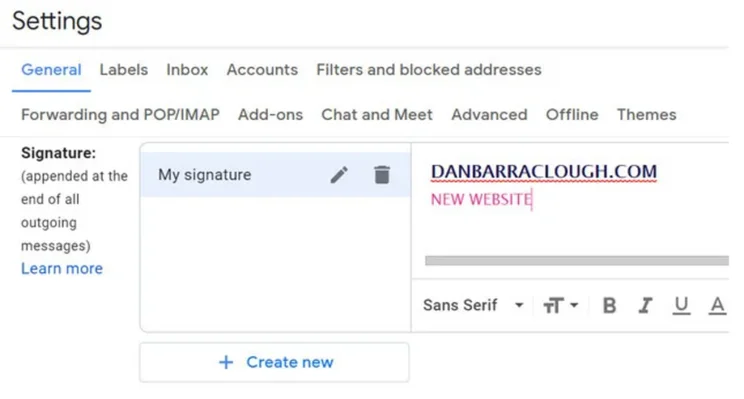
To customize your signature on Gmail, start composing a new email, then click ‘Insert Signature’ at the bottom.
To do list:
- Update your email signature to promote your website
- Include links to your social accounts
#9. Use Email Marketing
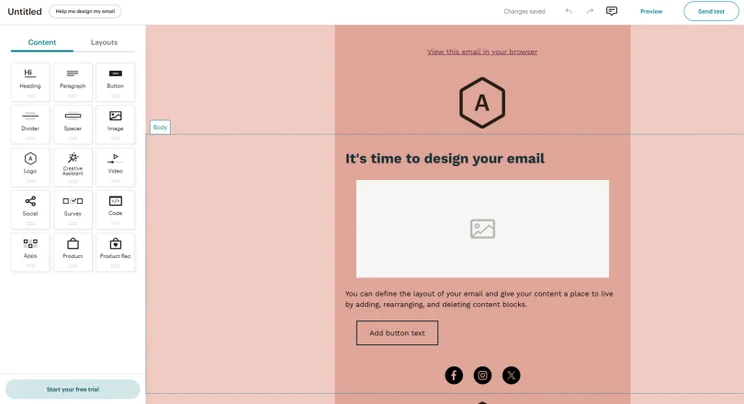
If you want to know how to promote your website quickly, easily, and affordably, get your email accounts at the ready. Email marketing is one of the most lucrative marketing methods, returning $36 for every $1 you spend on average.
Most website builders have a native email campaign tool that will let you build and send email campaigns in one place. Alternatively, you can use free third-party sites like Mailchimp.
Top Tip: A good way to capture users’ emails is to ask them to exchange their details when entering a contest or doing a quiz. Also, you should have emails already stored on your database if your business uses data forms for signing up to services or newsletters.
Create Killer Subject Lines
How do you get recipients to open your email and read about your new website? You need to nail your subject lines – and we’ve got some useful subject line tactics to help you do just that:
- Personalization – 80% of marketers say that email personalization improves performance.
- FOMO (fear of missing out) – tell users they’ll soon miss out on your discount, which can only be found on your new website.
- Intrigue – tap into users’ curiosity by asking strange questions, or by making bizarre (yet professional) promises
- Humor – website promotion is always more fun with puns
- Pain points – explain how your new website can help your users
Research has shown that the five most effective subject line keywords (words that increase the open rates the most) are:
- Upgrade
- Just
- Content
- Go
- Wonderful
So, when writing email content about your wonderful website that’s just had an upgrade, you should try the above tactics and keywords we’ve included. Go!
#10. Choose the Right Web Host
To make sure your website can handle all of the traffic that your website promotion is going to generate, you have to choose the right web hosting provider.
The right web host will be able to supply your site with enough resources to accommodate large numbers of visitors at one time, which will prove invaluable when you start to promote your website.
Good to know: If you’re using a website builder to create your site, then web hosting will be sorted for you! The appeal of website builders is that they take care of all the technical, behind-the-scenes work, but the trade-off is that you won’t have as much scalability or control as you get when you take care of hosting yourself.
How Do I Choose the Right Web Host?
The major players of web hosting – which we’ve ranked in our guide to the top five web hosting providers – are determined by factors like server uptime, storage, bandwidth, and value for money. Depending on which factor you think is most suitable, we recommend picking one of these providers:
- Bluehost – best overall hosting provider
- Hostinger – best for hosting an ecommerce store
- GoDaddy – best server response time
When it comes to picking the right provider for the industry you operate in, it’s a case of “different hosts for different folks.” The best hosting providers for students won’t be the same as the top web hosts for photographers because each site has a different set of needs.
If you’re not sure which provider will best set your site up for success, our comprehensive web hosting comparison chart will give you more information on the top providers!
#11. Leverage Online Advertising Networks
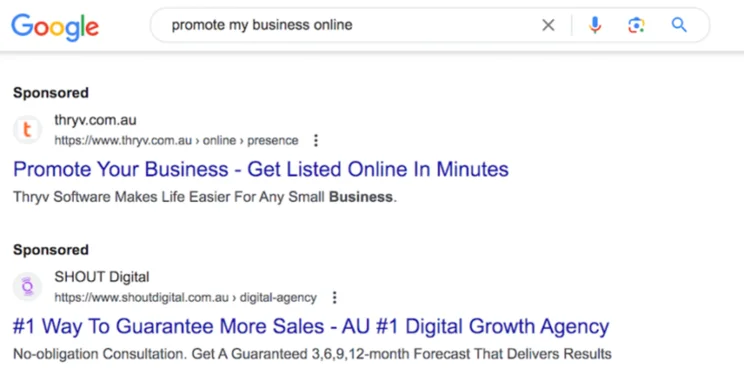
Online advertising networks – Google AdSense and Microsoft Ads (formerly Bing Ads) are two notable examples – allow you to display ads on various websites and connect with your target audience at the right time, in the right place.
Signing up to these platforms – which boast extensive networks of partner websites where your ads can be displayed – enables you to take advantage of their reach and accessibility to connect with potential customers.
Here are our top tips for utilizing these online advertising networks to best effect:
Craft Compelling Display Ads
Create eye-catching display ads that grab attention and communicate your message concisely. Prioritize visually appealing graphics and engaging copy, as well as a clear call to action (CTA) to entice users to click through to your website.
Set a Budget – and Target Wisely!
Unlike SEO, paid ads cost money – so before you begin, be sure to determine your advertising budget based on your goals and financial capacity. Online advertising networks allow you to set daily or campaign-based spending limits, so it’s easy to set your spending.
Plus, if you’re looking to maximize your budget, you can mix in some free types of advertising like online business profiles!
As for targeting, these platforms have advanced options to help your ads land with the right audience – so take into account factors like location, demographics, interests, and keywords to maximize your return on investment (ROI).
Monitor and Optimize Ongoing
By regularly monitoring the performance of your ads and tracking key metrics – such as click-through rate (CTR), conversions, and cost-per-click (CPC), you’ll be able to identify which ads and targeting strategies are most effective.
Then? You should harness this information to optimize your campaigns, allocate resources wisely, and refine your messages – and achieve, over time, increasingly impressive results.
#12. Collaborate with Other Websites
Building partnerships and collaborations with other websites in your niche is another powerful way to promote your website.
By working together and in harmony, you can tap into each other’s audiences, expand your collective reach, and create a mutually beneficial relationship.
Here’s how to leverage collaborations to boost your website’s visibility:
Seek Complementary Partnerships
Identify websites that complement your offerings – without being direct competitors. By this, we mean sites that share a similar target audience, but offer different products or services.
Cross-Promote Content and Offerings
Share each other’s content, blog posts, or promotional materials on your respective websites. This cross-pollination exposes your website to a new audience while providing valuable content to your partner’s followers, too. It’s a win-win situation!
Collaborate on Webinars, Podcasts, or Interviews
Host joint webinars, podcasts, or interviews featuring experts from both websites. Combining your expertise will give you to opportunity to showcase your authority, attract new visitors, and foster meaningful connections with each other’s followers.
Leverage Each Other’s Audiences
Encourage your partner to promote your website to their audience, and do the same for them. This exchange of exposure helps you not only tap into a whole new pool of potential customers – but one that’s already interested in similar content or products.
#13. Implement Local SEO Strategies
Local SEO is a crucial tool to promote your website and attract customers in the specific streets and suburbs you call home.
By optimizing your online presence for local search, you can boost your visibility and reach a targeted audience – close to home.
How’s how to implement our top local SEO strategies to boost your business online:
Optimize Your Website for Local Search Results
Include your business’s name, address, and phone number on your website’s footer or contact page – and make sure this information is consistent across all online platforms you appear on. Also, embed a Google Map with your location to make it easier for visitors to find you.
Claim Your Business on Google Business Profile and Local Directories
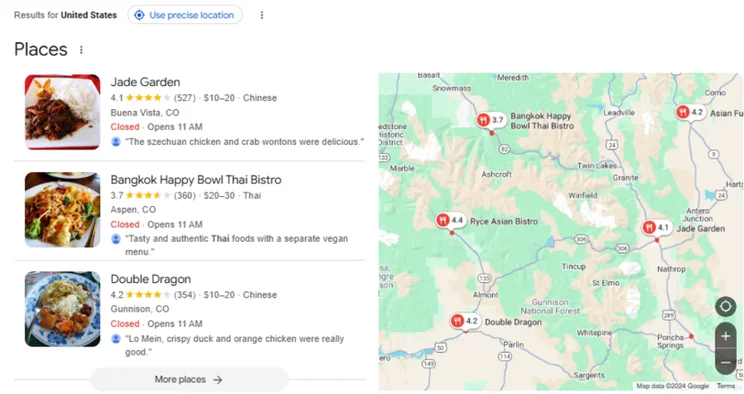
Create a Google Business Profile (GBP) listing and claim your business on other reputable local directories, such as Yelp.
Complete your profile with accurate and up-to-date information, such as business hours, services, and images. Having a GBP is particularly essential, as it appears in Google’s local search results and Google Maps.
Good to Know: Google’s updated GBP guidelines, which were updated in November 2024, mean that a physical store is now a requirement for businesses selling age-restricted items such as alcohol.
Use Location-Based Keywords
Incorporate location-specific keywords throughout your website content and meta tags. Think about the phrases your potential customers might use when searching for local businesses like yours.
For example, if you run a bakery in Melbourne, use keywords like “best bakery in Melbourne” or “Melbourne pastry shop” strategically in your content. (You can even zero in on a suburb or street to get really targeted!)
Encourage Customer Reviews
Positive customer reviews can have a profound impact on your local search rankings. So encourage satisfied customers to leave reviews on your GBP listing and other review platforms – either with a follow-up email, or in-person when you deliver the service.
Be sure to respond to Google Reviews in a professional manner to show that you value customer feedback. While it might feel difficult, responding to negative reviews is equally important because it shows that you value and prioritize your customers’ opinions.
Not sure how to ask customers for reviews? We’ve got you covered!
Summary: How to Promote Your Website
Hooray! You now know how to market a website. We’ve shown you 13 tactics that should bring clicks, eyes, and dollars to your new website.
To summarize, optimizing your website and its content will give you the best chance for visibility in search results. From there, choose from a range of free and paid marketing techniques. Not all of these will be a perfect fit for every website, so consider your audience demographics and the platforms they are most likely to engage with.
If you follow these steps, you’ll be able to start spreading the word about your site to the right audiences and be on your way to achieving some well-earned growth!
More information
- Did you know you can make money with a website without selling anything? Find out how in our full guide!
- Affiliate partners are a great way to increase the income of your website. Learn about the the different types of affiliate partners here.
- You don’t need an ecommerce website to sell online. You can use an online marketplace and reach a wider audience. Here’s our list of the best global online marketplaces.


1 reply
1 reply