
Google AI Studio is a browser-based developer tool used to build app prototypes and test generative AI models like Gemini 3 using natural language prompts. Like many vibe coding tools, Google AI Studio allows your business to experiment with ideas with little to no technical skills or experience.
Below, I’ll take you through everything you need to know, from its key features and pricing to how you might use the platform to save time, money, or resources.
- Google AI Studio is a browser-based workspace where you can “vibe code” apps and test Google’s different AI models
- Though the Free Tier costs nothing, Google can use your public data to train its models further
- You should upgrade to the Paid Tier if you want to keep your business data private and secure
- Paid Tier users also get access to a wider range of Google tools, such as Imagen 4 for photorealistic images and Veo 3.1 for video generation
- With Google AI Studio, you can create app prototypes and internal business tools, or generate multimedia content for your business
What is Google AI Studio?
Google AI Studio is a browser-based workspace for prototyping with Google’s generative AI models, such as Gemini 3, allowing users to develop apps, agents, and content through natural language prompting.
How To Access Google AI Studio
To begin using Google AI Studio, you’ll first need to:
- Head to “aistudio.google.com”
- Log in with a Google Account
- Accept Google’s AI Labs privacy and usage terms
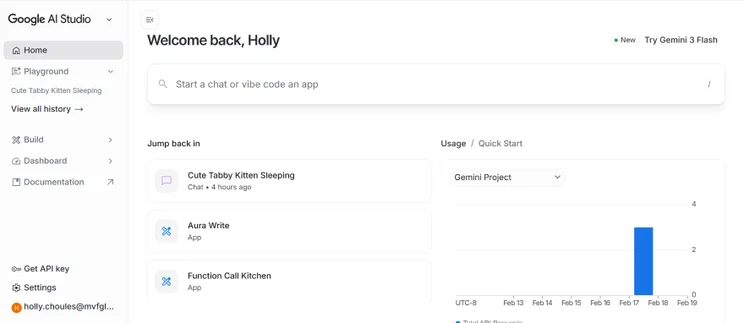
After following these instructions, you’ll end up on Google AI Studio’s landing page where you can begin experimenting with its AI models.
How Does Google AI Studio Work?
Google AI Studio functions by providing browser-based access to advanced AI models, requiring no software installation for natural language prompting or file input.
The following tabs are included in Google AI Studio:
- Playground: You can test out Google’s AI models here. For example, you can select the “Gemini” tab if you want to develop chatbots and agents, or the “Image” tab if you want to create high-quality imagery for a website.
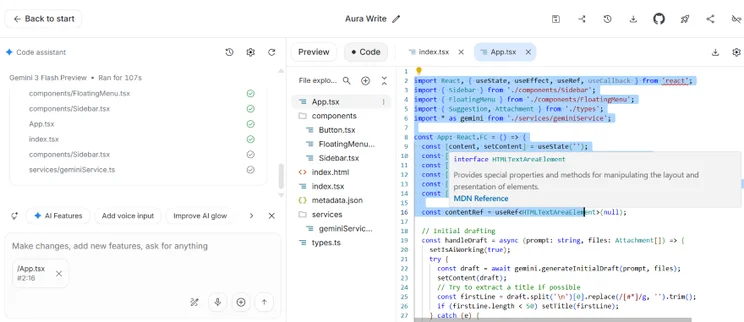
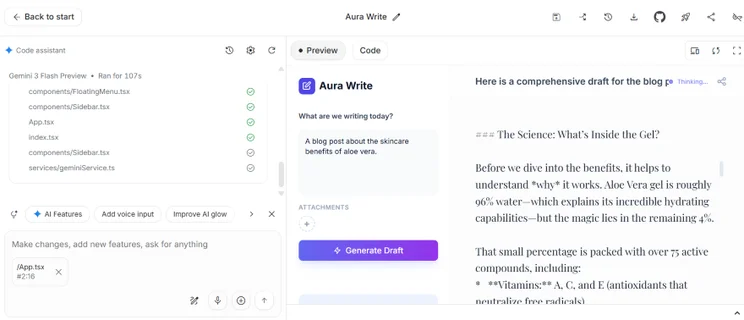
- Build: If vibe coding is your key focus, click on this tab. From here, you can start using natural language prompting to build an app with AI. Gemini will generate your app’s code for you each time you prompt and produce a live preview of how the app looks and runs.
- Dashboard: This is a centralized area where you can manage your projects, the API Keys you’ve created, and your usage rate limits or billing.
- Documentation: Here you’ll find useful resources on Google’s AI models and what they can do.
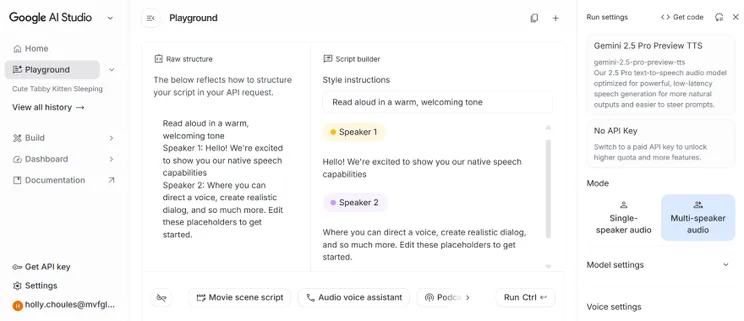
To get an API key for each project, you can click on the “Get API Key” button in the left-hand sidebar, enabling you to create a new key or select an existing Google Cloud project. However, treat your API key like a password and don’t share it with anyone. Malicious third-parties could use your key to access your data.
What Are the Key Features of Google AI Studio?
Google AI Studio’s key features are listed below:
Long Context Window
Google AI Studio’s Gemini models use a long context window to process and remember high volumes of text, images, and documents in a single session. A long context window is helpful if you intend to have long, in-depth conversations with the AI models, or want to upload large documents.
Multimodality
Google AI Studio is multimodal, meaning that you can test prompting for text, imagery, video, and audio in one place. The main AI models enabling you to generate different content types include:
- Nano Banana for image generation (on Free Tier)
- Imagen 4 for photo-realistic image generation (on Paid Tier only)
- Veo 3.1 for video generation (on Paid Tier only)
💡If you intend to use Google AI Studio to create content, read our AI content creation tips guide first
Easy Code Export
One of Google AI Studio’s strongest features is the ability to easily export your code and put it into action, a crucial step that’s made super accessible for new users.
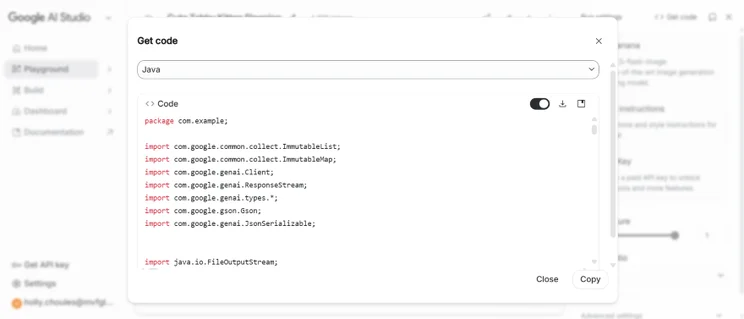
Once you’ve finished a project, you can retrieve the code so that it’s ready to add your website or app. In “Playground” mode, select the “Get Code” button to convert the code into a suitable programming language (like Java or Python). If you’re a complete beginner, you can hand this code over to a developer later, since they’ll understand what’s most suitable for your project.
Google AI Studio’s “Build” mode provides more code export options than “Playground” mode, including:
- Copy and paste code from the “Code” tab
- Push code to Github
- Download app as a ZIP file by clicking on the download icon
Run Settings
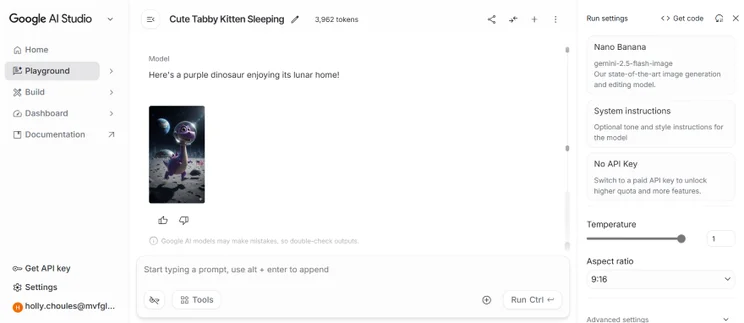
Run Settings are the control room in “Playground” mode, where you can adjust how you want Google’s AI models to run during the prototyping stage. The main tools you can access include:
- Model selection: This makes it easy to switch between AI models
- Temperature: A slider than enables you to control how creative or random you’d like an AI model to act
- Aspect ratio: If you’re generating images, you can use this feature to adjust the width and height of your image
- Safety settings: This tool enables you to adjust harmful content thresholds, spanning harassment, hate speech, sexually explicit content, and dangerous content
- Stop sequences: You can control when an AI model should stop generating further text or content in a response
What’s the Difference Between Google AI Studio, Vertex AI, and Gemini Advanced?
While Google’s AI platforms – Google AI Studio, Vertex AI, and Google AI Pro (formerly Gemini Advanced) – all support the use of AI models like Gemini, they have major differences and specific use cases:
| Google AI Platform | What It's For | Pricing | Features | Best For… |
| Google AI Studio | Browser-based workspace for experimenting with Google’s leading AI models | • Free tier: $0, but there are daily usage limits • Paid tier: pay-as-you-go based on token usage | • Ability to test Google’s AI models • Vibe coding functionality for app creation • Multimodal input for images, audio, and text • Easy code export | For building your own prototypes and tools at a low cost |
| Vertex AI | Enterprise tool for building AI agents or integrating AI into your apps | • Complex pay-as-you-go costs depending on Gen AI usage, training, and storage | • Model Garden that enables businesses to use pre-made models • Enterprise-level security • 99.9% uptime rates | For enterprise scale businesses that want to produce public-facing apps |
| Google AI Pro | Subscription-based service for businesses that want to boost productivity or creativity | • $19.99 per month (fixed subscription fee) | • Gemini App access • Deep research tools • Image generation and editing • Flow5 AI filmmaking tool • Whisk7 image-to-video-creation • NotebookLM research and writing assistant • 2TB storage for Photos, Drive, & Gmail | For businesses that want to streamline everyday work tasks and improve efficiency |
To get a taste of Google’s AI tools, I recommend beginning with Google AI Studio, since you’ll be able to vibe code apps and generate content without spending a cent.
For businesses with more specialized needs, I recommend looking into the other two options instead. Vertex AI’s complex, custom pricing and enterprise tools are most suitable for large or scaling businesses that want to create powerful apps. Meanwhile, Google AI Pro offers a useful selection of tools for small or medium sized teams to use and boost productivity.
If you’re wondering why Gemini Advanced isn’t on this list, it’s because Google renamed it as Google AI Pro, which is the subscription-based service outlined above that comes with multiple AI tools.
How Much Does Google AI Studio Cost?
Google AI Studio costs are split between a Free Tier for experimentation and a pay-as-you-go Paid Tier for regular business use and data privacy. I’ve outlined the costs in the table below:
| Plan | Costs | Daily Capacity | Data Privacy | Model Access | Best For… |
| Free Tier | $0 | Can only make a limited number of requests per day. | Your data is public: Google can use your data to train and improve its AI models | Limited access to Google’s AI models | • Personal projects. • App prototyping. • Internal business tools. |
| Paid Tier | Pay-as-you-go. Costs depend on the AI models used and the number of tasks completed per day | Can make a higher volume of requests per day | Your data is private: Google can’t use your data to improve its AI models | Access to all of Google’s AI models, such as Veo 3.1, Nano Banana Pro, and Gemini 3 Pro | • Public-facing apps. • Generating a high-volume of content per day. |
The Free Tier is ideal if you want to experiment with Google’s AI tools, work on personal projects, or create app prototypes and internal business tools that don’t contain sensitive data.
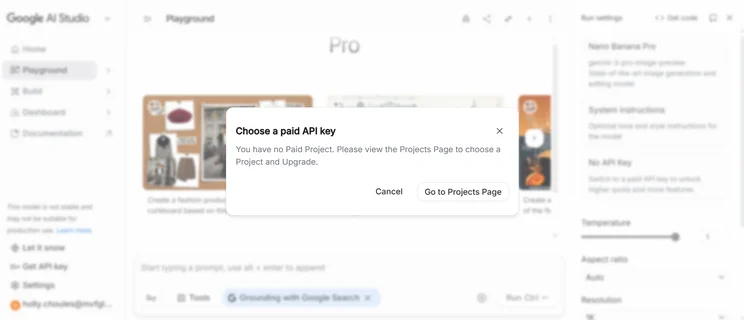
However, I recommend enabling billing and upgrading to the Paid Tier if you want access to all of Google’s AI models and don’t want to be restricted by a limited number of daily requests. It’s most useful if you’re going to be using Google’s AI tools regularly, or are interested in creating public-facing apps that may contain private data.
On the Paid Plan, Google bills you monthly based on your actual usage, which is typically measured in the number tokens you’ve consumed when working on your projects. Because it follows a pay-as-you-go system, you won’t be charged a flat subscription fee.
For example, if you use the service heavily throughout early January, but not late January, your bill will the reflect the volume of tokens spent during the first one-two weeks.
Can You Get Google AI Studio for Free?
While you can use Google AI Studio for free, I recommend upgrading to the Paid tier to remove limitations, such as Google using your data to train its AI models and access to a limited number of tools. Upgrade to the Paid Tier to try out Google’s best AI content tools or models, such as Nano Banana Pro.
Examples of How To Use Google AI Studio in Your Business
If you’re unsure how Google AI Studio might fit in with your business’ operations, here are a few examples of how it could help.
Speedier Content Creation
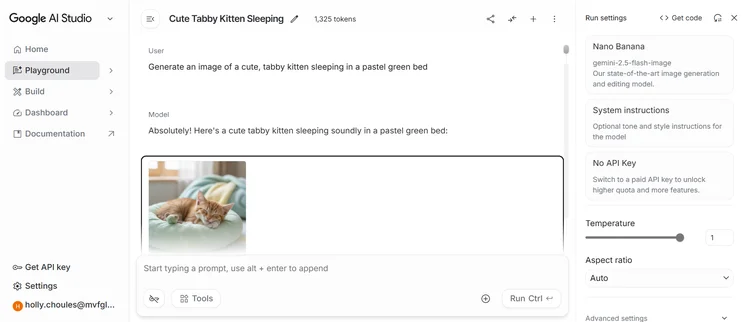
If you’re most interested in AI content creation and would like to generate content for your business, Google’s AI models like Nano Banana can help.
For example, you could head into Google AI Studio’s “Playground” and:
- Generate images or videos for your website and use prompting to refine the content until you’re happy with the finished result
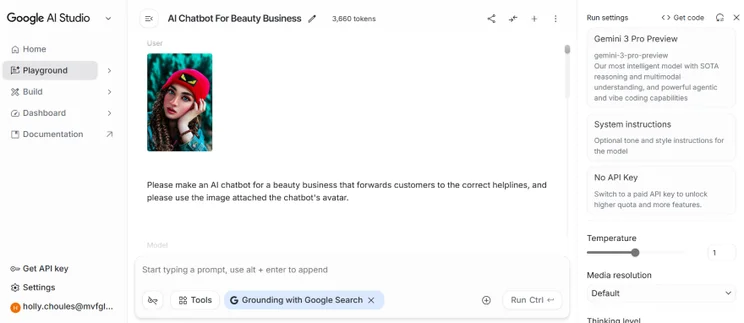
- Use text-based prompts to generate website copy, such as long-form blog posts or social media captions for an image you’ve attached
Rapid Prototyping
In “Build” mode, you can start vibe coding and prototyping your own apps within minutes. This functionality is useful if you want to bring your initial ideas into reality, but you’ll still need to hand your project over to a developer later on so they can refine and secure your code. Because of this, I don’t recommend using Google’s AI models alone for public-facing apps that will contain sensitive data.
Developing Your Own Tools
You could also use vibe coding on Google AI Studio to develop your own tools. This might include a personal productivity tool to keep yourself on track, or an internal business tool that you and your colleagues could use to boost efficiency. Some ideas include:
- A budget tracker, helping you better organize your personal or business expenses
- An email drafter to generate email templates in your company tone of voice for different clients or purposes
- An AI product description generator to create descriptions in bulk for your store
- An alerts tracker that notifies your business of any major industry news or product releases
- An SEO analysis tool that could score your webpages based on how SEO-friendly they are
Be mindful of the data that you’re sharing with Google’s AI models. Under the Free Tier, Google may utilize submitted data to train and improve its generative AI models, making it unsuitable for sensitive customer data or business information.
What’s My Final Verdict on Google AI Studio?
Google AI Studio allows businesses to quickly prototype their project ideas, generate website and social media content, and physical marketing materials.
However, Google AI Studio won’t be a perfect solution for most businesses, especially if you’re on the Free Tier. Google can use your public data to train its AI, there are daily usage limits, and you’ll have restricted access to some of Google’s AI models. Keep these cons in mind when deciding if the platform will be useful for your business in the long-term or not.
💡 Interested in other platforms on the market? Check out our guide to the seven best vibe coding platforms out there.


0 comments