

- What Is Hostinger Horizons?
- Hostinger Horizons: Key Features
- How Hostinger Horizons Works: My Hands-On Test
- Hostinger Horizons Pricing Explained
- Pros and Cons of Hostinger Horizons
- Who Is Hostinger Horizons For? (And Who Is It Not For?)
- Hostinger Horizons Alternatives
- Methodology: How We Tested Hostinger Horizons
- Final Verdict: Is Hostinger Horizons the Right Vibe Coding Platform for You?
Hostinger Horizons is our top-rated vibe coding platform, offering affordable plans, intuitive AI, great functionality, and 24/7 multilingual support to help you launch your web app. With a simple prompt, you can get your app live without needing to write a single line of code yourself.
In this Hostinger Horizons review, I’ll dig into its key features, pricing, and how to use the tool.
- Hostinger Horizons is the most beginner-friendly vibe coding tool we’ve tested, offering guidance when building and an auto-fix feature
- With over 80 languages supported, use naturally-worded prompts to describe your web app idea and Hostinger Horizons will generate the code for you
- Hostinger Horizons is incredibly affordable, with plans starting from $6.99 per month
- For advanced control, you can edit the code yourself on the Hobbyist and Hustler plans
- Hostinger Horizons is best for entrepreneurs and small businesses, as opposed to advanced app developers or large agencies
What Is Hostinger Horizons?
Hostinger, a trusted and popular website builder and hosting provider, launched its vibe coding tool in March 2025. Hostinger Horizons is a no-code AI tool that lets you use your native language to describe the web app you want, from analytics dashboards to unique business trackers.
You don’t need any coding experience – share your prompt, refine the output with the AI chatbot, and launch your app at the click of a button. Hostinger Horizons is an all-in-one solution for solopreneurs and small businesses that don’t have the time or money for traditional app development.
Hostinger Horizons: Key Features
Hostinger Horizons offers a lot to users, with built-in functionality, an easy-to-use interface, and reliable customer support. I’ve highlighted some of the key features of this vibe coding tool below:
- Trusted brand – Hostinger is already a recognizable brand for many, achieving a positive score of 4.7 out of 5 on Trustpilot (with over 57,000 reviews)
- All-in-one Hostinger ecosystem – businesses can depend on Hostinger’s existing infrastructure with building a web app, including hosting, domain services, and email
- Beginner-friendly tool – Hostinger Horizons is the easiest vibe coding tool we’ve used this year, with a straightforward interface, reactive chatbot, and a code editor for advanced users
- Variety of prompt types – you can use text, voice, or image-based prompts to communicate with Hostinger Horizons
- Multilingual support – over 80 languages are supported, so you can use your native language when using the tool
- Security included – every plan includes DDoS protection, malware scanning, and a firewall
- Auto-fix errors – Hostinger Horizons alleviates my concern as a beginner to vibe coding since its auto-fix feature detects errors and resolves them
- Add integrations – connect your web app with payment gateways, like Stripe, or integrate with Supabase for its open-source cloud-based database
- Restore previous versions – Hostinger Horizons automatically saves your work as you build your app, and you can easily revert to earlier code when needed
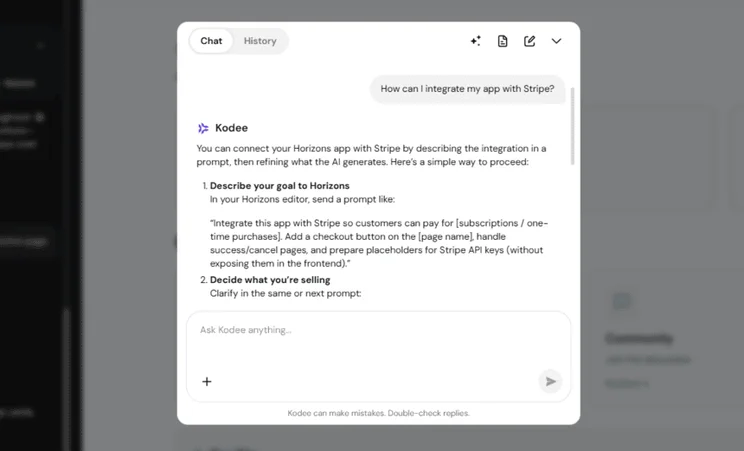
- 24/7 support – you can contact Hostinger 24/7 if you run into any issues when vibe coding, and you can use its AI-powered assistant Kodee to support you as you develop your app
How Hostinger Horizons Works: My Hands-On Test
To get started with Hostinger Horizons, you need to sign up for the seven-day free trial (no card details needed) or subscribe to one of the premium plans.
After logging in, you can access Hostinger Horizons via your account dashboard. Simply navigate to “Websites,” then click “Websites list,” followed by “Add website.” This is where you’ll see the option for Hostinger Horizons and your vibe coding journey can begin.
Taking that first leap can be daunting, especially since vibe coding is so new, so I asked the Head of Hostinger Horizons, Dainius Kavoliūnas, to share some advice for beginners:
Treat Hostinger Horizons like a very smart developer that needs clear directions: explain who the site is for, what it should do, how users should move through it, and the design you want.
Since it’s a no-code AI tool that works through simple prompts in 80+ languages, you can build using your own words. Make sure to break bigger ideas into smaller prompts, set constraints like “no login yet” or “keep the design minimal,” and refine each part step by step.
If you’re stuck or unsure how to phrase something, use Kodee, the AI assistant built into the editor, to help you brainstorm ideas, improve your prompts, or troubleshoot issues. It’s there to guide you without needing to leave your workspace. Once your site looks right, launching is straightforward: hosting, domain, and email are all included, so you can go live in just a few clicks.

1. Writing Your Prompt
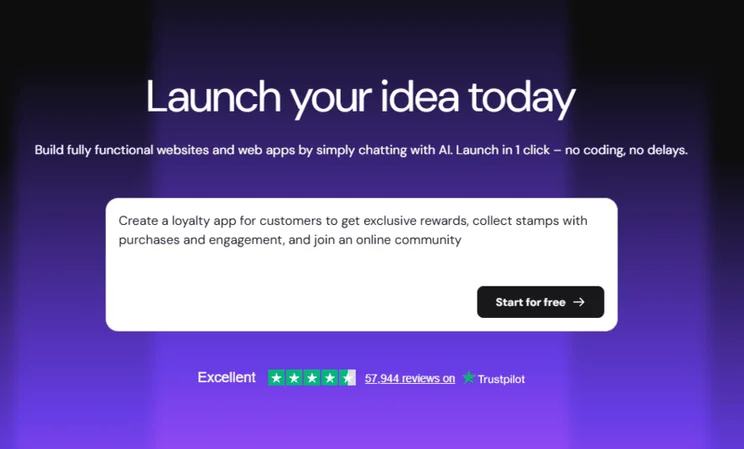
Think about a simple app idea that could benefit your personal life or business, whether that’s a habit tracker or product recommendation tool. Vibe coding lets you use natural language to describe your web app.
With Hostinger Horizons, you can submit a text, voice, or image prompt. For my test, I used a standard text prompt:
Create a loyalty app for customers to get exclusive rewards, collect stamps with purchases and engagement, and join an online community
2. The AI Build
In the spirit of vibe coding, Hostinger Horizons takes your prompt, fleshes out your idea even further, and generates the code for your web app. All in minutes.
After entering the initial prompt, you’ll be taken to a screen with two panels:
- The left panel shows the live chat and history detailing the app building process
- The right panel displays an interactive preview of your web app
Horizons had a few questions before it started the build for my web app. Based on my prompt, the tool wanted to check how customers should join (e.g., via signup) and what I envisioned for the community aspect (such as a forum for chatting or a leaderboard for top customers). I asked for both.
You might also be asked to connect with Supabase to create a safe backend to store customer accounts and data, depending on your app idea. In the interest of time, I asked Hostinger to build the frontend of the app for now and I could connect with Supabase later on.
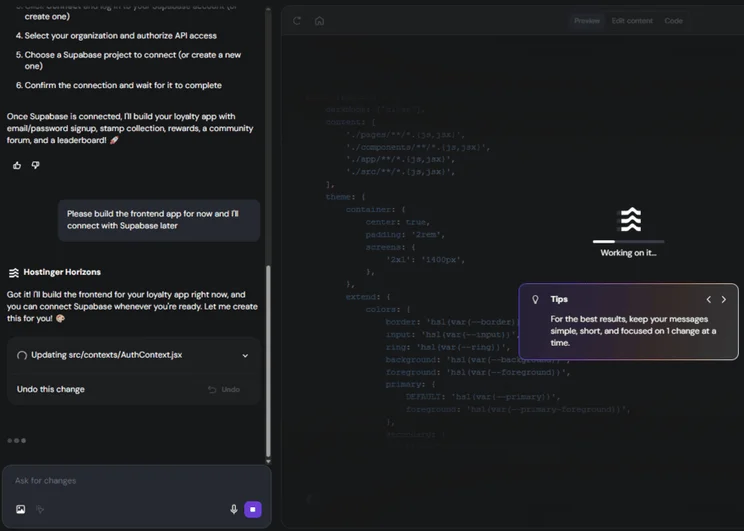
Following the signup process, it took Hostinger Horizons roughly five minutes to produce the first iteration of my web app.
Once Hostinger Horizons has produced your idea, it’ll describe exactly what it’s done and what’s been included in your app. For me, that was an email/password signup and login, stamp collection system, rewards system with multiple tiers to unlock, community forum for engagement, and a leaderboard to showcase top members and rankings.
3. Iterating
After your app’s code has been produced, you can then make further refinements to your app’s design or features. Hostinger Horizons remains beginner-friendly at the iteration stage, since you can simply request your changes in the chat box using conversational language.
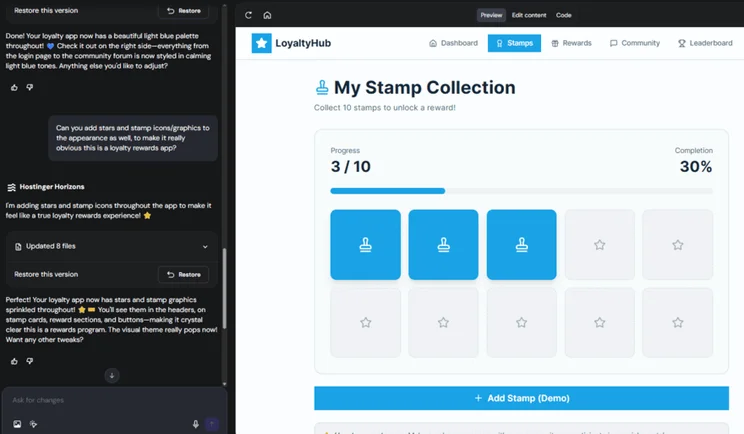
There are a few extra benefits to using Hostinger Horizons to tweak your app:
- The auto fix tool detects bugs or coding errors for you and fixes these at the click of a button – this is great for a beginner like me because I wouldn’t even be able to spot an issue with the app unless it was obvious
- Suggestions are provided by Hostinger Horizons – these one-click buttons are useful if you’re testing out new ideas and aren’t sure of the end vision yet
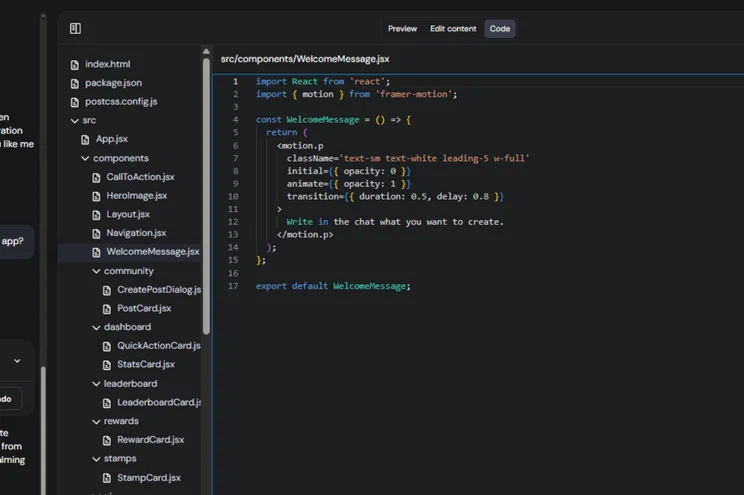
- The code editor is available for advanced changes (though it’s only included on the Hobbyist and Hustler plans) – click “Code” in the preview panel navigation bar to start making detailed edits
If you’re unhappy with any changes made, Hostinger Horizons also includes a button to “Undo this change” or restore to a previous version thanks to the chat history. It’s very easy to fix a mistake or get rid of potential obstacles with these tools.
5. Launching Your App
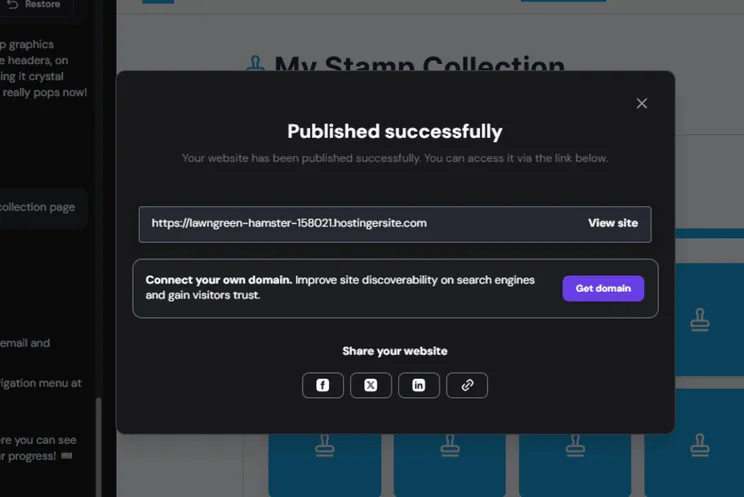
Once you’re happy with your web app, following your tweaks and testing, it’s time to launch. This is a one-click process. Simply click the purple “Publish” button in the top right of the screen.
After this, you’ll receive a unique URL with a Hostinger subdomain, or you can connect a custom domain, which would be the better option for professional businesses.
If you’re on the seven-day free trial, you’ll have a limited number of message credits to use. You can keep an eye on these by clicking the three-line icon in the top left.
Hostinger Horizons Pricing Explained
Hostinger Horizons has four premium plans: Explorer, Starter, Hobbyist, and Hustler. Introductory prices for Hostinger Horizons start from $6.99 to $79.99 per month (billed annually), making Hostinger Horizons the most affordable vibe coding option on the market.
You can get started with the seven-day free trial, but it only includes five free message credits, so it’s worth upgrading as soon as possible so you’re not cut off after a very brief chat.
The main difference between the premium plans, besides the subscription fee, is the message credit limit:
|
Plan name
|
Today's best deal
|
Message credits (per month)
|
Websites
|
Ecommerce
|
||
|---|---|---|---|---|---|---|
 |
|
|
|
|||
|
Explorer |
Starter |
Hobbyist |
Hustler |
|||
|
|
|
|
|
|||
|
30 credits |
70 credits |
200 credits |
400 credits |
|||
|
1 |
Up to 25 |
Up to 50 |
Up to 50 |
|||
|
|
|
|
|
|||
| Start Free Trial | Start Free Trial | Start Free Trial | Start Free Trial |
Premium plans with Hostinger Horizons have a 30-day money-back guarantee. So, even after you’ve exhausted the seven-day free trial period, signing up for Hostinger Horizons is pretty risk-free.
Pros and Cons of Hostinger Horizons
To summarize what we’ve covered already, these are the key pros and cons of Hostinger Horizons:
- Great for beginners, since the platform is very easy to understand and you don't need to know how to code
- Part of the Hostinger ecosystem, meaning hosting, domains, and security can be dealt with from one account
- Launch your app with one click, making the vibe coding process very quick
- 24/7 customer support and guidance as you build your app (in 80+ languages!)
- The free trial can be limiting for beginners because you can burn through the message credits almost instantly
- Can only build browser-based apps – there's currently no plan to let users build mobile apps for the App Store or Google Play
- Less advanced control since the tool caters to beginners more than advanced developers, plus you're reliant on the built-in Hostinger features
Who Is Hostinger Horizons For? (And Who Is It Not For?)
Hostinger Horizons directly targets non-coders, offering an all-in-one platform to help entrepreneurs and small businesses launch unique web apps. It’s ideal for anyone with a vision but without the experience to develop the idea themselves.
But, who should and shouldn’t use Hostinger Horizons?
✅ Entrepreneurs & Founders:
It’s arguably the best tool on the market to build an MVP (Minimum Viable Product) in a short time frame. This is ideal for entrepreneurs looking to show off the app to investors, test a market, or gather feedback from interested customers.
✅ Small Businesses:
Hostinger Horizons is great for small businesses, but it’s more suitable for building internal tools (such as a custom dashboard to track customer analytics) or for building simple customer-facing portals. We wouldn’t recommend using vibe coding to build any complex or mission-critical apps, at least not without professional insight as well.
⚠️ Complete Beginners:
While Hostinger Horizons caters to the non-coder, complete beginners should tread carefully. It’s all “vibes” until your web app breaks and you don’t know what to do. It’s a tool, not a magic wand. That’s why we recommend brushing up on the basics of vibe coding before you get started.
❌ vs. Website Builders (Wix/Squarespace):
Vibe coding tools, like Hostinger Horizons, should be used to sound out web app ideas and experiment creatively. It’s not a website builder. After all, Hostinger markets a separate website builder tool to customers. You can use Hostinger Horizons to build a custom web app (like SaaS) that you can then link to from that website.
❌ Advanced Users & Agencies:
Hostinger Horizons offers a lot of flexibility, but large-scale teams and projects will struggle with the lack of advanced customization or collaboration tools.
Hostinger Horizons Alternatives
While Hostinger Horizons might be our number one choice of vibe coding tool so far, there are plenty of alternatives to consider as well.
Some are better for experienced users and large-scale businesses, like Tempo Labs and Bolt, whereas others cater to beginners and those looking to prototype new app ideas, like Lovable and Base44.
The vibe coding platform you choose will depend on your credit needs, scalability requirements, budget, and level of experience:
|
Overall rating
|
Starting price
|
Free plan or free trial
|
Free credits (daily)
|
Credit allowances
|
Key features
|
Recommended for
|
||
|---|---|---|---|---|---|---|---|---|
|
|
 |
 |
 |
 |
 |
|||
|
Hostinger Horizons |
Base44 |
Lovable |
Tempo Labs |
Bolt |
Replit |
|||
|
4.6
|
4.1
|
4.0
|
4.0
|
3.5
|
3.4
|
|||
|
$6.99/mo |
$16/mo |
$21/mo |
$30/mo |
$25/mo |
$25/mo |
|||
|
7-day free trial |
Free plan, with 25 credits/mo |
Free plan, with 30 credits/mo |
Free plan, with 30 credits/mo |
Free plan, with 1 million tokens/mo |
Free plan, create up to 10 public development apps |
|||
|
5 |
5 |
5 |
5 |
300k |
||||
|
30-400/mo |
25-1,200/mo |
100-5,000/mo |
30-Unlimited/mo |
300k-Unlimited/mo |
$25-$40 worth of monthly credits |
|||
|
|
|
|
|
|
|||
|
Budget conscious no-coders looking to build and run an app with one tool. |
Entrepreneurs and small businesses looking to create a minimal viable product as quickly as possible |
Brands who want to create visually appealing websites and apps with lots of functionality |
Creating intuitive customer focused apps and collaborating on complex projects |
Developers wanting full manual control over the backend settings of their app |
Code enthusiasts who want to upskill as they create |
Methodology: How We Tested Hostinger Horizons
Vibe coding is a very new process and term, so we’ve taken it upon ourselves to test each platform thoroughly to ensure our reviews are accurate, fair, and honest.
What does this look like? We’ve focused on the non-negotiables, such as credit allowance, ease of use for non-coders, integrations, and security, and narrowed our testing down to five core categories. Each area of investigation has been given a unique weighting to help develop our final scores:
- Pricing & Value: 30%
- Usability & Accessibility: 30%
- Product Capabilities: 20%
- Customer Support: 10%
- Market Perception: 10%
Final Verdict: Is Hostinger Horizons the Right Vibe Coding Platform for You?
Thanks to its affordable plans, built-in hosting and domains, multilingual support, and beginner-friendly interface, Hostinger Horizons has been crowned our top vibe coding platform.
After launching at the start of 2025, Hostinger Horizons is still a new tool (like vibe coding as a whole). Already, we’ve seen a lot of improvements, such as a select-and-edit feature and templates, but I expect the platform will continue to grow next year.
We’ll keep this page updated with the latest changes, but it’s worth giving the seven-day free trial a go to see if it’s the right tool for your app building needs.

Build your app in minutes with Hostinger Horizons
Hostinger Horizons' free trial is quite limited, so it's worth upgrading to a premium plan ASAP to unlock additional message credits and features.


0 comments