
You’ve decided you want to create and host your own website but with so many web hosting providers to choose from, it can be difficult to know how far your budget will go.
So, how much does it actually cost to host a website? The simple answer is that you can spend anywhere between $1.99 and $250 per month on web hosting. The exact price you’ll pay, however, is determined by the kind of website you want to build and, therefore, the type of web hosting you choose.
This can seem like an overwhelming choice but don’t worry. In this article, I’ll explore the cost of web hosting for each different web hosting type, as well as give recommendations about which websites best match which hosting. I’ll also cover any hidden costs, too!
By the time I’m done, you’ll have a solid idea of just how much your web hosting is likely to cost each month.
Types of Web Hosting
Although there are a ton of different web hosting types to choose from, there are five key varieties that you need to know about:
- Shared hosting – best suited for beginners, this is where most people start out on their hosting journey. It’s usually the cheapest, too.
- VPS hosting – “VPS” stands for “Virtual Private Server” and, although you’ll still share this server with others, it offers greater control than shared hosting because you get your own dedicated resources within that wider server space.
- WordPress hosting – this is similar to shared hosting, but it’s often a little more expensive as it’s tailored towards WordPress users specifically. You can get unmanaged WordPress hosting (where you do it all yourself) or managed WordPress hosting (where technical aspects like website maintenance and security are handled by your hosting provider).
- Dedicated hosting – with this type of hosting, the server is entirely yours, giving you the maximum amount of control. This is usually the most expensive type of hosting.
- Cloud hosting – most hosting providers solely use servers stored in physical data centers, but cloud hosting providers use a hybrid physical and virtual server approach for greater flexibility.
Hosting Types: My Recommendations
There’s a reason there are so many varieties of website hosting – each type of website requires a different flavor of hosting to meet its needs. In the table below, I’ll explore which hosting type suits which website or business.
| Hosting Type | Hosting Type | Hosting Type |
| Shared Hosting | html |
● You need dedicated resources or servers ● You want to scale your website |
| VPS Hosting | html |
● Your budget can’t accommodate the price gap between shared hosting and VPS ● You don’t have the technical know-how needed in case you need to configure your servers |
| WordPress Hosting | html |
● You aren’t using WordPress to build your site ● You’re planning to grow your website quickly |
| Dedicated Hosting | html |
● You’re on a tight budget ● You want to keep your website small ● You don’t have the technical knowledge to maintain your own server |
| Cloud Hosting | html |
● You don’t want to be dependent on Wi-Fi ● You have concerns about security and can’t afford the additional add-ons to protect your website |
Costs of Website Hosting
Now that you’ve got an idea of which hosting type is best for your website and business, I can move onto the interesting stuff – how much is it going to cost you?
Below, I’ve taken a deep dive into each of the different hosting types, comparing the monthly plans of Website Builder Expert’s top-rated web hosts so that you can explore which plan is the most affordable for you.
You’ll notice that the plans all have different term lengths. Rather than keeping the term length consistent, I’ve allowed this variety so that you can see the very cheapest plans on offer.
However, it’s important to note that, although it’ll save you money in the long run and will come with a cheaper monthly plan, longer terms will require a higher initial outlay as well as more commitment from you.
Good to know!
No matter which plan you opt for, hosting can be a big financial commitment and that can seem daunting! However, most hosting providers come with a money-back guarantee so there’s a little wriggle room if you change your mind. The length of your money-back guarantee will vary depending on the hosting provider you choose, but they usually range between 30 and 90 days.
All of the providers I’ll discuss in this article offer a 30-day money-back guarantee, with the exception of SiteGround’s cloud plans specifically, which operate a 14-day money-back guarantee.
Shared Hosting
Shared hosting is the cheapest of the hosting types. This is because you’ll be sharing server space and resources with other users. Because of this, it’s best suited for websites with low traffic.
The average monthly price of shared hosting plans runs anywhere between $1.99 and $19.99. Unsurprisingly, the more you pay for your shared hosting plan, the more resources you’ll get.
For example, Hostinger’s cheapest plan costs $2.99 per month and provides 200GB of storage, 3GB RAM and 2 CPU cores, but its more expensive $9.99 plan comes with 300GB of storage, 12 RAM, and 6 CPU cores.
Out of the hosting providers, Bluehost offers the cheapest shared plan, but Hostinger’s shared plans are more feature-rich.
| Hosting Provider | Initial Term Length | Entry Plan (per month, billed upfront) | Low Mid-Tier Plan (per month, billed upfront) | High Mid-Tier Plan (per month, billed upfront) | Top-Tier Plan (per month, billed upfront) |
| Bluehost | 12 months | $1.99 Renews at $7.99 | $3.49 Renews at $13.99 | – | $6.99 Renews at $18.99 |
| GoDaddy Hosting | 12 months | $6.99 Renews at $18.33 | $9.99 Renews at $13.99 | $14.99 Renews at $17.99 | $21.99 Renews at $24.99 |
| IONOS | 12 months | $4 p/m for the first 6 months and then $6 p/m for the remaining 6 months. Renews at $6 | $6 p/m for the first 6 months and then $8 p/m for the remaining 6 months. Renews at $8 | $1 p/m for the first 6 months and then $12 p/m for the remaining 6 months. Renews at $12 | $10 p/m for the first 6 months and then $16 p/m for the remaining 6 months. Renews at $16 |
| SiteGround | 12 months | $2.99 Renews at $17.99 | $4.99 Renews at $24.99 | – | $7.99 Renews at $44.99 |
| Hostinger | 48 months | $2.99 Renews at $7.99 | $4.99 Renews at $24.99 | – | $9.99 Renews at $19.99 |
More Information
If you’re interested in finding out more about shared hosting, be sure to check out our ranking of the best shared hosting providers.
Want to keep costs as low as possible? Our roundup of the best cheap web hosts can help you stay within budget.
VPS Hosting
If you like the sound of shared hosting, but you want more dedicated resources, VPS hosting is a great option. However, it is more expensive than shared hosting plans, with the average VPS plan costing anywhere between $2 to $144.99 per month.
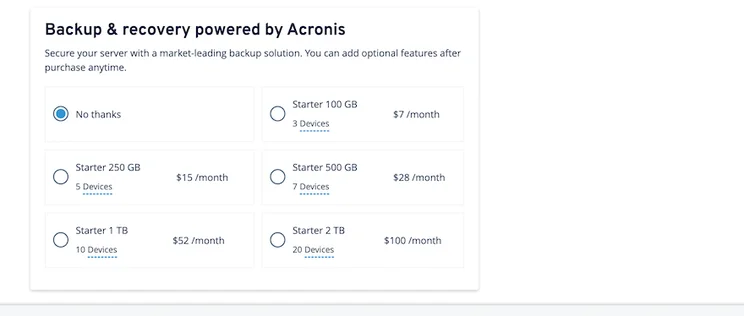
IONOS offers the cheapest VPS hosting plans, starting from just $2 per month, however, this doesn’t include backups. These can be purchased separately and cost between $7 and $100 per month depending on the volume of storage you opt for.
The most expensive VPS plan out of the top providers comes from Bluehost, but I’d encourage you not to write it off just yet. If you can afford it, Bluehost’s VPS plans are very feature-rich and support scalability, with its cheapest $31.99 plan coming with unmetered bandwidth and 120GB SSD storage.
| Hosting Provider | Initial Term Length | Entry Plan (per month, billed upfront) | Low Mid-Tier Plan (per month, billed upfront) | High Mid-Tier Plan (per month, billed upfront) | Top-Tier Plan (per month, billed upfront) |
| Bluehost | 36 months | $31.99 Renews at $81.99 | $41.99 Renews at $116.99 | – | $71.99 Renews at $144.99 |
| GoDaddy Hosting | 36 months | $8.99 Renews at $9.99 | $17.99 Renews at $19.99 | $34.99 Renews at $39.99 | $44.99 Renews at $49.99 |
| IONOS | 1 month for entry plan; 12 months for other plans | $2 Renews at $2 | $6 p/m for the first 6 months and then $9 p/m for the remaining 6 months. Renews at $9 | $10 p/m for the first 6 months and then $15 p/m for the remaining 6 months. Renews at $15 | $30 p/m for the first 6 months and then $50 p/m for the remaining 6 months. Renews at $50 |
| Hostinger | 24 months | $4.49 Renews at $7.99 | $6.99 Renews at $10.99 | $10.49 Renews at $22.99 | £19.99 Renews at $44.99 |
More Information
Our list of the best VPS hosting providers is the ideal guide if you’re interested in a VPS plan to host your website.
Not sure if you should go for shared or VPS hosting? Take a look at our comparison of shared hosting vs VPS hosting to see which one comes out on top.
WordPress Hosting
If you’re planning on building your website with WordPress, the chances are you’ve already looked at WordPress hosting plans. These plans are similar to shared hosting plans, but they’ve been specifically tailored with particular features. I’m talking auto updates and one-click WordPress installation, both of which are designed to make the lives of WordPress users easier.
If you opt for WordPress hosting, you can expect to pay anywhere between $1.99 and $19.99 per month for your plan.
Bluehost is the cheapest WordPress hosting provider, and its cheapest plan costs just $1.99 per month when you choose an annual plan. Not only that but Bluehost is recommended by WordPress itself so you can be sure you’re getting real quality if you opt with this provider.
Good to know!
Some hosting providers offer shared WordPress hosting. This is a type of WordPress hosting plan that gives you full control of all aspects of your hosting, including your updates and site maintenance. However, it’s more limited than managed WordPress hosting, and we’d only recommend it for smaller WordPress blogs or brochure sites.
The plans we’ve detailed below are all managed WordPress plans.
| Hosting Provider | Initial Term Length | Entry Plan (per month, billed upfront) | Mid-Tier Plan (per month, billed upfront) | Top-Tier Plan (per month, billed upfront) |
| Bluehost | 12 months | $1.99 Renews at $7.99 | $3.49 Renews at $13.99 | $6.99 Renews at $18.99 |
| IONOS | 12 months | $3 p/m for the first 6 months and then $6 p/m for the remaining 6 months. Renews at $6 | $1 p/m for the first 6 months and then $10 p/m for the remaining 6 months. Renews at $10 | $7 p/m for the first 6 months and then $15 p/m for the remaining 6 months. Renews at $15 |
| SiteGround | 12 months | $2.99 Renews at $17.99 | $4.99 Renews at $24.99 | $7.99 Renews at $44.99 |
| Hostinger | 48 months | $2.99 Renews at $7.99 | $3.99 Renews at $8.99 | $9.99 Renews at $19.99 |
More Information
Keen to get started with choosing a managed WordPress host? Check out this list of the best managed WordPress hosting providers to get the ball rolling.
Dedicated Hosting
If you run a large website that has to deal with a ton of traffic, you need a powerful server to support that. Dedicated hosting is the best option here because you’ll get a server all to yourself, with your very own resources.
However, in exchange for this, you’ll need to pay a steep fee. In fact, dedicated hosting is the most expensive out of all the different hosting types, and you can expect to pay anywhere between $91.98 and $519.99 per month.
| Hosting Provider | Initial Term Length | Entry Plan (per month, billed upfront) | Low Mid-Tier Plan (per month, billed upfront) | High Mid-Tier Plan (per month, billed upfront) | Top-Tier Plan (per month, billed upfront) |
| Bluehost | 36 months | $91.98 Renews at $181.99 | $121.88 Renews at $181.99 | – | $141.99 Renews at $261.99 |
| GoDaddy | 12 months | $159.99 Renews at $179.99 | $199.99 Renews at $229.99 | $339.99 Renews at $379.99 | $469.99 Renews at $519.99 |
Not every hosting provider offers dedicated hosting, so you’ll only have a few to choose from. Bluehost is a very reliable option, with plans starting at $91.98 per month, which is significantly cheaper than GoDaddy’s $159.99 entry plan.
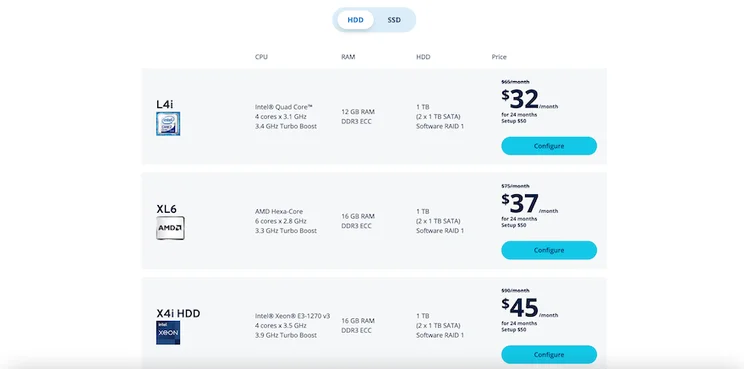
IONOS also offers dedicated hosting, but unlike its competitors, it doesn’t have a rigid set of dedicated plans. Instead, its prices vary depending on the type of server you choose. IONOS offers AMD or Intel servers, the cost of which ranges from $32 to $250 per month.
Cloud Hosting
The final type of hosting in this list is cloud hosting. This type of hosting is fairly new, so isn’t as common as others, although it’s steadily growing in popularity. This is because it doesn’t rely on a physical server stored in a data center, but instead uses a collection of virtual servers to host your website. This means that if one virtual server goes down, there’s another waiting to take its place.
This makes cloud hosting pretty reliable, especially for ecommerce sites that need to avoid downtime during busy periods such as sales season. It’s also great for scalability but doesn’t come with the sometimes eye-watering prices of dedicated hosting. For a cloud hosting plan, you’ll pay anywhere from $9.99 with someone like Hostinger and up to $380 with a provider such as SiteGround.
| Hosting Provider | Initial Term Length | Entry Plan (per month, billed upfront) | Low Mid-Tier Plan (per month, billed upfront) | High Mid-Tier Plan (per month, billed upfront) | Top-Tier Plan (per month, billed upfront) |
| Bluehost | 12 months | $29.99 Renews at $79.99 | $49.99 Renews at $109.99 | $89.99 Renews at $169.99 | £109.99 Renews at $249.99 |
| SiteGround | 12 months | $90 Renews at $90 | $180 Renews at $180 | $270 Renews at $270 | $380 Renews at $380 |
| Hostinger | 48 months | $9.99 Renews at $19.99 | $14.99 Renews at $32.99 | – | $29.99 Renews at $54.99 |
Like its approach to dedicated hosting, IONOS bucks the trend when it comes to cloud hosting. Instead of charging everyone a flat fee, it runs a usage-based billing system, charging customers by the hour.
To further complicate things, it allows users to configure every element of their hosting plan, treating cloud hosting like a pick ‘n mix. Firstly, you’ll need to select your AMD or Intel core, which costs between $0.045 and $0.05 per core per hour. You’ll then be able to add your RAM ($0.0071 per GB per hour) and select your vCPUs ($0.0310 per hour).
The options don’t stop there, and although this is great for users who want a completely custom plan, it does make it difficult to calculate exactly how much it’ll cost per month overall. If you’re considering this option, I’d recommend contacting IONOS directly to discuss your requirements to get an accurate estimate.
Hidden Web Hosting Costs
Choosing your web hosting plan isn’t the only thing you’ll need to consider when figuring out how much it’ll cost to host your website. There are still a few extra fees you’ll need to factor into your calculations. Below is a quick overview of any extra costs you may have to pay.
| Hidden Extras / How Much Does it Cost? | |
|---|---|
| Domain Registration | $10 – $20 per year |
| Additional Security Features | $40 per year (depending on software) |
| SSL Certificates | Up to $70 per year |
| Site Backups | $36 per year (depending on web host) |
Domain Registration
When you create a website, you’re going to need a domain name before you can get everything up and running. Domain names aren’t free and you’ll have to pay a fee to register your chosen name.
A domain name costs between $10 and $20 per year, depending on the registrar and top-level domain. Luckily, most of the hosting providers I’ve discussed in this article offer a free domain for at least the first year as part of their plans.
Additional Security Features
When you choose to host your website, you’re also in charge of keeping it secure from malware and hacking attempts. Most hosting providers offer a default layer of website security that protects your website from DDoS attacks, but if you want to make sure your site is completely secure, it’s worth investing in extra protective software.
Most web hosts offer this as an additional add-on, with a popular choice being SiteLock Essentials. This costs around $40 per year and will protect your website from unnecessary downtime, as well as malicious attacks.
SSL Certificates
Another security essential to bear in mind is an SSL certificate. This certificate gives your website an extra level of encryption to protect the data of your website visitors. The majority of website hosts come with a free SSL certificate for at least the first year, but if you need to renew it once it expires, expect to pay up to $70 for this, especially if you opt for a premium certificate.
Site Backups
If the worst does happen and you need to restore your website, backups are worth their weight in gold. Which is why they, usually, aren’t free.
Although some plans will include at least a basic backup schedule, you’ll most likely want something more rigorous as your website grows. Usually, these backup packages are sold as optional add-ons to your hosting plan. For example, Bluehost offers CodeGuard Basic, which costs $36 per year.
How To Choose a Web Hosting Provider
Although it sounds simple, making that final decision and committing to a web host can be a daunting prospect. When deliberating, there are a few things to weigh up to make sure you choose a web hosting provider that will meet your website’s needs:
- Budget – this is an obvious one, but make sure the web host you choose fits in with your pre-set budget. You’ll only be setting yourself up for failure in the long run if you choose a provider that’s outside of your price range.
- Hosting Type and Website Purpose – think carefully about the type of web hosting you choose. It must have everything you need to suit the purpose of your website, especially when it comes to growth and scalability.
- Plan Period – all hosting providers offer different term lengths and this will affect how much money you pay. Usually, a longer term length means that you’ll spend less in the long run, but seeing as how hosting plans are paid upfront, this will result in a high initial outlay.
- Renewal Prices – hosting providers will usually offer a low introductory price as an incentive for customers to commit and purchase a plan. However, after your initial term is over and it renews, the price will hike back up to the standard. It’s important you know exactly how much this is.
- Additional Costs – I talked about this earlier, but usually hosting plans come with some hidden extra costs you’ll need to factor in. Some have more than others, with the total number being dependent on what is included in your basic plan. Make sure you know what is and isn’t included if you don’t want to be hit with a surprise bill.
- Be Realistic – when you’re first starting out, you’ll be full of dreams about how your website is going to grow – and this is great! However, it’s important to be realistic about where you are now. Shop for your current website status, and you can scale your plan up later when you need the extra features and resources.
Web Hosting Costs: Summary
Calculating how much it costs to host a website isn’t as easy as it seems, and it depends primarily on the type of website hosting you opt for. Here’s a quick rundown of the average monthly costs you can expect to pay for each hosting type:
- Shared hosting: $1.99 – $19.99
- VPS hosting: $2 – $144.99
- WordPress hosting: $1.99 – $19.99
- Dedicated hosting: $91.98 – $519.99
- Cloud hosting: $9.99 – $380
It’s also important to bear in mind that choosing a plan is only the start of figuring out your web hosting costs. Don’t forget to factor in those hidden extras such as security add-ons, backups, domain registration, and SSL certificates.
The good thing to note, however, is that no matter what type of website you want to build, there’s a web hosting plan out there to suit your needs. And once you’ve found it, the fun can really begin!
Speaking of which, before you head off, make sure you check out our guide all about how to host a website so you’ve got all the tools you need to get started when the time comes. Good luck, and don’t forget to come back and tell us how you got on in the comments below!


1 reply
1 reply
1 reply
1 reply
1 reply
1 reply