My Honest Squarespace vs WordPress Comparison: Choose Your Platform Now

We may receive a commission from our partners if you click on a link and purchase a product or service on their website. Learn more

A smiling headshot Holly Choules
Written By
natasha_willett
Reviewed By
Updated on November 17, 2025
Advertisement
We may receive a commission from our partners if you click a link and purchase a product or service. This does not impact our ratings, which are determined by years of hands-on testing and expert research.
For portfolios
Basic
See Pricing
  • Sell unlimited products
  • Blueprint AI
  • SEO support
For small businesses
Core
See Pricing
  • Removes transaction fees
  • Google Shopping integration
  • Add pop-ups
Most popular plan
For growing stores
Plus
See Pricing
  • Increased video storage
  • Lower credit card rate
For established brands
Advanced
See Pricing
  • Lower credit card rate
  • Unlimited video storage

In March 2025, our in-house experts researched, tested, and compared the website builders Squarespace and WordPress, analyzing them across seven key categories, from design capability to pricing. Though Squarespace was the winner overall, with its impressive templates, customization options, and easy-to-use editor, WordPress is a more suitable option if you need specialized blogging tools or limitless customization.

I updated this page in November 2025 to ensure that the information provided is as accurate and as helpful as it can be. I’ve fact checked details like key costs and template number, and fleshed out this article with additional information to help you make your choice, such as outlining the migration process and mentioning each platform’s security features.

For a quick comparison of the two website builders, check out the side-by-side table below:

0 of 0
Today's best price
Free plan or free trial
Number of templates
Apps
Storage space
Recommended for
Squarespace logo black background

Squarespace

WordPress.org

14-day free trial

Free to install

190+

13,000+

40+

62,000+

Unlimited

50GB – Unlimited

Creatives, portfolios and service-based businesses

Businesses running content-heavy websites

More of a visual learner? Check out our YouTube video putting them head-to-head:

The Winner

WordPress' pricing is more flexible than Squarespace's

WordPress is the best value provider because it’s free to install and use. What you will actually be paying for are all the necessary features, such as hosting, themes, plugins, and domain names. However, if you stick to a sensible budget, you can find a price range for these features that are appropriate for your business.

When you’re building a website, there’s a key pricing difference to note between Squarespace and WordPress.

  1. Squarespace uses set pricing, giving you a good idea of how much you’ll spend over the year but locking you into at least its $19 per month plan.
  2. WordPress itself is free to use but comes with essential extra costs to run, meaning you can shop around for a lower fee as long as you’re happy to put a little more effort in.

I’ll elaborate below:

WordPress Pricing

WordPress’ pricing doesn’t come wrapped up in an all-in-one payment plan. Though it’s free to use, you’ll need to source everything else to publish a website yourself, like hosting and a domain name. In comparison, Squarespace’s plans come with everything you need already built in.

These are the key costs to consider for WordPress:

💡 Key feature 🤔 What it does 💸 Potential costs
Website host A third-party service provider that securely hosts your site's files Hosting with Bluehost starts from $2.95/month (billed annually)
Domain name Your site's web address $10-$20/year
Website themes Your site's design Free-$130 (typically a one-off payment)
Plugins Apps you can install on your site to add extra functionality Free-$129/year (one-off or ongoing payment)

As a business, you most likely have a budget you want to stick to. While Squarespace is simpler, you also don’t know what you are individually paying for. With WordPress’ approach, though it requires more work, you can keep track of each element and adjust how much you pay as your website grows. 

Squarespace Pricing

With Squarespace, there are four premium plans to choose from, alongside a 14-day free trial. Squarespace’s pricing, when billed annually, is as follows:

  • Basic – $19 per month
  • Core – $29 per month
  • Plus – $49 per month
  • Advanced – $99 per month

You can get 10% off at checkout if you use our code “WBE10”.All of the tools you need, like website hosting and a website editor, are included in your Squarespace plans already. So, unlike WordPress, you don’t have to source most of your website’s key features yourself.

If you’re a creative who needs a basic portfolio website, the Basic plan will be enough. It’ll leave you with a professional website that’ll impress potential clients and will give you the creative tools to help you display your content exactly how you want to.

The Winner

Squarespace has impressive built-in features for businesses

Squarespace’s built in features are ideal for a variety of small businesses. From your dashboard, you can track your site’s progress with its analytics, integrate social media accounts with your page, and even try out generative AI tools when creating your site.

Try Squarespace

Squarespace comes with more built-in features than WordPress, saving you time since everything you need is accessible right away. This makes Squarespace a better fit for small business owners, because they can swiftly set up the features they need as soon they create an account. 

These are just a few of the features I found most useful when building with Squarespace:

  • Analytics: Track website visits, traffic sources, visitor geography, and more with Squarespace Analytics.
  • Social media integration: I could import content to my site from social platforms like Instagram and embed social feeds directly on my pages.
  • Podcasts: Host a podcast on your Squarespace site, and publish it to Spotify or Apple Podcasts.
  • AI tools: Squarespace boasts a range of generative AI tools, from an AI writer to auto-generated product libraries for sellers and even hyperreal AI photo environments – I could click on any text box in the editor and get its AI to generate copy for me.
  • Acuity Scheduling: This allows you to take online bookings and set up appointments through your website, but the Acuity Scheduling feature is an additional cost (with plans starting from $16/mo).
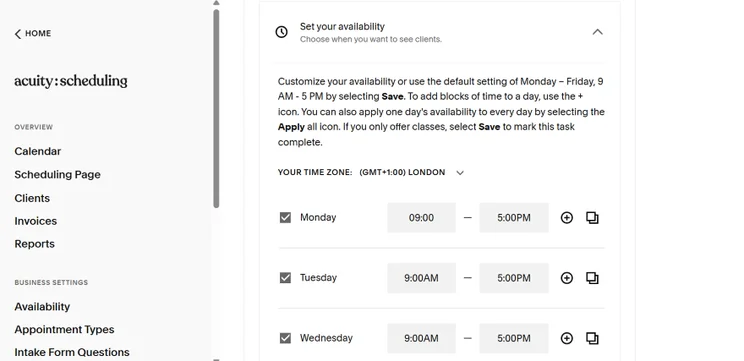
Screenshot of Acuity Scheduling ability to change availability
With Acuity Scheduling, you can also set your availability so potential clients know when you're free. Source: Website Builder Expert

The best part about these features is that they all work with Squarespace’s editor, meaning I could simply pick them out from a menu and drag them onto my site. Squarespace’s features, then, are far easier to use than WordPress’s, since they’re already built into the editor and typically only take a few clicks to add to your site!

Though Squarespace has a wide range of built-in features, WordPress is better known for its large library of plugins, and is very reliant on these integrations for adding functionality to your site (I’ll discuss this in more depth later).

However, that’s not to say that WordPress doesn’t have any built-in features. I was impressed to find the following when building a site:

  • Password-protected pages: I could lock certain pages with passwords, making it ideal for creatives who want member-only content.
  • Multiple contributors: Have different authors and admins manage your site and produce content.
  • Image editing tools: Edit images in WordPress, freeing up storage space and improving SEO.
  • Comments management: Other WordPress users can leave comments on other blogs, helping websites build engaged communities.
  • Multilingual site options (70+ languages): Make your website accessible to viewers all over the world.
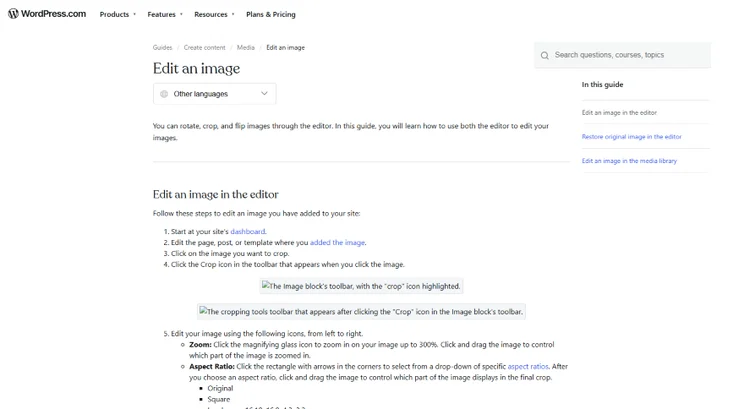
Text on a WordPress page explaining how to edit images
I found tutorials on WordPress' site showing me how to use its built-in tools, like image editing. Source: Website Builder Expert

How Secure Are Squarespace and WordPress?

Squarespace is secure, since its security features are contained within its website builder. All websites have:

  • Built-in SSL certificates
  • Two-factor authentication
  • A login activity panel that flags suspicious online behavior
  • 24/7 security monitoring from the Squarespace team

WordPress is safe to use, but you will need to play a more hands-on role to keep your website as secure as possible. This includes making sure that you’re using the most current version of WordPress, carefully vetting the apps and templates you’re downloading, and sourcing a SSL certificate yourself.

The Winner

Squarespace has the easiest editor to use

Squarespace pulls ahead of WordPress thanks to its drag-and-drop editor, which seamlessly places all the elements onto your site without corrupting the template, leading to a well-designed website every time.

If you want to set up your website quickly, is Squarespace or WordPress the better option? Let’s take a closer look.

My Experience Setting Up With Squarespace

Squarespace is the easiest website builder I’ve tested. After onboarding, I could get right into designing my site by clicking “Edit” in the account dashboard. Its aptly named Fluid Engine editor placed a grid over my site, helping me place and align elements easily. This worked for everything, from images and videos to text boxes and sign-up forms. It’s a really useful tool to keep things organized.
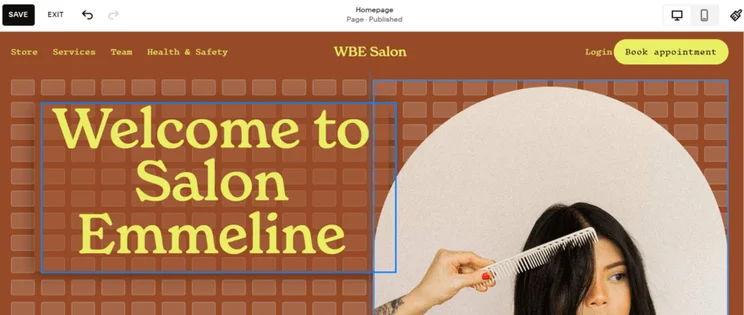
Squarespace editor showing the grid markings
I used Squarespace's smart grid to align elements when dragging them around the editor. Source: Website Builder Expert

I could move these elements around wherever I wanted, giving me lots of creative freedom but not complete control. Ultimately, I found it easy to make a stylish website with Squarespace in a few hours. Skip to 00:57 in the video below if you want to see the Squarespace editor in action:

My Experience Setting Up With WordPress

WordPress doesn’t have a drag-and-drop editor – at least, not initially. At its core, WordPress is a CMS (content management system), meaning it’s designed for posting regular content. However, unlike earlier versions of WordPress that heavily relied on user coding, you can access a built-in block editor called “Gutenberg” that comes with basic design options.

But I must warn you, don’t expect sophisticated designs that are on par with Squarespace. I felt quite limited by WordPress’ basic editor during hands-on testing, which restricted my creative options.
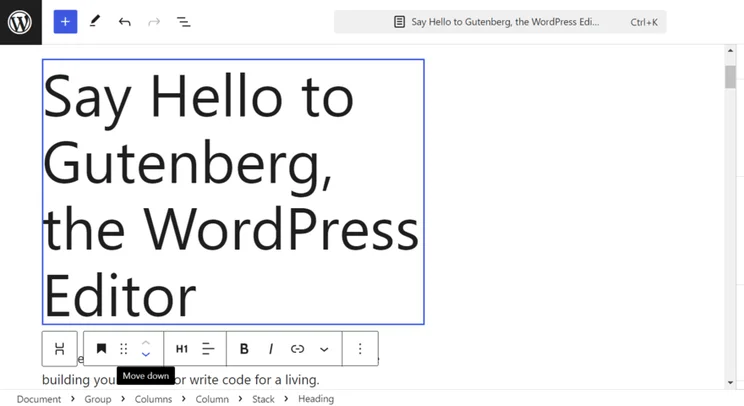
Gutenberg WordPress editor
I found the WordPress block editor easy to use but I could only place elements on top of one another. Source: Website Builder Expert

However, if you want to add advanced functionality to your website, you’ll likely need to use code. As a result, I don’t recommend WordPress for beginners who lack building experience. You might need to install a drag-and-drop editor plugin like “Elementor” to make things easier, or hire a professional web designer if you want a good-looking site – something that Squarespace gives you the freedom to do yourself.

The Winner

Squarespace has the best-designed templates

Squarespace’s templates are some of the best-looking in the industry, making it a clear win. Combined with its easy-to-use editor, creatives can get a professional-looking site no matter their skill level.

Squarespace’s 180+ free templates are known for their style, covering a range of industries and website types, including artist websites, portfolios, online stores, and blogs. I could browse and select a template during the onboarding process, with Squarespace letting me preview the theme for both desktop and mobile users.
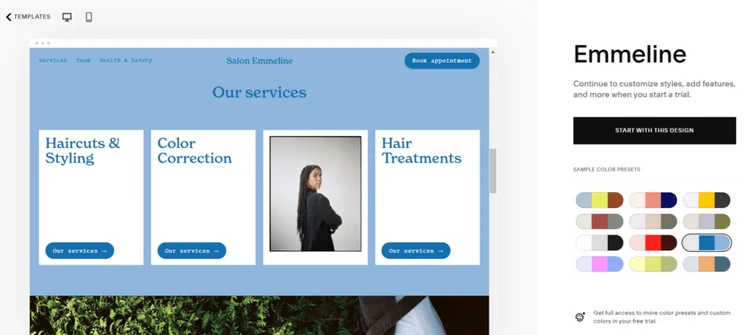
Preview of Squarespace's Emmeline website template
I loved being able to preview each Squarespace template and test out different color schemes before deciding on a theme. Source: Website Builder Expert

WordPress offers over 13,000 templates (themes) to choose from, though the quality can vary. You’ll have to pay a one-off payment for premium WordPress templates, whereas all of Squarespace’s templates are free to use. When browsing the templates on WordPress, the options are a mixed bag of well-designed options and outdated-looking templates. With Squarespace, all templates are vetted by professionals, guaranteeing a library of high-quality designs.
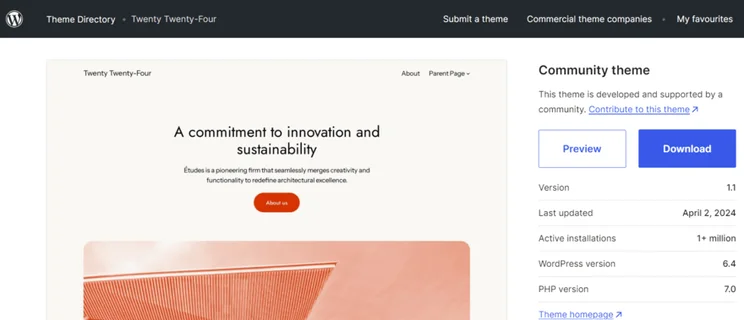
WordPress template preview showing an option to download the theme
I particularly liked that I could see how many people had installed a theme with WordPress since I didn't want my website to look like others. Source: Website Builder Expert

Squarespace also has the added perk of Squarespace Blueprint, a design tool which uses AI to generate a template customized to your liking.

Squarespace Blueprint asking what homepage sections to include in the AI-generated site
I found it easy and quick to build a simple (but stylish) website with Squarespace Blueprint. Source: Website Builder Expert

I used Blueprint AI when building a site with Squarespace and had to complete a short questionnaire and make a few design choices, such as page options and a color scheme. It took minutes to create a website with Squarespace Blueprint. Check out the video below if you want to see Blueprint AI in action:

The Winner

Squarespace built-in sales features overshadow WordPress'

Squarespace’s ecommerce features are built into the builder, meaning that you can simply add it to your page and you’ll have an online store.

If you want to sell online you need certain ecommerce features, such as accepting payments and listing products, as well as guarantees around security. Squarespace offers built-in sales capabilities, while WordPress relies on ecommerce plugins like WooCommerce. So which builder is best for selling?

Selling on Squarespace

After Squarespace’s May 2025 pricing update, you can now sell on any of its four plans.

With these plans, you unlock a whole range of sales features, including:

  • Send invoices
  • Sell online content like blogs, courses, or videos
  • Automatically send abandoned cart recovery emails
  • Sell in person with POS integration
  • Update customers on the status of your products (e.g. limited availability, out of stock, etc)
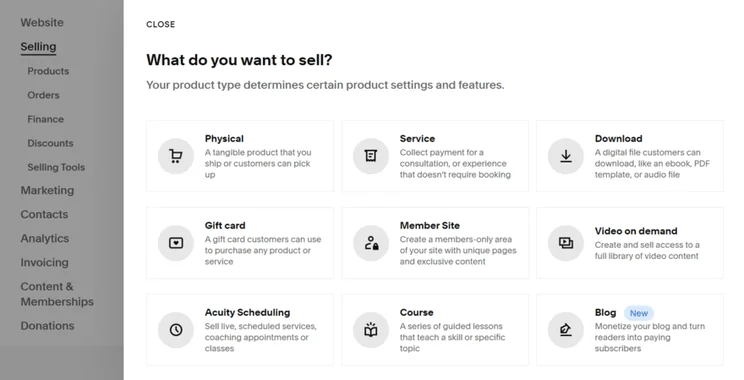
Product options in Squarespace's selling option
I could add a variety of product types through Squarespace, including physical products and online courses. Source: Website Builder Expert

If your services are more appointment-based, say like a professional photographer, Squarespace’s Acuity Scheduling service can keep your customers up-to-date on when you’re available and then let them book you for creative gigs.

To start building my Squarespace inventory, all I had to do was click on the “Selling” section in the dashboard to add products. From there, I could add relevant product information and imagery.

Selling On WordPress

With WordPress, I needed to download the ecommerce plugin WooCommerce in order to sell online. WooCommerce is a full ecommerce platform, used by international brands like ChiaPet and Nutribullet.

WooCommerce is free to install, but it’s reliant on plugins for many of its sales features. So while it seems like a budget-friendly option initially, the costs will add up. Ecommerce plugins like this can cost roughly $79 to $299 per year, for each app.
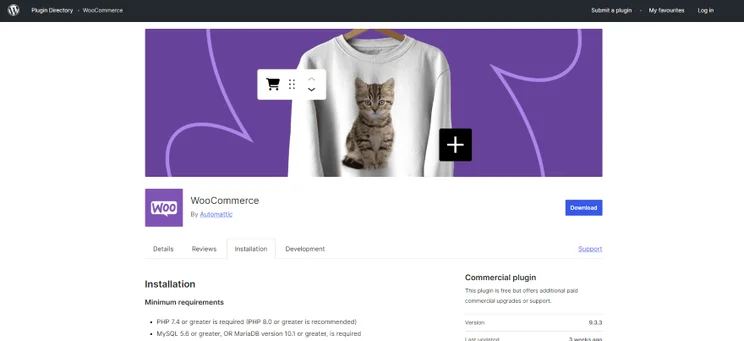
Screenshot of WooCommerce's app on WordPress' plugin directory
I found the WooCommerce plugin on WordPress' Plugin Directory. I also needed to make sure that I had the correct system requirements to get started. Source: Website Builder Expert
The Winner

WordPress is built for content-heavy blogs

WordPress was built with blogging in mind. Every WordPress site includes commenting abilities, plus helpful plugins to achieve creative, content-heavy blogs.

Starting a blog is a great way for you to connect with your audience and monetize your website. If you’re interested in finding the best blogging platform, you should consider WordPress. Its CMS lets you create multiple blog templates, schedule hundreds of posts at a time, and have access to hundreds of blog-specific apps and plugins. You can even have multiple authors work on your site at once.
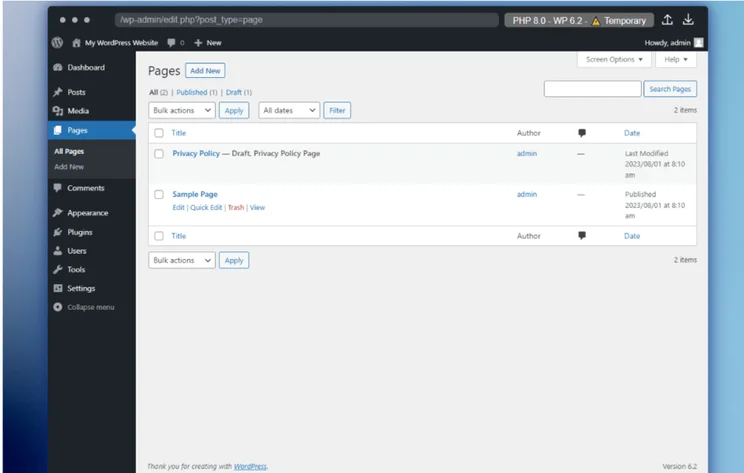
WordPress backend dashboard
This was the first sight that greeted me in WordPress.org. It can look confusing at first, but it's been designed for blogging. Source: Website Builder Expert

In comparison, Squarespace’s blogging tools were easy for me to use, but they weren’t as heavy-duty as WordPress’. That said, I could still accomplish a lot, such as scheduling posts, setting up multiple authors, and even creating blog tags. Plus, in combination with Squarespace’s simple-to-use editor, it’s a much easier way to blog for beginners.

To access Squarespace’s blogging features, I simply had to add a “Blog” page to my site. Some templates come with a blog pre-equipped, but my template didn’t include one, so I clicked “Pages” under “Website” in the dashboard.
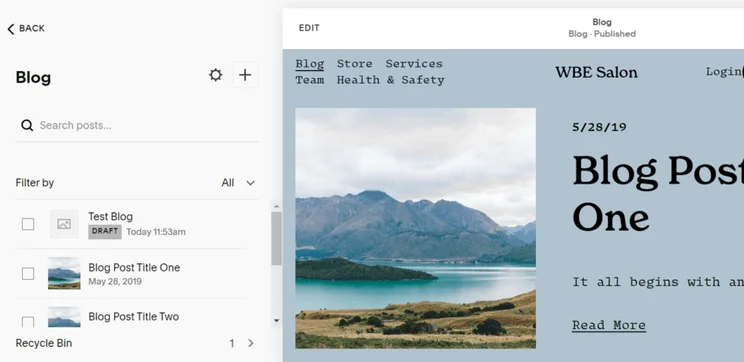
Squarespace blog page showing a list of content
I could add and edit blog content through the Squarespace "Pages" section, but I thought it was odd there's no blog management section in the account dashboard. Source: Website Builder Expert

However, what really sets WordPress above the rest is its community. Anyone with a WordPress account can comment on any other WordPress blog, provided that the blogger doesn’t disable the ability. Comments help build a community and can lead to dedicated fanbases, which is what all bloggers aspire to. Since WordPress already powers nearly a third of the websites on the internet, there are plenty of WordPress accounts that might stumble upon your blog and leave a comment.

The Winner

Squarespace apps are more trustworthy than WordPress'

Squarespace has the best apps and plugins. Despite only offering around 40 apps, Squarespace’s feature quality is more consistent, making it way more user-friendly and less risky.

It’s fair to say that there’s a WordPress plugin for everything – from SEO, ecommerce, drag-and-drop editors, and scheduling. I could browse over 60,000 plugins to download and add to my site.

The open-source nature of WordPress encourages you to download as many plugins as you need, but I found the plugin library difficult to navigate when testing. There’s a search bar for specific queries and featured apps on the homepage, but it would’ve been nice to have plugins categorized by need or industry. If you’re new to building websites, locating the right WordPress plugins for your business will feel overwhelming.
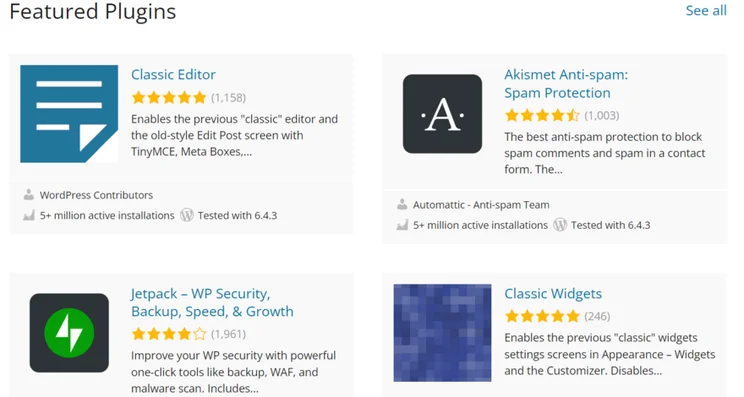
WordPress featured plugins in the plugin library
I could easily browse WordPress' plugin library, although the sheer number is overwhelming! Make sure to use filters and read reviews to ensure you get good quality plugins. Source: Website Builder Expert

In comparison, Squarespace already comes with the apps you need – you just need to follow the instructions provided to install them. Though there’s only around 40 apps to choose from, each app has been vetted and approved by Squarespace itself, so you don’t need to worry about their quality.

With WordPress, you have access to over 60,000 plugins, but they are not all vetted for quality unlike a curated app store. In fact, we’ve covered news stories of WordPress plugins getting hacked due to vulnerabilities. To avoid risk when choosing a plugin, check the ratings to see what other users say and if it’s been updated recently – most importantly, make sure it’s compatible with the latest version of WordPress.

Eight extensions in Squarespace's extensions library
I found Squarespace's Extensions Library to be small but easy to navigate. I found it easier to quickly find suitable apps than when browsing WordPress.org's directory. Source: Website Builder Expert
The Winner

Squarespace and WordPress have equally good SEO tools

Both WordPress and Squarespace scored full marks in our SEO-specific testing. WordPress’ SEO tools are better for controlling individual details, while Squarespace prides itself on having more built-in features.

Both Squarespace and WordPress have access to a fantastic range of SEO tools, such as:

  • Customizable meta titles and descriptions: These are the titles and paragraphs that describe a page in Google search results.
  • Customizable URLs: You can clean up your URLs to make them more readable to search engines (for example, www.squarespace.com/pricing is a clean and simple URL).
  • Image alt text: Alt text just describes what an image is showing, and it makes your website more accessible because anyone using a screen reading tool won’t have to wonder what each image shows. Alt text also helps search engines understand the purpose and relevance of each image.
  • Page redirects: If you change a page’s URL and someone tries to visit the old one, Squarespace will let you automatically send them to the new one.
  • Automatic sitemaps: A sitemap is a list of the different pages on your site, designed to help search engines figure out how they’re all related. Squarespace generates one of these for you automatically.
  • Hide a page: If you don’t want a certain page to show up on search engines just yet, you can simply hide the page from Google.
  • Control social image: You can control which image appears alongside your content when someone shares it on social media.
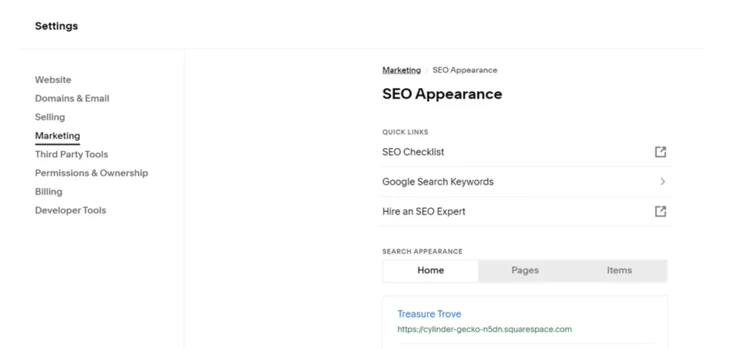
Squarespace dashboard showing SEO settings
Squarespace made it easy for me to edit my test website’s SEO settings in the backend, offering handy links to resources too. Source: Website Builder Expert

The major difference between the two is that Squarespace’s SEO features are all built-in, while WordPress’ SEO capabilities rely on plugins like Yoast.
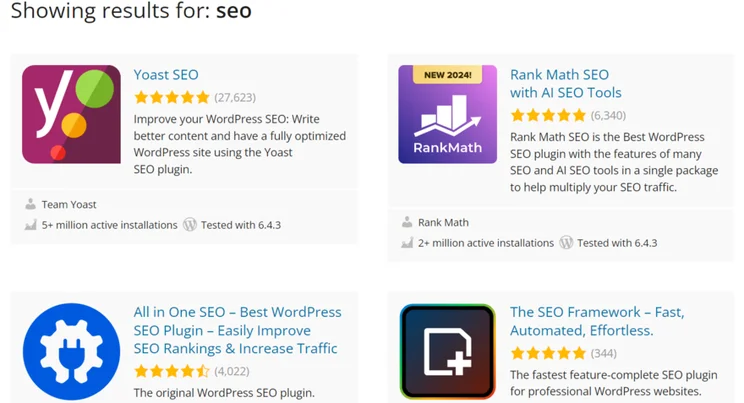
Plugin results on WordPress for search term "SEO"
I easily found these SEO plugins when I search for "SEO" in the WordPress plugin library. I always check which version of WordPress the plugin is compatible with, and number of good reviews before installing. Source: Website Builder Expert

With Squarespace, you won’t be able to change technical SEO factors like you can with WordPress and Yoast, but you do get a lot of the work taken care of automatically, meaning you have more time to spend on other areas.

The information in this article is supported by our 2025 round of in-house website builder research, which investigated six key criteria. Our team weighted this criteria based on its importance to businesses that are choosing a website builder – it goes as follows:

  1. Website functionality: 30% – The key features a website builder has built-in, like generative AI
  2. Design features: 25% – The quality of a builder’s templates and customization tools
  3. Pricing: 15% – If a builder is good value for money
  4. User experience: 15% – How easy the builder is to use, from setup to publishing
  5. Help & support: 10% – How useful a builder’s support options are
  6. Reputation: 5% – A builder’s popularity and its online reviews

Alongside this in-house research, I’ve also tested out each website builder myself. So, throughout this article, you’ll find useful insights from my firsthand experiences that can also help you make you an informed decision.

Whether you want to switch from WordPress to Squarespace or vice versa, migration is a time-consuming process. There are manual steps you’ll need to take that require careful planning.

Migrating from WordPress to Squarespace

It’s more straightforward to migrate from WordPress to Squarespace, since Squarespace’s dashboard has an import tool that enables you to transfer over your WordPress content. This includes blog pages, posts, comments, and authors.

However, you won’t be able to import:

  • Your WordPress website design
  • Any content from apps
  • Gallery images and captions
  • Images in your Media Library that aren’t displayed on your WordPress website

Before you import your content, you’ll need to make a Squarespace account, choose a plan, and create a new website design first.

Migrating from Squarespace to WordPress

WordPress doesn’t have a dedicated Squarespace importer, so you’ll need to manually move most of your website content from Squarespace to WordPress. However, you can download an XML file from Squarespace and import it into WordPress. The file contains:

  • Basic pages
  • Your blog page, its posts, and comments
  • Some image blocks

After that, there’s a lot of heavy lifting you need to do, such as:

  • Importing your website’s images
  • Creating a new website design
  • Recreating your previous navigation menus
  • Migrating content that wasn’t included in the Squarespace XML file (like audio blocks)

Overall, Squarespace is the winner of this head-to-head. Its superior editor and built-in features simply mean it’s more recommendable than WordPress – even for those with website-creating experience. Also, it’s the ideal builder for creative businesses promoting their services online. Its high-quality templates can help you add some artistic flair to your online presence, while the Acuity Scheduling tool enables you to set up meetings with potential clients.

However, WordPress could still be suitable for your needs. If you need a content-heavy website that you have more control over, the builder’s advanced editor and customization options could be a great asset to your business.

Written By

A smiling headshot Holly Choules

Holly Choules is a Writer at Website Builder Expert with a background in researching and crafting engaging content for digital platforms. In previous roles, she has demonstrated her wordsmith skills by writing for public facing brands in a range of industries. After gaining hands-on experience using leading website builders, like Wix and WordPress, she is now keen to share her findings through informative, easy-to-follow articles that help small business owners get online and grow their presence.

Since joining the team in 2024 and transitioning into the tech sphere, Holly is passionate about applying her three years of content writing experience and upholding Website Builder Expert’s position as an authoritative source on website builders, ecommerce, and digital marketing.

You can read Holly’s articles below, or connect with her on LinkedIn.

More about

Reviewed By

natasha_willett

Natasha brings her expert credentials – a BSc, Ma, and MMRS – to Website Builder Expert. Natasha has qualifications in Advanced Statistical Analysis, MRS certificate in Market Research, Brand, Finding the Story in the Data, and Big Data: Measuring and Predicting Human Behaviour. These have allowed her to carefully analyze over 64 providers across website builders, ecommerce web builders, and hosting.

Natasha began building websites when studying sports science, originally using Weebly to create websites to help students learn in a more interactive way. During her first week at Website Builder Expert, she realized that website builders would become important in giving business owners full control over their websites. She began creating a rigorous methodology of research that centered around testing providers and products against a large set of mixed criteria turned into quantitative findings, comparing value for money, design, ease of use, and more. All to provide the most honest and objective insights rather than just looking at their claimed features.

In five years at Website Builder Expert, Natasha has attended multiple expos in her field, including ESOMAR, MRS, eCommerce Expo, Ad World, Digital Customer Engagement Summit, and IMRG, just to name a few. Natasha has also worked alongside website builders directly to share her research with them, so that they might improve their products for users.

She’s clocked an impressive 9,600 hours of product research and testing, pulling data from multiple sources and providing the Website Builder Expert team with the scores and product details they need to give you the best recommendations to succeed online.

More about

398 comments

Your email address will not be published. Required fields are marked *

  • Petersvh

    Cultural Exchange Tours: Join guided tours that consist of home remains and neighborhood activities. As opposed to obsolete stereotypes, eastern songs over 50 are tech-savvy, globe-trotting, and eager to trade ideas linking custom and technology. Many Asian elders encounter unique difficulties, from browsing family assumptions to connecting cultural spaces. As a leading dating platform for fully grown adults, SeniorMatch provides a secure and inviting area for Asian senior citizens to link. Security functions like profile confirmation aid avoid fraud sites, making certain a safe area for interacting with asian potential customers. Online dating can be an amazing trip, but it's important to remain risk-free. Throughout this trip, eastern singles over 50 repeatedly find benefits one-of-a-kind to their age brace. On specialized systems like SeniorMatch, you'll discover individuals in your age group that understand your life experiences. These systems usually integrate cultural elements, such as regard for family members values and customs, helping individuals get in touch with people of oriental descent on a deeper level. You can locate people who share your love for Asian traditions, regard family values, and appreciate the exact same way of life. It shows regard and effort in interaction, essential in any kind of relationship. These ideas dive deeper into promoting intimacy, reinforcing communication, and building a structure of trust fund that goes beyond language obstacles.

    The message is clear: love's language is timeless, and for eastern songs over 50 the next excellent phase begins today. Cultural recognition plays an important function in Asian elderly dating. Why Choose a Specialized Senior Dating Platform? The system uses multilingual assistance, making it comfortable for individuals who like communicating in their native language. With functions specifically developed for Asian customers, consisting of language choices and social preference settings, finding somebody who shares your values and history has actually never been much easier. Many Asian seniors on SeniorMatch are seeking partners who understand their cultural history. These distinctions additionally produce purposeful opportunities to share abundant social practices and life experiences with potential partners. Many customers like companions who recognize Asian worths, practices, and family characteristics. These acts strengthen shared values, widen social media networks, and infuse every day life with objective beyond 2 individuals. Such contribution highlights the self-respect embedded in asian senior dating, showing [url=https://www.bestbrides.net/asiame-reviews/]asiame review[/url] that love in later life can be all at once personal and community-minded. Asian elderly dating equips fully grown grownups to stand tall in heritage and individual option, crafting connections abundant in feeling and based in knowledge. Why Should Asian Seniors in America Choose SeniorMatch?

    Finding love after 50 is coming to be a growing pattern among Asian seniors in America. With over 1.7 million senior songs over 50, SeniorMatch hosts among the biggest Asian elderly areas in America. Safety and privacy are leading concerns for elderly daters. Ready to Start Your Senior Dating Journey? Start with fundamental details like your age, place, and Asian history. With these defenses in area, you can concentrate on making authentic links without stressing over your personal info or safety. The details provided in this post is intended for instructional and self-help objectives just and need to not be interpreted as a replacement for specialist treatment or therapy. Top dating sites utilize sophisticated matchmaking formulas. But just how easy is it to use? Nevertheless, one of the most reliable method to locate your soulmate is to utilize search filters. Take your time to satisfy brand-new people and enjoy making pals in the process. It's a timeless platform trusted by millions, leading the way for purposeful connections. With a durable platform for video clip intros and messaging, it specializes in Filipino and other asian songs, providing totally free features for women to motivate equilibrium.

    However, people on free subscription are only permitted to send out 10 messages a day. The dating scene is not without challenges. Cultural differences can provide both opportunities and obstacles. While these ways still work, online dating deals more opportunities and convenience, particularly for those with active timetables or restricted social circles. These typical topics make conversations more meaningful and natural. Ladies even have to offer their ID with the image to make certain there are no catfishing. Once there are suits, we help with remarkable communication whenever you desire. Knowing what you desire aids tighten down your options significantly. This figure underscores the importance of selecting a dating internet site that not just provides innovative video clip conversation options and secure messaging however likewise supplies an easy to use interface for a smooth dating trip. It is trying to be like an Indian version of Tinder but the designers of this app lack the knowledge to supply a fluid interface. The user interface sustains numerous Asian languages including Japanese, Korean, and Chinese. There are many websites available for dating Asian women.

    As a leading dating system for mature adults, SeniorMatch gives a safe and welcoming area for Asian senior citizens to attach. Cultural recognition plays a crucial role in Asian senior dating. Such payment emphasizes the dignity installed in asian senior dating, revealing that love in later life can be concurrently individual and community-minded. Asian senior dating equips fully grown grownups to stand tall in heritage and individual selection, crafting partnerships abundant in feeling and based in knowledge. With over 1.7 million senior singles over 50, SeniorMatch hosts one of the biggest Asian elderly communities in America.

  • MichaelDarve

    Быстро собираем первичную информацию, оцениваем риски и предлагаем подходящий вариант обращения.
    Подробнее можно узнать тут - [url=https://kapelnica-ot-zapoya-v-moskve14.ru/]sdelat-kapelnicu-ot-zapoya[/url]

  • Holly Choules
    Holly Choules

    Hiya Zigman,

    Thanks for sharing your experiences with blogging and thoughts about WordPress and Squarespace's pricing.

    If you ever decide to move from WordPress to Squarespace, you'll need to migrate your blog content across - which can be time consuming. You will also need to redesign your website, but this is made easy with Squarespace's professional templates.

    Hope this helps!

    Best,
    Holly

  • Lisa

    Thank you for this in-depth review. Very helpful!

    1 reply

    • Holly Choules
      Holly Choules

      Hi Lisa,

      I'm so happy to hear that you found our in-depth review helpful!
      If you haven't already, you can also take a look at our individual reviews for Squarespace and WordPress if that helps too.

      All the best and happy holidays,
      Holly

  • Tom

    I have replicated squarespace site using wordpress.
    I set all the font style the same as the squarespace.
    But when we compare them, it has significant difference.
    Please tell me why it happens.
    Thank you.

    1 reply

    • Jacqueline Renouard
      Jacqueline Renouard

      Hi Tom,
      Thanks for getting in contact, without being able to see the two websites, or knowing which fonts you're using, we would say it's a case of trial and error. Every website builder works slightly differently, but you should be able to replicate your page with Squarespace. If you're using a special font then it might be worth contacting Squarespace support. We hope this helps!
      Warmly,
      Jacqueline

  • reezan

    thanks for this blog its really helpful for me

  • Amos Weisskopf

    Lucy, I tend to agree -- SquareSpace turns out often MUCH more affordable than Wordpress in the long run. The designs on SP are stellar; I like Wordpress, have used it for years but really -- SquareSpace is simply superior for owners of simple websites that just need convertable traffic (rather than fancy shmancy fireworks).

  • Nikki

    This was SUPER helpful, thank you. After reading this I made my decision to move forward with Squarespace.
    Thank you again.

  • Phil

    Thank you Lucy, a very insightful and helpful review covering all the bases.

  • jenifer David

    Appreciating the persistence you put into your blog and detailed information you provide.

  • Srishti

    Thank you for the elaborate article, appreciate it!

  • Pedro

    Great article and in depth review. Thank you! :)

  • Joseph

    This really help me make up my mind Square space here I come thanks so much for this article I was lost on which platform to go on I will use square space for now when business reach like apple I will migrate thanks a lot

  • Dom

    What an amazing review ! Genuinely the most concise and informative I have come across over the years of debating which one to go with .. I can firmly say Squarepace is the one for my business

  • Lyubov Strauss

    It's a great article.

    I will continue design websites for my clients in Squarespace.

    Squarespace is a great tool for a graphic designer for building websites. Elegant beautiful professional website design will be the main feature of Squarespace. I used WordPress to manage my client website but I don't like clicking from one page to another to see the webpage layout. WordPress doesn't inspire you by the way the server pages look and updated tools. It is very technical code looking pages.

    I rather design beautiful websites that national companies e-commerce websites. My client list is limited but my creativity doesn't.

    1 reply

    • Lucy Carney
      Lucy Carney

      Hi Lyubov,
      Thank you for sharing such an interesting insight on Squarespace and WordPress! I'm so glad you find Squarespace so enjoyable and efficient to use for your business. It certainly is a wonderful platform for creating stunning websites, I hope it continues to inspire your creativity -
      Thanks for reading,
      Lucy

  • Sam

    Thank you very much for sharing this informative write-up. There is very much to learn from the blog. This is really very useful.

    1 reply

    • Natasha Willett
      Natasha Willett

      Hi Sam,
      Welcome to the community. Thank you for your comment, it's great to hear you enjoyed the article. Please do feel free to share with anyone else who you think could benefit from the content also.
      Thanks,
      Natasha.

  • Lisa Pecunia

    This seems very biased towards SquareSpace. The true value of Wordpress is being able to 1) have a massive amount of control over your site, and 2) do pretty much anything with it for very low cost, as there are thousands of high-quality plugins available. The fact that there are lots of low quality plugins is simply a reason to be careful about which ones you choose (Wordpress has a great review feature, which exposes the poor quality ones - people are NOT afraid to tell it like it is, especially if they've had a bad experience). Let's not throw out the baby with the bathwater.

    1 reply

    • Charlie Carmichael
      Charlie Carmichael

      Hi Lisa,

      Thanks for your comment. The point to make is that with Squarespace, you can be assured of quality as everything is built-in - the same can't be said for WordPress, which can make it a tricky platform to navigate. This review is aimed at helping people with limited-to-no technical experience get online, and for that reason, Squarespace becomes the obvious choice. As you rightly point out though, WordPress has more capabilities and gives you much more control, so it's definitely suited to those who are well-versed in website building.

      Thanks again and have a lovely day,

      Charlie

  • Jon Finch

    After three years, I'm leaving Squarespace. What change?
    I needed to build a website in Wordpress and discovered how much easier it all was.

    I've looked at my main competitors and each time I see something I like. "Wow, look at those company logos scrolling smoothly from right to left." I message Squarespace, and they tell me three weird "work-arounds" to make my testimonials do that.

    When you look at it, it's not scrolling smoothly... it's very jerky. And there's no way to make it go on continuous loop.

    I'm looking forward to having a website that looks as good as my competitors' sites. Good-bye, Squarespace!

    1 reply

    • Lucy Carney
      Lucy Carney

      Hi Jon,
      Thanks so much for your comment, I'm sorry to hear you've had such problems with Squarespace! It's a shame it wasn't the right website builder for you - Squarespace performed really well in our research but there are lots of other options out there. If you're still looking for an alternative, have a look at our website builder comparison chart. I hope this helps, and best of luck with your website.
      Thanks for reading,
      Lucy

  • Patrick

    Great article and good review of both platforms.

    However, I disagree that you need to know how to code to build a Wordpress website. While it is not a WYSIWYG platform, I have built my website on Wordpress (with the help of some free online tutorial) without ever writing a line of code.

    My website has a Blog, a Portfolio, a Contact Form and even a PayPal checkout. I am not a software developer and have very limited knowledge in that field.

    1 reply

    • Fred O'Brien
      Fred O'Brien

      It's certainly possible to build a site on WordPress without using code, but as you point out even then you need to be a bit of a self-starter. I'm not a software developer either and I use WordPress for my site, so I completely understand where you're coming from.

      That said, I also know people who prefer WYSIWYG platforms simply because they free up time to focus on other things. In a lot of cases it's a question of convenience rather than of technical knowledge, I think.

  • Mina

    Helpful and very upfront =)

  • Lottefier

    Fantastic article, many thanks.

    I would have loved to have your views comparing SEO strengths and weaknesses on Squarespace vs WordPress

    1 reply

    • Fred Isaac
      Fred Isaac

      Hi Lottefier, we'll keep that in mind! We do have a review of Squarespace's SEO that you might find interesting: https://www.websitebuilderexpert.com/website-builders/squarespace-seo-review/

  • David

    Thanks a lot for the review. It provides a good view on Squarespace, although it seems biased.

  • Sara Lajas de Oliveira

    I'm really happy to found this article :) Thank you very very much!

    1 reply

    • Fred Isaac
      Fred Isaac

      Hi Sara,

      Thank you for the comment - glad you found the article helpful!

      Fred

  • Christy

    Thank you for this review!

    1 reply

    • Fred Isaac
      Fred Isaac

      Hi Christy,

      Glad you found the review useful!

      Best,

      Fred

  • Anita

    Hi there,
    I want to start a blog essentially with affiliate product links built in eventually and ‘shop the look’ type capabilities.
    Are there any platforms that work better with affiliate marketing links?
    Thanks,
    Anita

    1 reply

    • charlie Carmichael
      charlie Carmichael

      Hi Anita,

      Thanks for your comment.

      It shouldn’t matter which builder you use regarding affiliate products but I would advise you take SEO into consideration when embedding the links. If you need any further info on SEO, read some of our useful tips here.
      Good luck creating the blog!

      Charlie

  • William Arias

    JEREMY,
    Thanks a lot for such a great review.
    Currently I have 2 squarespace websites. Having so little knowledge about IT, I found that Squarespace was a no brainer for somebody just starting a website, when I started my research for a provider , 4 years ago. When it comes to customisation, value for money and time saving, Squarespae is a fantastic solution. After getting used to the prompts and clean instructions, I find it a total "idiot-proof" alternative. On top of that, the customer service is truly good. After reading your article, I'm happy i made the right decision when i decided to pick squrespace all that time ago. The only "problem" was getting the right templates for my business. They have very good, clean and professional looking options. I highly recommend for those who don't have time to learn coding or any complicated IT education. Simply, Squarespace delivers added value. Just in case, my opinion is free and I don't know anybody linked to that company. I'm just a grateful customer. Cheers. Will

    1 reply

    • Fred Isaac
      Fred Isaac

      Hi Will,

      Great to hear you've had a positive experience with Squarespace - thank you for sharing!

      To our mind, Squarespace leads the way for stunning, professionally-designed templates, so it's good to hear you agree.

      Thanks again,

      Fred

  • Brett

    I am a photographer and have built out my website both on SquareSpace and WordPress. I like the features of WordPress, but there is one thing that is a deal breaker that I haven't been able to solve: the photos I upload in my gallery are sharp on SquareSpace and blurry on WordPress. I have tried resizing and regenerating the thumbnails to no avail. Is there a solution? Otherwise, I will have to go with SquareSpace.

    Thanks,
    Brett

    1 reply

    • charlie Carmichael
      charlie Carmichael

      "Hi Brett,

      Thanks for your question.

      This is a fairly common problem among WordPress users so you're not alone. Most of the time resizing the thumbnail should be sufficient, but if they're still coming out blurry, I'd recommend one of two plugins.

      The first is called WP Resized Image Quality and the second, ImageMagick. Both can be really helpful with this issue so I'd recommend looking into them.

      If you're still having trouble, we've got a guide to the best website builders for photographers here that may prove handy.

      Hope this helps - let us know how you get on.

      Thanks,

      Charlie"

  • Sue Hansen

    You fail to mention that the host can make up for some of the wordpress shortcomings you point out. When you pay for wordpress hosting, you can (often) get wordpress technical support from the host. And this can include phone support, not offered by square space.
    Also, the host may maintain upgrades automatically. And generally speaking, you can separate the "good vs. bad" quality wordpress plugins/templates based on the number of downloads.

    1 reply

    • Tom Watts
      Tom Watts

      Hi Sue,

      Thanks for joining the discussion.

      While it's true that 3rd party hosts can provide WordPress support, this isn't the same as getting support from the platform itself. Squarespace edges it for us because it's support guides are super detailed and - more importantly - very well organized. This is really helpful in finding answers to queries you might have, whereas as we mentioned with WordPress, you need to do a lot of sifting around to find the right information.

      It's also worth mentioning that to get any decent WordPress support from a hosting provider, you'd need to use a "premium" WordPress host (such as WP Engine) which can run from $29/ month to $249/month. And even then, this doesn't guarantee that they will help you solve all WP issues that you may have. This means that for any issues beyond the scope of WP Engine's offering (for example), you would have to hire your own developer for trouble shooting. - which will be costly!

      So, taking this into account, it wouldn't be fair to compare WordPress + Host to Squarespace as a platform, which is why we have compared the pair on face value alone.

      Hope that clarifies things! Thanks for reading
      - Tom

  • Ken

    Thanks for this helpful comparison. I bought the Beaver Builder Pro package several months ago because it was advertised as the leading, simple drag & drop program. I've had success with drag & drop website programs, so I paid the $199.

    Every screen is different or missing feature tabs that you see in tutorials. There has been no way to complete a task. Instead of creating content, I'm sitting with an empty page almost a year later. The frustration has nearly killed my desire to create a blog for my projects.

    Yesterday I tried the Squarespace trial and created a nice looking blog in 20 minutes.

    I'm a little nervous about the "cons" I've read about Squarespace, but it boils down to one decision: can I live without a few programming restrictions, perhaps a slower site, and perhaps some issues IF....and ONLY IF... my project is one of those fortunate one-in-a-million blogs that may succeed in the ocean of great projects out there... or will I remain the owner of the "world's most popular WordPress plug-in" that has hindered months of my effort to post even one word?

    Time should be spent creating content instead of enduring a technical obstacle course.

    I just thought I'd share my experience for anyone else considering BB to try it out first before purchasing and possibly losing valuable time. There's no one-size-fits-all product or service in any industry.

    1 reply

    • Tom Watts
      Tom Watts

      Hi Ken,

      Thanks for sharing your experiences with the community - It doesn't sound like you've had the best of times on WordPress with Beaver Builder!

      It's also interesting to hear you had pretty immediate success with Squarespace, at least in creating a nice-looking and functional blog.

      I think knowing what you want to get out of your blog and getting it online is the key thing - which situation is more preferable: having a half-built website that doesn't look or work right but is on WordPress OR having a nice-looking, functional albeit slightly more limited website built on Squarespace?

      Personally, I'd rather have the site and continually work on improving it or finding ways to replicate the WordPress features I liked, but that's just me.

      It would definitely be worth having a play around with Squarespace a bit more, or even Wix if you wanted more design freedom?

      I've linked to our review, so that should help give you some ideas.

      Thanks for reading and sharing your thoughts,

      - Tom

  • Izzy

    Thanks so much for this comparison. It’s exactly what I I was looking for. As a complete novice, I’d like to know if your analysis would be the same if you’re only planning on doing some basic blogging, rather than a full-fledged, feature packed site.

    1 reply

    • Tom Watts
      Tom Watts

      Hi Izzy,

      Great to hear you found the discussion useful!

      I would say that yes, this advice would also hold up for blogging - although it does come down to what you want to achieve with your blog.

      Squarespace is quicker and easier to set up, so you can create a beautiful blog in no time and start writing. WordPress will take a little more setting up and tweaking to get it to where you want, but if you're going to avoid plugins and too much coding customization then both are good options for you.

      Hope that helps,
      - Tom

  • Katie

    Thank you so much for this super detailed and informative article. It was just what I was looking for.

    I do have one question though: I keep hearing people talk about how WordPress offers better SEO, which confuses me because SS claims to do the same thing. I have SS and have been considering migrating - which would be a huuuuge hassle since my site has hundreds of pages. I've read that SS doesn't tag photos correctly (among other things), which some people claim can hurt rankings. I even read one article where the author claims to have a higher MOZ score because they have WordPress. I am so confused!

    Do you think there's any reason to migrate if design-wise I am happy with my site? Thanks in advance for your advice and for putting together this detailed guide.

    1 reply

    • Tom Watts
      Tom Watts

      Hi Katie,

      There is a lot of talk online about the SEO capabilities of website builders, and much of this focuses on very tiny technical capabilities.

      While this is fair to a degree, SEO is much, much more than that. Thanks to Google's computer learning and AI initiatives, search engines are smarter now than ever before and are more attuned a wider range of factors than simple keyword stuffing or if the site is made on Wix or SS.

      SEO is heavily determined by creating great content that is relevant to a user's search intent. What constitutes great content? Length, depth of knowledge, usefulness to the user, how long it keeps the user on the site, whether it directs the user to another page on the same site, etc, etc.

      There's such a large number of influencing factors that to say your site won't rank because it's on SS is just plain silly. I'd definitely recommend reading our discussion about website builders SEO for more information.

      As long as you are happy with your site design, the traffic it is receiving and it is achieving what you want it to, then you shouldn't feel the need to switch platforms.

      Hope that helps,
      Tom

  • PeterL

    Excellent article!
    I am a professional programmer (python, groovy etc) and I very much appreciate your correctly selected criteria. I had experience with WP and came to exactly same conclusions (endless search for themes, conflicting plugins, even paid ones that sometimes did not work at all, the site had forced WP updates which again meant monitoring of the application).

  • Monica

    Thank you so much for a well written and thorough article. It definitely helps to clear up what is the best route based on everyone's individual needs. Thank you!

    1 reply

    • Tom Watts
      Tom Watts

      Hey Monica,

      Thanks for the lovely feedback.

      Feel free to spread the word and share this discussion if you think others will find it handy too!

      thanks,
      - Tom

  • Nicole Louise

    Thanks for sharing information.

  • Mel

    Hi there, I was told to purchase Squarespace and I did but when I spoke with the person who is going to design it they said you should have gone with Wordpress. I asked why and they said because if your business grows and you have to go bigger, you will have to leave squarespace and you will lose all of the work you did in the sense that any data linked to your page and to you in google and so on will no longer be connected to the website and there's no way of transferring it. Is this the case?

    1 reply

    • Tom Watts
      Tom Watts

      Hey Mel,

      Nice work on choosing Squarespace - it's a great platform with a lot of potential for creating some very slick websites.

      For what it's worth, here's my two cents: I think your friend is both right and wrong!

      They are right in the sense that WordPress does offer huge room for potential growth and for managing large databases of content (just like our own site here!), but it doesn't offer as much in the way of ease of use and intuitiveness.

      On the other hand, Squarespace offers ample room for your site to expand and grow, and unless you are monstrously successful (fingers crossed!) then you won't have the need for such space. By smartly optimizing on-site content and images, or opting for a premium plan with a bit more storage space, there's no reason why Squarespace shouldn't cover your needs. The easy to use interface makes it winner for me if I'm being honest, and the beautiful end product is a definite bonus!

      I've a few friends using Squarespace and I know they wouldn't change to WordPress as all their needs are more than covered.

      We've got more in-depth information in this Squarespace review.

      Hope that helps,
      - Tom

  • Ulla

    Amazingly helpful article, thanks a lot! Everyone keeps telling me that I need to switch to Wordpress as soon as possible, because they have better SEO? What is this fuss about? (I am currently using squarespace).

    1 reply

    • Tom Watts
      Tom Watts

      Hi Ulla,

      There is a lot of online hearsay about the effectiveness of website builder SEO, most of which we look at in more depth in this article.

      From my experience, no-one website building platform offers ""better SEO"" than any others because SEO (or Search Engine Optimisation) relies on a wide range of factors including: quality and length of content, frequency of publication, and how well your content answers a user's search intent.

      Other factors that impact SEO and your ranking in search engine results pages (SERPS) are the bounce rate for your website, which is a metric that tracks how long people stay on your site for (the longer the better!) as well as on-site linking between pages.

      If your content is good enough and clearly focused on the subject matter then there is no reason why it can't rank highly regardless of the platfrom you use.

      - Tom

  • Kris

    2017 SquareSpace is dead, take a look their official forum, no answer to any question from staff or even moderator, customer abandoned.

    Sadly I just want to try squarespace because their TOS is flexible.

    I'm using wordpress self hosted for 5 years, and this is very powerful for me, I can create my site to following my style or what I want it, and the plugins is awesome. SEO is perfect, my site is very small only maybe 10 post, but it's always on page one google search, famous niche (Graphic Designs).

    The cons is heavy server resources, my site is very small, only 5000 UV/month, running on VPS 2core 4GB plan, maybe if it grows bigger I need dedicated server.

    Now I want to create a blog that doesn't need to think about server side, my choice is wordpress.com and squarespace, but wordpress.com is not the best choice for professional, they're not allowing user to put affiliate and banner ads in any plan, which is painful because I need to covering the hosting cost. Squarespace allows us to put banner ads or affiliate, but I read a lot of people tell the SEO build in is bad.

    Honestly I don't want to create a blog for profit, but for sharing my work experience to help college students to prepare their self. But I'm thinking if someday the blog is going popular, it's so bad if there's an opportunity from advertising and affiliate.

    So Jeremy, do you think SquareSpace is worth for 2017? Or do you have another option?

    1 reply

    • Tom Watts
      Tom Watts

      Hi Kris,

      I would disagree that Squarespace is as "dead" as you claim. The Squarespace support forum may look a little quiet right now because it's a peer-to-peer community forum, which means that it is the users of Squarespace - rather than dedicated developers or support team - who answer questions. This is the way that Squarespace has found it best to operate and while it might not be ideal for everyone, they have built up a rich deposit of knowledge if you're happy to dig a little to find what you need.

      You can find answers to most questions by filtering through the topics and questions in the top menu bar, or by searching on the right.

      Alternatively, you can search the Squarespace Help page, which has been created by Squarespace itself and isn't reliant on 3rd party users to answer questions.

      If you were looking to run a simple blog site and make some money through affiliate/banner marketing then I'd definitely point you in the direction of Wix and Weebly. Both are a bit simpler to use than Squarespace, have dedicated and active support teams and they also allow banner ads and affiliate marketing. We take a close look at Wix, Weebly, Squarespace and Jimdo in this comparison article, so give it a read - it might prove helpful.

      Oh and for an in-depth look at Squarespace (and other web builders) SEO capabilities, I'll direct you to this guide, which compares SEO across a number of platforms.

      Hope that relieves the concerns you had.
      - Tom

  • Carrie

    Hi Jeremy,

    This was VERY helpful not only for my 9-5 job where the new site has fallen into my hands (cuz ya know, I've got so much free time [not]) let alone my two side businesses. Funny thing is, I already knew how great Squarespace but was thinking it's more limiting than what it's become, even at the beginner level before bringing in a custom designer for certain elements.

    I love Wordpress and have done sites in them but with the updates and spam, it always makes my clients nervous when something goes wrong long after my part is done and I don't like being IT.

    So thank you again for a well written article on the topic.

    1 reply

    • Jeremy
      Jeremy

      Hey Carrie,

      Thanks for your feedback - always good to know that our advice is proving handy.

      I agree with you that both have their pros and cons. WordPress will always be a bit more intimidating for those people who are either not too technical or unfamiliar with how the platform works. I've found Squarespace to be much more intuitive to use, especially when using Squarespace's integrations (essentially apps/plugins) or even third party integrations.

      Maybe using these integrations would prevent the need to hire a custom designer?

      Also feel free to share this post using the social icons above - you never know who else might benefit.

      Thanks,
      Jeremy

  • José

    Thank you A LOT for this. The thing that set squarespace for me reading this were the simplicity and no headache long term factors.

    A lot more expensive as you can get this for 3-5€/month, but I still think is worth it, specially if you set up an online store as my plan is.

    Again, thank you

    1 reply

    • Jeremy
      Jeremy

      Hi Jose,

      Thanks for sharing your thoughts. I also like the fact that Squarespace simplifies things for users so you don't have to worry about various fees and manage a lot of different moving parts.

      Thanks for your comment!

      Jeremy

  • Lesley Michelle

    Hi Jeremy,

    Fantastically clear and concise article. Extremely helpful to me in presenting to my clients why they should shift from a Wordpress site where they are heavily dependent on external providers (they are 100% non-tech savvy) to Squarespace which offers 24/7 support. They will work with an external Squarespace developer, but know that there will be no extra or hidden support costs passed on to them by the developer (contractually stated).
    Only one major, huge problem, I work in Europe, in Italy. And, I see very, very few users here. The Squarespace web had a handful of EU users (not in Italy). So, please remember, Jeremy, many people who read your wonderful articles are not U.S.A. based, so one of your criteria for these types of reviews (i.e. one program/platform vs. another) should also be "internationally supported", because many companies want to know that their non-US branches can find support for their country-specific websites: internationalization of websites, that can be facilitate easy changes for users from different cultures with different sensibilities SHOULD BE an important evaluation criteria. All this said, might you know of any Squarespace plans to roll out their product here in Europe: I have ready a few short notes on this, but please let me know if you know of anything.
    Perhaps someone reading this will know of an Italian developer.
    Thanks. LMP

    1 reply

    • Jeremy
      Jeremy

      Hi Lesley,

      Thanks for your feedback.

      As far as I know, Squarespace is available to all users around the world, even if you are based in the EU. I think what Squarespace has done to facilitate this expansion is that they opened an office in Ireland so they can provide around the clock support to international users.

      In terms of developers who specialize with Squarespace, I'm not sure how many of them are located in Italy. I suppose it won't be as many as WordPress developers as WordPress has a much larger community.

      If anyone reading this know of an Italian developer who specializes in Squarespace, please do leave us a comment!

      Jeremy

  • Silas

    Thanks a lot, helped me to make my decision (Squarespace)! I checked both Websites before I came here and Wordpress seemed to confusing at first sight. I totally hate to waste time with issues...

    1 reply

    • Jeremy
      Jeremy

      Hi Silas,

      Glad you found this comparison guide helpful.

      Jeremy

  • A Hayner

    Great information! Appreciate the thoughtful analysis

    1 reply

    • Jeremy
      Jeremy

      Thanks!

  • Shawn

    The article fails to mention that Squarespace has a Developer Mode, which can be turned on and off allowing for the so-called missing flexibility. There is also a community of developers specializing in the platform that can be hired and/or consulted if one wishes.

    1 reply

    • Jeremy
      Jeremy

      Hi Shawn,

      Thanks for adding to this discussion. Yes, you're right, there is a Developer Mode for those who want to customize Squarespace websites. That does add a lot more flexibility to Squarespace users if they are code savvy.

      Thanks for your feedback!

      Jeremy

  • Jeremy
    Jeremy

    Hi Codi,

    Thanks for sharing your situation with us.

    To answer your questions, a website's loading speed depends on a number of factors. But important factors include which hosting service you are using (specifically relating to WordPress as Squarespace provides their hosting service already), and how graphic intensive is your website.

    So if you decide to use WordPress, it can load really fast but you'll have to use a premium hosting service (such as WP Engine), which is much more expensive than the average shared hosting service. If you were to use an "average" share hosting service such as Bluehost, then I'd say the hosting speed is probably the same as using squarespace.

    For images, you can manage the size by resizing the dimension of the images and also compress them. We use a couple of free tools to do this - you can find the links at the bottom of this guide.

    Squarespace is very easy to use. You can sign up for a free 14-day trial to test them out directly. I'd say Wix is easier to use, but Squarespace is still designed for non-technical people to build great looking websites. So definitely consider testing them out.

    And yes, Squarespace is safe, secure and reliable based on my own experiences.

    Hope this helps.

    Jeremy

  • Codi

    Hi Jeremy,

    So I've been searching and searching for the best thing to do. Currently have an extremely outdated website that came with a business I purchased. Also came with a tech manager who fixed the website with changes. To be kind, we are not having the quickest or best time.
    I'm wanted to transfer the already created domain name to a new place, so I can re-create a more modern and functional website that I can do myself with no middle person. I don't know how to code and I don't want to have to learn how to simply have a website.
    This tech manager absolutely shot down Wix for my change, stating that it wasn't reliable and practically pleaded with me to not use them. Instead he said to use Wordpress with Divi. I'm concerned that using wordpress with divi will still be too technical and very much code oriented- not to mention much more expensive. In the end I think I will end up needing this tech managers help to keep it up (part of his plan to keep me needing him I think).
    So would you say that Squarespace is quicker loading, easier to use, safe& secure, and reliable? thank you for your help.

  • Rob Birnie

    Hi Jeremy, thanks for your interesting and informative article. I made my business' website using Adobe Portfolio but I'm thinking of switching as they won't allow SSL on custom domains. That's a serious problem given Google are moving towards "naming & shaming" non-secure sites. The SEO impact is very concerning.

    I see now that SquareSpace offer free SSL on custom domains and in all honesty that's enough reason for me to switch. Been requesting this feature to Adobe for over a year now and their "be patient, we're working on it" is wearing a bit thin now.

    Just thought I'd mention this as it's something I feel people need to consider when planning a website.

    All the best,

    Rob

    1 reply

    • Jeremy
      Jeremy

      Hi Rob,

      If you have a log in function, or a page where people insert sensitive data such as passwords, or credit card information, then you definitely need SSL protection (which Squarespace does provide).

      Google did suggest that SSL is a ranking factor, but they said that it is not high on the list (amongst of potentially well over 100 ranking factors). I think they recently said that they don't have plans to increase this ranking factor's weight.

      Nevertheless, if you have pages where your visitors need to insert sensitive information, it's only best practice to include SSL to protect private information.

      Thanks for your comment!

      Jeremy

  • Ella

    This is an awesome comparison, Jeremy. Thank you for taking the time.

  • Jeremy
    Jeremy

    Hi Cuthy,

    Thanks for taking the time to provide us with your feedback. I very much appreciate your point of view!

    It's not my intention to be overly unfair to WordPress at all. I think I was just expressing how I felt when I was first trying to learn how to use WordPress effectively, which required me to know how to code to maximize its potential. It also required me to stay on top of updates and continuously test our website to ensure any WordPress or plugin updates didn't unintentionally cause any problems or conflicts.

    I think WordPress is a wonderful, flexible builder. But I don't think it is suitable for all users at all.

    For those who don't want to play the role of being an IT administrator, or hire someone capable to assist, I think Squarespace has a lot to offer. It's the idea of offloading administrative work to Squarespace so the user can focus on building his/her website (without knowing how to code), and also focus on other things that might be of higher priority (work, life, etc).

    I do have to say WordPress is much more flexible and powerful than Squarespace, if one has the time and knowledge or financial resources to take advantage of it. But for a lot of users (such as myself around 6 - 7 years ago), I just didn't have those "privileges" as I was too busy trying to build small businesses while working full time.

    But I appreciate you for pointing this out. It brings more balance to our discussion here.

    Best,

    Jeremy

  • Kort

    A great and fair comparison. I am looking to create a new website for my wife's illustration business. We used WordPress for the latest version, and I created it in Dreamweaver before that. Now we're looking for an easy to use, modern interface with a good e-commerce solution and fairly adaptable format that we can give "her" look. I'm looking to move away from clunky WP interfaces and have something that is easy to design with and update on the back and. SquareSpace is a contender, as is Weebly and Wix. Do you have a preference?

    1 reply

  • tosca

    Thank you so much. I am looking to build a website for a customer who can update the site himself. Squarspace will do that. I code in HTML and have learned Angularjs, after reading about your comparisons, I know that I will not use Wordpress.

    1 reply

    • Jeremy
      Jeremy

      Hi Tosca,

      If your goal is completely hand off the website to your client without being involved any more (or significantly reduce your involvement), then a code-free website builder such as Squarespace can do well.

      Let me know how it works out for you!

      Jeremy

  • Maggie

    So helpful and thoroughl! Thanks a million

  • Barbara

    Hi There,

    Can you tell me why Wordpress for a blog? I've been looking at SquareSpace because I am not technical at all but I am looking at starting a blog. I've seen multiple "blog" templates in SquareSpace.

    1 reply

    • Jeremy
      Jeremy

      Hey Barbara,

      Either Squarespace or WordPress will work well for blogs. It really comes down to how much you enjoy working with each platform.

      Squarespace is more user-friendly as it doesn't require you to be technical to build your blog.

      WordPress is more flexible / powerful, but for you to use it well, you do need to be more technical (knowing a bit of coding goes a long way).

      Jeremy

  • Mike Estes

    Jeremy, great and helpful article! I purchased a WP course and taught myself how to build sites. But you are spot on with the massive headaches you can run into when you have an issue or a plugin doesn't get updated, etc. So I'm very interested in SquareSpace going forward.

    My question is this. What are your thoughts on the scalability (price wise of building multiple sites). With WP, I can buy a theme pkg (I use Elegant Themes) and host multiple sites (Blue Host) all for under $100. With SquareSpace my assumption is I must have a separate account/plan/fee for each site. Thoughts?? Any discounts for multiple sites with SquareSpace?

    1 reply

    • Jeremy
      Jeremy

      Hi Mike,

      Thanks for your comment. You're right, you need to pay for each website created using Squarespace. So for instance, if you subscribe to the "Personal" plan, that's $12 per month per website.

      So if you want to scale up to multiple websites, this can definitely add up. But if you are designing / building websites for individual clients, you can usually pass on these costs to them as part of your pricing packages.

      Financial costs certainly matter, but time is also an important currency to consider as well! If you were having challenges managing WordPress, imagine if you have 20 sites to manage and the time they will consume, versus having Squarespace's technical teams manage all the websites for you. Just something to consider I suppose.

      As for discounts, I'm not aware of any bulk deals. But Squarespace did provide us with an offer code which might help you a bit. But make sure you test the platform out properly (14-day trial) and only sign up if you are fully satisfied with what Squarespace can do for you!

      Jeremy

  • Mahmoud zakzok

    Thank you for your comparison

    I have a question please

    Is there any method to move my wp site to squarespace and keep the custom design of my website?

    1 reply

    • Jeremy
      Jeremy

      Hey Mahmoud,

      Unfortunately I don't think there is an easy way of keeping your custom WordPress design. You'll have to use one of Squarespace's themes if you decide to migrate to using their platform. You could however, customize the design if you want to (and if you're proficient with codes).

      Jeremy

  • Carole

    I've been agonizing over the decision to rebuild and move my website to Squarespace from a Wordpress site that I paid someone to set up a few years ago. I was trying to figure out if Wordpress had a easy to use website builder but couldn't even figure out how to get live chat or send an email to support. My trial at Squarespace ends in a few hours and then I found this article. So helpful!! I am not tech savvy and Squarespace is clearly the place for me. Thank you! Now I can commit to Squarespace and get back to work in my studio.

    1 reply

    • Jeremy
      Jeremy

      Hey Carole,

      Thanks for your comment! Good luck with building your website!

      Jeremy

  • Jim

    Thanks for the article! Can I use affiliate links on Squarespace?

    1 reply

    • Jeremy
      Jeremy

      Hi Jim,

      Yes you can. You can embed affiliate links (just like any normal links) to text or images in your Squarespace website. There are no restrictions.

      Jeremy

  • Collin

    Hi Jeremy,
    Thanks so much for the well-researched article!

    My big question is about SEO. People say wordpress is better for it... but if I hire a Marketing person to do top-notch SEO magic with Squarespace, it can still work, right?

    1 reply

  • Theresa Choi

    A very thorough article. I appreciate your insight into how there are hidden costs of a WP site via hiring contractors and spending time to figure things out.

    I was wondering if your price breakdown included all costs. I am probably wrong, but looking at WP's site it seems that if you want to map a domain to WP, you cannot do it with a free account. The min is $2.99/mo and then they will charge you $13 to map the domain? On top of all the other costs you listed? Would love some clarification, thanks!

    1 reply

    • Jeremy
      Jeremy

      Hi Theresa,

      The comparison above compares Squarespace against WordPress.org. I think the $2.99 per month you are referring to is for WordPress.com, which is the hosted version of WordPress.

      If you use WordPress.org, there is no fee to connect your domain name to your website. However, you do have to pay for your own hosting services.

      Jeremy

  • ML The Nutritionist

    Hi Jeremy, this was a really good article. It really pointed out the pros and cons so I can decided which of these platforms is best for me. As a non-technical 1-woman-band I don't have the time or the inclination to fuss around and wade through scrolls of information so looks like Squarespace might just be the workable option.

    1 reply

    • Jeremy
      Jeremy

      Hello ML,

      That's a common and reasonable conclusion. I think that Squarespace is an excellent platform if you don't have the time and financial resources to either learn all the technicalities of using and managing WordPress or hiring someone to help you.

      You can always give Squarepace a try (14 days free trial) and see if it's a suitable platform for you.

      Jeremy

  • John

    Hi Jeremy, Terrific review. I've been a novice user of Wordpress and can attest that I have spent way too much money over the years while trying to optimize my blogs, sites in the WP world.

    I currently use Wix for one of my businesses and understand fully the limitations of that platform. I've been thinking of switching some of my other sites to Squarespace and your review has been extremely helpful and I suspect will save me a ton of money in 2017.

    I'll be taking advantage of the offer code in your report to set up my first Squarespace site. Mahalo to your group for these balanced reviews!

    1 reply

    • Jeremy
      Jeremy

      Hello John,

      Thank you so much for your feedback! We struggled with WordPress at the beginning too, but it's definitely possible to become proficient with it if you're willing to invest a lot more time and energy. But I completely understand that some people have no desire or time to become a technical person as they have other aspects of their businesses to manage.

      Wix and Squarespace are both good website builders. We have a guide that compares both of them here. Hope you find it helpful!

      Jeremy

  • Indra

    Thank you Jeremy. This is an excellent article, and you break it down nicely. I am starting a real estate rehabs business, and interested in Squarespace business level. However, I saw on the list it charging 2% transaction fee. I thought they only charge when you set up an online store. I wonder if you have any inside on this one.

    1 reply

    • Jeremy
      Jeremy

      Hey Indra,

      Thanks for your feedback and glad you're finding our discussion here helpful.

      Regarding Squarespace's 2% transaction fee under their Business Plan, it's only charged if you use their ecommerce features to sell products (physical, digital or services). If you are not planning on selling products, then this fee is not relevant to you. You won't get charged anything other than the monthly subscription fee ($18 per month under the annual plan).

      If you do plan on selling products and sell using Squarespace's ecommerce tools, then there will be a 2% transaction fee per sale. In this case, you can consider subscribing to one of their online store plans (Basic or Advanced), which is slightly more expensive on a per month basis but there won't be any transaction fees.

      Here are more details about Squarespace's pricing plans.

      Jeremy

      1 reply

      • Indra

        Thanks for super fast reply. Yes I am not going to use their e-commerce feature. As real estate, the transaction will be done in traditional way. The Website only to show case the properites.
        You are awesome.

        1 reply

        • Jeremy
          Jeremy

          Thanks, Indra! Glad we were able to be helpful.

          Best of luck with your website!

          Jeremy

  • Gus

    Very thorough and balanced review. Helped me to make an informed decision.

  • Raymond D

    Thanks Jeremy! Great article. Very thorough coverage of the exact topic I was researching. It really helped me make a decision about what platform to use.

  • Harry

    Very useful analysis and breakdown! I'm on the fence about choosing WordPress or going with Squarespace, but your candid comparisons were massively helpful in making a decision. The emphasis on the support factor was a big decision maker in my case.

    As much as I love the flexibility and power of WordPress the constant maintenance and potential for hiccups doesn't help take work off my plate. Squarespace has a very attractive package to offer and the elimination of maintenance, along with the reliable support, is making them look like a winner to me.

    1 reply

    • Jeremy
      Jeremy

      Thanks for your comment, Harry. Good to hear that you found our comparison helpful. Let me know Squarespace works out for you!

      Jeremy

  • Steve Markowitz

    Excellent analysis

    1 reply

    • Jeremy
      Jeremy

      Thanks for your feedback, Steve.

  • Lianna

    I was seriously considering starting my new blog on WP, but after researching more about the pros and cons of WP vs SS, I think I'm going to stick with SS! It really is user friendly and whenever I need to add custom CSS code, they provide it for me very easily. Thanks for this article!

    1 reply

    • Jeremy
      Jeremy

      Hello Lianna,

      Thanks for sharing your decision with us. WordPress is a very flexible and powerful platform for blogging, but it's not a "slam dunk" win as each person's requirements are different.

      I'm glad you've evaluated the pros and cons before making your decision!

      Jeremy

  • MirandaP

    This was so helpful. I am currently trying to see if I want to build my second site through squarespace as I thought wordpress was quite confusing and tricky.

    1 reply

    • Jeremy
      Jeremy

      Really cool to hear that you're enjoying using Squarespace to build your website!

      Jeremy

  • Nikolas

    Hi there .
    Is it true that all traffic(or the most) from seo in a web page built on squarespace, gain it the squarespace itself?
    Thanx in advance.

    1 reply

    • Jeremy
      Jeremy

      Hello Nikolas,

      I'm not sure if I fully understand your question - sorry about that. But we do have a detailed discussion about website builder SEO here. Hope it answers your question!

      Jeremy

  • Tom

    In terms of the ease of use for Wordpress, if plugins such as Visual Composer, Page Builder (+Sandwich), Beaver Builder is used its not too bad doing the editing.

    1 reply

    • Jeremy
      Jeremy

      Hey Tom,

      Thanks for adding to this discussion.

      I haven't used those plugins before and I've heard of this type of tool where it introduces some drag & drop features. But the core challenge to be aware of is that what if the plugin breaks or is not updated on a timely matter when WordPress updates.

      Also, make sure the plugin doesn't conflict with the various other WordPress plugins that you might want to use.

      So picking the right plugin is important. Make sure it is reputable, that that the plugin developer is responsive and takes ownership to ensure that the plugin is working properly.

      Jeremy

  • Rhonda

    Thanks for the great information - very well presented, clear, easy to understand

    1 reply

    • Jeremy
      Jeremy

      Thank you, Rhonda. Glad you found our comparison helpful to you.

      Jeremy

  • Tandy Martin

    I really enjoyed this article and found ti clear and informative. I had designed a website in the old iWeb and it was so simple and beautiful. And no longer applicable. Went to Wordpress to check it out and found it gothic and non-intuitive. Checked out Squarespace and it looked great. You helped me make clear to myself why I"m going w/ SqSp.

    1 reply

    • Jeremy
      Jeremy

      Hello Tandy,

      Glad you found our review helpful. WordPress is a powerful and flexible website builder, but it's not very user-friendly for a lot of people in the beginning relative to Squarespace.

      I'm just glad that you tested out both platforms and found the one that works better for you!

      Jeremy

  • stephanie

    This is an interesting article... I am in the situation where I came from a wordpress site to squarespace but am thinking of going back to Wordpress.

    Squarespace is great from a security/maintenance (I had a blog hacked at one point) and from a point of ease perspective, but unless you have a knowledge of coding etc (which I don't), there is limited looks for your site.

    At least with Wordpress there are quite a few sites where you can purchase good looking themes with not a lot of work required.

    So I am stuck at the moment as to what to do... I have just found that squarespace can be a bit limiting with the templates, but I do like the ease of use (have I been spoilt by WP??)

    Questions, questions....

    Steff

    1 reply

    • Jeremy
      Jeremy

      Hello Steff,

      Thanks for your comment and it's a great discussion point.

      I think your points are quite valid, and the point about flexibility with the templates is debatable!

      There are definitely a lot of premium themes that one could purchase for WordPress, but those themes are pretty hard to customize unless one knows how to code. At least that's in our own experience.

      They're easier to use if you stick with what they display on their demo sites, but any other modifications have to be done by editing codes.

      With Squarespace, at least they have a Style Editor where you could do some level of customization without touching codes. Does it cover all aspects of customizations? Nope, just some.

      Squarespace also allows you to modify CSS codes to a certain extent. So that can add more flexibility to your design.

      If you don't know some basic codes, here are some resources that we found helpful when we were learning how to code. Or, hiring a freelancer also helps if you have a budget (here's our guide on how to hire a freelancer).

      So at the end of the day, you're right. It's a judgment call between moving back to WordPress and having to deal with the technical side of things, or stay with Squarespace and let them manage all the technical items.

      Questions, questions, indeed!

      Jeremy

  • Ida

    Never mind my previous comment!! (which I can't find?) After poring over your site some more I see you've reviewed all of the "drag and drop" website builders and like Wix and Weebly as well as Squarespace. :)

  • Ida

    Fantastically thorough article!! Thank you for that!! I'm in the throes of starting a new business this year and made a quick half-assed site in Weebly but at some point I know I'm gonna have to make a better one. I keep hearing Wordpress recommended by many friends and techies, but everytime I've been impressed by a small biz' website (ie. it looked slick, modern, and professional) it was Squarespace. So my main question is... out of the "drag and drop"/WYSIWYG website builders, ie. Weebly, Wix, (any others?) is Squarespace by far the best?

    And someone today was mentioning Squarespace doesn't have a widget/built in "connect" icon for Facebook? Is that true?

    Thanks for all your help and your responsiveness to comments below! :)

    1 reply

    • Jeremy
      Jeremy

      Hi Ida,

      I think Squarespace probably has the best design templates out of all the drag and drop website builders. But I wouldn't say it's the "best" overall, but it definitely has its strengths.

      Have a look at our website builder comparison chart here, and also this guide to compare Squarespace against other website builders.

      Squarespace also has social icons and can connect to your Facebook account. Just search for "Facebook" in their support portal and you'll find the relevant tutorials.

      Jeremy

  • Lindsay Law

    Essentially,

    Let's simplify it.....

    Wordpress is Android/PC

    and Squarespace is Apple/Mac!

    1 reply

    • Jeremy
      Jeremy

      That's a good way of putting it!

      Thanks for adding to this discussion, Lindsay.

      Jeremy

  • Michael

    Wow what an article. This website has been incredibly helpful for me deciding how to upgrade my website from a cheap website builder I used 7 years ago but looks more like 20 years old and isn't mobile friendly. It got me lots of work from Google but it really is time to modernise especially as I think the work is dropping off from it now.
    I am a plumber and spoke to some in our networking group. They all seem to pay people to build them wordpress sites apart from one used 1&1 my website and another used Weebly. I am most interested in Squarespace as I'm more of an Apple person rather than Android and wordpress reminds me of Android!

    Plus it seems that you can get virtually just as good from Squarespace unless you're a professional web designer. There seems to be a lot of pro wordpress myths but it seems that mostly it is for the professionals and keeping them in a job! As someone like me would just find it far too daunting and time consuming.

    I was really struggling to decide whether to go for Squarespace or pay a local contractor to build me a wordpress site but your comments about the on going maintainence with wordpress has kind of put me off them! Definitely sounds more expensive and not always better. It is slightly daunting to go with such a massive company like Squarespace but overall I think it sounds like the way forward if you don't mind building it yourself which I'll be happy with as long as it is satisfying to use and not too enfuriating! It can't be any worse than my current website builder from British Telecom which is such a nightmare to use that I have hardly updated it for 7 years!

    1 reply

    • Jeremy
      Jeremy

      Hello Michael,

      Thanks for sharing your thought process with us - I appreciate it!

      I agree with your comment, and at the end of the day, give Squarespace a test run to see if you enjoy working with it. You won't know until you give them a try!

      Jeremy

  • Scott

    Great article and far to both WP and Squarespace based on my experience. It should probably be noted that this website is built in WP... perhaps telling for which platform the folks that manage this site perfer...

    1 reply

    • Jeremy
      Jeremy

      Hi Scott,

      We’re using WordPress to build this website as this is a “blog” and WordPress is the best tool to use to build this type of website. Further, we’ve been building websites for more than 5 years, so we’ve invested a lot of our time into learning about different website builders, how to code, amongst other things!

      Our views of WordPress hasn't changed, though. For instance, WordPress just released version 4.6.1 and we have to upgrade to it, and we have to keep a close eye on all the plugins we've installed. We also have to triple check some of the custom coding edits we've made to the site, to ensure that the updates of WordPress and any plugins won't conflict with it.

      I personally run sitewide checks every single week to ensure that all of our WordPress related tools are running smoothly. It's fine most of the time, but some things do break from time to time and I have to coordinate with our hired developer to fix things.

      We enjoy using WordPress, but that's after building websites for many years and learning a lot of technical things along the way. Having said that, it's still quite a bit of work for us to maintain this website, to ensure that it's running smoothly and without hiccups.

      We just picked the best platform that will do the best job for what we want to accomplish, while complementing it with our skills.

      So if a person isn't technical, we still recommend testing out drag & drop website builders (such as Squarespace) to get their venture off the ground. We've seen a lot of folks become "paralyzed" due to the fear of having to be technical to build websites. This just isn't the case anymore.

      The comment directly below this will also share some insights as to other users' experiences.

      Thanks for commenting!

      Jeremy

  • Lani

    This is the best article I've read re Squarespace vs Wordpress.

    I was on a Business Facebook Group and asked them about options as I've been on Wordpress for years but experience real issues as you've outlined above. Been hacked, constant updates with a purchased template that doesn't work well with plugins, coding novice ... purchases to plugins that render others inoperable ... the list is endless. An 'advisor' told me to stick with wordpress and she'd help me out with a few things. $1k later in website design fees, not getting what we discussed and a very unprofessional phone call from this so called professional designer ... I'm back finalising my decision to go with Squarespace.

    I'm bookmarking this article ... the questions you're receiving are gold and it's always going to be a great reference point and something that I will forward to all business forums that I'm in ...and then some.

    THANK YOU

    1 reply

    • Jeremy
      Jeremy

      Hello Lani,

      Thanks so much for your feedback! WordPress is flexible and powerful for sure, but it's not meant for everyone.

      We also write an article about when to hire a designer and when not to. I think you'll find it an interesting read as well!

      Here are a few other resources you might find helpful:

      Website design tutorials

      Template design tutorials

      Other "must have" tools

      These guides are written with non-coders and non-technical users in mind. We wrote them because we were looking for these resources when we first started building websites a few years ago! We really struggled ourselves too, but things will get better!

      Good luck!

      Jeremy

  • Ian Cassells

    Hei Jeremy.
    I have a couple of questions.
    Does Squarespace support a blog type of page?
    Does it support the Norwegian language with three extra letters in the alphabet?
    Best regards,
    Ian

    1 reply

    • Jeremy
      Jeremy

      Hey Ian,

      Squarespace does have a pretty good blogging tool. So you can definitely create your blog with them.

      As for language, I'm not entirely sure if they have settings for the Norwegian language. But you can sign up to their trial account and quickly take a look.

      Or else, if you visit their support center, and search for "Language", they will show you how to use an app called Localize to translate your website.

      Jeremy

  • Samantha

    Thank you so much for this article. Someone created a Wordpress site for my business, but now I have no idea how to use it and find it so time consuming to change anything, and as you say 'sift through the clutter'
    Plus it doesn't look anywhere near as professional as the square space web sites i have seen
    I am going to rebuild with Square Space.
    Can I ask you, is it easy enough to transfer domain names etc over?

    1 reply

    • Jeremy
      Jeremy

      Hey Samantha,

      Glad you found our guide helpful.

      As for domain names, it depends on where you have it registered. If you have it registered at a domain name registrar, such as GoDaddy, you can just disconnect it from your current website, and re-connect it to your new Squarespace site. Squarespace's support portal will have tutorials on how you can do that.

      An alternative is you can transfer your domain name to have it be registered at Squarespace. There are pros and cons in doing so. We have much more details in our domain names guide here.

      Hope it helps!

      Jeremy

  • Bridget

    Hi Jeremy

    A timely and well written post, thank you - and the collective comments below have also added to the value of this post.

    I've been looking at starting a blog but found - despite many a blogger's recommendation - that WordPress was too clunky for me and never got past a draft post. It's just, me, myself and I so your article aptly pinpointed a big value to me: SquareSpace is a one stop shop and particularly good if you want to kick things off, you're just on your own and don't want get bogged down by code and all that tech jazz.

    I've just built two websites with SquareSpace and after a few initial frustrations of how to figure out some of the edit tools, now got it and love their clean / modern design and working in a framework that is exactly how it will look published. . What a difference & their customer service (I use their on-site chat) is excellent! The migration of the domain / website from Wix to SquareSpace was the only really painful part (no website for 24 hrs..) and having to deal with A codes and CNAMES...ugh never again!

    So with help from reading your post I'm now set that SquareSpace is my solution. And - just learned - although haven't experienced it yet - is that if you build or contribute to 3 or more paid sites with them you gain access to a "Squarespace Circle" community, perks, insights etc.

    Thanks again

    Bridget

    1 reply

    • Jeremy
      Jeremy

      Hello Bridget,

      Thanks for sharing your experiences with us! I'm really glad that you found something you enjoy working with - Squarespace!

      As for domain names, it can be a bit frustrating to get them transferred. But at least you only have to go through with the process once.

      One other option is to consider transferring your domain names to a domain name registrar (such as GoDaddy). This way, you can store your domain name there, and connect it to your website. So just in case you decide to use another website builder down the road, you can just disconnect the domain name from GoDaddy (for instance), and reconnect it to your new website.

      Just something to consider even though I'm sure you're tired of moving your domain names around! But if you're interested, we have a domain names guide here that you might find helpful.

      Jeremy

  • Lynn

    Well at least I now know it's 'not just me'. ;-)

    I had some acquaintances (who are trying to start their own budding web design biz) offer to set up a webpage for me, in return for writing a review of their services on LinkedIn. For whatever reason (I suspect because they were already famil with WP, but on the BLOGGING side)...they said WP would be my best bet. They said they'd set up the sit and then give me some 'training'.

    Well, the training was very brief...I suspect because they themselves only figured out so much on WP. Now I am left with a website which, while technically up and running, is not exactly how I want it. But my agreement term with these acquaintances has ended, so now I'm on my own.

    And as you say, WP is very NON-intuitive. Some things I was able to manage ok but other things I am totally clueless. I am under WP's premium plan which says right on their site to offer email and chat support. Apparently they LIE, because I have found no such thing anywhere on the site. There is a generic 'discussion board' but it seems most questions fall into the abyss of QUESTIONS YOU WILL NEVER GET ANSWERED.

    Very irritating...

    1 reply

    • Jeremy
      Jeremy

      Hey Lynn,

      Sorry to hear about your experiences with your acquaintances and with working with WordPress.

      If you prefer something easier to use, Squarespace is an excellent choice. Here are few other website builders that you can consider testing as well. They all provide either phone, email and / or chat support.

      Test them out and see what you think! You're under no obligations to upgrade, unless you want to.

      Jeremy

  • Gary Johnson

    Hi Jeremy,

    I've got a web site that is up and running but very outdated, what I need to do is just be able change out photo's and some text, and do it myself, even though I am not computer savvy and really don't have time to learn.
    Is there anything out there that will allow me to basically remodel my existing site and make it simple for me to manage?
    I appreciate your input.

    1 reply

    • Jeremy
      Jeremy

      Hello Gary,

      So are you asking if there is an easy / quick way to duplicate your existing website with a website builder, then manage it yourself?

      I think the easiest way to do that is with Duda, The last time I checked, they have a tool that can replicate an existing website, then allow you to use their tools to manage your site without having to touch any code. Check them out.

      Other than that, you can still use website builders such as Squarespace to try to replicate your existing site, then managing it yourself that way. It will require some upfront investment of time to try to replicate your site, but once that's done, it will be much easier to manage afterwards.

      Jeremy

  • Imsagar.me

    In Squarespace the possibilities in terms of customizing your content are limited. You have to make do with what the platform provides and can’t make many modifications of your own.

    1 reply

    • Jeremy
      Jeremy

      Yes - it's true. There are certain limitations with using Squarespace when it comes to customization. But to be fair, you could do such customizations with WordPress, but you'd have to be pretty proficient with code, or hire a capable coder to make those changes.

      Jeremy

  • Vincent

    Hi Jeremy
    I am planning to create a blog and was deciding between Wordpress and Squarespace and I'm so glad I came across your page. The comparison was so concise and simple.

    It seems that Wordpress is kinda like Android with its flexibility and how you can install pluggins, themes and tools from various developers, more customisability, whereas Squarespace is like Apple where everything is customised, simple to use and should just work.

    As I plan to just have a simple blog to start off with and i'm not that tech savvy, I've decided to use Squarespace due to its simplicity.

    Thanks again for this article.

    2 replies

    • Kelly

      Vincent,

      If you are looking to just build a simple blog you should still consider Wordpress.com, which is the 'free' blogging platform from Wordpress. You won't need to get your own domain or hosting service and you gain many of the customizable aspects and plugin availability if you need them as your blog grows but you don't need to have the coding knowledge required for building a site using Wordpress.org. You can also choose to have your blog posts show up in the wordpress community alongside other popular bloggers making it easier for new readers to find you as you get started.

    • Jeremy
      Jeremy

      Hello Vincent,

      Wow - well put! I haven't thought of WordPress and Squarespace that way. But it makes a lot of sense!! I love your analogy!

      Jeremy

  • Sona

    I'm just reading my way into the world of building my own website. This article was easy to ready and bloody useful. Excellent content + context. Thank you.

    1 reply

    • Jeremy
      Jeremy

      Thank you, Sona.

      Building a website is a big topic to cover, so take your time when going through our discussion articles! I'd suggest starting either with our Roadmap or FAQ page.

      Good luck!

      Jeremy

  • Alex Santos

    I have used Squarespace for years. It has been reliable and headache free. It really is a hard to beat platform. Inredibly well designed.

    1 reply

    • Jeremy
      Jeremy

      Alex - Thanks for sharing your experiences with using Squarespace!

      Jeremy

  • Kelly Grace

    Jeremy,
    Thanks for this comparison article and all the great additional links to related articles. You helped me make the decision to move to Squarespace from Wordpress.com. I was contemplating moving to Wordpress.org to get the option of plug-ins, but wow, that would have been jumping out of the frying pan and into the fire.
    I recently watched a teachable.com Summit and both Mariah Coz and Melissa Griffin couldn't say enough good things about SS. They both run million dollar business sites from the SS platform. 'Nuff said.
    Cheers,
    Kelly

    1 reply

    • Jeremy
      Jeremy

      Hi Kelly,

      Thanks for sharing your thoughts with us. Wow - really cool to hear people building massive businesses using Squarespace!

      That just reinforces the point that a website is just a tool. Building a successful business depends on how you use the tool, and not necessarily which tool you use. For instance, even if someone used WordPress to build a website, that doesn't mean he/she will be successful if he/she doesn't work on improving sales & marketing.

      Just a point I'd like to clarify - our discussion above is focused on WordPress.org. But at the end of the day, I always encourage people to test out a few different website builders to see which ones they like to work with. Some are going to be more frustrating than others, so always test them out!

      Jeremy

  • Juan

    Hello. Many thanks for this informative and thorough review.

    I have one question: how do both systems rate when it comes to building multi-language websites?

    We have a website in English, Spanish, French and Arabic. So the issue is critical for us.

    Thanks in advance.

    1 reply

    • Jeremy
      Jeremy

      Hey Juan,

      I think both website builders can handle multiple languages. But WordPress is more customizable if you have specific ways you want your website to display languages.

      There are two main ways to display languages - one is to manually build out pages in different languages (so you have an actual human doing the translation). The other way is to use plugins / widgets to translate (but I was told that the actual translation is not very good when it comes to readability).

      There are a few different translation widgets out there, but I haven't had any experiences using them. There are also translation WordPress plugins, which makes it easy to translate your website. Having said that, just be aware that the quality of the translations should be carefully considered.

      We have a discussion here about creating multiple language websites with a drag and drop website builder here. This article doesn't discuss WordPress, as it is catered to non-technical folks.

      Hope this helps!

      Jeremy

      1 reply

      • Juan

        Thanks much, Jeremy!

  • PC Futures

    Being honest I would always go for WordPress. We weighed up a number of platforms when we set up and decided the best in balance was WordPress. Not through any loyalty but because we can access the code and the domain hosting.

    We can also control the SEO well and scale the site up as needed. WordPress gives you access to everything. Most things users won't need to tackle but if you can it's there.

    The worry with things like WIX and other out of the box sites is you are stuck with their hosting, back up plans and many other things.

    WordPress gives you the keys to the kingdom and you use what you will. Things like WooCommerce etc make for powerful shops and the user base says it all. WordPress has the user base because it's trusted and leading the way.

    1 reply

    • Jeremy
      Jeremy

      Hi there,

      Thanks for sharing your thoughts. I agree with your points. There are pros and cons to using "out of the box "drag & drop website builders and also WordPress. Each person has to test out various platforms before making a decision - sort of like test driving several cars before settling on one!

      Being able to dig deep into a website platform is a huge plus for using WordPress. But at the same time, it's not necessary for a lot of users, and the learning curve is quite high for an average user. I'm not saying WordPress is a bad platform (in fact it's really awesome if you can use it well) but it can be very frustrating to learn and use for non-technical users.

      Drag and drop website builders allow people to have immediate success right out of the gate, as it is so simple to use. This allows users to get their business (or whatever reason they're building websites) off the ground right away, saving time, mental bandwidth and cost effectively.

      Definitely no clear winner here as it all depends on the user's objectives. We shared a post here about our experiences with WordPress when we first started. It was pretty frustrating, but was a very educational experience.

      Now that we've been building websites for years and have learned to code, we enjoy using WordPress, but we still find using drag and drop web builders such as Squarespace such a joy as it allows us to launch new websites in less than an hour (depending on how much content we have to upload) - all published and ready for visitors!

      Thanks for sharing your views!

      Jeremy

  • Naida

    Which one is best for a fashion magazine? I have switching back and forth between wordpress and square space but I do not which one is best. Also I have Godaddy as my domain should I use them as a hosting?

    1 reply

    • Jeremy
      Jeremy

      Hey Naida,

      Since you have experiences with using both WordPress and Squarespace, then you should be in a good position to determine which builder is best for you and your needs!

      All our thoughts are laid out above in the discussion already.

      Jeremy

  • Melissa Sennett

    Hello Jeremy!

    Thanks for the post! When it comes to blogging/articles and selling handmade products which site would you recommend? I don't plan on going "big" with the products, and I want to take blogging seriously. I don't have experience with website building but I am a fast learner and can be pretty computer savy if I invest the time, however I have two young children and currently don't have much time to invest. Also, in time if all goes well I've thought about hiring and investing in a web designer. Can you tell me which website works well for my situation? And what your take is on switching to having my own website/hiring web designer in the future with squarespace or word press? Also if you haven't already noticed, I will be running it on my own.

    Thank you so much.

    1 reply

    • Jeremy
      Jeremy

      Hey Melissa,

      It's a really tough call. Either platform will work, as long as you understand the pros and cons of Squarespace and WordPress.

      WordPress is much more flexible, but can take time to get a good handle on. Squarespace is an easy to use website builder, and you can whip up a great looking website in a fraction of the time it takes for you to get your WP site set up.

      In terms of hiring someone for help in the future, either platform will work, to be honest.

      If you do plan on making some advanced customizations / code changes to your website, then WP is probably the better candidate. But with Squarespace's editor, you can make a lot of design customizations as well, so it's not inferior in that respect.

      One thing to consider is cost as well. Take a look at this discussion about the potential costs of building a site with a drag & drop website builder such as Squarespace and also WordPress.

      You should also check out this post where we discuss the merits of hiring a web designer. Might be interesting for you to check out.

      Another thing to keep in mind is that a lot of content built in Squarespace could be exported to WordPress. So down the road, if you want to migrate to WP, that's an option as well.

      It sounds to me that you might be pretty strapped for time (with kids), so just based on that, I'd suggest taking a look at Squarespace first. With limited time, if I were in your shoes, I'd spend the time focused on getting the site launched quickly, and focus on growing your audience.

      With WordPress, you might get really bogged down with playing the role of IT system administrator - which can be very frustrating (mentally).

      Squarespace is free to try anyway. So if you haven't checked it out yet, it's worth investing an hour or so to play around with it.

      Just my own opinion!

      Jeremy

  • Sam

    Hi Jeremy,

    Great article that is as unbiased as it is very, very useful. I’ve been debating whether to use Squarespace (I’ve already designed 4 sites on their platform and a big fan of their design/wysiwyg abilities) or Wordpress.org for the purpose of building a professional blog service. My budget is small and there is no dedicated coder for the task, so I'd rather reserve funds for other purposes such as promoting the blog. In the past I have designed websites on Dreamweaver etc but prefer not to get bogged down in coding again, especially as I am not a pro and out of touch with coding.

    My blog will have multiple writers and I expect to reach over 1000 posts in a year’s time. But as budget and resources are still an issue, do you recommend I start blogging professionally on Squarespace and migrate to Wordpress.org at a later stage or bite the bullet and do it now itself? Is a thorough end-to-end migration possible including all blog posts, comments, time-stamp, images, videos etc? I have seen the Squarespace tutorial on this point but it doesn’t mention the details.

    I actually don’t understand why the Squarespace medium is not apt for a blog-centric service from a technical standpoint, apart from a few missing but non-critical features such as blog counter, ‘you may also like’ option, etc.

    1 reply

    • Jeremy
      Jeremy

      Hello Sam,

      Thanks for your comment.

      I think if you feel that using WordPress is going to be a bit of a roadblock for you to achieve success, then go with Squarespace and get started right away - especially as it sounds like you are quite familiar with their website builder.

      It's so easy to get stuck in the technicals of building websites, and end up getting a bit paralyzed so to speak. Keep in mind that a website is just a tool for your business - and there are many different ways / tools to build a thriving business!

      In terms of migration of content, I'm not entirely sure if you can migrate comments. You might want to check on that with Squarespace's support team and I can definitely understand that it is an important consideration.

      Good luck!

      Jeremy

      1 reply

      • Sam

        Hi Jeremy,

        Thanks for your reply. I mailed Squarespace a list of questions and their answers suggested that their service isn't ideally suited to professional blogging. Out of 13 questions around 8 were flagged as not possible under their current set of services. At the end of the day, it's just not ideal in the long-run for professional blogging in terms of flexibility and even basic customisation unless you get to the code, in which case, one may as well look to Wordpress.org. So my questions for you are:

        Even if I were to install a basic Wordpress template from a reputable provider that has a high rating and good customer feedback and I made only basic changes such as font, colour, justification etc and added, if any, only basic add-ons - even these would require expensive maintenance over time?

        If a new version of Wordpress is released and the host updated their servers with the new version, would even such a basic template without m/any add-ons end up experiencing problems when viewed by site visitors?

        Basically, if a professional blog starts off small but within a year has thousands of posts, I’m trying to figure out if it is worth it to start off with basic Wordpress keeping such scalability in mind rather than a limiting Squarespace subscription that one is more likely to grow out of. This will prevent the added mess of eventual migration as I don’t see Squarespace adding serious blogging tools/plugins to their service any time soon.

        Can you also suggest reputed companies or links for blog/mags themes?

        Thanks a bunch for your support!
        Sam

        1 reply

        • Jeremy
          Jeremy

          Hi Sam,

          Thanks for keeping me (and all our readers) updated. Also nice to hear that Squarespace was quite responsive to your questions and provided you with honest answers.

          If you were to install a basic template from a premium template provider, and you don't plan on making customizations / code modifications to the template, then in theory when WordPress updates, you "should" be fine. However, this is not always the case so make sure you carefully vet the template provider. When it comes to WordPress, the code quality of the template and any plugins you use is really really important.

          However, just know that if you want to make design changes, you will likely have to go into modifying codes. Most templates will give you some options, but they will be quite limited.

          So if you want to hire help to do this, make sure the developer / coder is "good" (I know, it's such a subjective word). A good, experienced WP developer will keep in mind of future WP updates. That's important as the last thing you want to happen is when WP updates, and something on your site stops working.

          Take a look at this post here to get a sense the cost of building a website (such as WordPress). Keep in mind it's only from our own experiences, and others may have different opinions.

          Lastly, I personally don't know of any good templates that are dedicated to blogging or magazine-style blogs. But I suppose it's relatively safe to keep with the larger template providers (easily found if you Google for them).

          Hope this helps!

          Jeremy

  • Jennifer

    Thank you for this review. I am struggling between wordpress, squarespace, website builder and weebly. My question is: it seems to me that Wordpress is the only platform that allows readers to easily subscribe to the blog by entering in their email address and hitting a subscribe button. I can't see that squarespace or weebly has this option, and I know website builder does not.

    I would really love to avoid Wordpress, as I have several blogs with them and I lack the lingo/knowledge to make using them fun or easy. None of the platforms are truly customizable in the way I seek (oh, why did iWeb go away ), but I find the others easier than Wordpress.

    However, I do want my readers/customers to be able to get blog posts right to their email inbox. Do you know of a way to get this feature with any of these sites, other than Wordpress? Thanks for the help!

    1 reply

    • Jeremy
      Jeremy

      Hello Jennifer,

      Both Squarespace and Weebly can integrate with newsletter service providers. Specifically, Squarespace works well with Mailchimp and Weebly has an App Center where you can bolt on a few different newsletter apps (such as Aweber which is also quite good).

      So when you write a new blog post, just write a short email including your post link in your newsletter service provider, and send the email out to your subscribers.

      Hope that helps!

      Jeremy

  • Jasna

    Hi Jeremy,

    Thanks for writing this comparison, as I am just rethinkig my Squarespace platform. The thing is, without switching to Developer Mode you cannot do much of customization. And for Developer Mode you either need to have coding knowledge or you have to pay programmers do what you want. For example, I would like to add feature "you may also like" to my blog and regular Squarespace platform does not allow for it. I think it is a huge flaw since this is such a basic thing definitely needed for bloggers as it makes people stay on your blog either.

    The template I have also deosn't allow you to start your post with a photo. If you post photo first, when published it is transfered above the title of the post which is not good. Another huge flaw in my opinion. It should be easier.

    What is your opinion on this?

    Many thanks,
    Jasna

    2 replies

    • Ricarda

      Hi Jasna, might be a bit late – but you can start your post with a photo, just add an empty text block before it.

      Hope that helps!

      Ricarda

    • Jeremy
      Jeremy

      Hi Jasna,

      Squarespace does have its limitations when it comes to detailed customizations. Such limitations is also what makes Squarespace much easier to use as they offer you a drag & drop interface that WordPress on its own doesn't (not to mention the 24/7 support and back-end tech support they provide).

      Squarespace allows you the ability to modify styling to a certain extent, but if you want to go into very detailed customizations, you'll have to deal with codes, even with Squarespace.

      So if you want something a lot more flexible, take a look at Wix. They're a pure drag and drop web builder and you can literally insert content anywhere on your pages.

      Jeremy

      1 reply

      • Jasna

        Hi Jeremy,

        Thank you for taking time to reply to my message!

        Best regards,
        Jasna

  • Britany

    I am so grateful I can across your post! I have just recently started my first blog with Wordpress and very little knowledge. I quickly became overwhelmed and demotivated to keep going. This post has convinced me to switch to Squarespace.

    1 reply

    • Jeremy
      Jeremy

      Hi Britany,

      It's not uncommon to be overwhelmed by WordPress. While I absolutely think that WordPress is one of the best platforms out there, they are not the easiest to learn to use "well", especially if you want to make design changes which will have to be done by editing the codes.

      Drag and drop web builders like Squarespace make it really easy for non-technical users to excel.

      Thanks for sharing your thoughts!

      Jeremy

  • Kelsey Vere

    This is a FANTASTIC comparison with a very detailed, non-biased, and accurate look at both Squarespace and WordPress. There are two things I'd really like to learn more about, and maybe you've written about them, maybe they're worth a part 2 to this blog post:

    1. Tools that you can use in SquareSpace that act as plugins similar to WordPress, allowing further customization to your website outside the the template itself. Example, SumoMe's popup slider for email signups, crazy egg's heat map integration, etc. I'd love to know if there's a live chat tool that works with Squarespace (haven't done any research on it yet but I'm sure there is).

    2. How does SEO compare in squarespace vs. WordPress? Is one better than the other or do they simply just function differently.

    1 reply

    • Jeremy
      Jeremy

      Hi Kelsey,

      Thanks for your compliments and glad our discussions here have been helpful!

      To answer your questions, a lot of external tools will also work with Squarespace. You can insert them into a Squarespace website using the Code Block or Code Injection tools.

      For instance, I found this tutorial on how to install SumoMe into a Squarespace website. Having said that, Squarespace may not be compatible with "everything" but they are usually compatible with more mainstream tools.

      In terms of SEO, a lot of people will say that WordPress is better. But I personally think that is a very generic observation. For me, SEO is really what you do with your website, and more importantly how you promote your website. If you can get authoritative websites to link back to your website (therefore Google sees it as an endorsement), then a Squarespace website can outrank a WordPress site any day.

      Put it this way, if you created a WordPress site, and also a Squarespace site. You just left it there and don't do anything to promote it, I highly doubt either site will rank well at all.

      So while some folks might say that WordPress is better, the right question to ask is how you're going to promote your website and basically make it really popular. Google has over 200 ranking factors and which website builder you actually use is a very very small part of how they determine how your website should be ranked.

      So in conclusion, I'd say pick the website builder that best fits your needs, and that you enjoy working with!

      That's just my opinion!

      Jeremy

  • Robin

    We have an old, outdated website for our recording studio business developed in 2000, and now we want to build a brand new one most likely using Squarespace. We already have a great domain name that we wish to keep (we wouldn't necessarily have to keep the hosting service). Can we move our domain name to the new Squarespace website? Would we be using Squarespace's in-house hosting? And would that mean a new domain name for the old site if we wanted to link to it as an archive of much great content.
    Any help is much appreciated. Thanks!

    1 reply

    • Jeremy
      Jeremy

      Hello Robin,

      If your current domain name is registered with a domain name registrar (or a hosting service provider), you don't necessarily have to migrate your domain name into Squarespace. You can just connect the domain name from your registrar to your Squarespace website. Here is a tutorial on how to do this.

      If you connect your domain name to the new Squarespace website, then your old website will not have a domain name. So if you want to keep the website published, you'll either have to connect it to a new domain name, or assign a subdomain name to the site.

      What this means is that if your domain name is abc.com, you can create a subdomain name that's structured something like archive.abc.com. So abc.com will be your new Squarespace powered website, and your old site can be connected to archive.abc.com.

      It's a bit technical, if you ask your domain name provider, they should be able to help you get it set up.

      Lastly, Squarespace provides all the hosting services you need for your website. So you don't have to sign up for any other services - in a way it's sort of "one stop shop" website building for you.

      Hope this helps!

      Jeremy

  • Tash

    Hey, I've been searching for ages now, but was wondering if anyone could help here: I run a lead gen business and am working with a business partner who likes to move fast, so today I've done 3 websites with 11 pages on each. We really like weebly because it's so easy to use, and has contact form and easy text-to-call features, but because of the volume of sites we're planning to do, he says it will be cheaper on Wordpress.

    I've got very basic sites up, but if I add a custom Widget for a contact form, we will have to go through multiple companies to gather all entries and move forward, which is more time/money than weebly.

    Are any of these easier website builders (Wix, squarespace) offering payment per account rather than per site, or should I just invest more time/money into wordpress (I really don't want to, the sites I've created on other platforms have been so much better and quicker than the poop I can manage on wordpress, but I can't convince him otherwise)

    Thanks for reading! Tash :D

    1 reply

    • Jeremy
      Jeremy

      Hey Tash,

      Weebly used to charge per account - but that was a few years ago. All the drag and drop website builders nowadays charge on a per website basis.

      Regarding WordPress, don't you need to pay for extra hosting services for more website setups? Granted, there are some shared hosting services that are very cheap on a per month basis, so I suppose there is some savings there.

      But at the end of the day, as you mentioned, you'll have to weight the pros / cons of using a platform that you are comfortable and proficient with. The amount of time you save can be put to other productive uses. Just something to think about.

      Jeremy

  • Olivia

    This was immensely helpful!! Well written and incredible review of all the most important parts of website building. As someone who is just starting as a one woman website builder with very little knowledge about this topic, I think I will try Squarespace because of the time and resources! I am trying to start a blog and eCommerce site. I think the required plug ins to do so and needing them to be reliable is really important. This was a fantastic break down of the most important information. Thank you again!

    1 reply

    • Jeremy
      Jeremy

      Thanks for your feedback Olivia!

      One thing to consider with Squarespace, is that they only offer one shopping cart / payment processor at the moment. They integrate Stripe, which is a really good payment processor but they only offer their services in selected countries around the world. Here is the list of countries that can use Stripe.

      If you're not in one of these countries, there are still some very good ecommerce builders available for you to check out. Take a look at this comparison chart here. Shopify is one of the best ecommerce builders available today.

      Jeremy

  • Steven Ernest

    Very good comparison article!

    I set up my SquareSpace site in early 2012... however, due to some personal issues, (I'm bi-polar, a caregiver to my 95 year old mother), I unfortunately let it fallow for 3 years...
    Not long after I set it up, they moved to version 6, then to version 7... which is a "mobile responsive" design. Of course, that is very important these days.

    However, I'm now trying to update it to Version 7, and I'm having a VERY difficult time. (It would've been easier to go from 5 to 6 to 7... but there you are, lol.)

    I didn't have massive content, but using the import function didn't really help; I have to make new navigation menus...
    I'm trying to find a comparable template...
    "Native," looks pretty good, but they recommended "Five" as being closer to my original design. I'm slowly getting the feel for the new structure of the tools. But this is essentially TOTALLY REDESIGNING my site.

    Their help is quite good; they get back to you more like within 10 hours or so, not the 1 hour as advertised, and their responses are pretty detailed... they have so many help videos to watch, lol.
    But: I'm getting very frustrated with all this work... and was thinking that WordPress might be easier... but it doesn't sound like it per your comparison.

    Several times, I told them that I would be willing to pay a reasonable fee for them to fix this for me... Maybe I can find a SquareSpace expert. I'm not stupid, but just getting this basic site set up like my original one seems to be more difficult than it should be.

    Andy advice you might have would be appreciated.
    Thank you most kindly!

    1 reply

    • Jeremy
      Jeremy

      Hi Steven,

      Thanks for your comment! Yeah I'm guessing it's a bit more challenging to upgrade from Version 5 directly Version 7! I know that Squarespace came up with new themes and they didn't migrate all of their older themes to their latest platform. So in a way, going from 2 versions ago to the latest version, it's almost as if you have to pick a new theme and run with it.

      I know there are quite a bit of designers that focus on working with clients using Squarespace. i don't have any specific designers that I could recommend, but if you search for "squarespace designers" on Google I think you'll find some of them there.

      Sorry I couldn't be of any more help! But if you can find a good Squarespace designer / advisor to help you through this hump, you'll be back on track!

      Jeremy

  • Bree

    Hey Jeremy,
    Your information is very helpful as I ask the simple question of :Wordpress or SquareSpace?
    I am a beginner Blogger and would like to have a site that is visually appealing but also easy to navigate. I do not have a lot of money to invest in themes, plugins and hiring ddevelopers to help me build my ideal site (right now.)

    I just want to Blog about things that interest me and likeminded people. I'm a mom so I love sharing tips and d.i.y's to recipes as well as fashion tips to inspirational posts. I am a Beginner so I really DO NOT know what I am doing but I ask a lot of question in Blogging groups on Facebook to get feedback from bloggers that have more experience than I do.

    I currently have wordpress but have been so frustrated with it this past week, I haven't even logged in. I feel like I have neglected my Blog because I get frustrated with not knowing how to do certain things or add things where I want them.

    Im assuming SquareSpace may be the way for me to go right now considering all of you helpful comparisons. Can I transfer the little bit from my WP to SS? or would I have to start over if I want to switch to SS? Also, say I switch to SS right now, if next year I want to go back to WP is that difficult?

    Hope to hear from you and thank you in advance!

    1 reply

    • Jeremy
      Jeremy

      Hi Bree,

      Sorry to hear about your frustrations, as I can definitely sympathize when how you're feeling. For us, learning how to use WordPress was also quite challenging at first, but it gets a bit easier if you keep at it.

      To answer your question, Squarespace does allow you to import content from WordPress. Specifically, you can import posts, pages, images, comments and attachments. Here is the tutorial from Squarespace on how to do that.

      If you want to go back to WordPress one day, you can do that as well. Squarespace allows you to export most of your content, and into WordPress. Here is the tutorial for that.

      Hope this helps!

      Jeremy

  • Karen

    Hey guys I am on the verge of ditching my word press site because I have had so many issues. I did heard that square space was far more user friendly. I am a small one man show just getting up and running so lack funds to hire out for help.

    Right now I can not access my word press site through the wordpress login page it always says wrong password or username. I can access it through my site with wp-admin on the end. BUT I have a computer engineer guy helping me from the states (I am in Canada) and he can't access it through either of these. my links to my website through facebook say oops no page. People with iphones and one person that I know of with a Microsoft laptop can not access my website. I have plug ins that aren't working properly. The list goes on!!

    Biggest issue is the login problem I am willing to pay this guy to help me with the glitches but he can't access the dash board. I am nervous to start all over with squarespace because I have already paid for word press and domain name with go daddy for the year. Plus I have invested so much time learning word press.

    But if I can't find an answer I am going to have to, any ways any advice is appreciated before I throw my computer through a window lol.

    1 reply

    • Jeremy
      Jeremy

      Hi Karen,

      Deep breath! No need to throw your computer out the window... yet! I know exactly how you feel as I've been through the same thing before. It's definitely not easy at times, but once you get the hang of things or figure out where things went wrong, it gets easier with WordPress.

      But if you do decide you want to move on from WordPress, then Squarespace is a good candidate for a few reasons:

      * You can still use your domain name from GoDaddy and connect it to your Squarespace site. Here are some instructions.

      * Squarespace offers you a full time support team as part of their package, so you don't have to hire someone else to do that which will save you some money (as you mentioned that you are on a tight budget).

      * All the website tools / features offered by Squarespace are optimized to work seamlessly together. So they have a full technical team ensuring that things work properly, whereas with WordPress you are bolting on different plugins and that may potentially be problematic at times - especially if you are not technical.

      So while there are a lot of advantages with using WordPress, if you can't get it to work for you, then Squarespace is a good option for you to consider and test out as well! They take care of all the technical aspects of building websites, so you don't have to play the role of IT Administrator (which sounds like you are at the moment!)

      Squarespace also offers you a 14 day trial period so you can take them on a test drive.

      Jeremy

  • melissa

    I've created a (free) site on wordpress for myself, and a site on squarespace for a friend who paid a $70 for her site.

    my friend is ready for her site to go live and is passing out business cards - having been using wordpress up to now, i didn't realize that squarespace sites are live from the beginning. my friend also didn't realize that when she entered her preferred domain name (which was available) that squarespace would tack on ".squarespace" so that her business cards are now worthless.

    my free wordpress site doesn't add anything to my chosen domain name.

    i'm trying to reach customer service right now, and as has been the case every time except once, the chat feature is not available, saying it's "busy," even though it is within their published business hours.

    for those reasons i'm sticking with wordpress.

    1 reply

    • Jeremy
      Jeremy

      Hi Melissa,

      Their chat function could be busy (just like other service providers during busier times) but have you tried emailing / submitting a support ticket?

      As for domain names, with Squarespace you can connect your own custom domain names to the website. The .squarespace.com is there when you first create a website, until you connect your own custom domain name. Squarespace also gives you a free domain name for a year if you sign up to their annual plan (which sounds like what your friend did).

      Using WordPress.org to create a website is entirely free, as you still need to purchase a domain name, and pay for hosting services. But for sure, there are free themes and plugins for you to use, if you decide not to upgrade to premium themes or plugins.

      If you are using WordPress.com, you will need to pay for upgrades before they allow you to remove the .wordpress.com domain name, and connect your own custom domain name. Also, in addition to not being able to connect your own custom domain name with the free version of WordPress.com, they also limit you to to 3GB of storage space. With Squarespace, you have unlimited storage space.

      Jeremy

  • Utomo

    Wordpress need to improve the security also reducing the problems with the plugins after upadte the wordpress.
    WP also need good WYSWYG tools

    1 reply

    • Jeremy
      Jeremy

      Hi Utomo,

      WordPress is always updating and upgrading their security features. Whenever they do that, they will launch an update and you just have to click on the "update" button in your WordPress dashboard.

      But make sure you make a backup copy of your website, as sometimes these updates may cause some sort of conflict with some WordPress plugins that you are using. So you should thoroughly test your WordPress website to see if any of such conflict occur that can break some functions on your website.

      If some of your other plugins do present you with problems after the update, you can reach out to the developer of the plugin to see if they will update their plugins due to the WordPress update. This usually isn't a problem with premium plugins (plugins that you pay for) and for some of the more popular plugins. But it's not always the case for some of the free plugins.

      With Squarespace (or other drag and drop website builders), they manage all the security upgrades for you in the background, so you don't have to do anything. This is one of the advantages of using hosted drag and drop website builders, as mentioned above.

      Thanks for your comment!

      Jeremy

      PS: If you are using WordPress and not sure how to create a backup copy of your website to test WordPress or plugin update, I'd suggest you take a look at WP Engine as they allow you to create a staging website (duplicate website for testing purposes), so you can test the updates on the staging website, without affecting your live website (just in case something breaks).

  • Nicola

    Hi Jeremy,

    Thank you for your article. It was helpful, but I have some questions I need to ask. I went back as far as last August to see if anyone asked the same question but didn't find any.

    I have a photography site using WP theme designed for photographers. I have been with the hosting service (FatCow) for several years. I like the customizability of WP. Recently, a photographers rep had told me WP sites load slowly and buggy, and suggested I get off WP and move to SquareSpace.

    Here are my questions to you:
    1. Do you agree about the loading speed or some bug issues with WP? Or is it a theme-related issue?

    2. With the hosting service, I have access to FTP and manage my site from the FTP control panel. I also upload proof galleries to clients, which are not directly accessible from my website. I assume I will lose that access to the FTP and files I uploaded there if I move to SquareSpace?

    3. Isn't it true that since I'm uploading the images to SquareSpace servers, they can basically own them although I'm legally the copyright holder?

    If you could address these questions, I would really appreciate it!

    Nicola

    1 reply

    • Jeremy
      Jeremy

      Hey Nicola,

      Great questions. Here are my thoughts:

      1) How fast WordPress sites load usually depends on which hosting service you are using. So perhaps the hosting plan you are currently using is not configured properly, or you may need to upgrade to a higher plan with Fatcow. WPEngine is a very strong hosting service that's catered specifically for WordPress users. I'd actually highly suggest considering their hosting services if you end up staying with WordPress. They're a bit pricier, but we've had good performance and customer service experiences with them.

      Having said that, if your current WP theme may potentially slow down your site performance as well, if it's not coded well. But for that, you'll probably need to hire a capable WordPress developer to inspect the theme for you to draw any conclusion.

      2) Yes. If you use Squarespace, you won't need to use FTP as they have a file management system for you to upload all your files.

      3) Squarespace won't own any content on our website. Consider a scenario where someone uploads content that are illegal or of very poor taste, I'm sure Squarespace will not want ownership of those content! So as far as I know (but I am not a lawyer), you are responsible and have ownership of all your own content.

      Hope this helps!

      Jeremy

      1 reply

      • Nicola

        Thank you, Jeremy, for your response.

        So you are saying WP shouldn't have any loading time issue, correct?
        Or could it be still precarious depending on the themes, which you suggest a capable WP developer?

        Do you know if you can create "private galleries" for clients that are not shown on the website?

        Your blog has been very helpful!

        Nicola

        1 reply

        • Jeremy
          Jeremy

          Hey Nicola,

          You can definitely have loading issues with WP for sure, and it can depending on either your hosting services, theme quality, etc, or a combination of a few different factors.

          The challenge with WordPress is that it's very much "manage it yourself" type of platform. So if you run into issues, you'll have to sort things out yourself, or hire someone capable to help you troubleshoot.

          That is why it's advantageous to use managed website builders such as Squarespace, where they have a dedicated tech team to resolve issues or answer questions.

          Think of Squarespace as a "service" company, and not only as a website builder.

          Having said that, WordPress can definitely do a lot more than Squarespace. But in a lot of cases, you'll most likely need to involve a capable developer to configure things for you (if you don't know code, or don't have the interest / time to learn it).

          Squarespace currently doesn't have a way for you to set up a private viewing / membership type of pages. But you can hide pages and provide the page address to your clients. So in a way, the specific page will be hidden from public view. Only people who know the page address will be able to see it.

          Jeremy

          1 reply

          • Jack King

            Hi Jeremy,

            I was bummed to read in your reply to Nicola that Squarespace does not have a way to password protect any pages. I just want to understand if this is completely true.

            Simply hiding pages and then giving out the links, in my case to the contractors who buy my tools is too dangerous. Is there some way to implement a password system that only designated Users can access?

            1 reply

            • Jeremy
              Jeremy

              Hey Jack,

              With Squarespace you can password protect individual pages. But once a person knows the password, he/she can access the page on an ongoing basis, until you change the password. But if you do that, all others who once accessed this page will no longer be able to access the page (unless you tell them the new password, of course).

              Squarespace doesn't have a built in membership type of system, where only people who are members can access certain pages. The benefit of a membership structure is that you can "kick" some people out and they won't be able to access the membership area any more.

              If having a membership access is important to you, take a look at Sentry Login, which is an independent membership widget creator that apparently is compatible with Squarespace.

              If you prefer a membership tool that is "native" to the website builder (and not using some external widget which may potentially have integration issues), take a look at Wix or Weebly.

              Both have membership tools. But the drawback is that you can't charge your customers a monthly membership fee (so they don't have a mechanism where you can sell a monthly subscription plan).

              But they can definitely help you set up a basic membership access area.

              Jeremy

              1 reply

              • gerry

                Hi Jeremy your articles are very useful to possible site builders there is a lot of work involved and decisions at the beginning are so critical. I just noticed a point in point and would like a clarification if possible.

                Using Square Space and providing different levels of service to a paying client v.s. a trial client would require a widget service like Sentry( an extra fee) so....

                If we were to choose Wix or Weebly they already provide this within their site? Wouldn't this this also eliminate possible errors in connections similar to word press plug- ins pitfalls?

                1 reply

                • Jeremy
                  Jeremy

                  Hi Gerry,

                  Yes - it's always better to use tools that are "native" to the website builder, meaning that they are created an amanged by them. While using Sentry Login is an option, they are still managed by someone else and so that presents some opportunities for errors.

                  However, Wix and Weebly currently don't have the ability for you to create a membership subscription program for your website. You can create members and only allow them to access certain pages, but there they don't have "paid membership" features yet.

                  So at the moment, Sentry might be an option for you. Hopefully Wix, Squarespace and Weebly will create something for that in the near future!

                  Jeremy

  • Chemene

    Jeremy,
    I'll chime in that this is a VERY good article and great comments in the discussion. One thing I haven't read in regards to SquareSpace and why you would use a separate host service is their costs involved if you want email accounts tied to your domain name.

    I am working with a non-profit and am working to move our website from a dreamweaver built site to one that is more easily maintained by the novices that are members of our organization. Wordpress and SquareSpace are the two options we have been looking at.

    We wanted to go to SquareSpace because of its lower learning curve but we have a need to have domain specific email addresses assigned to our officers and committee chairs. SquareSpace provides the service at a $5per user/per month fee which is pretty hefty when we are all volunteers. Our other potential hosting option (HostGator) provides unlimited emails for free under the plan we are looking into. This really the only reason why I thought we needed to find an outside hosting company. All the other requirements we have were met by SquareSpace alone. You mention not paying for separate hosting when SquareSpace provides the service. Can you think of any other features like this that would in fact require having separate hosting account?

    1 reply

    • Jeremy
      Jeremy

      Hi Chemene,

      Thanks for your feedback and glad our discussion here has been helpful to you!

      I think email is probably the biggest item you'll need an outside service to provide, in order for you to operate a functional website. It is a bit unfortunate that Squarespace doesn't include this service, but I think the sensible explanation is that they are solely focused on building a better website builder, and so it makes sense to offload email services to professional email service providers (such as Google Business App).

      $5 per month isn't much fora for-profit business I guess, and in your case I fully understand that the economics are a bit different. I'm not really sure if there is a good solution for you if you want to use Squarespace (as you mentioned they pretty much offer you most of the things you need to create your website).

      Microsoft used to offer a free custom domain email service before, but they axed it about 1 - 2 years ago, which is a shame. I personally like to stick to larger email service providers that (in my view) are a lot more stable, user friendly and secure (such as Google or Microsoft).

      I've used some of the email services provided by hosting services before, and I just didn't like their user interface very much (personal preference).

      Jeremy

  • Daniel Keith

    Hi Jeremy,
    If we talk about the support then I agree with you. I also have a very bad experience with Wordpress help.
    It does not mean that I am not using Wordpress on my website. But the reason is every time you need help you have to wait for a long time.

    1 reply

    • Jeremy
      Jeremy

      Hi Daniel,

      Thanks for sharing your thoughts. The challenge is that WordPress' help is not a dedicated support desk (like what Squarespace offers), and so you have to wait for volunteers, or plugin creators to answer your questions.

      There are so many threads in the WordPress forum that it is likely that a question has already been answered, so a lot of people might prefer not to answer the question that has been asked before. So this makes the situation challenging as there are thousands of threads to dig through to find answers, and sometimes, the answer may or may not be helpful.

      Personally, I think the easiest / fastest way to resolve any WordPress related questions is to hire a capable WordPress developer. Yes it does cost money (especially for the good developers that can give you fast, accurate responses and fixes), but it's nice to be able to move on quickly, rather than waiting for days in hopes that someone will volunteer his/her time to respond. But hiring a capable WordPress developer is another set of hurdles.

      We just created a chart that discusses a lot of these issues relating to Squarespace and WordPress here. Hopefully that will also highlight some of our thoughts in a balanced way!

      Jeremy

  • Hubert

    Hey Jeremy, thanks for the informative post. I can see that you use Wordpress for your own website. Why is that, since squarespace won your comparison ? ; )

    1 reply

    • Jeremy
      Jeremy

      Hi Hubert,

      That's a good question and I think I answered another question like this somewhere in the comments (a while back).

      We picked WordPress because the purpose of this website is more of a blog, with a ton of text / discussions. Given that we didn't envision (and still don't) that our website will be need to be very graphics heavy, or look particularly "stylish", we decided to go with WordPress which is a much more powerful blogging platform than Squarespace.

      Having said that, it was easier for us to make that decision (to go with WordPress) as we're already quite proficient with the platform since we've "paid our dues" and invested hundreds of hours agonizing over figuring it out before.

      But prior to that, we used all sorts of drag and drop website builders for our projects. So it's a matter picking the right platform for the right project.

      I hope I didn't come across in implying that Squarespace is, with certainty, better than WP in all aspects. I think there are certain things that WordPress is great at, and some in which Squarespace is better. But they're all driven by user needs!

      We just created a chart here comparing both platforms, and I also hope this is a pretty balanced discussion as well.

      Jeremy

  • Dien

    Hi Jeremy,
    Thank you so much for your review. It was really helpful and very well written. (Usually after one paragraph of "techy-stuff" I lose interest and move on, but you got my attention because it was so clearly explained!)
    I have one question though. If I want to use PayPal. Will it be a problem with SS?
    I will only be using my site to provide information, to create a blog and for occasional payment.
    Go Daddy uses WP and Pay Pay seems to work with them but I'm not sure if they also work well with SS.
    Thank you for your help and keep writing!

    1 reply

    • Jeremy
      Jeremy

      Hi Dien,

      Glad you found our discussion helpful! I try to keep it as non-Tech as possible, as I remember when we first got started ourselves, there were many times when I wanted to bash my own head against my keyboard!

      One of the downsides of Squarespace's ecommerce tools is that they don't integrate with PayPal, as they only use Stripe to power their payment processor. Stripe is a very reputable payment processor, but they don't operate globally so you need to be based in one of the specific countries before you can set up an account with them.

      To be clear, you just need to be based on a country that they operate in to set up an account, but you can still accept payments from all countries around the world.

      One option if you really want to stick with Squarespace and use PayPal, is to just use PayPal's embed widget. You can get shopping cart codes from PayPal and insert it into your Squarespace website using the "code block". The drawback is that it won't be fully integrated with Squarespace's ecommerce tools.

      Another option is to use Shopify's widget to power your ecommerce transactions on your Squarespace site. Shopify is one of the best ecommerce website builder in the market today (and you should definitely consider using them if you want to build a comprehensive online store).

      Here is more discussion about how to use their widget with Squarespace.

      Hope this is helpful!

      Jeremy

  • michaelcollins

    Hi Jeremy,

    Really good article, clear and well written.

    A few things i'm still unsure of:

    Does squarespace host the website?
    Is there a website builder software that is not for free with good support that allows the website to be hosted separately by a hosting company website?
    If I create a .co.uk website to sell into the British market is it better to host the website with a UK hosting company to rank better on search engines?

    Thanks for all your help.

    Regards,

    Michael.

    1 reply

    • Jeremy
      Jeremy

      Hi Michael,

      Thanks and glad you found our discussion helpful!

      1) Yes, Squarespace provides all your hosting needs to power your website. So you don't have to get (and pay for) separate hosting services.

      2) If you want separate hosting services, you should probably consider WordPress. But just bear in mind our discussions above, about the pros and cons of using WordPress.

      3) I don't think it makes a difference. Nowadays hosting companies power websites around the world, it really makes no difference where the hosting companies are headquartered. They use data centers around the world, and I don't think search engines really care. The few factors that matter (amongst other factors) when choosing your hosting service, is security (so you can protect yourself and your website), and also how fast they can load your website to give your visitors a good experience.

      Hope this is insightful!

      Jeremy

  • Hilary

    Design costume jewelry and want to go ecommerce, however not computer literature. Learned much from your reviews and appreciate your being there. So far I like Shopify and Squarespace designs. Do I need both, how would they tie in?
    You guys are great.

    1 reply

    • Jeremy
      Jeremy

      Hi Hilary,

      Thanks for your comment and glad we can be helpful!

      Squarespace and Shopify are separate website builders. Shopify is a "pure" ecommerce builder so they have a lot more ecommerce related tools for you to use for sure.

      Squarespace's ecommerce tools are decent, but are no where as comprehensive as those offered by Shopify. So it really depends on what you need here.

      If you are fine with basic tools, Squarespace is a good option. But if you need more advanced tools, more integration with external service providers, then Shopify is the way to go.

      Here is a discussion comparing Shopify and Squarepace if you haven't seen it yet.

      One other option, is to use a Shopify widget in your Squarespace website. What this means is that you can integrate some of Shopify's more advanced tools into your Squarespace website. We have a more in-depth discussion here.

      Some people prefer to do that as they like Squarepace's drag and drop user interface, but want Shopify's ecommerce tools.

      Hope this helps!

      Jeremy

  • Heidi

    This article was very helpful. It seems like everyone I know uses Wordpress but recently a friend recommended SquareSpace. This article made it simple for me. I have a full time job but would love to start my own business. I don't have the time I wish I did to research Wordpress plugins and install updates, and learn code. I truly wish I did. My goal this year was to start a new website and stick with it and I think SquareSpace is the one for me. Thank you for the research!

    1 reply

    • Jeremy
      Jeremy

      Hi Heidi,

      Thanks for your feedback. I agree with you that Squarespace makes creating websites very easy, especially for people who don't have that much time and want to hit the ground running instead of dealing with technical hurdles.

      Sometimes, it's all about gaining momentum. Drag and drop website builders such as Squarespace really helps you get going right out of the gates.

      Jeremy

  • Andi Hauk

    Very helpful, but can you tell me if you actually own your site with Squarespace? That seems to be a recurring question. Thanks!

    1 reply

    • Jeremy
      Jeremy

      Hey Andi,

      Yes - you own all the content that you insert into a Squarespace site. So they don't own it at all. (To be clear, I believe you own all the content, but obviously Squarespace owns the tools they offer you to help you build your website).

      As you can imagine, if a person puts up some content (such as copyright violation material) on a Squarespace website, they wouldn't want any part of that ownership! When a website gets large and powers hundreds of thousands or millions of websites, it's practically impossible for them to monitor all the content on those sites.

      You can always read through their Terms of Services to ensure you are comfortable with their terms before starting to build on their platform.

      I'd also like to mention that you can export your content into WordPress if one day you want to migrate to WordPress!

      Jeremy

  • Bob Miller

    A very helpful review. Thanks.

    I want to create a website that stores data in a database and displays data from the database. When I went to squarespace's website there was no mention of databases !!!!!! Does Squarespace support databases ? If so, which databases ? I should be asking Squarespace this question, but I saw no mention of database storage on their website!!!

    1 reply

    • Jeremy
      Jeremy

      Hi Bob,

      Squarespace doesn't give you full access to their database. While you can upload a images into their database and choose your image to place in a Squarespace website within the database, if you want more flexibility and the ability to control the database, you'll probably be better off using WordPress.

      With WordPress, you get a lot more flexibility in managing your content. But if you want to be hands on an manage the database, you should know what you're doing or else it can really "mess" up your website.

      Jeremy

  • Bob Miller

    A very helpful review. Thanks.

    1 reply

    • Jeremy
      Jeremy

      Thanks Bob. Glad you enjoyed reading our discussion here.

      Jeremy

  • Ryan

    Thanks for the very informative article, Jeremy. After reading it, I agree that Squarespace is probably the smarter choice for me as I want to build & run the site myself, and do not have the resources to pay a contractor. I do have a question for you though:

    Is it possible to embed custom google maps with multiple markers in Squarespace? From what I've read/seen, (with Map Block) you can only embed maps with ONE marker. Is there any way to work around this? If not, I will not be able to use Squarespace as muti-marker google maps will be one of the core functions of my site.

    Thanks so much for your time

    1 reply

    • Jeremy
      Jeremy

      Hi Ryan,

      I haven't tried before so I'm not 100% sure how to do it. But I did a quick Google search and found this tutorial here.

      I'm assuming that it will give you some embed codes and you can just use Squarespace's "Embed Block" to embed the map code into your Squarespace site.

      Worth a try!

      Jeremy

      1 reply

      • Ryan

        Hi Jeremy,

        Thanks for getting back to me. That's pretty much what I was thinking - build the multi-marker map in Google Maps and then just embed the url in Squarespace. Funny that when I contacted SS they didn't (specifically) recommend doing this though. I know they don't offer support for 3rd party applications, and maybe that's the reason. Would love to see an example of a Squarespace site with embedded multi-marker Google Maps just to see if/how well they work. Guess I might just have to try it myself.

        Thanks again for your feedback.
        Ryan

        2 replies

        • Ryan

          Sorry for not getting back to you sooner. I have tried embedding multiple-maker Google maps on SS, and it is pretty simple to do. You just have to make the map public (on Google Maps), copy the "Embed on Site" HTML (from Google Maps), and paste it into a code block in SS.

          This has nothing to do with SS, but unfortunately when you embed a Google Map on your site, you lose the street view capability however. I'm sure there is a way around this, but haven't found a great option yet. Thanks again for your insight Jeremy. Greatly appreciated.

        • Jeremy
          Jeremy

          Hey Ryan,

          I suspect that's probably the main reason. They always prefer users to use their own set of tools to ensure that everything works smoothly. I've seen people try to bolt on a huge number of external tools and inevitably causes some conflict. The challenge then is, who's going to fix it? The creator of the widget? Or Squarespace?

          You can always sign up for a 14 day trial and try to insert the map. See how that works out for you!

          Jeremy

          1 reply

          • Ryan

            That's exactly what I'm planning to do. Tossed together a Google map yesterday and will likely start my trial today. Will let you know if I have any success. Thanks again for your insight.

            Ryan

  • Alan

    Great article, THANK YOU for writing this up. I've been umm'ing and ahh'ing over whether to use Wordpress or not (I've used Weebly in the past which was pretty good, but had a few limits around being able to remove the navigation bar to make landing pages), and I think this has sealed the deal for me towards Squarespace.

    VERY interesting to see your conclusion that despite Wordpress being a 'free' platform, it would most likely be more costly in the long run.

    Great analysis and breakdown, please keep it up!

    1 reply

    • Jeremy
      Jeremy

      Thanks Alan!

      I think one thing that a lot of people tend to forget, is that the concept of "cost" of building a website can mean time and money.

      One of the bigger positives of using a hosted solution (such as Squarespace) is that you don't have to worry about all the technical aspects of growing and maintaining a website.

      This really frees up your time to tackle more important things, such as growing your business, or just anything else that you value more (I'd rather plant my butt in front of the TV instead of ripping my hair out trying to fix hosting issues - terrible memories...)

      Jeremy

  • James S

    Jeremy, great article! I have one additional question though, if one is planning to build sites for clients - does the Squarespace price include the ability to build unlimited sites or is their cost "per site"?

    1 reply

    • Jeremy
      Jeremy

      Hi James,

      With Squarespace, the monthly fee is on a per website basis. So if you want to sign up to build another website, you will have to sign up for a second plan.

      Hope this clarifies things a bit for you.

      Jeremy

  • Robert M

    Thanks for the article. This made my decision much easier and I could not agree with the un-bais report of the two.

    1 reply

    • Jeremy
      Jeremy

      Glad this discussion has been helpful for you Robert!

      Jeremy

  • Catherine

    Has anyone had any experiences with Squarespace vs Wordpress and superior SEO?
    I have a Squarespace site, and am struggling with Google ratings, even though I have followed all recommended paths for a better rating.

    1 reply

    • Jeremy
      Jeremy

      Hi Catherine,

      A lot of times the success of ranking well on search engines comes down to promoting your website and creating very useful content. Google in my view is favoring websites that provide a lot of helpful information for people. So the way Google tend to gauge this is assess how many other authoritative websites link to you, and how often you are shared in social networks.

      Of course that's looking at this in an overly simplistic way, as there are hundreds of different factors Google considers when ranking a website. The in general, the more people recognize your site as a helpful resource, in theory you will rank much better over time.

      Jeremy

  • RebMill

    Your blog is so incredibly helpful, and accurate! I used wordpress a couple of years ago and the difficulty with plugins, forums is exactly what I experienced. The contents of your blog are clearly researched and "reality tested". Your blog should be required reading for anyone interested in building a website!

    1 reply

    • Jeremy
      Jeremy

      Thanks for your compliments RebMill!

      Glad you're finding our discussions helpful!

      Jeremy

  • Laurie

    You mentioned that SS interfaces with Mail Chimp. Does it interfaces with AWeber?

    1 reply

    • Jeremy
      Jeremy

      Hi Laurie,

      Yes - you can definitely use Aweber with Squarespace. Once you have your newsletter sign up form set up in Aweber, they should offer you a snippet of code for you to embed into your website so that the sign up box will show up on your page.

      Just take that code, and insert it into any Squarespace page using Squarespace's Code Block. Then the sign up form should show up!

      The only drawback with using Aweber, is that it isn't integrated with Squarespace's ecommerce function so you can't automatically add your customers to your newsletter when they purchase from you. But if you are not running an online store, then it's not a huge issue!

      Jeremy

  • John

    What about SEO? Let's say both platforms have the same info (text, graphics, photos, video etc), will one platform help the website outrank the other? Thanks!

    1 reply

  • Irene

    Hey, Thanks for the information! I think I'm going with SS because I'm not coding expert. But, can SS make double link (one domain) in one website like this?
    - yourdomain.com
    - blog.yourdomain.com
    - shop.yourdomain.com

    or you need to purchase more than 1 web and connect them?
    would be glad if you reply, thanks!

    1 reply

    • Jeremy
      Jeremy

      Hi Irene,

      Yes you can. Here is a help article from Squarespace that talks about subdomains.

      But I think if you want to create a site with a main domain, then another site using a subdomain, technically that's 2 websites (I think). But best to clarify that with Squarespace just to be sure?

      Jeremy

  • Ruby

    Hello,
    I'm starting a blog and I'm leaning towards SS because I've heard great things about them. My only question is, Would I be able to have my youtube channel on SS? Like is there a way I can add a link that will directly take people to my youtube page?

    1 reply

    • Jeremy
      Jeremy

      Hi Ruby,

      Sure you should be able to do that. You can insert an image of YouTube logo, or even your own custom banner image, then just hyperlink it to your YouTube channel. So when someone clicks on the image / banner, they will be taken to your YouTube channel page.

      Jeremy

  • Maria

    I learned to build web sites from the ground up using HTML coding from a book in the mid 90's. Once efficient web site builders were developed, I switched to save time (remember time=money) and I am not a full time developer. Since many have been singing the praises of WordPress, I decided to do a straw poll among friends I know in in large international corporate environments regarding the choice of a 'traditional' web site or WordPress. The concencus: WordPress is a blog product. The conception and design of the platform is to highlight the newest post. A web site is designed with curated content organization at top of mind. When seeking information, the organizational structure of a web site makes finding content easier.

    I know several WordPress users, including those with developer skills. The developers show me examples of WordPress sites that replicate the appearance of traditional web site design and structure, but in order to do this in WordPress, you must utilize many plug ins, and be very conversant in the coding tweaks, and keep abreast of updates and changes. High learning curve for a similar end result.

    My perspective is very simple: if you are publishing a BLOG, use a WordPress platform. If your information is out there for ongoing information dissemination, white paper coverage, ongoing education or product profiling, industry sensitive developments, coverage of new ideas or industry innovation with specific impact, indexed subject areas, etc. then a traditional web site is easier to implement and use.

    For the average person on the street my question goes like this:
    If you had read something on the web which would be easier to find again, something you saw somewhere on a blog (even assuming a search feature) or something you saw on a web site? My straw poll users say the ease of finding it again would be a nightmare if it were on a blog. For me, pages beat scrolling every time.

    1 reply

    • Jeremy
      Jeremy

      Hi Maria,

      Thanks for your comment. I'd tend to agree that if you wanted to make a WordPress site look like a non-blog website, there are a lot of modification/ tweaks that have to be done in the codes to make that happen.

      This can be solved in 2 ways (I hope this came across in my discussion above!) - time and money. Either pay an expert to help out, or learn how to tweak codes!

      Thanks for your comment and adding to this discussion!

      Jeremy

  • bill calhoun

    Jeremy, that was a no B.S., straight-to-the-bullseye-brilliant-report. You actually helped me make a crucial decision on custom vs. SS. Thanks for that buddy.

    I used a good SS expert to create my last (he's not very busy with a project that will take him into next year or I'd hire him again): 'https://bill-calhoun-ut6o.squarespace.com/#ready
    but, I'm mothballing that biz and going a different route. So, I was battering my brains over a really cool company from down under. But, the price kinda set me bug-eyed.

    Hey, what are your thoughts on hiring a SS expert that can do-up a killer podcast (mediapreneur) type site?

    Thanks for the Wong-wisdom!

    1 reply

    • Jeremy
      Jeremy

      Hey Bill,

      Your site looks great! I personally haven't used any of the Squarespace experts so I can't give you any opinion. But I'd assume that those who make it into the "expert" panel are going to be pretty decent. But of course, you should do all the typical due diligence before hiring (reference checks, ask them a lot of questions and see how fast they reply, and the comprehensiveness of their responses, etc).

      But it sounds like you've had a good experience working with a Squarespace expert already!

      Jeremy

  • Carlos

    Hi. I currently have a self-hosted WP site and I'm using Godaddy for hosting and domain. I'm considering Squarespace as a good option to renew my site to spare myself form the pain of customizing and coding so much. However, I do wonder the following; If the hosting and domain is in included in SS, is there an option to stop renewing my domain at Godaddy and transfer it to SS so I'm not paying twice for the same thing? Thanks.

    1 reply

    • Jeremy
      Jeremy

      Hi Carlos,

      Squarespace actually doesn't accept transferring of domain names at the moment, so you'll have to keep it at GoDaddy and manage it from there. You can still connect your domain name to Squarespace from GoDaddy's side and here are some instructions on how to do that.

      The annual upkeep fee of keeping a domain name at GoDaddy is usually around $10 - $15 so it's not too bad at all.

      Even if you transfer your domain name to Squarespace, I believe there is an annual fee to keep it registered under your name as well. There isn't a way to get around it no matter which website builder you end up using..

      Most website builders (if not all) only provide a 1 year free domain name if you sign up to their annual plan. So starting from year 2, you'll have to renew the domain name and start paying the annual fee for keeping the domain name.

      Hope this helps!

      Jeremy

      2 replies

      • Carlos

        One other thing I think wasn't mentioned is email accounts. SS tells me they do not provide email accounts, but I would have to either keep using my current host (Godaddy) or use Google Apps (quite expensive). So that's another extra cost to consider.

        1 reply

        • Jeremy
          Jeremy

          I think Squarespace (and a lot of other website builders such as Wix and Weebly) don't provide email services because it isn't their core competency.

          So I suppose their thinking is that instead of dedicating resources to building an email system, it's best to let other email service providers (such as Google) who already have an established infrastructure and technology platform to do what they do best - provide reliable and stable email services.

          We pay $4.20 per month for Google Business App's email and we get our own custom domain name email address, Google's reliable services and Gmail interface. So for us, it's really not bad at all considering that's only $0.14 per day!

          Jeremy

      • Carlos

        Thanks. I think I'll give Squarespace a shot with the trial. I asked them a ton of questions and apparently you can do pretty much anything you want with some coding knowledge. I'm curious why their templates look so damn good when compared with any other WP framework. Since my developer skills are limited it might help to have such a nice starting point. Still I'd like to know any downsides you can comment on.

  • Mike Duval

    Wonderful and very useful comparison, specially if you are a small team without having the finances to hire a developer, or use their service.

    Thanks a bunch, you saved me from trouble big time!

    Needless to say, I go with Squarespace

    1 reply

    • Jeremy
      Jeremy

      Glad you found this discussion helpful Mike! Best of luck with building your website!

      Jeremy

  • genesis

    Trust this guy. He's a super code expert that he created very beautiful themes for Weebly users.

  • LucySG

    Hi
    You had me completely sold on Squarespace, until the last paragraph (where you said you use WordPress because it suits the purpose of our website better - writing articles and blog posts).

    The reason I was originally going to use Wordpress was exactly that - I need really good blog facilities that make it easy for people to follow, share, etc. Wordpress blogs seem to get marketed and promoted really widely too.

    I take it you think Squarespace blogs aren't as good, since you use Wordpress??

    1 reply

    • Jeremy
      Jeremy

      Hey Lucy,

      It's really a personal preference to be quite honest. Yes I'd say that WordPress is really awesome with blogs, mainly because the user most likely won't have to do a lot of graphical / functional tweaks to a WordPress site to run a blog.

      On the other hand, if you wanted to build a graphic oriented site on WordPress, it can get really challenging since you'll have to start customizing the site. this is where drag and drop builders such as Squarespace allows you to do all that without knowing how to code.

      But having said that, you still have to invest time to learning how to set up WordPress, and how to use it. So it really depends on how much time and whether you think you have the patience to learn how to use WordPress properly.

      Squarespace, on the other hand, you can probably learn most of the in's and out's in a day.

      So if you're sort of sitting on the fence, I'd say to give both platforms and try. It's worth spending some time to test things out!

      Jeremy

  • Joy Black

    Several years ago, I purchased (and have continued to renew) a domain name through Network Solutions. I am now ready to create a website using this domain. I am interested in using Squarespace but am wondering about how to go about hosting the site once it is ready to go live. (Network Solutions currently hosts an active site of mine with a different domain name. The new Squarespace site with different domain name will replace it.)

    Thanks so much in advance for your recommendation re: hosting for the new site, going live with the new site and "turning off/discontinuing" the current site.

    1 reply

    • Jeremy
      Jeremy

      Hey Joy,

      If you build a site with Squarespace, they host the website for you so you don't need any other hosting services at all.

      What you then need to do is point / connect your domain name to the Squarespace website. Here are some tutorials from Squarespace on how to do that. Scroll down to the list of domain name providers and you'll find Network Solutions there.

      This is of course assuming that you are using a separate domain name from your current "older" website. If you are using the same domain name that you are using with your live site right now, you probably want to wait until you complete your new Squarespace website before connecting the domain name - or else your visitors will see a work-in-progress website!

      Jeremy

  • Utomo

    Wordpress need to improve easy of use for new user. it need WYSWYG.
    and they must collect all image on image folder instead of date folder

  • MsWilson

    Great review that has led me to consider using Squarespace for my clients who want to manage their own content ongoing, but don't want to set up the original site.

    The one query I have though, is that I haven't seen any Squarespace sites that are more 'text'' heavy. Do you know of any examples?

    Most of them are beautiful sites that are image rich, however I have a lot of clients in the finance industry, so I'm not confiden that Squarespace will suit them. I am encouraging the use of images and a more modern look, but when it comes down to it, they need to provide more than a few words on many of their pages. Mind you, WP doesn't suit them either as its too complicated for them to learn.

    Any suggestions?

    3 replies

    • anna

      one that I know of is https://www.jacquelyntierney.com she writes and sells etc

      How I see it, Squarespace is the Apple/iphone of websites. Exclusive, great support, paid, classy and gorgeous image/visuals, simple.

      2 replies

      • elin

        Do you know which SquareSpace Template this is? The site I'm creating is primarily text and I've been referred to a few templates, but seeing how she worked this is extremely useful.

        I didn't mean to be super picky about the Wordpress.com vs. Wordpress.org thing -- but everything else I've read here has been so clear & I found the comparison chart so useful.

        I was initially looking at Wix v. SquareSpace & your comparison site immediately answered questions I was thinking it would take me all day to find out on each site. Like... domain mapping, which can be done from SW but not Wix.

        1 reply

        • Jeremy
          Jeremy

          Hi Elin,

          Which template are you referring to?

          Glad to know that you are finding our discussions here helpful! Our material is not perfect by any means, but I think is a good starting point to get a conversation going!

          Jeremy

      • elin

        I Wish you could learn SquareSpace ins & outs in a day. That's sort of the sizzle I was sold, but it hasn't turned out that easy. I'm not 'off' them yet, but I'm here reading this because I'm having issues (yes, their support is excellent, but I'm just plain frustrated) and another friend recommended WordPress - which would be WordPress.com as it is free

        What I find completely confusing about yr comparison here, is that you don't say whether which WordPress you are referring to: .com or .org. I have just been reading their own comparison of the 2 and it seems that you are co-mingling them. When you talk about the plug-ins & the difficulties & the cost -- clearly that is .org. Then you talk about the limitations of the blogging platform -- which would probably be .com.

        Now, I was considering .com might work for me -- & i haven't checked out those limitations yet, but you do seem to be confusing very 2 diff. WP offerings here.

        1 reply

        • Jeremy
          Jeremy

          Hi Elin,

          We're talking about WordPress.org here. Sorry about the confusion.

          Squarespace, when compared to other drag & drop website builders, does have a bit of a learning curve. But I'd say it's a lot easier to learn and manage compared to WordPress.org.

          Plus, as you highlighted, you get access to Squarespace customer service. Whereas with WordPress.org, it will be quite challenging to get a quick response.

          Jeremy

    • Raymond Duke

      The amount of text on a page is completely up to you. Just because you haven't seen any text heavy SS sites does not mean they don't exist. And since you can easily change the size, font, and style of the text, you can easily manipulate a text heavy site with Squarespace.

    • Jeremy
      Jeremy

      Hi MsWilson,

      I don't have any examples handy, but for sure you can populate a Squarespace website with more text. I'd agree that a lot of examples are more image heavy (which looks nice) but you can always add more text into the content area of Squarespace sites. No problems there!

      Jeremy

  • Rev. Grace May

    Jeremy,
    Your article comparing and contrasting WordPress and SquareSpace is exactly what I needed and it's coming at a critical time when our group Women of Wonder, Inc. is needing to decide which to go with. Many thanks for your helpful evaluation.
    Grace

    1 reply

    • Jeremy
      Jeremy

      Glad we can be helpful Rev. Grace!

      Jeremy

      1 reply

      • Ignacio gomez

        the squarespace forum for developer have more questions than answers. Way too many questions with no answer.

        i think you have highlighted the best of SS and the worst of WP. WP is not that bad and SS is not that good.

        1 reply

        • Jeremy
          Jeremy

          Hi Ignacio,

          Fair enough. I was trying to highlight that while Squarespace's tools are not as flexible as advanced platforms such as WordPress, all their tools and content are "curated" by Squarespace and so all their tools will work well together, and if not, they'll fix it.

          For WordPress, as flexible as they are, there are great tools built by great developers, and there are also poor tools built by poor developers, and really no one to "monitor" the quality of the developers.

          So the spectrum of helpful tools / services is quite broad.

          For someone who is looking to build a good looking, functional website, while not investing a huge amount of time to learn codes, figuring out advanced platforms, climbing steep learning curves, or bother with hiring developers (there are good and bad service providers out there), Squarespace offers a very attractive way for such users to build websites.

          But of course, there has to be a good match between what Squarespace offers and what a user wants to build!

          Thanks for adding to this discussion!

          Jeremy

  • Sam

    Thanks for this comparison. As a coding novice on a tight budget, Squarespace definitely appeals to me as far as user friendliness. I guess my problem is the domain hosting--we just started a contract with Bluehost, which doesn't offer Squarespace as a sitebuilder. We have fought hard to keep our domain through several transitions, and it doesn't seem like a "custom domain" from Squarespace would fit with that. Your thoughts would be appreciated!

    1 reply

  • Leonie

    Great comparison. So helpful. Thank you!

  • Dee

    Wow, thank you so much for this article, i was for weeks debating what to do and who to go with since im not a tech savvy at all, but i get by. i wanna something fast nothing that i have to do much to start because im also press for time. Today i decided to search a little more online and i finally was going with wordpress but still wasnt 100% sure if this is what i want, but everyone talks a lot about wordpress so i figure all the hype means most be good place for me, but when i search for (W vs any other blog or website builder) "WALLA" here was your blog.

    thank you, thank you it seems that squarespace is a way much better fit for me. I read your info on both with good qualities wordpress is good but is not a good fit for me, now squarespace i can see working with that since is more easy when it comes to builder. thank you again for such a great article.

    1 reply

    • Jeremy
      Jeremy

      Hi Dee,

      Glad our discussion here has been helpful. Your approach is well thought out. WordPress is definitely more powerful than Squarespace, but if you are in a time crunch and want to best allocate your time, Squarespace is a fantastic platform to build a great looking and functional website. So sounds like it's going to be good fit for you!

      - Jeremy

  • Drakefire

    Wordpress is pain to use, in all honesty. I could not get the to even start designing the website.

    1 reply

    • Jeremy
      Jeremy

      I understand how you feel. When we first started out, it was a real challenge. Then we switched to drag and drop website builders as it was a better usage of our time.

      But once we went into the web publishing industry for a couple of years, with a lot more technical skills, we were able to pick up WP a lot faster than at the very beginning!

      - Jeremy

  • Martha

    I have a massage therapy business and want to showcase 2 specific kinds of work, with options to add more, as well have a links page, a contact page, a schedulicity payment button, paypal, a forms page, and an 'about me' page. Some pictures. Pretty simple. Have zero knowledge about how to do this. Which squarespace templates do you suggest?

    Oh, want to be able to insert various words that are not in my web name so that when people are searching, they will find me. Looks like that is not a problem with any template on squarespace?

    Thanks.

    1 reply

    • Jeremy
      Jeremy

      Hi Martha,

      I'm not entirely sure which specific template to recommend as it's really a personal choice. But one thing great about Squarespace is that you can try out different templates to see which one works best for you. So even if you have inserted content into your site, you can always test out a different design template if you want to.

      Hope this points you in the right direction!

      - Jeremy

  • Don Kennedy

    Wow, timing is everything isn't it? I have tried desperately to determine which platform (Squarespace vs Wordpress) to use for my personal site.

    I have reviewed a number of books available, read through magazine articles, and actually interviewed a Graphic Designer (whose client list use both products), a one-man e-commerce owner (Wordpress) , and reviewed a number of current blogs (eight by last count, three Wordpress and others) being used.

    This article resolved it for me. Thanks Jeremy!

  • chana

    I've been struggling for weeks with wordpress. I have a blog that I want to monetize sometime in the future, do you think squarepace is good use for a blog? I've heard that wordpress is best for blogs but I'm having such a hard time I don't know what to do.

    1 reply

    • Jeremy
      Jeremy

      Hi Chana,

      WordPress is indeed very good for blogs. But if you find it too challenging, Squarespace is also a very good option as they do have a lot of decent tools for blogs.

      Here is a video workshop hosted by Squarespace demonstrating how to build a blog using their platform. This will give you a better idea of what you can do within a blog.

      - Jeremy

  • Jhon Mourish

    Great and a unique post. I got many useful information's after reading this blog. Thanks a lot for sharing.

  • Bob

    So, which do you use for this site? SquareSpace or WordPress?

    1 reply

    • Jeremy
      Jeremy

      Hey Bob,

      We use WordPress for this site as this site is focused on blog posts - which WordPress is a much better choice. We don't need any gallery functions, etc, just basic blog post features.

      Also, we're pretty proficient from a technical perspective, since we started exploring building websites over 4 years ago and have been doing this full time so we're pretty good at making code tweaks, and managing hosting services, etc.

      There is definitely a place in time when using WordPress makes more sense, but when we first started over 4 years ago, without having any technical skills, the likes of Squarespace made a lot more sense in allowing us to build websites. Instead of spending over 90% of our time worrying about technical issues, using drag and drop builders like Squarespace allow users to get a website up quickly and efficiently.

      - Jeremy

      1 reply

      • Bob

        Thanks, Jeremy!

  • Adrian Vignarajah

    Your comparison helped me a lot while i am not a technical person and only looking to build a website to start my photography on a commercial basis.

    1 reply

    • Jeremy
      Jeremy

      Glad our discussions are helpful Adrian!

      - Jeremy

  • Jim

    Hello again, it's me, Jim...the super novice. I am looking to build 2 websites, but I truly need the kiss (keep it simple stupid) rule to apply. I want to be able to say, go in each day and write a few new paragraphs about certain things or say, answer a question that someone has asked me. Which one is the easiest to learn and then do? If I build a business site, can I sell things from places such as Clickbank? Is it easy to construct a landing page? Thanks again for any help that you can give me. P. S. I recommended you on FB! Peace!

    1 reply

    • Jeremy
      Jeremy

      Hi Jim,

      I answered your question on the other page already.

      And yes you can definitely sell products on any of the website builders we've discussed!

      - Jeremy

  • Rich Uhrlaub

    Thanks Jeremy. I've used Squarespace for my own business as well as those of small-to-medium-size non-profit and business clients since 2009, and still love its simplicity, easy-to-understand metrics, SEO, elegance, great templates, flexible design options and great support. For larger sites, I'm a Joomla fan. If you need a site that makes you look like Microsoft or Mercedes Benz, Squarespace is probably not the right choice. But, for most small-to-medium size operations, it's hard to beat!

    1 reply

    • Jeremy
      Jeremy

      Hi Rich,

      Thanks for sharing your experiences with us! Glad to hear that Squarespace has been helpful for you to build your websites.

      I'd also agree with your assessment that for very large websites, it might be worth considering using something more advanced.

      Just FYI, if you haven't seen it before, but Squarespace also has a developers platform that is used to power some pretty big brands.

      Thanks for adding to this discussion again!

      - Jeremy

  • Dale Smith

    Hello Jeremy, thank you for this very helpful (albeit admittedly biased) comparison between Squarespace and WordPess. Can I request that your future comparisons PLEASE include the very important issue of - "Integration"? What do I mean by "Integration"? For example, having form data on a Squarespace web form automatically post to a Lead or Contact record within a CRM would be a common use case for "Integration". With WP someone, somewhere and some point in time has created a plugin to enable WP integration with practically anything and everything.

    Although I am not yet a Squarespace user (researching it lead me to your site), I am impressed by the visual sophistication of the available templates and the overall ease of use especially when combined with good SEO features. What Squarespace is missing is the Integration features that enable a website to easily or automatically exchange information with other systems (think Zapier) to create the integrated online infrastructure that enables a website to dramatically impact business performance.

    Anyway, could you possibly consider a special look into the "Integration" possibilities of Squarespace?

    1 reply

    • Jeremy
      Jeremy

      hi Dale,

      Thanks for your comment. Yes it's true that Squarespace isn't as powerful as WordPress as WP is an open source in that a lot of developers can build a lot of cool and functional add-on's to bolt on to a WP site. So from that perspective, for sure, WP is more of a "complete" platform.

      In your specific example, Squarespace does allow any data that is submitted through the contact form to either be emailed to you directly (so you can read it on the fly), aggregated into a Google Doc (allowing you to compile a list of raw data), or can be added to MailChimp (the auto responder newsletter software).

      While WP can have much more sophisticated integration options, what Squarespace has to offer is much much better than other drag & drop website builders. Further, the benefit is that all these integrations are managed and updated by Squarespace itself, ensuring that everything works flawlessly and its codes are updated.

      With WP, while they have a lot more options, the updating of the codes whenever the platform updates is completely reliant on the developer of the plugin. I suppose there are options to purchase premium plugins and pay for annual support thereafter.

      As for more custom integration tools for Squarespace, they do have a pool of independent specialist that you can potentially hire to help you customize your site.

      Also, if you want to build something completely custom, they do have a developers platform here, and you can either do it yourself or even hire someone to build something from grounds up for you. The benefit is obviously that you can make it a lot more flexible than what Squarespace normally prescribes!

      Thanks for adding to this discussion!

      - Jeremy

      1 reply

      • Jeremy
        Jeremy

        Just as an added piece of this discussion thread (which is really good for all the readers to understand!), to a certain extent, WordPress and Squarespace are targeting different crowd of users.

        For those who need something really advanced / sophisticated with a lot of flexibility, WordPress is a really great choice. And the decision should be made together with the points I've outlined in the article above.

        For those who want a great looking site and have everything else taken care of (without worrying about integrating external tools, managing hosting (for wordpress.org), or learning how to use WordPress which has a steeper technical learning curve), Squarespace is a great choice.

        - Jeremy

        1 reply

        • M Holden

          Hi Jeremy,

          I've read a bunch of the great posts on this site (thanks for them!) and I'm particularly interested in this thread...

          We are an established business and already have a website, but it was created a long time ago, and it grew organically over time, mostly via trial and error additions by non-technical staff. As a result, the navigation is a bit of a mess and it's not superbly maintained (one or two broken links and/or pages "under construction"). Long story short, we are looking to re-design it and want it to be made with a robust CMS. After a couple less-than-great experiences with developers in the past, we would LOVE to create the new site on a website builder such as the ones reviewed here. It would be ideal to do it all ourselves, which makes Squarespace very appealing, but I'm concerned about a few things and wonder if you know the answers to the following:

          In Squarespace:

          1.) Are we able to include PDFs that people can download from our site?
          2.) Are we able to include something like a map with a zip code search function? (store locater for retailers who carry our product) ?
          3.) In the future, we would love to be able to integrate a web form that creates a contact in a CRM in the way Dale describes above. If we have a Squaresapce site, and hire a developer from their pool, would that person be able to make this happen (i.e., would it be a function that's supported in the site we have?). Ideally we'd love to be able to capture info from anyone downloading the PDFs mentioned in 1.) and/or create a customer login area where people could get access to special information and/or post questions, etc.

          Relatedly, I saw in your video review of Squarespace that you can import from and export to WordPress -- is there value in that for us, given our above needs? Also, if we imported a WordPress site that had plugins or tools that give us expanded capabilities, but managed it in Squarespace moving forward, would we have the same issues you describe above with updates to WordPress (and possible lack of updates to the tools/plugins we are using)?

          Thanks in advance for any insight you are able to share, Jeremy!

          Cheers.

          1 reply

          • Jeremy
            Jeremy

            Hi there,

            You can upload PDF files into your Squarespace site and people can download them directly on your webpage.

            Squarespace does have a Map block that you can insert, but there won't be a zip code search. But if you have a widget that provides this, you can try to insert the map widget into the website using the "inject code" function in Squarespace.

            I don't think there is a way to create a CRM within Squarespace. But you can definitely consult with some dedicated Squarespace developers to see if there is a workaround for this?

            - Jeremy

            1 reply

            • M Holden

              Thanks!

              I did speak w/ a specialist and for the benefit of anyone else who might read this, you can use Zapier with Squarespace to connect to a CRM such as Insightly.

  • Rachel

    Thanks for an excellent comparison. I'm probably going to go with Squarespace. Although I will do some of the work myself, I may want to hire a Squarespace "expert" who can help me with certain aspects. Any suggestions about an easy way to find such a person? I tried finding someone through my local colleges but was not successful. Most of the people who responded work with WordPress.

    1 reply

    • Jeremy
      Jeremy

      Hi Rachel,

      It's not surprising that a lot more people respond to WordPress help as it is definitely a much more popular platform at the moment. Also, there is a very broad range of WP freelancer quality, so you have to be extra careful there if you decide to get some help with WP.

      As for Squarespace, they do list out some Squarespace Specialists here.

      Also, a popular place to look for freelancers in general include oDesk and Elance.

      Hope this helps!

      - Jeremy

  • A Man

    Hey! THANK YOU SO MUCH FOR THESE ARTICLES! They are very informational and specific on the topics listed. You are a lifesaver! One quick question though.

    I am currently using Bluehost for hosting and I have my website (not finished) through WordPress. My website designer bailed on me and left me with a unfinished WordPress site.

    I am seriously thinking about going to Squarespace. Could I use Squarespace to build my website and still keep BlueHost for my hosting (I have already paid for three years) ?

    Also can I export my website from WP to Squarespace what I already have done? Down the road if I need to can I take my website from Squarespace somewhere else?

    Does the squarespace have ads like the Wix versions do?

    1 reply

  • Irene

    Hi, Jeremy,

    Do you recommend I use Squarespace for my web site of which 2/3 of visitors will come from China, while 1/3 comes from HK as I expected?
    I sincerely want to hear your advice in it. many thanks!~

    Cheers,
    Irene

    1 reply

    • Jeremy
      Jeremy

      Hi Irene,

      Squarespace shouldn't have any issues with getting traffic from China or Hong Kong. I know that there are firewalls in the mainland of China, so just as long as international websites are not blocked, then all should be able to access the website.

      - Jeremy

  • Chris

    While I think this is an excellent review for the true "newbie" or one-site, one-time web designer, it's worth noting that the price argument goes exponentially in WordPress' favor the minute one adds another site or has an evergreen site that is up for many years with no theme change. Basically, this sums up the argument between a subscription model (squarespace) and a more diy model with WP:

    I run a small shop with 12-15 live websites, each averaging a couple hundred hits a day each, and to host them effectively costs only $30 a month on a VPS. Although (as you noted) I've got a couple hundred dollars invested in start-up costs in themes and plug-ins, that is a one-time cost amortized over 12 websites over x years.

    At $16 a month x 12 months for a squarespace "unlimited" account, just 5 squarespace sites would cost a whopping $960 a year, compared to my annual WP hosting for 12 sites of $360, which also has room for growth, reallocation of resources, etc.

    So I would stress to anyone considering squarespace that if they want to expand beyond one website, be prepared to pay the price! It could well be worth the extra time and satisfaction of learning some of the ins and outs of WP, which let's be honest, can be quite simple if necessary, to save a whole lot of bucks!

    1 reply

    • Jeremy
      Jeremy

      Hey Chris,

      Thanks for taking the time in providing your thoughts!

      I'd agree with your thoughts in that if one wants to have multiple sites, the cost of using drag & drop website builders such as Squarespace will indeed start to add up. Your point about just paying a "flat" fee for hosting, while being able to host multiple websites in that single account is definitely valid!

      I suspect that a good chunk of Squarespace users are single website users (though I could be completely wrong as I don't have any data to support this!), so it's still worth considering using Squarespace. But yes, I agree that from a pure economics point of view, once a person start to run multiple websites, it's worth considering the WordPress route.

      Thanks again for sharing your thoughts!

      - Jeremy

  • R

    I have a question about this statement in your article:
    "Squarespace is a WYSIWYG (What You See Is What You Get) website builder. Meaning that when you drag and drop pictures, text, slideshows, etc directly into the website builder, you immediately get a glimpse of how the website will look like “live” as you are building the website.

    With WordPress, when you are inserting information, you can’t see what it really looks like on the page until your Preview the page or Publish it."

    I find that as I'm building my pages in Squarespace, I have to do exactly what you criticize Wordpress for above, I have to repeatedly scoot things a little here and a little there, hitting "Preview" each time to see what it actually looks like on the web page. The way things look in the website builder is not at all the way they look on the website. Is there something I'm missing?

    2 replies

    • Amor

      I find it annoying too, but what I do is open two tabs. One for when I'm logged into squarespace working on it and the other just my domain so I can just refresh to see my changes, rather then hitting preview and going back each time to make a change. I know it's not ideal but it works fine for me.

      1 reply

      • Jeremy
        Jeremy

        That's brilliant thinking Amor! That will cut down some hassle switching between editing and viewing the site. It's as close as to a "real time" preview.

        Thanks for adding to this discussion!

        - Jeremy

    • Jeremy
      Jeremy

      Hey R,

      That's a good observation, and we mentioned it as a drawback in our main Squarespace review discussion.

      The main reason is that all of Squarespace's templates are responsive, so they are more "fluid" and the content positioning will shift slightly depending on the size of your display monitor or viewing device.

      Responsive templates "respond" to different display sizes so to optimize the viewing experience. This is why what you see when you are building your site in Squarespace's editor will look slightly different than what actually shows up after it is published. But the viewing experience will always look good versus a non-responsive template which may not fit properly on different viewing devices.

      At least with Squarespace when you are inserting your content, you can drag and drop content into the webpage you are working on, so you can position items as you build out your content, and insert text directly on the page.

      With WordPress, you really don't have that visual option. Hope this clarifies things!

      - Jeremy

  • Jon

    After having done research to evaluate Squarespace, i have determined that it is in fact what I'm looking for and it's no wonder that the only competitor worth really mentionong is WP. Pictures and text with easy options and a friendly shipping truck outline. It's very attractive/classy, and monetizing is cake. Love the dollar sign option within for commerce.

    Thanks guys.

  • Jon

    Hi! I didn't know you guys existed! I've dreaded learning WP b/c I know that it would take the better part of a year of continuous research / trial&error to learn the basics of. I do NOT want that.

    Anyways, Here's what i need, please tell me if this would work with Squarespace. I want to publish unlimited articles about my passions to help people. I need unlimited comment thread capabilities for users to comment to me and also reply to each other.
    I want to log in from anywhere and update my content at any time. I want to sell ebooks to consumers limitlessly, without any sort of "off the top" skim by anyone. In other words, for my written content and ebook sales, i want all the profits. I would be paying for the website, afterall right?

    This review you gave was very helpful to me. Is there some "guide to Squarespace" that I can read that will answer all of my questions so that there are not potential surprises later on? Like can I sell my website when I don't want it anymore. Are others allowed to advertise on my blogs for my personal gain? That's a lot of questions. Thanks for reading... I have no problem getting the professional version. Just need to know my limitations.

    1 reply

    • Jeremy
      Jeremy

      Hey Jon,

      To my knowledge, I don't think there are any limitations to how many blog posts / articles you can publish, or any commenting limitations. But you can clarify that with Squarespace's support team if you want a definitive answer.

      As for selling of products, aside from the payment processor fees (these fees are charged by the payment processor (Stripe in this case), and not Squarespace), you get to keep all the profits as Squarespace doesn't not charge any transaction fees.

      As for selling your website, I suppose you can just transfer ownership to your buyer and provide the buyer with your log in details. Then the buyer can insert his/her own payment information within Squarespace for ongoing subscription purposes.

      Hope this helps!

      - Jeremy

  • Caitlin

    Hi Jeremy, thanks for this article. I am considering building a personal portfolio website and have been doing some research about the best options. I'll do some more looking, but I am pretty much convinced that Squarespace is the way to go.

    1 reply

    • Jeremy
      Jeremy

      Hi Caitlin,

      Thanks for leaving your feedback. Squarespace is a great website builder to use, especially if you want to showcase your portfolio. Their templates are very well designed and are very suitable for showcasing for sure!

      - Jeremy

  • Cheri W.

    Great info! I'm using the 14 day trial for SquareSpace and wanted some info on WordPress before I made the final decision to launch my (beautiful) SquareSpace site. After I got over the initial "shock" of having to learn ANYTHING about self-design, I got the hang of things and love it. Couple little quirks on SquareSpace that I need to work through, such as creating new "boxes" next to ones that already exist. Not easy. But overall, if I can do it, most people probably can, too. I don't want to do any extra design or hire someone to do it for me. I want to be totally independent, so SquareSpace it is. BTW, they respond via email within MINUTES to your questions.

    1 reply

    • Jeremy
      Jeremy

      Hey Cheri,

      Thanks for sharing your experiences! And congrats on gaining "independence"! Squarespace really makes it easy for users to create their own website (without technical knowledge as well).

      Of course, for those who want to hire experts to help with their Squarespace websites, they can continue to do that. But in general, you can totally be independent for sure!

      And thanks for sharing about Squarespace's support responsiveness. They're excellent in our experiences too!

      - Jeremy

  • Eliza Conquest

    Hi,

    I found this site extremely helpful to help me to decide whether to invest time in working out how to use Wordpress or Squarespace - so as I am a one man band, Squarespace wins hands down.

    I am a photographer, and have also been investigating another web design site called Clikpic.

    So now it will be a choice between these two.

    Thanks for such readable & understandable advise, without any waffle!

    Best wishes. Eliza

    1 reply

  • Svi

    If you need to migrate an existing site with more than 20 blog posts, you really need to pay for the Professional version to find out if migration from WordPress is a reasonable option. According to Squarespace customer care, the import mechanism on the trial version is limited and there is no way to know if the information that is lost when importing from WordPress is due to the limitation (incomplete transfer) or if the import mechanism is broken.

  • Cody W.

    Hi Jeremy- Your site has been extremely helpful. I'm reviewing website builders for my small tourism operation and a very important component for my shopping cart/e-commerce needs is a widget/plugin that keeps track of my bookings + calendar/availability. I came across Peek.com powering the bookings of a competitor site, and I'm curious if you have any insight on integration issues with Squarespace? Any thoughts on whether I'd be limited with SS for this key component of my business? Thanks for any feedback you can offer!

    1 reply

    • Jeremy
      Jeremy

      Hi Cody,

      Thanks for your feedback and glad that you're finding our discussions helpful!

      We haven't come across Peek before, but that's mainly because we never had a need to use a booking engine for any of our projects. In general, if Peek gives you an embed code, you should be able to incorporate it into a Squarespace website using its Code Block.

      The best way is to sign up for a free trial account with Squarespace and test the Code Block to see if Peek works properly!

      - Jeremy

  • Jeff Combs

    Your article is a great help. Thanks very much!

  • Susan

    Hi Jeremy,
    Thanks for your input. I currently have a WordPress and would like to switch to Squarespace. I would like to keep my domain name. Is there a way I can export my WordPress into my Squarespace and also keep my domain??

    1 reply

    • Jeremy & Connie
      Jeremy & Connie

      Hey Susan,

      Yes you can. For your content, you can follow these instructions here to import them from WordPress to Squarespace.

      As for domain name, you just have to go to your domain registrar, and point your domain name to your Squarespace. Here are the instructions.

      - Jeremy

  • Kerry Townsend

    One aspect not mentioned in this comparison is portability. IF (and possibly when) you decide to move your website to another hosting company, what then?

    Converting to another web platform can be VERY COSTLY. WordPress has the edge here. I have dealt with converting several 'in-house' web builders that prevent this type of mobility. Yahoo, Web, Homestead, to name a few...

    1 reply

    • Jeremy & Connie
      Jeremy & Connie

      Hi Kerry,

      That's a great point you've raised. Portability has always been an issue for hosted drag and drop builders. Squarespace does have an export function where you can export pages and your blog from Squarespace to WordPress, so in this instance it's an option here.

      Obviously, there will have to be some tweaking for this migration process, and one may have to touch codes (or hire someone to do this) to style the new WordPress site after the data is migrated from Squarespace to WordPress.

      I wished all drag and drop builders had this option. The only other website builders that we've tested that have export functions (but not into WordPress) are Weebly and IM Creator. Here's a chart where we've highlighted this.

      - Jeremy

  • Julie

    Wow!!! Thanks so much for sharing your experiences! : )
    I have spent days and hours on end trying to decide who to go with for an E-Commerce website. The only thing I am unsure about is using stripe? I haven't heard of it before and was wondering if you can use PayPal instead? Thanks Julie

    1 reply

    • Jeremy & Connie
      Jeremy & Connie

      Hi Julie,

      Stripe is actually a very well known payment services provider, at least amongst the e-commerce community. PayPal is more well known amongst the "general" community since they have a much bigger brand.

      You can certainly use PayPal on your squarespace site, but it won't be fully integrated with their e-commerce functions. Stripe is growing quite rapidly and more and more online shops are adopting their services to power their shopping carts. For instance, Weebly (another powerful drag and drop website builder) also recently adopted Stripe as one of the service providers to power their online stores.

      - Jeremy

      1 reply

      • Julie

        Hi Jeremy, thanks for getting back to me so quickly. Maybe because I'm in Australia is why I hadn't heard of Stripe. I realised this after some more research. I'll keep on with a bit more research before I finally decide who to go with. I'm very impressed with squarespace. Have a great day! Thanks again : )

        1 reply

        • Jeremy & Connie
          Jeremy & Connie

          Hi Julie,

          What you can do is actually set up an online store with Shopify (a leading online store builder), then use their Shopify Widget to embed the entire store (or just products of your choice) into your Squarespace website.

          Shopify offers you more than 70 payment gateway choices, so you can be sure to find something that works well for you in Australia! Here is our detailed discussion on how to use Shopify widget with your Squarespace site.

          - Jeremy

  • Marcel

    Thank you for your generosity and candid opinions. What seems to have escaped so many is that millions of people don't have the time or resources to even begin to use WordPress. From everything I have read so far, the learning curve is way too steep. When becoming competent with any software for a website requires considerable time and effort, support is king and must be 24/7. Nothing assures me that I can expect that from WordPress. Add all the comments around the web concerning widgets not working and templates interfering with this and that, and it's enough for any complete newbie to seek other options. And then there are the costs.

    Maybe I need to ask Squarespace directly, but it seems that they emphasize photos more than the subject of text. What limitations are there to the use of superscripted numbers for references with links and the use of special characters? What about fonts? I would like to think that they supply a vast range for free use and that the option is open for paid fonts from outside suppliers. I raise these queries because many writers are science-based and could be under the impression that all fonts are free.

    1 reply

    • Jeremy & Connie
      Jeremy & Connie

      Hi Marcel,

      All valid points about WordPress versus platforms such as Squarespace. At the end of the day, it all depends on whether the user has sufficient time and perhaps financial resources to commit to creating a good WordPress site!

      As for fonts, Squarespace integrates Google fonts which has over 600 custom font styles available. You can also integrate TypeKit, which is a third-party service that allows an extra 67 custom fonts to be used within a Squarespace website. So a lot of choices and flexibility!

      - Jeremy

  • Isabel Garcia

    Jeremy, thank you for providing amazing content! After reading all your articles on Square Space, I've decided to give this platform a try for time and cost reasons. I love using WordPress, but the costs of getting a web designer for help to set up the site adds up. I am wondering, though, will I get the same great SEO Google search results using Square Space. I appreciate your comments.

    1 reply

    • Jeremy & Connie
      Jeremy & Connie

      Hi Isabel,

      Thanks! Glad you're finding our discussions helpful. In terms of SEO, this is a frequently debated topic and there really isn't a 100% right / wrong answer (I wished there was!)

      If you do a quick search on your browers for the term "SEO" on this page, you will see that I've inserted my thoughts in numerous comments below that will be helpful for you.

      Thanks!

      - Jeremy

  • Pete

    Very good article. A few points to make in favor of Wordpress:

    CUSTOMER SUPPORT
    Wordpress theme developers now include at least 1 year of technical support. I've had many detailed questions answered by UD Themes and Foxhound Band Themes in the past. The developers helped me customize their site using CSS. Typical responses were within 12-24 hours.

    PLUGIN RELIABILITY
    The reliability of a Wordpress plugin can be determined based on the user reviews, ratings and compatibility with the most recent Wordpress update. Therefore, of the thousands of plugins made available to users for free, all of those that appear at the top of the search can be trusted.

    EVERY BUSINESS NEEDS A WEB DESIGNER
    Setting up a website is only half the challenge. Every business requires a designer who can envision the marketing strategies necessary to sell their company to a specific target demographic. For this reason, I find it useless to judge Squarespace and Wordpress based on their ease of use for novice users. If a business wants to compete in the big leagues, they need to hire a web designer. Period!

    1 reply

    • Jeremy & Connie
      Jeremy & Connie

      Hi Pete,

      Thanks for your points and they are very valid and I'm agreeable for the most part.

      A lot of people who want to build an online presence may not have the time or financial resources to hire a web designer / coder to build out a website. Having said that, not everybody needs a "full" website either, depending on what they're doing, how much of their hobby or business relies on an online presence, and various other factors.

      I know quite a bit of people visiting our blog as they have tried the WordPress route, and either don't have the time nor technical savviness (not judging!) to pursue that journey, or they just don't have the budget for that. I've even heard some people have a hard time hiring the right contractor for help (some great stories there, and some really terrible ones too).

      In any case, I think there is a case for both platforms, depending on the users' personal situation. That's why drag and drop builders such as Squarespace is becoming quite popular (even running a Super Bowl ad compaign this year!)

      For sure, WordPress is still the big elephant in the world of website building. There 's definitely enough room for different service providers to thrive!

      Thank you again for taking the time to add to this discussion Pete!

      - Jeremy

      1 reply

      • Chuck Hamman

        I'm with Jeremy on this one.

        This goes out to all the small business owners who don't have "big league" dollars.

        I've been burned badly by WP. As a small business owner, I've flushed thousands and thousands down the toilet on developer fees.

        After spending thousands, what am I left with? A clunky site that requires additional design fees for every change. I've had a handful of good ideas I've wanted to implement, but can't because we would have to rewrite our theme or programming fees are cost-prohibitive.

        The point about using multiple plugins is spot on. One of my plugins crashed my site a few weeks ago. I wasted an afternoon getting it back up.

        I'm a start up. I just need a good-looking, functional e-commerce site that I can understand.

        I wish I would have read this article earlier. I would have used Squarespace in a heartbeat. Thanks for sharing your insight guys!

        If anyone wants to ask more about my experience, you can find me at 'www.drinksleepyhead.com.

  • Andrew

    Thanks for the comparison! Do you know if it's possible to use any 3rd party things like Optinmonster and other plugins with SquareSpace?

    1 reply

    • Jeremy & Connie
      Jeremy & Connie

      Hey Andrew,

      I think OptinMonster only works with Squarespace. Generally speaking, any plugins that are created to work for WordPress won't work with Squarespace. Both platforms are completely different.

      - Jeremy

  • Kara

    Hi Jeremy & Connie --

    Once again, you've provided fantastic content. Very much appreciate all of your expertise!

    Question regarding membership type sites. I really would prefer to utilize Squarespace over Wordpress, but I would like to sell videos & written content where customers pay for access to a private site to view the content, like a membership site. I know there are many plug-ins that can help make this happen through Wordpress, but do you know if Squarespace's platform is capable of this type of business set-up?

    Thank you advance for any insight you are willing to provide!

    1 reply

    • Jeremy & Connie
      Jeremy & Connie

      Hi Kara,

      Squarespace doesn't have any membership capabilities built into its core platform. But if you check out Sentry Login, they are an independent membership gateway services provider and their product can be integrated with a Squarespace website, making your website a membership site!

      Hope this helps!

      - Jeremy

  • beth w

    Wow! You write some great stuff, and the comments are killer. I was all about SS, then started reading comments.

    How could editing and making changes be live? I currently "publish" when finished working, must have the ability to publish at discretion.

    Also, no backup or restore function? Oh my word… that's a must too.

    Thanks so much, your review are getting me closer to an informed decision!

    1 reply

    • Jeremy & Connie
      Jeremy & Connie

      Hi Beth,

      With Squarespace, you just need to click on the "View Page" button at the top of the page and you can see what your page looks like.

      Yes - currently there isn't a backup or restore function for Squarespace. You do have the ability to export the site though. If you creating backups and restoring older versions of your site is really important to you, GoDaddy website builder has a backup / restore function.

      Hope this helps!

      - Jeremy

  • diane

    Thanks for such a great overview! After several less than satisfactory experiences dealing with the complexities and nuances of Wordpress, with and without a web designer, I am about to turn to SquareSpace. I am launching an art gallery website and I love the clean minimal designs from SS and their treatment of images.

    My first question deals primarily with the content management capabilities of SquareSpace. Are there search capabilities for a name, word or term? If so, how will the results be displayed? Does SquareSpace allow articles, blog posts or images to be categorized or tagged? I love the use of tags in WordPress and I also like having a tag cloud. Is any of this a possibility with SquareSpace?

    In terms of SEO and Google searches, for example searching an artist by name, will it be necessary for me to write individual posts about specific artists represented, or will it suffice if I just provide a website page with the artist's name, brief bio and their artwork? In other words, will a dated news or blog post take precedence over a static web page?

    I did have great SEO Google search results with virtually no effort on my part when I used WordPress. I did nothing more than write a short blog post about an artist (not in the least bit famous) and my article came up on the first page of search results. The blog had been up all of one day! I was shocked! So if SquareSpace does not yield this kind of result, I might consider using SquareSpace for the gallery website only, and using WordPress for the blog portion. What are your thoughts?

    Thank you in advance for your input and advice!

    1 reply

    • Jeremy & Connie
      Jeremy & Connie

      Hi Dianne,

      Yes there is a "Search Block" that's available for you to insert into your website, so that your visitors can type in a search term to find relevant content within your site.

      Yes you can tag and categorize blog posts, galleries, events and product pages.

      As for SEO, I heard that Google does place preference on "fresh" content, meaning content that is updated instead of from say 5 years ago. So something dated might work better perhaps? Something worth testing for sure.

      As for Google search results for your WordPress blog, there are many different factors playing into how / why your posts ranked on the first page! Perhaps the artists have unique names and not a lot of competing content?

      In any case, I can only wished I had a concrete answer for you other than "I'm not sure, it depends?" but perhaps this is something that's worth testing as well! But if you're doing really well with blog post rankings with WordPress, don't change that up! As you said, you can split the content between Squarespace and WordPress.

      - Jeremy

  • Erokhane

    There are very good free hosting services. WordPress also offers WordPress.com for those who don't know enough about web site building. WordPress.com is completely free.

    WordPress.org and WordPress.com are built with the same software. And WordPress.org or WordPress.com site can be had completely free.

    1 reply

    • Jeremy & Connie
      Jeremy & Connie

      Hi Erokhane,

      Thanks for adding to this discussion. The only exception to the "free" part is that there are certain upgrades in which a user of WordPress.com may want to pay for, such as being able to use your own custom domain address (instead of using a WordPress domain address), video storage, get more storage space, remove advertisements and also get better support.

      So in a way, WordPress.com, while it is free, is somewhat similar to what you get from the likes of a free Weebly or Wix website. There are still some strings attached if you don't upgrade.

      Here is the link to the pricing table for WordPress.com for those who are curious!

      - Jeremy

  • Frank

    I appreciate all of the great information. Quite simply, I need to be able to build a website and insert 3rd party web forms on various pages of it. Of the different website programs you have recommended thus far, which will allow me to do so? (I'm sure that it is possible with Word Press, although I am likely to need developer assistance, but what about all of the other WYSIWYG site builders?)

    Thanks,
    Frank

    1 reply

    • Jeremy & Connie
      Jeremy & Connie

      Hey Frank,

      All of the website builders that we've reviewed and tested will allow you to embed newsletters / auto responder sign up forms to web pages. They usually have an element / widget where you can embed codes - and you just need to retrieve the codes from the newsletter service.

      - Jeremy

  • Gabrielle

    Appreciate the comparison, I was ready to go with square space until I found out they have absolutely no images /Content that I can use to create a professional looking page. They said they would "point me to some content that I could use." What Does that even mean? I contacted them about setting up the trial, and they only had a few templates but they stressed that content and images for the website construction would be available, and I have to upload my own images. That's confusing to me because I'm not sure what it is I am paying for. Further, the "professional" looking website with that slick templates sort of loses its appeal & it seems quite misleading if there are no images one can use. I'm not a photographer, that's why I'm looking for a website that has images I can use. Previously, I used iPage but their template images are mediocre at best. I hoped that square space would offer me something much more professional looking but they are now telling me I have to upload my own images or search around to find some. Can you clarify this? Is that the way it works? I'm such a novice with this, but it seems that images should be a part of the whole construction. Otherwise what's the point in using this versus buying a book on how to use Dreamweaver which is available in the Adobe creative suite for a monthly fee that includes all of the Adobe creative suite products for almost the same price? Any ideas or advice? Thanks...

    1 reply

    • Jeremy & Connie
      Jeremy & Connie

      Hi Gabrielle,

      It's normal that if you use a website builder, you have to supply your own content such as text, images, videos, etc, whatever you want to insert into your own website. A website builder's services (Squarespace in this case) is to provide a user with the infrastructure, the tools, to build a website without him/her having to be very technical, or know code in most cases.

      If you need some good resources for finding images, check out our page here for a few different sources. Hope this helps!

      - Jeremy

  • Jeremy & Connie
    Jeremy & Connie

    Hi Donna,

    Weebly currently doesn't have the image overlay function on its video, but it's worth having a look on MOJO Marketplace for a Lightbox Video plugin as they offer a wide range of premium Weebly add-ons.

    As for subscription / membership gateways, have a look at Sentry Login, which is compatible with Weebly and also Squarespace.

    Weebly has made a transition to HTML5 a year ago. So the websites you create with them are HTML5!

    Weebly's mobile mode is not as good as Squarespace's, as Squarespace's templates are all responsive. Weebly has its own mobile editor, which is decent, but not as optimal as responsive templates (from some perspectives).

    I think Squarespace also backs up your site for you. They "should" have an auto daily backup mechanism for all the websites built, just in case anything crashes, they can recover all their customers' websites.

    Jeremy

  • Donna

    Hi! Great article! I'm trying to decide between WordPress, Squarespace, and Weebly. (I've built WordPress sites before but I'm leaning away from WordPress because, like you said, it's time consuming and doesn't have the customer support I'd like).

    Do WordPress or Squarespace provide HD video/audio players and password protected pages like Weebly provides in their Pro plan for $6 a month? Weebly's Pro plan also allows unbranded videos (while their free plan only allows youtube videos).

    Mostly, I need blog features with password protected areas (or possibly password protect the entire site) with lots of videos that are 3-5 minutes in length each. And I'll need live video chat, like through Skype or Google Hangout. (Can that be added to the website or would it need to be linked to, and the user is redirected?) And I'll need 1-3 Paypal buttons. Based on that, which website builder would you recommend?

    Thanks!

    1 reply

    • Jeremy & Connie
      Jeremy & Connie

      Hi Donna,

      I don't think Squarespace has an unbranded video player. Their video player can play YouTube, Vimeo and Wistia videos, the those videos are all branded by their players. So Weebly does have an unbranded player if that's important to you.

      One of the good things about Squarespace's video blocks is that you can insert your own custom image overlay. I'm sure you've seen this but on some websites where they display a YouTube player, you see a random still image on the player. So for Squarespace, you can insert whatever image you like as the "face" of the player, so that allows you some freedom to inject some creativity and design over the surface of the video player.

      As for password protection of pages, both Weebly and Squarespace have this feature.

      I think for social tools such as Google Hangout and Skype, for both web builders, you will have to link them up manually. Both builders can add PayPal buttons.

      Hope this helps!

      - Jeremy

      1 reply

      • Donna

        Thanks, Jeremy! Yes, that's great information! I do like that SS allows us to insert our own custom image overlay on videos. Does Weebly allow that, also?

        Re: password protected pages, I've just learned about Paypal's Subscriptions Password Management feature that generates unique usernames and passwords with each purchase. That's exactly what I'm looking for, so that when a client purchases a service, they are given a unique password to a restricted webpage, but it requires installing a Perl script, and I have no idea what that is or how to do it. Paypal has instructions but I don't understand the instructions either (grr!), so I'm not sure how to proceed. Are you familiar with Perl scripts or have any suggestions on how to proceed? (I will call Paypal but thought I'd ask if you have any advice in the way of pros/cons for Perl scripts and Paypal's Subscription Management System, or know of any other options that are easier to implement).

        Also, I noticed another commenter recently (in the last few months) was concerned Weebly didn't support HTML5. But I saw on a Weebly blog (from 2010) that they had added HTML5 for videos. So does that mean they have HTML5 for video players but not for entire web sites? Is Weebly's mobile optimization not as good as SquareSpace's?

        Overall, what are your feelings about SS vs Weebly? I like that SS makes it easier to export to another site in the future if I outgrow SS, and Weebly is more difficult. But I like that Weebly backs up our site for us and SS doesn't do that.

        Thanks for your help!

  • Hannah

    Great information, very useful. Most blogs and sites just copy and repeat info found elsewhere. This is original, new. Thank you.

    1 reply

    • Jeremy & Connie
      Jeremy & Connie

      Thanks Hannah! Glad you found this website helpful. - Jeremy

  • Ray

    I made the switch from Wordpress to Squarespace 4 months ago and I could not be happier. Wordpress is a nightmare to deal with. I invested tens of hours configuring the backend and was always confronted with problem after problem.

    I feel strongly that Wordpress enthusiast have an interest in the platform for their business. That is, they are a designer or a programmer that depends on the complexities of Wordpress to help them... they don't want it to be easy because that would mean clients wouldn't hire them.

    With SS I can do anything WP can. And I can do it better. I can sell stuff, host a podcast and do it all with simple drag and drop ease. WP cannot offer that. WP gave me problems with simple things like adding columns on a page or adding content in my footer. Really? Yes. Really. Those things require plugins from 3rd parties (and you have to pay extra for the best plugins).

    1 reply

    • Jeremy & Connie
      Jeremy & Connie

      Hi Ray,

      Thanks for sharing your experiences. WP does have a much higher learning curve for sure, and with more advanced features, this comes with additional complexities. So that's why WP surrounds itself with independent developers and specialists, available for those who want to use their services to advance their websites.

      I'm glad you found Squarespace helpful and can fulfill your website needs! Thanks for sharing your experiences with us!

      - Jeremy

  • Kai

    I truly appreciate this article. I have been with Squarespace for several yrs now. I wanted an upgrade to my site and decided to call on some experienced web designers and almost every designer I spoke with was unfamiliar with Squarespace and encouraged me to go to Wordpress.

    Thank you again for the Article. It renewed my faith for Squarespace!

  • Emmanuelle Hessel

    Hi Connie and Jeremy,
    A great article thank you.

    It does come from personal choice (and often budget, as a Squarespace site is much faster to set up so much cheaper initially) but I always make my clients aware of certain limitations that I have found with Squarespace:

    - the ability to share a page on social media. Squarespace lets you share posts but not individual pages. Well, not in a straight forward way anyway.
    - a "follow" plugin. Again, there is no straight forward way in Squarespace for people to register and follow a blog. If they leave a comment on a post they can register to receive updates on that post but that's all. You can set up a kind of follow system by integrating with mailchimp / rss-to-email, but I wish it was easier.
    - what I also try and explain - somehow - is that Squarespace is not as intelligent as Wordpress. I mean Squarespace gives you flat sites where each page is built individually whereas Wordpress gives you database driven sites where you can "intelligently" call in and display information. That is the biggest difference in my opinion.
    - having the ability to preview a page in Squarespace before publishing would be useful
    - and finally, being able to get a backup of (and the ability to restore) a Squarespace site would be reassuring.

    I use Squarespace a lot and I really enjoy the system, as my clients do, but it is essential to be aware of these limitations when making a decision on which platform to build your website on.
    Do you agree?
    I would love your opinion if you have a moment. Thank you.

    Emmanuelle

    2 replies

    • Candace

      Hi Emmanuelle!

      How do you do the mail chimp/rss-to-email?

      I am currently thinking about switching to Squarespace from Wordpress, and I love it but my only draw back in the subscriptions and email platform.

      Thanks!!
      Candace

      1 reply

      • Emmanuelle Hessel

        Hi Candace,
        Sorry for the late reply; I thought I would be able to give you exact details but I am yet to see my first RSS campaign go out! The testing so far hasn't been 100% but I think we are there and the first mailout should happen on Monday.

        In the meantime, here is a very quick step through guide so you can give it a go:

        1. get your RSS feed URL from Squarespace
        Note that for some reason, image width will automatically be resized to 500px wide by Squarespace. It is important to know for when you design your email template.

        2. create a Blog subscribers list in Mailchimp (+ customise the subscription confirmation emails).

        3. set up a campaign in Squarespace. They have a series of RSS ready templates so that is the best way to start. I am planning on designing a specific template once I am convinced it all works smoothly! Follow the steps in Mailchimp, it is pretty straight forward, they give you lots of RSS short codes. However, I could not get the post extract to work properly so my email shows the whole post. The campaign is scheduled to go out automatically at a certain time / day(s) when new posts are published.

        4. TEST! Subscribe and test... My client only publishes 1 new post per week so testing is slow.

        5. on your Squarespace site, create a simple form and connect it to your Blog subscribers list in Mailchimp and start collecting new subscribers.

        I hope it makes sense.
        I'll be keen to know how you went.
        Thank you.

        Emmanuelle

    • Jeremy & Connie
      Jeremy & Connie

      Hi Emannuelle,

      Thanks for sharing your thoughts and adding to this discussion. Overall, I'd agree with you! The key point to understand is that WordPress is a full "content management system" that allows you to manage your website and content in a much more sophisticated manner. However, this comes with a trade off in that there is a much higher learning curve when it comes to learning WordPress vs Squarespace.

      I think you also bring up a very good point about being able to preview your changes prior to publishing. For those who are not familiar with Squarespace yet, is that changes you make when you are editing Squarespace are being instantly published live which can be a bit inconvenient.

      Thanks for sharing Emmanuelle!

      - Jeremy

  • Rebecca Russell

    Hello Connie and Jeremy,

    I'm really new to website design (but have a magazine design background) so really appreciate your posts. I inherited a ghastly website which I am about to throw away and start from scratch. I have looked at WIX and SquareSpace, but everyone seems to say WP to me. However, I like the design feel of Wix and SS. My only worry now is SEO ranking as this is vital (obviously!). The general articles I have read seem to say that Wix is inferior to WP on this front. I blog (currently with Blogspot), so also need to incorporate this in the new site.
    What do you think about the SEO situation? I would be grateful for your opinion.

    1 reply

    • Jeremy & Connie
      Jeremy & Connie

      Hi Rebecca,

      I think that there is definitely merit in that WordPress is a much more powerful and flexible website building platform, mainly because they are an "open source" so a lot of developers can build add-on products for it versus the likes of Squarespace or Wix, which is closed to the public so they control your entire experience within their environment. A lot of the pros and cons are discussed above and also in our article on Wix vs Wordpress.

      As for SEO, I also mentioned in my May 20 2013 comment in the Wix vs WordPress that it is broadly agreed amongst industry experts that the code structure for WP sites are more search engine friendly, but that doesn't mean that you can't rank well with hosted web builders such as Wix or Squarespace.

      If you have a good traffic generation strategy, I think that is more important than using the right platform. For instance, if you built a site on WordPress, but dont' write any interesting content or articles to drive inbound traffic, create repeat visitors, and have great content that your visitors will spread your content around the web (social media, word or mouth, etc), it's pretty much "dead in the water" anyway. It doesn't matter which web builder you are using in that scenario.

      So I think picking a website builder from the perspective of SEO is just a part of your overall strategy and consideration. I would recommend picking a builder that you are most comfortable with (do consider my pros and cons of each in the article above - such as if you need more focused support, if you are tech saavy, or have the time to learn WP or not, or financial resource to hire developers, etc), build your site, then continually create great content as an inbound traffic generating strategy. If you do that, I think you can perform very well as a website.

      Hope this helps!

      - Jeremy

      1 reply

      • rebecca Russell

        Thanks Jeremy, this is very helpful indeed. I really appreciate your advice. I will now have to go and think about it all over again! I think the thing with WP is that it seems so huge and overwhelming in terms of choice. I kind of get lost looking at the options. Wix appeals in its design and ease. I take your point about sites needing to be active and interesting.... this is my plan once I have a site I can work with : )

  • Sally Parrott

    Great article, really helped me decide that Squarespace was for me (rather than WP which I have been struggling with) with my limited coding and configuring skills. Only thing I would have like to have known (now that I have signed up to Squarespace) was about the workability in Australia for eCommerce as the built in payment system, Stripe appears not available in Australia....?

    1 reply

    • Jeremy & Connie
      Jeremy & Connie

      Hi Sally,

      If you visit their pricing page, you can see under the Business plan that Squarespace does make e-commerce available in Australia.

      - Jeremy

      1 reply

      • Sally Parrott

        Thanks Jeremy, the reply I received form Squarespace is that Stripe is not available in Australia but buy doing some configuring you can use paypal. Hopefully Stripe will be added soon as it is in beta phase.

        1 reply

        • Jeremy & Connie
          Jeremy & Connie

          Hi Sally - thanks so much for sharing that piece of information with us (and everybody else here).

          The last I heard is that they were in beta phase with Stripe in Australia (that was a couple of months ago?), but when I saw their description on their pricing page that e-commerce is now supported in Australia, I made an assumption (incorrect one!) that Stripe is now available!

          Thanks for letting us know!

          - Jeremy

          UPDATE: You can also consider using Shopify to power your ecommerce functions while using Squarespace. Shopify is one of the leading ecommerce online store builder, and they offer you the ability to embed an entire store or just products into your Squarespace website. We have more details regarding how to use the Shopify Widget with your Squarespace site here.

  • Phill

    I think you missed a key point in Wordpress' favour, which is if you find your own host, you can have unlimited sites for the same price.

    On Squarespace, you are paying for each site.

    2 replies

    • JEG

      Actually that is true although if you only have one site doens't really matter that much. One thing I did forget to mention is that the SS software only works with their hosting. WP works on any host that supports PHP and MySQL.

    • Jeremy & Connie
      Jeremy & Connie

      Hi Phill,

      You're right and thanks for including that point into this discussion. One benefit of getting your own host is that you can have unlimited installations of WordPress whereas for Squarespace, it's a monthly plan for one single website.

      Having said that, the majority of people are only focused on building one website (I can't say that with statistical certainty though, just a gut feel), and so the key for them, I feel, is to build the best website that works for them, and get the best experience out of the process.

      While both WP and Squarespace can provide great experiences to users, what users perceive as great experiences are very different from one another.

      For instance, someone who is a bit more technically savvy, doesn't mind going through somewhat disorganized libraries of knowledge / help, WordPress might be a great solution. But for people who don't want to climb the steeper learning curve, and prefer to build websites quicker with drag and drop tools while still having a really good looking website, Squarespace will provide that experience.

      In any case, thanks for raising this point and adding to this discussion! Much appreciated.

      - Jeremy

  • Bob

    Great review! Thanks for making things very clear. One thing I didn't see though is information about the perspective that with Squarespace (SS) you're going with a single vendor and cannot move your website to another vendor. So if you have any problems (hey, it happens every now and then) with the SS folks, you're stuck. I know you can "export" a SS site to a Wordpress format, but then you'd be back to recreating a Wordpress site, likely with some didn't-go-to-well issues in the export. Still it's a nice feature to be able to do an export, but this "single vendor" issue is a big one.

    1 reply

    • Jeremy & Connie
      Jeremy & Connie

      Hey Bob,

      Thanks for your comment. Actually, Squarespace does allow you to export pages and blog posts into a WordPress compatible format. We discussed it in our full Squarespace review (https://www.websitebuilderexpert.com/website-builders/squarespace/squarespace-review/) and I've included more information there.

      But in general, I absolutely agree with you, that most website builders don't allow for exporting of websites. Weebly is another website that allows you to export the website, though not in a WordPress compatible format.

      - Jeremy

      1 reply

      • Bob

        Hi Jeremy. Yes, I did know about and mention the SS (Squarespace) export feature in my earlier post. That's not in question. The bigger problem is that SS is a single vendor for their proprietary format. If you have to export a SS site into WP (Wordpress) format, then you're back to just having a WP site with all it's limitations, plus the export is likely to have snags... I think SS is great, just that this little "single vendor for a proprietary format" issue is underplayed I think...

  • Jesus Garcia

    No problem Jeremy.

    I should clarify something about email hosting. The point was that just about every hosting plan you purchase comes with this included. I forgot to point that out.

    About SS international support do note that last time I checked was about 1 year ago. I did a lot of research in the topic and the feeling that I got was that SS wants to focus only in the US and other English speaking markets.

    Best

  • Ben

    Hi guys,
    Is the blogging functionality in Squarespace any good? How does it compare to WP?

    Thanks,
    Ben.

    1 reply

    • Jeremy & Connie
      Jeremy & Connie

      Hey Ben - I think there isn't any platform out there that can outperform WP in terms of blogging due to their built in functionality and flexibility. Having said that, although using WP is not "rocket science", it does have a higher learning curve than using Squarespace.

      So if you are going to build a "huge" blog and have the resources such as time and money (to hire designers, developers, if needed), WP is the way to go. But if you want to build a blog that looks attractive, yet doesn't consume most of your time but just focus on creating something that works, Squarespace is a good choice for you.

      HOpe this helps!

      - Jeremy

  • Hugo

    Hello there! First off, I would like to congratulate you for the great article you have written. I came across it when searching for alternatives that could help me building my first website. The website I have in mind will be used for a real estate company I am planning to start up now. I have read quite a few articles which compared solutions such as Squarespace, Weebly, Wix and WordPress. Not only have I read those articles, but also I tested some of the mentioned competitors myself. After all the research, I am still a little insecure about what path should I take. I graduated from the university with a Computer Engineering degree, so programming would not be a real problem for me. Nevertheless, I am not a very experienced web developer. Given the industry where I am inclined to run this next business (real estate field), I believe that what I really needed now would be a visually beautiful website that could enable me to present listings of the apartments which I have for rental/sale. Just for you to get a better picture of what I am trying to describe, this website does pretty much what I have in mind for mine: www. luxuryrealestate. com Taking everything that I said into account, what do you think would be the best approach for me to build this website? Should I use Squarespace, WordPress or some other CMS? What else would you suggest? Thank you very much in advance.

    1 reply

    • Jeremy & Connie
      Jeremy & Connie

      Hi Hugo,

      The website that you shared is a very "complex" website - meaning that there are a lot of moving parts and complicated codes underneath the service. If you want to mimic something like this, I don't think any drag and drop builders will have the power nor flexibility to do this.

      Drag and drop website builders are easy to use, and you don't have to touch codes if you don't want to. But it does have its limitations. I would suggest you find a capable developer and see what they have to say in terms of best CMS to use, and how much it would cost to get all the functionalities inserted into the website. WordPress is a very powerful / flexible platform and I believe it can work for these sort of websites.

      It won't be cheap to develop it (in the thousands of dollars), and you probably don't want a "cheaper" developer to build it for you as you may end up spending even more time, energy and money to fix it up later if it isn't stable.

      But if you are willing to simplify the website, without so many "moving parts", Squarespace has a lot of beautiful themes that can make your site look professional, and functional at the same time.

      Hope this helps.

      - Jeremy

      1 reply

      • Hugo

        Jeremy, I am so sorry for the late reply! Thank you so much for the great response. You gave me some very helpful insights here. I really appreciated it. After doing a very time intense but productive research over the internet, I was able to find quite a few WordPress responsive templates which I do think would work perfectly for my website. Summing up and confronting their aesthetics/responsiveness features and real estate related functionalities, I would say that the following templates are probably the ones which rank better from all the alternatives I have seen so far.

        What I am doing now is trying to analyze which of them would be a better fit for my needs. : )

        Thank you very much!

        1 reply

        • Hugo

          The links for the themes didn't really work out. Can I send them to you through email?

  • Amy Cygan

    Hi there,

    Thank you for the enlightening articles and for putting my mind more at ease.

    I am an average-Jane, who wants to launch a small online business. I tried using WP and was frustrated almost immediately. I did not want to start paying for things/plug-ins when I wasn't sure I was even going to go with their platform.The one thing I DID like was the potential for exposure among the WP community; I seem to recall that you could write a blog article and then post it publicly, where it would circulate and potentially attract other members. I thought that was a nice feature, but honestly, I just found the platform too hard to work with. Then again, I am not a coder or web-developer.

    My first "fun and creative" website was with FreeWebs. I enjoyed the website and learned a lot. But now that I want to get serious about pioneering a business, I'm nervous to stay with FreeWebs -- not to mention, I don't like that my FreeWeb store photos were so small onscreen. It seems to me that Google doesn't rank it as highly either, but I'm not sure how all that works.

    Anyway, I chose to try Squarespace -- because I need to feature large photos, since I believe customers respond to imagery more than anything else. I like that SqSp's templates are streamlined, elegant, rich, and VERY easy to use, although I do agree that I'm still trying to figure out exactly how to move modules around.

    Overall, I think SqSp also seemed to be, overall, more advantageous than Volusion and Shopify.

    BUT, I specifically wanted to write to yout to ask two questions:

    I am using the Five template. I would like to offer a product -- as a non-true example, a poem in a bottle. I'd like to charge just ONE price that the customer pays. But, let's say, I want the customer to be able to then choose the style of bottle, choose the color of paper, and choose a trinket charm. And, let's say, I want to keep track of my Inventory (the colored paper, the trinket charms, the bottles). How do I offer those items for "$o"? It seems I HAVE to charge a price for any "product" listed in my inventory. Not sure how to get around this. Any suggestions?

    Also, I have been researching "security" measures, as obviously, I would be conducting transactions across the web. I love that SqSp has the green lockpad with the "https" designation. Of course, because I am designing my website myself (with limited coding experience; I know a bit of HTML, but am heavily relying on most of SqSp's template coding), I am very concerned about maintaining a secure website. Now, when I'm viewing a SqSp page, my green lockpad switches to a yellow triangle. I read on another forum that it's not that SqSp is not secure, but that the connection from my computer when I'm uploading my own pictures onto the website is not utilizing the HTTPS protocol. Is there a setting in my control panel that would take care of this? How do I make sure that everything on my page is HTTPS???

    Any info would help. Thanks so much.

    Amy

    1 reply

    • Jeremy & Connie
      Jeremy & Connie

      Hi Amy,

      Thanks for sharing your experiences and thoughts. I think that really helps our community. One side note is that when you are inserting images into your site, make sure that you insert an "alt text" for the image. Search engine bots doesn't know how to look at images, and so they rely on what you insert into the image's "alt text" to understand what the image is all about. It's a simple, but effective SEO tactic.

      As for your questions:

      1) A very good question. We never had to try that out before, and it sounds like a logical shopping requirement but I would suspect it may not be easily implementable for shopping cart tools. Have you tried asking Squarespace support to see if anyone has done this before? I would be curious to know as well.

      2) I'm not sure if this is possible either. Usually HTTPs is used when a financial transaction takes place, to protect sensitive information such as credit card information, etc. So most people (I would think) are pretty relaxed about uploading other information without using HTTPS, as the information would end up being public anyway (such as when one publishes the website). I think this is also a technical question that you might want to bring up with their technical support team, as I'm not sure if you can purchase a HTTPS security certificate and implement it into your Squarespace site.

      Let me know how that goes!

      - Jeremy

  • VGER

    I do not think it is very useful to compare these two, it just adds to the confusion and perpetuates the fallacy that Squarespace is a comparable development platform to Wordpress. In reality, comparing Squarespace to Wordpress is like comparing an electric car to a spaceship. Squarespace has a range of about 200 miles and Wordpress has no foreseeable limits.

    1 reply

    • Jeremy & Connie
      Jeremy & Connie

      Hi Vger - thanks for your comment. It isn't our intent to say that Squarespace is on the same level as WordPress, as the truth is that they are very different platforms with pros and cons for each.

      There are a lot of folks out there who are trying to determine whether they should commit the time to learn WordPress, or go with something like Squarespace which has a much lower learning curve. It's a popular discussion topic, and so we just wanted to weigh in on this discussion and contribute to the community.

      A lot of times, some of these issues are obvious to a lot of people, but at the flip side, not so obvious for those who are just starting out.

      But thanks for adding to the discussion - we appreciate it!

      - Jeremy

  • suzanne

    Excellent artice on the pros and cons of Squarespace vs. Wordpress. You just saved me a world full of anquish and trouble, not to mention time and $$$. This was the perfect information at the perfect time. Thank you.

    1 reply

    • Jeremy & Connie
      Jeremy & Connie

      You're very welcome Suzanne! Glad we could be helpful. So which way are you leaning towards? Squarespace or WordPress? Either way, if you put your mind and commit to it, I'm confident that you will be able to do well. There really isn't a right or wrong website builder, but rather, the more suitable platform based on your own needs.

  • Cherita

    Great post. Thank you. I've been a bit torn between WordPress, Weebly and Squarespace. I have built a WP site in the past, and yes it took a LOT of time. My main concern with using Weebly or Squarespace is ranking in the search engines (specifically Google) and security. Are any of these platforms more vulnerable than the other for hacking? Do Weebly and Squarespace allow you or do they back up your site in case it is hacked and needs to be "redone"? Can you rank with Weebly and Squarespace using the same tactics that you would with a WP site and does Google in anyway discriminate against a site built with a builder? Any insight you can provide would be great. Thank you.

    1 reply

    • Jeremy & Connie
      Jeremy & Connie

      Hi Cherita - thanks for your thoughts.

      In terms of security, I really can't comment on that but if a person wants to hack into your website, it will be pretty tough to stop them. For all the website builders, you can change your passwords so it's not a bad practice to rotate passwords once in a while. But we've ran Weebly and WordPress websites for a long time and we've never had any issues with them.

      You can backup your WP and Weebly websites, but for Squarespace you can only "export" it into a WP blog if you wish. But in general, even though hacks are risks, it probably won't be a serious threat unless you have a really popular site.

      In terms of SEO / Google ranking, we've had success ranking WP and Weebly sites on page 1's of Google. So it's definitely achievable We've recently started using Squarespace so the jury is still out on that one : ) At the end of the day, creating good content and consistency will be important for good ranking.

      Hope this helps.

      - Jeremy

      1 reply

      • Lisa

        I love my Squarespace designed site so much that I'm willing to pay the extra money for it; however, I needed just one professional site to send people to and the others are blogs. One thing I don't like with WP is that so many of the designs look the same, even on custom templates. I finally just started using the Genesis theme by StudioPress and found that I can customize everything I needed to. It still looks like the same WP site as everyone else has but I love what I can do with some simple clicks. In that way, the Genesis theme is almost comparable to Squarespace on design. But not quite.

        WP took me some time to learn, but once I learned it, I loved it. You can do anything with it and it has always performed well. My WP site is performing better from an SEO standpoint but I don't have as much content on my Squarespace site so I'm not completely ruling it out. However, I know with WP there's always a developer making a new plugin or theme that encompasses the newest SEO requirements/suggestions so I don't have to worry about learning everything that's out there. Squarespace may do that, but design seems to be their emphasis.

        Regarding security, my WP site has gotten malware and that was a pain to deal with since my hosting company wouldn't assist (Bluehost). I had to buy another service for that. I'm sure Squarespace can be hacked but the security and customer service makes me confident that I won't have the same issues. Or at the very least, if I do, I can just put in a ticket.

        1 reply

        • Jeremy & Connie
          Jeremy & Connie

          Hi Lisa,

          Thanks for adding to this discussion - really enjoyed your thoughts.

          If you are worried about malware or hacking while using WP, check out WP Engine. We use them to power this site and their service, features and security is first class. I'd actually highly recommend them to anyone who has a growing / larger WP site.

          They're also lightening fast compared to other "generic" hosts, and all their customer service personnel are all WP specialists so they can answer a lot of your WP questions (we've found this seriously helpful). They cost a bit more than your "generic" host, but for us, it's money well worth it as they've saved us so much time in fumbling around with "generic" customer service knowledge.

          - Jeremy