
TikTok may have risen through the social media ranks because of its lip-syncing trends and dance routines, but in recent years, it’s grown into much more than this. With a huge 1.6 billion monthly active users, TikTok is one of the best platforms to make money on social media and is an important part of many businesses’ digital marketing strategies – especially for those trying to reach Gen Z and Gen Alpha audiences.
But if you don’t know how to advertise on TikTok it can be hard to stand out, which is why every aspect of your ads needs to be optimized for success. Don’t worry, though – this article is TikTok advertising 101. I’ll break down the types of ads, how to create them, and how to ensure they reach and resonate with your target audience.
What Are the Different Types of TikTok Ads?
TikTok has a plethora of ad formats to get to grips with, but not all will be suited to every business. Most TikTok ads are shown in the platform’s main content feed:
| Ad type (in-feed) / Description | |
|---|---|
| Top View | The first video users see when they open the app. |
| Standard Feed | This ad integrates into users’ For You Page (FYP) video feed and can be in video or carousel format (between two and 35 pictures). |
| Top Feed | This ad occupies the first in-feed ad slot. |
| Spark | The process of reusing preexisting TikTok videos as ads. |
| Branded Effect | An advertiser creates a personalized effect to promote a brand or products. Other TikTok users can utilize this in videos. |
| Branded Mission | A mission page with a brief is created, in which users upload authentic user-generated content for advertisers to use. |
| Pulse Suite | This ad will be placed directly after the top 4% of relevant trending videos. |
| Ecommerce | Those who sell on TikTok Shop can create product ads, which can be seen in TikTok Shop, feed videos, and live streams. |
| Playable ads | Gaming companies can invite users to interact with games through a short playable ad. |
But there are many other opportunities to advertise outside of feed posts – especially now that TikTok has become a popular search engine.
| Ad type (outside of feed) / Description | |
|---|---|
| Search Ads Toggle | When enabled, in-feed ads can also show in the TikTok search results. |
| Search Ads Campaign | A more advanced version of Search Ads Toggle where ads are created specifically for search. Keyword-based targeting ensures that these ads appear in relevant search results. |
| Global App Bundle | Ads will appear on other apps created by TikTok owners, such as CapCut and Fizzo. |
| Pangle | Ads will appear on Pangle, the chosen ad network of TikTok for Business. |
Good to Know: TikTok is currently testing Messaging Ads, which include a “Message Now” CTA that opens a chat in TikTok direct messages, WhatsApp, or Facebook Messenger.
How to Advertise Your Business on TikTok
Creating TikTok ads is relatively simple once you understand the components of an ad campaign.
How TikTok Advertising Works:
Ads are organized into three tiers:
- Ads – individual advertisements seen by a user on the app
- Ad groups – sets of ads that share a commonality (up to 50 ads per group)
- Campaigns – collections of multiple ad groups
To start advertising on TikTok, you’ll work backwards and first create a campaign, then ad groups which you can create your ads for. If you advertise on Facebook, you’ll notice that TikTok follows a very similar process! If not, don’t worry. I’ll walk you through each step below.
#1. Create a TikTok Ads Manager Account
Firstly, head to TikTok Ads Manager and create an account by linking your business’ TikTok page. I’d recommend using this site on a desktop for the most user-friendly experience.
Top Tip: To use TikTok Ads Manager you must have a business account type. If you don’t, you can quickly change this in your TikTok app settings.
#2. Create a Campaign
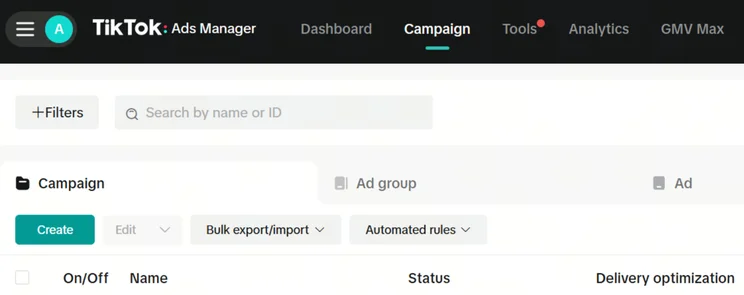
Once you’re in Ads Manager, select the “Campaign” tab at the top of your page, then select the blue “Create” button.
Choose an Objective
Next, you need to choose an objective. All the ads you create within a campaign will be working towards achieving this objective, and therefore each goal you select will have separate settings and preferences for you to choose from at ad group and individual ad level.
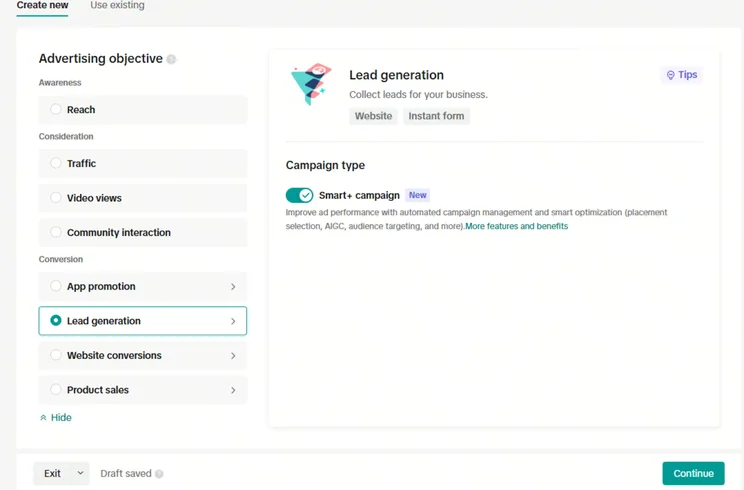
TikTok ad campaign objectives are divided into three sections:
- Awareness – increase general awareness of your brand or products
- Consideration – encourage users to think about brand or products and seek further information on them
- Conversion – increase a specific action, such as product sales, waitlist signups, or app installations
These three sections have smaller objectives within them, as shown in the image above. When choosing your objective, think about which helps to achieve your desired outcomes and select one that’s in line with your social media strategy and overall business goals.
Set Your Budget
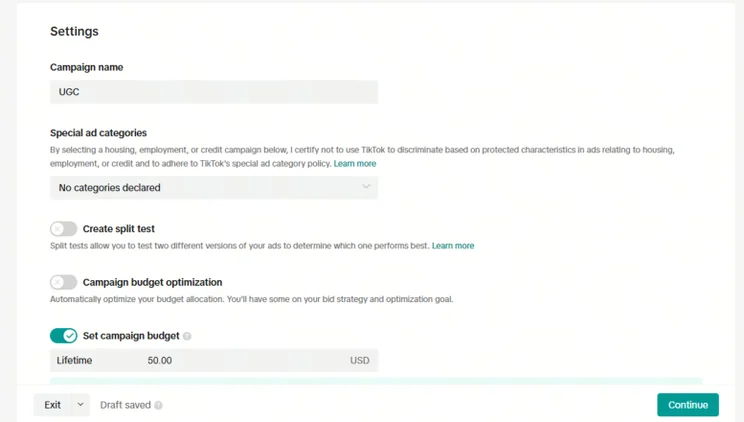
From here, scroll down and input the campaign name and your budget, which TikTok advises to be at least $50 for the campaign’s lifespan.
Top Tip: Enabling campaign budget optimization will mean that TikTok’s algorithm constantly monitors several factors to allocate your budget in the smartest way possible to maximize your results.
#3. Make an Ad Group
After selecting “Continue”, you’ll be directed to create an ad group. You can set up as many ad groups as you like, but to keep your campaign focused and manageable, I’d recommend no more than seven to ten.
You can stipulate a different set of rules for each ad group you create, which is vital to maximize the overall effectiveness of your campaign.
For example, let’s say I create an ad campaign to promote my new video game, which is released on two separate game consoles. However, the two consoles have different userbases. By creating an ad group for each console, I can control multiple aspects to ensure my ads reach both audiences in the best way.
Decide Your Ad Placement
The first decision to make is about the placement of your ads. Your ads will run as in-feed videos for most campaigns, but you can extend these to search results by selecting “Search feed”. It’s a good idea to keep this turned on because you can target customers using the app in different ways. Plus, you’ll be shown to high-intent users who are searching for your product keyword, so they’re more likely to take further action such as visiting your website or purchasing your product.
Good to Know: Enabling the “Search feed” toggle allows your ads to be considered for search results but doesn’t guarantee that they’ll be shown. If showing up in search results is a priority to you, you can create a search ad campaign to increase your search visibility.
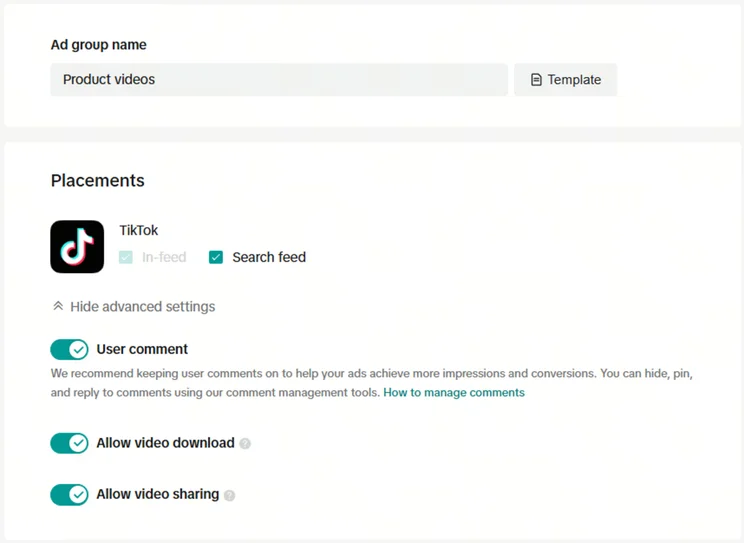
Top Tip: This page will look different depending on the goals you select. For example, the “traffic” objective will allow you to select automatic placement (showing your ads across all supported apps like TikTok and Pangle) but you won’t have the option to show in Search Feeds. Make sure you understand the advertising capabilities of each objective before committing to payment so you’re getting the most out of your ads.
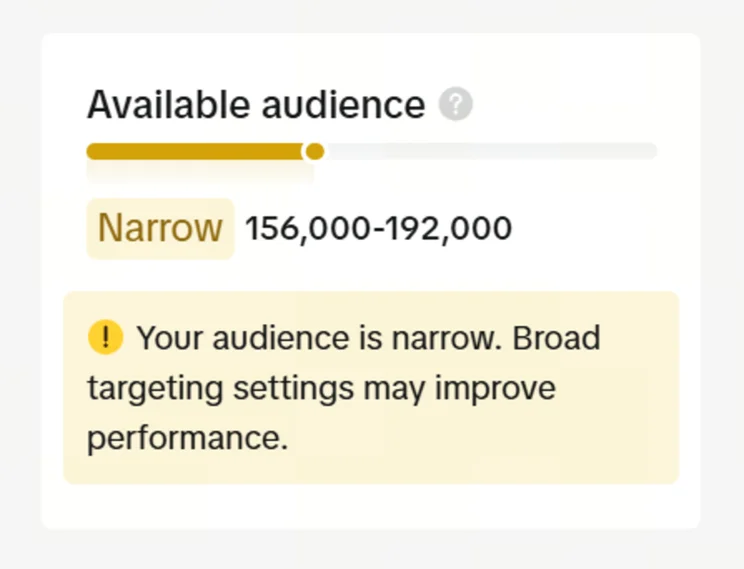
Refine Your Target Audience
If you want to successfully advertise your business on TikTok, you’ll need to input key details about target audiences in the “Targeting” section. This determines who your ad will be shown to.
There are four drop-down menus to fill out:
- Demographics – Basic information about your target audience, such as their age range, genders, and locations.
- Audience – Choose audiences to show or hide your ads from. Here is where you can add custom audiences based on your own customer data like previous email lists. Alternatively, you can choose “Lookalike audience”, which creates a target audience based on your existing online audience.
- Interests and behaviours – Here’s where you can finetune your audience’s interests and app usage. For instance, you can zone in on users with a specific purchase intention or who interact with particular types of videos, hashtags, or content creators. Creating different examples of user personas can help you to better understand these areas of your audience.
- Device – You can decide whether to target Android or iOS devices, down to the specific phone model, carrier, and connection type. Unless your product or service is specific to a device – such as an app or mobile repair service – I’d recommend leaving this blank to keep your audience open.
Confirm Your Ad Group Spend and Schedule
The next stage is to set a budget for your ad group and schedule when you’d like them to be active. Since I enabled budget optimization when creating my campaign, the ad group budget is automatically set to use this budget up. If you don’t select this, you’ll be able to choose a budget upwards of $20 daily.
You’ll then select how long you want to run your campaign for, and whether you want to run your ads at specific times or continuously throughout the day.
Good To Know: If you want to advertise internationally, be aware that the schedule you select won’t be localized to your customers, so you’ll have to calculate the time difference first. You’ll also need to create a separate ad group for each different schedule you want to use.
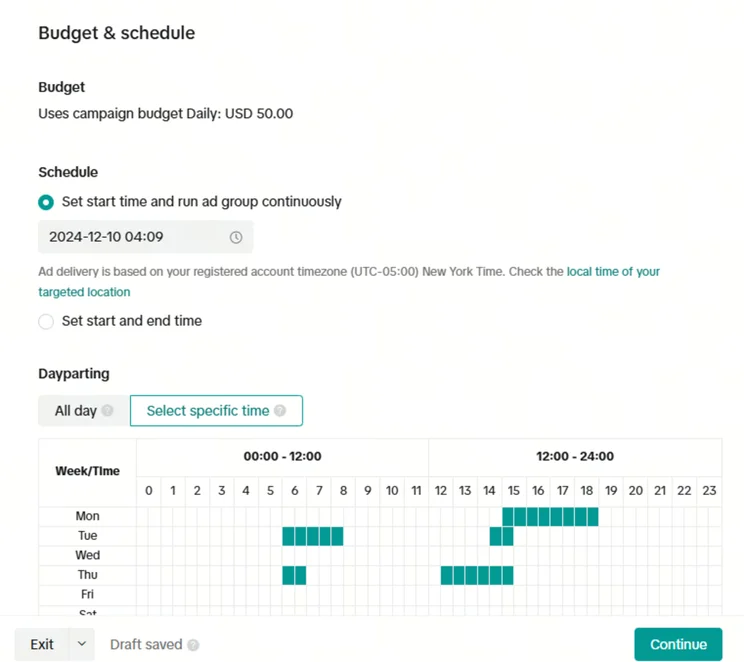
Top Tip: If you’ve had a business account type with an active customer base before creating ads, you can view the times of day when your audiences are most active on the app by entering the business suite, selecting “analytics,” “audience,” and then heading to “reached audience”.
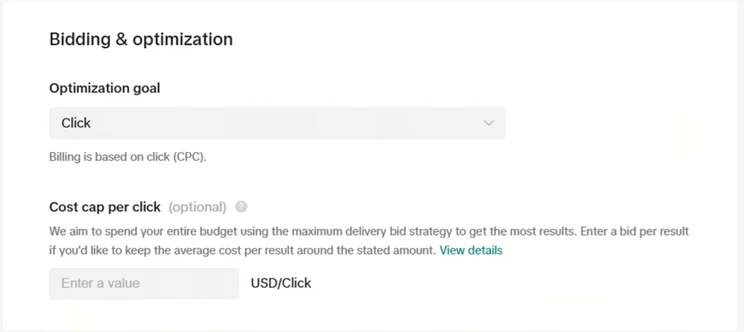
Select a Bid
You’ll then have to choose your bidding strategy under the “Optimization goal” dropdown. The options available will depend on your campaign objective, but the most common are pay-per-click, per-view, per thousand impressions, and per landing page visit.
#4. Make Your First Ad
This is the fun part – creating the content users will see!
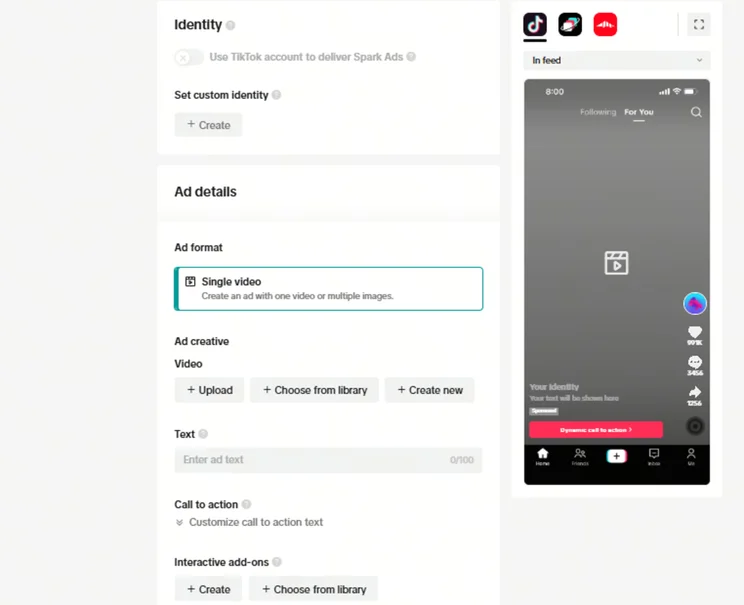
Firstly, select Spark Ads if you want to use your existing posts as ad content. This option is a timesaver because you won’t have to create fresh ad content, but certain objectives don’t support it.
You’ll then input the content of your ad in the “Ad details” section. Here, you can control the following elements:
- Video content – you can upload this from your gallery or create it
- Text – this is the caption that provides users with the necessary context
- Call to action – this is the button users click to complete the desired action of your ad You can set the text of this button yourself or select dynamic placement to let TikTok adjust the text to each user’s preferences
- Add-ons – these are extra elements like cards and stickers that add an interactive element to your ad
If you wish, you can also add tracking links to help monitor the performance of individual ads.
#5. Track the Success of Your Campaigns
The initial TikTok ad creation is complete – hooray! But there’s still work to be done.
Namely, you need to track the progress of your ads and campaigns to make sure they’re succeeding as planned. Luckily, the TikTok Ads Manager has sufficient tracking tools that’ll allow you to do this.
Within the Ads Manager, you can access:
- Custom reports
- Progress of campaigns and individual ads
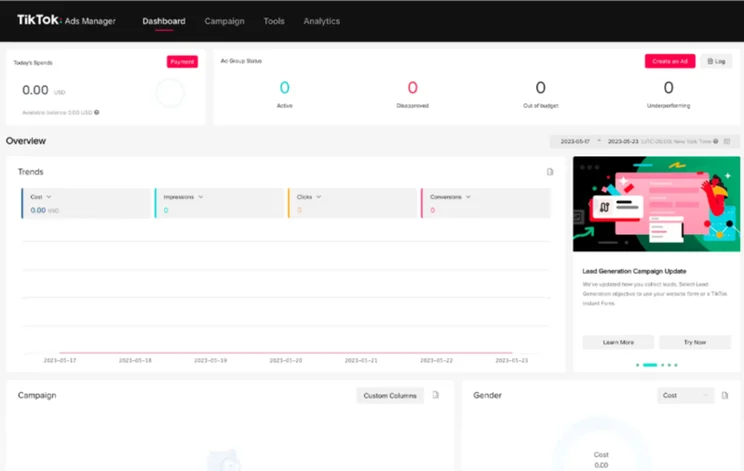
Top Tip: TikTok Pixel is a piece of code you can install to track website traffic and ad campaign performance. Downloading it will help you to optimize your marketing campaigns.
How Much Do TikTok Ads Cost?
There’s no set price for TikTok advertising, but TikTok sets a minimum budget of $50 daily at campaign level and $20 daily at ad group level.
There are a number of factors that effect the overall price of your tiktok ads
- Ad types: The higher the visibility of your ads, the more expensive they’ll be to run. This means that ad formats such as Top View and Top Feed will cost more than regular Feed ads.
- Level of targeting: Advanced targeting settings may increase your ad spend.
- Saturation: Some industries will naturally make use of advertising more. Similarly, certain times of the year, like the holidays, can encourage businesses to advertise more frequently. When advertising is oversaturated, you may find you have to pay more for your ads to be noticed.
Tips for Running Successful TikTok Ads
If you’re just learning how to advertise on TikTok, it may seem like there’s a lot to think about. To make this easier, I’ve put together some TikTok tips and tricks to help you create the best TikTok ads:
- Since most TikTok ads are placed between feed videos, you should aim to create content that flows naturally with the user experience and creates as little disruption as possible.
- Capture the attention of viewers by providing the necessary information immediately, without rambling.
- Use the split testing tool in TikTok Ads Manager to A/B test your ads. This will let you compare different types of ads to find the best option.
Summary
And that’s a wrap – you now know how to advertise on TikTok! Whether you’re showing off your latest tech innovation or spreading the word about your new startup, you have everything you need to create effective campaigns and maximize your online presence. And by following the tips I’ve provided, you’ll be able to make your content flow naturally and create authentic connections.
TikTok is fast-moving, and the only way to keep up is to hit the ground running. Create your first ad and learn as you go by monitoring its success and adjusting accordingly. For further inspiration, check out our TikTok content ideas for businesses. And, if you’re looking for more ways to boost your advertising further, consider working with TikTok micro-influencers.


0 comments