Does Jimdo Review Well? – We Tested the Website Builder To Find Out

We may receive a commission from our partners if you click on a link and purchase a product or service on their website. Learn more

Charlie Carmichael
Written By
Updated on January 5, 2023

Labeled as an easy-to-use, ad-free website builder, Jimdo is the online platform that gives you the tools to build your own site without breaking the bank.

That being said, the tools it gives you aren’t exactly the best. Based on our most recent round of research, Jimdo’s overall score has fallen from 4 to 3.6 out of 5.

Why? Well, in recent years, what Jimdo offers for its low price just hasn’t been that appealing.

Similar to Wix and Squarespace, Jimdo doesn’t require any coding knowledge and is a great alternative to these two builders if you’re looking for a website builder that lets you stick to a more restricted budget. But unlike Wix and Squarespace, Jimdo hasn’t kept itself competitive with many amazing new features. For example, Wix and Squarespace both have added blogging-specific features, calendars for booking, as well surface-level design features such as parallax scrolling.

Like every platform, Jimdo has its fair share of pros and cons. We’ll look into how Jimdo performs in areas like ease of use, tools, features, and help and support – just a few key elements to consider when creating an online presence.

Let’s jump straight in!

We’re pretty proud of our research process because not many sites can say they’ve carried out such in-depth testing before making recommendations. Here’s how our in-house research team goes about finding the best website builders on the market.

Every single builder goes through our thorough research process. We investigate important areas such as:

  • Ease of use
  • Design flexibility
  • Value for money
  • Feature quality
  • Help and support
  • Customer satisfaction

This helps us rate and compare the builders fairly, focusing on important factors that users have told us matter most.

We even get groups of everyday people to test the builders out and give us feedback, which we then analyze. This helps us:

  • Understand exactly how easy (or difficult) beginners find the builder
  • Uncover any issues within the builder
  • Judge customer satisfaction

We’ve applied this process to over 50 website builders so far – all so we can bring you the most accurate results and recommendations!

Still got questions? Read our report on How We Conduct Our Website Builder Research for a more detailed explanation.

Pros

ADI-based platform

✔️  Jimdo Dolphin is great for those who are less confident because the ADI functionality builds the site for you

Best cost per feature option

✔️  It’s not that great for features but it is really, really cheap!

Mobile Optimization

✔️  Optimizes for all mobile devices with its dedicated mobile editor view

Cons

Limited features and customization 

❌ Offers no blogging or internal marketing capabilities, as well as limited editing

Not the best for SEO

❌ SEO is more limited than with other website builders (e.g. no alt tags)

Less suited for US market

❌ European-focused platform – so features like shipping and tax codes don’t align with the US

Slow help and support

❌ Restrictive help and support provided to non-premium plans (1-2 business day waiting time)

Jimdo for personal blogging

So…Jimdo has no blogging capabilities. Its ADI software has still yet to add dedicated blogging capabilities, which is really quite disappointing. You still could still set up a personal blog through editing afterward, but you would be giving yourself a lot of extra work. In all honesty, it’s not worth it since there are many other builders that are specifically designed for blogging.

At Website Builder Expert, we’re proud of the research we conduct into different online industries, including the blogging space. And as far as blogging goes, Squarespace came out on top with its strong aesthetic abilities and ease of setup. It lets you easily link your blog posts to other social channels for marketing purposes, and get analytics to see how your posts are doing – a blogger’s dream!

Jimdo for small businesses

If you’re a small business that wants an online presence, Jimdo is perfect. You can get a professional-looking site up in a matter of hours to help advertise your brand.

There are a good amount of features and lots of third-party apps, which we’ll get into later. These can help you with anything from advanced analytics to running solid email marketing campaigns.

If you’re a large business, you may be better suited to something like Wix. With over 800 design templates, you have a huge amount of creative freedom to really make the site unique to your brand.

Jimdo for ecommerce

If you’re looking to start selling online, Jimdo offers an array of ecommerce features to get your store off the ground. You’ll have access to a professional domain, plus the ability to add product galleries, and you can hook up worldwide payment methods such as PayPal or Visa.

Jimdo’s standout ecommerce feature is its “no commission fee” policy. Any sale you make, the platform doesn’t impose any sneaky fees – so you get to keep 100% of your hard-earned money!

However, we’d definitely recommend Jimdo for advertising products, rather than selling them. It’s a great platform if you own a cafe, for instance, because its category and product gallery elements let you display food menu items, locations, and opening hours really well.

Whereas, if you’re a retail company and your primary focus is to sell clothing online, you’d be better off with more powerful platforms like Shopify or BigCommerce.

Jimdo for portfolio

As we mentioned above, Jimdo is ideal for displaying images and creating beautiful galleries, but it’s good to note that the templates are limited for someone in the artistic industry.

Photographers, graphic designers, and stylists should look at something like Squarespace. With templates tailor-made for creative types, Squarespace is perfect for any kind of online portfolio.

You might see the name “Jimdo Dolphin” swimming about (excuse the pun!), which is essentially Jimdo’s ADI (Artificial Design Intelligence) website builder. Dolphin uses ADI to create a website for you based on how you answer a series of questions. This way, your design process is more streamlined and specific to your needs!

With this in mind, Jimdo – and more specifically the Dolphin ADI product – is great for users with basic computer skills, or for those who don’t have a lot of time on their hands but still want to achieve an awesome online presence.

You may have heard of Jimdo Creator and Jimdo Dolphin referred to as separate entities. When we refer to Jimdo on Website Builder Expert, what we are referring to is Jimdo Dolphin, the company’s ADI platform.
You see, Jimdo does in fact have another builder, Jimdo Creator, which is more in line with traditional builders. However, we have seen it being phased out in current years in favor of its ADI platform, Jimdo Dolphin. So when we refer to Jimdo, we speak of Jimdo Dolphin, which is what Jimdo itself seems to be preferring. (Simple, right? Now say Jimdo 10x fast.)

How Does Jimdo Work?

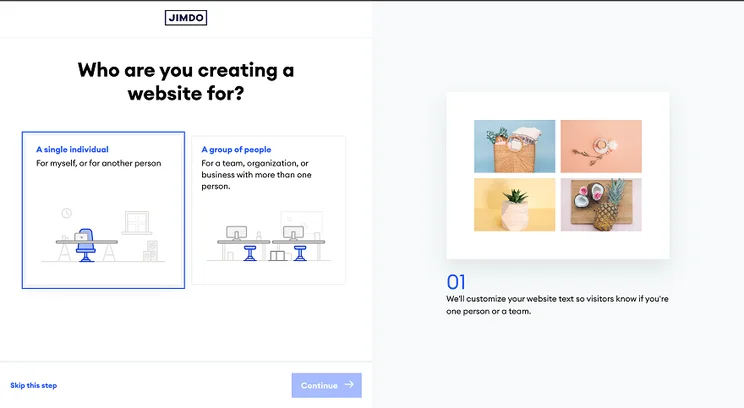
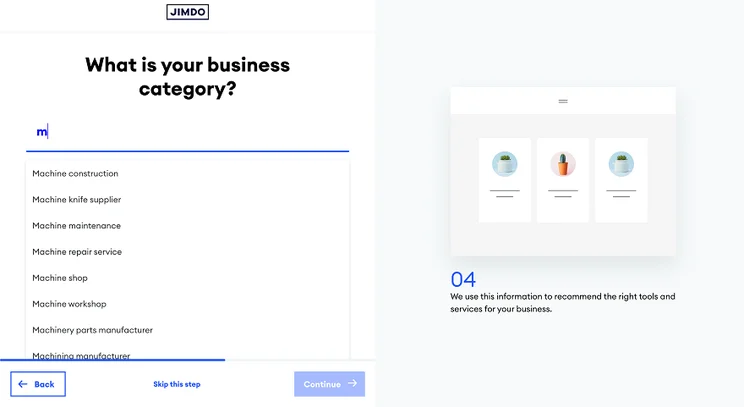
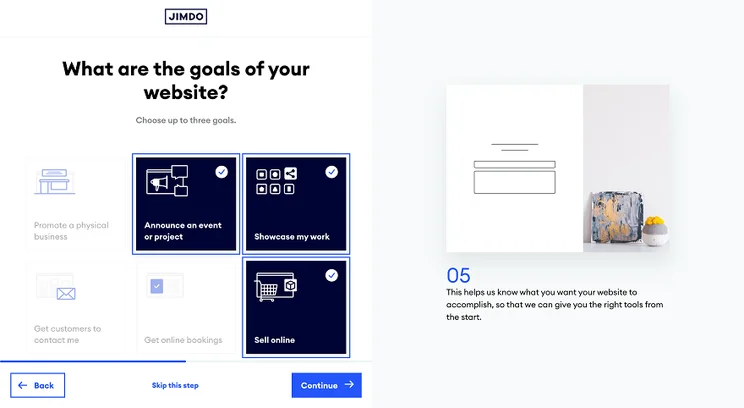
When you sign up to Jimdo, you’ll be asked a series of questions such as:

  • Who you’re creating a website for 
  • What the website is for – e.g. a personal project, event or established business
  • What your website goals are – e.g. to promote content 
  • What your website is about, such as fashion or PR
  • Which styles and colours you most prefer out of the given combinations 
  • Which pages you’d like to add

Once you’ve answered these questions, Jimdo has a better insight into your online requirements and business goals, which allows it to design your perfect website accordingly.

It still gives you the option to add or delete blocks of content as you go along. This is super helpful if you want to continue customizing your site off the back of what Jimdo initially creates for you.

What’s great about this building process is that you can pull things from social media or existing websites onto your new site pretty instantly. The downside, however, is that the platform is pretty limited in terms of how much you can actually edit yourself.

In terms of producing a ready-made website in just a few minutes, AI website builders are generally really easy to use. This is because they eliminate the time investment that comes with the “drag and drop” interface, taking the world of website building to a new level.

After you answer a few questions and select styles and colors, Jimdo will create your website in just a couple of clicks. If you choose to add more elements, you have the option to select “add block” and pick anything from text, images, and multiple-grid slideshows.With that said, we did put Jimdo to the test against other website builders out there to draw up some comparisons. 

We tested this by getting everyday people to build their own website using Jimdo, before gathering feedback. We found that some users still felt as though they had the creative freedom to execute their ideas, but this was only the case at a basic, starter level.

It’s clear from our research that Jimdo’s ADI platform was more helpful than restrictive for users, and still holds onto the “fun” of editing whilst doing a lot for you initially. Although it’s really easy to use, Jimdo is definitely a website builder that eliminates a lot of the creative processes behind designing a website because of the more structured format of the ADI tool.

If you still want to add your own touch to your site, we would recommend adding different blocks and elements to help jazz it up. Jimdo recently introduced Smart Apps, allowing users to embed content from a number of the web’s best-loved sites. From Calendly, Pinterest, Airbnb, and Twitter, you can include and customize these extras to suit your needs, giving you a great level of personal touch to your site. 

Overall, Jimdo scored 3.4 out of 5 for ease of use during our in-house research. A middle-of-the-road score, it falls behind the likes of Wix, Squarespace, and GoDaddy, which all scored above a 4 out of 5.

Pricing is Jimdo’s most competitive category, earning 4.8 out of 5 in our research! Jimdo plans happen to vary depending on region – and so do the price tags, for that matter. In the US, the platform offers two paid plans:

  • Start Plan ($9 per month)
  • Grow Plan ($14 per month)

Wix, for example, costs $16 per month for its lowest plan and so we awarded it a 3.4 out of 5 for its value of money. Sure, you get a lot more with Wix – it has the best features of any builder we’ve tested – but its higher price tag means a reduced value score when compared with Jimdo’s much cheaper plans.

Additionally, we want to mention Play – Jimdo’s free plan – which is a great way of getting started on the website builder. It’s really easy to test out for yourself and offers basic design templates to create a simple site for you in no time. Anything beyond that, we’d recommend going for a premium-paid plan.

The Play plan comes with Jimdo advertising in the footer of your website, and a not-so-attractive Jimdo subdomain. This isn’t something you’ll want when trying to achieve a professional site to showcase your best work – but the free plan is an option to consider if you just want to test out the platform.

It’s important to note that help and support features are a lot more restrictive on the free plan compared to Jimdo premium plans. You’ll be looking at a 1-2 business day turnaround when placing a help request – which isn’t the best when you need a quick fix to your problem.

It’s safe to say, you get what you pay for – or, in this case, what you don’t pay for!

To really get the most out of your website-building process, we’d suggest upgrading to one of the two premium plans that Jimdo offers.

If you choose to level up to Jimdo’s Start plan for $9 per month, you’ll get all your Play plan features, plus:

  • Free domain 
  • Ad-free website 
  • Up to 10 website pages 
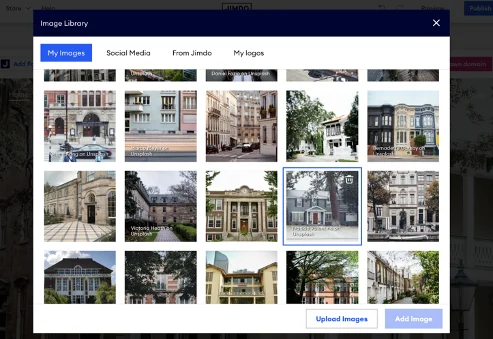
  • Access to image library
  • Customer support within 1-2 business days 
  • Advanced SEO tools
  • Mobile optimization

Jimdo seems pretty reasonable with its premium plan prices compared to other competitors on the market. Squarespace, for example, starts its pro plans at $14 per month but comes with a 14-day trial for users to explore.

Jimdo’s Grow business plan is its best-seller at $14 per month – you get access to all of the above Start plan features, and more, including:

  • 50GB of storage
  • 50 web pages
  • 5 forwarding emails
  • Help and support within 4 hours.

While a 4-hour support turnaround is better than waiting 1-2 business days, it’s not much of an improvement, especially in the help and support area. Builders like Wix and Squarespace can offer 24/7 support across all plans. In our research, Jimdo earnt a 2.5 out of 5 for its support.

Jimdo also has its ecommerce plans; the Business and VIP plans

  • Business Plan ($18 per month)
  • VIP Plan ($24 per month)

The Business Plan is much like the Grow Plan, except with a larger focus on the ecommerce side. The VIP Plan is Jimdo’s most feature-heavy plan, offering unlimited bandwidth, web pages, and customer support within the hour plus being added to the Business Listings, helping visitors across the web find your site.

Overall, we’d always suggest you try before you buy, but once you’ve built your site – before putting it live – we recommend you consider upgrading to one of Jimdo’s premium plans.

Opinions definitely varied across the board. The majority of Jimdo users enjoy how much the platform does for you with its virtual assistant, but it still remains limited and basic in terms of personalization.

We reached out to various Jimdo users to get an insight into their own experience of using the website builder to grow their online presence.

User Review

Jimdo used to have over 100 templates but has since cut back to a much more manageable 19 (plus a blank template). This is likely due to the swap to an ADI-based builder. Each template lines up to a specific sector with the ADI making adjustments based on the user’s answers.

The good news is that each of Jimdo’s templates looks tremendous! All of the designs are slick in their own way and provide a good range of different styles and aesthetics.

What’s even better is Jimdo’s integrated Mobile Editor. All of Jimdo’s templates are mobile-ready, meaning it scales seamlessly whether on a desktop or mobile (both portrait and landscape).
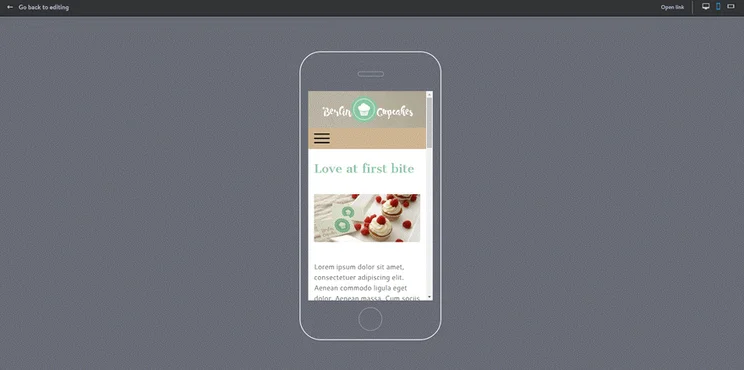
jimdo mobile templates
An example of the mobile viewer to optimize mobile formatting

Being viewable on mobile is increasingly crucial as more and more online traffic is being done from the comforts of our mobile devices, so Jimdo’s got a slight edge on the competition with this feature.

While all of this sounds great, the truth of the matter is that Jimdo doesn’t particularly hand over too much control over the templates it provides you. In our research, we could only give Jimdo a 3.1 out of 5 for design. The lack of true design freedom reinforces the belief that the ADI should be the solution to all your problems.

If you’re just looking for something that looks nice and does the job, then Jimdo is a very viable option. But if you want more control over how your site looks and want to stand out from the crowd, we recommend a more design-focused builder like Squarespace.

When testing out Jimdo’s free website builder, we were impressed to see how easy it was to add block elements such as slideshows and banners, and change up the design as we went along.

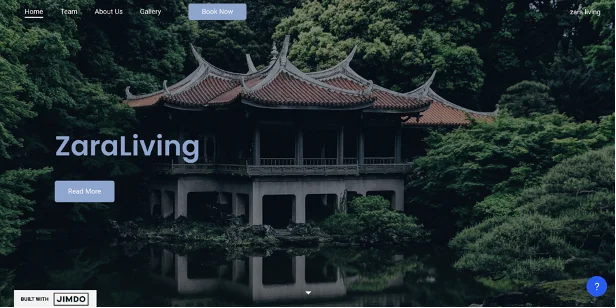
We created a demo site for the Real Estate industry, named “Zara Living,” to put Jimdo tools and features to the test. You can see below how the building process unfolded.
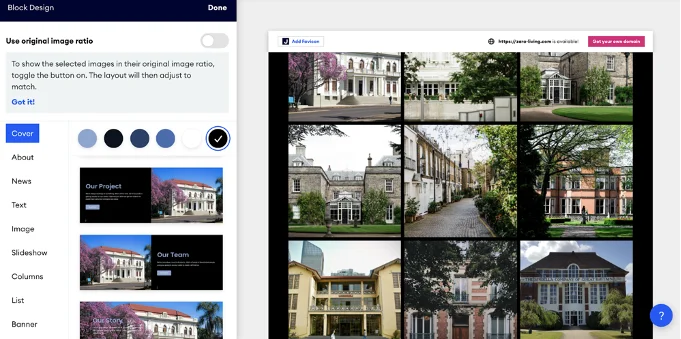
Using the free editor, you’re able to add block elements to build a page format as you go along. Jimdo offers access to slideshows, banners and various column layouts to give you creative control over the design process.

When you upgrade to Jimdo’s bestseller business plan, Grow, you’ll receive a free custom domain, SEO tools, social marketing, and personalized support within four hours of sending a help request through.

If you don’t see a specific feature that you need, you can always search for it through an independent company called POWr Plugins. It partners up with Jimdo to provide plugins with your site.

Here you can check out our free demo site created with Jimdo with the help of its ADI editor.

Domains

Jimdo offers a free custom domain for one year on any of its premium plans.

You do get a subdomain with Jimdo’s free plan, but you’ll have a tacky “.jimdofree.com” hanging off the back of your URL – hardly professional if you ask us! 

It’s always worth getting a custom domain if you’re looking to enhance your online presence. Not only does it inspire trust in your brand, but it just looks pretty awesome, too.

It’s also possible to transfer over an existing custom domain if you already have one. You’ll just need the authorization code, or auth code, from your previous domain host to transfer it over in the Jimdo editor. Jimdo offers a full breakdown of how to transfer a domain in case you get stuck during the process. The domain transfer itself usually takes 1-5 days to complete.

The annual cost of renewing a Jimdo custom domain after a year is $80 – the highest of any website builder we’ve tested.

SEO (Search Engine Optimization)

There’s no point in building a beautiful website if no one can find it, right?

That’s where SEO comes in. The better your SEO, the more likely you are to rank highly on search engines like Google.

With the Start and Grow premium plans, you can get your hands on advanced SEO tools to ensure your site is getting seen far and wide.

Jimdo uses smart technology to fill in a lot of your SEO settings for you, from meta titles and descriptions to image alt text. This means you don’t have to worry about these fiddly parts of the building process, and you can stay focussed on the creative side of things!

While Jimdo is pretty competent at SEO, there are still some issues. There’s currently no way to add alt tags, which is a big miss as far as SEO is concerned. Alt tags not only allow your site to be more accessible, they directly help search engines scroll and index your site, allowing them to be higher up the results page.

Additionally, Jimdo doesn’t have any dedicated internal marketing capabilities. If you are wanting to get involved with the marketing side of your website, we’d suggest another builder which has a better marketing framework, like Wix or Squarespace.

Jimdo got a disappointing 2.5 out of 5 for Help and Support in our research. Jimdo offers support via social media, a knowledge base, and FAQ sections but doesn’t offer phone, email, live chat support or a site restore option.

But what you do get are answers that are clear, concise, and to the point. Its knowledge base in particular is useful – it comes with a mixture of text, images, and videos to help solve your problems.

The Help Center is located in the top right-hand corner of the editor. Straight away, it opens up to a range of questions that users often need answers to. This is a huge time saver when you don’t want to go through the process of writing a big chunk of text and explaining the issues you’re having!
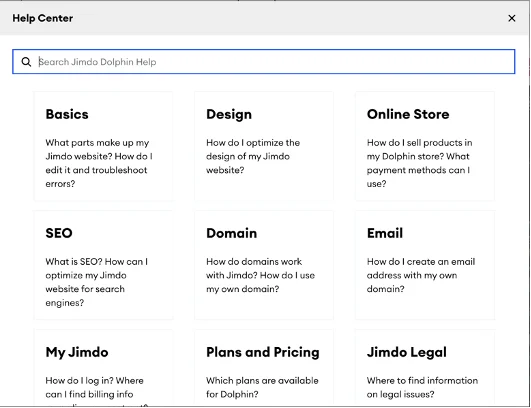
Jimdo_help_support
This is what appears when you select Jimdo Help Center. A range of pre-made questions are presented to you instantly.

What stood out was the impressive, in-depth articles that appear when you click on any of the FAQs. You get a step-by-step breakdown of how to solve your specific problem, written in a way that is super easy to follow – plus a clear indication as to where to find all of the elements it mentions!

This form of support is ideal for users who want a quick fix to any website issues, and want to avoid waiting up to an hour for an expert response.

The only downside is that the articles are only limited to Frequently Asked Questions (FAQs), so more complex, extensive issues will require getting in touch via Jimdo’s contact form.

Contact Form

Alternatively, Jimdo offers you a small contact form to fill in with text and attachments, and an expert is expected to get back to you within a four-hour time frame (and within one hour if you upgrade to its premium plans). It’s pretty disappointing to see that Jimdo prioritizes its help and support center for customers that pay more per month, because this poses a struggle for the platform’s free plan users.

Jimdo is a simple, clean, and easy-to-use website builder.

It’s best for either personal or small business websites and comes with a host of great features and apps.

Jimdo’s pricing plans are affordable ($9 per month or $15 per month), and with such a range of choices, you won’t have a problem finding one that works for you.

It isn’t for everyone, though, and medium to large businesses who need a powerful online store would be better off looking at Shopify. For creative industries, Squarespace is better.

If you’re looking for a nice, “out-of-the-box” website, you could do a lot worse than Jimdo.

Found our Jimdo review helpful?

Note

Website Builder Expert aims to provide you with honest data. That’s why we conduct our own research and obtain direct, personal insight. Click here for further information.

Written By

Charlie Carmichael

Hi, I’m Charlie:

I know first-hand how intimidating it is to create your own website – but it doesn’t have to be. I joined Website Builder Expert in 2018, first as a researcher and then as a writer, so I got up close and personal with all the very best (and worst) website-building platforms and committed myself to helping others with theirs.

 During my time at Website Builder Expert I worked on identifying the very best online tools out there through detailed and rigorous research. Most importantly, this helped me understand how these platforms can help with your specific needs. 

I left Website Builder Expert in 2019, and now live my dream of being a sports writer as the Content Lead for GiveMeSport. I have also worked as a contributor and editor for COPA90 and These Football Times.

You can find me on LinkedIn here.Charlie hopped aboard the Website Builder Expert express at the start of 2018 and hasn’t looked back since. He may be a writer by trade, but having joined the team as a researcher, his work brought a unique perspective to help readers on their online journey.

Charlie’s work about the online world has been featured the internet over, taking pride of place on sites such as TechWyse and Small Business Bonfire. Although he began as a novice, he has since proved that anyone is capable of building their very own website, as well as becoming well-versed in ecommerce platforms and web hosting too. 

Since leaving Website Builder Expert in 2019, Charlie has spent his time writing about his first love: Soccer. You can see his work on These Football Times and GiveMeSport, of which he is now the Content Lead. 

Read his articles below and feel free to share anything you find particularly interesting or helpful.Linkedin: Charlie Carmichael

Email: charlie@websitebuilderexpert.com

More about

Popular topics

146 comments

Your email address will not be published. Required fields are marked *

  • Peteroxt

    The experience is organized so that the service improves the more cash you spend. Implementing stringent security measures and sturdy privateness policies is paramount for guaranteeing a safe on-line dating experience on Asian dating sites in the USA. In search of love with Asian Dating Sites singles? What makes AsianBeautyOnline race for the title of the best Asian dating site? This modification is especially useful for an Asian single who desires the freedom of a dating app with out dropping the full service of a relationship site. What Makes Asian Dating Sites Special? Below, you’ll find our curated record of the very best Asian dating sites - whether or not you’re hoping for a serious relationship, friendship, or just need to discover new connections throughout Asia. One in all the explanations we beneficial so many mainstream relationship apps on our record is that a big dating pool will naturally deliver a wider number of outcomes. In case you determine to turn into a paying member, the upper your subscription, the better your likelihood of being observed in response to the way profiles are ranked (as a free member you come decrease down the record).

    Always keep the give attention to her till the topic is over and she feels better. 「VIP Membership Service Description」 Purchase VIP Membership and get pleasure from a better swiping and matching expertise: 1. User name spotlight & unique badge that will help you [url=https://twitter.com/asiamereview]asiame scam[/url] stand out from the remaining! Unlike regular dating apps, they assist customers find severe relationships. Generally, SakuraDate gives a safe and handy space for international relationships. In recent times, Asian American on-line courting has emerged as a outstanding development, offering a novel area for people to connect throughout cultures and geographies. Dating is already a challenge, however for Asian American men, there’s an added layer. Many Asian dating apps include features that match those on older sites, ensuring that even a traditional courting site stays aggressive in today’s quick-transferring market. Try the free model first to gauge match high quality, then upgrade only if these extras clearly improve your experience. Remember, everybody has their own boundaries and expectations-respecting them is essential for having a profitable experience.

    Improving your online dating expertise goes beyond easy matchmaking. For those who observe these simple tips, you’ll have all of the components for a long-lasting relationship. With several pricing options obtainable and a really generous free membership option, we feel that you've the time and features to discover the site way more totally than you’ll find with other sites. Membership numbers are excessive and you’ll even be in a position to speak to non-paying users. Quora customers also level out other issues to expect from Asian girl relationship. High concentration of lively customers from Asia. In means that you need to use ThaiFriendly to search out Thai girls in the US, the UK, Australia, and even in different international locations in Asia like Japan, China, or South Korea. Whether you might be looking for Chinese, Japanese, Filipino, Korean, Indian, Thai, etc., you'll discover many potential matches on our site. Built-in safety features - like photo verification, privateness controls, and moderated chat rooms-help protect you as you get to know potential matches.

    Many sites organize romance tours to cities, the place you can meet a number of potential partners in person. You could prove your relationship is real, meet no less than once in particular person inside two years, and present you both plan to marry inside 90 days of her arrival. Choose country, age vary, and relationship kind! It would crack down on faux profiles and other people mendacity about their age etc. because there are a whole lot of male profiles that state one age, but in the description they write 38 not 32. So I might simply advise girls to be careful. If you do not get a match right away, don't be discouraged, there are plenty of beautiful and interesting single Asian on Tantan ready to match with you. The help information cowl queries on logging in, profile and match management, photo management, e-mail, the "curiosity" perform, languages, chat room, on the spot messaging, looking out and browsing, membership options and cost, technical issues, and security/security. If I am a standard member, the best I can do is send my possible match to some five questions which can be generated by the relationship web site. Some dating websites and apps mix the ease of a website with the benefits of on-line dating.

  • Ren

    I wish there was more information on the renewal plans and the variations - that was rather thin! What was the renewal situation for each of the payment plans - surely they don't all cost $80 when the monthly cost itself on some plans are more??
    Bit disappointed even though in general this review was way better than the earlier one. But still I do get the feel that the reviews are rather superficial.
    Maybe it's the style of writing, maybe it's the lack of detail....Even though you do give some detail, you could compare it with what is better in the competitors ..... that would make the review deeper.

    1 reply

    • Hannah Whitfield
      Hannah Whitfield

      Hi Ren,

      Thanks for your feedback, we'll be sure to take this on board for when we review website builders in the future. In the meantime you might find our Website Builder Chart helpful for more of a side by side comparison.

      Thanks,

      Hannah

  • Jack

    I was making websites on Jimdo every time I am getting error, I had made many domains but getting error like "Couldn't load website"
    I had sent emails regarding this however I didn't get any reply from them. I don't know what is happening with Jimdo. Kindly check this issue.

    1 reply

    • Natasha Willett
      Natasha Willett

      Hi Jack,
      Cheers for the comment and for bringing this to the communities attention. Sorry to hear you are currently having issues with Jimdo, I haven't personally heard of any concerns with this builder recently so thank you for reaching out. Just to be clear we are just a review website helping others such as yourself be successful online, not Jimdo directly. However, the only thing I can think it could be is their system / web servers, you can actually check out their system status here. If you are still having issues getting this resolved, I would just drop them another email. I hope you get this sorted soon.
      All the best,
      Natasha.

  • Sean

    Are there sites where you can purchase code/plugins, or look for other code to use with a jimdo website? Are there limited options for jimdo (I'm looking and adding different fonts and trying to use my site in a way that my friends use WordPress)?

    1 reply

    • Charlie Carmichael
      Charlie Carmichael

      Hi Sean,

      Thanks for your comment. The place to purchase plugins for Jimdo is POWr. I believe from there you can look at adding different fonts but it's worth having a look for yourself and finding out if it's the sort of thing you're after.

      Hope that helps,

      Charlie

  • Patsy Lyn

    JIMDO has terrible customer service. They inadvertently shut down our children's literacy website was and then did not get back to us for 24 hours!! I do not recommend this website builder and I am not sure that their understanding of English is very good.

    1 reply

    • Natasha Willett
      Natasha Willett

      Dear Patsy,
      Thank you for your comment, I'm sorry to hear that your experience with Jimdo wasn't all that great. Have you since directed your disappointment with them? Most companies such as Jimdo are always looking at ways of improvement and customer feedback, if you have not yet I would advise that you approach them and voice your concern, please find the link here.
      Natasha.

  • Christy Wynne

    A major flaw that I’ve found with Jimdo is when you go to type a blog on the iPad Pro it switches to landscape mode and flips on it’s side. I won’t flip back to portrait mode so you can’t use your keyboard with the iPad Pro. VERY disappointing. Makes it unuseable with the iPad Pro which is what I use. I’ve already paid for the Pro to connect my domain and now I may have to cancel the whole thing and start over. So frustrating.

  • Anna Hodges

    Hi Website Builder Expert!

    I have been watching numerous website builder videos and reading about them. Throughout these last 4 years, I have been using Webs.com for free. Even though I really like some of the template and interface designs, Webs has too many glitches and their tech support is lousy.

    Right now, Webs has a lot of irate customers, including yours truly. I have put my blood, sweat, tears, and pride into building my website on Webs. However, I am searching for a website builder very similar to Webs except better. Judging by the looks of it, Jimdo is the closest to Webs.

    Besides having a user friendly website builder, I am looking for a free website builder with similar template and interface designs, will generate more blog traffic to my website, can convert and import all my blogs from Webs to another website builder, is mobile friendly, and has servers that always work.

    Thank you and I look forward to your feedback!

    1 reply

    • Tom Watts
      Tom Watts

      Hi Anna,

      Sorry to hear about your experiences with Webs, their standards have really started slipping over the past year, which is a shame.

      Regarding your hunt for a new website platform, I would recommend checking out our website builder comparison chart, which compares a number of leading website builders on the factors you've noted in your comment.

      Aside from Jimdo, I would recommend looking into Wix and Weebly too, both of which are easy to use platforms that offer free plans. You can create a blog on each and also optimize on-site SEO to help improve your visibility on line and hopefully increase traffic.

      Unfortunately, Webs doesn't allow users to export content, so you may struggle to move your blog articles to another site. You will need to do this manually unfortunately (e.g. copy + paste each one), which I know isn't ideal and one Webs' limitations.

      I've linked to our comparison chart and reviews for Wix + Weebly, which should give you plenty of food for thought.

      Thanks for reading
      - Tom

  • jerry

    Jeremy, their format has totally changed and is not so intuitive. I tried to add an element to a column and nothing happened. I am more impressed with Weebly and Squarespace

    1 reply

    • Tom Watts
      Tom Watts

      Hi jerry,

      Thanks for letting us know your feedback, it's always useful to know how our readers are getting on with the various website builders.

      I'm also inclined to agree with you, Weebly and Squarespace are both much more versatile than Jimdo and easier to use too, so I hope you have more success building with on the platforms where you feel more comfortable.

      Thanks for joining the discussion,

      - Tom

  • Ed

    jimdo.com only has live chat for your website to chat with your visitors. You cannot live chat with jimdo.com

    I don't see any settings or apps on jimdo.com to prevent downloading of professional copyrighted photographs. Can anybody in the world right-click and download every photograph you put on jimdo.com?

    1 reply

    • Tom Watts
      Tom Watts

      Hi Ed,

      You're right in pointing out that Jimdo support doesn't offer a live chat option (and yes it is a little odd that they offer it for users' sites...but not for their own!).

      Unlike Weebly, where you can disable image downloads, unfortunately Jimdo doesn't offer this service. The best thing to do would be to add a copyright notice to your site in the footer and then add a watermark to any photographs you upload. This is pretty standard practice when sharing images online simply because there are so many ways of copying or downloading them for free.

      Hope that helps,
      - Tom

  • clarck

    Many thanks for the advices! your advices really helped. but pricing JIMDOFree is not forever, All new jimdo users need to know
    Because I took the jimdofree offer and I spent a lot of time creating my blog, and the first month when my blog became indexed and I had 10,000 visitors every month since the search engine jimdo close my blog Without any warning ,
    that hurts me , but Life Goes On ,

    Thank you again! adios...

    1 reply

    • Tom Watts
      Tom Watts

      Hi clarck,

      Thanks for your contribution. It certainly sounds like a very strange situation you've found yourself in! I've literally never heard of anyone's free Jimdo account just disappearing without reason!

      I would definitely suggest contacting the Jimdo support team to find out what happened to your site.

      The thing is, JIMDOFree is exactly that - a free account that doesn't expire. In fact, off the top of my head, the only Jimdo account I can think of that does is expire is the 7-day free trial that automatically relegates you back to the free account if you decide not to upgrade!

      Very strange indeed. Please let us know what Jimdo say.

      - Tom

  • Kelvin

    Hello Is possible for two people to work on the site at the same time?

    1 reply

    • Jeremy
      Jeremy

      Hey Kelvin,

      We've actually tried this before and it worked, as long as both of you are editing different pages (not the same page). I'm not entirely sure if it works today, but you can definitely give it a try even with their free trial account.

      Jeremy

  • Sovey Seabright

    Hi, Jeremy ~

    I'm looking for a free website builder that doesn't have intrusive ads. My project is a text-heavy (workbook style) website with about 100 different written skills, one to each web page.

    Would you recommend Jimdo for that? No e-commerce necessary -- all I need are a blog feature and a contact form.

    Best,

    Sovey

    1 reply

    • Jeremy
      Jeremy

      Hey Sovey,

      Yes, Jimdo can get the job done but you'd have to upgrade to one of their paid plans in order to remove the Jimdo ad. The advertisement only appears for their free plan, as a form of compensation of offering free websites to users.

      This is the same for other website builders. You'll need to upgrade to a paid plan in order to remove their ads on your website. All of the website builders in this comparison chart give you the capability to create a lot of pages that can be populated with text.

      Jeremy

  • victort

    hey there, i have used jimdo for a while and i love it. As much as i like the ease of use, i wish they could make their hero image area wide like wordpress themes, It puts me off honestly but i always come back to it :). I know there is an italian guy who can customise the hero are amd make it wide, but i found it too expansive, i think it was $200 if i recall

    Overall it is great builder. what i want to know also is the website

  • Joseph L

    One very important piece of information is nowhere to be found here. What payment methods are available for my customers if I build a website with Jimdo? My very first website was with wix.com and the only option they had was Paypal. I don't consider one option an option at all. More like forced acceptance. I tried it and had nothing but headaches dealing with Paypal.

    1 reply

    • Jeremy
      Jeremy

      Hi Joseph,

      Wix actually accepts many more payment processors in addition to PayPal, including Stripe, Square, etc. Take a look at our ecommerce discussion here to see which ones can be integrated with your website.

      As for Jimdo, their ecommerce tools are integrated with PayPal and Stripe.

      Jeremy

  • hamed abboud

    hey there
    i have i small question please

    would i have only the name of my website without the Jimdo word in it and .at in the end if i buy Jimdo pro
    i live in Austria

    thanks

    1 reply

    • Jeremy
      Jeremy

      Hey Hamed,

      That is correct. if you subscribe to a premium plan with Jimdo, you can connect your own domain name to your website so it won't have to include "jimdo" in the website address.

      We have a domain name guide here which you might find helpful.

      Jeremy

  • Jurgita

    How many websites for free can I create with jimdo?

    1 reply

    • Jeremy
      Jeremy

      Hi Jurgita,

      You can create as many websites with Jimdo as you want to. There are no restrictions on how long you can continue to use their website builder, so you can thoroughly test them up before deciding if you want to upgrade.

      However, just know that with their free accounts, you only have access to some of their tools and you'll need to upgrade if you want to take advantage of all their advanced tools.

      Jeremy

  • Victor

    Thanks for the information and be blessd

  • Andrea Sutherland

    I want to create a website that offers free PDF downloads and also the ability to read the PDF online. The website must keep track of the number of downloads for each file. A great feature and one that would be very desirable, would be the ability to keep track of and to display on the website the number of times the file was read and the number of times it was downloaded. Is there a free website builder that can create such a website?

    Thank you in advance for your assistance.

    1 reply

    • Jeremy
      Jeremy

      Hello Andrea,

      Unfortunately I don't think Jimdo offers such tool. There are widgets out there that might facilitate this and if they offer you embed codes for such a widget, you can certainly embed it into a Jimdo website.

      If you do find a widget that supports this function, you can actually embed it in other website builders too (not just Jimdo). Just something to keep in mind!

      Jeremy

  • Julika

    Thank you for your great blog, that is true content! Very helpful!

  • Tee

    If I'm using free jimdo, on zero payments, what happens after one month or a year. Is my website swiped out.

    1 reply

    • Jeremy
      Jeremy

      Hi Tee,

      You can keep using Jimdo's free plan for as long as you want to. There is no time limit on that. You're just restricted to a set number of tools and features that you only have access to after you upgrade.

      But if you don't want to upgrade, you can keep your site for as long as you want to.

      Jeremy

  • Mama

    If Jimdo has culled the non-responsive templates and is now focusing on responsive templates why have you left the rating for templates on your comparison of website builders at 3/5

    Have you forgotten to update this?

    If not why specifically are you limiting their rating to 3?

    1 reply

    • Jeremy
      Jeremy

      Mama,

      3 is a rating for their theme design, and isn't influenced by whether they are mobile responsive or not. Being mobile ready is rated in a separate category in our comparison chart.

      Jeremy

  • Kyle W.

    Thanks for sharing this post and information.

  • justin jones (uk)

    Hmmmmm few days on trying set up an eccommerce store suing jimdo, by way been with a flashy shopify site on another business and like that alot, just thought for once i would try and build and save money!?
    I took a while to understand there long way of adding products by creating a page for it in navigation then you need create tags then you need make a category with said tags then link them up then hide said product page in dropdown...alot of effort, i then hit a wall when realised i have to do this for maybe 100 or 200 items, no way in hell is that dropd down list gonna work or even fit on page with 100s pages in it???? crazy i just cant see it working? guess may have to go over to shopify and pay for a coded site...sad :-(((

    1 reply

    • Jeremy
      Jeremy

      Hi Justin,

      Thanks for sharing your experiences with us. Shopify is indeed a much more advanced online store builder. Their user interface is much more comprehensive as well when it comes to managing a lot of products.

      They're a bit pricier for sure, but it's worth considering if you have a lot of products to manage or if you need more advanced ecommerce tools.

      Jeremy

  • Tess

    Bull shit! I spent several sleepless nights to create an online shop, and just at the end I found out that I can list ONLY 5 ITEMS for free! And there is no this information anywhere! I have at least 50 knitted items and I only wanted to sell them with your help. Do you really think that usuall people will sell 5 airplanes on free website??? yeah???
    Unfair. Disgraceful.

    1 reply

    • Jeremy
      Jeremy

      Hi Tess,

      It actually clearly states here that the free plan only allows you to sell 5 items.

      I don't think it's unreasonable for them to require you to pay to sell more products, and to access more tools. At the end of the day, they are a business and require revenues to support their IT infrastructure, staff, overhead, etc.

      Jeremy

      1 reply

      • A. Howell

        Agree. In fact, I only plan to "sell" several professional services online. Will be trying to start building my first website with Jimdo this week!

  • ye_olde_troller

    they now have a free 7 day trial of jimdo business after about a week of having your website up so you can see if you want to pay for the upgrade long term.

    1 reply

    • Jeremy
      Jeremy

      Thanks for the update!

      Jeremy

  • Justin castonguay

    Hi, just wondering if jimbo has a paid membership option for a e commerce site? I would like to post video's an a video liberary page and have those ( paid members ) have access to them on a monthly or yearly paid membership basis.

    Thanks

    1 reply

    • Jeremy
      Jeremy

      Hello Justin,

      Jimdo doesn't have that capability yet. What you can consider is adding Sentry Login, which is an independent membership widget creator that can help you create a paid membership gateway with a Jimdo site.

      Jeremy

  • Keely Bannister

    Hello.

    I am looking to create a hyper local news website for my area.

    I don't have the knowledge to build one using Wordpress so I am looking for my best website builder option.

    I am torn between Squarespace and Jimdo.

    Which platform do you feel would be best? Can I use affiliate marketing banners etc on Jimdo?

    Thanks

    1 reply

    • Jeremy
      Jeremy

      Hi Keely,

      Jimdo is a good website builder based out of Germany. Wix is also a really great website builder too.

      Given that you've narrowed down your choices to two (which is great), you should consider signing up for free trials with both website builders and see which one you prefer using. Both are quite different when it comes to user experiences, so the best way to find out which you prefer is to test them out yourself.

      To answer your question, both website builders will allow you to insert banners to promote other people's products.

      Hope this points you in the right direction!

      Jeremy

      1 reply

      • Keely Bannister

        Thanks for the reply Jeremy. Very helpful. Will look at Wix as well.

  • rodney

    Hi Jeremy

    Would I be able to add a mobile app using Jimdo? If not ,which builder would you recommend. My plan is to have the website with online store and supporting mobile app.

    cheers

    Rod

    1 reply

    • Jeremy
      Jeremy

      Hello Rod,

      All websites built with Jimdo includes a mobile optimized version of the website. So each website comes with its own mobile template.

      Hope this answers your question?

      Jeremy

  • Gerry

    Does Jimdo allow to have two different E-com sites for that one price?

    1 reply

    • Jeremy
      Jeremy

      Hello Gerry,

      Each plan gets you one single website. So if you want two websites, you'll need to subscribe to two different plans.

      Jeremy

  • Judith

    Hi Jeremy,

    These reviews are very, very helpful. Thank you!

    I am looking for a new platform where I sell about 25 small Word e-templates.

    Does this platform have a way to allow the purchaser to pay and then be able to download the template? I also need to be able to switch out and revise the templates easily.

    Also are the domain email addresses extra cost like with Weebly per email? This is kind of irritating as it's no cost on the host end and helps in sort and maintaining different hats on the back end.

    Thanks.

    1 reply

    • Jeremy
      Jeremy

      Hello Judith,

      You can definitely sell digital download products with Jimdo. If you want to update your products, you can always re-upload the updated product into the download page.

      As for email services, Jimdo includes that for you as part of their package. You get 1 email address with Jimdo Pro, and up to 20 email addresses with Jimdo Business.

      Jeremy

  • Lionel

    Hello, I have few questions...

    Is Jimdo has a backup system?
    I want a new domain name, how can i buy the domain name and link it to the site?

    Thanks

    Lionel

    1 reply

    • Jeremy
      Jeremy

      Hello Lionel,

      I believe that most (if not most) website builders will back up the websites that are hosted by them. So I would think that if anything happens to your website on Jimdo, they should be able to recover it.

      In terms of domain names, take a look at our beginner guide here. It will cover a lot of the commonly asked questions.

      Jeremy

  • Basia Zielinska

    I have listened to review above. What I need is a simple to use website (using my own images)with a blog and possibility to sell my art which I can link to my FB page and instagram (Perhaps)
    From the review I do not see a Blog option (which is very important to me). I look forward to response. Basia

    1 reply

    • Jeremy
      Jeremy

      Hi Basia,

      Jimdo does offer you the ability to insert a blog on your website. If you sign up for a free account, you'll get a chance to set one up and see how it works (and whether you like it or not).

      Jeremy

  • Nita Campbell

    I have a non-profit that has a conference once a year and a membership fee that includes a newsletter that goes with the memberhship. The site is being developed for 2 reasons 1) provide conference materials and registering and 2) increasing membership and taking the fee. Add into this the fact that we are all non-tech people. What would you suggest?

    1 reply

    • Jeremy
      Jeremy

      Hello Nita,

      You can consider using a newsletter tool that Jimdo provides (or Wix as Wix has a newseltter tool called WixShoutout as well. You can see our discussion about Wix here.)

      You can consider setting up a product and check out cart, so after people pay for their membership fee (this is your product), you can put them into your newsletter tool and start sending them newsletters.

      To see if Jimdo (or Wix) works well for you, you can just sign up for a free account and test out their functions to see if you like them. That's the only way to know!

      Jeremy

  • Janey

    This was really helpful. The only problem is I can't decide between wix and jimdo. I was going to use square space but I wanted to make a website for free. Jimdo sounds better but I don't know if it is as I have used wix before but never Jimdo. Still, this review and all the other posts on this website have been EXTREMELY helpful. By now, I've probably read half of your website trying to figure out which website builder to use. I'd didn't even know they existed. I only knew Wordpress, blogger and wix.

    2 replies

    • JimmyB

      I signed up for Jimdo two weeks ago. The customer support was awesome the first week or so. Since that time, all I get are unhelpful email tidbits. Making a website, like your introduction states is not the easiest thing to conquer. My questions were very plain and simple at first and the help was awesome. Now, after I am done with the finishing touches, I need a bit more detail in helping get this to the business upgrade. Seems like the help in San Francisco isn't totally worried about everyone being satisfied. Maybe Squarespace's 27/7 support is the better deal when it comes to getting a few simple questions answered.

      1 reply

      • Jeremy
        Jeremy

        Hi JimmyB,

        Best way is to experience Squarespace's support is to sign up for a free trial account and actually test it out!

        Jeremy

    • Jeremy
      Jeremy

      Hi Janey,

      Thanks for your compliments! Glad our discussions here have been helpful to you.

      I think the best way to find out is to sign up for Jimdo and test it out for yourself! They also have a free plan. That's the only way for you to figure out which website builder best meet your needs.

      Good luck!

      Jeremy

  • ayisha

    i created a website using this and it was awesome
    it was a food blog
    i need to make recipe index and its directions in a simple and systematic way how will ii do that
    thank you

  • Gary

    with a jimdo business account will they host more than one website? thanks!

    1 reply

    • Jeremy
      Jeremy

      Hey Gary,

      You can only create 1 website per Jimdo account. So if you upgrade to their business plan, you can use that account to create one single website.

      Jeremy

  • Katherine

    Hi Jeremy,
    I am trying to open a business that is available in both China and the US and in English and Mandarin. I originally thought I would use Squarespace but after more research saw that they were having their sites blocked in China and that their ability to offer pages in multiple languages might be challenging. For someone who will be opening an international business, do you think that Jimdo is the right platform for that?
    Thanks!

    1 reply

    • Jeremy
      Jeremy

      Hi Katherine,

      Jimdo is a good choice for websites based in China, as they do have a team based in Shanghai. So that just shows that Jimdo is committed to growing their presence in China!

      Jeremy

  • Karen

    Hi, I'm researching ecommerce sites for a jewellery business. I saw your review of Jimdo and I'm wondering if Jimdo allows for the sales price of products to be selected in Australian dollars? I almost went for weebly but I believe I can only sell in American dollars with them, not sure about Wix. I don't think my business would look professional unless its in the correct currency.

    1 reply

    • Jeremy
      Jeremy

      Hi Karen,

      Jimdo does allow you to set your own currency in its Settings when you set up your store information. So you can definitely sell in Aussie dollars!

      Jeremy

  • rick v

    Google Merchant just told me that I was denied for listing products because the Jimdo checkout does not have SSL encrypted checkout for their shopping cart.

    After the cart is full, and you perform your review, you click checkout to go to the next step.

    At this point shopping carts enter SSL https secure environment to protect all data entered henceforth. However Jimdo does not do this, but instead collects shipping and billing address information in non SSL environment. Not until the page that says we will now take you to Paypal does the checkout enter SSL, but it is a bit late perhaps for many shoppers who expect it earlier.

    Google is adament about this and will not give merchant accounts fearing data theft. Smart shoppers may just leave the moment the https does not appear when they start the process.

    This is a major flaw. Jimdo support staff say they are aware of it , but there is no timetable for implementation. Had I know this I might have used another ecommerce solution abeit more expensive but cheaper than losing half your carts during checkout.

    1 reply

    • Jeremy
      Jeremy

      Hey Rick,

      Thanks for adding to this discussion. You're right, when filling in address there is no SSL until you fill in your credit card information.

      There are other really good ecommerce builders here (see our comparison chart) that provides much more comprehensive security.

      Hopefully Jimdo will amend this soon. I do agree that it's important to protect data when it comes to inserting credit card information (which Jimdo currently does), but it's also important for other pages as well!

      Jeremy

      1 reply

      • Suly

        Good afternoon Jeremy,

        I am a fan of all your ecommerce articles and thank you for being so detailed and informative. Now my question in regards to this post is, although Jimdo does not supply SSL throughout its pages... Can one be purchased and request Jimdo implement it in our site or they dont support SSL at all? I agree with previous post, this could inevitably be a huge downside.

        Suly

        1 reply

        • Jeremy
          Jeremy

          Hello Suly,

          Jimdo offers you the ability to connect a Jimdo check out cart to PayPal. So once your customers add your product to the shopping cart and is ready to pay, they will be redirected to PayPal and PayPal will provide SSL security when your customers insert their payment information. So you don't have to worry about this part at all.

          Jeremy

  • Sabrina

    I am currently using Jimdo as my web site builder and hosting facility for a book shop. However, the one disadvantage I am finding is that there is no login facility for customers to login and facilitate the shopping experience. Is there any 3rd party application that supplies this login facility and is compatible with Jimdo too?

    1 reply

    • Jeremy
      Jeremy

      Hi Sabrina,

      Check out Sentry Login. They are a membership creation widget that is compatible with Jimdo.

      Alternatively, you can take a look at Wix or Weebly. Both have membership functions built in. For Wix, you'll find the membership feature in their App Market (see our review here).

      Hope this helps!

      Jeremy

  • Ian

    Looking for an easy to use web site builder as I did not have much success with Joomla as I am not that tech savvy.
    What would you recommend for the following ? I run a small virtual language school In Zürich which does courses in German and English predominantly. I need to have the web page in 2 languages (English and German) and I have to SEO for both of these languages. The most important part would that I could SEOptimise for the Zürich area without doing lots of google ad words. I do not know if having a server in the US affects SEO in any way. Any comments would be appreciated.
    Ian

    1 reply

  • Michelle Oxman

    I have been with InMotion Hosting since I started my wedding officiant business in 2008. Like you, I didn't know anything about building web sites. I found their website builder confusing, and have tried Microsoft Publisher, NotePad++ (with my husband who codes) and Word Press. Someone proposed a redesign of my site using Square Space. It's beautiful, miles above what my site looks like now. To move to square space I would have to pay for a separate email account because they don't do email.
    Have you tried any of the site building programs that aren't affiliated with a hosting company? What did you think?

    1 reply

    • Jeremy
      Jeremy

      Hi Michelle,

      Do you mean web builders that don't provide any hosting service, so you will have to find your own hosting provider?

      If so, then you should have a look at WordPress.org. But you'd probably need to be a bit more technically savvy to take on WordPress as they are not as straight forward as drag and drop website builders, but definitely more flexible if you are comfortable with codes.

      Here is an overview of how Squarespace compares with WordPress here. I'd agree that Squarespace gives you the ability to create really great looking sites!

      Jeremy

  • Jaymi Higgins

    I am thankful for your service... I sell puppies and will require shipping of the puppies, supply sales, ect.. do you think jimdo is an ideal choice for this type of business? I went through the comparison chart.. I'm thinking it is.. but what do you think? Maybe a different one would be better.

    1 reply

    • Jeremy
      Jeremy

      Hi Jaymi,

      Yes, it sounds like Jimdo will have the right tools to help you!

      There's no harm in trying them out for free, before you decide to upgrade to their paid services or not.

      Jeremy

      1 reply

      • Jaymi Higgins

        Thank you

  • Anibal Perry

    yeah now new version update relay superb

  • Ken

    Loved the video reviews and comparisons of the various website builders.

    Do you know if Jimdo allows me to keep customer credit card information upon checking out so I can use it for recurring charges?

    1 reply

    • Jeremy
      Jeremy

      Hi Ken,

      Glad you're finding our discussions helpful!

      Regarding recurring charges, currently Jimdo doesn't offer this option. Perhaps you can submit a features request email to their support team to see if they have any intention of developing such a tool in the near future! That would be helpful to a lot of users as well.

      - Jeremy

  • Toni

    Does jimdo have the facility to charge monthly membership to protected pages on the website?

    1 reply

    • Jeremy
      Jeremy

      Hi Toni,

      Unfortunately Jimdo doesn't have a paid membership function at the moment.

      Perhaps it's something you can submit a feature request to their team so that they know people are looking for this function?

      - Jeremy

  • Fred

    Hi Jeremy,
    we like your input by testing some diff. web sites. We realy like what we saw at jimdo Business $240 per year.
    If you had to chose a web site builder would it be jimdo too??
    It is to hard for us to check all the cons and pros because we have a hard time to
    understand all the Futures. Even the price range seams akzeptable. Can it be paid by month?
    Thank you for your help
    Fred

    1 reply

    • Jeremy
      Jeremy

      Hi Fred,

      Jimdo is a good website builder that has some interesting tools and features that some other website builders don't have. The best way to get a quick overview of Jimdo compared to other website builders is to see our comparison chart here.

      You can also read our other article that compares a few other website builders and Jimdo here.

      As for the subscription plan, Jimdo currently doesn't have any monthly plans, but they do have a 14 day refund policy so if you have any issues you can always request this. But best to start with a free plan to see if you like their tools before committing!

      - Jeremy

  • Monique

    Hello there.
    Thanks for the services you offer. So helpful!!
    I am building an online shop for a client in Jimdo. I am not an expert but Im giving it my best shot. I have a very tight deadline, time is of the essence. I will need to do a few changes that are beyond the capability of the frontend editor, for example change the colour of the content area. I guess this means delving into the code. I am prepared to do a few lessons and tutorials, is this the kind of thing a beginner could quickly learn? I am a beginner with HTML and CSS. Or would you advise finding a Jimdo expert and paying them (keeping in mind I have a small budget).
    Thanks in advance.

    1 reply

    • Jeremy
      Jeremy

      Hi Monique,

      If you have time, I'd definitely encourage you to invest in time to pick up some basic coding skills so that you can make those modifications yourself going forward. We mentioned a helpful source to learn codes here (it's what we used a few years ago).

      If you're short on time, you can definitely reach out to freelancers, such as those on oDesk or Elance.

      - Jeremy

  • sanjiv raman

    hey,
    thanks for the review. I'm a newbie to internet marketing(more into affiliate marketing),that said seo is a good advantage for me. i see that jimdo pages are automatically seo ready and it is available in india too. however do you think i should go for go daddy or jimdo, because jimdo is relatively new and does not have a strong presence in india. another query is that (bear in mind this is totally new to me) will i be able to host multiple websites with one account,if so how many?

    2 replies

    • Gopa

      Hi Sanjiv,

      Did you finally use Jimdo or Godaddy as a website builder?
      I am also little confused.

      Regards
      Gopa

    • Jeremy
      Jeremy

      Sanjiv,

      Jimdo is a great company and really cares about it customers based on our personal experiences with them. They also have an international support team, which is rare for a website builder - this just goes to show you how dedicated they are to serving their customers.

      In terms of creating multiple websites under one single account, Jimdo doesn't have this feature yet (so one account for one website with Jimdo).

      Hope this helps!

      - Jeremy

      1 reply

      • Kerrie

        Hi Jeremy

        I live in Australia and I have found the support pretty poor to be honest. Because of the time difference you can't contact anyone during business hours. I also spent nearly 2 hours waiting on "live chat" when trying to get some help. Jimdo advised that they have no plans to add anyone to their team to help people in this part of the world which is disappointing. They suggested I contact a Jimdo expert for frther help (and cost) but again they are all located in the northern hemisphere. I plan to cut my losses and switch to Shopify.

        Regards
        Kerrie

  • JJ Cai

    Hello Jeremy and Connie,
    You guys write really good reviews, I read the one on Jimdo, really helpful. I have a question for you, hope you can reply my email as well.
    I'm looking for a web builder that allows me to develop a web site in Chinease language, it would be a online store targetting mainland China. I will have the site hosted elsewhere (i.e. close to China); In yoru opinion, is JImdo a good web site builder for this purpose?
    Appreciate your feedback.

    1 reply

    • Jeremy & Connie
      Jeremy & Connie

      Hello JJ,

      I think Jimdo might be a good option for you, as they have a team located in Shanghai and so if you have questions or if you are wondering how to do certain things in Chinese with Jimdo, they will be in a very good position to answer your questions.

      I think amongst all the website builders that we've used, Jimdo is the only one that has a team actually located in China.

      - Jeremy

  • Johanna

    Hi Guys

    Stumbled across your site and what a great resource it is, thanks for all of the wonderful tips! I am a jimdo user and being simply dreadful in all areas of IT I was able to build my website over a few evenings and have been getting lots of positive remarks about it- so would def recommend it to other
    SMEs out there.

    I do have a question for you, I am a freelance consultant and part of my plan is to create a "document shop" where clients and new customers can buy / download template documents straight from the website once payment has been processed. Is this type of download online shop supported on jimdo? I have the jimdo pro subscription and would ideally like to use my existing site especially as I have been so happy with jimdo for the last year.

    Thanks in advance

    Johanna

    1 reply

    • Jeremy & Connie
      Jeremy & Connie

      Hi Johanna,

      I don't think Jimdo has a download function but what you can do is set up your store using e-junkie which is a digital product delivery system. So once your customer pays, they will automatically receive an email from e-Junkie with a download link where they can download the document.

      e-Junkie can be inserted into your Jimdo site using the Jimdo HTML element, as e-Junkie gives you a unique buy now button code that people can click on.

      Good luck!

      - Jeremy

  • Karinettesoleil

    Hi i was wondering if you knew how to do translation on my jimdo blog as I want to have that same webpage (which i will use mostly for blogging) in english and in french.
    THANKS !

    1 reply

    • Jeremy & Connie
      Jeremy & Connie

      Hi there,

      I think you will have to create two separate pages, one in English and one in French. You will have to do the translation yourself or hire someone to do it for you, then post the second language into a separate page.

      Jimdo has a guide here on how to create a multilingual site. Perhaps that will give you more ideas!

      - Jeremy

  • Carly

    Hi! Thanks so much for these thorough reviews. I have used Jimdo Pro to create my own website for my performance career, and I absolutely love it! Quick question:

    1. I also work for a nonprofit that needs a new website and I'm trying to make a new website for my Dad's small law firm - I was thinking of using Jimdo Business for these two other ventures. Do you know if the email service provided with Jimdo is secure? Dealing with legal matters and business for these other two websites - I wanted to make sure that was the case.

    Thanks!

    1 reply

    • Jeremy & Connie
      Jeremy & Connie

      Hi Carly,

      Thanks for your comment and glad you liked our review! I'm can't speak to the extent of how secure Jimdo's email services are. But if you are looking for other options, just sign up to our Free Tools Guide and we have suggest 2 different email services that you can use. They are Google Business Apps (paid, but probably quite secure as it's Google services?) and also Microsoft (free). They both allow you to use your own custom domain name to create email accounts, and you get to use their Gmail or Hotmail interfaces which are very user friendly.

      - Jeremy

  • May

    Hi. If I want to build a website for an animal shelter that features their pets for adoption through a third party platform such as petfinder, which builder do you recommend? I would also like to be able to allow others to make changes to part of the site but not all of it. Thank you!!!

    1 reply

    • Jeremy & Connie
      Jeremy & Connie

      Hey May,

      Jimdo is a good candidate, as long as you can integrate Petfinder into Jimdo. If Petfinder gives you a snippet of code to insert into a website builder, then you can try to sign up to Jimdo for a free account, and test insert the code into Jimdo using the HTML element.

      - Jeremy

  • Christina

    Thank you for the review, it was very helpful to me!

  • monique

    Hello there.
    Thanks for your honest reviews and advise. I have built my site using the free Jimdo service. Before I upgrade to the Professional service I wanted to know a few things but couldn't find the answers anywhere. I would be grateful if you could help.

    1) What are the transaction fees on each item sold?
    2) Does Jimdo support different VAT rates for different countries?
    3) Because my site is fashion related, does Jimdo provide any kind of returns management, automated invoicing and crediting?
    4) Is Paypal the only payment provider?

    Hope thats not too many questions. Thanks in advance.
    Monique

    1 reply

    • Jeremy & Connie
      Jeremy & Connie

      Hi Monique,

      1) There are no transaction fees with Jimdo (they used to have it, but now they removed them). You will however, need to pay transaction fees to the payment processor (such as PayPal). These are just standard fees that all merchants have to pay for processing credit cards and the like.

      2) Yes. You can configure the VAT rates in the Settings panel, to select where you are living so you can charge taxes accordingly.

      3) I don't think they have any automated functions for managing returns and credits. You will have to manage that yourself through discussion the terms with your customers and also refund the money through the payment processor.

      4) Mainly yes. But Jimdo also supports Paymill which is more Europe focused.

      Hope this helps!

      - Jeremy

      1 reply

      • Peter

        Jeremy, Connie, GREAT job on your reviews!
        I haven't choosen who I will build my website with yet (So many to choose from!) but thinking about Jimdo. Good question from Monique, i have a spin off. Does Jimdo allow charges for eCommerce to be in CAD funds? Also it appears most of these website builders fees (IF you upgrade) are all in USD monthly funds, this makes it harder to budget given the fluctuation with currency rates. Are any website builders/designers Canadian or bill in CAD funds at lease?

        1 reply

        • Jeremy
          Jeremy

          Hey Peter,

          Thanks! Do you mean if you can pay PayPal in CAD (assuming you upgrade to one of their premium plans)?

          If so, then I believe so and the price list you see when you visit Jimdo's website should be in CAD. They can detect where you are from (Canada) and should be listing their plans in CAD.

          If you're not seeing that, perhaps you can reach out to their support team? I've visited Jimdo's website across different countries and they always reflect the local currency (at least in our experiences anyway).

          - Jeremy

  • camica

    I am looking for the best website builder to use for selling my jewelry. I need to be able to feature good photos of my products. What do you all recommend.

    1 reply

    • Jeremy & Connie
      Jeremy & Connie

      Hi Camica,

      I think Jimdo is a good choice. You can always sign up for free and test to see if it's a good fit for you. Or else we have a summary chart for e-commerce store builder that will give you a break down of some of the high level pros / cons.

      If you have a lot of products to sell, Shopify and Bigcommerce are good candidates. But if you have a smaller number of goods (which sounds like maybe you do?), Jimdo, Squarespace or Weebly are good candidates for that.

      - Jeremy

  • Patti

    I have a host and want to create my own website tho have never used any website software. If I use Jimdo or wix do they become my host?

    Where should I start?

    Thanks

    1 reply

    • Jeremy & Connie
      Jeremy & Connie

      Hi Patti,

      Yes. Both Jimdo and Wix will provided the hosting for you so you don't have to worry about it or pay for it separately. You can sign up for a free testing account with both website builders and start following their tutorials on how to build your own website. They also give you a free subdomain name so you can publish your website. If you want to have your own custom domain name, you can upgrade to one of their paid plans to connect your own domain name to the website.

      - Jeremy

  • Argi

    Hi there, i am new one to Jimdo. I am a web developer and is the first time i am into this platform. What i need to ask is, how do i change the language of the platform to english(is in spanish, and sometimes i loose translations), and how can i upload instead of photos as products, archives, like music etc (the site i am supposed to re construct is a music one, so i need to create his personal e-commerce page in order to sell from his page).

    Is that possible? Can i use Jimdo for this kind of e-commerce? And if so, how am i supposed to do so..

    thank you for your time,

    Argi

    1 reply

    • Jeremy & Connie
      Jeremy & Connie

      Hi Argi,

      You just have to go to Jimdo Support and type in "Change Language" and the instructions on how to change the language should show up. Are you trying to sell digital products? If so, I don't think Jimdo has that ability yet.

      Other website builders such as Squarespace and Weebly have this ability if you upgrade to their premium plans.

      Hope this helps!

      - Jeremy

      1 reply

      • Argi

        The problem is that the site already exists and my clients does not want to change neither appearance or any detail from his site now. Yes products will be digital ones, i worked with Joomla and Wordpress, and within their platform there is a flexibility to upload an archive, and sell it, with not mattering it shall be a pdf, or a music archive.
        I already found out the change of language, thank you so much for that, and i am already into the Cpanel of Jimdo, exploring how things work etc.

        But thank you for the other platforms that exist, i will let my client know of the changes, when time comes.

        Argi

        1 reply

        • Jeremy & Connie
          Jeremy & Connie

          Argi,

          You can also try using e-Junkie, which is a digital files delivery system. You can insert the codes into a Jimdo HTML element and connect e-Junkie with PayPal (or a few other shopping carts). So when people purchase, they will receive an email (delivered by e-Junkie) with a download link to download the digital file.

          - Jeremy

  • Kathleen Thompson

    I love you guys! U have been so helpful! I think I'm going to go with Jimdo. I have an invention I want to market..... I've created a computer generated algorithm that transforms the planets in our universe into musical notes... Essentially I transform you into a tune according to the planetary positions as of the day you were born. You are a tune. We all are. I've put 30 years of research into this in order to create this mathematical formula/algorithm. Wish me well!

    Thanks again for your advice!

  • Larry

    Great review.

    So Jimdo cannot export .

    Can we use web scraping software to scrap our own Jimdo created website and export it to other website builders?

    Is this feasible?

    Please enlighten.

    Thanks a million.

    1 reply

    • Jeremy & Connie
      Jeremy & Connie

      Hi Larry,

      Jimdo doesn't have an export function built in at the moment. But I have seen somewhere a couple of years ago in its support forum that you can scrape the codes somehow, but I'm not entirely sure how effective it is. But even if you were successful in doing it, and importing it into another host, I'm not entirely sure how you can continue to modify the website content and design without Jimdo's editing platform, unless you are proficient with codes.

      - Jeremy

  • mike arodak

    I provide real estate services. Can I use e commerce, shopping cart ...etc to sell my services? Also, I want attract foreign investors..which template should I use? Thank you

    1 reply

    • Jeremy & Connie
      Jeremy & Connie

      Hi Mike,

      I'm not entirely sure which template would be most suitable for you. Best way forward is to just try out a few, build your site using the template and see how you like it and whether the template suits what you are trying to convey. Jimdo makes it easy for you to switch templates, as you can just click on a new template and it will show up on your site. Any existing content on your existing website will be automatically transferred into the new template so it's easy for users to switch between templates.

      - Jeremy

  • London

    Hi Jeremy & Connie, I am in the process of building a e-commerce store in JImdo. I would like to see if you can, or know of someone who can customize/embed some code to my Jimdo site?

    I have 4 things I need coded (if possible).

    1.) The navigation bar/menu floats in the header. I would like the menu to be at the bottom of the header, horizontal on the page. I can not find a template that does that without a lot of other design elements added. I would like my nav menu plain text on a white background, no lines, color, or embossed looking out buttons.

    2.) Slider on the home page under header. I have put one in - but the size cannot be formatted smaller. The only option, leaves my slider pictures with large black spaces on the top and bottom of the slider. I can't find a way to size the slider.( I think I have a picture there now no slider)

    3.) Product variants in the store. My products have up to 4 variants, (12 colors, 4 lengths, 3 textures, up to 5 gram weights). Can Jimdo be coded to have more product variants, and a way to add additional costs for some of those variants? I had to get REAL creative to micky mouse my store to get that many product options to work on Wix!!!!!!!!!!

    4.) Is there a way to customize the look of the buttons, (add to cart, variant pull down menu buttons. etc..)?

    I plan to upgrade to the business plan, are there different templates to choose from for that plan or are they the same ones as the free trial version I am working in?

    Your information is really insightful, I like your reviews and helpful tips. You really sold me on Jimdo! I love the cleaner more professional look of Jimdo! Thanks for your help!!
    London Greene

    Current website/store - www. remyclips. com (have mirrored the basic layout/website in Jimdo)
    Jimdo website - still under construction - londongreene. jimdo. com/

    1 reply

    • Jeremy & Connie
      Jeremy & Connie

      Hi London,

      Thanks for your questions. You should check out Jimdo Experts to see if you can find someone there to help you insert your custom codes.

      Alternatively try looking for freelancers on Elance or oDesk!

      Good luck!

      Jeremy

  • Mila

    Jimdo is great and very easy to use. PEople behind it are real people and genuinely interested in making your site work beautifully.
    Well done.

    1 reply

    • Jeremy & Connie
      Jeremy & Connie

      I'd agree as well Mila. In my experiences interacting with various members from the Jimdo team across a few different countries, they are genuine, caring and are responsive.

      Thanks for sharing your experiences!

      - Jeremy

  • Estelle

    Hi Jeremy and Connie,

    Thank you very much for all your reviews. I'm currently choosing a website builder for my small freelance company and you are so helpful!

    Jimdo seems quite appropriate for me, but I haven't found a theme I like on their website. However, I've found that Matrix Themes (https://www.matrix-themes.com/templates/) is offering great themes for Jimdo. Do you know their work? Have you tested their templates?

    Cheers,
    Estelle

    1 reply

    • Jeremy & Connie
      Jeremy & Connie

      Hi Estelle,

      Thanks for your feedback. We haven't used Matrix Themes before but we've seen their website. Based on a quick look of their website they look pretty good. If you do decide to try them out, do let us know what you think!

      - Jeremy

      1 reply

      • Estelle

        Thank you so much for taking the time to answer. In the meantime, I've also seen the Gud Themes you're mentioning above. Some templates are nice too. So many options to choose from when you want to build your site from scratch :-)

        Cheers,
        Estelle

  • Nicola

    Hi Jeremy and Connie,

    I have used Jimdo...I am a novice and know very little about building sites.

    Jimdo was extremely easy to work with and I built the website (not published yet) within one day.

    First I tried Weebly and then found Jimdo...Weebly I found a little unstable (when viewing) compared to Jimdo.

    Loved your reviews on Jimdo and would recommend Jimdo to people like me.

    Glad they kept it simple, for user friendly experience.

    Try Jimdo you won't be disappointed.

    Cheers,
    Nicola

    1 reply

    • Jeremy & Connie
      Jeremy & Connie

      Hi Nicola,

      Thanks for sharing your experiences with Jimdo with all of us. We really appreciate it!

      - Jeremy

  • Theresa

    I read your review, watched some of your videos and decided to try out Jimdo. But their site is down, and all sites using it. Is this a common occurrence with Jimdo? It makes me afraid to use it now.

    Thank you,
    Theresa

    1 reply

    • Jeremy & Connie
      Jeremy & Connie

      Hi Theresa,

      Thanks for letting us know. We've never had any outtages with Jimdo before, so this is a very rare occurrence. Jimdo is a very reputable company supporting millions of websites, and we've had a many email exchanges with one of their founders (Christian) and also met with their Chinese and Japanese teams while we were traveling. We like them quite a bit!

      In any case, I just checked their site and looks like it's working right now. I think all website builders will have their own hiccups and server outages (infrequently). It's the same thing if you get your own hosting as well. We've had our own hosts go down once in a blue moon. It's just the nature of technology.

      Hope this helps!

      - Jeremy

  • counter visiters

    I have spent a lot of the time in different blogs but this is really a unique blog for me.

  • Ita

    Hello Jeremy, Connie, and whoever wants to answer :)
    I fell upon your website here, and it's fabulous and helpful.
    I wanted to ask, for your experienced opinion, which of the platforms/web builders would be the most suitable for building a website for artists like https://www.etsy.com or www. society6. com?
    thank you for your help

    1 reply

    • Jeremy & Connie
      Jeremy & Connie

      Hi Ita - I think if your website is more focused on pictures / images, I would suggest testing Squarespace. Squarespace is well known for their professional templates that can really help showcase art products or portfolio. See our review here - https://www.websitebuilderexpert.com/website-builders/squarespace-review/

      - Jeremy

  • DEE ANDERSON

    Is Jimdo website builder responsive? Will it automatically adjust for cell phones?

    1 reply

    • Jeremy & Connie
      Jeremy & Connie

      Dee - Jimdo currently does not offer responsive designs, but they do have a separate Mobile View program that optimizes Jimdo websites upon activation. You can find out more about it here.

      If you are interested in responsive designs, check out Squarespace as they have beautiful templates for you to choose from. Here's our detailed review - https://www.websitebuilderexpert.com/website-builders/squarespace-review/

  • Lynn Fraser

    Jeremy:

    Absolutely loved your video on the review of Jimdo's online store. As a new user of course I have
    many questions. Have you made your video regarding tags on the store items. I am really confused here.

    Also, is here a way to line a heading to a sub heading to a sub-sub heading. So that the product shows us in all three places.

    Also, if I have a lot of different products (for example girls dresses, how can I show them all together and then in more detail somewhere else?

    Thanks, so much. Your video was great. Please let me know if I should be asking Jimdo all these questions instead of you.

    Again greatly appreciated.
    Lynn Fraser

    1 reply

    • Jeremy & Connie
      Jeremy & Connie

      Hi Lynn,

      You can see some video tutorials we have on Jimdo here - https://www.websitebuilderexpert.com/jimdo-tutorials/ - there are a few on store elements.

      Check out the one about Store Catalog as that allows you to show multiple products.

      Hope this helps!

      Jeremy

      1 reply

      • Aubrey

        Hi,can you create a store website on JimdoPro as well?

        What if i want to cancel before the year ends,is it easy to cancel?

        In Jimdopro,is the domain name and ssl included in the price?

        Thank you.

        1 reply

        • Jeremy & Connie
          Jeremy & Connie

          Hi Aubrey,

          Yes you can build a store using Jimdo Pro. You get a 30 day trial of Jimdo Pro in which you get to cancel your plan if you want to. But if you sign up for a 1 year plan after, I "think" you will only get a refund on the unused portion of the plan.

          Best to check out their terms of services just to make sure you get a full understanding of their refund policy. But I know you get a free 30 day trial of JImdo Pro if you want to.

          You will have to get your own domain name if you want a custom one. Also, SSL is provided by your transaction services provider such as PayPal.

          - Jeremy