I Gave Wix Velo a Spin: Here’s Everything You Need To Know

We may receive a commission from our partners if you click on a link and purchase a product or service on their website. Learn more

headshot of Sam Jagger
Written By
Updated on June 13, 2024

Formerly Wix Corvid, Wix Velo is a web development platform built into the Wix visual builder that gives you the ability to create your own web applications.

Once you’ve switched it on in the Wix Editor, you can use Velo to add advanced functionality to your Wix website, from customized user journeys to dynamic pages.

Keen to know more? Below I’ll take you through my experience with Velo as I decode its main features, describe who should use it, and demonstrate all the cool things you can do with it.

Wix offers a lot of features through its platform. Like, a lot. But even though it flies close to the sun, it still cannot match the abilities of a professional web developer.

Wix Velo gives you that extra boost without having to rely on external help. It empowers you to create your own custom functionalities – like dynamic pages, custom interactions, and site monitoring – since you can add custom JavaScript code to the backend of your website.

For this, you’ll need to access “Dev Mode” in the Wix Editor (it’s easier than you think). I’ll explain in more depth later. 
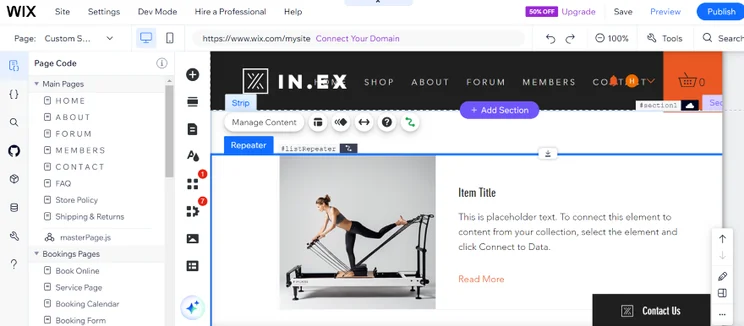
Screenshot of a dynamic list page on Wix for a fitness store
I didn't need a developer to add dynamic pages to my website. I could use Wix Velo and its resources instead, which felt very empowering. Source: Website Builder Expert

Usually, if you wanted these functionalities, you would have to hire a web developer. This would cost you an average of $75 an hour, but Wix includes them, via Velo, in its editor. That’s nice of Wix, isn’t it? All in all, Velo is a cheaper and beginner-friendly way to get into web development, but I’ll cover this below.

Intrigued? If that’s the case, use the table below to decide if Wix Velo is the right fit for you:

Use Wix Velo If… / Don't Use Wix Velo If…
You already own a Wix website and want to add more complex functionality You don’t need to add custom functionality to your website and are happy using Wix’s pre-existing features instead
You have coding experience already, or are willing to put in the hours to learn via Wix’s easy-to-follow tutorials and code examples You aren’t confident with technicalities like code, or don’t have the time to teach yourself this skillset
You’re a web designer who desires creative freedom beyond the generic Wix editor, but don’t want to navigate a complex open source software, such as Magento or WooCommerce, either. You only need a simple, informational Wix website for your business

Wix Velo will keep your wallet happy, since it’s already built into the Wix website builder and is accessible to all users on the free plan and above.

However, there are limits to what you can do on a free Wix website. If you’d like to access more advanced features, like external database integration, you will need to upgrade to a premium plan to access them.

Below are a few examples of the limits you’ll have using Wix Velo on a free plan:

Wix Velo Feature What Is It? Free Site Limit
Dedicated infrastructure Dedicated servers for large companies that require exceptional data security to maintain Not available
Data storage The number of files and documents you can store on your Wix website Up to 1,000 items per website
Data collections The number of sources you can collect data from Up to 10 per website
Data indexing A way to create queries that make it easy to lookup requested data Not available
External database integration The ability to connect a database from an external source Not available

Need more information on costs? Refer to our comprehensive Wix Pricing guide.

Think Velo sounds cool? So did I! Thankfully, it couldn’t be easier to get started.

To enable Velo, all I had to do was select “Dev Mode” in the Wix Editor as I built my Wix test website. After I’d switched Velo on, I could double-click “Home Page Code” at the bottom of the Editor page to open the code panel. Then, it was time to go wild!
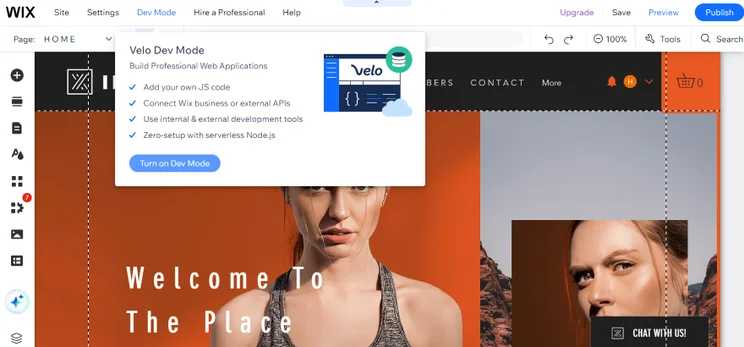
Screenshot of the Wix Editor and a pop-up after clicking on Dev Mode
If you're struggling to find "Dev Mode," all I had to do was open the editor from my dashboard. I found it between "Settings" and "Hire a Professional." Source: Website Builder Expert

Activating Velo couldn’t be more simple but, once you’ve enabled this awesome new feature on your Wix site, you’ll find that it’s anything but basic.

Luckily, Velo offers courses to get to grips with coding if you’re a beginner. Coding is difficult, so don’t worry if you feel overwhelmed at the beginning. If you’d rather have someone walk you through the process, there are plenty of resources to give you a helping hand. 
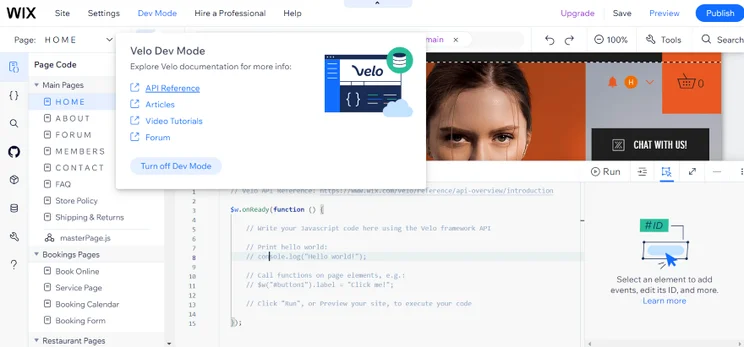
Screenshot of a pop-up in the Wix Velo Editor linking the user to various tutorials on coding
I could access tutorials from the editor, ranging from videos to detailed documentation. Even if you're a beginner, these resources will get you off to a good start. Source: Website Builder Expert

After adding Velo to my Wix website and delving into the numerous resources at hand, I could start testing out Dev Mode.

At the bottom of the screen I found the “Page Code Tab,” allowing me to type out my custom JavaScript code. To test out the code I’d inserted, I could click the “Run” button to preview it and see how it’ll look on my test website.
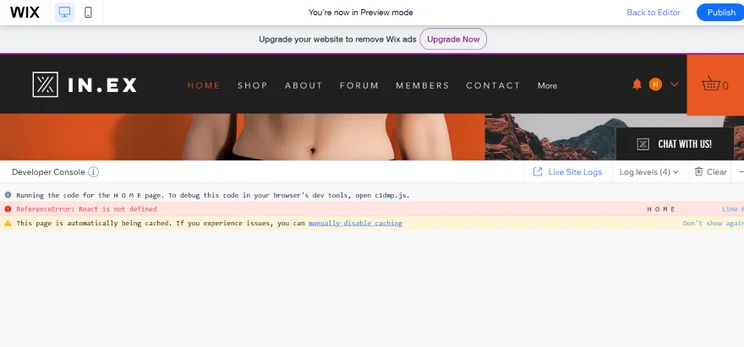
Screenshot of the Wix Dev Editor and code being tested with a red error message
I encountered a red error message after running JavaScript code on my test website. It was back to the drawing board for me. Source: Website Builder Expert

Thanks to the “Page Code” tab on the right, I could add JavaScript code to individual pages such as the “About” page or the “Book Online” page. This makes it easy to add functionality to specific areas of your website.

Alternatively, I could assign code to every page by clicking on the “MasterPage.js” button which caused a separate code box to appear.
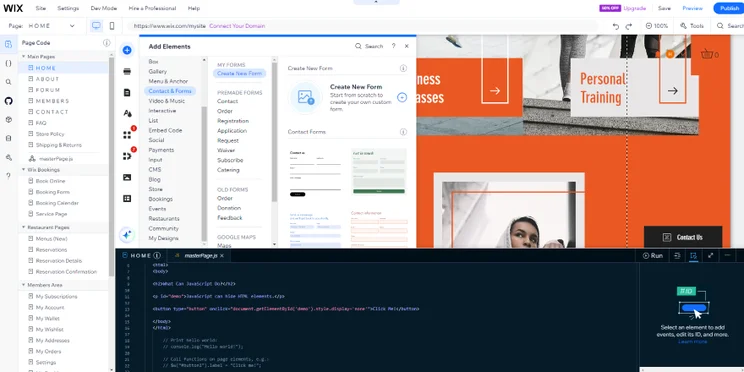
Screenshot of Wix Velo and two MasterPage tabs across the page.
I could find the "MasterPage.js" button below the main pages in the left sidebar, or next to "Home" in the coding box. Source: Website Builder Expert

What I’ve just explained are the basics of Wix Velo, however, you’ll come across much more when you start experimenting with the interface!

Wix Velo consists of three main components that grant you various coding powers:

  1. Database System: This is where you can store all the information you need to populate your website – think images, URLs, product descriptions, etc. Velo’s database system is the foundation for building dynamic pages and repeating layouts
  2. JavaScript Snippets: You can access the JavaScript code and create snippets to build custom interactions, such as collapsible menus that website visitors can use to hide or show content on any given page
  3. Wix API (application program interface): Using the API, you can influence how your website interacts with third-party apps, creating a seamless integration between your website and apps such as Vimeo, Twitter, and Stripe Payments

Now you know about those three components, it’s time to delve into some of Wix Velo’s key features! Here are some of the coolest things you can do:

Database Collections

A database collection is a spreadsheet containing information and media, such as images and product descriptions. You can create your own database collection using Velo, and use it to automatically generate content on your website. Database collections are useful for websites that will need to display a huge variety of unique web pages, such as food recipe websites.

When you enable Wix Velo, your site is automatically connected to Wix Data, providing access to Wix’s built-in databases, which you populate yourself. Alternatively, you can connect your site to an external database using the External Database SPI (though you will need to be on a premium plan to do so!)
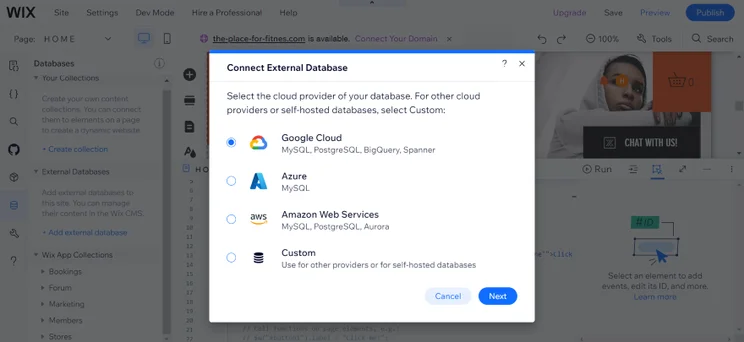
Screenshot of a pop-up on Wix Velo featuring various thrid-party sources I can set up an external database with.
I could add external databases by clicking on the "Database" tab on the left side of my screen. I could connect with Google Cloud, Azure, and more. Source: Website Builder Expert

Dynamic Pages

Let’s say you’re building a website for your muffin-baking business. After creating your database, you’ll need to create a single web page in your Wix Editor.

From here you will then link each area of the page to the relevant column on your database spreadsheet, e.g. ‘name of muffin,’ ‘picture,’  ‘ingredients,’ ‘cooking method,’ and Wix Velo’s dynamic page feature will generate individual pages for each database row automatically – in this case, that’s an individual page for each muffin recipe.
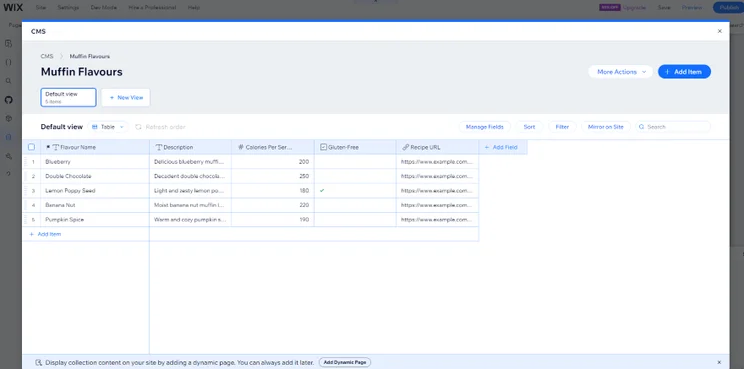
Screenshot of a Wix Velo database featuring data on muffins for sale.
I could AI generate this database and use it to add dynamic pages to my website. The AI created suitable database fields relating to muffins! Source: Website Builder Expert

Repeating Layouts

Having individual pages for each recipe is great for the user, but you might also want to include a snapshot of all of your recipes on one page. This can be done using the Velo repeating layouts feature.

I could add a recipe list to my website by creating a new page, then finding my desired database under “Page Code.” Once I’d found the database named “Muffin Recipes,” I clicked on the three blue dots to the side of the database, and then selected “Add Dynamic Page” to insert my list on the page.
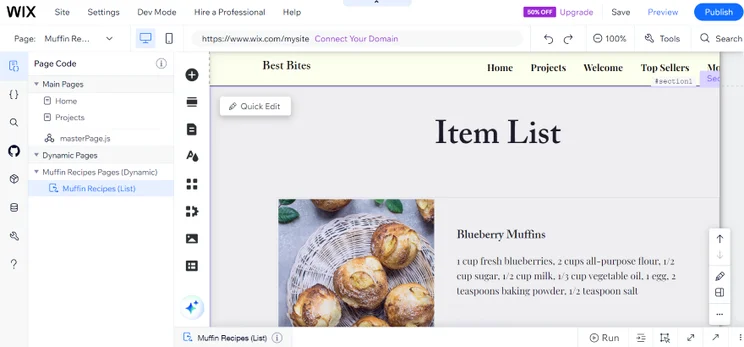
Screenshot of a Wix Velo repeater list featuring muffin recipes.
I liked how the recipe list smoothly integrated with my page. It maintained the design elements of my entire test website for consistency. Source: Website Builder Expert

Custom User Input Forms

Wix Velo makes it easy to collect information from your users, such as reviews, feedback, or user-generated content for a competition.

It’s the same principle as generating on-page content or dynamic template pages except, in this instance, I had to create an empty database collection.

Afterward, I:

  1. Designed an empty form box in the editor
  2. Linked the text boxes with the relevant empty columns in my spreadsheet
  3. Set the mode to “Write” instead of “Read”

…and presto! Website visitors could now write in these empty text boxes. Once the user clicks “Submit,” their answers will be automatically added to the empty table.
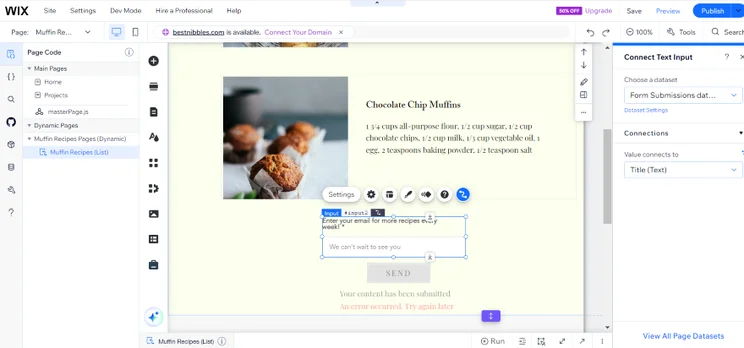
Screenshot of a Wix Submission database on a muffin bakery website.
Via Custom User Input Forms, I could add a form box to my website and use it to collect emails that would end up in my connected database. Source: Website Builder Expert

Custom Interactions

With Velo, you can create custom behaviors for your web pages by updating the JavaScript code. This means your web pages can react in a different way based on each individual user.

For example, you could create animations that appear while the page is loading, or set up different actions depending on how people answer the questionnaire form you’ve created. Overall, custom interactions make your website more interactive and engaging for users!
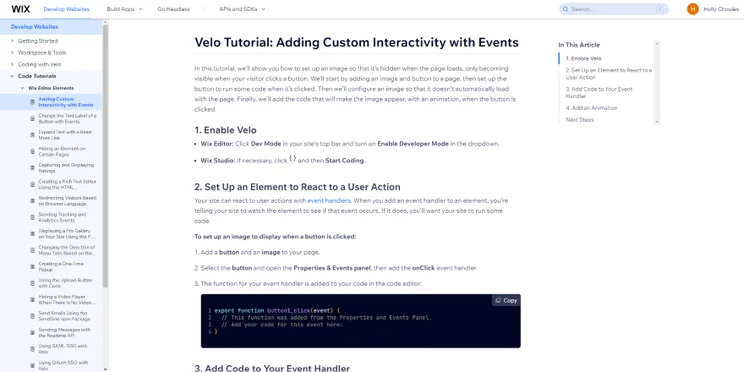
Screenshot of a Wix documentation page for Wix Velo's custom interactions with code
I found custom interactions tricky to create, but luckily I could look up Wix's documentation for a step-by-step breakdown of the code I'd need. Source: Website Builder Expert

APIs

An API is a type of JavaScript message that tells different software how they should interact with each other. Through APIs, you’ll be able to seamlessly integrate your website with third-party plugins, such as Facebook or Vimeo.

API integration is quite advanced and is only really suitable for JavaScript pros. However, you could easily learn about APIs with a little bit of research – check out Wix’s instructional video below for some helpful insights into Velo:

Now that I’ve run through the tops and bottoms of Wix Velo, I hope you feel prepared to explore the world of web development!

Coding might be tricky at first, but Wix Velo gives you a platform where you can learn and experiment with a safety net underneath. Expanding your knowledge is crucial to your online journey, and I hope that my guide to Wix Velo has alleviated some of the anxieties that come with it. Happy coding!

Still not sure if Wix is right for you? Check out our guide to the best website builders on the market for more options.

Written By

headshot of Sam Jagger

Hi, I’m Sam:

Samuel Jagger is a Senior Writer at Website Builder Expert, specializing in AI integration and web design theory. He has created editorial content for the publication since 2022 and has covered topics ranging from website design, ecommerce, digital marketing, and more. He’s written articles for apps like UXPin on web design in the modern age, as well as answered over 100 user comments on the site. Sam has also created his own websites, such as this Strikingly demo you can view here. He also writes and stars in the official WBE TikToks, sharing helpful website tips and commenting on the latest in website design news.

Previously, Samuel worked as a Freelance Blog Writer for The MIZU Hub and as a Digital Content Creator for Europa Music Management, working with musical artists like Purple Disco Machine, David Penn, and Monolink. Samuel has a Master of Arts in Creative Writing and a Bachelor of Arts in Film Practices from Newcastle University, where he graduated with honors and distinction.

Samuel is passionate about writing, visual media, and the creative arts. He is always looking for new avenues to funnel his creativity and align his skills with projects that interest him. You can find him and keep up to date with what he’s up to on his LinkedIn.

More about

24 comments

Your email address will not be published. Required fields are marked *

  • john

    Can you please tell me where I can find a Wix Velo dev that can help me with a previous devs work that left my site unstable? I have tried but it is hard to find.

    1 reply

    • Annie Angus
      Annie Angus

      Hi John, thanks for commenting!

      I'm sorry to hear you're having trouble with your site. I'd recommend visiting the Wix Marketplace to find the right developer for your problem. You can narrow your search by selecting the specific service you require, so this should point you in the right direction. Let me know if there's anything else we can help with!

      All the best,
      Annie :)

  • Jim

    Tom,
    I am planning to use Wix to re-do some pretty vanilla web pages I wrote years ago. These pages are marketing oriented to sell a Java stand alone application. If my end user wants to buy my product I shall launch a purchasing page which shall interface with an AWS-VPS which I am writing. The interface shall use HTTP messages to read/write from/to the VPS. Can I do that using Wix Corvid?

    Also this purchasing page shall use ' ZeroBounce' to validate an end user supplied E-Mail address and shall process a credit card transaction. Can I do the above using Wix E-Commerce and Wix Corvid or should I go to my ISP provider for these capabilities?

    BTW: Is there an additional charge if I use Wix Corvid?

    Regards,
    Jim...

    1 reply

    • Jacqueline Renouard
      Jacqueline Renouard

      Hi Jim,
      There's no additional cost for activating Corvid on your Wix site. However, there may be a fee for certain software you might need. We're not 100% sure about whether Wix has HTTP capabilities, it would be best to chat with the Wix customer support as they'll know exactly what Wix Corvid is capable of. We hope that helps!
      Warmly,
      Jacqueline

  • Anastasis Kokkinos

    This sounds great. One thing I was looking at doing was adding an accordion menu with dynamic pages , but wix lacks this feature, does Corvid bring this into play?

    1 reply

    • Lucy Carney
      Lucy Carney

      Hi Anastasis,
      Thanks for your comment! You can add dynamic pages to Wix if you add the Content Manager. Simply click the large plus in the left-hand sidebar, click "Content Manager" and then "Add to Site." This then allows you to add dynamic pages to your site. You can do this as long as you've built your site on the Wix Editor or Editor X. In terms of your menu, you can create a drop-down menu, if that would work? Wix doesn't support accordion content sections yet, but yes you can use Velo to create expandable sections like this example.
      I hope this has helped!
      Best, Lucy

  • Paulo

    Is it possible to create a 'thank you auto-redirect page after x seconds' with wix code?

  • Arati Nath

    Hi Tom,
    I want to improve my SEO on Wix. With wix code or oether wise could you pls advice.

    1 reply

    • Fred Isaac
      Fred Isaac

      Hi Arati, your best bet is to follow Wix's SEO guide https://seoguide.wix.com/en/ and check out the SEO-focused apps available - https://www.wix.com/app-market/search?query=seo. In our experience, making sure your meta descriptions and meta titles are on point is very important.

  • Dany jedi

    Hi Tom., finding it hard to implement what is claimed to be easy on mouseOver show etc ..
    Trying to find someone with basic jS is also difficult as they need to know about about Wix.
    Any suggestions as i would love to push the limits of what can be done with Wix code

    2 replies

    • Andreas Kviby

      Look at the Wix Code Forums for free help

    • Natasha Willett
      Natasha Willett

      Hi Danny,

      Thanks for joining the discussion.

      It may be worth looking at sites such as Fiverr or Upwork, they should help you find that reputable freelancer.
      https://www.fiverr.com/
      https://www.upwork.com/

      However, if you want to learn how to do the MouseOver yourself it maybe worth looking over the Wix Code help guide: https://support.wix.com/en/wix-code/wix-code-tutorials-examples-videos

      This tutorial video in particular is really useful: https://www.wix.com/code/home/video-custom-interactions

      Hope this helps.
      Natasha.

  • Shelly

    If I have products to sell and want to set up my items using WIX Code database collections / dynamic pages, how do clients submit payment? Do the dynamic pages somehow connect to my WIX online store??

    2 replies

    • Nayeli Gomez

      This is completely inaccurate. You cannot code into the Wix Store yet, therefore you cannot add a "Add to Cart" button on a dynamic page because your page will not know what product to add. The button does not change dynamically. It is static and stays the same.

    • Tom Watts
      Tom Watts

      Hi Shelly,

      As long as you're subscribed to the Wix eCommerce plan and have access to Wix Stores (with all your payment processing methods set up), then you should have no trouble.

      When creating the dynamic pages, click 'Add' scroll down to 'Store' and then look for an 'Add to Cart' button. Drag and drop this on your page, and you're good to go!

      I've just done exactly that on my Wix store to make sure it works and hey presto, all good! It really is very time saving :)

      Thanks for reading and hope that helps,
      - Tom

  • Tina

    Hi Tom, thank you for this information. I started using wix last year and decided that it could only be used for a pilot version of what I needed as its functionality was too limited. Now seeing wix code, quite excited to see this might mean we can keep on where we are, but can you tell me if it will enable the development of user accounts (ideally different kinds of accounts depending on the user, with passwords and dashboards) and if multiple languages can now be added? I am trying to grasp the extent to which the new developments can be applied. Many thanks!

    1 reply

    • Tom Watts
      Tom Watts

      Hi Tina,

      Great to hear you've stuck with Wix and are as excited as we are by Wix Code!

      You absolutely can now create member profiles on your website using Wix Code and this handy guide explains how to do so!

      You should also be able to create a multi-lingual website, but I believe this was possible before the release of Wix Code - it's just a bit time consuming. This guide gives you the details, but from what I can see it involves creating duplicate pages + then translating them, which feels like more of a fix than a solution. However, you can combine this with the Wix Language Menu app to direct users to the most relevant language version of your site, which could solve your issue? Here's some more information about it from Wix.

      Hope that helps,
      - Tom

  • Drew

    Any idea how Wix code will be able to interact with Google Tag Manager? I have several websites set up already, curious whether i will be able to input the code straight onto the site

    2 replies

    • Code Queen Nayeli

      Google Tag manager (and other tracking & analytics tools) will be released within the next few weeks. Wix Experts have been testing this for a couple of weeks now. ;)

    • Tom Watts
      Tom Watts

      Hey Drew,

      Right now you can't actually add the GTM code to your Wix website (see here).

      Hopefully that will be rectified soon!

      Off the top of my head, I can see a lot of potential use in GTM's event tracking to track users through ecommerce pages, particularly filling in custom forms and identifying the user flow through database-generated transaction pages.

      Hope that helps,
      - Tom

  • Kelly

    I am excited to learn more now that I have read your article. This product is phenomenal in it's potential to build custom sites with minimal coding and tedious repetition. I thank you for removing some of the fear of committing to Wix based development!

    1 reply

    • Tom Watts
      Tom Watts

      Hello Kelly,

      Great to know we managed to settle some of your nerves about Wix!

      Wix Code really does have incredible potential to empower people to create stunning websites without any coding knowledge.

      Even when playing in the beta, I was able to create things I never thought possible with Wix, which really impressed me.

      It's definitely worth reading the guides Wix have prepared and playing around with Wix Code to get comfortable with it, but I'm sure it will help you build a great website, Kelly!

      Best of luck and thanks for reading,
      - Tom

  • AD

    Hello, thanx for your support.y
    i want to make a product comparison website.
    so how can i make it.
    please help me.
    i will be very thankful to you.
    thanx.

    1 reply

    • Tom Watts
      Tom Watts

      Hi AD,

      It depends on the sort of comparisons you want to make.

      At the very least, it's worth getting hold of and using the products you want to compare, then write about your experiences using those products!

      So at the very least, you'll want a platform on which you can blog easily. I'd recommend Wix or Weebly as good starting points.

      Check out the reviews I've linked to and see how you get on.

      Thanks for reading
      - Tom