

Wix’s latest AI website builder, Wix Harmony, combines classic website building tools with vibe coding, making it easier and speedier for businesses to build a professional page. Powered by Wix’s AI agent Aria, the builder lets you use natural language prompts to direct the AI and shape how you want your website to look and act.
In light of this news, I’ve given Wix Harmony a spin to test out its features and see what’s possible. I’ll share my experiences, and explain what the AI builder is and how you can give it a try yourself.
What Is Wix Harmony and How Does It Work?
According to Wix’s official press release, Wix Harmony is the “company’s new flagship AI website builder,” which combines “vibe coding with Wix’s powerful visual editing capabilities.”
The tool works by processing your natural language prompts, via the AI Agent Aria, and using them to construct your website. For example, when I used Wix Harmony for the first time, I wrote a detailed prompt that asked Aria to:
“Create a professional website for my private dental practice called All Smiles Dentistry. It must have a dedicated section for listing general and cosmetic services, a ‘Book Appointment’ form, and a welcoming ‘Meet the Team’ area. My website also needs a calming color palette of soft whites and calming blues.”
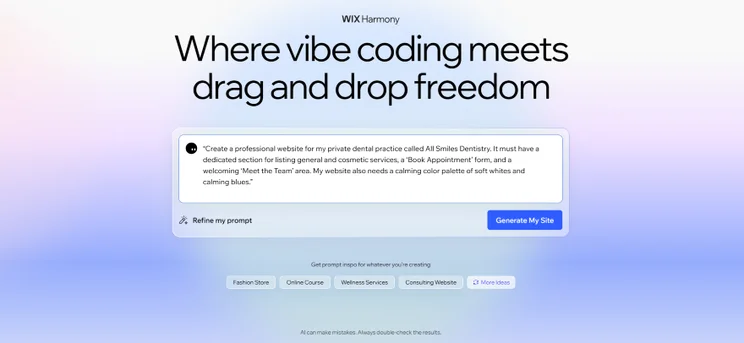
Then, I clicked on the “Generate My Site” button so the AI could build my website. It redirected me to another page where Aria introduced itself and started planning my website. I had to wait a few minutes for my initial design to load.
As Aria created my website, it also kept me informed about what it was making next and why in the right-hand sidebar. This is a common feature of vibe coding tools like Lovable, since the AI is typically transparent about the changes they’re making to your project.
Once Aria had finished, my website appeared:
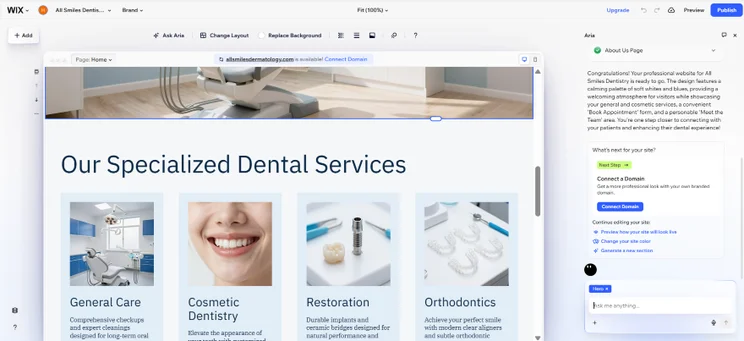
Though I liked the initial design, it still needed plenty of personalization so that it was tailored to the business. Like you would with AI content creation tools, it’s important to edit the AI-generated website content to make sure that it’s truly aligned with your business goals, has the right branding, and features accurate information.
Thankfully, Wix Harmony lets you speak to Aria as much as you’d like until you’re happy with the finished design. With further prompting, I could ask her to:
- Improve my website copy
- Better match the imagery to the design
- Suggest another section for a page
- Generate a new design entirely
How To Get Started With Wix Harmony
Wix Harmony is included in all of Wix’s plans, which includes its free tier plan.
However, if you’d like to access Wix’s top features, such as having your own domain name and increased storage space, you’ll need to be on one of the paid plans that range from $17-$159 per month (billed annually). I’ve outlined each plan in the table below:
|
Plan name
|
Price with our discount code
|
Monthly price (paid annually)
|
Monthly price (paid monthly)
|
Ecommerce
|
Recommended for
|
|
|---|---|---|---|---|---|---|
 |
|
Best Value
|
|
|
||
|
Free |
Light |
Core |
Business |
Business Elite |
||
|
$0 |
||||||
|
$0 |
$17 |
$29 |
$39 |
$159 |
||
|
$0 |
$24 |
$36 |
$46 |
$172 |
||
|
|
|
|
|
|
||
|
Trying out Wix |
Portfolios and personal sites |
Small stores and growing businesses |
Established businesses |
Large businesses with complex needs |
If you’re unsure if the AI website builder is right for you, I recommend visiting the official Wix Harmony page and testing out the tool for free first. This will give you the chance to play around with Wix’s interface, experiment with your design, and explore some of the builder’s key features. That way, you can upgrade to a paid plan if you’re confident that it’s a strong fit for your needs.
💡Still unsure if Wix Harmony will be right for you? View our in-depth Wix review to learn more about the platform and its key pros and cons.






0 comments