
When creating or designing a new website from scratch, there are a myriad of choices, features, and limitations to consider. Pricing is a major deciding factor for many future site owners. For WordPress users, your main cost comes from web hosting, but other factors such as themes, plugins, or developer help can all add up.
Not only can it be frustrating to find transparent WordPress pricing, but many costs change regularly based on promotions, incentives, and special offers. If you’ve considered signing up with WordPress but struggling to get clarity on costs, we can help.
In this post, we’ll break down how much WordPress costs overall, highlight included features, and help you decide whether it’s the best value for your investment.
How Much Does WordPress Cost?
WordPress.org itself is free, but comes with essential extra costs to publish and run your site. Starting and maintaining a WordPress.org website usually costs around $11-15 per month for intro-level users. Realistically though, you should anticipate a one-off cost of around $200, with a small ongoing monthly charge ($11 – $40/month). Your WordPress.org costs could quickly creep into the $1,000+ mark if you need to hire a web designer.
WordPress.org Pricing: The Basics Explained
Before we dig deeper into pricing specifics, there are two important things to mention about WordPress.org: it’s an open-source Content Management System (CMS), and it’s actually free!
Yes, you read that correctly! As a software framework, WordPress.org is completely free to download and use. Of course, there’s a lot more to the platform’s capabilities than simply downloading it and designing whatever site you want.
That’s where monthly costs, upgrades, and subscriptions come into play.
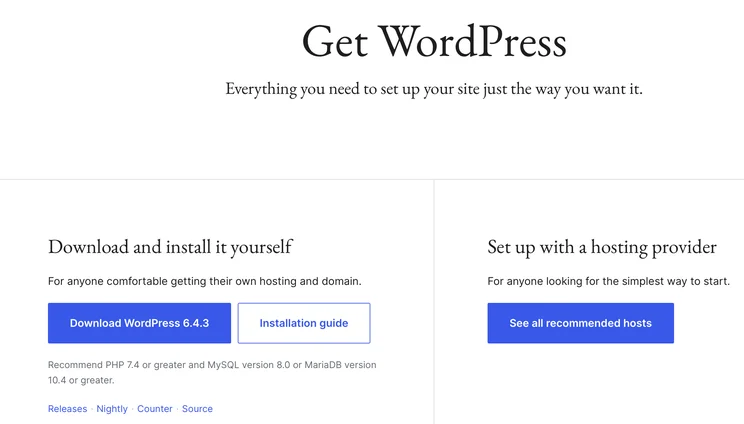
Even though WordPress.org is technically a no-charge service, you’ll never be able to launch a live, scalable website without investing in at least a few of the six costs we’ll cover below.
Before you start to worry about big picture financial investment, don’t stress. Many website costs are both optional and affordable, making it easier to get started if you’re a beginner or looking to save on necessary site features.
At an introductory level, remember this—the main costs you’ll encounter include domain name charges, hosting fees, premium themes, and helpful WordPress plugins to optimize your site.
Simple Cost Overview for WordPress.org
Here’s a quick rundown of the six major pricing factors you’ll need to budget for when using any WordPress.org account:
| Service or Add-On | Total Cost and Frequency | Necessity |
| Web hosting price | From $2.95/month | Essential |
| Domain name | From $12/year | Essential |
| Pre-made website themes | $0-200, one-time charge | Essential |
| Website plugins | $0-1,000, ongoing or one-time charge | Optional but recommended |
| Website security features | From $50, ongoing or one-time charge | Optional but recommended |
| Extra developer fees | $0-1,000, typically one-time investment | Optional |
When your site grows in visibility or complexity, you may need to invest in more advanced features to keep it running smoothly. Many WordPress add-ons can streamline your site’s user experience, improve load times and site speed, optimize for search engine optimization (SEO), or even incorporate ecommerce selling options.
If you’re just starting out, however, keep it simple. Most beginners benefit from having a sustainable monthly cost that’s easier to manage before a website becomes profitable.
Let’s take a closer look at where these costs come from and the actual service providers you’ll expect to pay throughout the journey.
Web Hosting Provider Price: $2.95+ per month
The most important cost associated with a WordPress website is web hosting. Think about hosting like a steady foundation—it’s where you’ll build your site from the ground up. Web hosting providers offer site creators “land” (in the form of server space), where they can build and maintain new, fully-functioning websites.
There are many different types of web hosting. For example, web hosting can be shared (where you’ll divvy up server resources with hundreds of other site owners), or dedicated. Dedicated hosting is usually reserved for big businesses that require more space or privacy on their own server.
Because there are so many hosting providers on the market, prices can range from about $2/month to over $100/month for dedicated server hosting plans. The upper end is typically common for sites that have extremely high traffic volume, require robust storage space, or need advanced levels of technical and coding support. The total cost to host a website depends on your unique resource needs and website goals.
Based on our research: Bluehost continues to be our top choice for web hosting services. Its reliability and affordability place it at the top of the pack, year after year.
Domain Name: $10-20+ per year
In website speak, a domain name is your site’s directional address – for example, ours is websitebuilderexpert.com. You’re probably familiar with popular domain extensions like .com, .net, and .org.
But how much does a domain name cost? On average, expect to invest $10 to $20 per year in a domain. Depending on which hosting provider you choose, you might be able to claim a free domain name at sign-up, but this is usually only valid for one year. After the promotional offer expires, you can expect to pay for the renewal of the domain. Eligibility depends on whether you’ve already bought a domain (which anyone can do at any point), or whether you choose a new domain when you sign up for hosting.
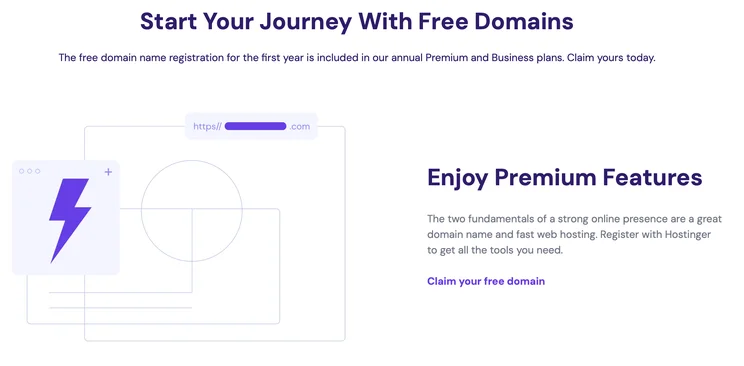
While the name alone is its own cost, some users also choose to include domain privacy. This add-on protects the private, personal information of a site owner and keeps it out of public databases in search. If not included with your web hosting, domain privacy costs $10-20 per year.
Pre-Made Website Themes: $30-200 per purchase
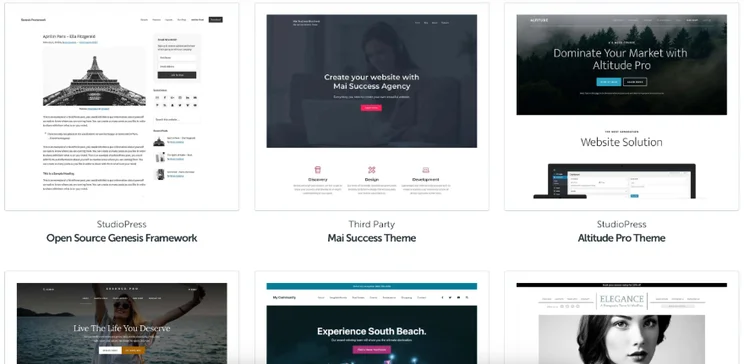
Once you have your WordPress dashboard set up, you’ll discover a wide variety of simple, predesigned templates and themes. Essentially, a website theme is what determines the look and feel of your website.
Free themes are widely available, but many users choose premium themes from niche designers. The benefit of choosing a specialized theme from a designer is that you’ll unlock many bonus features, customer support, and future theme updates. If choosing a custom theme is a priority for you, expect to invest $30-200 in a one-time purchase. Expect to pay again if you ever want to change your theme.
You can shop for custom themes on marketplaces like Etsy or through individual site designers. StudioPress and Elegant Themes are popular options.
Website Plugins: Free-$300/year+
WordPress plugins act like the “cherry on top.” They’re specialized tools and features that give each site owner extra customization—like adding whatever features your site needs, giving you ultimate control over your website’s functionality.
The good news is, there are lots of free website plugins that you can install directly from your WordPress dashboard. These add-ons will let you share new posts to social media, collect visitor information in basic web forms, and design pop-ups when visitors land on particular pages.
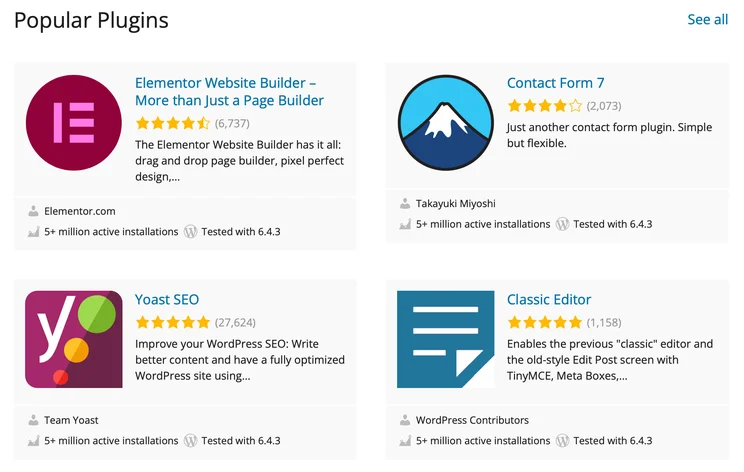
On the other hand, you can buy premium plugins that offer expanded, in-demand features. Serious website builders can buy these for a one-time fee (usually a single-use license) or as part of a monthly subscription for access to a suite of tools. Here’s a few of the most popular plugins and their fees:
| WordPress.org Plugin | Category | Expense |
| Yoast | SEO |
Free version: $0 Premium version: $99/year |
| Share This | Social sharing | Free |
| Wordfence | Security |
Free version: $0 Premium: From $119/year |
| WooCommerce | Ecommerce | Free |
When it comes to plugins, tread lightly and have a strategy. Installing too many extras can quickly elevate your monthly expenses and slow down your site.
Website Security Features: $8-100+ per purchase
When it comes to investing in your website, security deserves a rightful spot. After all, if your website goes down in a security issue, you could lose years of hard work and valuable data.
Many users invest in site security by purchasing an SSL certificate. These certificates identify your website and encrypt sensitive data. SSLs also protect your site from malicious threats, and they safeguard any customer data or information you plan to collect. SSL certificates may or may not come included with your hosting service provider. Although most good web hosts will include an SSL certificate for free (included as part of your plan), not all hosts do. We recommend double-checking before you commit.
Basic SSL costs range from around $8 to several hundred dollars depending on the level of certificate you need.
In addition to buying these certificates, you might also protect your site with extra backups, encryption, and security scans for malware or other harmful code. As a general rule of thumb, before you purchase separate website security features, always verify what’s included within your selected host plan.
Additional Developer Fees: $100-2,000/project, one-off cost
Not the most tech-savvy site owner and want expert help? No problem! Consider hiring a developer or designer to create the customizations and backend code that your site might be missing.
Many developers and designers work on a freelance basis, charging anywhere from $50-250 per hour based on their level of expertise. You can often hire these professionals for troubleshooting, new site design, or optimization. Conversely, many web development agencies have set packages that you can invest in based on your current goals.
Before you outsource this aspect of your site and invest hundreds or thousands of dollars, ask for proof of work and past portfolios. Choosing a developer who has similar style and communication can eliminate frustration and give a better end result.
Is WordPress.org Good Value for Money?
WordPress.org is a cost-effective platform for building and managing a new or existing website.
The software itself is free, the community support is robust, and the potential for customization is nearly unlimited. Plus, it’s an incredibly popular and well-recognized platform. According to the organization’s own data, nearly 40% of public websites exist on WordPress, and the goal is to move that number to over 60%.
The good thing about WordPress.org is that you control how much you spend. If you’re happy hunting for the best deals, you’ll find you can get great value from building your site using WordPress. However, if you don’t do the research or if you don’t budget carefully, your costs can easily stack up.
Compared to hiring a professional web designer or developer, using WordPress.org on your own can save you thousands of dollars in startup costs. However, stay diligent about any additional costs you pick up over time. Eventually, the prices of themes, plugins, and hosting adds up, especially if you choose premium options.
Remember—WordPress is a foundation for long-term website growth. The value you invest today will also equate to the value you get out.
Are There Hidden Costs?
Hidden costs associated with WordPress.org pricing are usually things for which you have to opt-in, or even agree to pay extra per month. While they’re not a secret, some users might find them surprising if they don’t know what to expect.
We’re here to help you see that most expenses are optional, but some choices do depend on the level of personalization that you want to enjoy on your specific site. As we’ve worked with WordPress users, we’ve noticed a few common expenses that can catch site owners off-guard.
Customization or Site Fixes
Some beginner site owners have an idea of what they like or what they want their site to look like. But when they go to design it themselves, they realize those themes are tricky and complex. Hiring a developer or designer to create what you really want could be an unplanned expense.
In rare cases, it’s possible to “break” a site or get it to a place where it needs a more in-depth reset. If you’ve added complex code and want to backtrack, hiring a designer or developer can reduce that stress and save plenty of time. Expect to spend a little more when you’re troubleshooting or fixing a site that’s gone off the rails.
Advanced Website Security and Protections
Many full-functioning security plugins are free. Ensuring your site’s safety, however, is even more important as it grows. If you’re not expecting security-related costs as your traffic increases, go ahead and plan for that now.
Vital Maintenance
Regular backups and system maintenance can make or break your site performance. Although some hosting plans include this, others might upcharge. If you want to avoid surprise maintenance costs, pick a hosting service provider up front that you can trust to perform this work on a regular basis.
Keep in mind, WordPress.org isn’t trying to trick new site owners or cause them to abandon their work. It’s really a matter of knowing what you might expect in the future. By being aware of your own personal limitations and needs, you’ll be able to budget more successfully.
WordPress.org Versus WordPress.com
Sometimes, users get confused between two main offerings: WordPress.org and WordPress.com. What’s the difference, and why does it matter?
WordPress.com is a less powerful WordPress platform that functions more like a website builder for basic users. Although it has a free plan, and comes with hosting built-in, it’s really suited to hobby bloggers or small business operators who don’t need a lot of customizations or backdoor tech. Additionally, WordPress.com may limit how your site’s domain name or blog title looks to visitors.
On the other hand, WordPress.org gives complete control and opens the door for monetizing a website. Although beginner users can also take advantage of its flexibility, even major corporations and enterprises use WordPress.org to maintain and build public-facing websites.
Our WordPress.com vs WordPress.org comparison is full of more information.
What About WordPress.com Pricing?
WordPress.com has a free plan, and four paid plans ranging from $4 to $45 per month, billed annually. There’s also a fifth, custom-priced Enterprise plan. The key thing to note with these plans is that a lot of the add-ons you usually shop around for with WordPress.org are alredy included. For example, WordPress.com users don’t have to pay for separate hosting, support, security, or a domain name.
Remember, WordPress.com is a beginner-level platform design for hobby bloggers or small businesses without much room for growth. Although it acts like a simplified website builder, the WordPress.com platform has introduced its own upgrades that improve the experience.
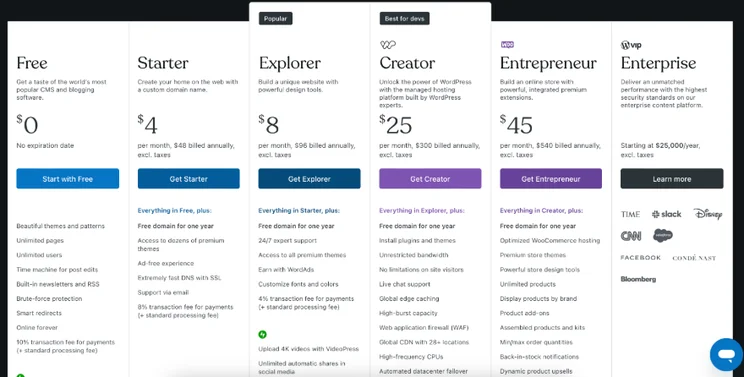
One of the biggest distinctions here is that WordPress.com users can expect to have the bulk of their costs paid to WordPress.com. That’s not the case with WordPress.org, where users need to outsource (or buy separate) things like hosting, themes, and site development.
Additionally, WordPress.com limits monetization. If you’re leaning towards WordPress.com as your site host because it looks cheaper on the surface, you’ll likely hit later limitations over digital ads, selling to customers, and even owning the rights to the content you create.
Our Testing Methodology
At Website Builder Expert, we regularly survey hundreds of readers to find out what’s important to them when building, designing, and hosting a website. Our team then spends hundreds of hours researching how the top providers measure up.
Our goal is always to provide clear and honest data that helps you arrive at better decisions for your own website or business. That’s why our research process involves cross-validating authentic sources, confirming information with an in-house team of experts, and keeping up with important industry trends and announcements.
Total Cost Summary
WordPress is a free open-source platform, but it still comes with costs attached. The main cost associated with WordPress is hosting, which starts at around $2.95/month. Other common costs include domains, themes, and plugins. Realistically, WordPress pricing falls between $11 and $40 per month, after a one-off cost of $200.
We’ve taken you through the key costs you’re likely to encounter when making or designing a brand new website through WordPress.org. As you might have gathered, it’s challenging to put an exact figure on how much it will cost for your particular website and long-term goals. On the upside, by searching for the best deals and doing your research, you’ll get full control over how much your website costs, both at the time of starting it and as you maintain it.
On top of securing a unique domain name and choosing a hosting provider, most users tack on extras like domain privacy and an SSL certificate. Realistically, this means spending a bit more money.


1 reply
1 reply
1 reply
1 reply
1 reply
1 reply
1 reply
1 reply