We’ve Had a Play Around With Weebly: Here’s Our Beginner-Friendly Tutorial

We may receive a commission from our partners if you click on a link and purchase a product or service on their website. Learn more

Headshot of Emma Ryan
Written By
natasha_willett
Reviewed By
Updated on March 24, 2023

To use Weebly, you’ll need to sign up, create a domain name, and then choose a pricing plan. This may sound like a lot, but don’t panic! A Weebly website can be made in eight easy steps, and we’ll show you how.

We’ll cover the basics, from start (signing up) to finish (publishing) with all the creative stuff in between, such as how to make the most of Weebly’s editing features, edit templates, choose a domain, integrate apps, and set up an online store.

So just sit back, relax, and get ready to create.

Register with Weebly

Firstly, head over to Weebly.com. You can build and publish your site totally free, so there’s plenty of time to see if you enjoy using it.

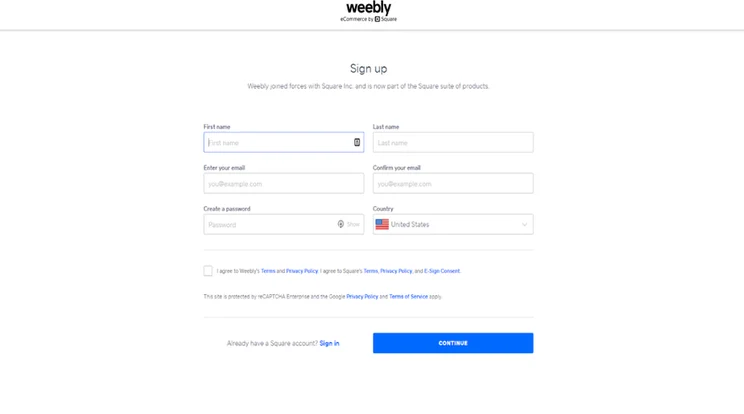
To kick things off, click “Get Started” – either using the button in the top right corner or the center of the page. Now type in your name, email, and create a new password to get the Weebly ball rolling.

Choosing the Type of Website You Want to Build

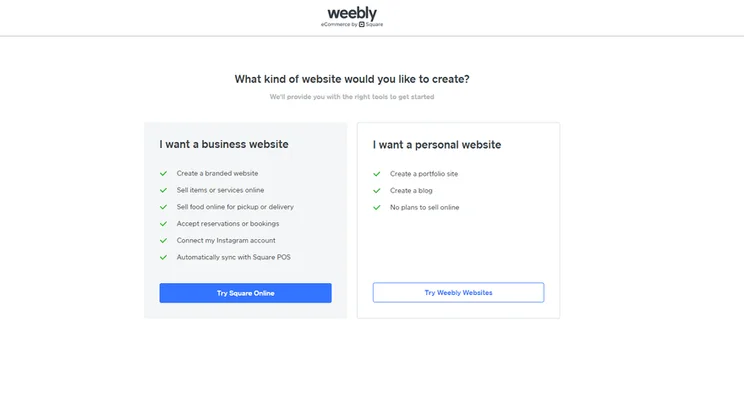
After clicking “Sign Up”, you’re taken to a page with one question: “What kind of website would you like to create?”

You’ll then be offered two options – “I want a personal website” or “I want a business website.” The one you go for depends entirely on your ecommerce ambitions, however, it’s useful to point out that if you opt to build a business website at this stage, you’ll be redirected to Square Online.

If you’re confused by this, let us explain. Square acquired Weebly back in 2018, so the two are actually sister builders. Square Online is entirely ecommerce focused, whereas Weebly is more of a general builder. Our advice? If you want an online store, head straight to Square Online to get started, since Weebly no longer supports ecommerce functionality for new customers.

When you’ve selected “Try Weebly Websites”, you’ll then be directed to Weebly’s template library.
Browse Weebly’s Themes

Weebly has around 50 themes, all of which are totally free! There are plenty of categories to choose from: business, portfolio, personal, blog, and more. Once you’ve filtered the library depending on the type of website you’re planning to build, Weebly will then narrow your choices down to a smaller number of industry-specific templates.
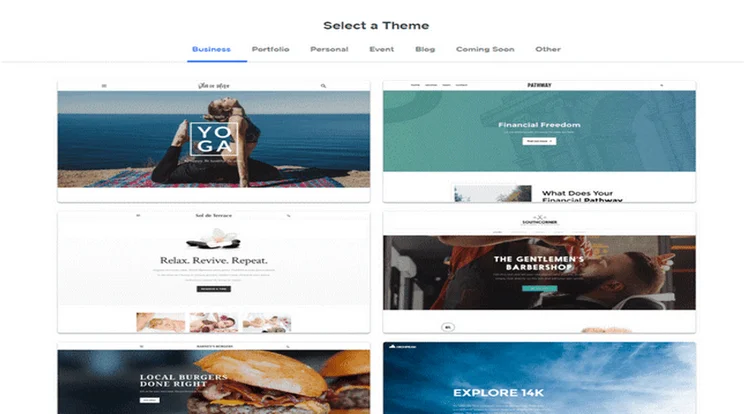
Selection of Weebly website themes with industry categories above to help filter
Weebly has a wide choice of mobile-responsive themes for almost any industry.

We won’t lie to you: Weebly’s themes aren’t the most attractive on the market. They’re not the worst either, though! They’re not as modern as they could be – which is part of the reason Weebly only scores 2.3 out of 5 for design in our recent research – but they do look reasonably clean and polished. And, unlike Wix, you can change templates at any time, so you’re not restricted by your choice.

Preview Your Favorite Designs

When browsing for themes, you can preview each one by clicking the thumbnail to see how it looks on a full screen. We recommend doing this for every theme that catches your eye. That way, you can navigate around them as if you were a real-life visitor. Then, once you’ve found one you like, hit “Start Editing” in the top right.

If you decide later on that you’d like to try something different, you can change your template by clicking the “Themes” header in the top toolbar. This will redirect you to the template library.
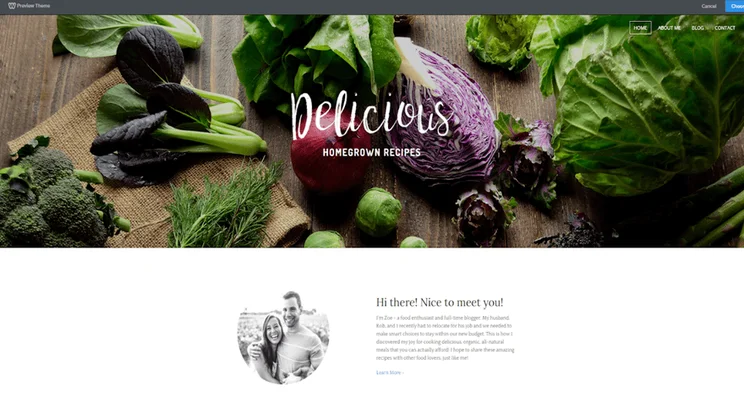
Preview of a Weebly website template featuring a large image of vegetables and an about us bio
Make sure to preview a wide selection of themes before settling on one.

Weebly offers a number of industry-specific options. It has delicious restaurant templates, fresh cleaning service designs, strong-looking personal training themes – you get the idea. These options save you even more design time – you just need to edit the text boxes and images and you’re good to go.

Do You Want a Free or Custom Domain?

Before you start editing, you’ll need to name your website. The name of your website appears in your website address and is called a domain name. For example, ours is websitebuilderexpert.com.

So, how do you go about getting a domain for your Weebly website?

It’s easy – Weebly will automatically prompt you to type in a domain name!

You can get a free domain by choosing the Weebly subdomain. This means your website address will contain “.weebly.com” – it’s not very attractive or professional, but it means you don’t have to pay a cent for your domain.

See the image below for an example of a Weebly subdomain as well as professional, or custom, domains.
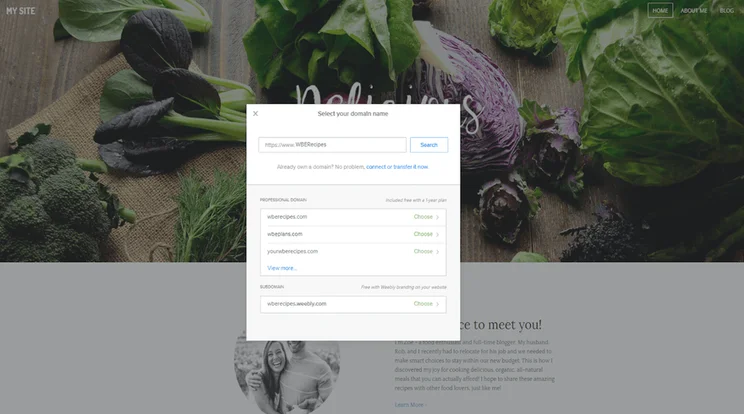
Weebly preview website showing a pop up to select a subdomain
Weebly offers a free subdomain name, ideal for cost-conscious users.

Buying a Custom Domain

If you want a custom domain (like ours), you can simply register one through Weebly. Just click “Choose” to register your favorite domain. You’ll have to pay for this, however, and upgrade to a paid plan to actually use your domain.

The upside of using a custom domain is that it’s more professional, memorable, and attractive. Your domain is unique – think of it like your site’s fingerprint – so it’s worth finding the perfect one.

Just how much is a custom domain, though? Is it worth it? 

Domains vary in price, but usually fall between $14 and $20 per year.

There are cheaper prices elsewhere (check out Domain.com for great deals – you can get 25% off using the code WBE25), but registering your domain through Weebly is the easiest and quickest option.

Connecting an Existing Domain Name

Already have a domain? You can easily connect it by clicking “connect or transfer now” at the bottom of the popup – then just type in your URL and press “Search”.

Creating a Custom Domain Name

No guide on building a website would be complete without some tips on how to create the best domain name. So, here are our top tips:

  • Keep the name short
  • Include popular keywords
  • Target your area
  • Make it memorable

And voilà! You have a beautiful domain just waiting to be used – let’s get on with building your site so you can make good use of it.

Further Information

Weebly Design Overview

After choosing your domain name, it’s time to start customizing your website. Weebly scored 2.3 out of 5 for design in our research, so although this isn’t one of its strong suits, it still comes with enough scope to give your template its own unique spin.

You’ll automatically be taken to the Weebly website editor once you’ve completed step two. This is where you’ll let your creative juices flow. We’ll go through the menus and features one by one, but here’s what it looks like at first glance:
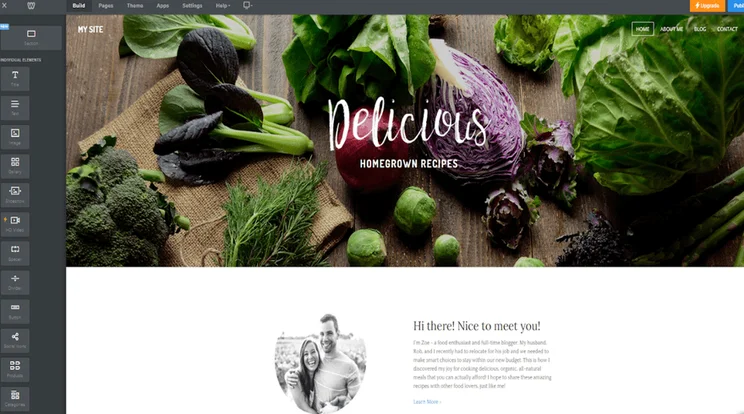
Weebly's website builder editor in use, featuring the homepage of a website with the editor toolbar running down the left hand side of the screen
The Weebly editing homepage is easy to navigate and use.

Editing Text Boxes

Weebly is a “What You See Is What You Get” (WYSIWYG) website builder. This means you can click and edit, as well as drag and drop media, without needing to know any code. So to update the text, simply click the box and type.

Editing the Background

You can customize your theme even more by changing the background. Simply click the background image and select “Edit Background”. From there you can change the image, scrolling effect, and page alignments.

Adding New Elements

This is where you add the fun stuff. Using the “Element Menu”, on the left hand side, simply drag and drop your chosen media icon anywhere on the page. You can pop text, videos, buttons, and more almost anywhere you like. There are some limitations though. Weebly’s templates are organized in rows, so you’ll need to stick to these blocks when moving elements around, which can make full customization tricky.

Take a look at the Element Bar below for just some of the elements you can choose from:
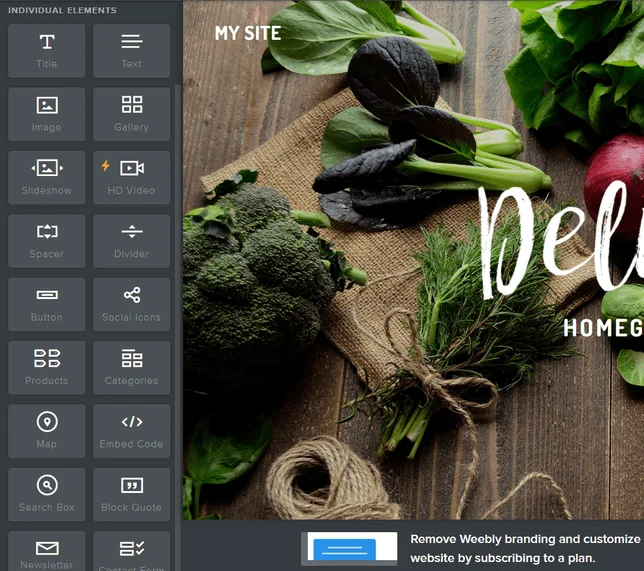
Weebly's elements bar sitting to the left of a website homepage, featuring columns of icons
The Weebly Elements Bar clearly shows what you can drag and drop onto your site.

Any element with the lightning bolt symbol next to it can’t be used on the free plan – you’ll need to upgrade to use these features. However, everything else is free for you to play with!

Let’s say you want to add an image. Drag the icon where you want, then click “Upload Image”. A popup will then give you some options: you can upload from your computer, or press “Search” and find a free Weebly image.
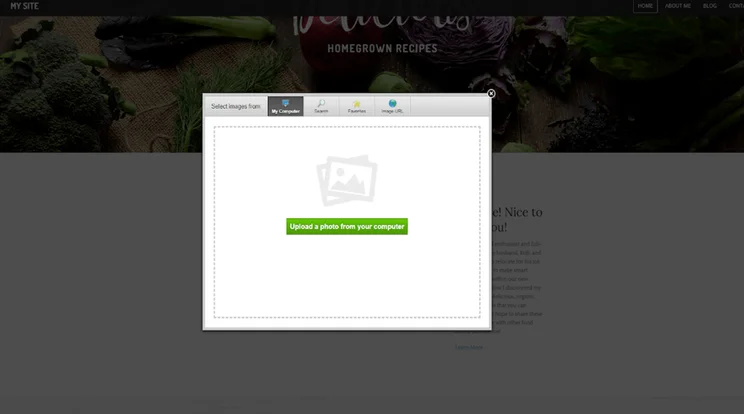
Pop up over a website homepage, featuring a button to upload new images to the editor
Weebly provides a wide choice of free images to keep your design costs down.

To edit other pages on your Weebly website, simply click “Pages” on the top Navigation Menu and choose a different page. Adding elements is the same process for each page – just drag, drop, and click your way to a beautiful website.

From the Navigation Menu, you can make the most of Weebly’s flexibility. Change your theme, edit your site settings, move to a different page – it’s all there.

Adding New Pages

It’s easy to add new pages to your website. Simply go to the Pages tab in your menu and click the plus icon in the left-hand sidebar. A drop-down menu will appear with different types of pages.

Select the type of page you want to create – a blog page, for example – and give it a name. As you do this, Weebly automatically loads the page for you, with pre-filled images and content for you to make your own.

Remember to click “Done” to save your new page’s settings. Once you’ve done this, return to the “Build” menu tab to edit the page just like you would normally!
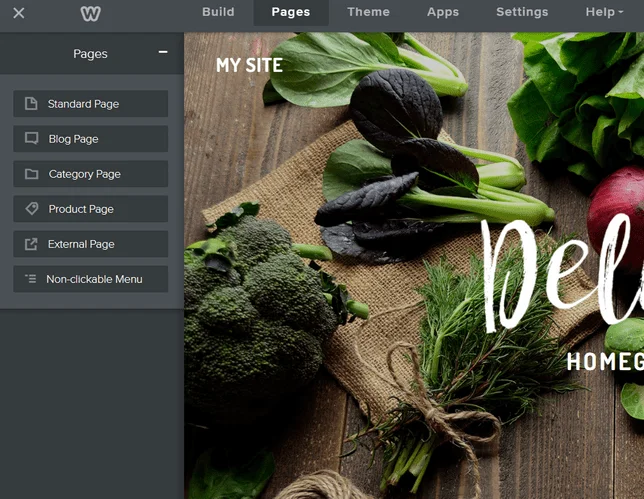
List of pages to add to your website when editing with Weebly
Weebly provides different types of pages to add to your site.

Changing the Color Scheme

You can change the color theme of your page by heading to the Theme section of your dashboard. For some themes you simply have the options of light or dark, while others give you actual colors to switch between.

This is fairly basic and you won’t see massive changes to your theme, but you can add a custom color to the range of choices if you want to.

Adding New Layouts

To really personalize your website, you’ll want to add new sections to the pages you’re editing. Apart from adding new elements, there’s also the option to add new sections.

This element sits at the top of the left-hand sidebar above all the other elements – simply drag it to where you want it on the page and let go.
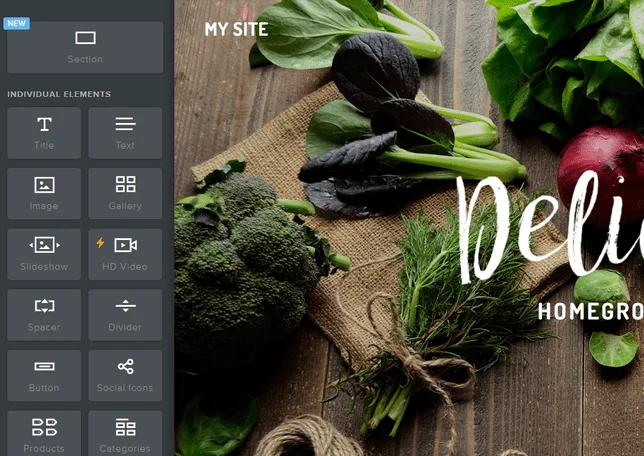
Columns of elements to add to your Weebly website with a larger element box above called "Section"
The Sections element sits above all the others in the left-hand sidebar.

It’ll give you a list of options: Gallery, Contact, Menu, Featured, and Team. Select the one you want to add.
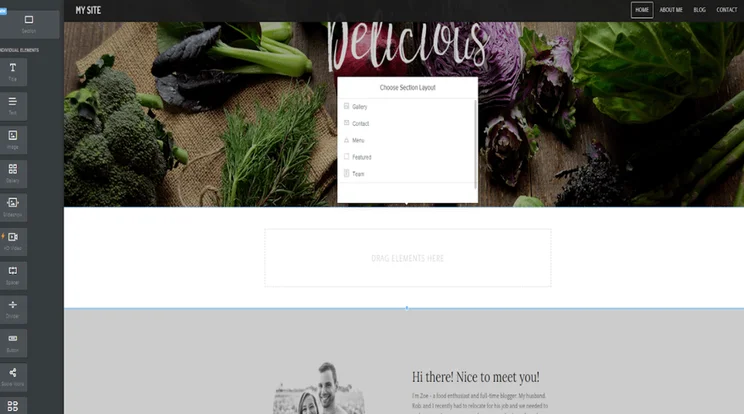
Editor view of a Weebly website featuring a box to choose the style of section you want to add to the page
You can choose the type of section you want to add to your page.

Weebly then gives you a list of different layouts to choose from, so you can pick the one you like the best. Click on the layout you want, and it’ll appear on your page. Click “Save” in the popup box, and get editing!

Deleting Sections

We all make mistakes, we all change our minds, and we all learn differently – we’re only human after all! That’s why it’s important to know how to delete elements on your site, as well as adding them.

You might want to try out a gallery on your homepage, but then decide it doesn’t work. You’re not stuck with it forever – simply click on the element, and look for the small blue cross that appears in the top right corner of the editing box.

Click on that cross, the box will turn red, and you’ll have the option to delete that element.
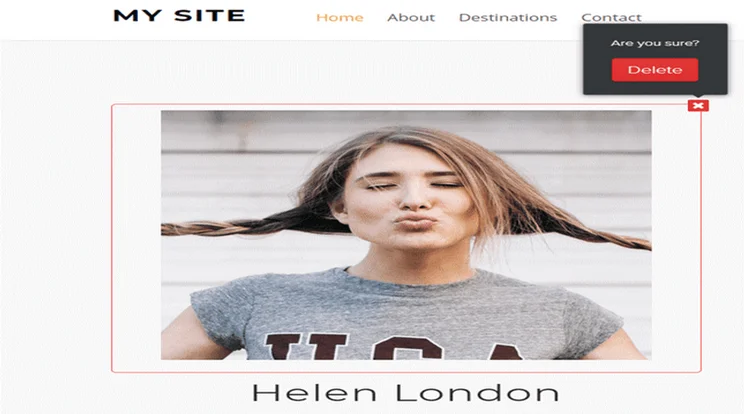
Element on a Weebly website selected for deletion with a pop up box asking the user if they're sure they want to delete the element
Deleting elements is easy – simply click the cross!

This is how to delete small elements such as galleries, text boxes, images, buttons, and more.

If you want to delete a larger section such as a background, simply click on the area you want to remove. You’ll see a few options appear: Edit, Move, and Delete. Click the Delete button and you’ll see a popup asking you if you’re sure you want to delete. At this point, you can either cancel or confirm – if you click “Delete” then that section and everything inside it will be deleted.

This “are you sure?” method means you won’t scrap any bits of your website by accident, which is a relief!
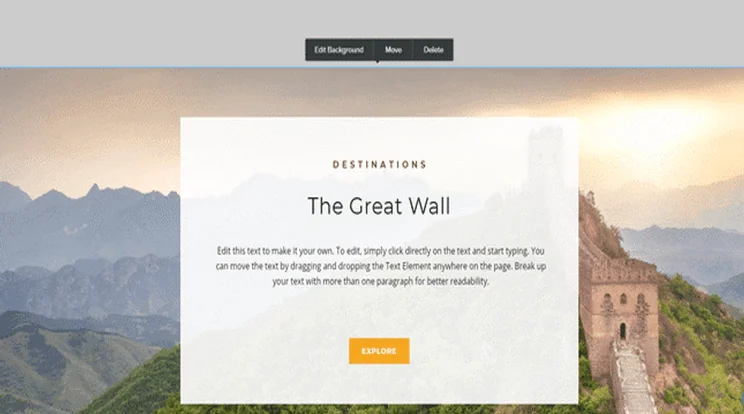
A section on a Weebly website with action buttons above, including "Delete"
You can delete whole sections of your page if you want to – just click "Delete" and then confirm your decision!

Check out our video below on how to use Weebly’s basic elements.

Further Information

Searching for Apps

Also in the top Navigation Bar is “Apps”. You guessed it – this takes you to the Weebly App Center. Whatever your website, Weebly has an application to help boost your performance. We recommend adding some popular apps like “Site Booster”, and “Content Color Box”.

Not only does it categorize apps for sales, traffic, social and Weebly-specific, but it even recommends apps just for your website. It’s like having your own personal shopper – the American dream, right?
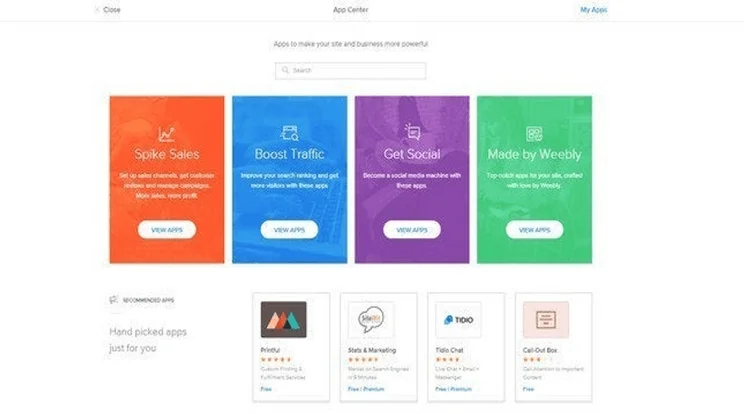
Weebly's app store featuring a selection of apps and categories such as "Boost Traffic" and "Get Social"
Weebly has over 300 apps to boost your website’s performance and appearance.

Weebly has an impressive amount of apps – over 300 apps, to be (sort of) precise. More than 50 are free, and there are always new apps being added, so you won’t struggle for choice.

Don’t feel overwhelmed – you can sort by “Popular”, “Highest Rated”, “New”, and “Free”. Or just search for whichever type you want, whether it’s an FAQ section, countdown timer, or social feed. You can even categorize them on the left-hand side.

Also, before making any purchases, you can check the user ratings on each thumbnail. Can’t find one you like? Scroll to the very bottom and you can submit a new app idea, or even develop your own (if you can code).
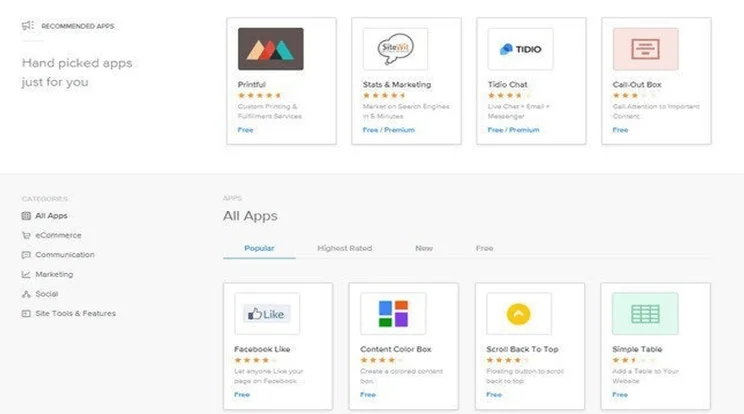
Homepage of Weebly's app store featuring a selection of hand-picked apps in rows
You can search for specific apps to make things even easier.

Installing Apps

To install apps, click on the one you want and then find the “Add” button. A popup box will appear – you need to click ‘Connect’ to install the app and agree to any terms.

Once the app has installed, you’ll be taken back to your website. The app will automatically appear at the bottom of the left-hand sidebar, under the “Installed Apps” section.

Once your app is installed, drag it onto your page as you would any other element.

What Pricing Plans Are Available?

Up until now, we’ve assumed you’re happily building on the free plan. However, as we’ve seen there are cases where you might want to upgrade – for example, to unlock advanced features.

Let’s take a quick look at Weebly’s prices and how you can upgrade if you want to.

You already know about Weebly’s free plan. There’s no time limit on it, and you can actually publish your site without paying a dime. However, it has its drawbacks – no custom domain, limited features, and Weebly adverts displayed on your site.

Out of all of the website builders we tested, Weebly is also one of the worst when it comes to value for money. Despite its free plan, Weebly scores 3.2 out of 5 in our pricing research, meaning its three paid plans are not the most cost-effective option out there:

  • Personal: $10 per month, billed annually
  • Professional: $12 per month, billed annually
  • Performance: $26 per month, billed annually
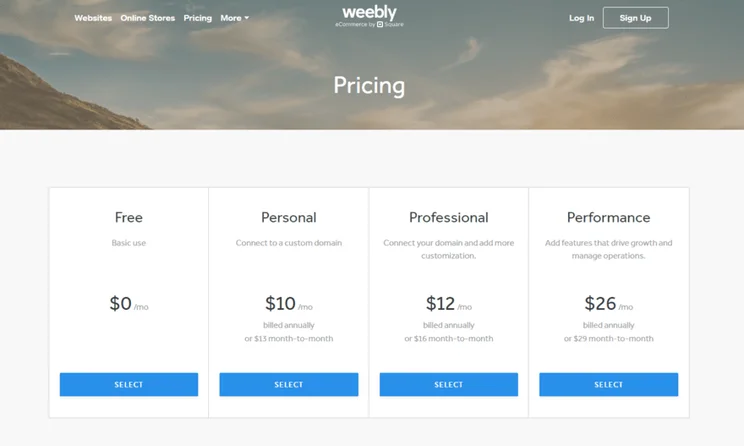
Row of Weebly's website builder plans, featuring price and a button to choose the plan
Weebly has four pricing plans that range from $0 to $26 per month, billed annually.

Which Plan Do We Recommend?

If you just want to start a hobby site, or a blog, we recommend the Personal plan. You will still have to deal with adverts on your site, though, so if you’re looking to be taken seriously, we recommend upgrading to the $12 per month Professional plan. It unlocks more features and it’ll help your website be taken more seriously.

It also offers much better value for money than the Personal plan. Considering how many more features you get compared to the Personal plan, paying $12 per month for the Professional plan seems like a total steal! It’s the cheapest plan for creating a truly professional website.

Further Information

Publishing Your Site

If you’re happy with what you’ve created, you can now publish. Great! If you’re not completely happy, don’t worry – you can revisit the Weebly website editor to make some changes after you publish.

To publish your site, hit the blue “Publish” button in the top right corner. You will then receive a popup telling you it’s published, and how to integrate a “Pro Tip”. Weebly really wants your site to succeed.

You’ve now published your Weebly website. Like we said, it’s easy to update and edit at any time. You can also upgrade your plan if you want to. Just head back to Step 1 to view the plans and their benefits.
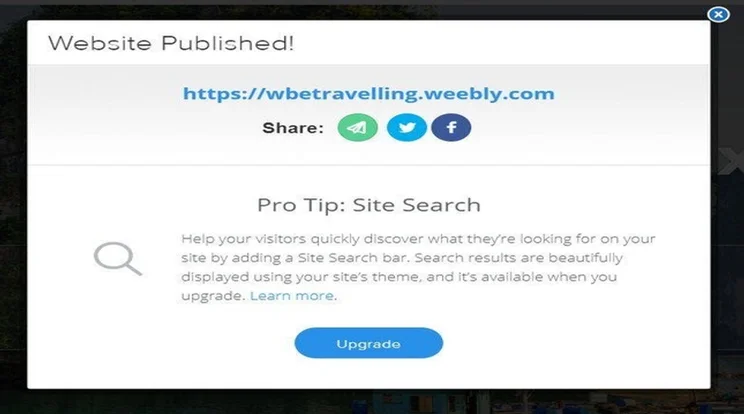
Pop up when publishing your Weebly site, with buttons to share across social media or upgrade to a higher plan, along with a top tip from Weebly
After publishing, Weebly provides a helpful Pro Tip!

Unpublishing Your Site

If you publish your site, but then change your mind, you can head to your Settings and scroll down to the very bottom. There, you’ll find an option to unpublish your site with a single click. Easy!

Once your site is live, there are a few things you can do to encourage its growth and success. Don’t just leave it to languish all alone – instead, make regular tweaks, edits, and changes to keep your site fresh and relevant.

Edit Your Content

Go back and edit content – update old information, write new articles, and add extra sections to old pages. Fresh content will not only keep your visitors happy, but it’ll also show Google that your site is relevant and active.

Optimize for Google

You want your site to rank in Google’s search results, right? Right. It’s the best way of getting more traffic and boosting your online presence. The way to climb up through the ranks is by mastering SEO (Search Engine Optimization).

SEO is the process of boosting your site’s chances of ranking highly in the search results, and involves lots of factors. Some are super simple, like using headings to structure your content, while others are a little more advanced, like optimizing your video content.

Weebly has a great range of SEO tools to help your site rank, as well as beginner-friendly guides to walk you through each step. Start off with its Ultimate SEO Guide and you’ll be a pro in no time!

Promote via Social Media

Everyone is on social media these days – and you want everyone to see your site!

Pick a couple of social channels that suit your site – for example, Instagram is perfect for photographers, and Pinterest is ideal for selling handmade items. Then start sharing snippets of content, blog posts, images, and more to engage your visitors and gain followers.

Get Marketing

Email marketing can be your best friend. It’s a great way of releasing new product information, letting your visitors know about news and events, or enticing them back with sales and discounts.

Weebly has its own email marketing system called Weebly Promote, which helps you build your mailing list, easily create customized emails, and track your emails’ performance. This is free to use for your first two campaigns; after that it costs $8 per month.

Weebly also has good blogging tools, so you can combine blog posts with email campaigns and newsletters to keep your visitors informed and engaged.

So, from Sign Up to Publish, these are the eight steps for creating a Weebly website. It really is that simple!

If you’re looking for a basic, no-frills-attached website, then Weebly could be a good fit for you. It has a free plan that you can stay on for as long as you’d like, and it’s pretty straightforward to use.

Ultimately, Weebly is a fairly average builder, and it doesn’t really excel in any area, from value to money to website features. Where Weebly is really let down is its design options. Yes, its templates are clean and professional, but they’re not as contemporary as we’d like and they’re overshadowed by more sophisticated templates from the likes of Squarespace and Wix.

If you do want to try out Weebly, we’d recommend choosing a premium plan for a more advanced, personalized Weebly website that truly works for you.

Written By

Headshot of Emma Ryan

Emma is Deputy Editor of MVF’s B2B brands, specializing in website builders, ecommerce, marketing, and vibe coding. Emma combines her wealth of knowledge and years of hands-on testing with a passion for helping small businesses and website owners navigate the highs and lows of being online. Her work has been featured in Newsweek, Digiday, TechRound, and Industry Today.

More about

Reviewed By

natasha_willett

Natasha brings her expert credentials – a BSc, Ma, and MMRS – to Website Builder Expert. Natasha has qualifications in Advanced Statistical Analysis, MRS certificate in Market Research, Brand, Finding the Story in the Data, and Big Data: Measuring and Predicting Human Behaviour. These have allowed her to carefully analyze over 64 providers across website builders, ecommerce web builders, and hosting.

Natasha began building websites when studying sports science, originally using Weebly to create websites to help students learn in a more interactive way. During her first week at Website Builder Expert, she realized that website builders would become important in giving business owners full control over their websites. She began creating a rigorous methodology of research that centered around testing providers and products against a large set of mixed criteria turned into quantitative findings, comparing value for money, design, ease of use, and more. All to provide the most honest and objective insights rather than just looking at their claimed features.

In five years at Website Builder Expert, Natasha has attended multiple expos in her field, including ESOMAR, MRS, eCommerce Expo, Ad World, Digital Customer Engagement Summit, and IMRG, just to name a few. Natasha has also worked alongside website builders directly to share her research with them, so that they might improve their products for users.

She’s clocked an impressive 9,600 hours of product research and testing, pulling data from multiple sources and providing the Website Builder Expert team with the scores and product details they need to give you the best recommendations to succeed online.

More about

36 comments

Your email address will not be published. Required fields are marked *

  • Petercid

    It's a cost-free online dating site that assists you satisfy single males and females with all type of Asian backgrounds, consisting of Taiwanese, Cantonese, Korean, Chinese, Thai, Japanese, Indian, and Filipino singles. With their high appeal and excellent service they bring in all type of individuals, so you will most likely obtain a number of referrals if you set the ideal matchmaking filters. We'll schedule an interpreter who will certainly help you with the translations, if your woman doesn't speak English. These technologies will change the dating landscape, using amazing opportunities for those on asian dating platforms. There are a huge selection of reputable on the internet sites readily available throughout Asia, each using its very own distinct functions and customer experience. You've got Kiwi-born Asians trying to find partners that recognize their bicultural experience. We have actually got all the tools you require to browse online for appropriate single Asian girls who could be your possible life partners. We have a straightforward goal. The mission of our internet site is to aid individuals link with each other in a practical manner and eliminate solitude and monotony from their lives. Asian Dating Sites help individuals find love past borders.

    Scams are a concern on dating sites. This aids us to enlighten victims/survivors about why these criminal offenses happened and to not [url=https://asiame-com.blogspot.com/]asiame.com scam[/url] criticize themselves, far better develop healing programs, and to assist targets prevent rip-offs in the future. Why Popular: Indonesian women often value household and social traditions, making them attractive to foreign companions. 2. Why exists no membership offered that gives unlimited access to the site? To be eligible for the eHarmony guarantee, there are degrees of interactivity you should satisfy. There are a lot of dating applications available that just solution countries in the western globe like the US, the UK, Canada, and Australia. 3. Gifts delivery - Which woman doesn't such as gifts and flowers? And in a society that is moving a lot more towards dating and marrying within their race, choices such as this come to be a growing number of appropriate. If you decide to remain as soon as they run out, you can buy even more for $19 (50 credit reports) to $200 (1,000 credit histories).

    Users often face stereotypes that can affect their dating experiences. You can exchanges charming messages with her while considering her beautiful face and smile. It's additionally vital to be prepared to face bigotry, discrimination, anti-Asian bias, and stereotypes. In their society, it's not normal for males and females to just be good friends and cool together, so if you start talking, you can be particular that she's interested in taking place a day - which is great information! Here are our Asian dating ideas, it's a good idea to foot the expense for the preliminary experience. If you intend to see your love interest in actual, we are right here to aid with the "Romance Tours" solution. Most importantly, Asian songs want honesty. Asian singles frequently hold deep ties to household, rules, and practice. You might have encountered challenges when dating someone from a different cultural history, especially when thinking about the special elements of a deaf Asian relationship. Make your girl swoon over you by taking advantage of our gift and flowers delivery service.

    Millions of individuals have actually currently used Asian on-line dating sites to make connections. EME Hive is a popular Asian dating website that provides an excellent system for Asian Asian expats and american people to attach. How can I fulfill Asian American ladies personally? Respect can be shown by showing authentic rate of interest in her culture, asking concerns, and being open to finding out. While you do not require to understand every information, showing curiosity aids. 1. How do I recognize participants are real? A stunning lady Tori discovered me on this website and we are having a blast getting to understand each other and becoming really buddies online. We intend to assist our consumers in all feasible methods, by providing a safe platform where you can make pals and discover dates. As your network of buddies expands, you'll expand mentally and socially as an individual who believes in nurturing wonderful partnerships. Whether you're looking for love, you'll discover great deals of interesting girls on our Asian dating site. Asian dating sites offer you an extraordinary possibility to locate your life partner from Asia. Your profile must consist of a clear image, a brief bio, interests, and what you're searching for in a companion.

    These advancements will certainly transform the dating landscape, providing interesting opportunities for those on asian dating systems. Millions of people have actually currently made use of Asian on-line dating websites to make connections. EME Hive is a popular Asian dating internet site that uses an exceptional system for Asian Asian expats and american individuals to link. Whether you're looking for love, you'll find lots of intriguing girls on our Asian dating site. Asian dating websites give you an amazing chance to discover your life partner from Asia.

  • Cooknsa

    Learning how to date a Ukrainian woman may be a great strategy to experience and appreciate the robust tradition she comes from. Ukrainian culture has exerted an ideal affect on its people over the centuries, which suggests that there's loads of material out there if you need to do a little analysis on topics comparable to food customs or conventional Ukrainian music and dances earlier than the date. There are various Russian/Ukrainian dating sites on the net today 80% of them are pretend sites if not they're poorly managed with no consideration for customer experience. Ukrainian traditions, comparable to communal vacation celebrations and a profound respect for elders, are core to their societal fabric. A mannequin of 19th-century Ukraine, the museum sits on some a hundred and fifty hectares of inexperienced land and lakes cuddling thatched roof huts, old windmills and genuine Ukrainian bars. In Ukraine, men are anticipated to deal with their dates like kings, so spending time in polite conversation and giving compliments can go a good distance in making your date feel particular. The subsequent stop on our listing ought to definitely be Odessa, located subsequent to a stunning Black Sea beach, ideal in case you dream of spending just a few solar-stuffed days, snuggled under the heat rays of the sun as you gently stroll along the sand tenderly clasping your fingers collectively.

    Here guests can experience native structure with influences from cultures throughout Europe, pattern delicious traditional delicacies, and take pleasure in lush parks perfect for spending time outdoors romantically together. The variety ensures that you can see one thing appropriate in whichever a part of Ukraine you visit: from majestic gardens like Catherine Park close to Kyiv, hidden parks in Lviv, or huge expanses full of leisure actions just like the Artificial Lake Park in the city middle of Kharkiv. For intimate dining, there are plenty of cozy eateries all through Ukraine, including superb rooftop terraces providing unimaginable views at sunset, akin to Kanapa restaurant in Kyiv, or dreamy views at the Shevchenko Park Café just outside the center of Lviv. Most Ukrainians recognize gifts, though they aren't obligatory: small gifts reminiscent of flowers, chocolates, or small accessories. If you happen to resolve to be seen together in public, act discreetly: normally, only small talk is acceptable at such events, so don’t get too carried away! As an added bonus, social network accounts are sometimes extra personalised, making initial conversations easier, but remember to not get carried away with attempting all of those networks directly.

    What Leisure Activities Are Popular Among Ukrainian Women? AmourFeel is one of the fashionable Ukrainian dating providers (which might be considered the most effective European dating sites, too) one can find on the internet. When searching for real Ukraine women on worldwide relationship sites, it’s necessary to know some matters that may destroy all your effort to attract a neighborhood girl. Humor typically performs an important function in building relationships, but typically jokes can end up offending without realizing it. They symbolize great resources within the pursuit of constructing sturdy emotional bonds in budding romance without any stress expectations aside from yourself having a optimistic outlook on life itself! There should always be room for spontaneity and surprises, which is able to assist create an exciting dynamic between both companions over time, slightly than feeling obligated or forced into certain situations due solely to one partner’s expectations. When contemplating relationship a Ukrainian woman, there are a couple of necessary things to bear in mind. Whether it’s disappointment with local courting tradition or a desire to seek out someone with shared relationship targets, these ladies are open to love that knows no borders. Maybe a picnic in the park, a visit to a neighborhood artwork gallery, or perhaps a cooking class.

    With its intensive coastline on the shores of the Black Sea, Ukraine boasts stunning beaches good for a romantic seaside stroll or picnic. This busy metropolis offers plenty of opportunities for adventure in addition to romantic encounters with potential companions from all walks of life in Ukraine. Be sure to all the time make a very good first impression by being clear and neat when meeting a potential Ukrainian companion. Contrary to misconceptions, potential Russian brides showcase a refined strategy to make-up. That's the reason I examined multiple platforms with European brides so that my readers can look for somebody particular without scouring via questionable pages. With the best information of Ukraine's culture and dating etiquette, yow will discover true love in Ukraine! The culture of Ukraine and its people have many unique characteristics that should be respected to ensure a successful date and [url=http://www.charmdatereviews.com/charmdate-review/]charmdate review[/url] relationship. I've been working as an international matchmaker and courting coach for over eight years. The popularity of Ukrainian mail order brides has always been impressive compared to other overseas ladies, however it has skyrocketed lately.

  • Suvasini

    Hi ,

    How do create Footer menu in weebly for example: About Us, Newsletter, Membership, Home etc?

    1 reply

    • Holly Choules
      Holly Choules

      Hi Suvasini,

      Thanks for your question. If you're on the free plan, you can't add a menu to your footer. According to this Weebly article, you can on the Pro or Business plan (but this article is from 2014, so might not be 100% accurate).

      It's worth getting in touch with Weebly customer support if you can for further information. Go onto the support page and scroll down to "Contact us". You should be able to access the live chat and talk to a support agent.

      Hope this helps!

      Best,
      Holly

  • Theresa

    what to put in the footer?

    1 reply

    • Emma Ryan
      Emma Ryan

      Hi Theresa,

      Thanks for commenting! Typically, a website footer can be a good place to add key website or business information, such as opening hours, contact details (e.g. an email address), or even social media links. Weebly also lets you add contact forms and images to the footer, so you can get pretty creative with it! I hope that helps, but let us know if you have any other questions.

      Very best,
      Emma

  • alie

    How can I disable right-clicking using Square?
    How can I create a bundle for purchase?

    1 reply

    • Samuel Jagger
      Samuel Jagger

      Hi Alie! Thank you for your comment! You will have to add custom code to disable right-clicking. You can find a guide here on the Square Online forums.

      You can create bundles for products through your Square Online dashboard. Here is a guide from the Square Online support site. Hope this helps! All the best - Sam

  • Malcolm

    Hi Sam
    I’m intrigued by the comments by ingrid black. I would like to set up some sort of web page visit counter, but have no idea how to go about it.
    Would you be able to help , point me in the right direction ?

    1 reply

    • Samuel Jagger
      Samuel Jagger

      Hi Malcolm! Thank you for your comment! Weebly has a tick counter app called Hit Counter. Simply add it your website via Weebly's app store. Hope this helps! All the best - Sam

  • Ingrid Black

    I don't understand the Page Views, Unique Visits and Page Views per Visit details.
    My site shows 68 Page Views, 8 Unique Visits and 3.881 Page Views per Visit.
    If I multiply the unique visits by the page views per visit (8 x 3.881) I get 31.048 page views. Why does it show 68 page views. And how do you get 3.881 page views per visit. If you visit a page, you visit the whole page. How do you get .881 of a page view?

    1 reply

    • Samuel Jagger
      Samuel Jagger

      Hi Ingrid! A Page View is anytime a page on your site was loaded by a browser. This anytime someone visits your site, or even how many times they reloaded the page. Each counts as a View. Unique Visits are how many brand new people are coming to your site. Even if they looked at your page every day for a month, that's still 1 Unique Visit (but multiple Page Views). Page Views per Visit is the average number of pages each visitor looked within a Session, which is 30 minutes. So each visitor to your site in a 30 minute period viewed 3.881 pages before leaving. Hope this clears it up for you! All the best - Sam

  • Jane

    Is there a way to add a logo to the top left of every page? There seems to be but every time we try it, the page crashes. So all we can have is the same of the site in letters, but not a logo?

    1 reply

    • Samuel Jagger
      Samuel Jagger

      Hi Jane! Thank you for your comment, and sorry to hear about your issue. You should be able to attach a logo image to sites header so that it appears on all your sites pages. It may be crashing because the size of the image is too large. If so, use an image resizer and try and convert the image to a more manageable side. Here's a guide from Weebly for more info. Hope this helps! All the best - Sam

  • Patricia

    I am trying to import one of my weebly sites to a new weebly account but can't. I have the archived file, but there isn't a feature in the new website to import it. I researched it on the internet and in the instructions it says use the import feature. There is no such feature. Do you have any suggestions? Thanks

    1 reply

    • Jacqueline Renouard
      Jacqueline Renouard

      Hi Patricia,
      Thanks for reaching out! So you're trying to import one of your Weebly site to another account, yes I see your predicament. The internet says you can do this by exporting your website data from one account to the other. There should be an option to import that data over - but on further inspection, it would seem that the only way to really copy over everything in a website from one account to the other is with the help of the Customer Success team. There are other builders that make this a simpler transition, but unfortunately, Weebly isn't really one of them! So contact the Customer Success team and send them your exported files and the account details you'd like to transition and they should be able to do it for you! Hope that helps!
      Warmly,
      Jacqueline

  • Lisa

    I am trying to build a website for a college class I’m taking. I already started but I think I didn’t do it correctly. How can I get help? Because I do need help. Thank you.

    1 reply

    • Lucy Carney
      Lucy Carney

      Hi Lisa,
      Thanks for your comment! That's great that you're building a website with Weebly, although I'm sorry you've run into trouble with it. We don't offer personal support here, but it may be worth checking out the Weebly community and seeking support from other Weebly users, it's a really helpful resource! Alternatively, you could try an ADI builder like Wix or GoDaddy instead, if you find that Weebly isn't right for you.
      I hope this has helped!
      Have a great day, Lucy

  • Lindsey

    Hello
    I havnt needed to do any editing on my weebly website for years but l wish to now...how do l access my website to edit please?

    1 reply

    • Lucy Carney
      Lucy Carney

      Hi Lindsey,
      Thanks for your comment! That's great you want to edit your Weebly website again. You'll need to head to Weebly and login using your account details. That will then take you into your Weebly account where you can edit your website again! If you have trouble logging in, Weebly has a "Forgot Password" option which may be helpful.
      Enjoy editing your site! Best, Lucy

  • Jim

    I am using Weebley for selling items, can I have more than one view of each item?

    1 reply

    • Samuel Jagger
      Samuel Jagger

      Hi Jim! Thank you for your comment! Weebly does allow you to upload multiple images for each of your products. Just simply click the 'Media' box with the dotted line when filling out the 'Add Product' page. If you are needing more views for a certain product, you are going to have to take them and upload them yourself. Hope that helps! All the best - Sam

  • Judy

    Can you tell me if I can move the text box?

    1 reply

    • Jacqueline Renouard
      Jacqueline Renouard

      Hi Judy,
      Thanks for your comment! Yes, you can move the text layout around a little, it's not super customizable but it does give you some options. So, when you go into editing your website, click on the box where the text you want to change is. Then go to Customize, and in Layout and Design, there should be some options to rejig where your text sits. Some templates might have more options than others, hope this helps!
      Warmly,
      Jacqueline

  • Hart

    Thanks. There is a lot of information here :)
    A few questions:
    1. Can you add links to text ? So that you can link from one web page to another.
    2. Are there any restrictions of image type eg only jpegs?

    1 reply

    • Jordan Glover
      Jordan Glover

      Hi Hart,
      Thanks for your comment. You absolutely can add links to your text. Just highlight the text you want to link and click the chain icon that will appear. This will open a dialogue box where you can add your link in. Alternatively, you can also insert buttons that can help users navigate from page to page. In terms of images, Weebly supports jpg., png., and gif. files.
      I hope this helps!
      Jordan

  • Alison

    My website looks good on a computer but does not look good on mobile phones....things are not lined up and neat looking. What can I do to improve the look of our website when viewing on a mobile phone?

    1 reply

    • Samuel Jagger
      Samuel Jagger

      Hi Alison! Sorry to hear you're having a problem! Weebly promises a responsive design that works on both desktop and mobile, but sometimes these things happen! My advice would be to download the Weebly Mobile App. This will allow you to edit your site on the go, and get a better idea of how the site will look for mobile users. The app is free, so just link your existing account and you'll be good to go! Hope this helps! All the best - Sam

  • Rosetta Marie

    My Website will not publish. I have a domain for the next 3 years and keeps saying wait 48 Hours. It's been months

    1 reply

    • Jordan Glover
      Jordan Glover

      Hi Rosetta Marie,
      I'm sorry you're experiencing problems with your Weebly site. Unfortunately, without knowing exactly how your website is set up, I can't confidently diagnose what's going wrong. I'd suggest contacting Weebly's help and support directly. They'll be able to provide a specific solution for you.
      Good luck!
      Jordan

  • Pat

    I am just trying to find a friend's property which is listed on the Weebly format . Is there a way I can do this without joining Weebly?

    1 reply

    • Jordan Glover
      Jordan Glover

      Hi Pat,
      Do you mean you're trying to find your friend's Weebly website? If so, you don't need to join Weebly to see it. You just need to enter their Weebly website address into your URL search bar.
      I hope this helps!
      Jordan

  • Trish

    Why does my site editor screen look different? I'm having such a hard time and I can't find any resources that look like what I'm dealing with.

    1 reply

    • Lucy Carney
      Lucy Carney

      Hi Trish,
      Thanks for your comment, I'm really sorry to hear you're having problems! I'm not sure why your editor screen looks different - if you run an online store it could be that you're now on Square Online's editor, as it's taken over the ecommerce side of Weebly. If your site isn't a store then I'm not sure - have you contacted Weebly support directly about this? They may have more answers for you.
      All the best, Lucy

  • Robert

    Thanks

  • Albert

    Hi, I am a real estate negotiator. I plan to have my own website. Basically it is something like iproperty or propertyguru where I can pose listings, photos and receive notification via email or whatsapp. Could you provide a few websites from existing users. Thank you very much.

    1 reply

    • Samuel Jagger
      Samuel Jagger

      Hi Albert! Thanks for leaving a comment! We love your idea and think it would be great to build with Weebly! Here s a list of the top grossing sites in the US built with Weebly so you can get an idea of what yours could look like!
      1. FuryCat Ocean Adventure Park
      2. Qgiv (software company)
      3. Woodgrain HR (company site)

      As you can see, the uses for a site made with Weebly are endless. I hope you notice that you can have a wide rage of pictures and media, which is perfect for showing of property! I hope this has helped! All the best - Sam

  • Diane Elizabeth

    Thank you keeping it plain and simple.