

Black Friday 2026 is only weeks away, but you still have time to organize and prepare your business for the busy sales period. From testing your site’s performance to optimizing your product pages, online stores need to lay the groundwork now to handle the sales rush and increased site traffic.
Whether you’re already in the throes of Black Friday prep or it’s your first holiday season as a business owner, I’ll walk you through our 10-step Black Friday checklist to get your store ready.
- Start your Black Friday preparation weeks or months in advance to map out promotional strategies, fix performance issues, and set up automated email campaigns
- Prevent high cart abandonment rates by optimizing your checkout with multiple payment methods, including BNPL, and allowing guest checkout
- Deliver personalized messaging to customers to tease promotions, boost loyalty, and drive traffic to Black Friday landing pages
- Update your product pages and check your stock levels ahead of Black Friday to avoid frustration caused by sold-out products

Build your website for Black Friday with Hostinger's AI Builder
Ask Hostinger to get your site ready for Black Friday, without needing any coding experience.
Black Friday Checklist 2026: When Should You Get Started?
Ideally, you want to start your Black Friday prep work months or weeks in advance, since testing and optimizing your site can take time (especially if there are issues to fix!).
Before I dive into the Black Friday checklist step-by-step, take a look at the table for a quick overview of what your business needs to check off.
| Step | Urgency | What’s involved? |
|---|---|---|
| Define your sales and promotional strategy | Early prep | Brainstorm sales, identify bestselling products, see where your customers are active |
| Check site performance | Early prep | Test site speed, update security, ensure pages are optimized for mobiles |
| On-page optimization | Weeks before BFCM | Update content and visuals, streamline your site’s navigation, showcase trust signals |
| Boost site visibility | Weeks before BFCM | Check SEO best practices, add rich product data |
| Prep your inventory | Weeks before BFCM | Highlight discounted goods, check stock levels, update listings |
| Streamline the checkout process | Weeks before BFCM | Add multiple payment methods, simplify the checkout page, allow guest checkout |
| Set your shipping strategy | Weeks before BFCM | Review shipping options and rates (e.g., free shipping) |
| Deliver marketing campaigns | Weeks before BFCM | Early access emails, personalized messaging, abandoned cart reminders |
| Provide customer support | Weeks before BFCM | Loyalty programs, AI chatbot, update FAQs |
| Post-BFCM review | After BFCM | Review sales data, communicate with customers |
More of a visual learner? Watch our guide to help you optimize your store for Black Friday:
How Can Your Business Prepare for Black Friday 2026?
Your business can prepare for Black Friday 2026 with a few tasks, from recognizing your top-performing sales channels to rolling out personalized marketing campaigns to delivering responsive customer support.
Our Black Friday checklist includes 10 steps to guide your business through this critical shopping season.
1. Define Your Black Friday Sales & Promotional Strategy
Black Friday is a competitive time of year for selling, so you want your products and business to stand out. You don’t want to wing it – figure out your strategy around promotions, plan for a longer sales period, and know how and where to target customers.
Here’s where you should get started:
- Reflect on last year’s Black Friday season: Use your sales data to mark which products to promote in 2026, and identify site or checkout issues to fix this time around
- Plan your sales: Map out your sales for the rest of the year to help you stay organized. Do you want to apply a discount to all products, or just select categories? How long do you want your Black Friday sale to run? Will your sale actually interest existing and new customers?
- Identify your top sales channels: Know where your products sell best, whether that’s your website, social media channels, online marketplaces, or physical stores. Prioritize these high-revenue channels during the Black Friday Cyber Monday weekend!
- Consider all possibilities and emergencies: Prepare for the good and the bad, including store downtime, sold-out products causing frustration, or issues with POS devices holding up in-person sales
Make sure to calculate your profit margins ahead of setting your Black Friday discount. If you offer too large a discount, you risk losing money.
2. Check Your Site Performance
To prevent site crashes during Black Friday traffic spikes, test your site speed, server capacity, SSL security, and mobile responsiveness at least 4-6 weeks in advance.
Use the weeks beforehand to test a few areas:
- How quickly does your site load?
- Is your infrastructure set up to support traffic spikes?
- Do you have an active SSL certificate to keep customer data secure?
- Can your site be viewed across different devices?
This last point is especially important, since mobile commerce is expected to reach $2.82 trillion in 2026, according to Mordor Intelligence. Adobe also reported that 56.4% of online transactions came from mobile devices last Black Friday.
Your chosen web host or website builder will usually come with built-in measures to keep your site running smoothly. For example, Hostinger’s AI Builder guarantees 99.9% uptime (ensuring your site remains operational for Black Friday), uses the Cloudflare content delivery network, and optimizes all images and videos automatically.
Keep your site running smoothly this Black Friday
Hostinger’s AI Builder is fully optimized for different devices and relies on a built-in CDN to speed up performance, preventing crashes when hundreds of shoppers hit your site during Black Friday.
3. On-Page Optimization
After checking your site’s infrastructure, it’s time to think about your on-page elements and visuals. Before you launch your Black Friday sales, get your site in the best shape possible to ensure a consistent and smooth customer experience.
- Optimize your homepage – make sure to feature your Black Friday sales prominently, update images with seasonal visuals, and tweak hero copy
- Make navigating easy for customers – add clear signposting to your Black Friday sale from your homepage, and make it easy for customers to shop around in case they want to add extra products to their carts before checkout
- Check conversion points – whether you want customers to purchase products or sign up to your newsletter, your call to action buttons should be obvious and engaging
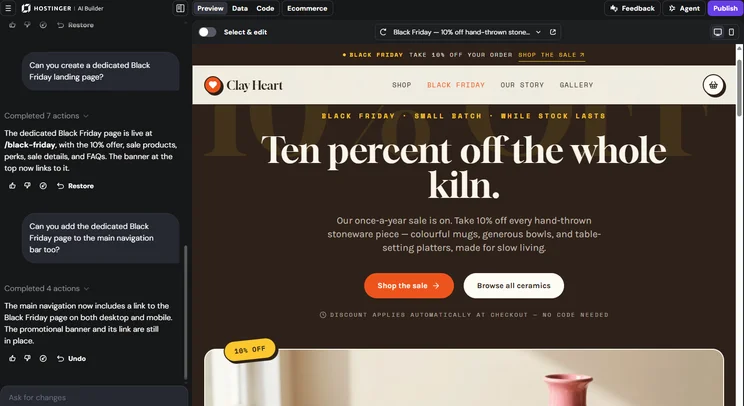
- Create dedicated Black Friday landing pages – I asked Hostinger’s AI Builder to generate a Black Friday landing page (which it did in roughly a minute!), with the AI pulling relevant products and generating sales FAQs
- Update relevant content and images – make necessary updates for Black Friday, such as new gift guides, seasonal product images, and dedicated social posts for the sale
- Showcase trust signals – customers trust other customers, so make sure to highlight product reviews and user-generated content across your homepage and product pages to help customers feel confident when shopping with you (this is especially important for new customers)
4. Improve Online Visibility
Of course, you want customers to find your store during Black Friday, which means optimizing for search and LLMs. This is best practice all year round, but essential when you’re looking to drive a lot of traffic to your site for a sale.
Nailing your SEO basics means reviewing your meta titles, editing image alt text, and adding schema markup. Rich product data helps your products appear in search results, boosting your chances for a sale.
Thankfully, Hostinger’s AI Builder generates a sitemap and robots.txt file for your site automatically and uses server-side rendering to improve your site’s SEO. AI-generated code is also optimized and well-structured to help Google crawl your site easily.
During Cyber Weeks 2025, AI agents and conversational AI directly influenced 20% of global online orders, while retail site traffic from AI sources grew by 693% year-over-year.
Agentic commerce is a growing trend we’re seeing in the ecommerce space, with consumers using AI to find the best deals, compare products, and research quickly. That’s why it’s important to follow SEO best practices with scannable product data, create competitive deals, and directly engage with customers to boost conversions.
5. Prep Your Inventory
One of the most important steps on our Black Friday checklist is to update your products for the holiday season.
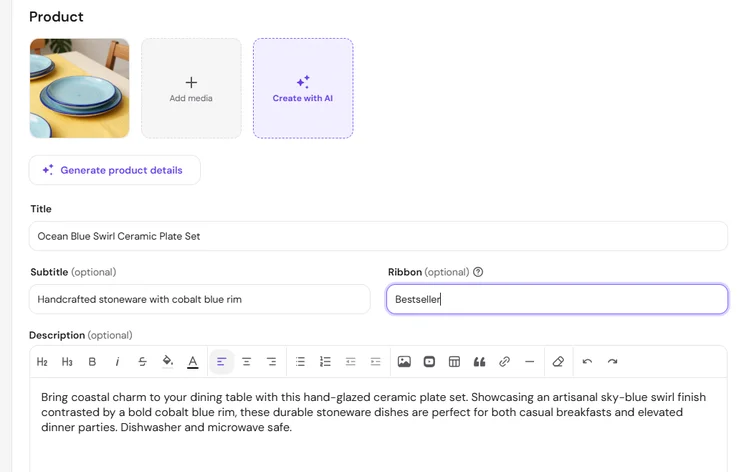
- Mark your discounted products, whether that’s your entire inventory, a select group of items, or discontinued products you want to get rid of
- Create product bundles to encourage high-value sales during Black Friday – it also offers repeat customers something unique to buy during the holiday
- Check your stock levels to make sure you don’t run out of popular products during Black Friday (I also recommend setting minimum stock thresholds to avoid overselling)
- Update product listings so all pages have accurate information and imagery
- Set up stock labels so customers can view popular products or see when a product is sold out – I recommend setting up email alerts to notify customers when an item is back in stock
6. Streamline the Checkout Process
Reduce Black Friday cart abandonment by enabling guest checkout, offering Buy Now Pay Later (BNPL) payment options, and displaying total shipping costs upfront.
- Offer multiple payment methods to boost conversions – for example, Adobe reported that the BNPL method was responsible for $20.1 billion in sales during November-December 2025
- Allow guest checkout – according to Baymard, 18% of US shoppers will abandon their purchase at checkout if they have to create an account, so it’s best practice to offer the option
- Confirm key information is visible before checkout – make sure to display important details at this stage, such as shipping costs, expected delivery date, and taxes
- Add trust signals – prove to customers that your store is trustworthy before they pay with security seals and payment method logos
- Keep things simple – don’t scare customers away with lengthy and complicated checkout instructions (keep required fields to a minimum)
Hostinger’s AI Builder connects with Stripe (2.9% +$0.30 transaction fee), PayPal (3.49% + $0.49 transaction fee), and dLocal Go ($1 minimum order value) in the US. Hostinger won’t charge any additional transaction fees.
You can also set up manual payment options in your ecommerce dashboard, such as cash on delivery.
7. Set Your Shipping Strategy
A robust and well-communicated shipping strategy is needed during a busy sales season like Black Friday.
Due to the competitive nature of Black Friday, I recommend offering free shipping to help your business stand out, whether that’s for all purchases or orders over a set value. Offering free shipping significantly reduces cart abandonment rates during peak holiday sales.
DHL reported that 73% of Black Friday shoppers say free shipping improves the shopping experience, and 82% of shoppers would abandon their purchase altogether if their preferred delivery option isn’t offered.
8. Marketing for Black Friday
Email marketing directly influences purchasing decisions for 59% of US consumers during Black Friday sales. Thankfully, Hostinger Reach (Hostinger’s AI-powered email marketing tool) can study your business and suggest campaign ideas and automations for you. And if you’ve got the budget for paid marketing, Hostinger integrates with Google AdSense and Meta Pixel.
Some email campaigns and automations you should consider ahead of Black Friday 2026:
| Marketing campaigns | Why it matters |
|---|---|
| Pre-BFCM teasers | Plant the seed early so customers are aware of your deals ahead of time and ready to shop – data from Dotdigital recommends you start sending Black Friday emails 16 days before if you operate in the Americas |
| Early access alert for loyal customers | Exclusive deals and early access are a great way to reward loyalty and improve customer relationships (an NRF survey found 54% of consumers took advantage of early holiday deals) |
| Holiday messaging | Update your marketing language to reflect the holiday season and show that your business is better than competitors |
| Personalized offers | Grab the attention of your customers with custom messages and deals for products they’re actually interested in |
| Abandoned cart reminders | Prevent lost sales by reminding customers of the products they were tempted to buy |
| Post-purchase email | Thank customers for shopping with you and follow up for feedback and reviews |
| Outreach after BFCM | Show evidence of your brand’s popularity during Black Friday (such as sold-out product messaging), and get your audience excited about what’s next for your business |
9. Consider the Customer Experience
Ahead of the holiday season, make sure you’ve set up clear pathways to answer customer queries, engage and reward loyal customers, and train your team to handle difficult situations.
- Provide personalized 24/7 support – I asked Hostinger’s AI Builder to create a chatbot to answer standard customer queries (this is really handy if you don’t have a large team, but keep in mind that the chatbot’s responses will eat up some of your AI credit allowance)
- Offer VIP and loyalty perks – nurture the customer experience and build long-lasting relationships with a loyalty program (and remember to advertise this widely during Black Friday to encourage new customers to return)
- Update FAQs – make sure to update any old content so customers have accurate details before shopping with you
- Showcase your returns policy – ensure the process is as frictionless as possible, and provide clear messaging on your policy so customers know what to expect
- Prepare your customer service team – run through scenarios with your team, review and set standard responses, and monitor channels for problems
Before ticking off this step on our Black Friday checklist, put yourself in your customers’ shoes. You should be thinking about the customer experience at every stage of your Black Friday preparation – go from the start of the journey, navigate the website, build a cart, ask the customer service team a question, experience the checkout process. This will help you identify any areas to improve, where things slow down, and what might cause friction.

10. Post-BFCM Review
The final step in our Black Friday checklist comes after the event. Once the sale has ended, it’s time to review what worked, flag areas for improvement, and turn your attention towards retaining new customers. This is how you prepare for next year’s Black Friday.
Keep these steps in mind after Black Friday:
- Analyze Black Friday sales data – check your performance, identify bestselling products, track where customers came from, learn from abandoned carts, and see how many new customers flowed through your business
- Maintain communication – keep up conversations with customers via their inbox and social media, especially when it comes to new customers
- Offer subscriptions to retain customers – you can set up subscription plans with Hostinger’s AI Builder chat and manage them from your ecommerce dashboard
Black Friday 2027 will land on November 26, and it’s best to start preparing months in advance. As I’ve already mentioned, you can learn a lot from Black Friday 2026 and do some prep work right away – analyze your sales and customer data to help shape your strategy for the year ahead.
Summary: Are You Ready for Black Friday?
Our ecommerce cheatsheet for Black Friday covers the key actions your business must take ahead of the holiday season, such as SEO, inventory prep, and marketing. Ideally, you’ll start this prep work months or weeks in advance, giving yourself a buffer to solve any issues that pop up.
Most importantly, remember to dig into the data following BFCM 2026 to help you get started for Black Friday 2027.
FAQs: Black Friday Checklist 2026
According to 2025 data from Adobe, electronics generated $44.2 billion in online sales during the Thanksgiving-to-Cyber Monday period. Clothing, beauty, fitness, and toys were also hot categories last year.
Your Black Friday discounts are entirely up to your business and what works for your margins. Of course, you want to entice customers in, so do some competitor research, learn from last year’s sales data (if possible), and consider product bundles or exclusive items to boost engagement without losing money on high-value products.


0 comments