

Black Friday 2026 is nearly upon us, but is your website ready for the holiday season? It’s important to update your pages to showcase your sale and boost engagement, whether that’s with a countdown, a scrolling discount banner, or fresh gift guides.
Using a store I previously built with Hostinger’s AI Builder as a practical test case, these 16 steps demonstrate how to optimize design, navigation, and promotions for Black Friday.
- You should start preparing your online store for Black Friday by the beginning of November
- Hostinger’s AI Builder can help you set up dedicated landing pages, sales banners, and countdown timers to drive urgency
- Optimize your product pages and inventory with bundles, ribbons, and seasonal imagery
- Display user-generated content and product reviews to boost customer trust and confidence

Get your site ready for the biggest sale of the year
Use Hostinger’s AI Builder to help optimize your store’s design and pages for Black Friday 2026.
When Should You Start Prepping for Black Friday 2026?
Start preparing your online store for Black Friday by the beginning of November at the latest, though planning 2-3 months in advance will relieve some of the rush.
If you have left things to the last minute, don’t fret! For last-minute store setup or optimization, Hostinger’s AI Builder can help generate custom landing pages, sales banners, and promotional copy from simple text prompts.
Watch our video to help your business win this Black Friday:
16 Essential Steps to Prepare Your Online Store for Black Friday
I’ll walk you through elements, content ideas, and optimization tips you need to prepare your online store for Black Friday 2026.
I asked Hostinger’s AI Builder for suggestions to improve my site for Black Friday to help me get started. Hostinger responded with a few great ideas, including a dedicated landing page, a sale banner, gift bundles, and a countdown.
1. Add a Dedicated Black Friday Landing Page
A dedicated Black Friday landing page centralizes discounted products, featured deals, and store perks, making it easy for customers to see what’s on offer and convert.
I asked Hostinger’s AI Builder to create a dedicated Black Friday landing page and to feature it in the navigation bar. That’s all. Hostinger went the extra step, adding featured deals, product categories, store perks, a countdown, and shopping links to the new page.
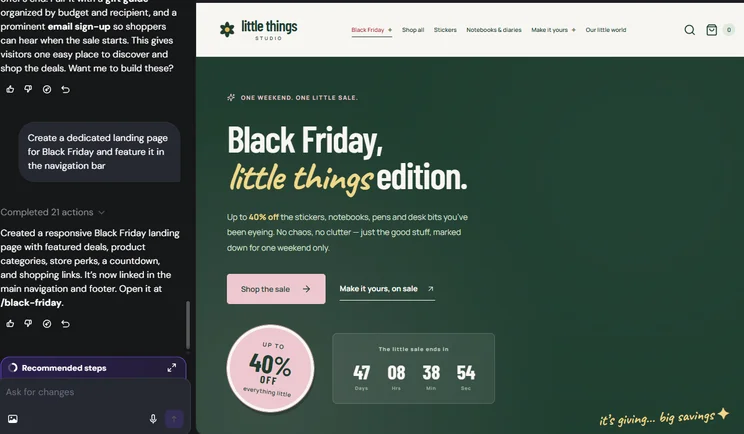
I was really impressed to see the tailored copy and CTAs, in line with my store’s branding and tone of voice. Hostinger also added the landing page to my site’s main navigation bar (as requested), as well as the footer.
2. Signpost Your Black Friday Sale
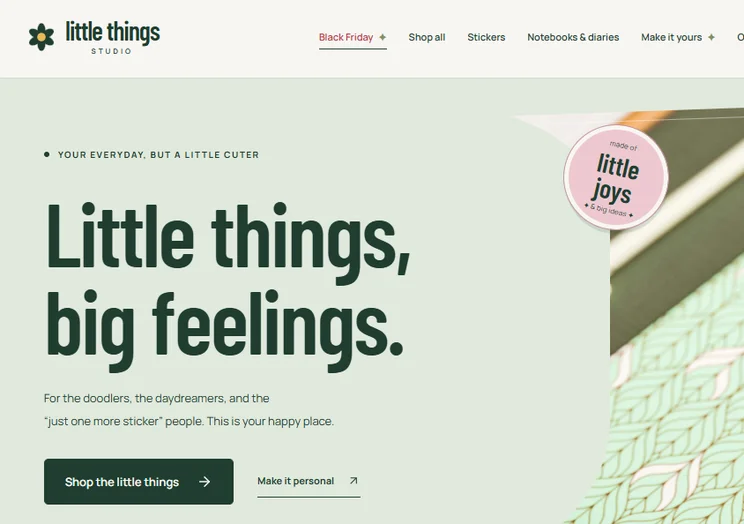
There’s no point advertising your store’s Black Friday sale if customers can’t find it. That’s why it’s important to signpost your sale so customers can actually shop your discounted products.
Consider adding links to your dedicated landing page or Black Friday sales category across these site elements:
- Navigation bar
- Homepage
- Footer
- Shop page
3. Optimize Your Product Pages
Review your product pages so the information, photos, and prices are all correct before you launch your Black Friday discount. Edits to your products can be done in the Hostinger Ecommerce dashboard.
The Hostinger Ecommerce add-on is available with the Unlimited and Cloud Startup plans, costing just $1 per month for your first 3 months (then $10.99 per month).
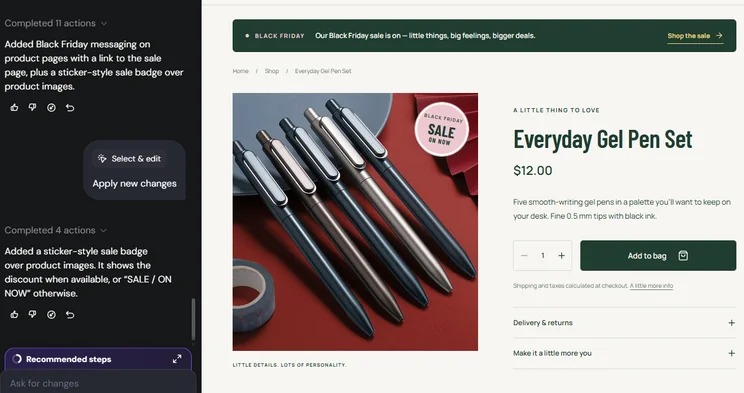
To experiment, I also asked Hostinger’s AI Builder to add Black Friday messaging to the individual product pages. Based on my prompt, it added a prominent Black Friday message at the top of each product page, along with a link to the sale.
And, with a direct comment left using the “Select & edit” feature, I got Hostinger’s AI Builder to apply a sticker-style badge over product images to mark them as on sale.
Use AI credits to optimize your store for Black Friday
Ask Hostinger’s AI Builder to generate Black Friday messaging, landing pages, banners, and more.
4. Bundle Products
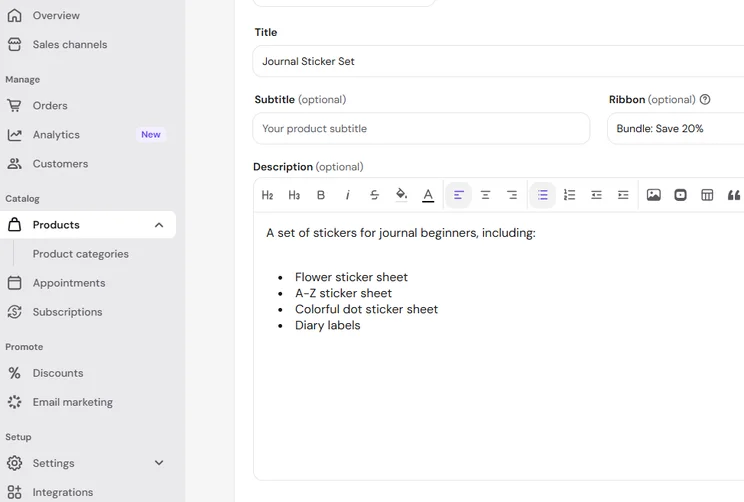
The easiest way to create product bundles with Hostinger is through new product listings. Follow these steps from the Ecommerce dashboard:
- Add a new product under “Products”
- Choose your product type
- Upload product photos that showcase the bundle – you can get
- Hostinger’s AI to generate product details based on these images
- Make sure your product title clearly identifies it as a set or bundle
- List the individual products in the description so customers know what’s included
- Add a custom ribbon to label the bundle
- Set pricing and the SKU
As part of your Black Friday checklist, prep your inventory so your business isn’t caught short over the weekend. With Hostinger’s AI Builder, you can track stock quantity and set low-stock alerts for each product.
5. Display Shipping Cut-Off Dates
Online stores must clearly display shipping cut-off dates to help manage customer expectations during the busy shopping period.
- Check shipping couriers – review your chosen providers to make sure your shipping deadlines match the reality
- Show clear dates – make the cut-off date for shipping clear on your homepage, product pages, and at checkout
- Adapt for different regions – provide clear messaging for different markets, such as “Order by Cyber Monday for international shipping (7-14 days)”
6. Announce Your Black Friday Deal
Along with signposting your Black Friday sale in your site’s navigation, you need to update copy across your site to drive conversions and announce the sale.
I used Hostinger’s AI Builder to update my homepage using this prompt:
- Can you replace the hero image/copy/buttons with Black Friday messaging?
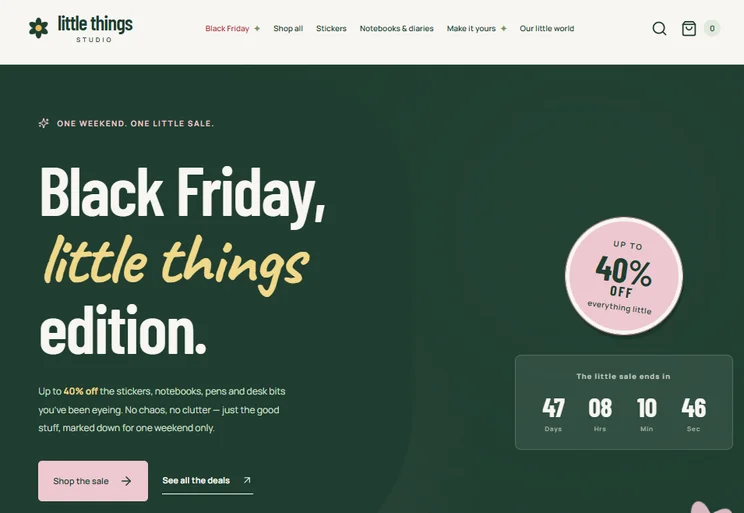
The output included seasonal messaging for the Black Friday weekend, links to the sale, and a countdown (automatically set to end on Cyber Monday). You should also promote your upcoming discount across social media channels and email.
If you notice any inconsistency across your site following prompts, just ask Hostinger’s AI chat to change what’s needed. For example, my Black Friday offer was different across the scrolling banner, homepage, and product pages, so I asked Hostinger to change all Black Friday discounts to consistently say 40% off.
7. Consider International Customers
Hostinger’s AI Builder supports localization to ensure your pages and content match the relevant audience.
- Showcase international shipping options – as discussed earlier, make sure delivery timeframes are made clear to your non-US customers as well
- Currency conversion – Hostinger stores support a single set currency, but your connected payment gateways, such as Stripe, can handle transactions in multiple currencies
- Update messaging for international audiences – make sure you tailor your copy for different regions and markets (for example, “Cyber Weekend” resonates more broadly than US-focused “Thanksgiving” copy)
8. Generate a Banner
Another way to announce your Black Friday deal is with a hero banner. This makes your deal obvious to new site visitors immediately, and it’s visible throughout the holiday season as they navigate your site.
I used this prompt when building with Hostinger:
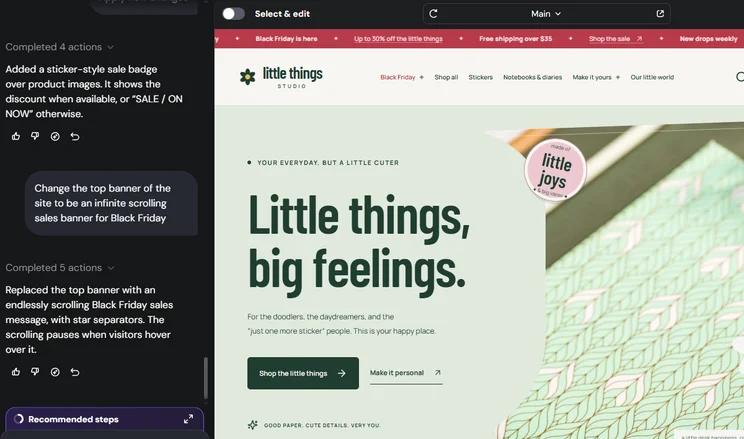
- Change the top banner of the site to be an infinite scrolling sales banner for Black Friday
Not a super detailed prompt, I’ll admit, but Hostinger got the job done in seconds. I recommend adding a sales banner to your site as soon as you start teasing your Black Friday sale, probably around mid-November. Just remember to update the necessary copy when the sale actually starts!
9. Capture New Emails
Create new sign-up forms for your homepage or Black Friday landing page to capture the influx of new traffic. Alternatively, you can ask Hostinger’s AI Builder to generate an engaging pop-up for your website. I used this prompt:
- Create a pop-up to capture emails from new visitors
If you connect your store to Hostinger’s email marketing tool, Hostinger Reach, you can capture new sign-ups automatically.
10. Give Loyal Customers Early Access
Reward existing customers with an exclusive window to shop your sale, ahead of the actual launch. This helps foster a community of loyal customers, especially if they know they can expect tangible perks for supporting your business.
There are a few ways to give customers early access to your Black Friday sale:
- Send an email campaign to newsletter subscribers or loyalty program members with a discount code and private shop link
- Create a quick link and share with a select group of customers via email or socials – this can be set up under “Sales channels” in Hostinger’s Ecommerce dashboard
You could also generate a new discount code to share with loyal customers, which they can apply at checkout as usual. However, there’s a risk that the coupon could be leaked or shared more widely than you expect, putting unnecessary pressure on your stock levels and staff before Black Friday begins.
11. Add a Countdown
Hostinger’s AI Builder had already added a countdown timer to my homepage and dedicated landing page without me prompting for one.
However, if you haven’t got one set up, simply ask the AI chat to create one and where you want it featured. For example, I specifically requested a countdown timer for the online cart page to increase urgency as customers go to review their purchase.
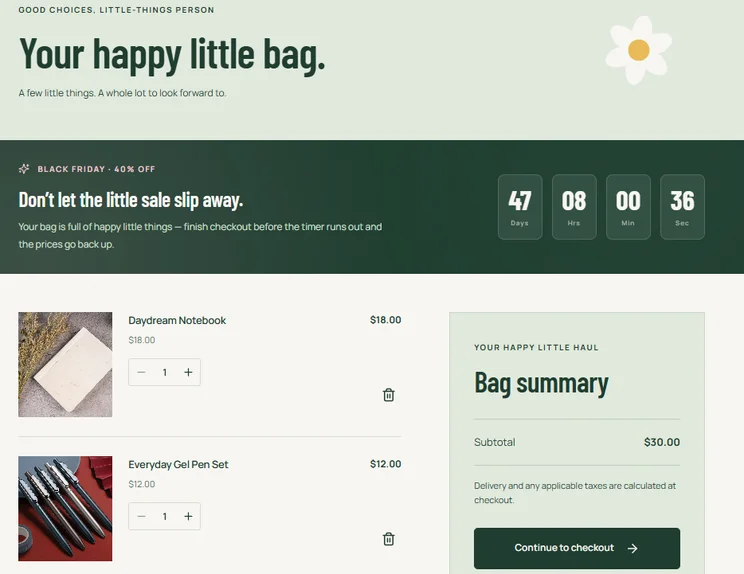
If you’re selling internationally, make sure your countdown reflects the visitor’s time zone. With Hostinger’s AI Builder, I simply asked AI to make the change for me, ensuring the countdown’s end time would reflect the relevant time zone.
12. Label Products to Drive Urgency and Sales
You can influence buying decisions and highlight demand with the words you choose to label products with. This extra visual offers key information to customers, and your business can use it to:
- Feature your Black Friday sale – labels like “On sale,” “10% off,” or “BF exclusive” can help customers spot discounted goods
- Drive urgency – labels like “Bestseller,” “Nearly gone!,” and “Popular” show shoppers that your products are in high demand
13. Help Customers With an AI Chatbot
Adding an AI-powered chatbot to your online store can help your business handle a surge in customer queries, guaranteeing shoppers get answers quickly to anything from order tracking to return windows, while also freeing up your customer service team to handle more complex issues.
I don’t know the first thing about creating an AI customer service bot, so I asked Hostinger’s AI Builder to do it for me. After a couple of minutes, a floating chatbot appeared on my stationery website.
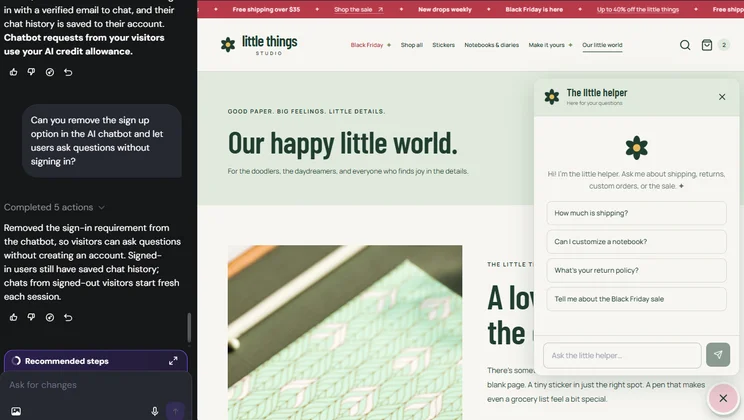
Originally, the pop-up required email verification, forcing users to sign in with an email to chat with the business. I didn’t want this potential friction point, so I asked Hostinger to remove the sign-up option, allowing users to ask questions as guests.
Keep an eye on your AI credit allowance if you generate an AI chatbot with Hostinger, since chatbot conversations will use these credits too.
14. Link to Socials
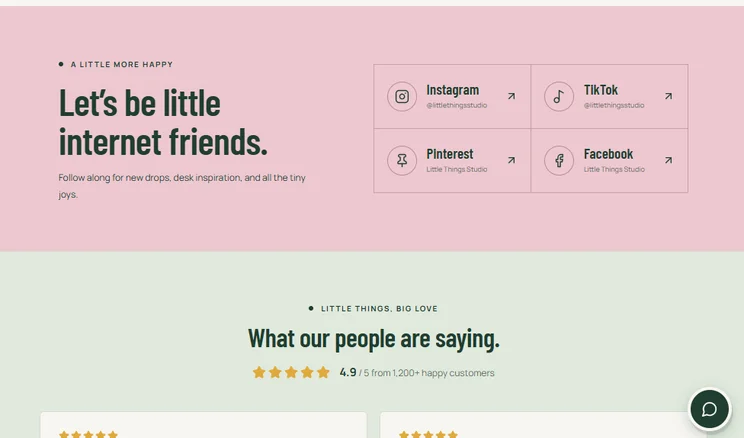
Make sure your online store showcases your social media channels, whether that’s with built-in feeds or simple links.
This is a great way to encourage consumers to engage with your business across channels, drive awareness for your Black Friday sale, and boost sales on platforms that customers prefer to shop on, such as TikTok. According to Salesforce, 53% of shoppers discover new products via social media.
Just remember to keep your Black Friday messaging consistent across platforms to avoid confusing your audience.
15. Boost Customer Trust With UGC
Adding user-generated content (UGC) to product pages boosts conversions by up to 161%, according to Influee. UGC is brilliant social proof, building brand trust and offering reassurance to hesitant shoppers.
Potential customers want to hear from real shoppers before purchasing an item, rather than listening to a sales pitch from the business.
- Add user-generated content to your homepage – a feed of images and videos from socials can be really engaging, showing off your products in natural situations
- Make product and business reviews visible – ideally on the homepage and on product pages (ask Hostinger’s AI Builder to match reviews with products)
- Display customer ratings – along with reviews, star ratings add instant visual credibility and help customers compare products quickly
Remember to compress any images you upload to keep your site load times to a minimum and ensure your site runs smoothly during the busy traffic period.
16. Create Gift Guides
My final suggestion when preparing your online store for Black Friday is to create relevant gift guides to showcase your products and drive high-intent traffic to your store. The holiday season is the peak time of year for gift shopping, so seasonal blog posts or social media content can help spread awareness of what your business has to offer.
You can create broad gift guides or guides for very specific customers and needs, such as the best gifts for new parents or gift ideas for your best friend that already has everything.
Final Thoughts: Is Your Online Store Ready for Black Friday 2026?
Adobe expects US online spending to hit $12.9 billion for Black Friday 2026, hitting over $275 billion overall across the November and December months. That’s why it’s so important to get your store in shape ahead of the peak sales season, from adding a Black Friday landing page to writing gift guides.
Obviously, with anything AI-generated, it’s best to review and edit the content to make sure your customers are seeing the most accurate information during Black Friday. But Hostinger’s AI Builder gives you a polished starting point that you can then tweak to your needs.


0 comments