Shopify Payments 101: My Guide to Shopify’s Payment Gateway

We may receive a commission from our partners if you click on a link and purchase a product or service on their website. Learn more

Smiling headshot of Annie Angus looking at the camera
Written By
Updated on October 9, 2025

Shopify, our top ecommerce website builder, simplifies the online payment process by offering an integrated payment gateway: Shopify Payments. Whether you’re just setting up your store and are overwhelmed by the processes, or you’re a seasoned seller looking to make the move from a third party gateway, Shopify Payments could save you both time and money.

In this guide, I’ll give you the low down on Shopify Payments and teach you how to set it up on your Shopify account and start making payments.

Shopify Payments is Shopify’s native payment gateway that provides an all-in-one solution for merchants. A payment gateway is a service used to process and receive online payments from customers; it acts as a bridge between the customer and merchant’s bank accounts to securely transfer the money to the seller.
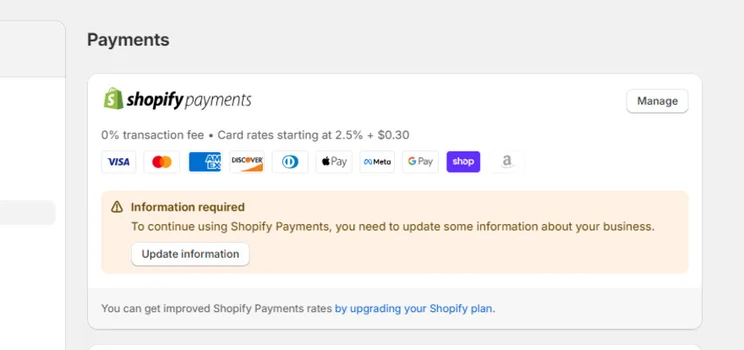
Shopify Payments showing 10 payments accepted payment types
Shopify Payments lets you accept major debit and credit cards, digital wallets, and Shop Pay. Source: Website Builder Expert

What’s the Difference Between Shopify Payments and Other Payment Gateways?

Since Shopify Payments is a native solution, it streamlines the overall payment process by cutting out the need to register for external accounts and reducing the time it takes to receive payments. Plus, you won’t have to pay transaction fees, which are often demanded by external gateways.

To understand this further, let’s take a look at the typical payment process for a merchant using an external payment gateway, versus the process of using a native one like Shopify Payments:

Payment Process with an External Payment Gateway

  1. Set up a merchant account
  2. Set up a payment gateway and link this to your merchant account
  3. Integrate the payment gateway into your Shopify checkout
  4. Pay processing fees to Shopify and transaction fees to your external gateway for each payment
  5. Receive payouts in up to five business days

Payment Process with Shopify Payments

  1. Set up Shopify Payments
  2. Pay a processing fee to Shopify and zero transaction fees for each payment
  3. Receive payouts in one to three business days

Shopify Payments is free to use with all Shopify plans. When using it, you’ll pay no transaction fees, and will only be charged a payment processing fee that decreases with each plan.

Basic plan Grow plan Advanced plan
Shopify Payments online processing fees 2.9% + 30¢ 2.7% + 30¢ 2.5% + 30¢
Shopify Payments in-person processing fees 2.6%+ 10¢ 2.5%+ 10¢ 2.4%+ 10¢
Shopify Payments transaction fees None None None
Third party gateway transaction fees 2% + your chosen gateway’s standard processing fee 1% + your chosen gateway’s standard processing fee 0.6% + your chosen gateway's standard processing fee

If your business sells in a brick and mortar store, you can also use Shopify Payments with a Shopify Point of Sale (POS) device. As shown in our table, these fees will range between 2.4% + 10¢ and 2.6% + 10¢, depending on your account.

Does Shopify Cover Chargeback Fees?

Shopify will pay a chargeback fee for you if the chargeback is resolved in your favor. If the chargeback is resolved in the customer’s favor, or if you choose not to dispute it, then you’ll have to pay both the disputed amount and the extra chargeback fee, which is a standardized $15 for US merchants.
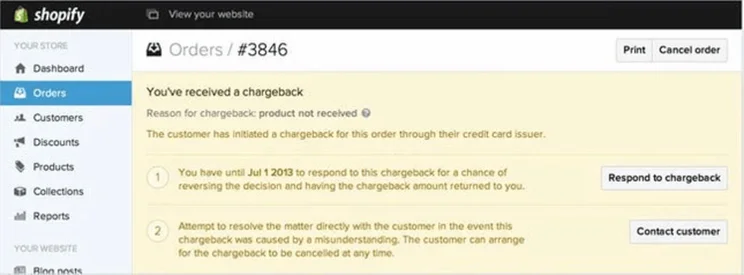
notification receiving a chargeback for an order within Shopify admin
Chargebacks can be monitored from your Shopify admin. Source: Website Builder Expert

Shopify payments is integrated into your Shopify admin automatically, and it takes around five minutes to get set up. 

The information required will vary slightly depending on the country you’re in, but the process will be similar on the whole. Here’s how to set up Shopify Payments in the US:

#1. Enter Your Account Settings

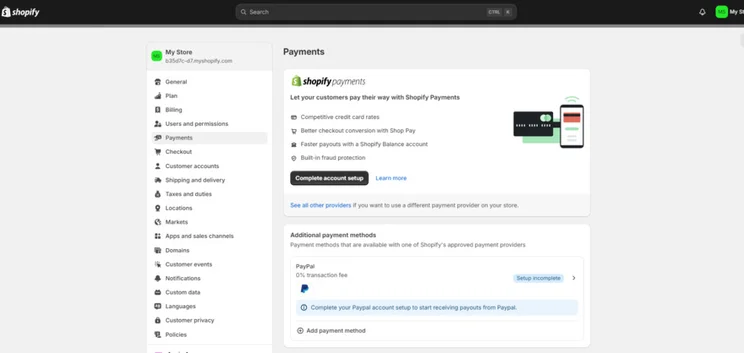
From your Shopify dashboard, select the settings button in the bottom left corner of the sidebar.
Shopify payment settings on dashboard
The payments hub allows you to add multiple payment methods and customize payments through apps. Source: Website Builder Expert

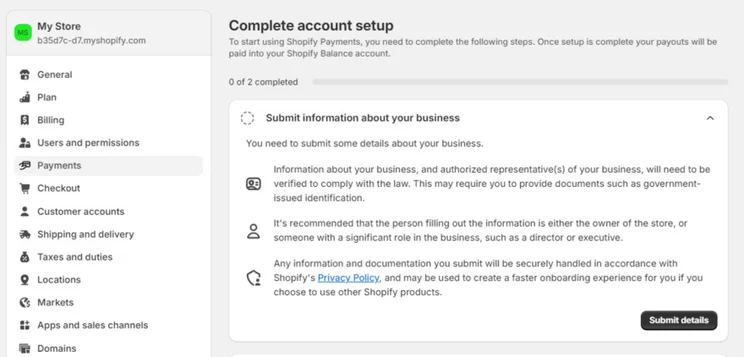
Once you’re in the settings, select payments; you’ll be able to view and set up payment methods for your store on this page. Shopify Payments should be the first payment option you see. Select complete account setup, and you’ll be prompted to add any details needed. Then, submit details.
Shopify payments settings page prompting to complete account setup by submitting details
I was asked to provide my personal and business information before being able to accept payments. Source: Website Builder Expert

#2. Confirm Your Business Type

Next, you’ll need to classify your business as one of the following:

  • Individual/sole proprietor/single-member LLC
  • Corporation
  • LLC
  • Partnership
  • Nonprofit
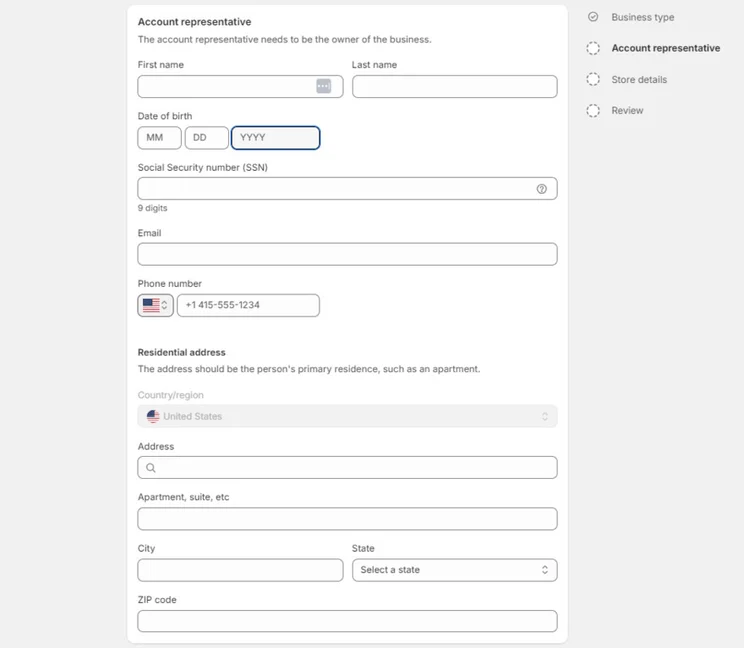
account representative details form
The details requested will change depending on your business type and location. Source: Website Builder Expert

#3. Share Business Owner Information

Next, you just have to provide some basic details about your business, starting with information about the account representative – or the owner of your business. For an Individual or sole proprietor, I was asked to submit the business owner’s:

  • Name
  • SSN
  • Email address
  • Phone number
  • Personal address

If you’re a corporation, you’ll have to provide your business number, EIN, or Taxpayer Identification Number.
Shopify Payments business details form
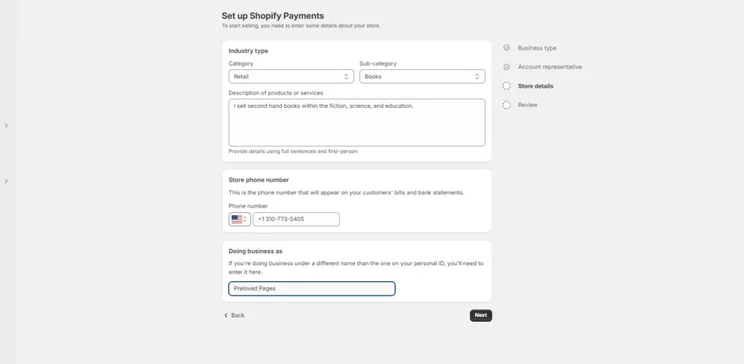
Your store details are collected by Shopify for verification purposes. Source: Website Builder Expert

#4. Input Business Details

The final step is to include some basic store details, like your industry type, company name, and what you’re selling.

Shopify asks for this information mainly so that it knows who’s joining Shopify Payments. While you should provide the correct information, it’s not set in stone and won’t affect your store, so don’t worry if you want to change these details at a later date!
Shopify payments set up review page
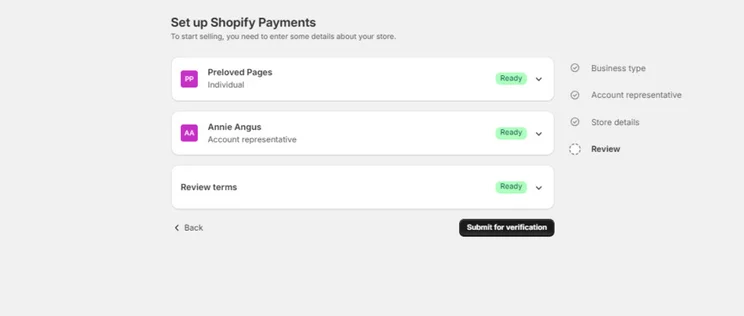
Reviewing your details before you submit them will help to avoid mistakes. Source: Website Builder Expert

It’s as simple as that! Your information will be verified in up to three business days, after which you’ll be ready to start accepting payments!

Do I have To Share My Bank Details?

You might be wondering why you haven’t been asked to input any bank details. If your business is in the United States or Puerto Rico and meets the eligibility requirements, Shopify Payments will automatically set you up with a Shopify Balance account.

This will let you manage your ecommerce store’s payments and transactions in one place, and comes with perks like faster payouts and cashback on spending. Bank details will only be requested if you’re not eligible for a Shopify Balance account.

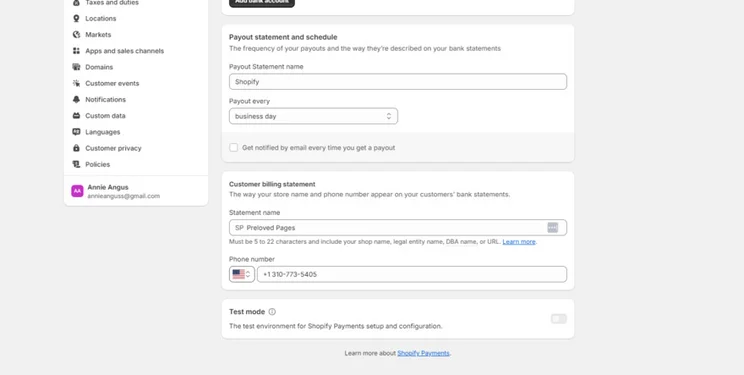
Shopify payment settings showing test mode at the bottom of the page
Test mode is a great way to check your Shopify Payments settings are configured correctly. Source: Website Builder Expert

Once you’ve been approved for and set up your preferences in Shopify Payments, you should test a transaction to see how the customer will be able to purchase an order, as well as how your company processes these orders.

Test mode disables the use of real credit cards in your store, so you can mimic the whole payment and iron out any issues that crop up. It can be found by going to your settings, scrolling to the bottom of the payments section, and toggling it on.

Shopify Payments is a convenient payment solution for anyone with an online Shopify store, but unfortunately, there are strict criteria for eligibility that not all businesses will meet.

Which Countries Does Shopify Payments Support?

Shopify Payments for online stores is available in 39 countries. This list of supported countries includes the United States, Canada, Hong Kong, Singapore, and the United Kingdom.

If you’re looking to use Shopify Payments for in-person payment processing, the list of supported countries narrows to 18. 

Does Shopify Payments Restrict Businesses?

You also won’t be able to use Shopify Payments if your business offerings are prohibited. Prohibited products and services vary in each country depending on regulations, but across the board, you cannot use Shopify Payments to sell:

  • Regulated or illegal products and services
  • Financial and professional services
  • Adult products
  • Pharmaceuticals
  • Gambling products and services
  • Counterfeit products

This list prohibits a lot of lawful businesses from using Shopify Payments, such as law firms, mortgage consultancies, online pharmacies, and even sites selling fireworks. On top of this list, there are additional guidelines for each country. Shopify states that it may shut down any non-compliant store with zero notice, so it’s important to be aware of the guidelines that apply to you.

Does It Require Two-Step Authentication?

You’ll also be required to secure your account with two-step authentication before you can use Shopify Payments. This means that, to log into your account, you’ll have to use your standard login credentials as well as a secondary security measure like SMS or an authenticator app.
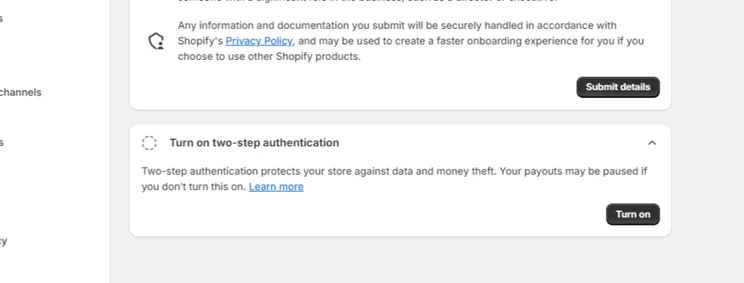
Prompt to turn on two-step authentication for Shopify payments
Without two-step authentication your payments will be put on hold. Source: Website Builder Expert

How Do I Set Up Two-Step Authentication on Shopify?

Turn on two-step authentication by clicking your profile icon from the top bar of your Shopify admin. Select your username, then head to the “Privacy” tab and scroll to enable two-step authentication.

You’ll need to add at least one authentication method to your Shopify account, such as an authentication app. Backup methods can be added for extra security and peace of mind that no unwanted parties can access your Shopify account.

If you’ve built an online store with Shopify already, utilizing its payment gateway is definitely worthwhile. However, other ecommerce platforms offer similar integrated payment services. Here’s an overview of the main features offered by the leading all-in-one platforms:

Shopify Payments Wix Payments Squarespace Payments
Online payment processing fees 2.5%+30¢ – 2.9% + 30¢ $2.9+30¢ $2.9 + 30¢
Transaction fees None None 0%-3% depending on the plan
Countries available 23 15 3

While Shopify, Wix, and Squarespace all charge the same processing fee of 2.9% + 30¢, Shopify offers lower rates to anyone on its Standard plan or above. While this is a standout feature, you should consider whether the reduced processing fees will outweigh the price of upgrading your Shopify plan.

Shopify Payments is also the most widely available, and comes with no transaction fees. Compared to Wix Payments, which is only available in three countries and charges transaction fees on its business plan, I’d recommend Shopify Payments as the best overall.

Shopify Payments is a neatly-packaged solution for Shopify merchants wanting to manage and monitor everything payment-related in one place. That said, its main drawback is its eligibility criteria, which will prevent a lot of businesses from using the service. This isn’t singular to Shopify, as Wix and Squarespace are limited to even fewer countries.

Luckily, third party payment gateways can be integrated into your Shopify store as an alternative.

For those who are eligible for Shopify Payments, you now know how to integrate it into your store and start seeing the rewards!

Written By

Smiling headshot of Annie Angus looking at the camera

Annie Angus is a Writer for Website Builder Expert with a passion for shaping jargon-heavy research into digestible content. She has previously researched and written about industries ranging from tech to fashion, and now, after testing our top website builders such as Wix and Squarespace, she is enthusiastic to share her findings with our readers.

With first-hand experience in utilizing social media and online marketplaces to grow a small handmade clothing business, Annie understands the priorities and concerns held by SME owners, and knows precisely what they look for in a website builder. She combines this unique perspective with her knowledge of website builders to produce engaging content spanning all areas of the small business journey, from creating a strong website to growing and maintaining an audience.

You can read Annie’s articles below, or connect with her on LinkedIn.

More about

65 comments

Your email address will not be published. Required fields are marked *

  • Bruce

    Do I need an employer Identification number to sign up with Shopify? I don't have one because I have no employees.

    1 reply

    • Zara Choudhry
      Zara Choudhry

      Hi Bruce,

      That's a really great question and one I'm sure many people may wonder! You don't necessarily need one to sign up to Shopify but we'd recommend having an Employer Identification Number for tax reasons. Having one means you're able to file business taxes and also create sales taxes on certain items that you're selling. We hope this helps! If you feel you need any further information on this topic, you're able to reach out to Shopify who can provide a more tailored response to your query!

      All the best,
      Zara

  • Margie

    Hello, can I disable using Shopify's default payment gateway to use another type?

    1 reply

    • Lucy Carney
      Lucy Carney

      Hi Margie,
      Thanks for your question!
      Yes, you can absolutely use a different payment gateway - you don't have to use Shopify Payments if you don't want to. Head to Settings > Payment Providers and there should be an option to "Manage" Shopify Payments. You should find a "Deactivate Shopify Payments" button at the bottom of this page. There are plenty of alternatives to choose from, including PayPal, Amazon Pay, and Apple Pay - here's a full list!
      I hope this helps, best of luck!
      Lucy

  • Carol

    Hi there, Is there someone who can help me set up my payment gateway pls? I’m a digital nomad. I live everywhere and no where. I don’t have a set address. The bank Acct I use is not American as I’m travelling around a lot. I feel like my website is limited for my customers Bc I’m not based anywhere concrete.

    1 reply

    • Lucy Carney
      Lucy Carney

      Hi Carol,
      At first look I would say it's going to be difficult setting up Shopify Payments without a set address, as you have to enter one during the setup process. Unfortunately we can't physically help you set up a payment gateway. I'd recommend reaching out to Shopify's help and support if you haven't already, as I've seen other people asking this and it may be something they've advised others on before!
      Best of luck, Lucy

  • Alex

    While we are not selling products which not comply with Shopify Payments, they suddenly shut down our payment gateway as they are requiring a physical presence in the eligible country. And this while we have a company incorporated since 15 years in that country and with a bank account also located in the country. Due to the nature of our business we don’t need a physical office and only had a virtual office, which is not sufficient for them. It means that Shopify payments is not suitable for digital nomads/expats even though they have a legal structure in an approved country, which is really a shame when it comes to online business.

    Has anyone faced the same issue and knows a work around?

    1 reply

    • Lucy Carney
      Lucy Carney

      Hi Alex,
      I'm sorry to hear about your struggles with Shopify Payments! This is definitely an issue I've read about others having, so you're not alone. Sadly I don't currently have a workaround to offer, but would always recommend getting in touch directly with Shopify to flag the issue. You're right it is a shame that digital nomads face such frustrations, I hope you find a way to make it work.
      Many thanks for sharing your experiences here with us, I'm sure other readers will find it useful!
      Best, Lucy

  • Marilyn

    Hi, thank you for this comparison. I was searching for alternatives to Etsy and this came up. Since I was previously thinking of starting with a Weekly website this article was perfect. The question I have is for all these platforms. Does the vendor (me) have a way to obtain and collect user and buyer contact info from these services? I gratefully await your reply.????

    1 reply

    • Lucy Carney
      Lucy Carney

      Hi Marilyn,
      Thanks for your question!
      When a customer places an order with your Shopify store, their name and information are added to your customer list. You can email them using this information, or create customer groups to help manage your marketing and orders. I hope this helps!
      Best, Lucy

  • Michael

    A very helpful and informative review. Thanks

  • Kelly

    I live in the US Virgin Islands, owned by USA, however, we are never treated equally. It is a shame. Shopify Payments is allowed in the USA AND PUERTO RICO, yet NOT the US VIRGIN ISLANDS. Please revise this error. We are owned by the USA and should be treated equally.

    1 reply

    • Lucy Carney
      Lucy Carney

      Hi Kelly,
      I'm very sorry about your frustrations! We're not part of Shopify Payments in any way, we're an independent review site, so sadly I can't change this for you. I recommend taking it up with Shopify to see if you can get them to revise this. As you say, Shopify Payments is currently supported in the US, but is not available in any US territories excpet Puerto Rico.
      Thanks for sharing your experience, and best of luck!
      Lucy

  • Patrycja

    It is great that Shopify has a payment gateway already integrated into its core. However, as for now I am using a third party payment gateway Cardinity and had no problems so far. Certainly, you have to spend some time on integration, but it paid off for my business. It's a pity that Cardinity is available only for European businesses.

  • Raja singh

    You have discussed an interesting topic that everybody should know. Very well explained with examples.

  • Lisa

    Thanks for this. Can you say if the customer's payment details are stored by Shopify centrally? I really want a solution that I don't see and retain the customers financial information because if I do, I then need to have many more procedures in place to take care of it. Can you expand on this area?

    1 reply

    • Lucy Carney
      Lucy Carney

      Hi Lisa,
      Thanks for your comment and your question, I understand your concerns. When you use Shopify Pay customers can save their card, shipping, and billing information to make checkout faster. This is important for online stores as it keeps customers happy! But more importantly, these details are stored on Shopify's PCI (Payment Card Industry) compliant servers. These details are only shared with you when that customer places an order. So you are not storing payment details yourself and shouldn't need any extra procedures or documents to safely handle transactions. You can also choose which payment methods to enable on your website (for example credit cards, PayPal, Amazon Pay, Apple Pay etc).
      You can read more about payments on Shopify, more about Shopify Payments and Shopify Pay in their help centre, which I have linked to for you to look at.
      I hope this helps, and best of luck with your online store!
      Thanks for reading,
      Lucy

  • babu

    Your information is really helpful for my business. Thanks for sharing this post.

    1 reply

    • Natasha Willett
      Natasha Willett

      Dear Babu,
      Welcome to the community. Really pleased to hear that you enjoyed the article.
      Cheers,
      Natasha.

  • Vijay

    Is Shopify good for digital download products store? How does it compare with, say FastSpring?
    thanks.

    1 reply

  • Sheila Cabador

    Thanks for sharing Jeremy, looks Shopify is good when processing payment but I have to stick with creationshop.com. I have been their client for a year now and the flow is fast and never encountered problem yet (hopefully not) :)

  • Farid Emran Mohd Tajuddin

    I love your write up! It has been a tremendous boost of confidence for my first foray into e-commerce. Wish me luck!

    Rgds,

    Farid

    1 reply

    • Tom Watts
      Tom Watts

      Hey Farid,

      Good to hear you found the conversation useful!

      Best of luck with your ecommerce website building.

      If you think your friends or family might find this guide helpful too, then please feel free to share on social media - we greatly appreciate it!

      Thanks,
      - Tom

  • Imran Karim

    Hi All,

    Do you know if Shopify Payments does 3D secure in the UK?

    1 reply

    • Tom Watts
      Tom Watts

      Hi Imran,

      At this moment in time Shopify does not support 3D Secure payments on UK stores, which - as you can probably guess - is a constant source of frustration for many ecommerce users as many merchant account providers charge you more for not using 3D Secure!

      There's been no indication made that this will be rectified at any point in the near future, so definitely something to be aware of.

      - Tom

  • Lynn Anderson

    A great help with useful videos, thanks alot

  • Mel

    Hi! Do you know if Shopify Payments is available in Singapore?

    1 reply

    • Jeremy
      Jeremy

      Hi Mel,

      I'm not entirely sure. Shopify Payments is powered by Stripe and Stripe is available in for Singaporean based merchants. You can see where Stripe is available here.

      However, based on Shopify's latest support document, Shopify Payments is not yet available in Singapore. Perhaps you can try reaching out to Shopify's support team to verify this?

      Let me know what you find out.

      Jeremy

  • Terrea

    SHOPIFY ABRUPT GATEWAY SHUTDOWN

    April 2017. I've have had a Shopify e commerce business for 2 years, spent at least $3,000 in customizations for my website and received my “pink slip” email this week from Shopify's Olivia (Risk Analyst) as follows:

    “Olivia from the Business Operations Team,
    We value your business at Shopify but it looks like you are selling a product we can’t support on the Shopify Payments Gateway as it violates the Shopify Payments Terms of Service. We are unable to accept payments for pseudo pharmaceuticals (meaning any product that makes a health claim including things like supplements, vitamins, teeth whitening products, and many skin care products including skin brighteners, whiteners, lightening products, peels and products that contain hyaluronic acid, retinol, glycolic acid, kojic acid, vitamin C serums and hydroxy acids), as outlined here here
    We apologize for any inconvenience this may cause. We will pay out any current balance to your bank account and you can continue to use Shopify to power your business, but you will need to change to a different payment gateway in order to process payments for the products/services you currently offer”.

    AND…. I responded, telling her that this was bad business and extremely unprofessional on Shopify’s part to give no advance notice. I asked Olivia if, since we are now FORCED to not use Shopify Stripe payment gateway (0% transaction fee), will the Shopify 2% fee be waived on top of the new payment gateway fee? Her response as follows: (Sounds like a lawyer written form letter)

    “I’m sorry to hear that you are unhappy with the way things have been dealt with.
    Please know that we are very aware you have been working with us for some time, it is just as frustrating for us to have to turn away businesses like yours.
    Accounts come up for review at various processing stages for various reasons which is why we did not remove Shopify Payments as an available gateway sooner.
    Regrettably, Shopify Payments isn’t a feature of our plans; the terms of service for Shopify and Shopify Payments are different. Shopify Payments is available to use as a payment gateway for eligible stores in certain regions, but it is not guaranteed that you will have access to this with any of the Shopify plans. Currently, we are only able to waive transaction fees when Shopify Payments is activated and we don’t have any discounts to offer when a store has been deemed ineligible for the gateway by our banking partners.
    I am very sorry about this inconvenience but please know that this is not something we are going to be able to reverse unfortunately”.

    If you look at the Shopify prohibited products page. It displays this:

    Pseudo pharmaceuticals Pharmaceuticals and other products that make health claims.

    Health claims could include baby diaper rash creams, dry skin creams, acne creams, dandruff shampoos, conditioners to repair damaged hair, sunburn relief, sunscreens…the list is endless.

    Another payment gateway, 2checkout.com prohibited products page displays this:

    Pseudo-pharmaceuticals (anti-aging pills, sex nutrients, etc.)

    As for Shopify. I'm out of here (the sooner, the better) and I won't recommend them to anyone. I'm seeing merchants citing major (250%+) fee hikes on BigCommerce also. I’m checking out other Payment Gateways, other e-commerce platforms and other options.

    It's possible that Trust Commerce, NETbilling GGe4, Skip Jack, Sage Pay, EasyPayDirect and USA pay might be usable Gateways.

    I'm also searching for an attorney and possibly a class-action lawsuit.

    At this point, it appears that the vague and ambiguous Pseudo-pharmaceutical definition is left up to the discretion of whomever wants to use the term.

    2 replies

    • Sara

      My little store has also been caught up in this fiasco and it doesn't matter that I have everything approved by the local government authority either and that nothing I say is considered a 'health claim' by any regulatory body... except Shopify and Stripe of course.

      What that means is that for any business that can't use Shopify payments you are going to be paying a transaction fee on top of a credit card fee. There is no way around this as even on the most expensive plan you are paying 0.5% (plus around 3% for the cc), which is not insignificant for any business.They won't engage with you on the issue either, except to repeat the line that the decision is final and it is this final point of rudeness that has made me decide to change to another platform, even though it's a complete waste of the time spent setting up the store.

      I'm based in New Zealand. To anyone reading the which do you think would be the best alternative? Squarespace, Bigcommerce or Neto?

      1 reply

      • Tom Watts
        Tom Watts

        Hi Sara,

        Thanks for sharing your experiences with us.

        It does sound like this new, more stringent policy on what can and can'tr be sold is having some serious knock on effects for store owners, which is never ideal!

        If you're considering other platforms, then BigCommerce is the most direct competitor and like-for-like replacement I can suggest to you. Have a read of our in-depth review and see what you think.

        Otherwise, Shopify could be an interesting option to look at, but it does depend on how large your store is and how fast you expect to grow as Squarespace is not as equipped as dedicated ecommerce platforms to handle larger, more demanding businesses.

        I've linked to our Squarespace ecommerce review too, so hopefully it should give you some food for thought.

        Thanks,
        - Tom

    • Jeremy
      Jeremy

      Hey Terrea,

      Sorry to hear about this this happening to stores selling pseudo pharmaceutical products.

      I've laid out my thoughts in a comment dated March 27 2017 (just a few comments below).

      I suspect government agencies are cracking down on some merchants making unsubstantiated claims about their products, just like how the FTC (Federal Trade Commissions) was shutting down fake news websites a few years ago and imposing heavy penaltie. Some overly aggressive merchants were selling supplements and stating that some famous individuals who have persuasive powers (such as Oprah or Dr. Oz) endorsed such products when in fact they didn't.

      I'm not saying that's what you are doing, but I think in a lot of other cases, some customers made complaints against some ecommerce merchants leading to them being shut down.

      In any case, sorry to hear about your situation.

      Jeremy

  • Albert

    If my company is in US, but the bank account is in other country (eg. Lithuania), can I use Shopify Payments?

    1 reply

    • Jeremy
      Jeremy

      Hey Albert,

      I'm not entirely sure, actually. My gut feeling is that Shopify Payments (basically Stripe) only works with bank accounts in specific jurisdictions. So it's not so much where your company is based, but where your bank account is based.

      See this page here.

      But it's worth asking Shopify's support team if you haven't yet.

      Jeremy

  • Betty

    Word of caution using Shopify's payment gateway -- THINGS HAVE CHANGED AS OF MARCH 20, 2017. Shopify is banning MANY shops if they are considered pseudo parmaceutical. For my business which is skincare products........which contain hyaluronic acid, glycolic acid and retinol. I was told that I cannot use their gateway (stripe) because my products are against their TOS. This news came to me on March 20 and I had 48 hours before my customers could no longer purchase with me unless I changed my gateway. Nice notice Shopify. They still charge a 1% fee for not using their gateway................make sense to anyone?

    1 reply

    • Jeremy
      Jeremy

      Hello Betty,

      Thanks for sharing this with us.

      Sorry to hear that this is happening to shops that are selling pseudo pharmaceutical products. I'm wondering if this is driven by FTC or FDA regulations? Perhaps certain government bodies are applying pressure on online selling platforms to help regulate the industry a bit?

      I can see how some merchants might be selling questionable products, or making questionable claims about their products (not referring to you in anyway, but just commerce in general!)

      Generally speaking, I'm pretty confident Shopify will have very good, legitimate reasons for their actions. Their action actually results in lost revenues for them, too!

      (Update: I just found this discussion thread here that discusses pseudo pharmaceutical products and payment processors. Apparently, other well known payment processors are also prohibiting selling of [certain] supplements)

      This is another good reason to have at least two payment processors handy. So if one goes down (it happens from time to time), you have another way for customers to pay. It's good business / contingency practice. Plus, offering multiple payment options for customers is never a bad thing.

      Sorry to hear about this again!

      Jeremy

  • Sue Nemish

    Can you please in detail describe to me how Shopify can down load into quick books? I already use quick books and we down load Volusion into it but we have to use a third party to this.

    1 reply

    • Jeremy
      Jeremy

      Hi Sue,

      Shopify does integrate with Quickbooks. If you visit Shopify's App Store and search for "Quickbooks", you can then install the app to your Shopify store.

      Hope this helps.

      Jeremy

  • Rebecca

    Thanks so much for your very helpful, thorough reviews Jeremy!!!

    1 reply

    • Jeremy
      Jeremy

      You're very welcome, Rebecca. Glad you find our guides helpful!

      Jeremy

  • Robin

    Thank you for this great article with useful and detailed information!. We do payment processing everyday and also it is very important to at least understand how it works. Something that bothers me is just how safe and secure are our individual information when they are submitted to the numerous companies that approve our payment.

    1 reply

    • Jeremy
      Jeremy

      Hello Robin,

      If you use a reputable payment processor, such as PayPal, Stripe, Square, etc, your customers' information will be encrypted and protected. Even you, as the store owner, won't be able to access these information. Generally speaking, I wouldn't think of it as anything different than your customers purchasing something in a physical store with their credit cards.

      Jeremy

  • Kylie

    Hi, I’m trying to determine if Shopify Payments deposit every single transaction into your bank account individually, or if they make one lump dum daily deposit? Can you shed some light on this, please?

    1 reply

    • Jeremy
      Jeremy

      Hi Kylie,

      I believe Shopify Payments is powered by Stripe. According to Stripe's documentation, if you live in the US, the payment schedule is 2-days rolling. So when someone pays you on Day 1, it will be transferred into your bank account by Day 3.

      The number of days vary depending on which country you live in. Here is the documentation from Stripe.

      Jeremy

  • Vivien A. Rogers

    Being an owner of a similar site, I truly appreciate this information re: shopify payments.

  • Marwa

    I have read a lot about Shopify and am really impressed of what it can provides. Am wondering if Shopify would be a great choice for me to start up my business in the United Arab Emirates (UAE)
    In addition, can I find payment gateways here in the UAE that are supported by Shopify?

    Appreciate your support

    1 reply

    • Jeremy
      Jeremy

      Hello Marwa,

      Shopify does support payment processors that work in the UAE. Take a look at this page here, and click on the link beside "United Arab Emirates".

      It will show you a list of check out carts you can use.

      Shopify is a global ecommerce builder so it will work for merchants located in UAE, selling products locally and globally.

      Jeremy

  • Mar

    Hi Jeremy. I'm a little confused. I'm planning to open an online store with shopify but then i'm wondering if they charge a transaction fee for bank transfer payments?

    When you say shopify payment gateways you mean paypal and etc. so that means they won't charge a transaction fee if my customers use that? So that also means i don't have to paypal the 2. Something fee they charge? :)

    1 reply

    • Jeremy
      Jeremy

      Hi Mar,

      I'll try to clarify what Shopify Payment is all about and how you can benefit from using it.

      Basically, whenever someone pays you for your product, you need to use a payment processor (such as PayPal) that will collect money from your customer, and deposit into your account. To perform this service, the payment processor will charge you a small % of the total purchasing price.

      In addition to a payment processing fee, a lot of online store builders also charge a transaction fee (also a small % of your overall sale). This fee typically helps support the bandwidth (think of it like electricity) that powers your website.

      So these two fees are different. One is charged by the payment processor (such as PayPal), and the other is charged by the online store builder (such as Shopify).

      So, if you choose to use Shopify Payments as your payment processor, they will waive the transaction fee from all your sales.

      So you will only need to pay a payment processing fee.

      If you decide to use PayPal to manage your payment collections, then Shopify will charge you a transaction fee. The transaction fee decreases as you move up to a higher plan. We've gone over this in our main review discussion here.

      But the best deal is still to use Shopify Payments to collect payments for you, and deposit the money into your bank account.

      Hope this clarifies things!

      Jeremy

  • Adam

    ie. Shopify is trying to monopolize the market by illegally (in Canada anyway) charging 2% - 0.50% (plan dependent) to their consumer (they call "merchants") for using "external payment gateways"... so a 500k monthly revenue merchant generates 30k in profit for Shopify annually! Keep in mind this free revenue for them is over and above the charges for the actual services they provide. SCAM!

    1 reply

    • Jeremy
      Jeremy

      Hi Adam,

      Thanks for your comment, but I'd have to disagree.

      You're actually in full control of whether you'd like to use Shopify or not, so you don't have to if you don't want to pay their transaction fee. You have that choice.

      Further, the transaction fee drops to 0% if you just use their Shopify Payments solution, which is powered by Stripe (a leading payment processor).

      All this information is very transparent on Shopify's website, so in my own view, it's definitely not a scam.

      Further, they are a publicly traded company on both the Toronto Stock Exchange and New York Stock Exchange. So Shopify is a reputable company, from that perspective.

      Thanks for offering your view though!

      Jeremy

  • Ravi Banerjee

    Hello Friends!
    Good to see the paymnent gateway which is provided by the shopify and allow you to manage your payment gateway directly in the dashboard of shopify. It provides the customers the great options for e-commerce builders.

  • DaveMac

    I am sorry but the delay from a customer making a payment to reaching my bank makes running my business difficult. This delay must be reduced, especially for small companies who rely on sales to buy additional stock.

    The current system truly is a difficult one for my company.

    1 reply

    • Jeremy
      Jeremy

      Hi DaveMac,

      I understand your concerns, and it's always challenging to manage your working capital / cash flow. Unfortunately that is the nature of merchant accounts, and they all take a few days before reaching your bank account. Even if you used PayPal, the transfer process will also take a few days.

      There isn't a way to work around this (yet), unless you take cash payments or direct wire transfer payments from your customers into your bank account.

      Jeremy

      1 reply

      • Sara

        I am about to open an online store with Shopify. I like all of the features associated with Shopify payments but for a start-up selling items averaging $10-$15 a unit it seems that Dwolla is more cost-efficient at a flat rate of 25 cents for transactions over $10. Am I missing somethi8ng?

        1 reply

        • Jeremy
          Jeremy

          Hello Sara,

          I think Dwolla has no transaction fees at all. Their lowest plan is $25 per month. With Shopify Payment, the payment processing fee is 2.9% + $0.30 for their Basic Plan (2.6% + $0.30 for their Pro plan and 2.4% + $0.30 for their Unlimited plan).

          So if you want to use Dwolla (I haven't used them myself before so can't offer more thoughts here), you should have a think about how many products you are going to sell, and project how much it will cost you if you used Shopify Payments to power your shopping cart.

          Basically, you are just projecting your average sales to see if it's more economical to use Dwolla for it's fixed $25 per month fee, or use Shopify Payments which charges you a little bit per transaction.

          Hope this helps!

          Jeremy

  • Kelly

    You can call it whatever you want, but to quote you, "you will just pay anywhere from 2.25% + $0.30 to 2.9% + $0.30 for every single sale you make" - that is a transaction fee.

    Sorry, but I find your 'explanation' to be confusing and circular.

    1 reply

    • Jeremy
      Jeremy

      Kelly,

      That fee that you referenced (from my comment below) is indeed a transaction fee. But to be more exact, it is a transaction fee charged by payment processors (such as PayPal, Visa, Mastercard). These fees are inevitable if you want to use their services. No such thing as a free lunch, right? (I wish!)

      There is another fee, which is the online store builder "platform" fee, that some other platforms do charge whenever you make a sale. This fee is waived if you use Shopify Payments.

      This is completely separate from payment processor fees.

      Hope this clarifies things a bit more.

      Jeremy

      1 reply

      • John Parker

        Thanks for the article. It is very helpful for me. I am also in this line so I have interest to know more. Amazing information.

  • Linda McCarthy

    I recently switched to Shopify Payments. I feel the payment page is confusing to customers because it only shows PayPal and Google. The customer has to fill out information and click continue to get to the credit card page.

    Shopify responded to my email saying it was that way to make it easier for customers. I disagree.

    We have not had a single sale since changing.

    3 replies

    • Omar

      its 2014 and I am wondering if you still use Shopify payments....did they change anything and fix the problem or are you still experiencing the same issues and moved to a different payment service?

    • Louis Kearns

      HI Linda,

      We're in the process of redesigning our checkout UI. I'm confident you'll be happy with the results when we bring the changes to market in the months ahead. Good luck with your first sale on Shopify Payments!

      1 reply

      • Jeremy & Connie
        Jeremy & Connie

        Thanks for joining the discussion Louis, and for providing some insights improvements to come!

        We think the recent upgrades are fantastic! Looking forward to more.

        - Jeremy

    • Jeremy & Connie
      Jeremy & Connie

      Hi Linda,

      Thanks for sharing your experiences. That's a great observation and I wonder what is the thinking behind this from Shopify's perspective. Let's see if others have any reactions to this, or if someone from Shopify can share some more insights.

      Thanks for adding to this discussion!

      - Jeremy