How to Sell on Facebook: A Step-by-Step Guide

We may receive a commission from our partners if you click on a link and purchase a product or service on their website. Learn more

rob-binns
Written By
Updated on October 6, 2023

Looking to start selling on Facebook? Excellent choice – because now is a better time than ever to start doing so.

Facebook Shops – a feature the social media platform first began rolling out back in 2020 – is available in more than 100 countries and comes complete with a whole array of exciting features.

Keen to get started? Below, we’ll walk you through everything you need to start selling through Facebook Shops: including how to create a product collection, customize your storefront to your business’s exact look and feel, before unveiling it to the world. Let’s get started!

Facebook Shops is a feature of the social media platform designed to make existing Facebook Page shops more shoppable. With it, Facebook aims to create an online shopping experience tailored for mobile phones and working alongside builders like Shopify to give businesses extra support.
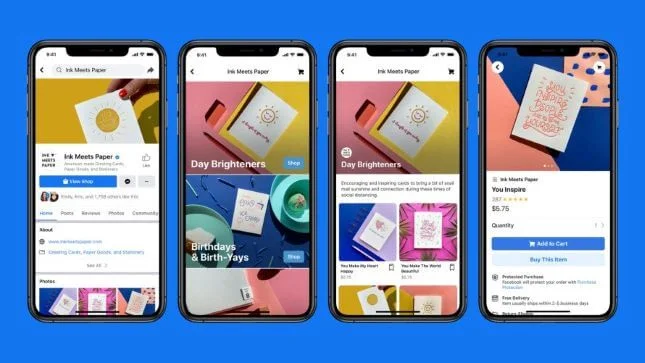
Facebook Shops onscreen examples

Facebook Shops gives your store a ‘storefront’, so you can make it look more like your own site, rather than a Facebook page. As with a Facebook Page Shop, customers can check out directly with Facebook, rather than be redirected to the business website. That said, it’s likely many will still use Facebook to browse, and come to the site to buy. The same feature is being made available for Instagram.

Facebook Shops: New Features

As we touched on earlier, Facebook Shops has had a bit of a makeover in the last few months. In addition to now being available in over 100 countries, Facebook Shops also offers some enticing features, including the ability to:

  • Create product collections to showcase your best wares alongside one another
  • Add product reviews to highlight five-star feedback and testimonials
  • Offer shipping discounts to give your conversion rates a boost
  • Run promotions and promote sales by discounting products
  • Track sales and monitor customer behavior to recover abandoned carts

Once upon a time, you’d have needed to create a Facebook Page shop to start selling via Facebook. Now, however – with Facebook constantly tweaking its approach – Facebook Shops is available to all businesses: regardless of whether they have a Facebook Page shop.

Still, it’s worth quickly defining the difference between these terms, especially because they’re so similar. (We blame Facebook for their rather unoriginal names.)

To get started with Facebook Shops, all you’ll need is a valid Facebook business page and a valid payment method (such as debit card, credit card, or a PayPal account).

You’ll also need to enable Checkout with either Facebook or Instagram. This is a requirement for all new Facebook Shops from the get-go.

The other things you’ll need to do are agree to Facebook’s Merchant Terms – a standard agreement that sets out the terms and conditions for all businesses using Facebook Shops – and have a clear shipping and returns policy. You’ll need to showcase this transparently on your Facebook Shop, so it’s easy for your customers to locate and read.

Facebook Marketplace is a great alternative to setting up a Facebook store if you’re just looking to sell on a few items you don’t need anymore. It works in a similar way to sites like Craigslist, but is accessed via your Facebook account.
To get started, go to Facebook Marketplace and hit the button in the left menu that says + Sell Something, then follow the onscreen instructions.

One of Facebook’s recent changes? A freshly simplified process for setting up Facebook Shops. Now, your business can create a Facebook Shop in Commerce Manager in just a few steps – four, to be precise!

  1. Set up an account with Facebook’s Commerce Manager
  2. Create a collection
  3. Customize your storefront
  4. Publish your shop

Let’s take a look at exactly what’s involved in each step, below.

1. Set Up an Account with Facebook’s Commerce Manager

You may already have an account with Commerce Manager, but if you don’t, here’s how to set one up.

Head to Facebook’s Commerce Manager, and you should see a screen that looks something like this:
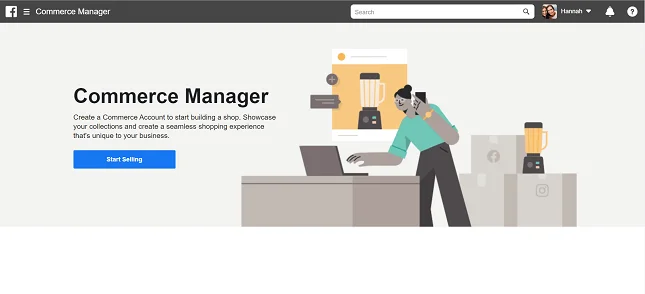
Set up Facebook Commerce manager

Click the blue Start Selling button. You’ll then see this option:
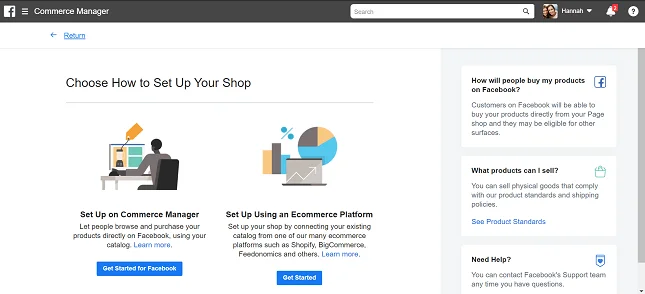
Setting up Facebook Commerce Manager

We’ll cover using an ecommerce platform later on, but to set up a Facebook Shop, hit Get Started for Facebook on the left. You’ll then see this recap of requirements for Facebook Shops:
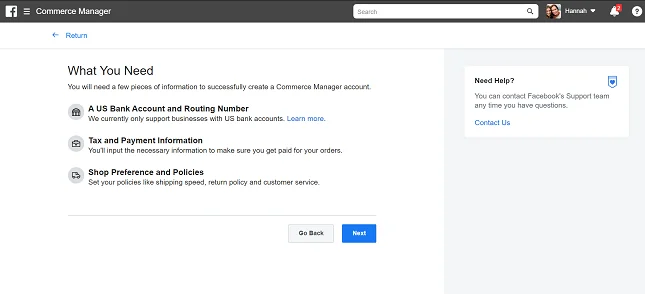
Facebook Shops: what you need

Clicking Next takes you through to the following screen:
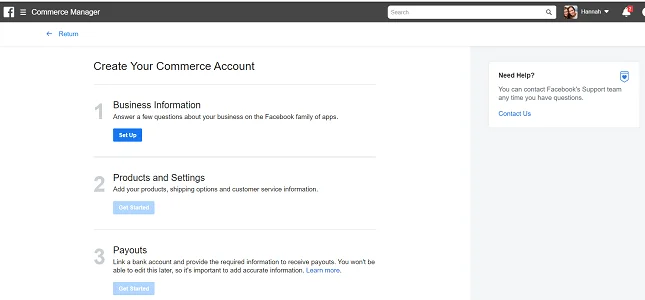
FAcebook Shops: commerce account info

Start by clicking Set Up for your business information. You’ll then be walked through the process of choosing a name for your store, and linking your Commerce Manager to an existing page (or creating a new one).

That said, we won’t go through each of these stages here – Facebook does a brilliant job of guiding you through adding products and payment details to your account, so as long as you follow this guidance, you won’t go too far wrong!

One thing we will mention, though (again, because it’s important) is that you’ll also need to enable Checkout with Facebook or Instagram. This is now a requirement for all new Facebook Shops.

2. Create a Collection

Your products need to be grouped together into ‘collections’ in order to get the most out of Facebook Shops. To create a collection, log in to your Commerce Manager and click Create Collection.

For each collection, you’ll need to add:

  1. A collection name. This can be up to 20 characters long, and include emojis for an extra sprinkle of fun.
  2. A collection description. You have 200 characters for this, so make them count! We’ve got a guide to writing great product descriptions which will help you out here.
  3. Cover media. As well as product images for each item, you’ll need an image that can serve as the ‘cover’ for your collection. This should be at a 4:3 ratio and 1080 x 810 pixel size.

Once you’ve finished, you can add more collections (click Create Another Collection), or move on to the next stage – customizing your storefront.

3. Customize Your Storefront

This is where Facebook Shops really comes into its own! You have the chance to personalize your store, making it look more ‘you’ and less ‘Facebook’.

When customizing your shop to get it ready for publishing, jump back into the Commerce Manager (if you’re not already there). Click on Shops, and select the Shop you want to edit (if you have more than one). Click Edit.

You’ll see two tabs within your chosen shop:

  1. Layout – this is where you can choose to display collections as featured, and add in carousels of other collections.
  2. Style – this is where you can adjust colors, button size, and text to align the storefront with your branding.

Another – albeit less aesthetic – level of customization you’ll get is being able to choose to redirect customers to your own website to checkout, instead of doing so directly through Facebook. What’s more, you can manage your product catalogs from Commerce Manager – rather from your Facebook Page, as you’d have had to have done in the past.

4. Publish Your Shop

Check out how your page will look by using the Shop Preview, and when you’re happy with everything, click Publish. Facebook will then review and approve your collections within 24 hours – you can select whether you’d rather they go live as they’re approved, or all at once.Find Out More

If you have an ecommerce website, we recommend syncing this up with your Facebook shop as soon as possible. This will allow you to control your inventory across both platforms from one place, and for any updates to carry across to both stores – thus halving your admin time.

We’ll give you a quick rundown of how to sync up Facebook Shops with two of the most popular ecommerce platforms: Shopify and BigCommerce.

Integrating Facebook Shops with Shopify

Shopify is one of the top ecommerce builders out there because its an all in one platform.

The first thing to do is to make sure you add Facebook as a Sales Channel.

Shopify will then walk you through the process of syncing up your Facebook Page Shop and your Shopify site.Find Out More

  • Shopify Review – see our comprehensive discussion about the pros and cons of using Shopify
  • Shopify Pricing Review– find out about Shopify’s price plans and value for money in our in-depth pricing review

Integrating Facebook Shops with BigCommerce

It’s a similar story with BigCommerce. You’ll want to integrate your Facebook Page shop into your BigCommerce store. To do this, download BigCommerce’s Facebook Shop app, which will walk you through the process of syncing both stores.

BigCommerce is more ideal for larger enterprises and clothing stores due to it’s great inventory systems, check out our reviews to learn more about it!Find Out More

No – you don’t need to set up a Facebook Page Shop to be on Facebook Shops. At one point, you would’ve, but that’s changed, and Facebook Page Shops have now been phased out. (Confusing, with the names – we know!)

With Facebook Page Shops in the twilight of their existence, Facebook is encouraging businesses to switch to Facebook Shops, which offers a more comprehensive shopping experience. Going forward, you won’t be able to host a shop on your Facebook page or Instagram account unless you have Checkout with Facebook or Instagram enabled in the US.

Alright, you say – but what about my existing Facebook Page Shop? Well, you had until April 24, 2024 to switch to Facebook Shops. As for how you coordinate your Facebook selling efforts, there’s a few more changes it’s worth knowing about:

  • You’ll no longer be able to manage your product catalogs from your Facebook Page. Instead, you’ll need to do so in Commerce Manager.
  • You’ll no longer be able to post product details pages from your Facebook Pages. Instead, you’ll have to post links to your product pages on your website.
  • You’ll still be able to use product tagging in organic posts and ads, but only if you have a Facebook Shop.

In this article, we’ve walked you through Facebook’s latest ecommerce feature, Facebook Shops, and discussed its most recent changes and additions. We’ve also shown you how to install Facebook Shops, which is as simple as:

  1. Setting up an account with Facebook’s Commerce Manager
  2. Creating a collection
  3. Customizing your storefront
  4. Publishing your shop

Now the only thing that’s left to do is wish you good luck! Facebook Shops is already changing the game for small businesses, and its latest evolution and expansion will only make this more so.

In the meantime, we’re so excited to see what you create – so enjoy!Find Out More

Written By

rob-binns

Hi, I’m Rob:

Hailing originally from West Yorkshire, but growing up in Wellington, New Zealand, I’ve written for brands and businesses all over the world – empowering everyone from solopreneurs and micro-businesses to enterprises to some of the ecommerce industry’s best-known brands: including Yahoo!, Ecwid, and Entrepreneur.

From foretelling the extinction of the high street ATM to attending PayExpo – Europe’s foremost payments conference – I immersed myself in the payments space, which left me with a love of small businesses that remains strong to this day.

It was that love that took me to Website Builder Expert, where I spent half a wonderful year as Content Manager in 2021. During that time, I researched and wrote a portfolio of articles focusing on the technology small businesses can harness to get online – then make an impact there. 

When I left Website Builder Expert, it was for a new adventure – one that’s taken me all the way Down Under. I’m now based in Melbourne, Australia, where I write freelance content.

Going forward, I’ll continue to bring my passion, profile, and personality to bear on my work here at WBE, and at large. My promise? To always keep the reader – be they an individual, a business, or something else entirely – at the heart of my approach.

You can find me on Linkedin here.Rob spent three years writing, editing, and strategising for renowned B2B comparison site Expert Market. With presences in the UK, USA, Canada, Germany, Australia, and Spain, Rob helped drive a wide range of niche content across industries and sectors. He also researched, ideated, and wrote content unpacking a wealth of technologies: including fleet management software, telephone systems, POS devices, and asset tracking.

Specifically, Rob delved into the payments space – crunching, comparing, and contrasting the range of ways for merchants to take credit and debit card payments. And then sharing this with his business audience – empowering them to sell with greater security, convenience, ease, and affordability.

Rob joined Website Builder Expert in 2021, where he took on the role of Content Manager. Besides testing the platforms we review, Rob also applied his excellent research and writing skills, extensive business knowledge, and general motivational attitude to create articles for the site and lead a team of writers to do the same.

Between dissecting the internet’s best ecommerce platforms to its most effective email marketing tools, Rob was in his element. He also mentored and managed several of WBE’s remarkable team members – helping them build the skills and mentality required to progress, grow, and excel in their roles, and get the best out of their prolific writing talents.

Rob left Website Builder Expert for new adventures across the world in Australia, where he now writes freelance content – continuing to share his expertise for Website Builder Expert’s articles, among other projects!

Rob’s commitment for the future is to empower his audience to make better, more effective decisions: whether that’s helping them pick the right platform to build their website with, the best hosting provider for their needs, or offering recommendations as to what – and how – to sell.

So drop him a line, or check out some of his articles below – and leave a comment there if you like what you see. He looks forward to continuing the conversation!

More about

132 comments

Your email address will not be published. Required fields are marked *

  • Bridget

    Do you have to have a business license to sell from home on FB, Instagram or TikTok?

    1 reply

    • Samuel Jagger
      Samuel Jagger

      Hi Bridget! Thank you for your comment! If you are an individual seller, than you do not need a business license. However, if you are a corporatized entity with your own branding, logo, products, and physical location assigned to the business, then yes you need a business license, which you can apply for online. Hope this helps - Sam

  • Tom

    does this work for UK based businesses? Seems like FB have disabled these options recently?

    1 reply

    • Emma Ryan
      Emma Ryan

      Hi Tom,
      Thanks for commenting! As of August 2023, Facebook/Meta are focusing on the US market at the moment, which means they've restricted businesses in various markets, including the UK. According to their notes, customers can still find your UK business through the Facebook or Instagram app (via Android and Apple), see product pages and tags, and follow links to checkout via your website. Users can no longer access previous features, such as the "View Shop" button or all web-based Shops features.
      Very best,
      Emma

  • Tatyana

    Hi
    What is your advice to someone who want to start from the beguinning with no experience in ecommerce.
    Usually the information is for those who started already and this is so confusing for me.
    Thank you!

    1 reply

    • Emma Ryan
      Emma Ryan

      Hi Tatyana,
      Thanks for the comment! We're happy to help. If you're looking to get started in the world of ecommerce, we'd recommend checking out our beginner-friendly guides on How to Build an Online Store and How to Sell Online. These should give you a good foundation to build on but let us know if you have any other questions. Best of luck with your ecommerce journey!
      Very best,
      Emma

  • Debbie

    I like to put SOLD next to my title of my painting, as in art, when I sell a painting. To me, it shows prospective customers that your does sell. I go to Meta Business Suite, Commerce, and add SOLD under the edited item. It then tells me my product is updated. However, when I check, it does say SOLD. What is the issue here??

    1 reply

    • Samuel Jagger
      Samuel Jagger

      Hi Debbie! Than you for your comment! It seems to be an issue with Facebook Marketplace. An item recently edited will be 'Pending' and needs time to update. We recommend just refreshing the page a few time and if that doesn't work, perhaps contact Facebook Marketplace support. Hope this helps! All the best - Sam

  • catherine

    can we do an in-store pick up? will facebook shop/store allow this? we don't want to do any shipping. we would rather have customer come into our stores and pick up the items.

    1 reply

    • Jacqueline Renouard
      Jacqueline Renouard

      Hi Catherine,
      You can add local delivery to your listings, which could add convenience for both your business and your customers. You might need to individually message saying that customers need to go to your stores or just use Facebook as a marketing platform. Hope this helps!
      Warmly,
      Jacqueline

  • Faze

    Hi I'm selling products on my own website. I also want to sell on facebook.
    I've over 3000 products and adding them to facebook page will take a lot of time.
    Q: Is there any possible way to automatically add products from my store to facebook store?

    1 reply

    • Lucy Carney
      Lucy Carney

      Hi Faze,
      Thanks for your comment! Absolutely, you can sync products from your store to your Facebook store - for example, here's a Shopify guide on how this works with Shopify. Other ecommerce platforms such as BigCommerce also support this feature.
      Hope this helps!
      Lucy

  • Carolyn

    Thank you for such a helpful article. Although I'm having trouble importing my shop to my Facebook business page. Everything has been verified, shop has been approved, yet it's not showing up on my Facebook page. However it did show up on Instagram. I've reached out to support but they're not too helpful. Any advice you can give me is much appreciated.

    1 reply

    • Jacqueline Renouard
      Jacqueline Renouard

      Hi Carolyn,
      Thanks for getting in touch! If you're having trouble seeing your items on Facebook it might mean you need to go into your shops inventory settings, or there may be an issue in your Facebook business page settings! It's difficult to know without seeing the problem, but Facebook have a page for troubleshooting this issue. We hope this helps you and have a great day!
      Warmly,
      Jacqueline

  • Dawn

    I have an instagram and facebook shop. I can not seem to make the collections work in my shop. I follow all the directions and make a collection name, but when I press add items it flashes a box that should have all the items listed to choose from but it disappears and the page goes blank. I have over 70 items in my shop. I can not find any info on why this would happen or if there might be a setting not ticked. I can't get any help from facebook. Please anyone help me, I am beyond frustrated.

    1 reply

    • Jacqueline Renouard
      Jacqueline Renouard

      Hi Dawn,
      Thank you for getting in touch! We're not 100% sure why this has happened without seeing the problem. It could be that the date has expired for your items and you'll need to change that date to bring them back again. Otherwise, head over to this Facebook help page to get ideas on how to troubleshoot the issue or email them directly. We hope this helps!
      Warmly,
      Jacqueline

  • Mary

    Hi Jeremy, do you have this Step by Step in book form?

    1 reply

    • Jacqueline Renouard
      Jacqueline Renouard

      Hi Mary,
      thanks for taking the time to get in touch, we haven't got a Facebook step by step guide in book format at this time. If you need a downloadable checklist for what you need to build a website then do take a look - hope that helps Mary.
      All the best,
      Jacqueline

  • Nikki

    Is selling internationally a requirement to have a facebook shop?

    1 reply

    • Jacqueline Renouard
      Jacqueline Renouard

      Hi Nikki,
      Thank you for reaching out to us! Selling internationally is not a Facebook shop requirement as far as we know it - your store does need to be in a country or region where the Facebook shop feature is located, check out where here. Hopefully that answers your query.
      Many thanks,
      Jacqueline

  • Denise

    I have set up my Facebook page to go to website to purchase my items, how do i change it so that they can message to make the purchase ? as my website is information based only not a eCommerce site.
    thank you

    1 reply

    • Jacqueline Renouard
      Jacqueline Renouard

      Hi Denise,
      We're not sure if this exact function you described exists, but your visitors should be able to message you using Facebook messenger. You can also let your customers know through your bio. We hope this helps you, and wish you all the best.
      Regards,
      Jacqueline

  • John

    I'm having a problem setting up my shop. The system is saying that my Commerce account does not comply with Facebooks rules. All I'm trying to do is setup the shop to sell from my website. They are not helping me very much. I tried to remove the catalog and again the same message appears I also tried to remove the commerce account and no go.
    Any help would be appreciated

    1 reply

    • Jordan Glover
      Jordan Glover

      Hi John,
      Thanks for your comment. I'm sorry you're having problems with your Facebook store. Unfortunately, without seeing exactly what's going wrong, it's a bit tricky for me to try and help you find a solution. In this case, I would contact Facebook's help and support directly, as they'll be able to give you more relevant and tailored advice. I'd also recommend checking Facebook's selling rules and making sure that the products you want to sell don't feature on its restricted list.
      I hope this helps,
      Jordan

  • Phyllis Bouldin

    I can not get my pictures to my computer or on site ?

    1 reply

    • Lucy Carney
      Lucy Carney

      Hi Phyllis,
      Thanks for your comment! I'm sorry to hear you're having issues. If your pictures are on your phone, you can simply connect your phone to your computer using a USB cable, and transfer your images onto your computer. If your pictures are on a camera, most cameras come with a USB to make transferring them to your computer nice and easy.
      You can upload pictures to your Facebook store via the Commerce Manager, following the steps in or guide.
      I hope this helps!
      Best, Lucy

  • Dan

    Thank you for the useful information! I want to add another tool that I use for Facebook sales. This browser extension is called cucomm. Thanks to this, it turns out to automatically send messages to users. Facebook doesn’t block the account because it doesn’t consider it a program. I advise you to install and make life easier.

    1 reply

    • Lucy Carney
      Lucy Carney

      Hi Dan,
      Thanks for your comment, I'm so glad you enjoyed the article! I haven't tried Cucomm myself, but thanks for sharing - I'm sure other readers will find it useful!
      Take care, Lucy

  • Shahid Jamal Tubrazy

    I appreciate you sharing this good post. you write it in such a way that it makes sense.

  • Dennis

    I have had a FB store for 2 years. We have plenty of likes etc. But we haven't sold one thing on my Facebook store - why do think that is? Thank You, Judie & Dennis

    1 reply

    • Lucy Carney
      Lucy Carney

      Hi Judie and Dennis,
      Thanks for your comment! I'm sorry you're having problems gaining sales through your Facebook store. It's extremely hard to say why you haven't sold anything yet without looking at your page, as there's a lot of factors to consider. However, some things to think about are:
      - The price of your products. Are they too expensive?
      - Your product photos. Are they very high quality?
      - Your target audience. You're getting lots of likes etc. so what's interrupting the customer journey? I'd recommend conducting a poll or reaching out to ask your followers directly what they want to see from your store!

      It's easy for people on Facebook to like a page or product and keep scrolling - actually purchasing a product is a huge step up from simply liking or following something. You need to make it as appealing and easy as possible for people to buy from you. For example, make sure your design is attractive and easy to navigate, include contact information, and if you have a large product range use collections to organize your items.

      Sorry I can't give more specific advice without seeing your store! I hope this helps though - all the best, Lucy

  • Jon

    Can items be added that can be customized? For example our brand sells jerseys and we offer the option to add names and numbers. How can this be done on FB shops?

    1 reply

    • Lucy Carney
      Lucy Carney

      Hi Jon,
      Thanks so much for your comment, that's a great question. As far as I know, Facebook Shops does not support text field options, or file upload fields, which means you'll struggle to sell customizable products. I'm not sure what the best workaround for this would be - whether you rely on a messenger feature to gather customization details, or if it's better to direct customers to an online store for these types of products.
      I hope this has helped - sorry it wasn't the answer you were hoping for!
      Best, Lucy

  • Peggy

    I’ve had a business page since 2013 on fb and just edited it to shopping. I don’t see any buttons for Shop so I can’t get to the commerce section and set up a Facebook shop. I don’t want a website at this time and only want to sell through my fb page. Please help

    1 reply

    • Lucy Carney
      Lucy Carney

      Hi Peggy,
      I'm so sorry to hear you're having problems! I'm not sure exactly what steps you've already taken to edit your page, but it sounds as though you may need to switch your template!
      Here's a quick run-through of the steps to do that. If you've already done all of this, then I'm sorry for repeating them - in this case, I'd suggest reaching out to Facebook support directly.

      1. Click "Settings"
      2. Click "Edit Page"
      3. If it says your current template is Business (or anyting other than "Shopping" click edit!
      4. Find the "Shopping" template and apply it to your page.

      ALternatively, go to Settings and click "Edit Page". Then click on "Add Tab" and try to add the Shop tab manually.

      Again, I sincerely apologise if these steps don't work - without seeing the problem I can't be of much further help! I hope you manage to fix it using these methods - here's a helpful guide in case my instructions weren't too clear!
      Best, Lucy

  • Sam

    Great info - thank you.
    OK so its March 2020 in Queensland, Australia and I have spent countless hours trying to find a way for my customers to pay directly on my Facebook Store page either with Stripe OR PayPal. Can it be done in Australia yet? If not, does anyone know when or if it will become an option?
    Many Thanks in advance!

    1 reply

    • Lucy Carney
      Lucy Carney

      Hi Sam,
      Thanks for reaching out!
      Oh no, I'm sorry to hear that - unfortunately I believe that direct checkout on Facebook is only available in the US currently. You'll have to choose either "Message to Buy" or "Check out on another website" - although I'm sure you knew that already!
      I'm not sure when this feature will be rolled out to other countries - Facebook hasn't given away any information that I've come across to give us a hint.
      Sorry I can't be of more help, and thanks for joining in the discussion!
      Best, Lucy

  • Heather

    How do you skip the Commerce Manager if you do NOT want to check out on Facebook? I want to connect directly to my website to check out, but I keep getting forced to Commerce Manager.

    1 reply

    • Lucy Carney
      Lucy Carney

      Hi Heather,
      I've heard of this issue before - if you're in the US then Facebook automatically channels you through its own checkout - as you're experiencing! The only solution I've come across so far is to change your location to a country outside the US (Canada, for example) in your checkout settings - Facebook should then give you the option to checkout on anther website. Hopefully, this shouldn't affect the actual location of your store in your main settings.
      This could be worth giving a try - I'm sorry I don't have a better solution for you though!
      Best, Lucy

  • Happi

    Can I create an online store today and start a Facebook Ad without necessarily having any post on Facebook page or a blog on my store?

    1 reply

    • Lucy Carney
      Lucy Carney

      Hello,
      That's a great question!
      You just need to set up a Facebook Business page, and then you can create your Facebook ad campaign in the Facebook Ads Manager. Here's a helpful guide from Hootsuite on how to advertise on Facebook.

      Being active on your Facebook Business page would probably help to grow your audience and reach more people with your ads - for example, you can select an option to promote to "People who like your Page" which targets those who interact with your Facebook Page. Likewise, running a blog on your store is a great way of upping engagement and creating content for your Facebook ads. This is totally up to you, however - neither is necessary to start advertising your products.
      I hope this has helped - happy marketing!
      Best, Lucy

  • J

    Can you sell live fish on a Facebook Store you create from your Facebook Business Page? I do not have a retail front store.

    1 reply

    • Lucy Carney
      Lucy Carney

      Hi J,
      No, you can't sell any live animals, pets, or even animal parts on a Facebook Store. So fish are a no-go! You can check out the full guidelines on these animal restrictions here.
      Sorry to be the bearer of bad news!
      All the best, Lucy

  • Ninotchka

    Hi
    I already have a shopify store but i dont ship outside my country. In this case, can i still sell thru a fb shop connected to my shopify or do i HAVE to ship internationally too ?
    Also, does fb charge any commission / fee on the set up or on the product sales?
    Thanks.

    1 reply

    • Lucy Carney
      Lucy Carney

      Hello!
      Thanks for your question - you don't have to sell internationally in order to connect your Shopify store to a Facebook Shop. So, you can still sell through Facebook!

      There are a few requirements you need to meet to connect your store to a Facebook shop - one of these requirements is that the products listed in your Shopify store need to be in a currency that's also supported by Facebook.

      You can see Shopify's guide to these requirements, and the full list of currencies that Facebook supports, in this Shopify help article here.

      Facebook charges a 5% transaction fee once you start selling, (they call this a "Selling Fee") which is charged per shipment rather than per product. If a shipment costs less than $8 then you're charged a flat rate of $0.40. However, there's no setup fee for creating your Facebook Shop, and no listing fees either!

      You can read about Facebook's Terms here, or check out this useful Facebook guide on selling fees.

      I hope this has helped, and best of luck with your business!
      Lucy

  • Tea C.

    This information was extremely helpful, especially for a local business owner who is not ready to expand from the local market. I'm more confident now in setting up my Facebook Store and accepting payments or hiring someone to set it up for me, and I'll have knowledge about the process. THANK YOU!!!!

  • Lucy Carney
    Lucy Carney

    Hi Diane,
    Thanks so much for your comment - I'm sorry to hear you're having problems! Unfortunately you can only allow payments on your Shop page if you are in the US, as stated here in Facebook's help center. I'm sorry I can't be of more help! If you still want to sell online a website builder is also a great choice - you can see our comparison chart of the best online store builders here. Our top two are Shopify and Wix, you can click on the links to read their ecommerce reviews - both accept PayPal payments on their paid plans. We also have an article about "Shopify Payments" which was launched by Shopify to make life easier for Canadian and US based users, so I've included the link in case it's of any interest!
    I hope this helps in finding a solution to your problem, best of luck moving forward with your online store!
    Thanks for reading,
    Lucy

  • Diane Donald

    If you are in Canada, can you add a PayPal button on your Shop Page? If so, how is this done please. I've been trying to figure this out for the past several months. I have a Shop page, which is no good to me if I can't sell my items directly from my shop.

    Thank you.

  • Adam Fills

    Thank you for explaining every detail in easy words, I never tried to sell directly on facebook page. However I have a shopify store that I am running for almost two years now and I have learnt a lot during my research and lost and earned money lol. I want to tell this to you and other that for successful facebook marketing with Shopify or other platforms you need Trackify pixel app to build niche audiences and get maximum ROI with targeted audience many other features. I will now setup a facebook store and will try my luck with this. Thanks Again 

    1 reply

    • Natasha Willett
      Natasha Willett

      Hi Adam,

      Glad you found the article useful. Thanks for sharing with everyone your experience. Please do feel free to share with others if you feel that they would also benefit from this article.
      Natasha.

  • Kirsty

    Hey Jeremy,

    Great article! So practical and easy to follow, not like ‘yeah FB is good for selling. Do it. Cool’ like some other articles I’ve found researching this.

    One question I had for you was related to SquareSpace. Does FB integrate with SqSp ecom sites? Is it easy to do? My main motivator is to then link to Instagram to allow easy access to our products.

    Any advice is appreciated!
    ???? thanks from AUS

    1 reply

    • Fred Isaac
      Fred Isaac

      Hi Kirsty,

      Great to hear you found the article useful!

      As far as I know Squarespace DOES offer integration with Facebook and Instagram. They have some useful guides on it you might want to check out: https://support.squarespace.com/hc/en-us/articles/206544007-Using-Facebook-with-Squarespace and https://support.squarespace.com/hc/en-us/articles/206543367-Using-the-Instagram-Block

      Hope they help and thank you for the comment!

      1 reply

      • Rotem Segal

        does it also track content id and content type automatically if I have a general track purchases, add to cart etc. pixels installed?

  • Clara

    Very very helpful-liked the basic terminology for everyday communication!

  • Poonam (USA)

    Is there any way to connect a Weebly site with Facebook in order to sell ?

    1 reply

    • Natasha Willett
      Natasha Willett

      Hi Poonam,

      Thanks for joining the discussion. At the moment this is not a current feature for Weebly, website builders such as Shopify or Squarespace however do allow for this functionality. With Shopify for example, when you set up the Facebook sales channel, Facebook creates a Shop tab on your Facebook page that displays your Shopify products. It really dose depend on what you want the builder to do why not have a look at our article on ecommerce builders.
      All the best,
      Natasha.

  • Pete

    Hi Jeremy,
    Let me ask you this. Which tool or plugins do you use to setup the advertisement screen that pops up on the screen while visiting your site?

    Thanks.-

    1 reply

    • charlie Carmichael
      charlie Carmichael

      Hi Pete,

      Thanks for your comment.

      It depends on which platform you are using but Wix have a great selection of plugins for pop-ups. Lumifish is one (see here) that lets you create and add a message that visitors will see upon opening your website. It's perfect for gathering your visitors' email addresses, promoting a specific sale, advertising new arrivals and driving customers to a specific page. Other builders also have plugins available so its just a case of having a look round and seeing which one suits your needs.

      Hope that helps,

      Charlie

  • Amir Muhammad

    Sir,
    I have an affiliate website of word press by the woo commerce plugin in which I have created a stone from Amazon products to promote.can I push it to fb store as you mentioned above. Please guide me
    Thanks.

    1 reply

    • charlie Carmichael
      charlie Carmichael

      Hi Amir,

      Thanks for your comment.

      There is a Woocommerce to Facebook plug-in available:

      Download the zip file seen here and save it locally – woo-to-facebook-shop.zip, then log in to your WordPress blog administration screen. Click on ‘Plugins’ and then on ‘Add New’ (left menu) before clicking on the ‘Upload’ link, choose ‘woo-to-facebook-shop.zip’ file and click on the ‘Install’ now button.

      Hope that helps,

      Charlie

  • Tom Watts
    Tom Watts

    Hi Jhon,

    Thanks for your positive feedback.

    I'm not too sure how possible it would be to create an affiliate style program through your Facebook store.

    As the purpose of an affiliate site is to redirect traffic to the partner site, it might prove hard to implement this on a Facebook store without simply displaying the affiliate links and hoping people click through.

    I understand that there are third party programs that could help you, but they are beyond the scope of our site discussions.

    Facebook is not really set up to be an affiliate marketing platform, so it may prove difficult, but I'm sure there's no harm in trying!

    Thanks for reading,
    - Tom

  • Tim Huffman

    Hi Jeremy,

    Thanks for the info. I recently created an online store through GoDaddy and was hoping to connect it automatically to my Facebook store in the way that you suggest. Do you know if it is possible to create the Facebook store by uploading from my GoDaddy website? When I spoke to the GoDaddy rep he said it was possible on one of their older platforms but didn't think that it was possible any longer.

    Any help you could offer would be appreciated.

    Thanks!

    Tim Huffman

    1 reply

    • Tom Watts
      Tom Watts

      Hi Tim,

      I believe it is still possible to connect your GoDaddy Store to your Facebook Store.

      It requires you to make a local business or place page on Facebook for your business first (this isn't the same as your own, private Facebook profile).

      You can then connect the two through the 'Promote' menu in your GoDaddy back-end.

      This helpful guide from GoDaddy will help you through the exact steps.

      Hope it helps,
      - Tom

  • Rita

    HI! We are a Not for Profit, based in the southern zone of Costa Rica.. our mission is to assist families, women and children with basic necessities of life. Our mandate is that 98% of all funds raised, goes towards helping families.

    What is the best way for us to "sell" our donation packages... such as "provide a family of 4 with a months supply of food" - $100.00

    We are learning and working to be efficient in our fundraising... help!

    1 reply

    • Tom Watts
      Tom Watts

      Hello Rita,

      I believe the solution would be to simply add a donation plugin/app to your website, maybe the 'Get Funding App' on Wix, and accept donations like that? The 'Get Funding App' can be fund in the Wix App Market and is safe, secure and connects directly to PayPal.

      As for specifying 'recommended' amounts, I would recommend creating content for your website around this and then adding donation buttons near it, e.g. writing some content about the cost of living and the issues faced by the people you are supporting. This is a great way of building awareness and also highlighting the costs needed to support these communities. With a donation button nearby, this could help encourage people to donate after reading.

      It would be a serious design challenge to create custom donation buttons that each donated different set amounts!

      I hope that helps,
      - Tom

  • Ana

    Is there a way to use my already built wordpress website? Or do I have to use the three mentioned "BigCommerce, Wix or Shopify?

    1 reply

    • Tom Watts
      Tom Watts

      Hi Ana,

      It's definitely possible to connect a WordPress site with Facebook in order to sell. You'll want to have a look through the plugins available for WordPress to find the right one for your needs.

      A good starting point would be to look into WooCommerce or 'StoreYa' for Wordpress.

      Hope that helps,
      - Tom

  • Grace

    Does this setup connect to the Facebook market place and will new items that are added to your online shop be posted to the marketplace on Facebook?

    1 reply

    • Tom Watts
      Tom Watts

      Hi Grace,

      It's probably best to quickly clarify that selling an item through a Facebook store is a bit different to selling an item on the Facebook marketplace.

      The FB Store is more of an ecommerce platform like ASOS or Amazon, whereas the FB Marketplace is more of user-driven car boot sale where items can be put up for sale but where money can't actually be exchanged and so requires a face-to-face exchange, sort of like Gumtree or Craigslist.

      In answer to your question, unfortunately this setup doesn't combine the FB store and Marketplace together as this currently isn't possible.

      Hoep that clears things up,
      - Tom

  • Brandon Miller

    Mr.Jeremy,

    I did not know the breath on the scope of all the plugins available for FB business page.

    Thank you for the information!!

    Best,

    Brandon Miller

  • Maria

    Which is better option? I haven't heard of wix before. I want to make online store for Hair Extensions website.

    1 reply

    • Tom Watts
      Tom Watts

      Hi Maria,

      You will need to consider what features and functions would best suit what you want to achieve with your Hair Extensions website.

      Should people be able to contact you? Submit photographs or view existing images, share across social networks, make purchases?

      Your needs will determine the best site builder for your business. Going by your message you are interested in selling products online so it would be best for you to look into ecommerce website builders such as Shopify, Wix or BigCommerce.

      If it's a smaller business, I would suggest Wix as it has the simplest interface and the ecommerce offering is aimed at independent and small businesses, whereas Shopify + BigCommerce are aimed at a much wider range of businesses and are more sophisticated platforms because of this.

      Hope that helps,
      - Tom

  • phil

    Hi Jeremy Wong, great article. I'm doing some research in this area.

    I was wondering what your opinion is using wordpress-woocommerce powered website to set up a facebook store with.

    I see there's a couple of woocommerce plugins that connect this such as storeya, display-woocommerce-shop-on-facebook. plugins

    In your opinion, comparable to the above platforms you suggested? Cons to wordpress for this etc. Thanks and Regards, pHil

    1 reply

    • Jeremy
      Jeremy

      Hey Phil,

      WooCommerce is a reputable WordPress-based plugin. In fact, they were purchased by WordPress's parent company (Automattic).

      Having said that, the primary challenge you should be aware of is that if you want to use WooCommerce, you'll need to use WordPress and manage your own hosting for your website. WordPress is an amazing website builder, flexible, comprehensive, perfect for those who don't mind climbing a steeper technical curve and don't mind closely managing their website. Also, to use WordPress effectively, it's best if you have some coding knowledge (or hire someone who has it).

      Compared to hosted website builders (such as the ones we highlighted above), who will manage all the technical aspects of running a website for you, and also provide you with 24/7 support.

      If you need support from WooCommerce, you can get that too as they also have a dedicated support team. But if you have questions about using WordPress (the platform), then you'll have to dig through online tutorials from the community (which is very broad and comprehensive, but require digging) as there is no dedicated support team from WordPress.org.

      So to answer your question, I would think WooCommerce is a very capable tool. But just be aware of the extra technical work you'll have to do and learn if you decide to use WordPress. The other builders I've highlighted above are a lot more user-friendly and comes with dedicated support for their entire platform. So in a way, they can free up some of your time to do other things, versus having to solve your own problems if you come across a WordPress issue.

      Jeremy

  • Charlie.T

    Great article! I was wondering if only Shopify, BigCommerce and Wix are the only "recognized" platforms for Facebook Shop integration? I would love to setup FB Shop in my Page (I'm from outside US btw) in a jiffy but I'm currently using OpenCart... Any suggestions? :)

    1 reply

    • Jeremy
      Jeremy

      Hey Charlie,

      There are other ones but this guide only discusses platforms that we've used and support based on our own experiences.

      I'm sure there are plenty of other solid platforms that can integrate with Facebook!

      Jeremy

  • Halima

    Well done. This is just what I needed. Thanks a bunch

    1 reply

    • Jeremy
      Jeremy

      Thanks for your feedback Halima. I appreciate it!

      Jeremy

  • Marc Andre Sarazin

    Thanks Jeremy, very insightfull article to start my venture.

    1 reply

    • Jeremy
      Jeremy

      Hi Marc,

      Thanks for your comment, and best of luck in 2017!

      Jeremy

  • Jayne

    Hi Jeremy, I recently set up my own interiors/ building design website through weebly and have decided that I would like to sell some interiors products through my Facebook page. I went about setting up ecwid only to find that the Facebook shop does not show on mobile applications like iPad & mobile. Is there any way around this? I would prefer not to have a shop on my I actual website.

    1 reply

    • Jeremy
      Jeremy

      Hi Jayne,

      If you don't want an online store outside of Facebook, then our suggestions above probably won't make sense for you.

      I've seen some software out there that allows you to sell on Facebook (without having another dedicated website). But that was a while back. Perhaps a Google search will provide you with some options?

      Jeremy

  • Diego

    I wish to setup a platform Like shopify or better a platform people can setup a store, Is it possible to connect such platform to the platform facebook page and the stores/products on my platform will show on facebook store as it is on my platform or the owners of individual shops have to create their own facebook page to advertise and have their own shop?

    1 reply

    • Jeremy
      Jeremy

      Hello Diego,

      I think so, though creating an online store building platform is way beyond my expertise. Facebook has APIs and if you understanding how to use it you can connect your platform to it. Sorry, but this topic of building a web creator is beyond me!

      Jeremy

  • Maggie

    So useful thank you!

  • Juan

    Hi Jeremy. I've been reading all your answers and I appreciate what I have learn from you.

    I couldn't find though, any reference to shopial, which is the e-commerce platform that shows up in my Facebook page when I hit the link "get a free Facebook store" in my Wix editor. So far it seems it integrates my Wix store to Facebook but in a limited way unless I upgrade. Besides that, I haven't been able to know how it works or how to make changes in the free version. What I mean is that the free version doesn't work at all, it is a facade just to get new clients. That' s why I haven't been sure if upgrading or not. Do you know anything about Shopial? is it functional? is it a good alternative in case I don't want to use ECwid or shopify?

    1 reply

    • Jeremy
      Jeremy

      Hey Juan,

      I actually haven't used Shopial before, so can't provide you with any feedback. If others reading this comment have experiences with them, please do share them with us!

      Jeremy

  • NKabani

    Thanks for the great article. Very good information.

    I already have my ecommerce website built for my product, and am wondering if that can be utilized to create a Facebook webstore rather than using Shopify, and Big Commerce, platforms?

    Thank you once again. Look forward to hear from you.

    NK

    1 reply

    • Jeremy
      Jeremy

      Hi NKabani,

      Yes you can definitely create a Facebook page separately. But if you can sell directly on Facebook or if it can be integrated with your online store depends on the ecommerce platform you are using to power your website.

      If the platform that you are using doesn't offer such integration, then you'll have to manage both your online store and your Facebook listings individually. That's why using something like Shopify that can integrate with Facebook streamlines the entire process - less work for you.

      Jeremy

  • Laura

    Hi, Jeremy!

    Do you recommend selling through a Facebook Page or Group? I like the Group idea because you can add members to the group, as well as they can add themselves. So, that eliminates the need for some users to "like" your page, since they can be automatically added. (For example, check out Discount Divas in Huntsville, AL on Facebook.)

    Also, I noticed some boutique clothing sellers who ask their customers to simply comment their size, color, and email address in a post's comment section. Is there software that automatically grabs this information and spits out an invoice?

    I hope I'm making sense. :)

    Thanks!

    1 reply

    • Jeremy
      Jeremy

      Hey Laura,

      Great question. I think there are many different strategies with regards to using Facebook as a platform to grow your business, so if any one reading this has any suggestions, I'm here to learn too!

      My immediate thought is that even though you can sell products directly on Facebook, my own preference is to lead them back to my online store to make the actual purchase (But if people choose buy on Facebook, that's great too!)

      The primary reason is that I can add them to my "customers only" newsletter, then I can follow up with them separately via emails.

      The idea is that the content that you share with your newsletter subscribers should be different depending if they are existing customers, or if they are still new prospects.

      For instance, you might not have to explain your brand as much if you are emailing your existing customers, versus someone who has yet to purchase and want to find out more about you.

      Also, you can probably offer less discounts to existing customers since if they love your products, they are more likely to purchase at full price (or closer to full price). For your prospects, a steeper discount might nudge them over to purchase from you for the first time.

      So separating customers from prospects using an newsletter email tool (such as Aweber) makes you a better marketer. It's something I don't think Facebook can do quite yet.

      So if you post something on Facebook either in your Page or in your Group, you are just shotgunning your message to everyone (including existing customers or new prospects). So it might not be as effective.

      What you can consider, however, is setting up a Group for existing customers. In theory, the members will be much more engaged and interactive since they should be familiar with your brand and products. You can also tailor your messages / marketing promos specifically to this group, which in my mind is much more effective.

      Again I'm sure there are a lot of different strategies of using Facebook, so if others have input please do share / comment!

      Jeremy

  • Tamanatha

    Hi Jeremy, great site! I was hoping to be able to create a facebook shop, but without having an actual website. Is this possible?

    1 reply

    • Jeremy
      Jeremy

      Hello Tamanatha,

      Glad our website is helpful to you!

      To answer your question - I think you can create a completely standalone Facebook shop. There are a lot of tutorials on how to do that if you just Google for them.

      However, I'd suggest you consider setting up a separate ecommerce site to complement your Facebook shop.

      You don't have to have it done right away (I know just getting a FB shop up and running is hectic enough already!) but it's something we discuss in this post here. The article focuses on Etsy, but the principle is similar. You just never know if any changes on Facebook are going to benefit or hurt your shop. So having a separate online store can bring some level of stability to your business.

      Hope this helps!

      Jeremy

  • Jason Marvin

    Her Jeremy, what if I want to link my facebook shop to other e-commerce sites such as lazada or zalora? Is that possible? Or it's only limited to shopify, wix, and Bigcommerce?

    1 reply

    • Jeremy
      Jeremy

      Hey Jason,

      I'm not entirely sure as I'm not familiar with the platforms you mentioned. It's entirely possible as there are a lot of platforms out there that can integrate with Facebook. Our discussion here focuses on website builders that we've used extensively and know very well.

      You can probably find out quite quickly if you visit their websites or reach out to their support team.

      Jeremy

  • ross

    Hi WBE aka Jeremy Wong and thanks for the info. If I add SHOPIFY to a FB fanpage, that is, NOT a website, will the products appear in search engines such as Google et al.?

    1 reply

    • Jeremy
      Jeremy

      Hey Ross,

      I don't think products that are listed on Facebook appear on search engines - at least I haven't seen it anyway. But it may change down the road, maybe?

      Jeremy

  • Mary

    Hello, after 3 years working with well known Ecwid, I learned a lot about eCommerce platforms. I started with dropshipping items from eBay and Dealextreme, it was pretty good. Last year I decided to pay developers to create website for me..as I used blogspot and wordpress, and youtube and social media to promote my blogs, It wasn't enought to get more sales. I paid for website, and I paid for SEO. Me and my family have started to produce pumpkin seed oil. For payment methods we use PayPal and 2Checkout, for larger purchases Wire payments.

    Then I made Facebook fanpage, and found that Ecwid Support Facebook online store. I created it, paid $50 for ads on facebook and sales increased for 41% in 2 days.

    I didn't know the power of Facebook and store option! I just wanted to share my little story with you, this is my first post, so sorry for bad english, I am from eastern europe.

    Facebook Ecwid store + Ads works great, and it will increase your sale definately!

    About ecwid - they have free plan if you want to try (not trial!). You can use it free forever but it's for 10 products,

    Price for 100 products is $15 and for 2500 products is $35 per month..or unlimited products for $99 per month, but if you would like to get discount, then you should hurry up and buy your plan because discounted price now is $69 for unlimited!

    They are most popular for facebook stores, anyway, if you have more questions, fell free to ask me..

    2 replies

    • Chudy

      hey Mary

      Please I would like to contact you privately, maybe through mail or facebook.

      on Facebook I'm Okoli Gabriel Chukwudi.

      I'm currently working on creating a facebook store to sell my products and found your explanation helpful. Thanks

      Meanwhile Jeremy, you did an amazing job in this article.

    • Jeremy
      Jeremy

      Thanks for sharing Mary!

      Jeremy

  • Melanie

    If I m starting a new brick and mortar business but am not ready to sell on my Facebook page yet, what kind of Facebook page do I choose? I want to be able to add "selling" at a later date.

    1 reply

    • Jeremy
      Jeremy

      Hi Melanie,

      Just set up a basic Facebook Business Page. You can always convert it into a store later.

      Jeremy

  • Coach Huey

    Hi, I have been making custom shirts for over 25 years. I want to open up an ecommerce store via Facebook. What builder would one recommend; shopify, big commerce, or wix. I plan on selling local school spirit printwear and team uniforms.

    1 reply

    • Jeremy
      Jeremy

      Hey Huey,

      That really "depends". Shopify and Bigcommerce have much more advanced tools when it comes to ecommerce, whereas Wix have more "basic" tools when compared to Shopify / Bigcommerce.

      You can see that the differences in price points reflect this point as well.

      I think the way forward is for you to map out what you want the store to be able to do, then see if each of the platform will be able to do them. Don't worry about not mapping all your requirements out - just make sure you jot down the bigger, more important items.

      The best way to find out if the ecommerce builder has the features you're looking for, is to sign up for a free trial account, and invest some time into using them. That's the only way you can get an actual sense of which one you prefer to work with.

      Hope this points you in the right direction.

      Jeremy

  • cynthia b

    I want to sign up with Facebook online store, but i want to use my own service merchants account that i use everyday in my business. Is that possible?

    2 replies

    • Jerry

      Hi Cynthia, hi Jeremy,

      to be totally honest I tried both Shopify and Ecwid and the benefits over Ecwid are just irresistible. The ability to have a feature-rich free plan, wide range shipping carriers and options for free, huge variety of payment options available for no additional cost is just a no brainer for me.
      They are most popular for facebook stores, anyway, if you have more questions, fell free to ask me..

    • Jeremy
      Jeremy

      Hi Cynthia,

      You can, as long as the merchant account you are using is included in one of the 70 payment processors that Shopify has partnered with. Here is the list of payment processors.

      If you want to start setting up a Facebook online store that's integrated with Shopify, click here.

      Jeremy

  • George

    I did it. But it's pretty easy. Now, it's working.

    1 reply

    • Jeremy
      Jeremy

      Awesome! Good to hear you got your Facebook shop up and running.

  • Jeremy
    Jeremy

    Setting up a Facebook page doesn't cost you anything. However, if you want to integrate it with an ecommerce builder such as Shopify or Bigcommerce, then you will have to subscribe to these builders' services. But Shopify and Bigcommerce offer you a 14 day and 15 day free trial, respectively. So give them a shot to see if you like them.

    Jeremy

  • Elliot Wortley

    Interesting, my issue with the Facebook store is still that it is behind the scenes and not frontend of my Facebook page. Let's be honest, most of our followers (and most people in general) spend their time in the Newsfeed, and nobody is clicking into backend of a Facebook page.

    I've been using the software of a company called Mbeddo for my Etsy store where you can do sales into the Newsfeed (their program puts a call-to-action Buy Now button into a post) and sales are processed in one click on the following page.

    1 reply

    • Jeremy
      Jeremy

      Hi Elliot,

      If you are living in the US, you can also insert "Buy" buttons directly into your newsfeed items (see more discussions here).

      But in general, I haven't seen Facebook stores set up directly on a Facebook Business Page either. But what you can do, in addition to showing your store tab on your FB Page, is pin a post so that it is always displayed at the top of your FB page. And have the Post lead your visitors directly to your store tab, or at least just tell them to click on your store tab.

      So it's just a workaround to get people to land on your store page. Not ideal, but may work well.

      Jeremy

  • Ludde

    Is it possible to have the facebobok-store WITHOUT a blog? If you need a domain for registration, could'nt it just be a big thumbs up on it describing your product? So all the payments go trough facebook,and orders get e-mailed directly from the facebook-store

    1 reply

    • Jeremy
      Jeremy

      Do you mean if you can run an free standing Facebook store, without having it be connected to an ecommerce website?

      I'm not entirely sure if you can, as even though you can display a store on Facebook, you'll somehow need to power a purchasing process, such as a shopping cart, and as far as I know Facebook doesn't provide that (at the moment anyway).

      So that's why ecommerce builders such as Shopify makes it easier for you to create a Facebook store, and bring them back to your ecommerce website to conduct the check out process.

      Shopify and Facebook has also partnered up so now Facebook users can purchase products directly on Facebook news feed. But the actual check out / payment procedure will be powered by Shopify.

      Jeremy

      1 reply

      • Jian

        Shopify has the ability to sell on facebook alone, without a shopify website. It is also cheaper, about $9 per month. Check it out on the shopify pricing page.

  • Barbara

    Jeremy, thank you for your detailed overview of these sites. My question is how is a blog integrated into these online stores? Is the blog stored and space counted?
    Thank you
    Barbara

    1 reply

    • Jeremy
      Jeremy

      Hi Barbara,

      You can definitely create a blog with the website builders I referenced above (Shopify, Bigcommerce, Wix). They are all automatically hosted / saved by the builders and so you won't have to worry about that. There should be no limitations as to how many blog posts you can create.

      Hope this helps!

      Jeremy

  • Dan

    Does Facebook charge any fees for you to host a store?

    1 reply

    • Jeremy
      Jeremy

      Hey Dan - I don't think so. Not that I know of anyway!

      Jeremy

  • Ahsan Anwar

    Is there any open source software for this purpose?

    1 reply

    • Jeremy
      Jeremy

      Hi Ahsan,

      I'm not sure but it won't surprise me if there is a few. The challenge is that you'll have to be a bit more technical to make things work, which can be a bit time consuming as you grow your Facebook store as making updates and general maintenance work can consume time.

      With the software / programs as discussed above, they take care of most of the technical work so you can focus on growing your business.

      Jeremy

      1 reply

      • Sherryann Broxholme

        Yes

  • M. Chandler

    Wow, got to learn a lot about facebook store. But I wan't to know whether Facebook store's pouplarity is high or less than OLX and quicker.

    1 reply

    • Jeremy
      Jeremy

      Hey there,

      I think each platform has its own pros and cons, and more importantly, each platform has its own unique set of users.

      So depending on what business you are in, if you think your ideal customer tend to be on Facebook from time to time, then that should tell you if Facebook is going to be a good business channel for you.

      But it's hard to say sometimes so the best thing to do is not to guess, but to test it out to see if it works for you!

      You can either start engaging other Facebook pages (e.g. a fan page about photography) so that people may find you there through your interactions with others. Or you can advertise on Facebook and get people to visit your Facebook page, which can have a store there.

      Hope this gives you something to think about!

      Jeremy

  • Zach

    I had the same problem with my Shopify store not supported mobile on Facebook. ShopTab, one of the Facebook store apps not listed, provides a mobile version of their Facebook store. Here's their site: 'www.shoptab.net

  • Kitt

    Hi Jeremy,

    Among these three platforms, which one does support Facebook Store in mobile version? I tried Shopify's Facebook Store (to have a new tab integrated on my Facebook page) but it seems only work on desktop, not mobile browser or official Facebook app.

    Thanks,
    Kitt

    1 reply

    • Jeremy
      Jeremy

      That's a great question Kitt. I'm not sure if the FB mobile app supports custom tabs.

      Have you tried asking FB's support team, or even Shopify's support team to see what they think?

      - Jeremy

      1 reply

      • Kitt

        Hi Jeremy,

        This is what Shopify replied:

        "Unfortunately the facebook store is not available on mobile devices for viewing. We wish that it could be but unfortunately this is out of our control, facebook controls which apps are available via mobile devices and currently ours is not one of them."

        I'm surprised that this is a known limitation for most facebook store implementation considering the huge growth of mobile usage these days, and no permanent solution to this from any vendor. I only found a workaround by StoreYa so far - https://storeya.zendesk.com/hc/en-us/articles/203852508-How-can-one-access-my-Facebook-store-via-mobile-tablet-

        Thanks anyway for your reply and good article.

        Cheers,
        Kitt

        1 reply

        • Jeremy
          Jeremy

          Hi Kitt,

          Thanks for sharing this piece of intel! Much appreciated.

          I agree, a lot more people are surfing FB on their mobile devices. I'm hopeful that it's something that will be updated soon, as online shopping on FB using mobile devices can be a massive market!

          - Jeremy

  • Michelle

    This article is great! I already have a Wix website and was tossing up whether to start selling via my facebook page or Website. Awesome to know that I can do both for hopefully the one price!

    1 reply

    • Mark

      hey Dan depends on the store app you use like AddStore is free I use it for art what they do which is different is set your shop up for u. my shops called crazy scotsman with a chainsaw if you want to see how it looks on fb. my page issnt that popular but from the little traffic that came in I sold around 50-50 conversion which is awesome

      1 reply

      • Mark

        yea Jeremy people are definitely opting in on mobile as a shopping preference now