
Building online stores can be a daunting prospect, let alone an online boutique! But don’t fret – with our extensive ecommerce expertise, we’ve got all the info you need to build a beautiful (and profitable) boutique. But before we get started, let’s cover one important topic first: what makes a boutique a boutique?
Contrary to popular belief, boutiques are different from stores. They’re a lot smaller, and operate in a particular niche, specializing in a limited kind of product – usually fashion, jewelry, or accessories. A store, on the other hand, is much larger, with a bigger inventory of generic items that are routinely restocked. Often, they lack the carefully curated, personalized shopping experience of a boutique.
So how do you go about building a boutique, and not a store? Below, you’ll find detailed guides on creating business plans, registering your boutique, designing your brand, choosing an ecommerce platform, and marketing your products. We’ve got you covered!
Short on Time?
If you’d rather not read our whole article, we won’t take it personally. To save you time, we’ve condensed all the important points down in this video. You’ll have everything you need to know in under five minutes!
Decide What to Sell and Source Suppliers
In this section, we’ll cover:
- Finding your niche
- Different ways of sourcing supplies
- How to vet your suppliers
Before you can start setting up your online boutique, there’s one important thing to do first: figure out your niche. But what does this actually mean? Simply put, it’s the process of finding a product that differentiates your store from the everyday boutique bunch.
This can be a lot harder than it sounds, but don’t panic – we’ve got a few tips to help you begin thinking about what you want to sell.
- Consider where your passions and skills lie – this might sound obvious, but it should be a leading factor in your choice. Running a boutique store is no easy ride, so you’re going to need that enthusiasm to carry you through. And, if you already have the technical know-how to go alongside your passion, you won’t have to worry about having to upskill too drastically to make it work.
- Be specific – There are plenty of stores you could go to if you wanted to buy a coat for your dog. But how many places sell Lord of The Rings-themed outfits for Labradors? The more specific you are, the more likely it is that you’ll find an unoccupied gap in the market. But be wary of being too narrow with your idea, or else you could struggle with demand.
- Try and solve a problem for your customer – a unique product that provides a solution to an issue, or that answers an existing need, will give your niche a longer shelf-life. This can also help you winnow out those ideas that aren’t as robust.
Top Tip
Write it down!
When trying to find your niche, it’s okay to start big. Writing all of your ideas down can stop this process from becoming overwhelming, and help you to tunnel deeper into your options. Plus, seeing everything written out in one place might spark some inspiration, helping you to become more specific and draw connections between your various ideas.
Is trying to find your niche making your head spin? Take a look at our guide to Finding Your Niche Online, where we’ll dig into the nitty gritty of how to carve out your own section of the web.
Once you’ve found your niche, your next step is to source a supplier (unless you plan on making your products yourself, of course). You have two options to choose from here:
- Use a wholesaler – this involves purchasing your products en masse, and then storing and shipping them yourself.
- Become a dropshipping company – this is where you sell another supplier’s products through your own website, allowing the supplier to take care of storage, packaging, and shipping for you.
Top TipWhen choosing your niche and supplier, we’d recommend going green where you can. Studies show that 74% of 18-29 year olds prefer to buy from sustainably conscious brands. So, whether you’re selling sustainable saris or biodegradable boots, you’ll prove popular and trustworthy among the majority of millennial and Gen-Z consumers.
Below, we’ll examine both supplier options in depth so you can see how they compare. Click on the plus symbol next to each heading to find out more.
The more traditional route, using a wholesaler involves agreeing on a certain amount of inventory and storing those items yourself, whether it’s in your basement or warehouse. You’ll then need to pick, package, and ship items yourself. We’d recommend going down the wholesale route if you want to have full control over your logistics and brand image.
To find a wholesale supplier, all you need to do is Google search [your niche] + ‘wholesale’. You’ll then find a whole list of potential suppliers to get in touch with. You can also use sites like Alibaba to find reputable suppliers at cheaper prices. We’d recommend contacting both international and domestic suppliers and see which works out cheaper for your boutique.
Don’t like the idea of packaging and shipping on top of your other duties? Then you should think about starting a dropshipping business. This business model allows you to partner with suppliers and sell their products through your own website. As a dropshipping business, you take a percentage for each item you sell.
As with finding a wholesaler, you can easily source dropshipping companies that are suitable for your niche via a Google search. Or, you can search directly for dropshipping suppliers on sites like AliExpress or WholeSale2b.
If you want to find out more about dropshipping, we recommend taking a look at our guide, How to Start a Dropshipping Business. This will cover all the ins and outs of the process, and help you get up and running in no time.
Vetting: Is the Supplier up to Scratch?
When figuring out how to stock your online boutique, make sure you vet your suppliers. After all, your business is only as good as the products you sell. Just as you wouldn’t eat at a restaurant that serves poor quality food, your customers won’t hang around if your items aren’t up to scratch.
Vetting involves investigating the supplier to ensure they’re suitable for the standards of your online boutique. Here are some of the best ways to vet your supplier:
✓ Request samples before you buy to check the quality.
✓ Ensure the supplier provides a point-of-contact for whenever something goes wrong.
✓ Investigate the supplier’s history and reputation by searching through user reviews.
Design Your Brand
In this section, we’ll cover:
With over 2.1 million online retailers in the US today, you need to create an online brand that helps your boutique stand out. You could be selling the trendiest clothes in the world, but consumers will soon forget about your business if your brand isn’t up to par.
What do we mean by brand, then? Your brand is what your business stands for – its purpose, vision, mission, and values. Sadly, it’s unlikely that your brand will emerge fully formed – so you’re going to need to do some work to make it business-ready. In this section, we’ll go through four important ways to do just that.
Develop Brand Values
Your brand values guide your overall message and personality. Think of them as your principles. Developing values will help consumers identify with your brand and, if their values align with yours, they’ll choose you over the competition.
The online boutique PinkLily, for instance, has a very clear set of values that will appeal to a specific group of customers. They center on bringing brightly colored joy to fashion-savvy, social media-using Americans, with responsibly sourced products.
Another great example is Everlane, a sustainable clothing boutique. The core values at the heart of this brand encompass ‘radical transparency’, which involves partnering with ethical factories, and sharing stories about those relationships.
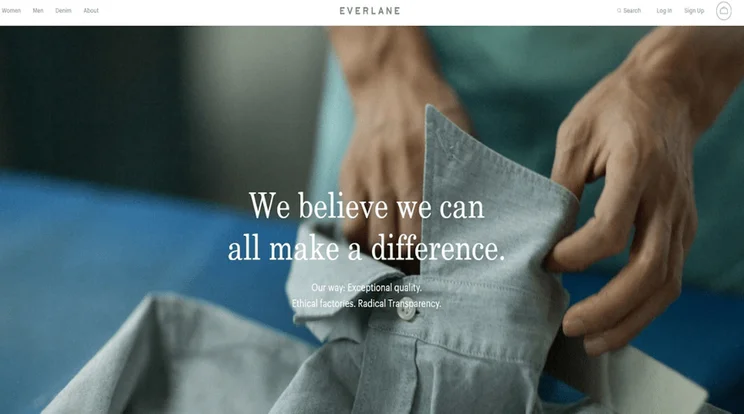
Ethical boutique, Everlane, places sustainability at the heart of its products
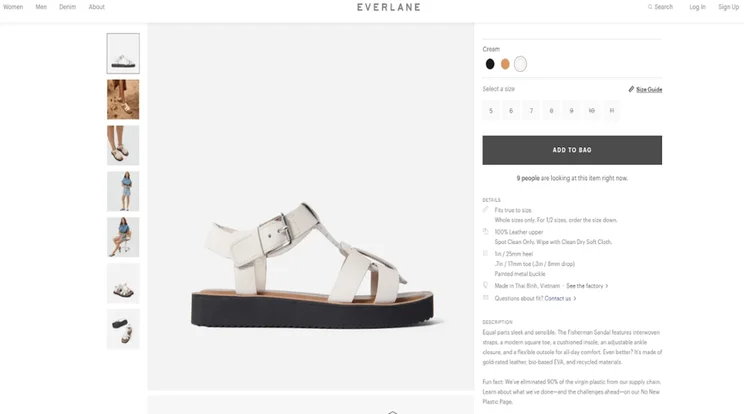
Everlane makes sure to include information on its product listings about how it’s working to reduce the impact the business has on the environment
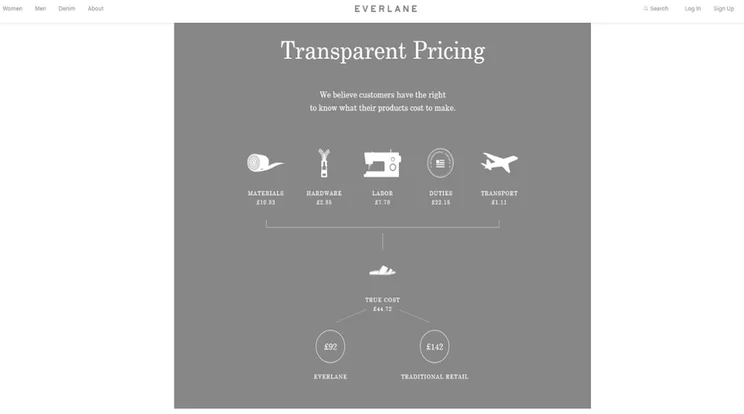
Transparency lies at the heart of the Everlane business model – customers can even see the exact makeup of a product’s pricing.
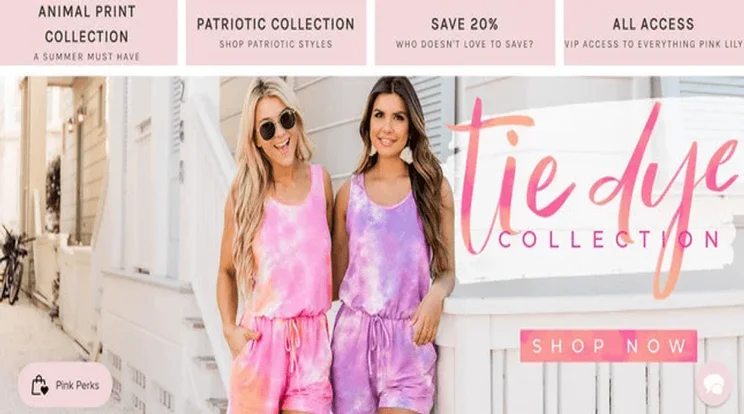
PinkLily.com’s brand values align with young, carefree Americans who like wearing pink
Design a Logo
Your logo is how consumers will recognize your online boutique. It should represent your brand and communicate your values. Aside from looking awesome, your logo should be legible at any size, and still be effective on any background or in any color.
You can find a graphic designer yourself and ask them to create a logo, or use a logo design tool, such as Tailor Brand, which makes it really easy to design a professional logo yourself.
We tried our hand at designing logos for our imaginary online boutique store using templates from the free tool BrandCrowd. As you can see from our lackluster designs, you’re probably better off hiring a professional designer, or using Tailor Brands to create a logo that truly stands out.

Choose Your Colors
As a fashion expert, you’ll understand the power of color. The same goes for your brand image – color is everything! Or, more specifically, consistency in your colors is everything. Pick a palette and stick to it – your website will have a more polished and professional feel.
We’d also recommend picking a website design theme that – ideally – reflects the colors and character of your brand. For inspiration, check out our guide to the top 10 fashion website templates, and get started in style.
Top TipWe’d always recommend choosing one primary color, then a complimentary secondary color. This adds depth to your brand and stops it from feeling cheap or superficial. Plus, it’ll help you create contrast when you design your online store front.
Amy Filippaios is the founder of luxury hair extensions shop Simply Hair UK. She tells us that it’s important to consider the bigger picture when choosing a color scheme:
 “Don’t rush into choosing your brand colors. They form a key part of shaping your business’s identity, as they will form part of your logo – one of the first elements of your brand’s image.
Consider how your brand colors will translate to physical products, and where they will appear. For example, if you are offering beauty services, then your brand colors will only appear on printed flyers and your website. However, if you are a retail business, these colors will apply across your product range and packaging – and, in a retail store, your shop’s interior design.”
Overwhelmed by the wealth of options out there? We can help with that – check out our guide on How To Choose A Color Scheme for some pointers on how to get started.
Deliver Trust
Fashionable items aren’t the only things you should deliver; you need to deliver a trustworthy brand image to your customers. This means responding to negative reviews, being transparent on your pricing, and sticking to your promises on delivery or returns.
The 2019 Edelman Brand Trust Report found that ‘brand trust’ is one of the most important ‘buying considerations’ for consumers, with 81% of participants saying they ‘must be able to trust the brand to do what is right’.
Create a Business Plan
In this section, we’ll cover:
- What to include in your business plan
- Insights from industry experts
Failing to prepare is preparing to fail. Creating a business plan for your online boutique is like drafting a blueprint for a construction project – it’ll help you plan for the journey ahead and should tell you from the start whether or not your business idea will succeed.
Whether you’re looking to purvey purses and pullovers, or trade t-shirts and tuxedos, your business plan should include details on your financial plan, marketing campaign ideas, and overall business model, as well as various other mapped out strategies. Here are six things to include in your plan:
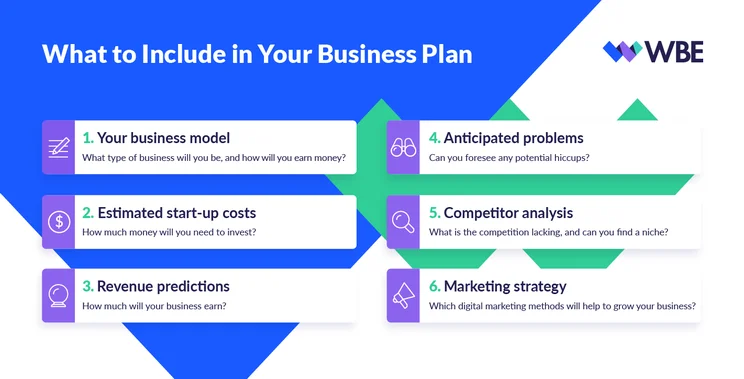
As time goes on, you can start to be more flexible as you get to know your online boutique better – and that’s a good thing! Don’t be afraid to adjust your business plan over time. Katrina Parsons, founder of mother-and-daughter clothing boutique Me & Maeve Grace, remembers how her business strategy has grown since day one:
 “Creating a business plan was the first thing that I did, and I spent weeks tweaking minor details. However, one thing I’ve learnt is that it’s rare your initial vision for business is the path that the business usually takes. You have to be agile and willing to go down roads that the market proves are more feasible.”Katrina used Shopify to build her online boutique, taking one of their popular templates and editing it to reflect her own brand.
And when we spoke to Ben Stinson, the head of ecommerce at Diamonds Factory, he gave us similar advice:
 “A business plan is a great way to start your commercial journey – however, there are some essentials to remember. For us at Diamonds Factory, understanding everything about our audience was integral to determining our best route to the market. We rigorously analyzed past consumer spending habits and successful competitor strategy, while using both internal and external expertise to predict future trends in the market.
Not every aspect of your business plan will go as you expect it to, so I’d suggest building contingency into your proposal, and to reflect this flexibility with some additional budget. Ultimately, build your plan with the customer at the heart of what you’re doing – whether it’s design, customer experience, or logistics – and a coherent business strategy will appear.”
Register Your Online Boutique
In this section, we’ll cover:
- The different types of business structures available
- How to register your business
Finding your niche and building a brand from scratch are pretty exciting tasks, but there are also some legal boxes you need to tick before you can open your boutique and start earning cash. This might sound a bit scary, but trust us – it’s easier than you think!
Plus, the earlier you get this stuff sorted, the less chance you’ll have an unexpected visit from Uncle Sam to deal with further down the line!
Here’s what you’ll have to do:
- Choose your business structure
- Register with your state
- Sort out your finances
- Meet the tax requirements
Choose Your Business Structure
The type of structure you choose depends on the size and type of your operations. Below, you’ll find a breakdown of the different options available:
| Business Structure / What is it? | |
|---|---|
| Sole Proprietorship | You’ll run the whole store on your own, under your own name, with full liability for its legal obligations, with very little paperwork required. |
| Limited Liability Company (LLC) | You’re not personally liable for your boutique’s debts, offering your business greater protection. |
| Corporation | Ideal if you’re planning to scale up and work with investors. |
Register With Your State
Once you’ve chosen your business structure, you’ll need to register your business name within the state you’ll be operating in. That sounds simple enough to do – and it is – but before you get to that part, you’ll need to check whether you need a licence to sell in your state, too.
The rules and procedures for doing this are different depending on where you live, so be sure to do your research beforehand!
Good to know…If you’re a sole proprietor (the first of the three business structures labeled in the table above) but you want to operate under a different business name from your personal name or DBA (Doing Business As), you’ll need to register your DBA with your state, too. As with the other business structures, the process for doing this varies from state to state, so use our map above to get the correct info!
Sort Out Your Finances
Before you start selling, regardless of your business structure, you’ll need to apply for a sales tax permit and obtain a federal tax ID number from the Internal Revenue Service (IRS). If you’re not sure what this means, don’t panic – we’ll break it down for you:
- Sales tax permit – this is an agreement with the tax agency in your state, declaring that you will collect and pay sales tax on any items you sell under your business name.
- Federal tax ID – also known as a Tax Identification Number (TIN), this nine-digit number how the IRS tracks your business. You’ll also need this when it comes to filing your tax returns.
When applying for your sales tax permit, be sure to check your state rules and procedures – they’ll be able to give you a helping hand if you get stuck.
Good to know…This is also a good time to start thinking about whether you’d like to register or trademark your business or logo – after all, the last thing you want is someone stealing your sparkly new idea after you’ve worked so hard on it! The US Patent and Trademark Office will be able to help out with this.
Meet the Tax Requirements
Once your online boutique is off to a flying start and you’ve begun to rake in the dollar, you’ll need to follow the tax requirements for your state. Taxes aren’t the most interesting thing in the world, but they are super important. Luckily, they’re pretty easy to get sorted, too!
We recommend finding your state department on the IRS website site, and giving them a quick call to learn about the tax and licensing requirements that are relevant to you.
Choose an Ecommerce Platform
In this section, we’ll cover:
You’ve got your brand, built your business plan, and ticked all the legal boxes… now it’s time to build your online storefront. In the same way you sourced a supplier, you’ll need to make sure that your ecommerce website builder is the right fit for your boutique. Does the platform have the tools, templates, and prices to suit your business model?
There are two main choices when it comes to picking an ecommerce platform:
- Use an ecommerce website builder, such as Wix or Squarespace
- Use WordPress with an ecommerce plugin, such as WooCommerce
It can feel a bit overwhelming when trying to decide between the two, but Sarah Dudgeon, the founder of online boutique Art Of Your Success, shared some thoughts on taking the plunge:
“Know yourself. Do you want something out of the box and ready to go, or would you like to tinker and add bits yourself? Are you happy paying more for extra features? Once you’ve answered these honestly, it will help you choose the right solution.”
Luckily, we’re also here to give you some guidance. Below, we’ll dive into the pros and cons of both these options, before digging a bit deeper to help you figure out which platform is best suited to you.
Having tested over 50 website builders and ecommerce platforms, we’re proud to be experts in ecommerce. We put each platform through rigorous user tests so that we can bring you accurate insights to help you make your decision more easily.
Thanks to our in-depth research, we’re in the best position to help you find which ecommerce platform is the right choice for your online boutique.
Ecommerce Builders vs WordPress
An ecommerce website builder is an online tool that’s designed to help people build their very own online stores – without needing any tech skills! It’s quick, easy, and comes with extra support which makes it perfect for beginners. However, some might find it too simplistic because of its can-do approach.
WordPress is a popular open-source platform that powers over a third of websites. WordPress is popular because it gives you ultimate creative control over the customization of your website. But because it’s like a blank canvas, it can take longer to build your site.
Below, we’ll provide a quick summary of both options, looking at their pros and cons and deciding who each platform is best for.
Ecommerce Builders: Pros and Cons
- You have hands-on help and support available to assist you anytime you feel stuck.
- You can easily customize your storefront to suit your branding without any coding knowledge or paid help from a professional.
- All the tools and features you need to make your boutique successful are already built into the platform, ready to be used.
- If you're planning a custom or complex store, you may feel limited by an ecommerce builder's capabilities.
- Starter prices for ecommerce builders usually land between $20 and $30 per month, which can feel like a lot to new businesses.
- Some ecommerce website builders charge transaction fees.
Ecommerce website builders are best if you:
- Want to build your store quickly
- Don’t have coding skills
- Prefer easy-to-budget costs
- Are keen to start building today
WordPress: Pros and Cons
- You have total customization control over your website.
- WordPress is free – there are other costs involved, but it's possible to keep costs very low.
- You can create a very large or complex website with WordPress, without running into limitations.
- While coding isn't essential, it is helpful for getting the most out of WordPress.
- If you need support, you'll either have to rely on forums, or hire someone to help you out.
- Building with WordPress takes time to do properly, from finding the best web host to securing your site.
WordPress is best if you:
- Have plenty of time to learn WordPress and perfect your store
- Need a complex or custom website
- Have some basic coding skills
- Want total customization and control over your online boutique
Using an Ecommerce Website Builder
To create a store using an ecommerce builder you simply sign up, choose a premade template you like, customize the design and settings, add your own products, and publish your store.
No coding, developers, or web designers needed!
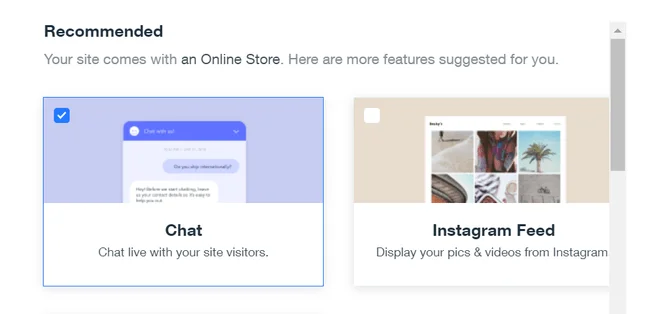
When choosing an ecommerce website builder, there are plenty of options out there. Below, we’ve compared our two favorites – Wix and Squarespace – to help you make your decision with confidence.If an ecommerce website builder sounds like the right fit for your needs, we have some recommendations for you! Check out the table below to compare the top three ecommerce builders on the market. Each one has earned its place in our rankings by performing well throughout our thorough research process.Both Wix and Squarespace have earned their place in our rankings because of their top performance in our research. But that’s not all – they each boast a great set of features that make them perfect for boutiques.
Wix is ideal if you have a smaller inventory, as it gives you the ability to schedule limited-edition drops of your products. It’s also excellent value for money!
Similarly, Squarespace has been designed to showcase a smaller number of products, and – thanks to its stunning template designs and strong branding – you can guarantee your items will always take center stage.
Find out more about Wix eCommerce
Wix is the best website builder with ecommerce functionality. That is, Wix is first and foremost a website builder that has ecommerce price plans.
Wix scored 4.5 stars out of 5 overall in our research.
Ideal for users with a creative eye, Wix’s intuitive drag-and-drop design tools will make building your boutique feel like a breeze. It’s a great option for starting a small online boutique, and will allow you to list a limited number of products in varying sizes.
On the other hand, Wix doesn’t have the same backend functionality that you’ll find with other ecommerce titans, such as Shopify or BigCommerce. However, you’re unlikely to need this kind of power if you’re starting a small boutique. If you do decide to transition your business to a fully-fledged store, you might find that you need a bit more than Wix can offer.
Wix’s standout ecommerce features include:
- Product zoom – allow users to really see the details in the products they’re purchasing
- Product videos – product videos are a great way of letting customers check out how the item looks and functions in action
- Supports over 15 payment gateways – connect to PayPal, Stripe, Square, and many more
- Wix Ascend – automate your marketing workflow and create campaigns
- 200+ apps with 50 within the ‘online store’ category
Wix’s ecommerce plans range from $27 to $59 per month when billed annually.
Find out more about Squarespace
Squarespace is renowned for its classy and chic design functionality. This is perfect for an online boutique, where brand-building plays a significant role in attracting loyal customers.
Squarespace scored 4.3 stars out of 5 overall in our research.
With its emphasis on slick, professional design and high-impact images, Squarespace’s templates act as a luxurious backdrop for exclusive boutique collections. It allows you to create a high-end personalized storefront to reflect your unique brand and niche.
Squarespace also delivers on the marketing front, giving you the ability to schedule social media posts and build your loyal following through regular email sends.
However, no builder is perfect – and there are areas where Squarespace could improve. For example, it currently supports fewer payment gateways than Wix, while Squarespace’s app store can’t compete with its main competitors.
Squarespace’s standout ecommerce features include:
- Quick-view highlight boxes – clicking on quick-view will give customers a snapshot of the product without navigating away from the main page
- Different product variations – add different sizes and colors for the same product listing
- Instagram selling – connect to Instagram and take your sales across multiple channels
- In-built analytics – track customer behavior without having to download a separate app
- Customer waitlists – customers can join waitlists for your most in-demand products
- Email marketing – cultivate your database into a loyal customer following
Squarespace’s ecommerce plans range from $23 to $49 per month when billed annually.
- Wix eCommerce Review – learn more about Wix eCommerce with our detailed review
- Wix Pricing – find out which Wix plan is best for you
- Squarespace Review – learn more about Squarespace with our detailed review
- Squarespace Pricing – does Squarespace represent good value for money?
Using WordPress With an Ecommerce Plugin
To build a store using WordPress, you first need to find hosting for your website. We recommend Bluehost because it has the best WordPress specific hosting plans on the market.
After this, your next step is to install WordPress with your chosen hosting provider, select and install your theme, and then add any plugins for features you might need. We recommend using the WooCommerce plugin (with Bluehost’s WooCommerce hosting) to create your store, as WordPress doesn’t come with ecommerce features built-in. WooCommerce is powerful, flexible, and scored 4.2 stars out of 5 in our testing.
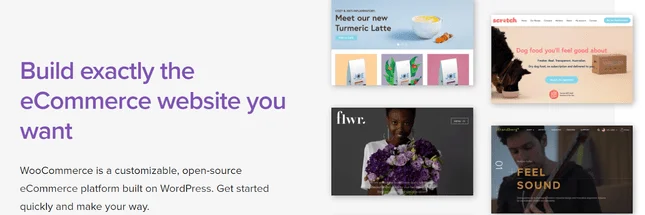
If you’re excited to make a start with WordPress, we have a couple of recommendations for you, based on our research, to help you take the first steps. Find out more about why we recommend WooCommerce and Bluehost below.
WooCommerce is an open-source ecommerce plugin, that’s specifically designed for WordPress. We recommend choosing WooCommerce because it lived up to its reputation when we tested it ourselves – it scored 4.2 stars out of 5.
WooCommerce is free, like WordPress, and comes with all the power and flexibility you would expect from an open-source ecommerce plugin. It’s also easy for total tech novices to get started on, because it has a helpful setup wizard that walks you through setting up your store.
If you decide to use WordPress to build your online boutique, installing WooCommerce is the natural choice, and one we can highly recommend.
Choosing a reliable hosting provider is essential for the success of your WordPress website. Bluehost not only topped our rankings as the best overall web host, it also steals the title for best WordPress hosting provider, scoring an impressive 4.8 stars out of 5!
Better still, both WordPress and WooCommerce have officially recommended Bluehost. This is because it offers WordPress-specific plans, which include:
- Automatic WordPress installation – Bluehost actually installs WordPress for you, which is much easier than trying to do it yourself manually.
- Automatic WordPress updates – WordPress is prone to security issues if you forget to update your site regularly, so Bluehost does it for you.
- 24/7 expert WordPress support – you have WordPress experts on-hand to help you with any issues, no matter what time or day it is.
Bluehost offers shared WordPress hosting, for small sites, and managed WordPress hosting, for larger businesses. It even has WooCommerce-specific hosting that automatically installs a WooCommerce and a storefront theme for you.
Read more:
- Read our full Bluehost Review to learn more about its pros, cons, features, and pricing
- Discover the Best WordPress Hosting Providers to make sure you find the best host for your nees
Set up Your Online Boutique
It’s now time to set up shop… literally! No matter which ecommerce platform you pick, there are some steps you must take when starting an online boutique. In this section, we’ll show you how to:
- Choose a domain name
- Add product photos and descriptions
- Create product categories
- Optimize your checkout page
- Set up a payment processor
- Organize shipping
Your domain is the unique URL address for your website. For example, ours is websitebuilderexpert.com. Your domain name should accurately reflect your business, helping the user to understand what type of website they’ll be visiting.
When choosing your domain name, bear these tips in mind:
- Try and keep it short and sweet – the longer it is, the harder it will be to remember!
- Avoid numbers or hyphens if you can
- Make it easy to spell
- Consider what Top-Level Domain (TLD) you’d like to use – this is the bit that comes after your domain name, for example, .com, . co.uk, .org
Once you’ve decided on a name, you’ll need to buy and register your domain from a domain registrar. If you choose to host with Bluehost, you’ll get a free domain for the first year with any of its Wix will provide you with a free domain name if you sign up for an annual plan, too.
A few well-known registrars include Domain.com and NameCheap. Once you’ve purchased and registered your domain, you can easily connect that domain to your online boutique through your chosen ecommerce platform. Think of your domain as your phone number, and your website as the cell phone.
The cost of your domain will vary depending on the URL suffix you choose – .com .net. org etc. – and the registrar you use, but a domain usually costs between $10 and $20 per year.
We’re sure that the beautiful items in your online boutique could sell themselves, but writing a good product description is vital to boosting sales and keeping customers happy. Studies show that 50% of shoppers have returned an item because the product didn’t match the description!
The perfect product description will appeal to your target audience, focus on the benefits and not features, be truthful and accurate, and appear digestible and scannable for users in a rush.
You’ll also need to take product photos. If you don’t want to hire a photographer, then you’ll need to ensure your photos are high-quality, and with the right lighting so users can see exactly how the product looks.
Look out for the extra features that come with each platform to make the most of your images. For example, combined with your excellent photos, Wix’s product zoom feature would really help to improve the shopping experience for your customers.
In the same way you’d group items together inside your physical boutique store, you’ll need to organize your products into categories on your online store. Doing so will, again, help to improve the shopping experience, which should keep customers coming back for more!
Whether you’re selling t-shirts, ties, or tank tops, your customers should be able to find what they want quickly and easily. Each of the ecommerce platforms we discussed make it easy to create product category pages – for example, Wix eCommerce has a product pages editor that lets you organize details and categories in just a few clicks:
We’ve talked about how ecommerce website builder templates make it easy to design stylish pages for your online store. But we haven’t talked about the most important page: your checkout page.
21% of shoppers abandon their carts at checkout because the checkout process is “too long or complicated.” The good news is, that’s roughly one in five shoppers that you can get back by optimizing the checkout process on your website.
You can take big steps, such as offering discounts, or small steps, like reducing the amount of information shoppers need to fill out. Whatever you do, it’s all about providing the most efficient customer experience possible. If you’re not sure where to start, we’ve covered our top 13 tips for checkout page optimization, with a special focus on how you can improve elements like design, payments, and shipping.
For your online boutique to grow, you need to get paid. Setting up a payment processor allows you to take payments online by connecting your website to a checkout system.
The most popular payment processors include Stripe, Square, and PayPal, and all three of the ecommerce platforms we mentioned enable you to connect with these providers.
Payment Processing Costs
Wix doesn’t impose any transaction fees itself, but you’ll need to pay a transaction fee of 2.3% plus 30 cents for using Stripe, PayPal, or Square. With Squarespace, whether you pay transaction fees or not will depend on the plan you choose. You can avoid shelling out extra if you opt for its Basic and Advanced Commerce plans, but if you go for the Business package, you’ll pay a whopping 3%.
WooCommerce automatically offers PayPal and Stripe from day one, and has integrations with around 140 other payment gateways for you to choose from, including Square and Amazon Pay. It also has its own payment gateway called WooCommerce Payments, which is free to install.
Shipping products? We’ve got a step-by-step guide for that. However, we’ll quickly run you through the essentials. Unless you’re operating as a dropshipping company, you’ll need to organize your own shipping logistics.
You’ll need to decide whether you want to offer free shipping, flat-rate, or real-time shipping (when customers are automatically charged the real-time carrier rates). You’ll also need to create shipping labels to enhance your brand image (which can be done on Wix and Squarespace), and create a clear returns policy.
You’ll need to pick a shipping carrier to deliver the goods, too. The most popular carriers in North America include:
- UPS
- FedEx
- USPS
- DHL
- Canada Post
It’s worth visiting each website and comparing the shipping rates to see which suits your business best.
Market Your Online Boutique
Congratulations! Your online boutique is now signed, sealed, and almost delivered. Why almost? Well, you now need to market your boutique and build a loyal base of customers. Below, we’ll discuss the most important marketing methods you should use:
- Email marketing
- Social media marketing
- Brand ambassadors
- Trade shows
Your mailing list is a direct line to your customers. With email marketing, you can keep your brand fresh in the minds of consumers by dishing out deals, sending fresh content about your seasonal trends, and much more.
Wix Ascend is ideal for creating email campaigns, with the ‘Basic’ price plan enabling you to create five email campaigns and send your newsletter to up to 9,500 email addresses per month. Squarespace has its own email marketing service, Email Campaigns, but you’ll need to pay to use it. Prices start from $5 per month, but, in our opinion, the quality of the emails you can produce makes it worth the price!
If you use Bluehost and WooCommerce together, you get a double bonus. Bluehost gives you a Microsoft 365 Mailbox free for 30 days on its WooCommerce plans, and WooCommerce has easy integrations with marketing solutions, including MailChimp.
Unsure how to get the best out of your email marketing? Take a look at our Top Email Marketing Best Practices for 11 awesome tips on how to boost your email performance.
To gain email addresses, you’ll likely need to offer your website visitors something in return whether it’s access to your newsletter, a discount deal for first-time visitors, or to participate in a competition.
Whichever type of content you send via email, you’re sure to see your profits rise – email marketing generates $38 for every $1 on average, which is a 3,800% ROI (return on investment).
For your fashion business to thrive in 2020, you must advertise on social media – it’s a no-brainer! There are 3.5 billion active social media users, and 71% of consumers who’ve had a positive experience with a business on social media are likely to recommend the brand to friends and family.
To start, we’d recommend that you set up a Facebook Store. This will allow Facebook users to buy your products directly from the social media platform. It’s like opening a second online store, but with much less hassle.
Boutique clothing items will really shine on image-led platforms like Pinterest and Instagram. On both platforms, you can upload photos of your items and attach a ‘buy’ button which takes users directly to your online boutique. Advertising on social media is all about bringing social media users’ attention to your products.
You can easily install integrations to market across social platforms using WooCommerce. Squarespace doesn’t integrate with Facebook, but you can feature your products on Instagram if you have upgraded to either its Basic or Advanced Commerce plans. In order to sell on Facebook through Wix, you’ll need to download the ecommerce app, Ecwid.
In the world of marketing, sometimes the oldest methods are just what your business needs. Word-of-mouth referral marketing involves users encouraging other users to try a certain brand or service, and hiring a brand ambassador is one of the most effective ways to get this done.
Unlike a social influencer who you pay to demonstrate using your products to their own followers, a brand ambassador is someone who promotes your brand by word-of-mouth on a long-term basis, either for free or for a fee.
Ideally, these people have already bought and enjoyed your products and have a strong social media presence which they can use to promote your products online.
To find an ambassador, you can reach out to your most loyal customers and invite them to start an ambassador relationship, or you can use tools like CrewFire or BrandChamp to find an ambassador and create a referral marketing program.
Attending fashion trade shows and events is a great way to network and expand your business. Whether you strike up a relationship with an investor, marketing agency, or a new set of customers, these shows can be a goldmine of opportunity.
Some of the biggest US fashion trade shows in the calendar include NY Women’s, CMC LA Fashion Market, and Magic Mens.
How to Start an Online Boutique: Summary
Starting an online boutique demands plenty of hard work, but if you stick to our step-by-step guide and use our ensemble of tips, you’ll soon have an online boutique to boast about. Let’s recap those steps…
How to Start an Online Boutique in 7 Steps
- Decide What to Sell and Source Suppliers – find and vet clothing suppliers for your boutique.
- Design Your Brand – develop your brand image with a logo and brand values.
- Create a Business Plan – estimate your costs and think of your strategies.
- Register Your Online Boutique – file the right state paperwork before you sell online.
- Choose an Ecommerce Platform – pick a platform that suits your specific needs.
- Set up Your Online Boutique – get your boutique ready to sell items and accept payments.
- Market Your Online Boutique – use tactics like social media and email marketing to gain new customers
When opening an online boutique, you’ll find it’s the work behind the scenes that can really help your business to grow. Sourcing and selling trendy threads is important, but we’re talking about things like strategy planning, brand building, and marketing campaign management.
While fashion never ends, it’s sadly time to bring our guide to a close. We hope to browse your online boutiques in the future, but for now it’s farewell, fellow fashionistas!


1 reply