


- Head-to-Head: Find Your Builder
- Best for Pricing: Hostinger
- Best for Selling Online: Shopify
- Easiest To Use: Hostinger
- Best Website Features: Shopify
- Best Online Store Templates: Shopify
- Best AI Tools: Hostinger
- Best Business Support: Shopify
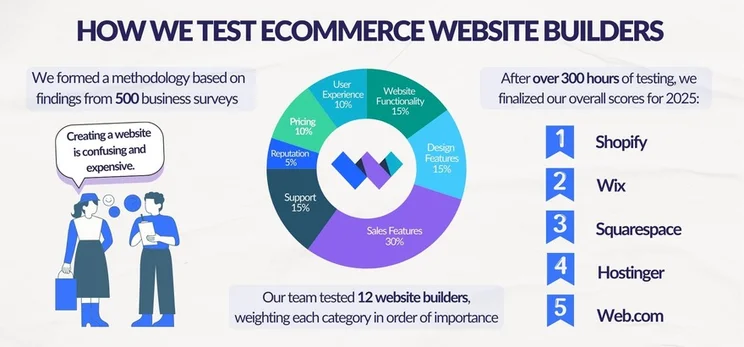
- How We Test Ecommerce Website Builders
- Final Verdict: Is Hostinger or Shopify Better?
I compare ecommerce website builders for a living, and it’s a close race between Hostinger and Shopify. But, after over 300 hours of hands-on testing and research, I can confirm that Shopify is the stronger builder for online stores, offering high-quality sales features, scalability, and business support. But is it right for your business?
- Shopify has the best ecommerce tools for selling online and scaling your business
- Hostinger’s single ecommerce plan is more affordable, starting at $3.99 per month – Shopify is more expensive, with plans starting at $29 per month
- Hostinger is easier to use thanks to its drag-and-drop editor, something Shopify lacks
- Hostinger imposes zero transaction fees itself, but fees with Shopify will depend on your plan and payment method
- Shopify has a small number of free templates available, with premium options ranging from $100 to $500 per template
- Shopify has better 24/7 business support, including phone support
I’ve recently updated this page to add more information about transaction fees and scalability with Hostinger and Shopify. I’ve also reviewed the copy to ensure the pricing and features mentioned are accurate. For example, Hostinger increased its product allowance from 600 to 1,000 this year.
Head-to-Head: Find Your Builder
If you’re short on time, I’ve pulled together a side-by-side look so you can compare Hostinger and Shopify at a glance:
|
Overall rating
|
Starting price
|
Free plan or free trial
|
Free custom domain
|
AI website builder
|
Recommended for
|
||
|---|---|---|---|---|---|---|---|
|
Best for Selling Online
 |
Best Budget Builder
 |
||||||
|
Shopify |
Hostinger |
||||||
|
4.8
|
4.2
|
||||||
|
|
|||||||
|
3-day free trial |
7-day free trial |
||||||
|
|
|
||||||
|
|
|
||||||
|
Businesses who want to easily scale their store as they grow |
Beginners and budget-conscious businesses |
Best for Pricing: Hostinger
When it comes to affordability and pricing, Hostinger is a cheap website builder for online stores, whereas Shopify is more expensive. I’ll break down each builder’s pricing plans below:
How Much Does Hostinger Cost?
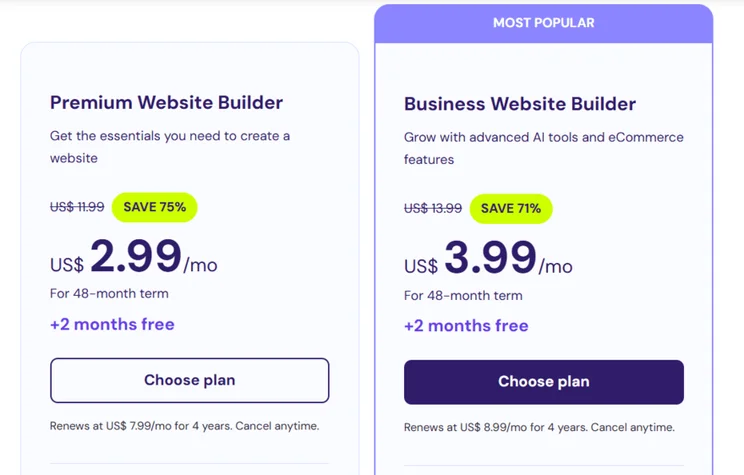
Hostinger’s pricing ranges from $2.99 to $3.99 per month, but only one plan includes ecommerce functionality. The Business Website Builder plan costs $3.99 per month (for a 48-month term), unlocking sales tools and Hostinger’s full suite of AI features.
For such a minimal price difference, I’d recommend opting for the Business plan from the start if you’re a small business owner. Unfortunately, there’s no free plan to test things out but I found I had plenty of time to learn the ropes with Hostinger’s seven-day free trial.
How Much Does Shopify Cost?
Shopify’s pricing ranges from $29 to $299 per month (billed annually), making it far more expensive than Hostinger. However, you can sell across all three premium plans:
- Basic – $29 per month
- Grow – $79 per month
- Advanced – $299 per month
Shopify justifies its higher prices (starting at $29/month) with an impressive range of sales tools, including multichannel selling capabilities and a native payment gateway. You can soften the blow to your budget with Shopify’s introductory deal and get your first three months for just $1 per month.
Hostinger doesn’t charge transaction fees with its ecommerce plans. You can also choose from over 100 payment providers when selling online with Hostinger, but these providers could charge an additional transaction fee, outside of Hostinger’s control.If you use Shopify Payments, Shopify’s native payment gateway, you can reduce your transaction fees. Online credit card rates start at 2.9% + $0.30 on the Basic plan and decrease to 2.5% + $0.30 once you reach the Advanced plan. If you use a third-party provider instead, you’ll also face third-party transaction fees, ranging from 0.6% to 2%, depending on your plan.

Hostinger is more affordable than Shopify
Hostinger has a single ecommerce plan which costs just a few dollars per month, making it incredibly budget-friendly for small businesses. On the other hand, Shopify’s cheapest plan is pretty expensive, starting at $29 per month. Plus, you can test out Hostinger with its seven-day free trial, whereas Shopify’s free trial is only three days long.
Best for Selling Online: Shopify
If you’re looking to get your business online, you’ll want to pick a website builder with the tools and scalability to support you on your journey. Our research analyzed key ecommerce tools, and I’ve focused on those most important to our readers below.
Shopify is the leading platform for ecommerce tools on the market, and it’s a much stronger choice for both growing and established stores. First of all, I’m a huge fan of Shopify’s process for adding products as it lays it out really clearly and makes the process straightforward, with clearly signposted sections and AI support if you’re struggling to write your product descriptions.
Shopify is better for selling online because it provides a complete suite of advanced tools, including customizable checkouts, POS integrations, and extensive multichannel sales support, which Hostinger lacks.

📦 Product Management
With Hostinger’s single ecommerce plan, you’re capped at 1,000 products, which is a tiny amount compared to most ecommerce builders. Shopify is the clear winner here since you can sell unlimited products on any Shopify plan. This is great for businesses looking to expand and grow their inventory.
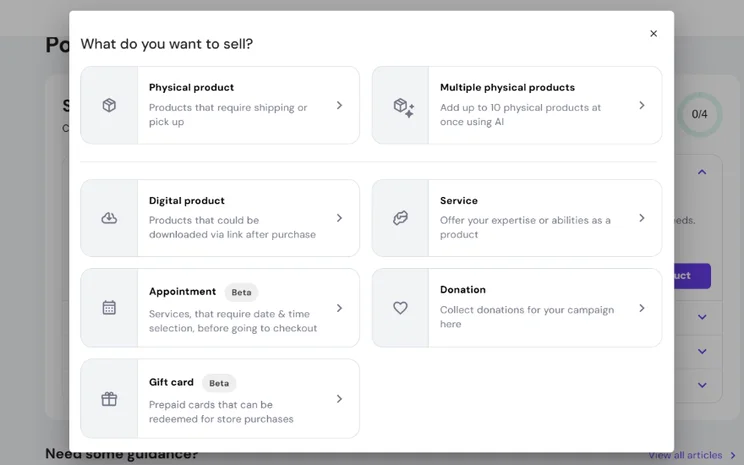
But what can you actually sell with Hostinger or Shopify? When adding products to your Hostinger store, you have the option of physical and digital products, services, appointments, donations, and gift cards. Hostinger has also recently introduced an integration with Printful to sell custom merch.
With Shopify, the default is set to physical goods, but you can also sell digital products (such as ebooks and music), services, dropshipping products, and print-on-demand products.
🛒 Multichannel Selling
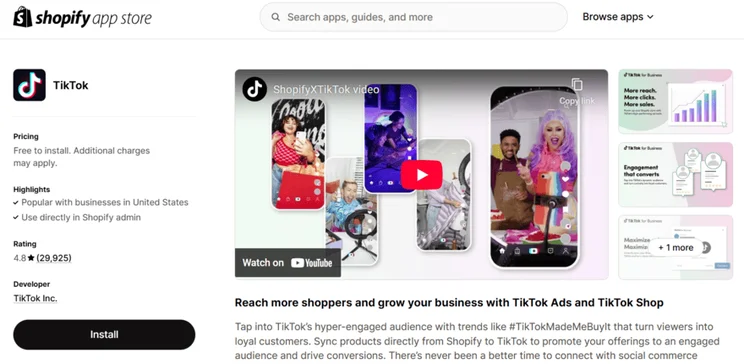
A key way to reach new audiences and build brand awareness is by engaging with and selling across other channels, beyond your website. With Shopify, you have impressive multichannel integration options, including Amazon and TikTok. Hostinger, on the other hand, only supports Google Shopping, meaning you can’t connect your website to popular marketplaces (such as eBay) or social media channels.
If you’re simply looking to sell on social media channels (and don’t need a full online store), you can subscribe to Shopify’s $5 per month Shopify Starter plan. This lets you sell across socials and messaging apps, including WhatsApp. It’s a cheaper alternative to Shopify’s website builder, but it’s still more expensive than Hostinger’s ecommerce plan (which allows you to build an online store).
💰 Payment Options
Both Hostinger and Shopify provide over 100 payment methods, meaning businesses can give a variety of choices to customers when it’s time to checkout. These payment processors include popular options, such as PayPal, Apple Pay, and Google Pay.
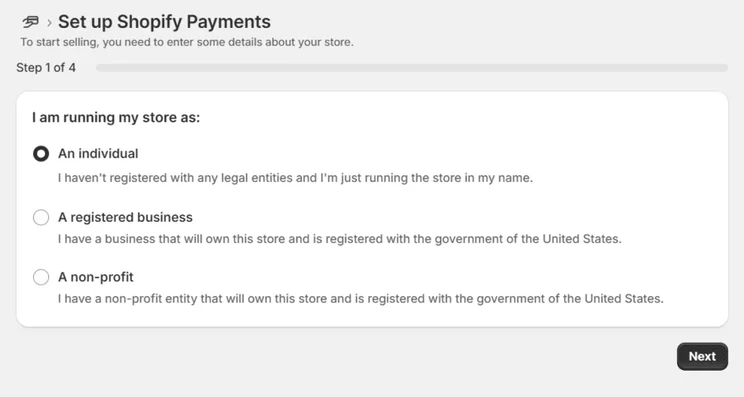
However, Shopify goes the extra mile by offering a native payment gateway, known as Shopify Payments. If you’re a Shopify merchant, I recommend picking this to simplify the process and eliminate third-party transaction fees. While Hostinger promises to not charge transaction fees as well, you might be subject to transaction fees from your chosen payment provider.
🚀 Scalability
Is Hostinger or Shopify better for growth? Shopify’s dedicated ecommerce plans, advanced sales tools, and enterprise plan gives businesses more wiggle room to grow than Hostinger.
With Hostinger, there’s a single ecommerce plan with a limited product allowance. If you outgrow this, you’ll have no choice but to switch website builders. In comparison, Shopify can grow with your business. There are three core premium plans with an unlimited product cap, plus a custom enterprise option for businesses taking their market by storm. This flexibility is the obvious choice for businesses looking to expand.

Shopify has unbeatable sales features
We’ve tested the top ecommerce website builders in 2025, and Shopify continues to have the best quality of sales features on the market. You can sell unlimited products, operate across multiple channels (such as Amazon and TikTok), and customize your checkout page.
Easiest To Use: Hostinger
When testing both of the builders myself, I found Hostinger much easier to use than Shopify for a few reasons. I’ll dig into each builder’s setup process below, as well as their editors and overall user experience.
While I think Shopify has made steady improvements in this area, building an online store with Hostinger is a straightforward and beginner-friendly process.
I found it incredibly easy to use the drag-and-drop editor since it gave me the freedom to position elements wherever I wanted, whereas Shopify limited me to sections. Plus, Hostinger has a bunch of AI tools to speed up the design process, which is great for business owners short on time.

Setting Up Your Online Store
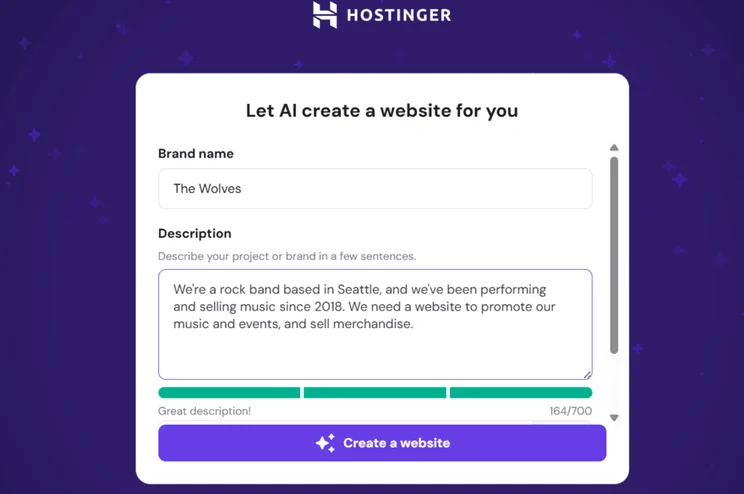
Hostinger keeps things simple for new users with its AI website builder prompt. I was asked to fill out a brief form, giving my brand name and a summarized description of my business. Hostinger then used this information to generate a personalized template for me. All in all, the onboarding process took a minute or two.
With Shopify, I had to answer a few questions about my business, including where I’d like to sell (e.g., an online store, online marketplaces, or social media), what types of products I’d be selling, and the location of my business.
After ticking the necessary boxes, Shopify then guided me to my account dashboard, where it then encouraged me to start adding products to my inventory. Hostinger, in comparison, took me directly to the editor to start designing my store.
Using the Editor
Hostinger uses a drag-and-drop editor, making it an easy website builder to get to grips with. As the name suggests, I could drag elements onto my site’s page and drop them wherever I wanted.
I also love that Hostinger provides grid lines, which I could choose to ignore or follow – this helped me align images and text boxes in seconds. There are plenty of professionally-designed sections to use, and I could also use Hostinger’s AI tools to generate text and images.
Unfortunately, while Shopify offers a lot of impressive features for businesses, I struggled to feel creative when using its editor.
Shopify has a section-based editor, meaning you can stack sections (such as an “About Us” section or “Product carousel” section) on top of one another, but you can’t drag elements to your desired location. It’s simple to use, but restrictive, and it lacks the flexibility provided by Hostinger.
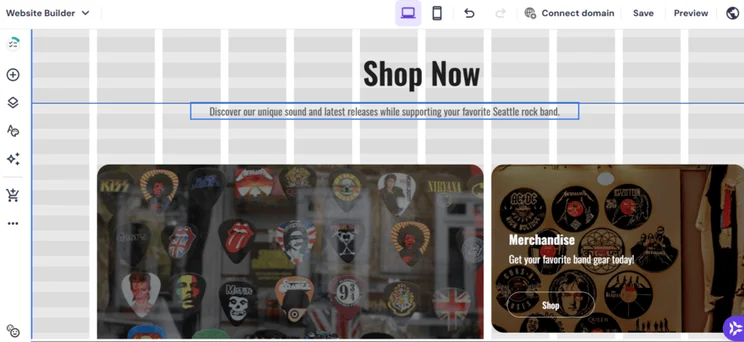
Hostinger's editor is very beginner-friendly
Hostinger uses the familiar drag-and-drop editor, meaning you can place elements wherever you want on your website. This gives you total creative control, and its AI website builder provides a decent starting point with a personalized template. In comparison, it took longer for me to get to grips with Shopify’s section-based editor, despite recent improvements made to Shopify’s design tools.
Best Website Features: Shopify
Of course, sales features aren’t all you need when building an online store. Your website builder needs to have the right functionality and tools to help you manage your website and grow your business, whether you’re looking to increase your site’s traffic or connect with customers. Based on our 2025 research, Shopify offers better website features than Hostinger and here’s why:
Email Marketing
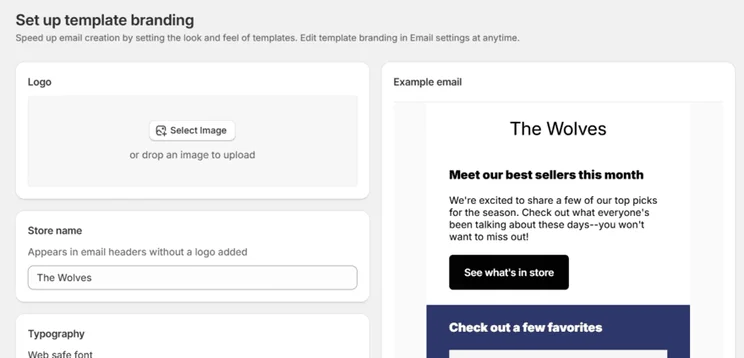
An essential website feature for any business is email marketing, and Shopify has great email marketing tools. You can customize your own emails, set up automations, build email campaigns (which can be great for big events, such as Black Friday), and keep your customers engaged with abandoned cart recovery emails.
Hostinger has recently launched Hostinger Reach, meaning it now offers built-in email marketing tools, powered by AI. Before, Hostinger made it difficult to connect with your audience or promote products, but this is a step in the right direction if it wants to compete with Shopify.
SEO
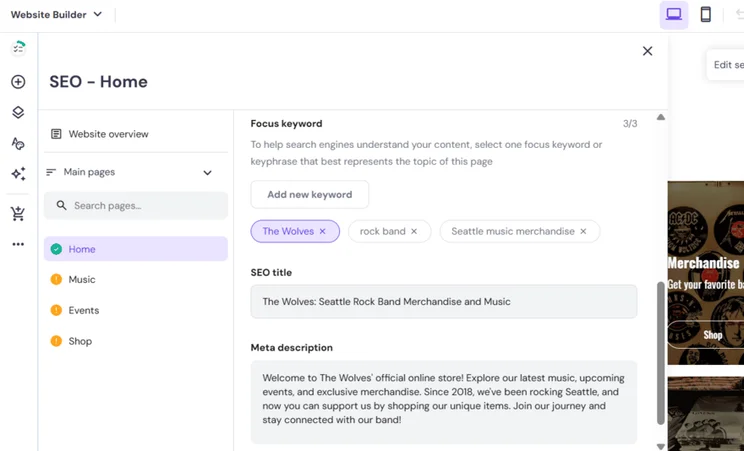
SEO, or search engine optimization, is an essential practice for any business looking to broaden their reach, improve visibility online, and boost sales. Luckily for Shopify merchants, Shopify has some of the best SEO tools I’ve tested. You’ll get the SEO basics, such as metadata and mobile optimization, but Shopify provides additional SEO support, including the ability to add schema markup.
In contrast, Hostinger keeps its SEO features very beginner-friendly, rather than offering any advanced tools. I did appreciate the SEO tips and advice when editing my website’s pages, but they won’t provide much value for anyone with a certain level of SEO knowledge already.
Apps
This is an easy win for Shopify since Hostinger doesn’t have an app market. Hostinger’s cheap ecommerce plan provides you with basic sales tools and website features, but you can’t add extra functionality through third-party integrations. This can be pretty limiting for businesses looking to scale up.
The good news is that Shopify has over 8,000 apps to choose from. In fact, Shopify relies heavily on these third-party apps, more so than its built-in features. This can be a drawback for some, since a lot of apps come with additional fees to install and use, but you can budget accordingly and only choose the apps that work best for your business.
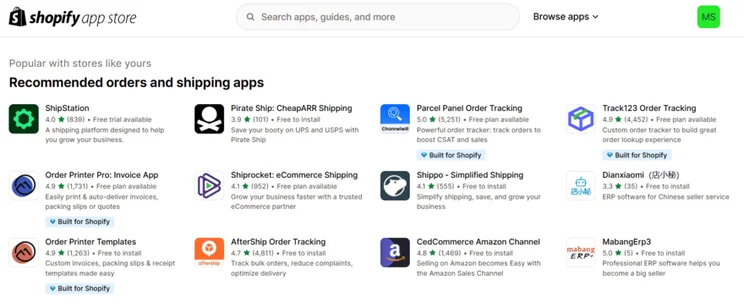
Shopify provides the tools your business needs
Shopify provides your business with both the sales tools and general functionality you’ll need to boost your site’s traffic, grow your business, and connect with your audience. Plus, if you can’t find a feature built-in, Shopify has thousands of third-party apps to choose from.
Best Online Store Templates: Shopify
Of the two builders, Shopify offers the best templates and designs for online stores. People do judge a book (or website) by its cover, so it’s important that your site appears professional and modern if you want to encourage people to shop with your business.
Shopify offers over 1,000 templates to choose from. But watch out for the fees! A small number of Shopify’s templates are free to use (24, to be exact), while the majority have a one-time fee, ranging between $100 and $500. In comparison, Hostinger has roughly 150+ free templates, but they’re not all suitable for an online store – some cater to blogs, portfolios, and other website types.
I was excited to see the introduction of Shopify’s AI store setup feature in March 2025. While the builder still lacks a full AI website builder, like Hostinger, the AI store setup takes a quick prompt (a few words summarizing your business and products) and generates three custom templates for you.And, with the recent Shopify Editions: Summer ’25, I can now use AI to generate custom sections for my site, making it easy to personalize templates to suit your business.
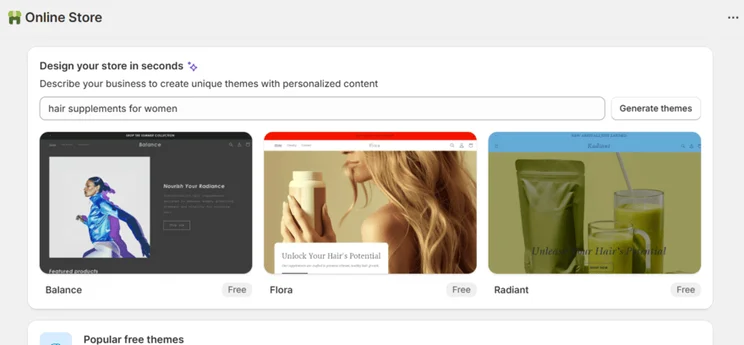
Shopify's templates cater to various industries
Shopify has an impressive range of free and premium templates built with online stores in mind, meaning they’re already equipped with the pages and features your store will likely need. And Shopify’s new AI store setup feature is a great way to generate tailored templates for your business.
Best AI Tools: Hostinger
Hostinger beats Shopify when it comes to AI-powered tools, which is why I highly recommend Hostinger for beginners and tech novices since it’s a great platform if you need a helping hand.
Shopify, in comparison, has a small handful of AI features, mostly offering support with business tasks and products, such as AI-generated product descriptions. I noticed during my tests that Hostinger’s AI tools were more readily accessible and well-rounded:
- AI website builder (and an AI builder for WordPress sites)
- AI image generator
- AI SEO tools
- AI writer
- AI blog generator
- AI product generator
- AI logo maker
- AI page generator
- AI email marketing
You’ll need to upgrade to Hostinger’s Business Website Builder plan to unlock the complete range of AI tools, including its AI writer. If you choose the cheaper Premium Website Builder plan (which lacks the ability to sell online), you can only access the AI website builder.
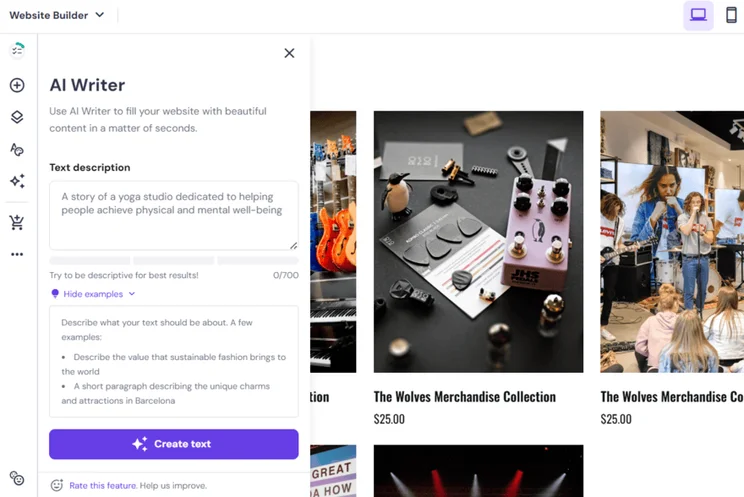
Hostinger has a better range of AI features
While Hostinger can’t compete with Shopify’s sales features and website functionality, Hostinger comes out on top when it comes to AI tools. You can expect AI assistance throughout your website builder journey, whether you’re designing your website, adding new products to your inventory, or assessing the user experience.
Best Business Support: Shopify
Shopify provides better customer support than Hostinger. I’ve listed what each builder offers below so you can compare them side-by-side:
Shopify’s Customer Support
✔️ Shopify Sidekick
✔️ 24/7 AI assistant
✔️ Email support
✔️ Phone support (for urgent issues)
✔️ Community forum
✔️ Shopify Academy, featuring online courses
✔️ Shopify Help Center
Hostinger’s Customer Support
✔️ Live chat
✔️ AI assistant, Kodee
✔️ Email support
✔️ Help Center
❌ Phone support
❌ Community forum
❌ Online courses
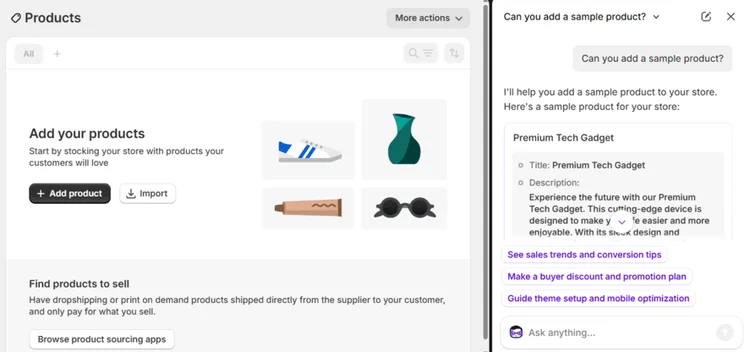
Shopify delivers 24/7 customer support
Shopify has great 24/7 customer service, providing a lot of options, from AI live chat to email support. I also loved using the newest AI feature, Shopify Sidekick, which I could toggle on and off within my account whenever I had a question or needed help with a certain task, such as adding products.
How We Test Ecommerce Website Builders
To fairly compare Hostinger and Shopify, I’ve used our annual research findings and conducted hands-on testing to assess their features and usability. Our thorough research process focuses on seven key areas of investigation that we know are important for small businesses, and weights these areas according to how significant they are:
- Sales Features: 30%
- Design Features: 15%
- Help and Support: 15%
- Website Functionality: 15%
- Pricing: 10%
- User Experience: 10%
- Reputation: 5%
Final Verdict: Is Hostinger or Shopify Better?
I’ve been using Hostinger and Shopify for years, but this year’s round of research continues to show that Shopify is the best builder for online stores. This is largely because of Shopify’s impressive sales tools and 24/7 support for business owners.
Of course, Shopify won’t be right for everyone. It’s expensive for smaller businesses, and its customization options can feel limiting. So, if you’re looking for an affordable and user-friendly builder, Hostinger could be the right fit. That said, you get what you pay for with Shopify, and that’s a recognizable and powerful platform for anyone looking to sell online.
While I’ve given you my expert opinion after hundreds of hours of testing and analysis, the best advice I can really share is to test out each builder for yourself by using their free trials. This will give you a good feel for the builder’s features and editor, so you’ll know if you’re happy to use it before you subscribe to a paid plan.


0 comments