
I Put Shopify vs WooCommerce to the Test: Which Do I Recommend for 2026?

We may receive a commission from our partners if you click on a link and purchase a product or service on their website. Learn more

A smiling headshot Holly Choules
Written By
natasha_willett
Reviewed By
Updated on March 12, 2026
Advertisement
We may receive a commission from our partners if you click a link and purchase a product or service. This does not impact our ratings, which are determined by years of hands-on testing and expert research.
1 Shopify
Basic
Start Free Trial

Starting from $29/mo

$1/mo for 3 months

  • 2.9% + 30¢ transaction fees
  • Up to 77% shipping discount
  • 24/7 chat support
2 Shopify
Grow
Start Free Trial

Starting from $79/mo

$1/mo for 3 months

  • 2.7% + 30¢ transaction fees
  • Up to 88% shipping discount
  • 5 staff accounts
3 Bluehost for Woo
Ecommerce Essentials
See Bluehost Pricing
  • 2.9% + 30¢ transaction fees
  • WooCommerce auto-install
  • 24/7 chat support
4 Bluehost for Woo
Ecommerce Premium
See Bluehost Pricing
  • 2.9% + 30¢ transaction fees
  • 1-click checkouts
  • Set up bookings & appointments

When comparing ecommerce website builders in our most recent round of testing, Shopify came out as the best option for growing online businesses selling a large number of products, thanks to its unparalleled sales features and scalability.

However, the right platform for you will depend on your needs. After 300 hours of data collection and first hand testing, I’ll help you decide the best platform in my honest review of Shopify and WooCommerce below.

I’ve refreshed this article to ensure that it’s up to date for 2026. When making my edits, I fact checked important details like pricing any key website builder changes since our last update in December.

Unlike Shopify, which is an all-in-one website builder, WooCommerce is an ecommerce plugin that runs on top of WordPress. It requires more work to set up, with users needing to find a website domain and host, install plugins, and potentially add some basic code to modify their store.

Need a quick comparison of both builders? You can use the table below to inform your final decision.

0 of 0
Starting Price
Transaction Fees
Free plan or free trial
Number of templates
Free custom domain
AI website builder
Payment options
Recommended for
shopify
woocommerce square logo

Shopify

WooCommerce

2.9% + $0.30

2.9% + $0.30 (+1.50% for non-US customers)

3-day free trial

Free to install

1,000+

100+

close
close
check
close

100+ including: Shopify Payments, Paypal, Klarna

20+ including: Stripe, PayPal, Square, WooCommerce Payments

Businesses who want to easily scale their store as they grow

Businesses that want more control over their store

You could also watch our Shopify vs WooCommerce video for a visual comparison of both platforms:

The Winner

WooCommerce’s flexible pricing helps you find costs that suit your business

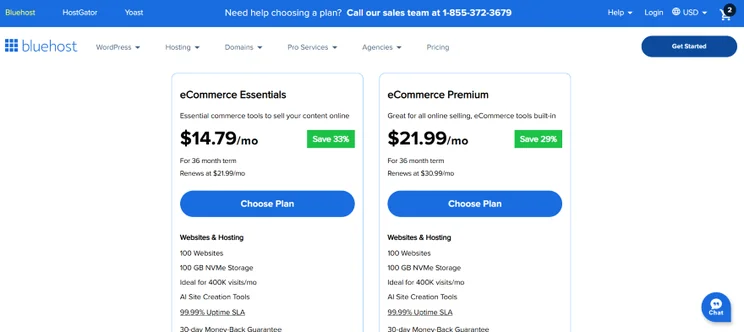
Despite the need to pay for domains and hosting yourself, WooCommerce’s flexibility allows you to find pricing that suits your business, and you can find affordable ecommerce hosting from $14.79 with Bluehost.

Before diving headfirst into an ecommerce platform, you need to look at the pricing plans available. Do they fit your budget and come with the features you need? Let’s see.

How Much Does WooCommerce Cost?

  • Free plugin
  • No set pricing plans
  • Hosting costs depend on your web host 

WooCommerce is the cheapest platform at first glance, since it’s a free WordPress plugin offering ecommerce capabilities. However, it’s also a selfhosted platform, meaning that you’ll be responsible for finding and purchasing a domain, a suitable WooCommerce site host, and additional plugins to install — this is where costs start to rise.

For your reference, I’ve broken down the average WooCommerce pricing for each of these factors:

Key purchase / Average price
Domain registrar $10–$20/year
Hosting provider $36–$5,400/year (ranges from inexpensive shared hosting to pricier dedicated hosting).
Themes Free–$130/year
Additional plugins Free–$129/year

Total monthly costs = $4-$480/month

If you’re confident budgeting and deal hunting, you won’t find it challenging dealing with these additional costs. WooCommerce is a great option if you enjoy searching for flexible pricing that’ll suit your store’s budget, or if you want more control over how you spend your money — be it on cheap shared hosting or your go-to domain registrar.

A Bluehost webpage displaying two eCommerce hosting plans: Essentials for $14.79/mo and Premium for $21.99/mo, with features listed.
I found affordable WooCommerce online store plans from $14.79/mo. Source: Website Builder Expert

How Much Does Shopify Cost?

  • Between $29-$299 per month (billed annually)
  • 3-day free trial
  • Get your first three months for $1 per month

Shopify’s pricing, ranging from $29 to $299 per month (billed annually), isn’t the cheapest option if keeping total costs low is your main priority. Additional fees from paid templates, apps, and transaction fees can also add up over time, which isn’t great if you’re on a tight budget.

But the quality of Shopify’s built-in features make this investment worth it. On each plan, you’ll receive a pre-built or custom theme, multiple sales channels, ecommerce app access, and Shopify POS for in-person transactions. This is all you need to set up a successful online store without much technical expertise.
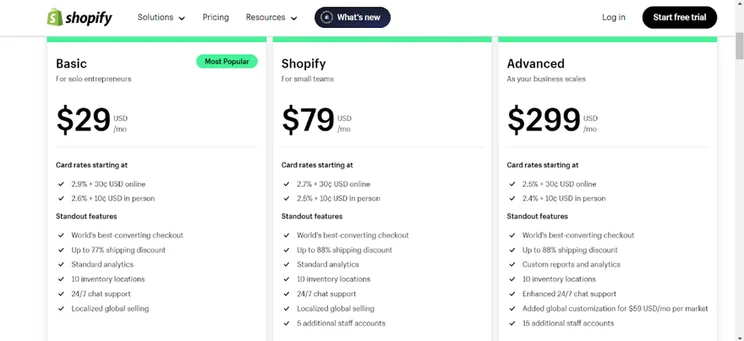
Three Shopify pricing plans
I found Shopify's plans expensive, but I was also impressed by the number of features included, from shipping discounts to analytics. Source: Website Builder Expert

How High Are Each Platform’s Transaction Fees?

Not all ecommerce platforms charge a transaction fee per sale, but you will always encounter processing fees based on the payment gateway you process orders through, such as Stripe or Safepay.

Shopify’s transaction fees vary based on the plan you’re on. For example, the Basic plan is 2.9% plus 30¢ for all online transactions. However, if you use Shopify’s in-house payment processor, Shopify Payments, you can avoid these transaction fees. 
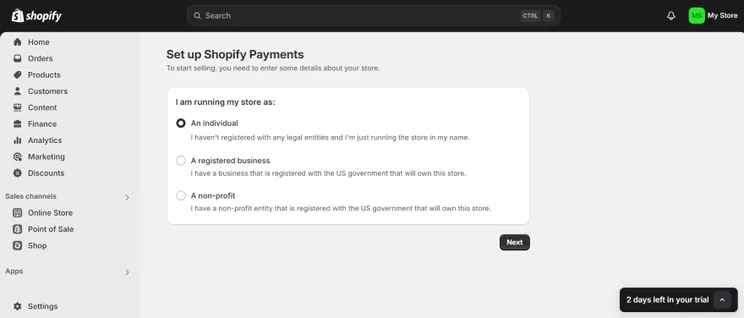
Screenshot of a user's screen when setting up Shopify Payments from their dashboard
Shopify Payments was built into my dashboard, so it didn't take long for me to install it and get started. Source: Website Builder Expert

Though WooCommerce doesn’t take a transaction fee from each sale, the payment gateways you choose will. Rates can vary depending on the provider you choose. As an example, WooCommerce’s WooPayments plugin offers standard pricing from 2.90% plus 30¢ per transaction (the same as Shopify’s Basic plan).

The Winner

Shopify’s sales features go above and beyond WooCommerce’s

From a straightforward inventory system to various shipping options, Shopify’s strong built-in sales features help large-scale stores to thrive.

Following our latest round of in-house research , Shopify remains the best platform for sales features, which includes inventory organization tools, in-person sales options, and flexible shipping.

What Inventory Tools Are There?

Shopify is the perfect ecommerce platform for stores with a large inventory due to its plethora of AI tools for stock management, customer journey optimization, and commission sales.

For instance, the Shopify Renaissance Winter’26 update released powerful AI features to drive ecommerce sales:

  • Agentic storefronts: Sell your products directly in AI conversations on key platforms, such as ChatGPT, Gemini, and Perplexity.
  • Product Network: Suggests complimentary products from other Shopify merchants that you can sell on your store, for a commission. Recommendations are data-driven and hyper personalized to your audience, driving revenue and improving customer satisfaction.
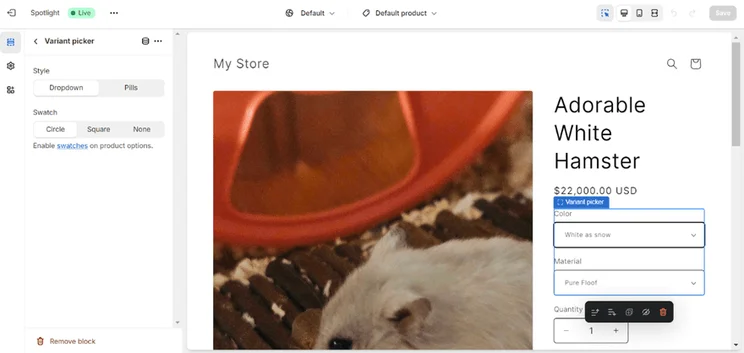
Product settings in Shopify store showing an item photo, name, price, and variants being edited
Adding items was an easy process because Shopify took me through it. I found out that you can even add variants if you need to. Source: Website Builder Expert

In comparison, WooCommerce’s scalability options are limited. You will receive a degree of inventory control – mainly through built-in features like stock tracking and product variations – but you will also need to download plugins to access more features. The platform also lacks inventory automations like Shopify, making managing your WooCommerce inventory much more tedious.

Because of these limitations, WooCommerce is more suitable for small to medium-sized stores. If you’re already using WooCommerce but are looking to scale your inventory, Shopify is the platform to switch to.

Are There a Good Number of Shipping Options?

So a customer has snapped up an item and you need to make sure it gets to them. How will you make that shipment? If using Shopify, you can pick from four courier shipping options: USPS, UPS, DHL Express, and FedEx. Even better, you can use Shopify Shipping to print discounted shipping labels that’ll save you some cash.
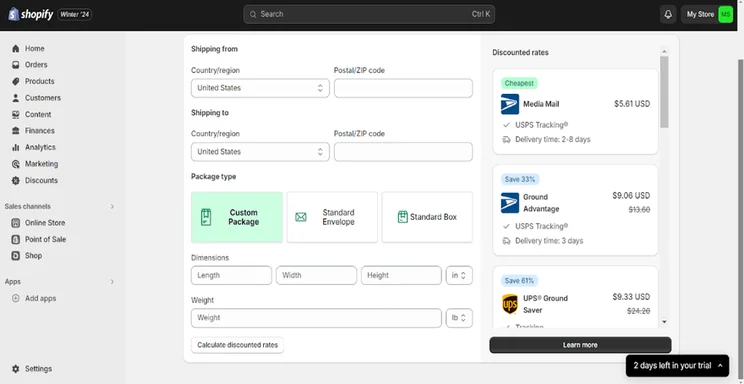
Shopify store settings showing shipping options
To see discounted shipping rates on Shopify, I filled in this form with my parcel details and the rates appeared in the sidebar. Source: Website Builder Expert

This still hasn’t covered the variety of Shopify’s shipping options that are accessible from the dashboard:

  • International shipping
  • Free shipping
  • Local pickup for buyers to collect their parcel from a specified location
  • Estimated delivery dates shown at checkout
  • Custom shipping rates
  • Delivery customizations that must be carried out via your external app of choice

WooCommerce does offer essential shipping options with its built-in system think free shipping, DHL and USPS label printing, and shipping zones based on area but your options will be limited unless you add additional plugins. To save you from this hassle (unless you like the flexibility of adding your own plugins), Shopify will streamline the shipping process for you.

What Payment Methods Are Available?

Taking online payments isn’t a headache with Shopify. There are over 100 payment methods to choose from, alongside a native Shopify Payments feature that offers a streamlined and stress-free way to accept and manage payments from your dashboard.

Sellers can easily accept payments for their stores, while buyers have the option to process their orders through payment providers. This includes:

  • Credit and debit cards like Mastercard, Visa, American Express, and Discover
  • Digital wallets like Apple Pay, Google Pay, and Amazon Pay
  • Buy now, pay later plans like Klarna, Afterpay, or ShopPay

Do note that transaction fees will vary depending on the payment provider used, so be sure to check these beforehand.

WooCommerce is also flexible with its payment gateways, but only offers over 20 to choose from. Through extensions, you can integrate your store with PayPal, Stripe, Amazon Pay, and Klarna.
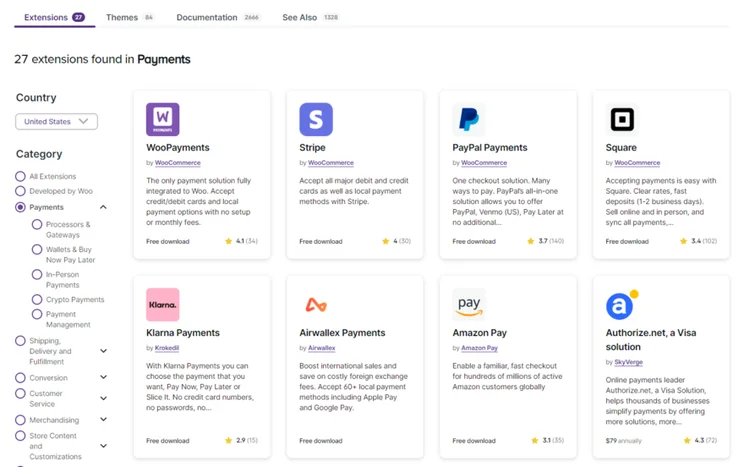
Page of results on WooCommerce Extensions showing a range of payment gateways with filter set to USA
I could download WooCommerce extensions to add payment methods to my store. Source: Website Builder Expert

Alongside online payments, Shopify provides point of sale systems that allow you to sell in-person – another great way to increase your business’ sales by moving beyond your online retail space.

WooCommerce no longer offers its own POS, which was discontinued. Instead, you’ll need to download an app from the store, such as Kestrel’s Lightspeed POS that costs $249 per year to use.

The Winner

Shopify’s marketing features will help your online store grow quickly

Even if your marketing knowledge is limited, Shopify makes it easy to grow online thanks to its built-in SEO, email marketing, and analytical tools, which WooCommerce doesn’t have.

To boost traffic and sales, you’ll need to promote your store with a foolproof content marketing strategy. Here’s how Shopify and WooCommerce’s marketing features compare.

What SEO Tools Do They Have?

An understanding of basic SEO practices will ensure that your product listings are visible to users on search engines like Google and Bing.

Shopify’s SEO tools offer easy, integrated ways to optimize your store for search. These include:

These features offer a brilliant way for beginners to grasp SEO regardless of their technical knowledge. However, since they’re all baked into Shopify, you’ll have less control over your site’s performance if you want to make more technical adjustments yourself.
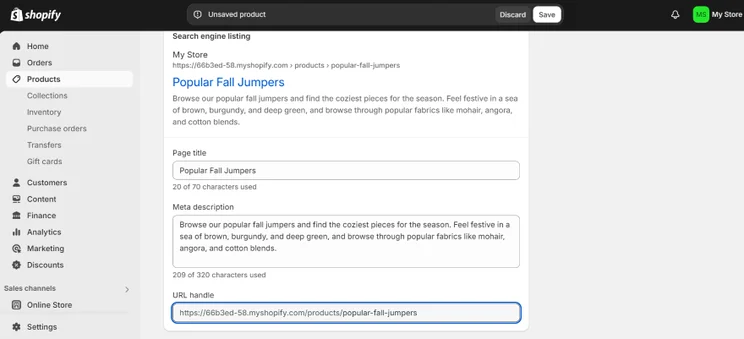
Screenshot of Shopify's dashboard product page with an area to change meta title, meta description, and custom URL
When adding new products to Shopify, I could add a meta title, meta description, and custom URL to ensure that the listing page was SEO-friendly. Source: Website Builder Expert

But what about WooCommerce? Since it allows you to add your own code to your website, it’s ideal for tech-savvy users who want more control over their SEO. 

But be careful. If you ever need to change WooCommerce website hosts, the downtime will temporarily impact your SEO while you migrate your online store to a new host. Definitely something to think about when considering WooCommerce over Shopify.

Can I Set Up Email Marketing?

To re-engage users who are already interested in your store, it’s highly recommended that you set up email marketing campaigns to notify your email list when there’s a new update.

Shopify comes with Shopify Email, a built-in feature that provides users with professional email marketing templates. An easy way to create and manage campaigns all in one place, you’ll receive a selection of pre-made designs and an intuitive drag-and-drop editor to work with, alongside automations to speed up the entire process.
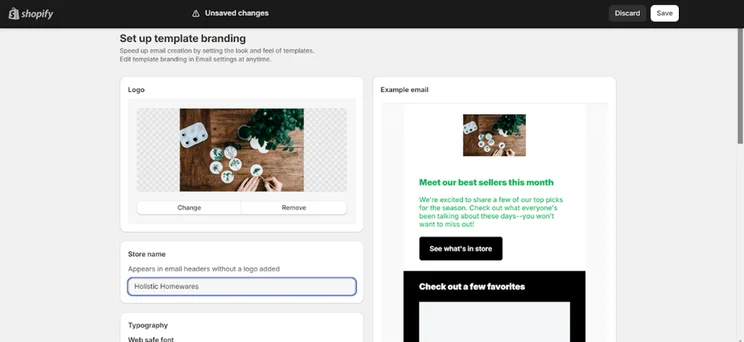
Setting up an email template in Shopify
Setting up an email campaign was simple. I was able to add an eye-catching photo, change the font and text color, and create a cool headline. Source: Website Builder Expert

Whether you’re on the Basic plan or Shopify Plus plan, you’ll get to send 10,000 free emails at the beginning of each month, with additional emails starting from $1 per 1,000 extra emails.

But if you’re keen on using another email marketing platform — like Klaviyo, Mailchimp, and Privy — you can download their respective apps from the Shopify app store.

WooCommerce, however, doesn’t have a built-in email marketing feature. Instead, you’ll want to delve into the available plugins and look for a suitable provider. As a recommendation, Mailchimp and MailPoet have plugins that are free to download from WooCommerce’s extensions page.

Can I Track My Store’s Progress?

With SEO and ecommerce email marketing driving traffic to your online store, you’ll probably be keen to keep track of your store’s visitors, clicks, and conversions. No matter which pricing plan you’re on, Shopify has store analytics you can view in the dashboard.
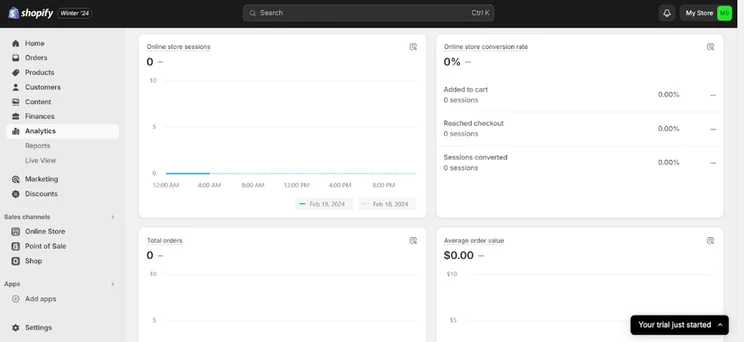
Example of Shopify analytics in the store's dashboard
On Shopify, I found metrics for conversions, total orders, online store sessions, and much more. Source: Website Builder Expert

Listed below are just a few of the analytics you’ll find on your Shopify dashboard:

  • Total sales
  • Total orders
  • Average order value
  • Top selling products
  • Returning customer rate
  • Sales by traffic source

The free WooCommerce Analytics tool helps you track your website’s progress through order attribution reports, such as orders by channel, source, or device, all of which will reveal important store metrics.
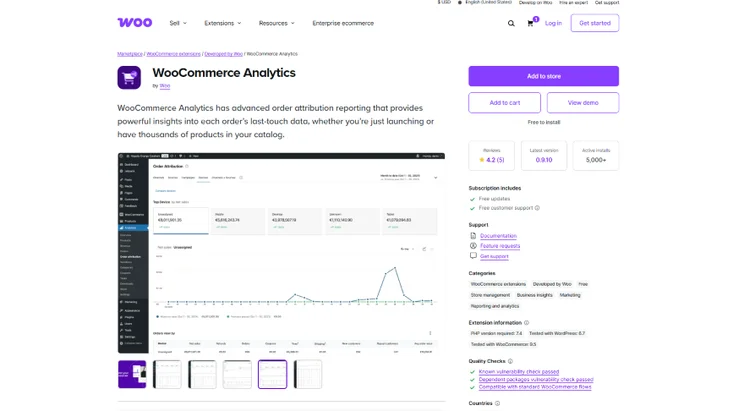
Page to download the WooCommerce Analytics extension with product photos and listed features
I could easily download WooCommerce Analytics from the extension store. Source: Website Builder Expert

For further insights, there’s also a free Google Analytics tool available where you can see where your store traffic is coming from.

The Winner

Shopify’s easy-to-use editor allows you to set up fast

Thanks to its intuitive, user-friendly editor, Shopify is more suitable than WooCommerce for setting up shop under a tight schedule. If you’re new to ecommerce platforms, you won’t feel intimidated either since Shopify will take you through each step.

If you need to set up your store fast and dive straight into making your first sale, Shopify will speedily lead you through the entire process, from uploading your first items to choosing the right template.
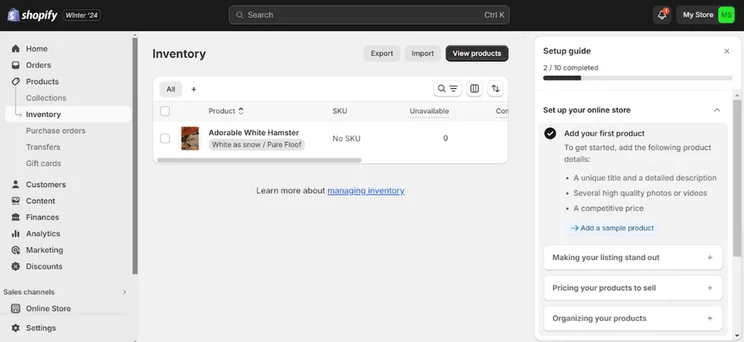
Shopify dashboard showing adding a product to the store inventory
Shopify encouraged me to add my products immediately. The steps in the setup guide were clear and easy to follow. Source: Website Builder Expert

Shopify is the best fit for large scale stores. From the outset, I was asked to upload my products before I picked out a template and started editing my store. This order was intuitive, since it allowed me to edit my item listings and create variants as I went along.

I could even upload a bulk number of items via CSV, which is especially useful if you’re switching to Shopify from another ecommerce platform and want to migrate your listings over.

Once you’ve uploaded your items, it’s plain sailing while you choose a template and add sections like contact forms and featured collection lists to your website. Also, there’s much less to worry about overall because its plans already include built-in hosting and an SSL certificate.In contrast, setting up with WooCommerce will take longer if you’re a beginner starting from scratch. The editor itself isn’t difficult to use, but you’ll need to think about your domain, hosting, and additional plugins while you set up, alongside additional tech skills like coding.

The Winner

Shopify’s responsive and sleek templates will make your online store look professional

The clear winner is Shopify with its stylish templates containing user-friendly features and optimization for phone and desktop.

Though both Shopify and WooCommerce offer polished store designs, I found that Shopify’s mobile-optimized themes will give your homepage some flair and entice users to keep clicking through your site.

How Many Shopify Themes Are There?

I could browse through over 1,000 Shopify themes, of which 24 are free and the rest require a one-off payment to use. This number has improved since our last update, since Shopify added hundreds of new free themes to its collection.

Each theme offers practical features for seamless site navigation, including mega menus, quick views, and stock counters. Just be aware that the best themes must be paid for, with the average prices ranging from $100 to $500 per theme.
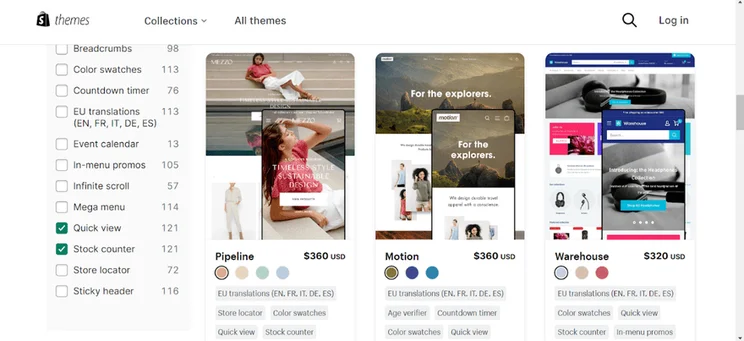
Results for Shopify themes filters set to quick view and stock counter features, showing three theme results
I wanted specific features for my Shopify store (quick view and stock counter) and I found what I was looking for on Shopify’s templates page. Source: Website Builder Expert

How Many WooCommerce Themes Are There?

When using WooCommerce, you can choose from 100+ specified WooCommerce designs, or pull from WordPress’ existing theme catalog when designing your online store.

When looking through WooCommerce’s main theme store, I could only find three free templates, while the rest required a one-off payment to use. This ranged between $47-$129 per theme, a bit cheaper than Shopify’s selection!
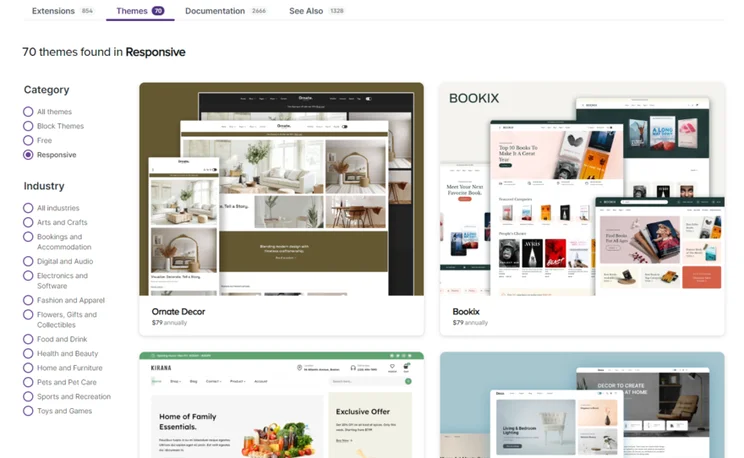
WooCommerce Theme Store showing responsive themes
I found around 70 "responsive" themes in the WooCommerce catalog when using the filters. Source: Website Builder Expert
The Winner

Shopify’s security features make it easy to protect your store against threats

Thanks to the variety of security features included in its plans, Shopify is the best ecommerce platform to keep store and customer data safe and secure.

Since Shopify is a dedicated ecommerce platform hosting thousands of online stores, it’s serious about the security measures in place to protect sellers. This makes Shopify the best platform for ecommerce security overall.

Even with a Basic Shopify plan, you’ll receive all of the security features listed below that we found in our hands-on testing:

  • Default SSL Certificates for secure website data
  • A fraud analysis tool
  • 2-factor authentication
  • Dedicated customer login areas so users can manage their security settings all in one place
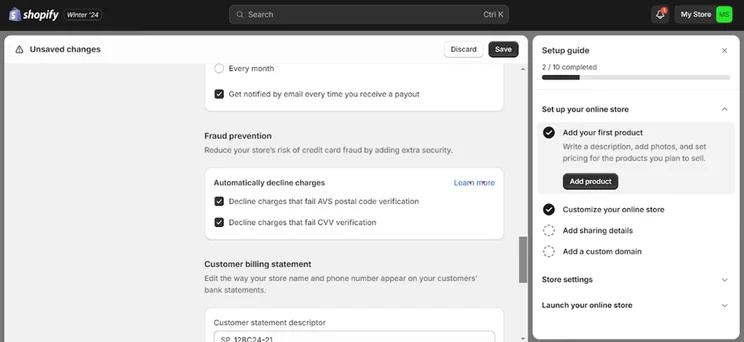
Shopify Payments fraud detection tool setup guide in progress
It was easy to find Shopify Payments’ fraud detection tool. I was relieved to know that these security measures are in place. Source: Website Builder Expert

WooCommerce does offer security measures, like 2-step authentication for admin accounts, but additional features will take longer to set up. In fact, more self-management is needed to protect a WooCommerce store against threats.

Since you’d be looking for an ecommerce hosting provider yourself, you’ll have to make sure that the provider you pick offers adequate security features. WooCommerce recommends users to look for reputable hosts, like Bluehost, that provides an SSL certificate – a necessity for any safe online store. 

You’ll also need to take security plugins into account. Popular WooCommerce plugins that cover all-in-one-security include Jetpack, Shield Security, Sucuri Security, Security Ninja, and Wordfence Security all scoring four stars or more on WordPress’ plugins store page.
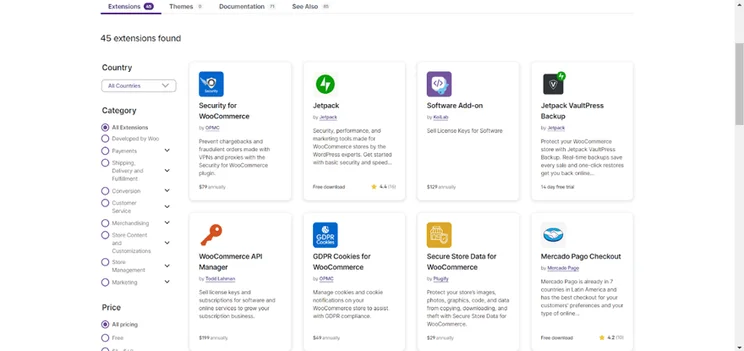
WooCommerce Extensions page showing a list of security plugins
It took me a while to sift through WooCommerce's security extensions and find the best one for my website. Source: Website Builder Expert

This additional research on secure hosts and additional plugins can take time, so Shopify will give you better peace of mind for security since it’s all included in your plan.

The Winner

Shopify’s help and support services make it easy to get assistance

Shopify’s robust customer support and valuable help resources make it easy to receive help and support when building your online store. Because these features are all in one place, it’s easy to find what you’re looking for.

Anyone setting up their ecommerce store for the first time will need a little help along the way. For this reason, I recommend Shopify as the best platform for reliable help and support. Its customer service lines are available around the clock via its live chat feature.
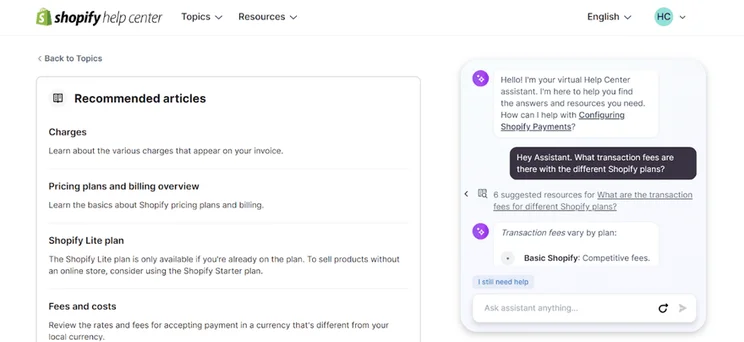
Using Shopify's live chat support
The Shopify live chat gave me plenty of pointers when I wanted to know more about its transaction fees. The chat linked me to useful resources that answered my questions. Source: Website Builder Expert

Alongside Shopify’s seamless customer support, its website is home to useful resources that’ll help support you at each stage of your journey. Among these resources is the Shopify Help Center that includes everything you need to know about the platform.

Quote
💡 One thing I noticed during testing…

I recommend browsing Shopify’s Help Center resources if you want to take your store to the next level. During testing, I found news on monthly Shopify-related webinars, as well as useful business lessons from the Shopify Academy. You can even showcase your newfound knowledge by displaying badges on your website!

A smiling headshot Holly Choules
Holly Choules Writer

In comparison, WooCommerce makes it trickier for users to find the help and support they need. Although the platform has comprehensive information in documentation and blog posts, many users find themselves digging through community forums to find answers to a specific question, or even watching YouTube videos from veteran WooCommerce users.

On the flipside, you won’t ever feel alone when using WooCommerce. Since it’s such a popular platform, you’ll find a wealth of user-led resources across the web that will help you while you build your online store.
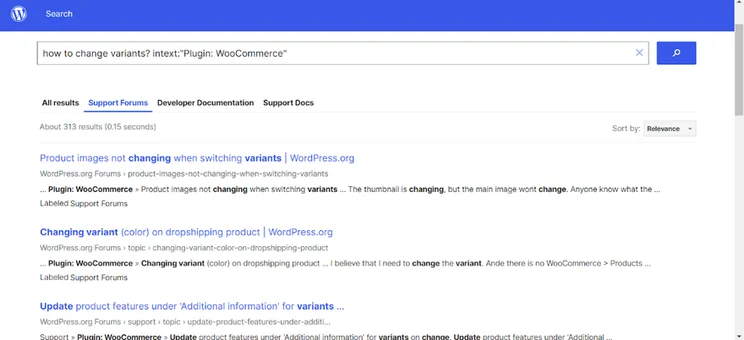
WooCommerce help center for search term "how to change variants"
I used WooCommerce’s dedicated community forum to look for answers to a question, but found it time consuming to scroll through each page. Source: Website Builder Expert

Finding additional support becomes even more strenuous with the addition of plugins. Since they come from third-party companies, you’ll need to look elsewhere if you’re having an issue with a specific extension. So, if you’re looking for centralized help and support at every step of the way, I recommend Shopify.

If you’re keen to switch from either platform, you’re probably wondering how easy it is to transfer your store over. Unfortunately, store migration is rarely a quick process, especially considering the amount of website content and product files that you’ll need to transfer. However, you do have a few options when switching between the platforms:

  1. Using a CSV: On both Shopify and WooCommerce, you can download your product files and customer data via CSV. Once you’ve downloaded these files, you can transfer the data to your new store. However, this doesn’t cover website content, which you’ll need to transfer manually.
  2. Using an app: You can download apps for Shopify and WooCommerce that’ll help you migrate your store. If you want to switch to Shopify, the platform is working on its own Store Migration app, but it’s currently in the early access stage and isn’t available to all users yet.
  3. Hiring a professional: If you have the budget for it, you can hire a professional to complete the migration for you. Shopify Partners and Woo Partners both have lists of verified professionals to choose from.

Remember, when you make the switch, you’ll also need to transfer your domain, choose a new theme, recreate your store’s key pages, and complete any necessary URL redirects to prevent dead links from appearing on your new website.

Also, if you’re transferring to WooCommerce’s open source platform, then you’ll need to buy an ecommerce website host first to get set up.

Finding it difficult to choose between Shopify or WooCommerce? To help you decide, it’s useful to think about which features to look out for based on your unique needs. Below are a few pointers I’ve come up with to help you get started.

Will the platform help me scale over time?

  • Strong inventory management tools
  • Ability to create variants on products in multiple styles
  • Varied shipping options that ship globally and offer discounted rates
  • In-depth analytics handling large amounts of data from visitors

Will the store be quick and painless to set up?

  • Pre-made templates
  • Intuitive store editor
  • Prompt customer service to resolve any technical issues along the way
  • Built-in security measures

Will there be any additional costs over time?

  • Free extensions
  • Free themes
  • Reasonably priced plans that features the key features you’re looking for
  • Special offers on plans
  • Good transaction fees

Will the platform’s marketing features help me grow my store?

  • Social media integration
  • SEO
  • Email marketing
  • Tracking tools to follow user behaviors

Will I have access to additional features when needed?

  • App market to download additional extensions from
  • Price plan upgrades when your online start scales up

To compare Shopify and WooCommerce, I applied insights from our ecommerce website builder research. This consisted of over 300 hours of data collection, alongside an examination of 283 key areas of investigation.
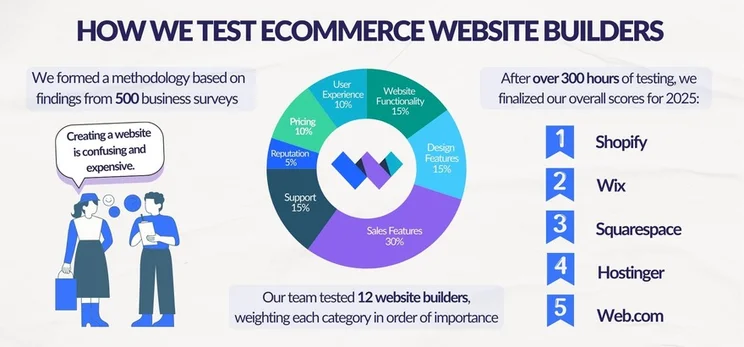
Graphic breaking down Website Builder Expert's ecommerce website builder testing into three steps: conducting business surveys to build a methodology, testing website builders, and finalizing scores

Our findings were split into seven areas of investigation, which were then weighted based on their overall importance to businesses looking for an ecommerce builder:

  1. Sales features – 30%
  2. Website functionality – 15%
  3. Design features – 15%
  4. Help and support – 15%
  5. User experience – 10%
  6. Pricing – 10%
  7. Reputation5%

Alongside our in-house research, I also took part in hands-on testing where I got up close and personal with each platform. So, I’ve also added my firsthand experiences to this article to better help you identify a builder that suits your needs.

After juggling the pros and cons of each builder, it’s clear that Shopify is the overall winner. I was impressed by its huge range of built-in sales features and seamless website editor, as well as its scalability capabilities fit for large businesses. Our research supports this conclusion, since we named it the best ecommerce builder out of all the platforms we tested.

But because everyone’s needs are different, let’s briefly summarize who Shopify and WooCommerce are best suited for.

  • Shopify’s tailored ecommerce features will help your business grow over time with ease. Its intuitive editor, brilliant inventory options, and prompt customer support means you’ll receive everything you need to manage and grow your store.
  • WooCommerce offers more flexible pricing and customization options. It’s better for two kinds of users: those with technical know-how, and those who want more control and personalization options over their store.

Find Out More

Read our Shopify review for a more detailed look at its features and pricing

Read our WooCommerce review for more information on this platform’s pros and cons

Written By

A smiling headshot Holly Choules

Holly Choules is a Writer at Website Builder Expert with a background in researching and crafting engaging content for digital platforms. In previous roles, she has demonstrated her wordsmith skills by writing for public facing brands in a range of industries. After gaining hands-on experience using leading website builders, like Wix and WordPress, she is now keen to share her findings through informative, easy-to-follow articles that help small business owners get online and grow their presence.

Since joining the team in 2024 and transitioning into the tech sphere, Holly is passionate about applying her three years of content writing experience and upholding Website Builder Expert’s position as an authoritative source on website builders, ecommerce, and digital marketing.

You can read Holly’s articles below, or connect with her on LinkedIn.

More about

Reviewed By

natasha_willett

Natasha brings her expert credentials – a BSc, Ma, and MMRS – to Website Builder Expert. Natasha has qualifications in Advanced Statistical Analysis, MRS certificate in Market Research, Brand, Finding the Story in the Data, and Big Data: Measuring and Predicting Human Behaviour. These have allowed her to carefully analyze over 64 providers across website builders, ecommerce web builders, and hosting.

Natasha began building websites when studying sports science, originally using Weebly to create websites to help students learn in a more interactive way. During her first week at Website Builder Expert, she realized that website builders would become important in giving business owners full control over their websites. She began creating a rigorous methodology of research that centered around testing providers and products against a large set of mixed criteria turned into quantitative findings, comparing value for money, design, ease of use, and more. All to provide the most honest and objective insights rather than just looking at their claimed features.

In five years at Website Builder Expert, Natasha has attended multiple expos in her field, including ESOMAR, MRS, eCommerce Expo, Ad World, Digital Customer Engagement Summit, and IMRG, just to name a few. Natasha has also worked alongside website builders directly to share her research with them, so that they might improve their products for users.

She’s clocked an impressive 9,600 hours of product research and testing, pulling data from multiple sources and providing the Website Builder Expert team with the scores and product details they need to give you the best recommendations to succeed online.

More about

69 comments

Your email address will not be published. Required fields are marked *

  • georgia

    Can Shopify intergrate with biscount ? How could i link them ?

    1 reply

    • Jordan Glover
      Jordan Glover

      Hi Georgia,
      Thanks for your comment. At present, I don't think Shopify and Biscount can be integrated.
      Best,
      Jordan

  • Roshni

    Which one is better for to set up a multi vendor seller platform?

    1 reply

    • Jordan Glover
      Jordan Glover

      Hi Roshni,
      Thanks for your comment. I'd recommend WooCommerce for this one. WordPress in general will allow you to create a more complex site, like one for multi vendors.
      I hope this helps,
      Jordan

  • Nat Miletic

    Great article! Really good points.

    Another thing I would evaluate is website performance. I have helped a few clients migrate from Shopify due to poor website performance (load times and no caching options) and also to lower their costs.

    1 reply

    • Jacqueline Renouard
      Jacqueline Renouard

      Hi Nat,
      Thanks so much, glad our article could help you decide between WooCommerce and Shopify! Thanks for your suggestions, but we do test the speed and other factors for website performance! But thanks for keeping us on our toes Nat.
      Warmly,
      Jacqueline

  • Mathew

    I've been using woocommerce for over 6 years. However as clients demands have grown with their business I am biting the bullet and getting to grips with shopify. However, I still prefer woocommerce as a personal choice.
    By the way, I always recommend my clients to make use of the cart2cart's migration preview option (it's free) - it allows to see how your current data will look like on the new platform before making the final choice. Veru useful, recommend.

    1 reply

    • Jordan Glover
      Jordan Glover

      Hi Mathew,
      Thanks for your comment. I hope all is going well with your Shopify journey! Cart2Cart is an option that we recommend too, particularly for those who aren't as tech-minded as others and want a straightforward way of transferring their existing store to a new platform.
      Thanks,
      Jordan

      1 reply

      • Lakissa

        I need help my WooCommerce webpage.. I have Godaddy with Woocommerce

        1 reply

        • Jordan Glover
          Jordan Glover

          Hi Lakissa,
          Thanks for your comment! I'm happy to try and help you – what are you experiencing trouble with?
          Thanks,
          Jordan

  • Chuhao Liu

    Very clear and helpful article! I decide to choose Shopify for it is simpler. Maybe migrate to woocommerce if the business grows quickly for reducing cost.

    1 reply

    • Samuel Jagger
      Samuel Jagger

      Hi Chuhao! Thank you for leaving a comment! I'm glad you enjoyed the article. We recommend Shopify for beginners, but we love that you have a plan if you get too big! You should always reach for the stars! All the best - Sam

  • Lilian wanjere

    This was so helpful. I got to know the difference between woo and shopify. I like woo ecommerce better due to the own customization though it got its huge disadvantage of not getting abandoned cart notifications. Either way if you don't have a website guy then just go with shopify. The problem will be when moving from shopify to woo ecommerce, you will begin from scratch and consume a lot of time and lose sales..

    1 reply

    • Jacqueline Renouard
      Jacqueline Renouard

      Hi Lilian,
      We're glad you found the article helpful and thanks for sharing your thoughts. To our knowledge you can migrate from Shopify to WooCommerce, there should be no need to start from scratch. Also, there is a way to set up a redirect, so whilst you're migrating your store across, you won't lose out on sales because customers will automatically be redirected to your new store through the old one. There are also apps that can help you migrate stores. All the best!
      Warmly,
      Jacqueline

  • Arjun

    Great comparison. thanks for this. That being said, this post doesnt seem to specify the limitations that shopify has in tiers that aren't shopify plus (which is 2000$ per month). Like checkout page customisation, or problems with conversion pixels in thank you pages etc.

    1 reply

    • Jordan Glover
      Jordan Glover

      Hi Arjun,
      Thanks for your comment and thank you for highlighting that. Cheaper Shopify pricing plans do typically offer less because these are aimed at smaller stores that might not need or want the more advanced features you've listed. Additionally, you can still customize your checkout page using the editor without being a Shopify Plus member. Shopify Plus gives you access to your website's liquid template language, so you can make more technical changes, but you can tailor your checkout page to your brand without it.
      Thanks,
      Jordan

  • Kenneth

    My wife and have been on Shopify for a few years now. It used to have great customer support if you had problems. You could talk to someone. Now they just have hundreds of already 'Frequenty asked Questions' which really isn't good enough. I'm planning to find an alternative with human support not robot support. Disappointed. Thanks. Cheers.

    3 replies

    • Miriam

      Hi,
      This was useful. I am considering a switch to WooCommerce.

      I don't think the Shopify support is great.
      Often live support is not helpful if you have a lot to say. It is easier to type and email type question via their support page (not chat). However, I find they typically take days and days to answer. I find their Facebook chat support workers don't read your questions properly, and typically add a link to a boring, unhelpful article - rather than answer your questions.

      My experience with them has been that they don't want to know your issues. I have also found them to take many months to fix technical issues. When asking for update, you get ignored.

      I do not appreciate them charging transaction fees, especially now that they have increased their plan fees.

      Harsh but honest, I feel they are greedy and offer little - in my personal experience.

      Over the last year or so, I have considered switching to WooCommerce. I am concerned about the need to understand some coding, having the right/necessary apps, and it not costing more in the long run. I think you have to ensure you have the latest updates on apps and there are incompatibility issues. I would not be in a position to hire a developer. So, I may be stuck giving money to Shopify, and that is not something I want to do anymore.

      1 reply

      • Jacqueline Renouard
        Jacqueline Renouard

        Hi Miriam,
        So sorry to hear the challenges you've had with Shopify support. The good news is you don't need to be good a coding to migrate a website manually from Shopify to WooCommerce! All you need to do is:
        - Export and download your product data from Shopify.
        - In your WordPress dashboard, navigate to WooCommerce → Products.
        - Select "Import" at the top. You’ll find a built-in product CSV importer which will make the process easier.
        - Click "Choose File" and select the "CSV" file that you want to import. Click Continue.
        - You’ll see the Column Mapping screen, where WooCommerce automatically attempts to match the column name of your Shopify CSV file to WooCommerce product fields. You may need to map some of these on your own; do so using the dropdown menus to the right of each row.
        - Select "Run the Importer" and wait until the import process is finished.

        Hope that helps!
        Jacqueline

    • LikeaG

      Hey Kenneth, a heads up that Shopify still has access to 24/7 LIVE chat AND telephone support. Note: to find the options, go to Contact us, you must now Enter something in the search field, THEN click on 'Contact Support' at the bottom of the page. You will see options to contact chat and phone support. The Phone icon will only appear if the phone lines aren't too busy (early AM or late evenings are best, North America time). Chat's will always appear. It's 24/7 and 365 support with live representatives fyi.

    • Jordan Glover
      Jordan Glover

      Hi Kenneth,
      We're sorry to hear you've had a bad experience with Shopify's customer support. We've always found their live chat and phone support to be very helpful and really responsive, but we understand that this might not be the case for everyone. If you're looking for an alternative, we'd recommend checking out BigCommerce. It can support the same sort of inventory as Shopify and also offers 24/7 phone support, live chat, and email, in addition to providing an excellent knowledge center and community forums.
      I hope this is helpful and good luck in the future!
      Jordan

      1 reply

      • Mike

        THanks for this interesting information!

  • Matteo

    I run multiple e-commerce stores using WooCommerce. I pay just over $200 per year for a hosting account with an unlimited number of sites/stores. SSL certificates cost me $50 each per year. There is no per month charge for WooCommerce, it's open source and free, as is the WordPress site you build your store around. If you need a robust website builder that's better than Shopify's, you can purchase a 25 site license of Elementor Pro for $199 yearly. Using Elementor Pro and their theme, Hello Elementor, your site is HIGHLY customizable. If your store has alot of items and photos, you can purchase the Imagify optimization plugin for $10 per month. This combined with the free NitroPack plugin for WordPress, and a free Cloudflare account will get you A+ speed ratings on both GT Metrix and Google Lighthouse. Lastly, if you want more customization of the WooCommerce storefront, the free Woolentor plugin gives you a ton of flexibility in the display of your store and product detail pages.
    With this setup, I can run up to 25 e-commerce sites for under $600 per year.
    If you're looking for a great hosting service, with excellent customer service, and runs on 100% green technology, I highly recommend GreenGeeks. I am in no way affiliated with them, just 25 years of experience dealing with hosting providers. They are by far the best I have worked with.
    No brainer... Woo.

    1 reply

    • Jordan Glover
      Jordan Glover

      Hi Matteo,
      Thanks so much for your comment. We agree that WooCommerce is an awesome platform for building an online store, and it's totally possible to keep your costs down, too. We're also a fan of GreenGeeks and we're glad to hear you've had such a good experience with them.
      Regards,
      Jordan

  • Roger

    Thank you for your detailed article.

    How about woocomerce in wordpress.com business plan? it only cost around $200/year.

    I was using woocomerce in self hosted VPS, and indeed it need WP security plugin and server security too, because my site was targeted by hacker bot with hundreds attack each day. It just a small website, I can't believe it what happen to big site, maybe thousands or even hundred thousand attack each day. Total monthly cost for my website is $70.

    If using wordpress.com, do I still need WP security plugin?

    However, I got a problem with the woocommerce SEO, google and bing detect my product pages as "Articles" or blog posts, not ecommerce products. Because of that my website hard to compete in search engine, because blog post usually need a lot of words, and my product description usually only around 300 characters. And my product not showing up in Google Shopping tab. Maybe they're detect the engine (wordpress), and by natural WP is designed for blogging.

    On the other hands, shopify SEO is perfect, search engine detect my pages as product for sale, and Google Shopping tab shows my products.

    Do you have any issue with woocommerce too? It seems search engine improving a lot, my site works great a couple years ago, but messed up since 2020.

    2 replies

    • Ankush Utekar

      I want to create e-commerce website with print on demand service, Which one should I use for it?

      1 reply

      • Jacqueline Renouard
        Jacqueline Renouard

        Hi Ankush,
        Thanks for your awesome question, let's see if we can get you printing on demand. So there are plenty of builders that help you create print on demand stores. Our top recommendations would be builders such as Wix, Shopify, and BigCommerce which all allow you to create super awesome online stores and have all the features you might need. If it's between WooCommerce & Shopify, although Shopify takes a minute to get to grips with, we would recommend that for print on demand because it's so feature dense and you can create really amazing stores with it. If you want more information on what is print on demand then click that link there to head to an article dedicated to it.
        Warmly,
        Jacqueline

    • Jordan Glover
      Jordan Glover

      Hi Roger,
      Thanks for your comment. I'm really sorry to hear that you had such trouble with bot attacks when you were hosting your own online store.
      If you were to use WordPress.com, you wouldn't need a security plugin, because WordPress.com has a dedicated security team to help keep your data safe. It's also possible for you to use WooCommerce with WordPress.com, as you say, so you could still use an ecommerce platform you're familiar with.
      I'm unsure why search engines would be registering your products as 'articles' in the results, especially if you're adding them as products through WooCommerce. If you'd like to continue using WooCommerce over Shopify, I'd recommend using this page to contact a member of WooCommerce support. They might be able to drill down to the root of the problem and help you out.
      Search engines are always changing, and Google in particular likes to carry out regular algorithm updates. As a result, what might have worked before the update, could suddenly stop working. Since 2020, the ecommerce space has also become very crowded, making it a challenge to stand out on the results pages. Why not take a look at our handy WordPress SEO tips to see if there's anything to help you boost your rankings?
      Regards,
      Jordan

  • Hilda

    Hi, I already have a blog with Wordpress.com for years and then tried a Woocommerce store which was integrated into my WordPress Business Plan at that moment I remember being charge €100 for the Woocommerce but I stopped it when it expired but the store kept running on WordPress. No, I want to start a new online fashion store but I do not know if I should try Shopify like a lot of people do or stick with Woocommerce as I want the store to have a new brand name just for the online store without involving it my WordPress blog. I'm really stuck between decisions and don't know what to choose whether Shopify or Woocom? Hoping for your honest response, Thanks.

    1 reply

    • Jacqueline Renouard
      Jacqueline Renouard

      Hi Hilda,
      That's super exciting, maybe take a look and try Shopify's 14 day free trial. That way you get to test out your new brand for free and see if it works for you. We also have a Shopify Review that might shed some extra light on your decision.
      All the best with everything!
      Regards,
      Jacqueline

  • natascha

    Hi! Great Article! Which one would you recommend if you need to create a subscription video course website?

    1 reply

    • Samuel Jagger
      Samuel Jagger

      Hi Natascha! Thank you for your comment! We would recommend Shopify as it comes with a subscription app in its builder! Simply add it to your store and hey presto! You can even track your monthly subscribers and growth. Click the link here to see how you implement it. Hope this helps! All the best - Sam

  • Shivam

    i am still confused which one to use ?

    1 reply

    • Jordan Glover
      Jordan Glover

      Hi Shivam,
      It really depends on what your needs are. If you want to be able to control every element of your online store and the way it looks, WooCommerce gives you a lot more customizability. With Shopify, you're somewhat limited to the theme you choose. However, if you want to get your store up and running quickly, and you'd like 24/7 support at your fingertips, Shopify could be your best bet.
      I hope this helps!
      Jordan

  • Natasha

    I have to say this article doesn't take into account the MANY woocommerce plugins that are free that allow you to do exactly what you say in this article cannot be done. Coupon codes, integration with USPS, abandoned cart recovery, email marketing, blogging, etc are all available with WooCommerce and for much cheaper than Shopify. It's just that you have to have some technical expertise to build a WooCommerce shop, or employ someone who does for a short time. I'd rather pay more upfront and less later than be locked into an expensive subscription service by Shopify.

    1 reply

    • Samuel Jagger
      Samuel Jagger

      Hi Natasha! Thank you for leaving a comment! In regards to your question, while it is true that WooCommerce does offer a lot of services through plugins, that little bit of technical expertise you mentioned can be a massive barrier to entry for many. At Website Builder Expert, we try to make sure that everyone, including the most computer illiterate, could make a website through our guides. While it is a shame we couldn't cover many of WooCommerce's amazing plugins, we had to make a choice to prioritize Shopify's ease of use for our audience, even if that means a subscription service. WooCommerce does require a subscription for hosting services, themes, etc. Those all soon pile up and in the end, the price becomes rather similar, especially if you need to expand your WooCommerce store. I hope this helps! And thanks again for leaving a comment! All the best - Sam

  • Timo

    I've been using Shopify now for 6 months and for me I seem to find a challenge/problem around every corner.
    Most of these challenges can be solved, but too many times it is via a App subscription (app to have a pre-order product, app for shipping, app for payments etc). Setting up Shopify and day to day management is easyd it is most likely "the perfect" platform is you are selling "uniform" products. When dealing with one of a kind products, then you are in for a surprise.
    My biggest annoyance for me is inventory management and the fact that Shopify does not manage basic product dimensions (except for weight). You can add other dimensions as well, but you need to via an app or creating custom fields. I upload new products via import (due to the fact that each product is unique) and i cannot add dimension information by fields, I can only add it through the description field which is HTML field so really easy (roly-eyes) to edit in excel. Making updating products a hassle.
    I'm currently evaluating woocommerce and different inventory management apps in Shopify. Will be interesting to see which one comes on top, but I'm leaning heavily towards Woocommerce (might be my history with WP talking).

    as a subnote, if you are using 3rd party payment solution, then you can only see the Shopify transition fees on your invoices, the reporting does not take into account.

    1 reply

    • Lucy Carney
      Lucy Carney

      Hi Timo,
      Thanks for your comment! I'm sorry to hear you're not loving your experience with Shopify so far - it is very reliant on apps, which is a bonus when it comes to customization, but can come with its own set of problems! Shopify's inventory system is usually very good, but as you say it does depend on the types of products you sell. It sounds as though WooCommerce may indeed be a better fit for your store - I hope that our comparison helps you make your decision! Choosing an ecommerce platform is all about finding the right solution for your needs, and sometimes that involves a little trial and error. Best of luck, and wishing you every success no matter which platform you choose!
      Take care, Lucy

  • Ravi

    I think WooCommerce is not reliable - I've first hand experience for the past one year - It crashed my website multiple times when I update the WooCommerce plugin. It happened again today. What I learned is to wait for a week or so and try again - by then WooCommerce would fix the issue.

    1 reply

    • Lucy Carney
      Lucy Carney

      Hi Ravi,
      Thanks for your comment - I'm sorry to hear you're having issues with WooCommerce though! WooCommerce is a great platform in many ways, but it does come with more technical upkeep than a platform like Shopify, which can result in crashes for any number of reasons (for example, other out of date plugins, buggy themes, or security issues). As it sounds like an ongoing issue I would recommend contacting WooCommerce support to see if it's something that's fixable, as I totally agree it's not ideal to have your site crash every time you update the plugin!
      Thanks for sharing your experience, and best of luck with your store!
      Lucy

  • Ariane

    Woocommerce is still my favourite and I have used both extensively. You don't actually need any coding knowledge to use Woocommerce. I have put together a solid store on my Wordpress install using the Woocommerce plugin and it even comes with templates and example content. It's MUCH cheaper to use and just as easy to set up.

    I use Shopify for the company I work for and Woocommerce for my own business and I am frequently frustrated with how Shopify is set up. Also, with Woocommerce - it's truly your own store on your own website. You own it and you have much more control and flexibility to make changes without shelling out money for every little app to make 1 single customization. Woocommerce all the way and that's with years of experience using both! I will agree that Woocommerce is a bit more of a learning curve, but it's no more complicated that using the Wordpress dashboard if you're already familiar with setting up various plugins. If you are a DIY enthusiast you will appreciate Woocommerce more than Shopify.

    1 reply

    • Jordan Glover
      Jordan Glover

      Hi Ariane,
      Thanks so much for commenting and sharing your experiences with the rest of our readers. We always really appreciate hearing what you guys think of the platforms we test and review!
      Regards,
      Jordan

  • Anna

    Nice Comparison! In my opinion, Shopify will beat Woocommerce for its easy to understand system and speed. Thanks for the article.

    1 reply

    • Lucy Carney
      Lucy Carney

      Hi Anna,
      Thanks so much for your comment, I'm so glad you enjoyed the article! It's all about finding the best platform for your needs, so if Shopify is your winner that's awesome!
      Happy building!
      Best, Lucy

  • Greg

    Personally I love the Divi theme and WooCommerce. I can create any look using both and can setup a basic store for someone quite easily. Yes, if I want more bells and whistles I may have to add plug-ins that have a yearly fee but when you break down costs on a monthly basis in the end one can have any amazing store for under $100 a monthly.

    But I always tell my clients it's best to let a pro run their store and they should be going out and promoting their product line.

    1 reply

    • Lucy Carney
      Lucy Carney

      Hi Greg,
      Thanks so much for your comment. I'm so glad to hear you enjoy WooCommerce - the Divi theme is a great choice! I'm sure other readers will also find your insights really useful, especially when it comes to price, as that can be tricky to predict when it comes to WordPress sites due to plugins and so on. So it's always useful to hear from WooCommerce users first-hand - thanks for sharing!
      Take care,
      Lucy

  • Krish

    I really regret opting for woocommerce - realisation after 1.5 years. It is painful to maintain a wordpress/woocommerce website as you need to pay for plugins, need to hire good developers and they dont come cheap even in the far east. Im just migrating to Shopify, i can say im almost 100% relieved that i dont have to worry about plugins crashing, php updates, hire developer to re design product page and so on. I wish i knew that Shopify was so easy and it was also catering to UK customers, i n the beginning i opted for woocommerce thinking i could save costs but in reality it has been very stressful and unreliable with wordpress and hosting, plugin updates issues etc.
    If y ou are a small to medium business i strongly recommend Shopify or any other completely packaged platform like bigcommerce, wix and so on.

    1 reply

    • Lucy Carney
      Lucy Carney

      Hi Krish,
      Thank you so much for your comment. I'm so sorry you've had such a hard time with WooCommerce, but thank you for sharing your experience with us - I hope you enjoy Shopify much more! Best of luck with your business, take care - Lucy

  • Shakeel

    Great comparison!! Really helpful content.

    2 replies

    • Lucy Carney
      Lucy Carney

      Hi Shakeel,
      Thanks so much for your comment, I'm so glad you found it useful!
      Best, Lucy

    • Zara Choudry
      Zara Choudry

      Thanks, Shakeel!

      We're glad that you found it helpful - that's what we like to hear.

      Zara

  • Prateek

    Thanks for sharing this vital article information with us. To understand which platform is better eCommerce website development platform between Shopify and WooCommerce.

  • Hugo

    Excellent overview of the two eCommerce solutions. I have used both and completely agree with Charlie's assessment.

  • Rao

    Very interesting & informative !Keep up the good work .

  • Amy

    Nice Comparison! In my opinion, Shopify will bet Woocommerce for it's easy to understand system and speed. Thanks for the article.

    1 reply

    • Lucy Carney
      Lucy Carney

      Thanks Amy! Really glad you enjoyed the article - we agree, Shopify's ease of use and built-in features helped it beat WooCommerce overall in this comparison!
      Thanks for reading,
      Lucy

  • Santiago

    Good Stuff! I got stuck with a WooCommerce website with Elementor editor built in. Feeling frustrated at all the limitations, and chunkiness of Elementor, so I'm going to try Shopify and see if I can build something sleeker.

  • Matthew

    Great article breaking down the differences. I like that you actually made a conclusion rather than the typical "find what works best for you." I agree with the overall analysis as well. Might be worthwhile to add a section on switching from one to the other and how easy that might be if you're already using a certain platform.

  • Whitney Osei-Akintaju

    I'm going to have to go with WooCommerce. There are free abandoned cart plugins that you can install that does that same as Shopify, so that shouldn't be a deciding factor. As far as technical support, if your site crashes, you can reach out to your hosting company. I use WP Engine and they are great at helping to resolve issues quickly. I like how affordable Woocommerce is. I dont have any recurring monthly fees to operate my store once I set up my store because there are so many free plugins--unlike the paid apps for Shopify!

  • Laura

    Great article, but you don't mention you need to add apps to get a variety of must-have functions with shopify and most of these have monthly fees to pay, while most of plugins are free on woocommerce. I would consider that in the sum of monthly payments it's not 29$ alone, you can spend more than 100$/month only for additional apps. Another important considerations is that you're a guest on Shopify, if the platform for any reason close your shop you can loose your business overnight. Don't be scared by this but you have to know it may happen.

    1 reply

    • Corrine

      Excellent point. I watched as the bill escalated from the original $29 when trying out Shopify because of all the needed add ons. But great post. It's a great little service but the escalating price put me off. I'm quite excited about Woo Commerce though and the ease of design.

  • wendy

    great comparison, just what I was looking for, does Shopify have any issues with multi-currency?

    1 reply

    • Lucy Carney
      Lucy Carney

      Hi Wendy,
      Thanks so much for the great feedback! Shopify has just released multi-currency as a new feature - you can only sell in multiple currencies if you use Shopify Payments (take a look at this Shopify help page to see if Shopify Payments is available in your country). It should be fairly simple to set up by managing the Shopify Payment settings and selecting which currencies you want to support.
      I hope this helps, and thanks so much for reading!
      Best, Lucy

  • Juan C. Henao

    Thanks a lot for sharing this comparison. I really helps me decide. Have a blessed day!

  • fede

    really good post , yes , the speed of shopify win 10 miles away , good read

    1 reply

    • Lucy Carney
      Lucy Carney

      Hi Fede,
      Thanks so much for your comment, glad you enjoyed the article! Feel free to share it on if you think others would benefit from it too.
      Cheers,
      Lucy

  • Jyoti

    Thanks for sharing the article. Keep up the good work

    1 reply

    • Charlie Carmichael
      Charlie Carmichael

      Hi Jyoti,

      Thanks for your positive feedback. Feel free to share the article on your social media - you never know who else it may help!

      Charlie

  • Niaz Mohammad

    Fantastic discussion!

    Thanks a bunch, Fred :)