



- A Quick Comparison of Shopify vs GoDaddy
- 1. Shopify Has the Best Pricing
- 2. GoDaddy Is the Easiest To Set Up With
- 3. Shopify Has the Best Sales Features
- 4. Shopify Is Best for Promoting Your Store
- 5. Shopify Has the Best Store Designs
- 6. Shopify Is Best for Help and Support
- How We Test and Compare Shopify and GoDaddy
- My Final Thoughts on GoDaddy vs Shopify
- FAQs
We compared 12 ecommerce website builders in our user-led testing and Shopify is the best platform for scaling online businesses because of its quality sales tools, such as shipping discounts and 24/7 business support. GoDaddy, on the other hand, reigns supreme for quickly launching simple stores, but it can’t match Shopify’s ecommerce functionality.
- GoDaddy’s $20.99 per month ecommerce plan is cheaper than Shopify’s – its plans start at $29 per month
- Shopify offers perks that reduce costs in the long run, such as shipping discounts of up to 77% and no transaction fees when using Shopify Payments
- It’s easier and faster to set up with GoDaddy due to its simple onboarding, helpful tutorials, and intuitive editor
- Both platforms enable you to create a store design with an AI website builder
- You can access a 24/7 live chat when using Shopify and GoDaddy
To compare Shopify and GoDaddy, we used our 13+ years of experience to carry out independent, user-led testing. Along with hands-on experience, we focused on seven areas of investigation that are important to US small businesses in 2026: sales features (30%), design features (15%), help and support (15%), website functionality (15%), pricing (10%), user experience (10%), and reputation (5%).
You can read a complete breakdown of our testing methodology at the bottom of the review.
I’ve updated this article to ensure that it answers key user questions in 2026. I’ve added an FAQ section to cover common queries, included a video offering further tips for business owners, and checked key information for accuracy.
A Quick Comparison of Shopify vs GoDaddy
Compare Shopify and GoDaddy with the following table:
|
Starting price
|
Transaction fees
|
Free plan or free trial
|
Number of templates
|
Free custom domain
|
AI website builder
|
Payment options
|
Number of products on cheapest plan
|
Standout features
|
Areas to improve
|
|
|---|---|---|---|---|---|---|---|---|---|---|
|
Best for growth
 |
Easiest to use
 |
|||||||||
|
2.9% + $0.30 |
2.7% + $0.30 |
|||||||||
|
3-day free trial |
Free plan |
|||||||||
|
1,000+ |
200+ |
|||||||||
|
|
|
|||||||||
|
|
|
|||||||||
|
100+ including: Shopify Payments, Paypal, Klarna |
GoDaddy Payments, PayPal, Stripe, Square |
|||||||||
|
Unlimited |
Unlimited |
|||||||||
|
|
|||||||||
|
|
1. Shopify Has the Best Pricing
Shopify is best value for money. While its three main pricing plans are pricier than GoDaddy’s single ecommerce plan, you’ll receive the best built-in sales features for the higher price point, like significant shipping discounts and inventory management tools for larger online stores.
I’ve outlined these key pricing differences in the table below:
If you need a simpler ecommerce platform, GoDaddy’s ecommerce plan for $20.99 per month (billed annually) is still a valid option. It’s about $8 less than Shopify’s cheapest plan and comes with a beginner-friendly setup process and editor to help you quickly build an online store.
Shopify has unveiled a new free “Agentic” plan which allows businesses to sell their products on Shopify’s agentic storefronts without creating a Shopify store or migrating from their existing platform. Businesses will only pay Shopify Payment fees or third-party transaction fees when they make a sale.
💰 For in-depth pricing information:

Shopify's ecommerce plans are better value than GoDaddy's
Shopify’s pricing plans are more expensive than GoDaddy’s, but come with the best sales features on the market, such as money-saving shipping discounts and seamless in-person selling integrations. Though you’re paying more, you’ll get the best sales tools in return.
2. GoDaddy Is the Easiest To Set Up With
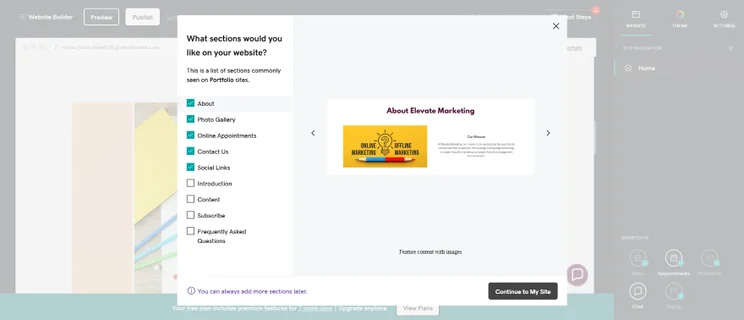
GoDaddy is the easier ecommerce builder to set up an online store with. Unlike Shopify, which doesn’t have an in-depth tutorial when you begin, GoDaddy will more closely guide you through the process and help you create a fully functional website in under a minute.
During my testing, GoDaddy’s setup process featured:
- Quick onboarding: I wasn’t asked too many onboarding questions, mainly my business name, my website category, and the features I wanted (e.g. an online store, bookings, etc).
- AI website builder: If I didn’t want to choose an ecommerce template, I could AI generate a tailormade design instead by filling in a simple prompt about my business.
- Mini editor tutorial: When I entered the editor, a tutorial appeared on screen to familiarize me with the builder’s key features.
- Website checklist: GoDaddy’s built-in website checklist helped me tick off key tasks as I went along, like setting up-to-date contact information and adding social media links.
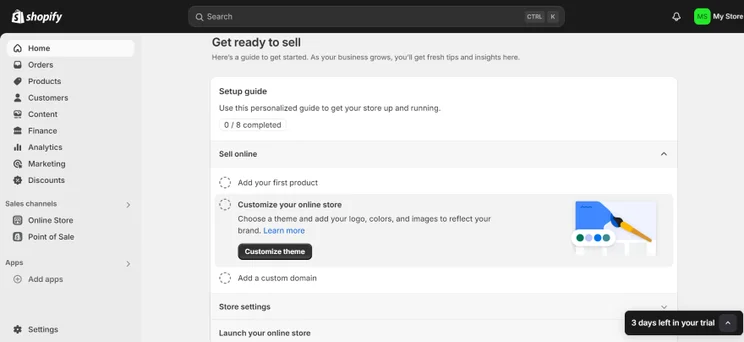
In comparison, I found Shopify slightly trickier than GoDaddy to get started with. Though its interface is built with beginners in mind, it took me a little bit longer to find my way around. For example, I found Shopify’s dashboard fairly gray with little signposting, so it’s easy to get lost in its navigation menu when you need to find a specific feature.
That said, I noticed the following beginner-friendly features when setting up with Shopify:
- Website checklist: I could follow essential steps, such as setting up payment methods, organizing shipping rates, and placing test orders.
- Shopify Sidekick: This AI-powered tool enabled me to ask a chatbot questions about setting up. The chatbot could also amend my store’s design and create themed content blocks from natural language prompts.

It's easier to set up with GoDaddy
GoDaddy’s editor is user-friendly, making it ideal for website builder newbies or business owners that need an online store fast. Its AI website builder, built-in tutorials, and website checklist will help you create a professional website with little fuss.
3. Shopify Has the Best Sales Features
Our research and testing proved that Shopify’s sales features are miles above GoDaddy’s since it has the best range of tools on the market. From your dashboard, you’ll find valuable tools helping you cover all aspects of your store, like its inventory, payments, shipping, and promotion.
What Sales Tools Does Shopify Offer for Growing Stores?
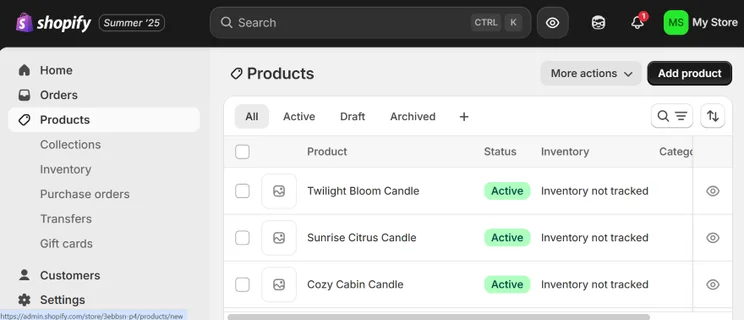
Shopify’s standout features include:
- Unlimited products – No product limit makes Shopify fitting for large inventories. GoDaddy has recently removed its product cap to match this.
- Shopify Shipping – I could use Shopify Shipping to manage my orders, access real-time shipping rates, and print shipping labels in bulk.
- Shopify Payments – This is Shopify’s native payment gateway that I could easily set up from my dashboard. The free tool helps you manage your store’s transactions in one place and removes transaction fees (though you’ll still need to pay a payment processing fee).
- Over 100 payment options – Alongside Shopify Payments, I could also connect over 100 other payment methods to my store, such as a PayPal express checkout.
- Customized checkout page – Want to tailor your customer’s checkout experience? Shopify let me add a logo to the checkout page and change the form fields shoppers must fill in to complete their order.
- Shopify POS – Shopify has a native POS system you can use to process in-person sales. If you’re paying monthly, the cheapest cost is only $5 per month on its Starter plan.
- SimGym app tests your customer journey with AI personas and provides recommendations to improve your user experience. This offsets the cost of manual UX testing for leaner teams on a budget.
- Product Networks allows you to offer relevant products from other Shopify merchants on your store, and own the customer reslationship and commission for each sale made. The tool uses data to recommend the perfect, hyper-personalized product mix for your specific niche.
- Shopify Sidekick is a key ROI lever, helping you track profits, move money, create custom data visualizations, and access personalized recommendations to increase your sales.
If you want to create a winning online store with Shopify’s sales tools, don’t make the Shopify mistakes listed in our video:
Shopify is better than GoDaddy for inventory management, especially if your business is expanding rapidly. Shopify lets you sell unlimited products online, sync online and physical locations, and its product backend can handle a high-volume of sales. After all, leading brands, including Kylie Cosmetics and Huel, rely on Shopify for global sales.
What Are GoDaddy’s Key Sales Features?
While GoDaddy’s sales tools aren’t as advanced Shopify’s, the builder now allows you to sell unlimited products, which is a huge improvement on its previous 5,000 product cap. You’ll receive essential sales features, such as responsive product listing pages, alongside other features like:
- GoDaddy POS – GoDaddy can accommodate in-person sales too, though it’s more expensive than Shopify’s offering. Monthly costs begin from $28.99 per month.
- Multiple payment methods – I could set up popular payment options on my GoDaddy store, such as Visa, MasterCard, Klarna, and PayPal (but this range wasn’t as vast as Shopify’s).
- Multiple shipping options – I could create shipping zones depending on where items were being sent to, and ship to customers via USPS or UPS.
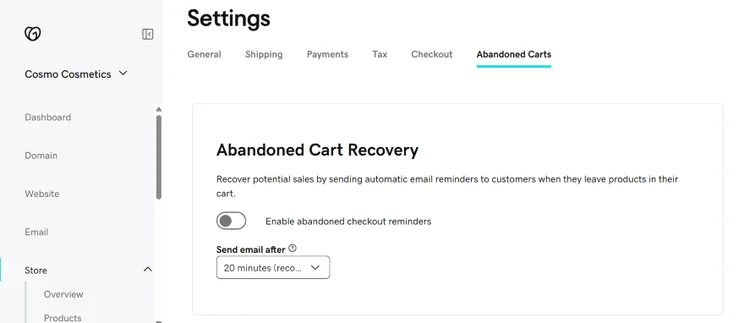
- Abandoned cart recovery – You can send an automated email to shoppers if they’ve left an item in their cart.
Shopify has the best sales features on the market
Unlike GoDaddy, Shopify is a dedicated ecommerce platform, which is reflected in the quality of its sales tools. You’ll have access to the best ecommerce features on the market, from a customizable checkout to its own built-in payment gateway.
4. Shopify Is Best for Promoting Your Store
Shopify’s website features will help you get your business seen by more potential customers. You can:
- Scale ecommerce blogs with AI content tools
- Set up email marketing campaigns
- Integrate your website with different social media channels
- Edit webpage SEO for better product visibility on search engines
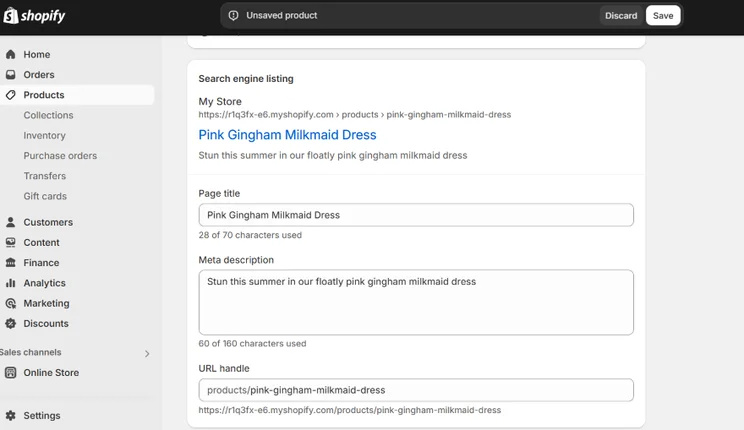
While GoDaddy’s promotional tools aren’t as advanced as Shopify’s, you can:
- Generate content ideas with its editorial calendar
- Create fully formed social posts and captions with AI
- Use GoDaddy Airo, its suite of AI tools, for key business tasks. For example, the marketing consultant can create campaigns, social posts, videos, and blog content that’s aligned with audience needs and business goals
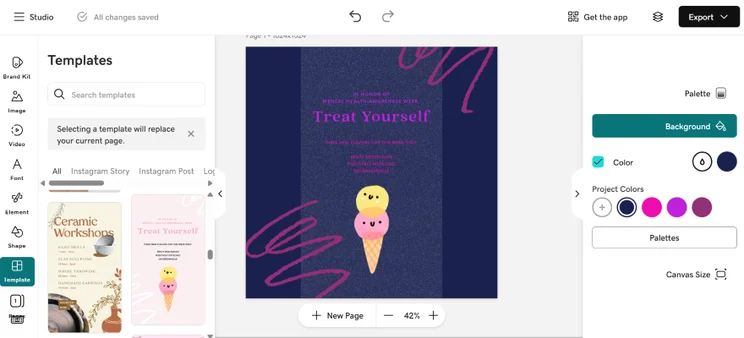
What Are the Key Differences Between Shopify and GoDaddy’s Promotional Tools?
- SEO: Shopify’s built-in SEO is more advanced than GoDaddy’s. With GoDaddy, you can’t add canonical tags and schema markup, or get multilingual SEO support. However, GoDaddy does offer SEO website suggestions, helping you add keywords to your pages.
- Blogging: If you want to add a blog to your online store, Shopify is the better option. You can access blog-specific analytics and create author profiles.
- Email marketing: You can create professional email campaigns from your Shopify or GoDaddy dashboard. This includes customization options and setting up automations.
- Social media: Both platforms let you share your website across different social media channels, like Instagram, TikTok, and X. They also let you advertise with Facebook or Instagram directly from your account.
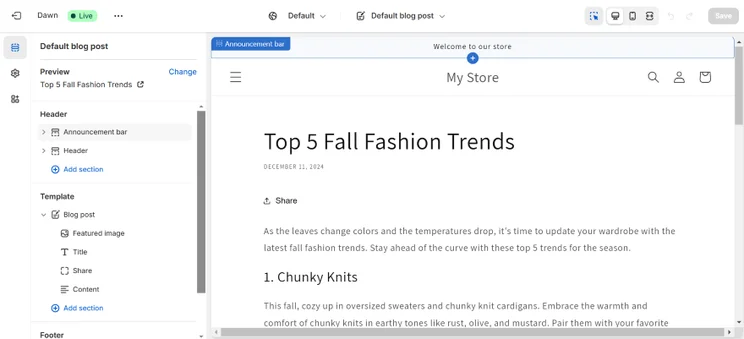
Shopify has better promotional tools than GoDaddy
With advanced SEO features, more blogging options, and great social integrations, Shopify can help you boost your store’s online presence and acquire new customers.
5. Shopify Has the Best Store Designs
Shopify offers more modern and responsive store designs than GoDaddy, featuring over 1,000 themes compared to over 200 on GoDaddy. Shopify’s editor also offers a wider range of content blocks to customize templates with, such as charts, maps, and additional tabs.
How Many Store Templates Can I Choose From?
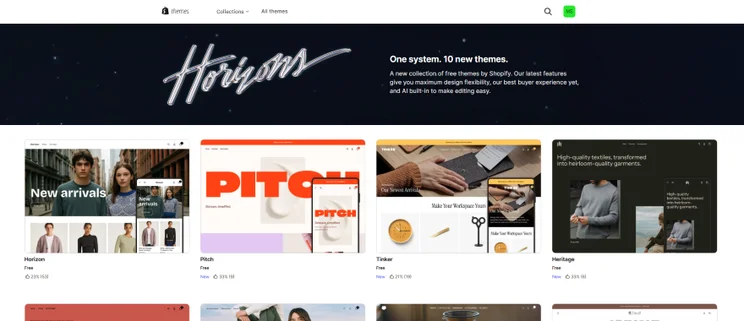
Only 22 of GoDaddy’s 200+ themes are made for online stores, whereas Shopify provides more than 1,000 ecommerce templates. However, all of GoDaddy’s themes are included with your plan, whereas Shopify only offers 24 free templates, with the paid themes charging a one-off fee of between $100-$500.
Shopify used to have only 13 free themes, but for Shopify Horizons (the builder’s biannual product update) it made 10 new free themes available. It also upgraded its editor, allowing you to AI-generate new blocks of content and quickly edit text by clicking on it.
Can I Create My Store With AI?
Shopify and GoDaddy enable you to AI generate a website in under 30 seconds, but Shopify’s results were better quality. Shopify’s AI website builder produced multiple distinct design options with contemporary elements, whereas GoDaddy’s AI-generated designs lacked variation and appeared visually outdated.
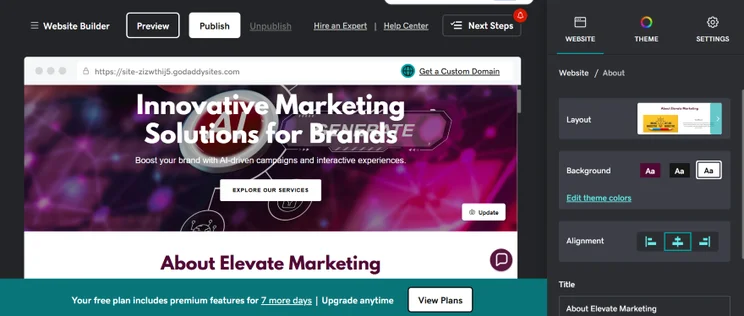
Shopify's store designs are modern and responsive
Shopify’s responsive template selection and AI theme builder give you plenty of choice when designing your online store.
6. Shopify Is Best for Help and Support
Our research revealed that Shopify’s help and support is more comprehensive than GoDaddy’s. This is partly down to the Shopify Help Center, offering detailed guides on key topics (like payments and security) as well as additional video tutorials, webinars, and community forum threads. GoDaddy lacked guides on advanced topics like writing alt text or mobile-specific UX editing.
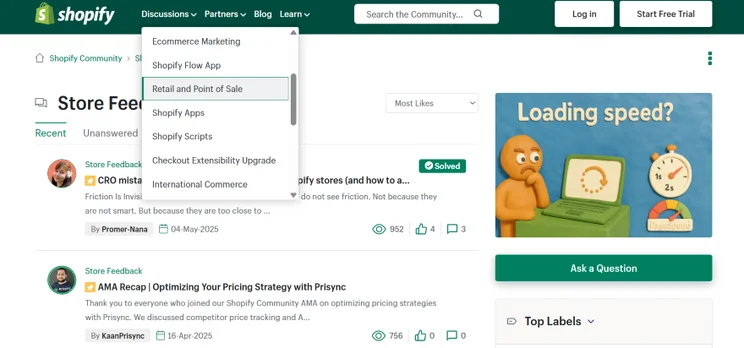
However, both ecommerce builders come with key help and support features:
- Live chats: Both Shopify and GoDaddy have a 24/7 live chat that you can access from their respective websites. Out of the two, I found Shopify’s live chat most convenient, since it responded to my questions in under 30 seconds.
- Phone chat: You can use GoDaddy’s support phone lines on all its plans. Only Shopify Plus customers have phone support access.
- Social media channels: Shopify is active on Facebook, YouTube, Instagram, X, TikTok, Pinterest, and LinkedIn. Meanwhile, you can contact GoDaddy via Facebook, YouTube, Instagram, X and TikTok.

You can no longer contact Shopify directly through in-bound emails. Instead, you need to use its live chat and ask to be forwarded to a support advisor.
Shopify has the best help and support options
With Shopify, it’s easy to find quick answers to your questions. Its live chat response times are speedy and it has a vast Help Center with resources to help you get set up.
How We Test and Compare Shopify and GoDaddy
The information in this Shopify vs GoDaddy comparison was informed by our ecommerce website builder research. Our in-house research consisted of over 300 hours of investigation. During that process, our team identified seven key areas that were most important to online store owners:
- Sales features (30%) – Key sales tools like inventory management and payment methods
- Design features (15%) – The quality of a builder’s templates or AI generated designs
- Help and support (15%) – If there are reliable contact options and resource libraries
- Website functionality (15%) – Website features like built-in SEO, email marketing or blogging
- Pricing (10%) – If an ecommerce builder is good value for money and the scalability of plans
- User experience (10%) – How easy it is to complete tasks on the platform and navigate the account
- Reputation (5%) – How customers perceive a platform online
When assessing Shopify and GoDaddy, I took these seven key areas into account. I also referred to my firsthand experiences testing each ecommerce builder. Because I’ve used both platforms myself, I can make clear recommendations to you based on my findings.
My Final Thoughts on GoDaddy vs Shopify
Out of the two, Shopify is the best ecommerce website builder, especially if scaling your store is your key goal. You can sell unlimited products, increase brand awareness via multichannel integrations, and streamline your sales through its optimized checkout.
That said, GoDaddy is more suitable for building simple stores quickly. You’ll also have access to essential sales features on the ecommerce plan, such as easy product upload and an integrated marketing tool to help you generate professional ecommerce content.For quick and easy guidance on the right ecommerce builder for your needs, take our quiz below:
What kind of website do you want to create?
Find Your BuilderFAQs
Yes, you can buy domain names directly through Shopify and GoDaddy for your website. Shopify domains typically start from $9 per year, whereas GoDaddy domains can start from as low as $0.01 for your first year.
For simplicity, I recommend purchasing a domain directly from the website builder you intend to use. That way, you won’t need to transfer your domain to another platform.
The migration progress from one ecommerce platform to another is never easy, so give yourself enough time to switch from GoDaddy to Shopify. You’ll need to move over your domain, download product information and transfer it to Shopify, recreate your store design, and redirect URLs.
They do. On Shopify’s Basic plan, there’s a 2% transaction fee on each order, while GoDaddy’s Commerce plan charges 2.7% + $0.30 per transaction.
That said, Shopify removes transaction fees when you use its native payment processor: Shopify Payments. You’ll still be charged for third-party payment processing fees, though.


1 reply
1 reply
2 replies