


- Shopify vs WordPress: Quick Comparison
- Is Shopify Cheaper Than WordPress?
- Which Platform Is Best for Selling?
- Can You Add Apps With Shopify or WordPress?
- Is Shopify or WordPress Best for Marketing?
- Does WordPress Have Better Design Options?
- How We Test Ecommerce Website Builders
- Should You Pick Shopify or WordPress?
If you want to build an online store, you’ll need to compare ecommerce platforms to find the right fit for your business. Shopify is the best platform overall, offering powerful sales features, a huge app store, and intuitive product management tools.
That said, WordPress powers over 40% of all websites, and its open-source nature gives you limitless customization options. However, it’s a more hands-on approach in comparison to Shopify.
- Shopify includes SEO, security, and hosting in one recurring payment, whereas WordPress requires you to pay for these separately
- While WordPress is free to use, plugin costs can add up quickly
- WordPress offers limitless customization options, with over 14,000 themes and 60,000 plugins
- Shopify’s streamlined onboarding and native AI tools make it easier to use and scale your business with
- With Shopify, get your first three months for just $1 per month
Shopify vs WordPress: Quick Comparison
|
Overall rating
|
Starting price
|
Free plan or free trial
|
Number of templates
|
AI website builder
|
Recommended for
|
||
|---|---|---|---|---|---|---|---|
 |
 |
||||||
|
Shopify |
WordPress.org |
||||||
|
4.8
|
3.4
|
||||||
|
3-day free trial |
Free to install |
||||||
|
1,000+ |
14,000+ |
||||||
|
|
|
||||||
|
Businesses who want to easily scale their store as they grow |
Businesses running content-heavy websites |
Is Shopify Cheaper Than WordPress?
Shopify has the most transparent pricing, with plans starting from $29 per month (billed annually), whereas WordPress’ pricing varies depending on the features and functionality you require. I’ll break it down further below:
How Much Does Shopify Cost?
- Shopify’s pricing ranges from $29 to $299 per month (billed annually)
- Get your first three months for just $1 per month
- You can test the platform with its three-day free trial
- Shopify’s three core premium plans all include ecommerce
How Much Does WordPress Cost?
- WordPress is free to download but requires paid plugins to build a functional site
- Pay extra for features (for example, plugin costs can start from $5 per month)
- Budget for a hosting provider (Hostinger’s WordPress hosting plans start from $2.99 per month)

Shopify is the best value for money
While WordPress is free to use, costs can add up quickly. Shopify’s plans might seem more expensive initially, but you get everything you need to run your online store in one package.
Which Platform Is Best for Selling?
Shopify is our top recommended ecommerce website builder for 2026, due to its powerful built-in, sales features. This sets it apart from WordPress which requires third-party ecommerce plugins and tools.
With Shopify, you’ll be able to:
- Sell unlimited products
- Add up to 2048 variants per product
- Sell on marketplaces, social media platforms, and AI answer engines
- Send abandoned cart recovery emails
- Run targeted discounts for customer segments
- Use Product Networks to fill gaps in your inventory by offering complementary products from other Shopify merchants and earn a commission on every sale
- Use the SimGym app to gather feedback on the user journey from AI personas to make instant store improvements
- Ask Shopify Sidekick to track your profits and move money, create custom analytics and explain data reports, and provide personalized recommendations to improve your sales based on store and market research
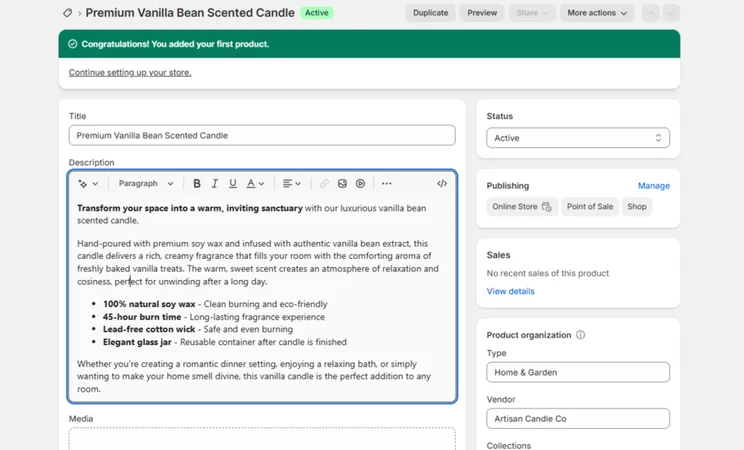
To sell on WordPress, you’ll need to install the WooCommerce plugin, which allows users to sell unlimited products, choose from 140 payment gateways, and sell with no transaction fees. However, WooCommerce requires consistent manual testing and updating of apps, which can stop your store from working temporarily.
➡️ You can read our full Shopify vs WooCommerce review to see the key differences.
If you activate Shopify Payments, Shopify’s native payment gateway, you can get rid of third-party transaction fees completely. Without Shopify Payments, third-party fees can be as high as 2%.However, you’ll still be charged online credit card rates with Shopify Payments. These start at 2.9% + $0.30 with the Basic plan, but decrease as you upgrade your subscription.
Shopify's sales features help you grow
Shopify’s built-in sales features are much easier to get to grips with, especially if you’re new to running a business and selling online. Plus, you don’t need to go hunting around for specific tools, like you would with WordPress, since Shopify houses everything in your account.
Can You Add Apps With Shopify or WordPress?
Shopify’s app store features over 8,000 integrations, compared to over 60,000 offered by WordPress. However, Shopify users are much less reliant on plugins for functionality thanks to its wide range of built in AI tools and features.
Not only are WordPress’ wide array of apps overwhelming and time-consuming to choose between, but they aren’t vetted like Shopify’s, which leads to security concerns for businesses with limited IT resource.
What lets WordPress down the most when it comes to apps is the lack of quality assurance and security. With many plugins remaining free to use, WordPress apps aren’t guaranteed to be data privacy compliant, which could put your business and customers at risk. Shopify’s apps undergo strict security audits and testing before they’re approved for the store.
Shopify offers over 8,000 apps
It’s quality over quantity in this match-up! While WordPress has a greater range and variety of apps on offer for stores, you’ll first need to find them and review if they’re worth using or too risky. Not only does Shopify provide secure and high-quality apps, but you can add them to your store with a single click.
Is Shopify or WordPress Best for Marketing?
Shopify and WordPress both have impressive SEO and marketing features to help you get your products seen online and increase sales.
Shopify has a number of built-in marketing and SEO tools to support its merchants, whereas WordPress relies on plugins again. That said, you get greater control and flexibility over advanced settings with WordPress.
📨 Marketing
Shopify helps you get products mentioned by AI answer engines, such as ChatGPT and Perplexity, with Agentic Storefronts. Shopify is at the forefront of agentic commerce developments in 2026, helping you get seen and secure sales in high-converting channels.
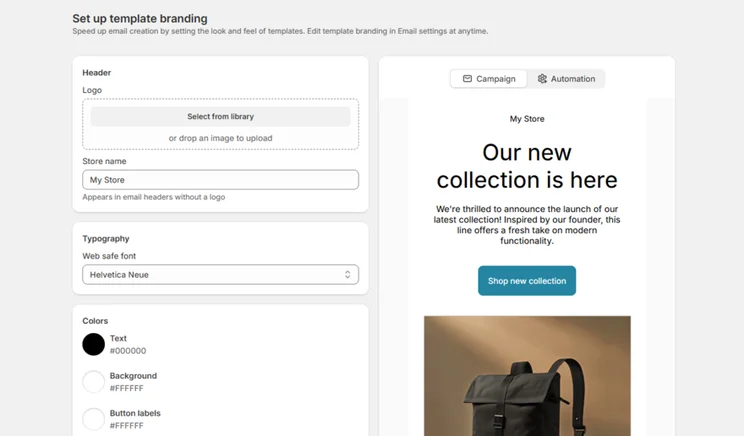
Shopify also has an AI-powered SMS and email marketing campaign app, Shopify Messaging, which generates subject lines and text, optimizes send times, and provides personalized recommendations. The Shopify Forms app also makes it easy to create contact forms for collecting leads, which can be automatically translated into 19 languages, helping to boost engagement and sales globally.
As expected, WordPress requires plugins for most of its marketing functionality, but there are a lot of popular brands on offer, including:
- Mailchimp for email marketing
- Hubspot for CRM
- Google Ads for creating ad campaigns
- Pretty Links for affiliate marketing
Of course, there’s still the issue of having to install and manage these apps yourself. With Shopify, you can access everything from your dashboard which keeps things simple.
🔍 SEO
Shopify is one of the best website builders for SEO from our 2025 round of testing, with AI- generated metadata, image alt text, product descriptions, and personalized SEO recommendations. Shopify also handles the SEO basics automatically, making it perfect for beginners.
WordPress leaves SEO up to the user. While this grants you greater control, you need the know-how to tweak and action changes to improve areas like site speed. Of course, you can use a plugin, like Yoast SEO, to help you along the way, but Shopify’s SEO tools are more beginner-friendly.
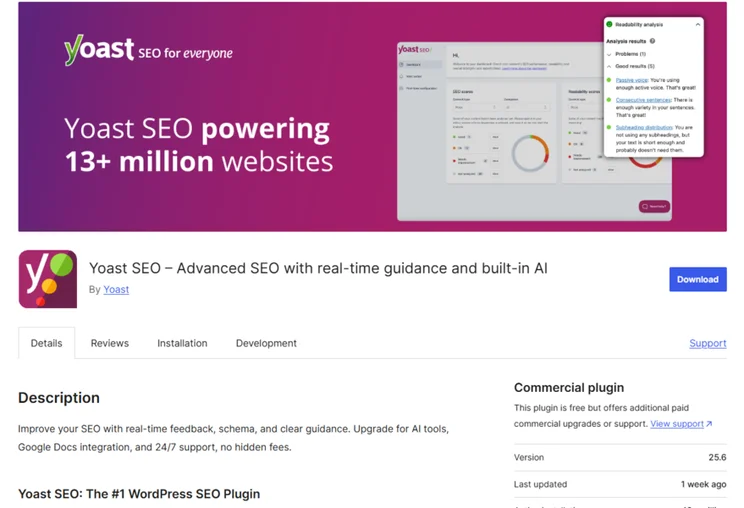
Both Shopify and WordPress help you promote your store
While Shopify may have WordPress beat in regards to built-in tools, WordPress gives you access to more advanced techniques because of its open-source structure. One is more convenient, one is more adaptable, so it really depends on what your business prioritizes.
Does WordPress Have Better Design Options?
WordPress offers greater customization options than Shopify, although it requires basic coding knowledge and a lot of time to implement your designs, so it won’t be the right option for beginners. Shopify’s onboarding and editing process is more accessible, but limited in comparison to WordPress.
Designing With Shopify
- Support from Shopify Sidekick, including custom app generation and AI prompting to make design changes
- Fast onboarding
- No drag-and-drop editor
- Over 1,000 templates
- Use AI to create custom blocks
- Schedule and A/B test theme changes with Rollouts
- Not as easy as other website builders
Designing With WordPress
- Basic coding knowledge required
- Over 14,000 templates
- Pre-designed “patterns” for your pages
- Complete control over website design
- Relies on plugins to simplify editor
- Find what works best for you
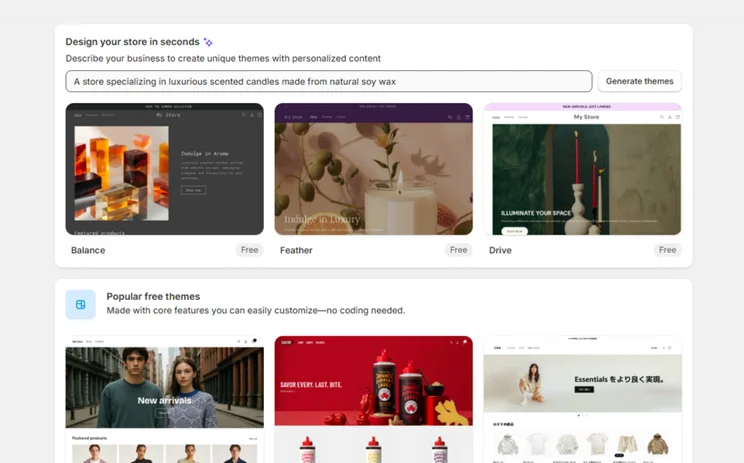

WordPress gives you total creative control
WordPress has a wider choice of themes (with more free options than Shopify!), and you have greater control over the look of your website thanks to its advanced editor. But, be warned that WordPress won’t be ideal for complete beginners to website building.
How We Test Ecommerce Website Builders
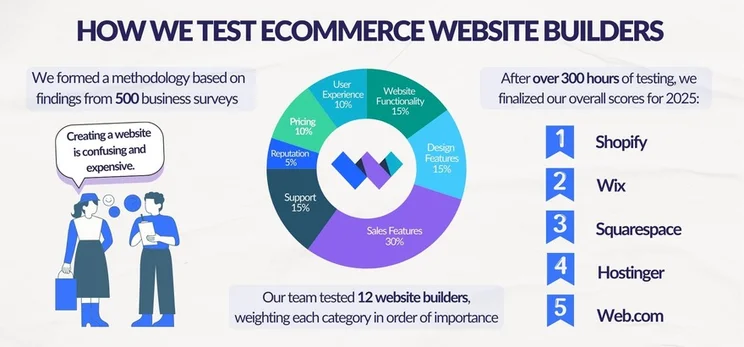
We’ve spent over 300 hours testing and building with the top ecommerce builders. Our in-house research process is carried out regularly to ensure our reviews and recommendations are accurate, up-to-date, and fair.
When looking at ecommerce builders, we focus on seven core areas of investigation:
- Sales Features: 30%
- Design Features: 15%
- Help and Support: 15%
- Website Functionality: 15%
- Pricing: 10%
- User Experience: 10%
- Reputation: 5%
Each category has a unique weighting, based on its importance for small businesses getting online. We then gather up all the scores to determine each builder’s overall rating.
Should You Pick Shopify or WordPress?
If you’re looking to build an online store, Shopify has my recommendation. Not only are its sales features the best we’ve tested this year, but businesses can manage everything from a single dashboard for convenience.
With WordPress, your success is entirely dependent on which plugins you decide to use and the hosting provider you opt for. Ultimately, which one you decide on depends on your budget, skill level, and business needs, but Shopify is the better choice for ecommerce websites overall.


3 comments