Squarespace Pricing 2026: How Much Does It Cost?

We may receive a commission from our partners if you click on a link and purchase a product or service on their website. Learn more

Headshot of Emma Ryan
Written By
Headshot of Ollie Simpson
Reviewed By
Updated on June 1, 2026
Advertisement
We may receive a commission from our partners if you click a link and purchase a product or service. This does not impact our ratings, which are determined by years of hands-on testing and expert research.
For portfolios
Basic
See Pricing
  • Sell unlimited products
  • Blueprint AI
  • SEO support
For small businesses
Core
See Pricing
  • Removes transaction fees
  • Google Shopping integration
  • Add pop-ups
Most popular plan
For growing stores
Plus
See Pricing
  • Increased video storage
  • Lower credit card rate
For established brands
Advanced
See Pricing
  • Lower credit card rate
  • Unlimited video storage

Squarespace pricing ranges from $16 to $99 per month (billed annually) across four plans, all of which include the ability to sell unlimited products.

We’ve spent over 300 hours testing and analyzing top website builders, including Squarespace and its pricing plans. Below, I’ll break down the pricing and features of each Squarespace plan, so you can see what you get for your money.

Squarespace costs between $16 to $99 per month (billed annually), which is split between four plans: Basic, Core, Plus, and Advanced. You can save up to 28% by paying annually instead of monthly.

See the table below for an overview of what’s included in each plan:

0 of 0
Plan Name
Price with our discount code
Monthly price (paid annually)
Monthly price (paid monthly)
Online credit card rates
Transaction fee
Recommended for

Basic

Core

Plus

Advanced

$16

$23

$39

$99

$21

$32

$48

$119

2.9% + $0.30

2.9% + $0.30

2.7% + $0.30

2.5% + $0.30

2%

0%

0%

0%

For online portfolios and side hustles

For small businesses

For growing online stores

For established businesses

Does Squarespace Have a Free Plan?

Squarespace doesn’t have a free plan, but the website builder does offer a 14-day free trial. You don’t need a credit card to sign up either. Once the free trial window ends, you’ll need to upgrade to a premium plan to share your site with the public.

But, don’t worry! Your site won’t be lost if you don’t upgrade immediately. Squarespace will keep your content and design work until, as Squarespace says, “our system removes it.” Some reports say up to four months before your site is removed, so I wouldn’t hang about for too long.

Watch our Squarespace review video here:

Squarespace offers four website builder plans: Basic ($16 per month), Core ($23 per month), Plus ($39 per month), and Advanced ($99 per month).

How Much Does Squarespace’s Basic Plan Cost?

Squarespace’s Basic plan is its cheapest option at $16 per month (billed annually).

The Basic plan is an affordable entry into selling, particularly for casual sellers with small inventories. For those serious about growing their sales and audience, you’ll find the basic sales tools and analytics limiting.

Squarespace’s Basic plan includes:

  • Unlimited products and services
  • Access to Squarespace’s Blueprint AI Builder
  • Free custom domain for the first year of your subscription
  • Squarespace’s AI tools, including an AIO Scanner and AI writer
  • SEO support
  • 2 contributors
  • Unlimited storage space
  • Unlimited bandwidth
  • Basic website metrics
  • Marketing tools, including custom forms
  • 30 minutes of video storage
  • Squarespace Payments
  • 2% transaction fee
  • 2.7% + $0.30 credit card processing fee
  • 24/7 customer support via email (live chat support is available Monday to Friday)
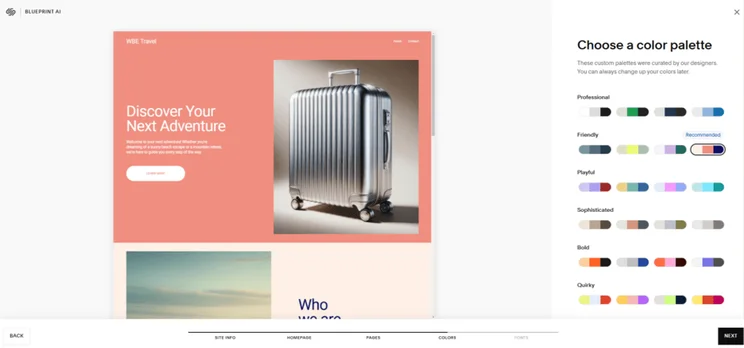
Picking a color palette in Squarespace's Blueprint AI
I used Squarespace's newly revamped Blueprint AI to build a website from scratch. Source: Website Builder Expert

How Much Does Squarespace’s Core Plan Cost?

Squarespace’s Core plan ($23 per month) unlocks advanced sales tools and waives transaction fees, making it a reliable option for most small businesses selling online.

The Core plan is $6 cheaper per month than Wix and Shopify’s equivalent plans (both $29 per month).

Squarespace’s Core plan includes everything from the Basic plan, plus:

  • 0% transaction fees
  • Unlimited contributors
  • Ecommerce analytics
  • Automatic tax rate calculations
  • Advanced customization tools, including code injection
  • Advanced sales and shipping features, such as discounts and shipping labels
  • Professional Google Workspace email address
  • Zapier and Mailchimp integrations
  • 5 hours of video storage
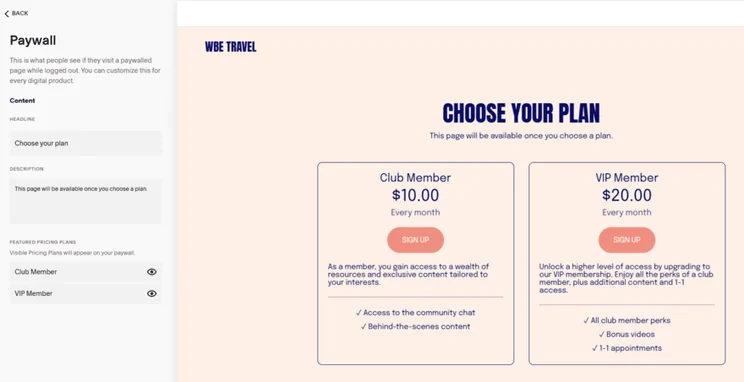
Squarespace paywall page showing two membership plans
I could offer membership plans to my site visitors with Squarespace. Source: Website Builder Expert

How Much Does Squarespace’s Plus Plan Cost?

Squarespace’s Plus plan costs $39 per month (billed annually). The Plus plan is ideal for growing businesses and high-volume sellers due to its lower processing fees (2.7% + $0.30 per transaction).

Squarespace’s Plus plan includes everything from the Basic and Core plan, as well as:

  • Lower credit card processing fees (2.7% + $0.30)
  • 50 hours of video storage

How Much Does Squarespace’s Advanced Plan Cost?

At $99 per month, the Advanced plan is Squarespace’s most expensive option. With even lower credit card processing fees (2.5% + $0.30), the Advanced plan is best for rapidly growing or ambitious businesses that could benefit from this reduced rate.

The Advanced plan includes everything from Squarespace’s Basic, Core, and Plus plans. You’ll also unlock:

  • Lower credit card processing fee (2.5% + $0.30)
  • Unlimited video storage

Squarespace charges renewal fees on your professional email and domain name after your first term is complete, optional scheduling and marketing add-ons, and transaction and processing fees per sale.

After being free for the first year, you’ll need to pay to renew your professional email ($7-$22 per user per month), as well as your custom domain name (a .com domain starts from $10 per year).

What Are Squarespace’s Transaction and Processing Fees?

Both transaction fees and credit card rates lower if you upgrade from Squarespace’s Basic plan:

Plan Basic Core Plus Advanced
Transaction fee 2% 0% 0% 0%
Credit card processing fee 2.9% + $0.30 2.9% + $0.30 2.9% + $0.30 2.5% + $0.30

How Much Does Acuity Scheduling Cost?

Squarespace’s Acuity Scheduling add-on features three premium tiers, ranging from $16 to $49 per month (billed annually):

Plan Starter Standard Premium
Monthly price (paid annually) $16 $27 $49
Monthly price (paid monthly) $20 $34 $61

How Much Do Squarespace Email Campaigns Cost?

Squarespace’s Email Campaigns add-on scales across ten volume-based tiers, starting at $8 per month for 500 emails and going up to $118 per month for 500,000 emails:

Emails per month Monthly price (paid annually) Monthly price (paid monthly)
500 $8 $12
5,000 $14 $20
10,000 $20 $28
25,000 $28 $40
50,000 $34 $48
100,000 $42 $60
150,000 $52 $73
250,000 $68 $96
350,000 $89 $127
500,000 $118 $169
  • Select an annual plan to save up to 28% and unlock a year’s free domain and professional email
  • Save a further 10% on all annual and monthly subscriptions with our code “WBE10”
  • Choose the right plan for your needs – the Core plan ($23 per month) is my top choice for online stores
  • Only pay for the add-ons, integrations, and extensions you need, and make use of free trials before committing

Our reviews and recommendations are based on hands-on testing with Squarespace and over 300 hours of analysis and data collection. The research process focuses on six primary areas of investigation, with each category assigned a unique weighting:

  • Website Functionality (30%): General performance and quality of features available with the platform
  • Design Features (25%): AI website building tools, design quality, and number of templates
  • Pricing (15%): Free/premium plan options, and overall value for money
  • User Experience (15%): Ease of use and accessibility (something we assess with hands-on testing)
  • Help and Support (10%): Available support channels and responsiveness
  • Reputation (5%): Brand trust and market performance

When writing about how much a website builder costs, we focus solely on our pricing category. In particular, we examine:

  • Whether a website builder offers a free trial or free plan
  • The quality of features for the price you pay
  • The average costs of plans
  • How much you have to pay for standard features, such as SEO and unlimited storage

We recommend Squarespace’s Core plan ($23 per month) for most small businesses since it offers advanced sales tools and completely removes transaction fees.

While Squarespace’s Core plan is great value for money, the subsequent Plus ($39 per month) and Advanced ($99 per month) plans provide no new features to aid expansion, instead focusing on lowering fees.

If you’re not sure which plan to pick, I’ve listed my recommendations below:

  • Choose Basic if you’re creating a blog, portfolio, or simple informational site
  • Choose Core if you’re a small business owner looking to sell unlimited products with no transaction fees
  • Choose Plus if you sell a high volume of products and want to save on processing fees
  • Choose Advanced if you own a larger, established business and want to save additional money

You can cancel or change your Squarespace plan at any point from the “Billing and Account” menu in your dashboard settings. Here, you’re able to change your billing cycle, upgrade or downgrade your plan, or cancel your plan altogether.

Squarespace offers a refund on annual plans within the first 14 days of your first billing, although it will deduct $20 to cover the cost of the custom domain name. Refunds are not available on monthly plans, or at any point after the first two weeks of your annual plan has passed.

Written By

Headshot of Emma Ryan

Emma is Deputy Editor of MVF’s B2B brands, specializing in website builders, ecommerce, marketing, and vibe coding. Emma combines her wealth of knowledge and years of hands-on testing with a passion for helping small businesses and website owners navigate the highs and lows of being online. Her work has been featured in Newsweek, Digiday, TechRound, and Industry Today.

More about

Reviewed By

Headshot of Ollie Simpson

After three years of refining his skills in data analysis, Oliver transitioned to a role as a researcher to help understand reader preferences, decision making factors, pain points, and needs when it comes to building an online presence.

Oliver’s professional journey started out as a researcher in law enforcement, where he developed strong analytical abilities. He later moved into operations, which strengthened his understanding of quantitative data.

Now, Oliver blends his quantitative analysis skills with qualitative research to explore both audience preferences and product nuances.

In his three years at Website Builder Expert, Oliver has used his skills to provide up to date, unbiased insights into the products we review, to help ensure the best possible recommendations for readers. Oliver regularly assesses and iterates our website builder research methodology, staying on top of industry trends, digging into platform features and UX, and prioritizing areas that matter most to business owners. This provides web builder and ecommerce rankings you can trust.

In 2025 alone, Oliver’s conducted over 100 hours of data collection across website builder and ecommerce testing, and investigated 283 individual areas in the ecommerce methodology. He’s overseen 54 individual user tests of website builders, to assess how easy they are to use, and compiled the data into clear ratings for each builder.

You’ll find Oliver’s research referenced across all of our key pages; our content team use it to determine the ranking orders of pages such as the Best Website Builders of 2025, or comparisons like Wix vs Squarespace. We don’t decide who “wins” on personal preference; Oliver’s thorough research clearly outlines which platforms are best for different user needs.

Equipped with a UX design diploma, Oliver translates complex research findings into actionable insights that facilitate informed decision-making.

More about

Popular topics

158 comments

Your email address will not be published. Required fields are marked *

  • George

    I have an online personal training business that already has a platform which host and tracks client workouts, bookings, payments, and back office functions, but has no other website functions.
    If I were to pay for and build a Squarespace website, would I be able to include a link to the training platform on my Squarespace website?

    1 reply

    • Holly Choules
      Holly Choules

      Hi George,

      Thanks for getting in touch!

      You should be able to add links to your external training platform in Squarespace, since you can add URLs to your navigation bar, buttons, or in hyperlinked text. So, you can add a link directly to that page (but make sure it's signposted clearly on your site to provide a great user experience).

      Hope that clears things up.

      All the best,
      Holly.

  • Kamila

    Hai! I kept wondering but does that free domain from the annual subscription plan have '/squarespace' at the end? Because i just found out that monthly personal plan doesn't actually give me a domain😅 also amazing review!

    1 reply

    • Annie Angus
      Annie Angus

      Hey Kamila, thanks for your comment, we're so glad you like the review!
      To answer your question, the domain offered in the annual Squarespace plan is a custom domain, so it won't include /squarespace at the end. So if you're wanting to save some money, moving to an annual subscription could be a good move! Its worth noting that this free domain is only for a year, after which you'll have to pay extra to keep your custom domain. Squarespace discuss their free custom domain offer further on their support site.
      Hope this helps! Best, Annie

  • Susan

    Yes. I did. I wonder with having a site with changing items is it easy to move things out and add new items? I have pics of my products.

    1 reply

    • Samuel Jagger
      Samuel Jagger

      Hi Susan! Thank you for your comment. Yes, its very easy to add/remove products on Squarespace! You will have to go through the dashboard in the online store widget, plus fill out all the product details before it goes live on the site. Hope this helps - Sam

  • Ralph

    You give discounts to students how about seniors?

    1 reply

    • emma.ryan
      emma.ryan

      Hi Ralph,
      Thanks so much for your comment. Unfortunately, Squarespace doesn't currently offer a discount for seniors. However, you can try Squarespace for free for 14 days if you want to see if it's the right fit for you first! Additionally, if it's your first time signing up to Squarespace, then you can use our exclusive offer code 'WBE' and save 10% on any plan! We hope that helps, and we'll make sure to update our readers if any new discounts appear.
      All the best,
      Emma

  • Michele

    I am based in New Zealand. How can I pay for a subscription as I don't use any of the four currencies listed?

    1 reply

    • Jordan Glover
      Jordan Glover

      Hi Michele,
      If you access Squarespace within New Zealand, it should show you the prices in NZD. For example, Squarespace's Personal plan would cost NZ$14 per month, its Business plan NZ$23 per month, and its Basic and Advanced Commerce plans NZ$27 per month and NZ$49 per month respectively.
      I hope this helps!
      Jordan

  • Kenny

    I find nothing that tells whether Squarespace hosts multiple websites. I need to publish online magazines and keep past issues up as archives. This requires multiple websites. I like their templates and tools but it looks like you only have one website per account. Is this accurate?

    1 reply

    • Jordan Glover
      Jordan Glover

      Hi Kenny,
      This is a great question! Squarespace doesn't offer multi-site plans, however, you can run multiple websites from one account. Each would have its own subscription and be paid for separately, but they'd all be linked to you. IF you'd like more information on this, Squarespace has published a very clear article on how it all works that you can access here: .
      I hope this helps!
      Jordan

  • percy

    Which plan is needed to use amazon blocks?

    1 reply

    • Zara Choudhry
      Zara Choudhry

      Hi Percy!

      Thanks for reaching out - that's a great question. So, for Squarespace, you'll need either the Business plan or any of the two Commerce plans in order to integrate Amazon blocks on your page. It just isn't available with Squarespace Personal plan. I hope this helps!

      Here's you can find out more on using Amazon blocks with your Squarespace page.
      All the best,
      Zara

  • Stacia

    Is there still a 3% fee for sales on the Business plan if transactions are made through Ecwid after it's embedded into the website?

    1 reply

    • Lucy Carney
      Lucy Carney

      Hi Stacia,
      Yes, I believe that the 3% transaction fee would still apply. But I recommend contacting Squarespace support directly for more information about its integrations and exactly how fees work once Ecwid is embedded.
      Take care! Lucy

  • Carol

    Hi Lucy,
    I'm reading your reviews because my Weebly Professional Plan that I've had for around 6 years "has a bug" (according to the support chat person) updating my products from the Square item list for POS, something I've done often since Square bought Weebly. I have found that the Weebly Support pages on the import subject no longer exist, however I can still Upgrade to a plan that costs $38 a month. The support page for the Upgrade Plan says "compare to other plans", I scroll down and there is only the one plan for $38 a month, nothing to compare it to.
    Support chat person says she will email me when the "bug" is fixed. It's been a week since I started having this import problem. In the past this product import from Square to Weebly has taken 24 hours, and been very easy for me to do. It syncs all my items so customers can use Square to buy from my Weebly website.

    1 reply

    • Lucy Carney
      Lucy Carney

      Hi Carol,
      I'm so sorry for the experiences you're having with Weebly! I hope our reviews can help you find an alternative that works better for you! Squarespace scored better than Weebly in our research, so you're definitely on the right track. Best of luck, thanks for reading and for sharing your experiences!
      Lucy

  • Karen

    Informative site thank you. I need to set up a website for a bed and breakfast business. It would need to facilitate information, photographs, contact information and possibly a live calendar. I want the front end to look modern, clean and user friendly for users and also easy to manage for me. I would also like to purchase my domain name via the web builder. Ideally I'd like no hidden costs, I want to know upfront what I may incur. Who would you recommend? Thanks in advance.

    1 reply

    • Lucy Carney
      Lucy Carney

      Hi Karen,
      Thanks for reaching out! From what you've described I would recommend Squarespace, because it's got very modern designs and high quality features for your business needs. I'd also recommend you look at the Business plan ($216 for the year, or $26 month-by-month) because it offers a wider range of tools than the cheapest plan, such as a professional email. You can purchase a domain through Squarespace too.
      I hope this has helped, and best of luck with your bed and breakfast business!
      Best, Lucy

  • Phil

    I'm a student and am in the process of launching a new website (school project) and I was reading up on a website and it said that students get 50% off on Squarespace...... do any competitors to Squarespace also offer big discounts for students?

    1 reply

    • Lucy Carney
      Lucy Carney

      Hi Phil,
      Yes, Wix also offers 50% off its annual plans in partnership with Student Beans.
      Hope this helps!
      Best, Lucy

  • Kim

    Hi, thanks for all the well written advice. I have been hesitating to start a website with Squarespace as I don’t understand how to deal with the domain name and email address I already have with VentraIP. Do I have to transfer both of these to Squarespace or do I just link them somehow?

    1 reply

    • Lucy Carney
      Lucy Carney

      Hi Kim,
      Glad you enjoyed the article! You have a choice - you can transfer your domain to Squarespace, or simply connect it to your Squarespace website (while keeping it registered with VentraIP).
      Squarespace recommends transferring your domain so that you manage everything through one platform, but you don't have to do this!
      If you want to simply connect your domain to Squarespace, and keep it registered with VentraIP, this Squarespace guide should help!
      Squarespace also has a guide about asking your domain provider for help, to help you through the process.
      Hope this helps!
      Lucy

  • Christian

    Hello. I'm an aspiring photographer looking for a website builder to help me make a professional looking website. For now, I want my website to act as my portfolio and have a contact form. I'm sure I'll want/ add more in the future, but I need a good place to start for when I want to do more. Would you recommend Squarespace or another website builder?

    1 reply

    • Lucy Carney
      Lucy Carney

      Hi Christian,
      Thanks for getting in touch! I can definitely recommend Squarespace for your project, it's a fantastic photography and portfolio website builder. It comes top in our list of the Best Photography Website Builders too!
      Best of luck with your website,
      Lucy

  • David

    Hello, I am a Personal Trainer and want to make my business more professional (and also facilitate online growth in the future) by using Squarespace.

    Some key features I will need are the ability to apply discounts to certain offerings (e.g. online programming) if clients are also purchasing other services (e.g. personal training sessions). Clients will also need to be able to sign up to a monthly rolling contract rather than just a one-off payment. Am I right in thinking I would need the Advanced plan?

    Also, is there any way to link the store with scheduling? If a client purchases a plan with 8 sessions, for example, is it possible for them to then book these sessions in?

    1 reply

    • Lucy Carney
      Lucy Carney

      Hello David!
      Thanks for reaching out. I'm happy to say that, from what you've described, Squarespace can cater to all your needs. Here's a quick run-down of your questions:
      Yes, you're right - applying discounts this way will need the Advanced plan, as they're classed as "Advanced Discounts".
      Squarespace has a subscription feature that lets customers pay monthly. (You can see all of Squarespace's features here).
      Squarespace's scheduling feature lets customers view availability and book accordingly.
      I hope this has answered all your questions - and good luck with your website!
      Lucy

  • Jamie

    I’m interested in creating a cleaning buisness website that is basic with information about our mission and what we offer. Contact info and an area for testimonials, info about the owners, types of cleaning services we offer and what we do! . Also, I wanted the buisness to have a blog but on a different side tab??? Would that be possible ? The blog would speak about cleaning ideas and DIY’s and keep others up to date on how I clean around the house etc. the blog would be a way to connect with others who do not receive commercial cleaning services from us. Yet we still want to have a website four our commercial cleaning company to send clients to to see the types of services we offer. What would you recommend?

    1 reply

    • Hannah Whitfield
      Hannah Whitfield

      Hi Jamie,

      Thanks for your comment, it sounds like you have some really exciting ideas for your site! Squarespace will work perfectly for what you have in mind - you can easily add a blog to your site, and they have an excellent support team if you get stuck at any point. Happy building!

      Best,

      Hannah

  • Ron

    I want to build a site for Writers to sell their books/stories, and Artists to sell their work. Plus, I'll let readers read stacks of my shorts for free as an inducement Plus, many of my synopses for Production companies, this is also open to screenplay writers. How to do I have a vague idea and oodles of enthusiasm-but is this sufficient? Advice welcome.

    1 reply

    • Hannah Whitfield
      Hannah Whitfield

      Hi Ron,

      Wow this sounds awesome! Squarespace would work for most of your requirements, unless you want the artists and writers to be able to sell through your website, effectively turning it into what's called a marketplace website. Squarespace doesn't have this functionality, but it's something you can get through Shopify, which is our top-rated ecommerce platform. Check out our Shopify review to find out a little more.

      Best of luck with your venture!

      Hannah

  • Mo Shadab

    Hi Sir,
    Very Good Squarespace Pricing.
    Thanks and Regards

    1 reply

    • Lucy Carney
      Lucy Carney

      Thank you so much for the feedback Mo!
      Lucy

  • Rakim

    I want to use Squarespace to sell digital work out programs, can i create the programs on the site or do i have to upload them to the site, thank you in advance

    1 reply

    • Lucy Carney
      Lucy Carney

      Hi Rakim,
      Thanks for your question! It depends on what exactly you're creating, but it's likely you'll have to create the programs first and then upload them. You can add custom code to your Squarespace site while building - find out more in this Squarespace coding FAQs help page. (Note that some coding options come as a premium feature only available on th Business and Commerce plans).
      Best of luck with your site!
      Lucy

  • Bill

    I'm looking to show off my portfolio.
    I has a mix of videos (computer animation and rigging and still imagery)
    Is Square Space a good option for me and what plan would you recommend?

    1 reply

    • Maura Monaghan
      Maura Monaghan

      Hi Bill,

      Squarespace is a great option for showing off your portfolio – it has the best imagery-focused site templates around. The Personal plan is cheapest at $12/month, and comes with unlimited bandwidth and storage. I'd recommend starting there, and if you find that you need higher capabilities, upgrading to a different plan is very easy to do. Best of luck!

      Maura

  • Bill

    Hi. I'm about to make a website for our rock band. It'll have photos, videos, bio's and performance dates.
    I currently use Weebly for my site as a music teacher and it's awesome, but from what I've read, Wix might be a bit better for my band. We have a Facebook Fan site, but feel a dedicated website/domain name might also be useful. I have my last name currently registered with a domain name registrar, so maybe I'll just add another with them to make it easier to manage. Does Wix seem like the best site for my purposes? Your site is helpful, thanks!

    1 reply

    • Maura Monaghan
      Maura Monaghan

      Hi Bill,

      Wix does seem like the best option for your purposes – we've actually ranked it #1 in our roundup of the best website builders for musicians, which you can find here. Definitely peruse some of the other builders we've ranked to find the one that's right for you. Best of luck!

      Maura

  • Megha

    Hi, I had a doubt. Can we build e-commerce site using the Business plan ($18 per month billed annually) instead of the Basic Ecommerce plan($26 per month billed annually)? Would like to make an art website for selling artworks/prints so wanted to know if we can have Add to cart/checkout options in the business plan.

    1 reply

    • Charlie Carmichael
      Charlie Carmichael

      Hi Megha,

      Yes you can get ecommerce functionality on Squarespace's Business plan. You'll have a cart/checkout but won't get access to Squarespace's advanced ecommerce tools and will be charged a 3% transaction fee. Hope that helps clear things up!

      Charlie

  • EBW in NYC

    THis is *really,* really helpful. Squarespace's customer care is a real advantage. Because their drag and drop easy templates are responsive--you can see how they translate as you go: that's another meaningful point of difference.

    Squarespace does not offer a free custom email , right? Since my current domain name is with godaddy and they offer a free custom email: Do you think it's okay to keep domain with godaddy for that free email service--and use Squarespace for hosting ?

    I'm nervous about having to learn/use/pay for G suite to manage custom email until I get comfortable. Thank you.

    1 reply

    • Charlie Carmichael
      Charlie Carmichael

      Hi there,

      Thanks for your comment. You're absolutely right about Squarespace offering email through G Suite. There's no issue with using GoDaddy and Squarespace in tandem but what we would say is G Suite is very easy to use and shouldn't take long for you to get used to should you decide to switch over. Best of luck!

      Charlie

  • O. Balcells

    Despite its cost, I love all about Squarespace: the beautiful templates, the easy building interface, the amazing versatility and, for sure, the always kind 24/7 support. Having tried many web builders before, I can say that this is, for sure, the best.

  • alan Fliegel

    We want to sell my wife's art on-line. We'd like to take a photo and post it on our website and show it to our family and friends. I need something easy to do. Along with some writing about the piece. Maybe twenty images at a time. What would you recommend?

    1 reply

    • Fred Isaac
      Fred Isaac

      Hi Alan, I've got just the thing for you, our guide on how to sell art online - https://www.websitebuilderexpert.com/how-to-sell-art-online/

  • Jaime

    Hi,
    Found this quite useful. Would you recommend also purchasing the domain name through Squarespace, v. Host Gator or comparable? If down the road I want to move from Squarespace to say, WP, would this be possible?

    1 reply

    • Fred Isaac
      Fred Isaac

      Hi Jaime, buying the domain from your builder does make it easier to manage and yes you're usually all good to take your name with you wherever you go. Hope this helps!

  • Mary M. Boyle

    Ok. I'm taking HTML5 at Gwinnett Technical College. I'm also trying, without much success, to follow up on a suggestion of an Emory University music composition professor a while back, to do a website of my pieces. Now, I'm about ready to give up the ship, as Free Hostia will only accept 500KBs of anything. The largest amount of MBs on one of the mp3 pieces I want to have on my website is nearly 17MBs of space. How many MBs can Squarespace accept on a piece of music? I have 13 pieces I need to upload. Another question: Can I code in HTML on Squarespace like I can do on Free Hostia? I really don't want anyone doing my website for me. Thank you much!

    1 reply

    • Fred Isaac
      Fred Isaac

      Hi Mary, the amount of storage you get depends on your Squarespace plan (more information here: https://www.websitebuilderexpert.com/website-builders/squarespace/squarespace-pricing/). This article has some useful stuff on Squarespace and HTML - https://support.squarespace.com/hc/en-us/articles/205815928-Adding-custom-HTML-CSS-and-JavaScript. Hope this helps!

  • Grant Crowell

    Great guide! I'm so glad I checked this out since I was debating between SquareSpace and WordPress. I would also be interested in seeing a comparison between SquareSpace and Weebly.

  • RjOI

    Hi Jeremy, thanks for this article.

    We are a business process outsourcing company and we need to have a booking system and also a newsletter signup for our customers. My question is, does Squarespace have these features?

    Thank you!

    1 reply

    • Fred Isaac
      Fred Isaac

      Hi Rjoi,

      Thanks for the comment! Yes, Squarespace should certainly be able to cater for booking systems and newsletter registration, either through in-built functionality or extensions. Good luck!

  • Georgiana Howard

    Hello,

    I am a school teacher thats starting a publishing company to write curriculum for homeschooling. Would square space be a good platform to start? I would need a website that allows me to upload sample lessons and eventually sell curriculum for each grade level.

    Thanks

    1 reply

    • Fred Isaac
      Fred Isaac

      Hi Georgiana,

      What an interesting question! We love hearing about all the different uses people have for building a website.

      Squarespace would certainly be able to cater to your needs, but I feel Wix might be an even more suitable option because of how intuitive it is to use. Have a read of our Wix Review and let me know what you think

      Hope it helps!

  • Sue Smith

    I need a simple website for my campground. I already have purchased Reserve America software for taking reservations and credit card payments. My website will need a link to the ReserveAmerica site. I would not be using Squarespace for merchant services. Is that OK?

    1 reply

    • charlie Carmichael
      charlie Carmichael

      Hi Sue,

      Thanks for your comment.

      I'm happy to say you can put links into Squarspace in order to redirect customers to your site. Squarespace does have its own payment methods but if it's easier for you to do it that way, that's no problem. You can read more info on how to embed the links here on Squarespace's help page.

      Hope that helps,

      Charlie

  • Philip C. Webb Sr

    Beware! Square offers no phone support. Limited chat support. And they only take online payments from only certain limited types of credit cards.

    1 reply

    • Tom Watts
      Tom Watts

      Hello Philip,

      You're not wrong.

      Squarespace doesn't offer phone support, and other platforms are slowly moving away from it too. However, these phone services are being replaced with very in-depth 'help' sections that are rich with problem-solving information. This is really handy if you're in a rush and don't want to wait on hold for a long time!

      The help chat is currently available between 4am - 8pm Eastern Time and so covers the majority of Squarespace's users (who are in the US). It would be good to see it become a 24/7 live chat though as I think this is where the industry is heading.

      As for limited credit cards, I'm not so sure this is true. Squarespace accepts: Visa, MasterCard, Discover, AmEx, JCB and Diners Clubs - which pretty much covers all the major cards. It's a little odd that Paypal isn't accepted (yet!) but I wouldn't think of the accepted cards as limited by any stretch.

      Hope that clarifies things a bit,
      - Tom

  • DanB

    Thank you Jeremy. Just starting a blog and have no prior experience with websites. Your article is very helpful to me. Appreciate it!

    1 reply

    • Tom Watts
      Tom Watts

      Hello DanB,

      It's really good to know the discussion above has proven so useful.

      Best of luck with your blogging and website building,

      Thanks for reading,
      -Tom

  • logiclaser

    It's difficult...

    I am a website programmer and for many new clients, Squarespace and Wix are the first thing on their mind. Often clients come to me after making some progress in Squarespace but running up against it's limitations.

    Things that you cannot do on Squarespace are things like bespoke animations, more integrated navigation systems, modern UX, UI design (Squarespace templates take a while to update while interface standards, especially on mobile, may have already moved on).

    Squarespace offers great value, but you will have to conform to their way of doing things. For a small amount of people that will mean reducing what they actually end up with when using the service.

    1 reply

    • Tom Watts
      Tom Watts

      Hi logiclaser,

      You make a good point that if you're hoping for a web building platform that offers unlimited creativity then using a website builder might lead to some limitations compared to hiring a designer to create something from scratch.

      But on the other hand, I think the biggest benefit of using a website builder is that it empowers users to overcome a huge limitation in the first place - the ability to even contemplate building their own website!

      From my experience, I love having the ability to create my own website in my own time in a way that suits me best.

      Sure, I can't create every last thing that pops up in my head, but the fact I can still realize the majority of that vision is hugely beneficial.

      And as a further benefit, Squarespace does let users implement some custom coding, so if you know you're way around basic coding then you'd be onto a winner.

      As an aside, it might also be helpful to mention that Wix offers a lot of updated design concepts so users can have a website that actually looks custom built. This sounds like it could be exactly what you're looking for? Here's our Wix review, it might give you some food for thought.

      Thanks for joining the discussion!

      - Tom

  • Mar

    This is nos current. squarespace has been raising the price again and again, it started in $8 now its $22...and they should have a partnership program like shopify for agencies, we are bringing a lot of clients, and they show no love back.

    1 reply

    • Tom Watts
      Tom Watts

      Hi Mar,

      Squarespace prices have risen a little in the past 12 months. They are currently $12 per month for a personal website or $18 per month for non-selling business website (if billed annually).

      If you choose to pay month by month, you'll be looking at $16 and $26 respectively. So it makes financial sense to pay the whole lot up front if possible and save yourself some money.

      Prices are a bit steeper for ecommerce stores as it is more expensive to run a store and they have more technical requirements.

      Hope that clarifies things.
      - Tom

  • Kevin

    I have a website and am using a web hoster. I also registered my domain name with them. After viewing squarespace, I may be interested in switching over. My question is, how can I go about switching over to squarespace and bringing my domain name? Also, I pay a yearly fee to my webhost, I do not want to pay two (one to squarespace and one to my webhost) ? What would be my next steps...please advise. Thanks

    1 reply

    • Tom Watts
      Tom Watts

      Hi Kevin,

      This is possible but you will need to look into domain mapping, which lets you connect and use your existing domain with Squarespace. It does involve tweaking some DNS records to your existing hosting though, as well as changing your primary domain.

      This Squarespace help page should clarify things for you.

      For more information on domains, we've got this handy guide that might prove useful too.

      Hope it helps,

      - Tom

  • Vynnie

    Jeremy
    Thanks for the rundown. So far in my research Squarespace looks like the best bet for me. This will be a church website.
    We want the ability to receive donations through the website. We have T-shirts for fundraising which we want to distribute online, most likely via PayPal.
    Does this mean we must sign up as a business account or can it be personal?

    1 reply

    • Tom Watts
      Tom Watts

      Hi Vynnie,

      Glad to hear you found our Squarespace discussion helpful.

      Just to clarify, if you'd like to receive donations then you will have to subscribe to an ecommerce plan. This is one way of connecting the church bank account with a payment gateway and ensuring you receive the donations.

      The alternative is to insert PayPal's donation widget directly without having to use Squarespace's ecommerce plan (you can do this by using their donation block).

      You can get the code snippet from PayPal directly and insert the code into your Squarespace website. It won't look as pretty, but it will help the commenter save some money.

      For more information from Squarespace, just click here and search for 'Using the Donation block'.

      Hope that helps,
      - Tom

  • Chris R

    I love the simplicity of Dunked for portfolio, but what appeals to me about Squarespace is that for $4 more a month, I can have a blog and ecommerce. I eventually hope to sell some of my arts/design stuff. I have a blog using self-hosted Wordpress at GoDaddy, but I've let it go into fallow mode because of the hassles of maintenance, updating themes and plugins, etc. This is a good overview.

    1 reply

    • Tom Watts
      Tom Watts

      Thanks for sharing your insights Chris.

      I'd definitely agree that Squarespace is a great choice for a portfolio. A number of friends of mine use it for their portfolio sites and they have zero complaints!

      As you've noted, the nice thing about Squarespace is that you easily incorporate the ecommerce side of things and monetize your blog. It's a really nice way of consolidating things.

      Thanks for joining the discussion,
      - Tom

  • David

    Hi there,

    Thanks for your article here and your responses to the various queries.
    I apologise if someone has already asked this but I have a question about the functionality of the ecommerce facility.

    Would I suit, or could it designed to work with food orders?
    I need a platform on which users can log in and select various freshly cooked items for delivery, both for immediate delivery and future dated delivery.

    Perhaps there are restaurants with online ordering facilities that are already using squarespace services?

    Many thanks

    1 reply

    • Tom Watts
      Tom Watts

      Hey David,

      Thanks for reading and joining the discussion.

      I don't see any reason why you shouldn't be able to create an online ordering website through Squarespace.

      In fact, Squarespace have a dedicated section on their support pages about creating such a site, so it should give you some food for thought (excuse the pun!).

      Just head to this page and search 'restaurant' and you'll find the guides to help you develop your delivery and order taking capabilities.

      hope that helps,
      - Tom

  • emad alkathiri

    hi, I would like to make a privet personalized and specialized dating wedding website for an international employee in a health affairs government hospital, minding all the manners, and security issues, thank you.

  • Antony Scott

    Hi,

    I already have an fully functional ecommerce site and pay fees to PayPal - our payment provider - do I pay Squarespace 2% on top?
    Thanks in advance
    Antony

    1 reply

    • Tom Watts
      Tom Watts

      Hi Antony,

      Transaction fees are waived if you are using Squarespace's "Online Stores" plans.

      However, if you're using Squarespace's "Website" plans, transaction fees are 3% for the Personal plan and 2% for the Business plan.

      Squarespace offer some in-depth information on this topic, which should help clear things up for you. Just navigate to the 'Managing Payments' option after following this link.

      - Tom

  • DVN

    Hello Jeremy,

    Thanks for all these reviews and comparasions. Very helpful. One problem I have with these website builders are that their email provisions are a total rip off. I have this experience with wix where for premium account I didnt even get an email address to go with the domain name but I had to pay for it seperately and that too just two email addresses per year for a $100!! Can you imagine that. Best to shop for email address provider seperately where you can get unlimited number of emails at a fraction of the cost and have it integrated in the wix/squarespace hosting.

    1 reply

    • Jeremy
      Jeremy

      Hey DVN,

      Thanks for sharing your thoughts with us.

      I personally use G Suite (basically Gmail but with a customized email address) and it's about $4.16 per month. So with 2 email addresses in your case, that adds up to about $100 per year. Wix and Squarespace both offer integration with G Suite.

      I guess I look at it in a different way. From a business perspective, for me to have a custom email address that helps me brand my business, is reliable, secure and easy to use is well worth the cost per month.

      Of course, if you have a new business it's very important to watch your finances, for sure. Perhaps start off with a generic email address such as the free version of Gmail to get started? You can always upgrade to a custom email address later once your business start to generate some cash flows.

      Jeremy

  • Dom

    As general rule - you want to separate your domain company from your hosting company. This is because some companies in past have locked up your ability to renew your domain name if you switched to new company to host your website (hello hostgator). Treat your domain name as separate real estate and then your free to test multiple platforms (Square space, Shopify, etc) and have security knowing you will always be in control of keeping domain name.

    1 reply

    • Jeremy
      Jeremy

      Good tip, Dom. Thanks for contributing.

      I also agree with you that there are positives with keeping your domain name separate from your host. We get this question a lot, whether to buy the domain name from the website builder or purchase it from a domain registrar (such as GoDaddy).

      I've always preferred purchasing domain names separately so if one day I decide to switch website builders, I can disconnect the domain name and reconnect it to the website building platform. Much less hassle than transferring the domain name out of the older platform and into the new builder.

      Some website builders (such as Squarespace) offer free domain names for 1 year and that can help save some money, not to mention it's easier to integrate the domain name with the website as it's all synchronized.

      But there are pros and cons and we highlighted these issues in our domain names guide here.

      Thanks for sharing your tip with us!

      Jeremy

  • dominique

    hello, is there any price without hosting and domain, i have one that is already payed

    1 reply

    • Jeremy
      Jeremy

      Dominique,

      Unfortunately, Squarespace comes with hosting services so you can't use your hosting services. This is one of the benefits of using Squarespace as they manage all the hosting for you (updates, upgrades, security) so you don't have to pay extra for this service, nor do you have to manage it yourself.

      As for domain name, you can definitely connect your own domain name to your Squarespace website. So you don't have to purchase the domain name from Squarespace (even though they offer you this service). We have a domain name guide for beginners here - you might find it helpful.

      Squarespace also has tutorials on how to connect your domain name to your website. Just search for "domain name" in their support center.

      Jeremy

  • Alice

    Can you monetize a blog with ads?

    1 reply

    • Jeremy
      Jeremy

      Hey Alice,

      Yes you can. You can insert advertisement images and hyperlink them to another website.

      Jeremy

  • Charles Phillips

    I am helping a very small non profits build a web site. Do you have any discounts for registered 501.c.3 nonprofits?

    1 reply

    • Jeremy
      Jeremy

      Hi Charles,

      I'm not entirely sure, actually. Have you tried reaching out to Squarespace directly to see if they have any offerings for non-profits?

      In any case, they did provide with an offer code to share with our readers. See this page.

      Jeremy

  • Kleb

    Thanks! Of good help! Although I would've expected less obvious things....

  • Surf13

    Great article! I have about 6 websites with Squarespace and love them, but never knew I could send them an email or do live chat with them. Even thought I clicked on the link you shared above, to live chat or send them an email, I still don't see the option to do so... I'm logged in as well. Can you help me figuring this out?

    Or do you know if "Business plan $18/month", can run eCommerce website? Or do we need to subscribe to "Online stores" plans? Thanks in advance!

    1 reply

    • Jeremy
      Jeremy

      Hello Surf13,

      When you are on Squarespace's site and logged in, click on the "Contact" menu bar item.

      As for the Business plan, you can sell unlimited number of products and have access to Squarespace's ecommerce tools. However, there will be a 2% transaction fee each time you make a sale. So if you are selling a low level of products, you should be able to save some money without upgrading to their "Online Store" plans.

      However, if you will sell more frequently, then it might make sense to upgrade to their "Online Store" plans as those plans don't have the 2% transaction fee.

      One option is to start off with the "Business" plan and once your business ramps up, upgrade to one of their "Online Store" plans. You always have that option. You can upgrade or downgrade your plan whenever you want to.

      Jeremy

  • Jeffrey Robbins

    How much does Square Space's "Momentum" cost?

    1 reply

    • Jeremy
      Jeremy

      Jeffrey,

      You can't purchase this specific theme / design. To use it, you'll have to subscribe to Squarespace's services, then you can access all their available themes as part of your subscription.

      Hope this explains things.

      Jeremy

  • Tom

    Hi,

    Do square space offer a business e-mail?

    Thanks,
    TOm

    1 reply

    • Jeremy
      Jeremy

      Hi Tom,

      Squarespace itself doesn't offer any custom email addresses. However, they've partnered up with Google so you can use Google Business Apps which will provide you with custom email addresses. It's only a few dollars per month, and we use this service ourselves.

      Jeremy

  • Tommy

    Hi what do you think about Square space when compared to something like Google Sites?

    1 reply

    • Jeremy
      Jeremy

      hi Tommy,

      We haven't used Google Sites before so can't give you any meaningful insights. Best way to get a good understanding is to sign up for trial accounts with both Google Sites and Squarespace and test them out yourself!

      Jeremy

  • Ceri

    Hi there,
    I wonder if you could help me? I was thinking of setting up a simple website with some news stories of ordinary people from around the world and then trying to link it with google adsense to see if I can make any money out of it if we get any hits etc Is this possible with Squarespace or can you think of anyone else if it is not? Thanks

    1 reply

    • Jeremy
      Jeremy

      Hi Ceri,

      Yes - you can definitely place Google Adsense on your Squarespace site. They have a tutorial here.

      Hope this points you in the right direction!

      Jeremy

  • Leslie

    Thanks for the great information. So, in your opinion, over the long haul, after the first year of Squarespace hosting your domain, is it cost effective to stay with Squarespace or look into GoDaddy or one of those?

    1 reply

    • Jeremy
      Jeremy

      Leslie,

      Given that the annual renewal cost of domain name with Squarespace is $20, you can just work the math to see what works best for you.

      The first year is free (if you sign up to Squarespace's annual plan), so that will save you about $10 - $15 in domain name costs (that's the average / typical domain name fee with registrars such as GoDaddy).

      But every year afterwards, you're looking at a "premium" of $5 - $10 to renew your domain name with Squarespace. So the longer you stick with Squarespace, getting a domain name with GoDaddy starts to become a better deal (assuming the your domain name fee is $10 - $15 per year with GoDaddy).

      One of the key benefits with getting your domain name through Squarespace is that they make it seamless / easy for you to connect the domain name to your website. If you purchased a domain name through GoDaddy, you'll have to manually connect it to your Squarespace site.

      It's not too challenging as Squarespace does provide tutorials on how to do it, but it does require a few more technical steps. Keep in mind that it is a one time set up so you won't have to deal with it later.

      One benefit of registering your domain name with GoDaddy is that if one day you decide to stop using Squarespace (for whatever reason), you can just disconnect your domain name (from GoDaddy to Squarespace) and re-connect it to your new website.

      Whereas if you registered your domain name at Squarespace, you will have to transfer the domain name out of Squarespace, and into a registrar such as GoDaddy. So it's a bit of a hassle there, and there is a transfer fee (about $10 - $15).

      So all in all, I think that registering your own domain name at GoDaddy makes more financial sense over time, and is a lot less work / headache if you ever decide to switch web building platforms.

      We have a beginners guide to domain name here which will highlight some of the issues I listed out above.

      hope this helps!

      Jeremy

  • Dash

    Hi Jeremy,
    Thanks for your article. Very informative.
    I'm looking to create a website which sells my one-of-a-kind jewelry pieces, and I'm looking to position it along the lines of an art gallery appearance/format. Which do you think would be the best format for me? I don't know any coding.
    Thanks so much!

    1 reply

    • Jeremy
      Jeremy

      Hi Dash,

      I don't have a specific template suggestion. But Squarespace does have a number of Commerce related template designs that they do suggest. Just go to their menu bar and click on "Commerce" and you'll see those templates!

      Jeremy

  • Eliza

    If I want to have a blog with an online store connected to it does the commerce cover that?

    1 reply

    • Jeremy
      Jeremy

      Hello Eliza,

      Yes. With Squarespace's commerce plans, they come with blogging capability.

      Jeremy

  • Heather

    Hi Jeremy
    What do you think about the optimization of Squarespace sites? Are they "Google friendly"? Ate they structured in a way where an average person can add meta data keywords and tags to pages and images? I probably don't even know what really to ask formally, but the basic question is, "will the sites be found & come up in search results? "
    Thanks

    1 reply

    • Jeremy
      Jeremy

      Hi Heather,

      Yes - you can add those to your Squarespace webpages and images. Here is some more discussions about Squarespace's SEO settings from their help guide.

      However, just because you configure those basic settings does not guarantee that your website will rank high in search engine results. If it was this straight forward, then everybody will rank well! So it is an advanced topic and there are a lot of discussions around the web concerning how to improve your search engine ranking results.

      A couple of good places to start understanding more about how to achieve better ranking include Moz and Quicksprout. It's a long term game but it will be well worth it!

      Jeremy

  • Simone

    Hi Jeremy!
    I love the internet and I especially love it when folks write about stuff that I want to know, like the difference between Squarespace and Wordpress for a website builder. I am super novice in this area and I just want a simple web page to share my experiences.
    Squarespace seems to fit the bill. I took the survey and it recommended WIX #1 Squarespace #2.
    I was desiring to embed some of my vlogs I do on YouTube as well and cannot tell if I will be able to do this on Squarespace. Would I be able to do this on the standard plan?
    Much gratitude
    Simone

    1 reply

    • Jeremy
      Jeremy

      Hey Simone,

      Yes you can definitely embed YouTube videos into your Squarespace website (or Wix, if you decide to use them).

      You can embed videos across all the plans for Squarespace.

      Hope this helps!

      Jeremy

  • Wad

    Hello.

    Your site is very resourceful - i'm going through it on a daily basis to learn more about setting up an ecommerce site of my own. Thank you!

    One question: can i build a squarespace site with the cart & all, but without the payment processor. Basically, i want to limit the options for my potential buyer to domestic bank transfer/COD, so that i can offer 'true' full refund i.e. without the cut that payment processors charge. Thanks again in advance.

    1 reply

    • Jeremy
      Jeremy

      Hi Wad,

      I don't think Squarespace has features to help you process offline payments at the moment. If that's important to you, take a look at Wix's ecommerce builder. They do allow you to manage payments offline when you sell products.

      Hope this helps!

      Jeremy

  • Kevin

    Hi,
    Thanks for your informative blog.

    Regarding Squarespace's basic offering it says 1 product. Does that mean I can only sell one product? It might be obvious but just want to confirm.

    So if I have 10 area rug designs in 3 different sizes each for a total of 30 combinations, can I only sell 1 area rug design in 3 different sizes?

    Thanks much.

    1 reply

    • Jeremy
      Jeremy

      Hey Kevin,

      I think when they say 1 product, it's a single product but you can have different variations of this single product. So you can sell 1 rug, but in 3 different sizes.

      The best way to confirm this is to sign up for a test account and see for yourself!

      Jeremy

  • Becks

    Hi.
    I've been recommended your Squarespace but i'm based in the UK. Will this deter my site from UK search engines? Is there a conversion to GBP?
    Thanks

    1 reply

    • Jeremy
      Jeremy

      Hi Becks,

      It doesn't matter where you are located (as far as my understanding goes). Plus, UK is a large market and so I wouldn't think Google will for some reason discriminate against UK specific web domain names / addresses!

      Squarespace's servers are pretty global so I don't think you have much to worry about there.

      Jeremy

  • Biscuit

    If you've never created a website nor don't know the codes is Squarespace the write choice? I want to be able to upload an image without having to resize it will Squarespace do that for me?

    1 reply

    • Jeremy
      Jeremy

      Squarespace can definitely allow you to resize your image after you've uploaded it into the website.

      But one note is that it's best practice to resize your image down to an appropriate size before you upload the image. The main reason being that if you upload a massive image, whenever your website loads, it may affect your loading speed even if the image is displayed as small on screen.

      But the answer to your question is a "yes".

      Jeremy

  • george

    what about emails? having a website without email service is meaningless

    1 reply

    • Jeremy
      Jeremy

      hi George,

      Squarespace doesn't include email services as part of their package as they're focused on building a better drag and drop website building platform. So for emails, they recommend you sign up with Google Business Apps in which you can get your own custom domain email address. Here is a tutorial on how to do that.

      We use Google Business Apps ourselves as well, which allows us to have our own custom domain email address, and utilize the Gmail interface. We're really happy with this email service as it's easy to use and it's super reliable.

      Jeremy

  • Cortney Ellis

    Hello, I'm interested in creating a website and I can not decide between your standard and professional option. The standard says 20 pages so does that mean it is 20 images only on the site? Which is more beneficial?

    1 reply

    • Jeremy
      Jeremy

      Hi Cortney,

      With the Personal Plan, you get to build up to 20 webpages with Squarespace. So you are not limited to inserting only 20 images. Technically you can insert a lot more images, you just can't create more than 20 pages on your website.

      Hope this clarifies things!

      Jeremy

  • Michael

    You right about Squarespace templates - they are beautiful and very functional. I love many of the features....very cool!

    However, have I missed something or is there no way to upload directly from Lightroom like you can with Photoshelter. I'm in the trial and seems like images can only be uploaded one at a time manually. Big problem for me.

    However much they minimize it on their website, their lack of phone support is an issue for me.

    1 reply

    • Jeremy
      Jeremy

      Hi Michael,

      I think with Squarespace you can upload one file at a time. So I don't think you can do bulk uploads.

      They only provide support via email, but most of the time they respond within the hour unless they need to escalate the issue to their tech team. So I think they are quite responsive!

      Jeremy

      1 reply

      • Michael

        Hi Jeremy......Thanks for doing the invaluable survey and comparison....I really appreciate it.

  • Lyes

    Hey Jeremy,
    I'm not really worried about the page limit, but does this also mean that you are limited to 20 blog posts a month? I was previously writing a blog using wordpress, but the price is making me lean over to Squarespace. However, Wordpress offers you unlimited blog posts, so that's why im wondering what Squarespace offers.
    Thanks,Lyes

    1 reply

    • Jeremy
      Jeremy

      Hi Lyes,

      That's what the pricing chart says, unfortunately. But if you want to re-confirm this you can always reach out to Squarespace's team directly.

      WordPress does offer you unlimited posts, but they don't offer you 24 support, ensuring that all your web building tools are working and that all the tools are fully integrated. If you run into issues with WordPress tools, it's really really challenging to find someone to troubleshoot for you right away.

      So there are a set of pros and cons to consider! We have a more detailed discussion comparing Squarespace and WordPress here.

      Jeremy

  • Lyes

    Hey Jeremy,
    Is the "20 pages, galleries, and blogs" for the 8 dollar plan for every month? Or do you get 20 for the whole year?

    Thanks, Lyes

    1 reply

    • Jeremy
      Jeremy

      Hi Lyes,

      The 20 page limit is for the life of the website, so in other words as long as you are building / using the website under the Personal Plan ($8 per month), you can build up to 20 pages in total.

      So if you want to be able to build more pages, you will have to upgrade to a higher plan.

      Hope this clarifies things!

      Jeremy

      1 reply

      • Christy

        Hi Jeremy!

        Just to clarify, this doesn't mean I can only write 20 blog posts, total, right? It would just mean I could only create 20 pages total (blogs, shop, galleries, or otherwise), if I understand correctly? But within those pages, there isn't a limit on the number of actual blog posts themselves, is there?

        Thanks!

        1 reply

        • Jeremy
          Jeremy

          I'm not 100% sure, but I think you're limited to 20 blog posts as each post has its own page.

          You might want to contact their support team just to get 100% clarify on this. I'm curious to know what they say!

          Jeremy

          2 replies

          • Raluca

            Hi,

            I use squarespace personal plan for 2 years, and I already have 20 pages built. Among them there is a blog page with 50+ posts. So, there is no limit for blog posts.

          • Cheng

            Hi,

            Just trying to shed light regarding pages, I found this article in their Help & Support page.

            https://help.squarespace.com/guides/page-limits

  • Sharon

    I have just set up a squarespace website for my cake business, but when I google Cakes Kempsey it does not come up. I need this to happen. How do I fix it?

    1 reply

    • Jeremy
      Jeremy

      hi Sharon,

      Sometimes it takes a while for Google to show updated results in their search results. Make sure you submit your website to Google by setting up Google Webmaster Tools with your Squarespace site, so at least Google knows the new website exists.

      Also you should look into SEO (search engine optimization) to learn more about how to promote your site and to increase value / recognition of your website so Google may rank it a bit her in the search results.

      Jeremy

  • D Diagne

    Hi Jeremy?
    Does Squarespace's Student discount apply to Ecommerce websites?
    Best Regards,
    D. Diagne

    1 reply

    • Jeremy
      Jeremy

      That's a good question - I'm not sure! Have you tried asking their support team to see if the discount is applicable to their Business Plans? I'd be curious to know as well.

      Jeremy

  • Matt

    Jeremy,

    Thanks for your work, it has made me change from goDaddy to squarespace. I agree with your diagnosis and would not have come to the same conclusion without your guidance, so thanks! One question, is the professional package worth the extra money? From what I can tell, if your site is not for e-commerce (mine is not), the upgrade would only be beneficial if you make use of the Developer Platform. So, my question is, is the Developer Platform worth it for me? The Developer Platform gives one more control over Git and SFTP coding. How important is this concerning hits? As a relative noobie, I do not know how important these features are. Are they important? And are they worth it? Thanks in advance.

    Best regards, Matthew L

    1 reply

    • Jeremy
      Jeremy

      Hi Matt,

      Glad you're finding our discussions helpful!

      If you're new to website building (and not a hardcore coder / developer), then then Developer Platform probably won't be helpful for you. It's for very technical users to really customize their Squarespace websites.

      The thing to consider for you is if you're going to exceed the 20 page page limit for the Personal plan. If you're not going to exceed 20 pages, then the Personal Plan should work fine.

      Keep in mind that you can always upgrade to the Professional Plan later if you need more pages!

      Jeremy

  • Nad

    Hi,

    I'm new to all of this. Is there an advantage or disadvantage with taking your domain name with squarespace versus purchasing it with another company like godaddy or namecheap ect..?

    1 reply

    • Jeremy
      Jeremy

      Hi Nad,

      From a simple functionality perspective, there are no differences.

      However, if you ever decide to leave Squarespace for whatever reason, it's always easier if you held the domain name with registrars such as GoDaddy.

      But even if you were to leave Squarespace and you got your domain name through them, you can always transfer your domain name away from Squarespace and into another domain name registrar. It's just a few extra steps.

      Jeremy

  • Neil

    Hi Jeremy,

    I have found your website to be really helpful for newbies like me who are also at the same time very particular with the small details. I just have a few questions in mind regarding the pricing of the plans and what each plan has to offer. what does it mean when you say that the plan offers 20 pages compared to unlimited pages? does this mean that if I get the personal plan the website as a whole would only have 20 pages starting from the home page?

    We are starting an online travel agency where mostly we will just feature partner resorts and description of each area in our website. Is 500 GB for a bandwidth enough for this kind of set up?

    What does having a "developer platform" mean? is it really that important?

    1 reply

    • Jeremy
      Jeremy

      Hi Neil,

      Yes - 20 pages means that your entire Squarespace website can only have 20 pages at the maximum. If you need more pages, you will have to upgrade to at least the next higher plan.

      It's hard to say if 500 GB is sufficient as it's really challenging to measure. It depends on how many people visit your site, how many pages they browse, how much content / images you have on each page, etc etc.

      Perhaps you can start off with the Personal plan and if you run out of bandwidth due to a good amount of traffic, you can always upgrade.

      The developer platform is for code proficient people to really customize a Squarespace site from the ground up. So it's for highly customized site that is powered by Squarespace. Most users won't take on this option as it can be very complex if you don't know what you're doing!

      - Jeremy

      1 reply

      • Neil

        Hi Jeremy,

        Thanks for the prompt reply. In my search of what could be the best website builder I can use for my business, I find that Squarespace, no matter how good it is, will not be able to cater to my needs. I just learned that I won't be able to use Squarespace's commerce option since Squarespace only uses Stripe as its payment carrier.

        1 reply

        • Jeremy
          Jeremy

          Hey Neil,

          Yes that's definitely a drawback if you don't want to use Stripe. Stripe is a really good payment system, but they're not catering to merchants around the world yet, only in selective major countries.

          In any case, perhaps you can check out Wix or Weebly, as both have pretty good ecommerce options as they have more payment processors for you to select from.

          Take a look at our ecommerce builder comparison chart here.

          Jeremy

  • Nel

    Thanks for your generous and comprehensive good work here, Jeremy. I found this very helpful.

  • Derek

    Hi Jeremey!

    Your blog is very helpful! Got a question Squarespace themes and reports. Does it cost money to use their templates or are they all free? As for the back end reports on sales, visits, etc, how are they compared to Shopify? Is it just as good or better?

    Thanks!

    1 reply

    • Jeremy
      Jeremy

      Hi Derek,

      To use any Squarespace templates, you have to subscribe to at least their Personal Plan. Their templates can only be used on their website building platform.

      But you do get to have a 14 day free trial if you sign up to Squarespace, so that you get a sense of whether you would like to continue to use them to build your website.

      As for backend reporting, Shopify will probably be a better option when it comes to e-commerce, as Shopify is a dedicated, pure e-commerce online store builder.

      - Jeremy

  • Carol

    Hi Jeremy! Thank you for such an insightful article about Squarespace. I just had a single query. Though Squarespace offers custom domains in all the plans, I still see several websites with a 'www.xyz.squarespace.com url. How does that happen?

    1 reply

    • Jeremy
      Jeremy

      Hi Carol,

      I think those sites just haven't connected their custom domain names yet. Once you connect you domain name to the Squarespace website, then it will be fine!

      Here is a guide from Squarepace on how to do this.

      - Jeremy

  • BW

    If you don't get an annual plan, then do you still get a free custom domain? I didn't see that anywhere. Thanks.

    1 reply

    • Jeremy & Connie
      Jeremy & Connie

      Hey BW,

      Good question and sorry for not clarifying. The free domain is only given to you if you sign up to the annual plan. So if you pay month-to-month, you won't be entitled to the free domain from Squarespace.

      - Jeremy

  • RichardL

    > So if you decided to host the website yourself and get your own domain name, this will cost you $14 to $18 per month anyway (Squarespace starts at $8 per month).

    You need to do a little fact checking on that pricing: $10-$12 month for a domain name? Really?

    1 reply

    • Jeremy & Connie
      Jeremy & Connie

      Hey Richard - that was an oversight on our part - thanks for pointing that out. What I meant was $10 - $12 per year. If it was a per month basis, that would be ridiculously expensive!

      Thanks for taking the time to leave us a comment! I've updated the text to reflect this.

      - Jeremy

  • Cw

    Squarespace commerce vs shopify? Which is one is more suitable for newbies in online business owner?

    1 reply

    • Jeremy & Connie
      Jeremy & Connie

      Hi CW - it really depends on what you need.

      Shopify has a lot more comprehensive e-Commerce tools (especially with their Apps store - see our review - https://www.websitebuilderexpert.com/ecommerce-website-builders/shopify/shopify-reviews/), so it's great if you require a lot of add on services, and if you have a lot of products to sell.

      Squarespace's e-commerce tools are also very effective, but they don't have as broad of a selection as Shopify. In my view, if you have a smaller number of products to sell, Squarespace is also a very good choice, especially if you want a very nice design to go with your online store. (See our review - https://www.websitebuilderexpert.com/ecommerce-website-builders/squarespace-e-commerce-business-review/)

      I'd encourage you to sign up for a trial account for each one of them, and invest a few hours in testing them out. It's important that you invest this time as the last thing you want to do is spend a few weeks building out your store, then discovering that something wasn't working out for you.

      Hope this helps.

      - Jeremy

      1 reply

      • Maria

        Hi, very helpfull review. What do you think about weebly, is it really bad to start a blog or a on line small business with the free weebly domain. I have never seen any blog or web page with the weebly at the end....

        Thank you :)

        Maria

        1 reply

        • Jeremy
          Jeremy

          Hi Maria,

          It's not necessarily bad if you are just starting out. But most people do upgrade to at least their Starter plan in order to connect their own custom domain name to the Weebly site.

          It's a better to brand you website over the long run. But if you're not sure about Weebly yet, you can definitely get started with their free plan, and take your time to see if it's worth further investments!

          You can see some of the extra features you will get if you upgrade your plan with Weebly here.

          - Jeremy

          1 reply

          • Tom

            Did Squarespace stop offering the $5 a month cover page plan? I don't see it on their pricing page anymore

            1 reply

            • Jeremy
              Jeremy

              Hi Tom,

              Yes, Squarespace discontinued their Cover Pages plan last week. But you can still access their Cover Pages if you sign up to their other plans. So you can add a 1-pager (Cover Page) to a website that's built with Squarespace.

              Jeremy