Shopify Pricing 2026: Plans and Fees Explained

We may receive a commission from our partners if you click on a link and purchase a product or service on their website. Learn more

Headshot of Emma Ryan
Written By
Headshot of Ollie Simpson
Reviewed By
Updated on May 11, 2026
Advertisement
We may receive a commission from our partners if you click a link and purchase a product or service. This does not impact our ratings, which are determined by years of hands-on testing and expert research.
Best for side hustles
Starter
See Pricing

$5/month (billed annually)

  • Not a full online store
  • Sell via social media and messaging apps
  • Cheaper than main pricing plans
Best for small businesses
Basic
See Pricing

$29/month (billed annually)

  • 2.9% + $0.30 online card rate
  • Agentic commerce
  • Multichannel selling options
Most popular plan
Best for established stores
Grow
See Pricing

$79/month (billed annually)

  • 2.7% + $0.30 online card rate
  • 5 staff accounts
  • Offers shipping insurance
Best for large businesses
Advanced
See Pricing

$299/month (billed annually)

  • 2.5% + $0.30 online card rate
  • Enhanced 24/7 support
  • Custom reports and analytics
Best for industry leaders
Plus
See Pricing

$2,300/month (3-year plan)

  • Priority 24/7 phone support
  • Unlimited staff accounts
  • Customizable plan
Best for titans of business
Enterprise
See Pricing

Custom pricing

  • Tailored to your business needs
  • Designed for high-growth, high-volume businesses
  • Offers advanced features

Shopify costs $29 to $299 per month (billed annually) for its three core plans: Basic, Grow, and Advanced. Plus, there are alternative options available for social selling, retail, and enterprise businesses.

After over 300 hours of research and hands-on user testing, we’ve taken a closer look at Shopify, our top-rated ecommerce website builder, and its pricing. Shopify’s plans offer unparalleled sales features for business owners looking to sell and grow online.

When billed annually, Shopify’s pricing for its core plans ranges from $29 to $299 per month — you can save 25% when paying for a yearly subscription instead of monthly.

Shopify has three core plans for building a full online store (Basic, Grow, and Advanced), as well as specialized plans, like Starter for social media selling and Plus for enterprise-level corporations.

0 of 0
Plan Name
Monthly price (paid annually)
Monthly price (paid monthly)
Online credit card rates
Third-party transaction fees
Shipping discount
Recommended for
shopify
shopify
shopify

Basic

Grow

Advanced

$29

$79

$299

$39

$105

$399

2.9% + $0.30

2.7% + $0.30

2.5% + $0.30

2%

1%

0.6%

Up to 77%

Up to 88%

Up to 88%

For smaller businesses

For established businesses

For large-scale businesses

Can I Build an Online Store With Shopify for Free?

Shopify doesn’t have a free plan, but there is a three-day free trial period. This doesn’t give you much time to become familiar with the platform and all of its features. However, when it’s time to upgrade, you can get your first three months for $1 per month with Shopify’s introductory deal. You’ll then pay the standard rate after the first 90 days.

Shopify offers three main website builder plans: Basic, Grow, and Advanced. I’ll explore the differences in price and available features in the dedicated sections below.

How Much Does Shopify’s Basic Plan Cost?

The Shopify Basic plan costs $29 per month (billed annually) and is best for small businesses needing unlimited products and AI automation.

According to Shopify, the Basic plan is the most popular option among merchants, offering agentic commerce and a customizable checkout experience. If you’re selling online already and pursuing long-term growth, Basic will set you up with the essentials, while providing room to scale.

You can expect the following features on Shopify’s Basic plan:

  • Unlimited products
  • Agentic commerce support so your products can be found and purchased through AI chats
  • customizable checkout experience
  • Up to 77% shipping discount
  • 10 inventory locations, which optimize fulfillments with faster, cheaper deliveries, and help to prevent wasting money on dead stock
  • Standard analytics so you can monitor your website’s performance and traffic
  • 24/7 support through its AI-powered assistant (Shopify Sidekick) — I got a response in three seconds when testing, and Sidekick can support with data insights, tasks, and content generation
  • Localized features, such as site translation and currency conversion, to help you sell internationally
  • Multichannel selling so you can connect your online store to marketplaces and social media channels, like TikTok — supported via Shopify Marketplace Connect
  • In-person selling — use your mobile’s Tap to Pay or a card reader to take payments
  • Abandoned cart recovery and personalized discount codes help maintain sales amid reduced consumer spending
  • Security features, including a free SSL certificate and fraud analysis detection
  • Shopify Tax provides a critical tax compliance automation for teams struggling to keep up with manual reporting
  • Marketing and ecommerce automations, such as inventory alerts, customer segmentation, and order fulfillment, allow small teams to optimize operations without the overhead of additional hires
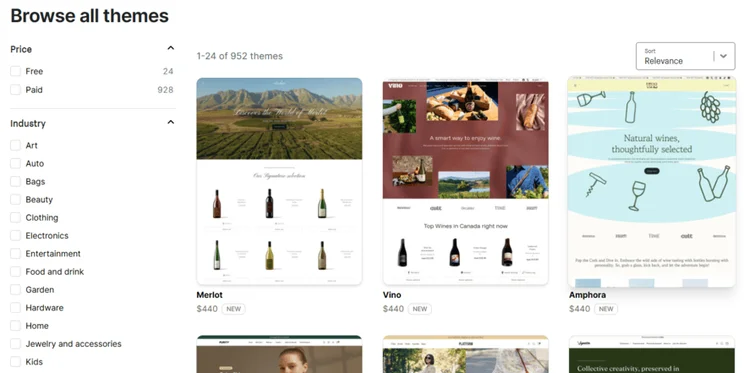
Selection of Shopify premium templates
In addition to your Shopify plan, you might need to factor in the cost of a premium template, which can cost hundreds of dollars. Source: Website Builder Expert

How Much Does Shopify’s Grow Plan Cost?

Shopify’s Grow plan costs $79 per month (billed annually), unlocking advanced inventory tools that allow you to optimize stock to avoid the idle asset drain on your profit margins.

The Grow plan is designed for established businesses seeing substantial growth in sales and team size, particularly since you can add multiple staff accounts.

In addition to what’s included with the Basic plan, the Grow plan provides further support for expanding online stores:

  • Up to 87% shipping discount
  • Five staff accounts — a useful feature for businesses of scale with multiple employees
  • Shipping insurance if using Shopify’s native payment solution, Shopify Payments — get up to $200 coverage with every Shopify Shipping label
  • USPS discounts for shipping products
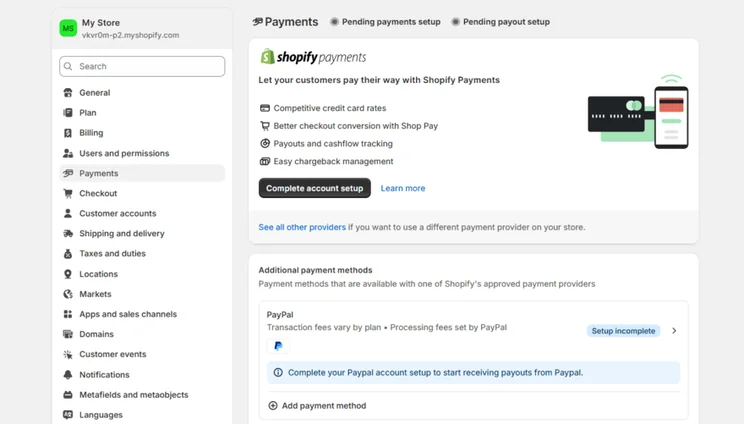
Shopify Payments setup page in a Shopify account
I could set up Shopify Payments from my settings. Source: Website Builder Expert

How Much Does Shopify’s Advanced Plan Cost?

The Advanced plan is Shopify’s most expensive core plan, starting from $299 per month (billed annually). This plan goes the extra mile to support very large businesses by providing even more features than its predecessors, such as custom analytics.

For the steep price point, the Advanced plan is only suitable for businesses seeing a high sales volume every month, since you’ll need the additional power to support your online store.

Unlock everything on Shopify’s Grow plan, plus:

  • Custom reports and analytics, so you can filter your store’s data with ease
  • Enhanced 24/7 chat support for urgent situations
  • Up to 15 staff accounts — the difference in staff accounts between the Grow and Advanced plans is a good indicator of the size of the business each plan supports
  • Third-party calculated shipping rates
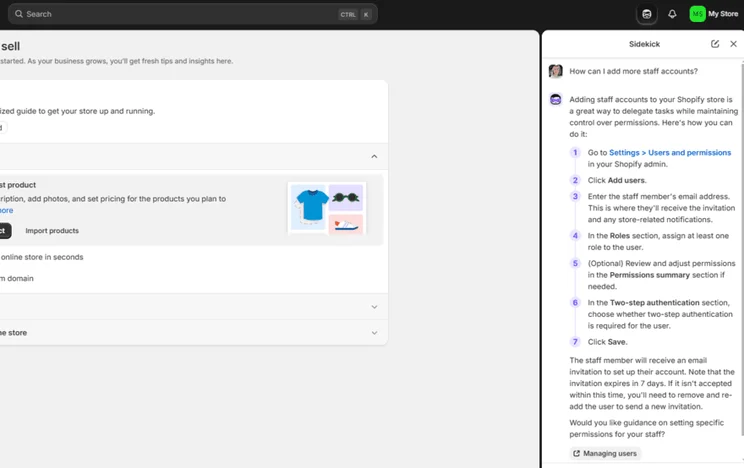
Shopify Sidekick chat about adding extra staff accounts to a Shopify site
I asked Shopify Sidekick, Shopify's AI assistant, for help when adding extra staff accounts. Source: Website Builder Expert

Which Specialized Shopify Plans Are Available?

In addition to Shopify’s three core plans, you can also subscribe to these alternative plans: Starter, Plus, Enterprise, Agentic, and POS Pro. These are available at varying price points with different ecommerce capabilities, from retail support to selling in AI channels.

Shopify plan Starter Plus Enterprise Agentic POS Pro
Starting price $5/mo (billed annually) $2,300/mo (billed annually, on a 3-year term) Custom pricing No monthly fee – card rates from 2.9% + $0.30/online sale $89/mo/location
Special offer N/A $399 for your first month N/A Try for $0 $67/mo/POS Pro location with Shopify plans
Purpose Sell across social media and messaging apps Provides scalable and customizable solutions for high-growth businesses Personalized plan to support industry-leading businesses Sell products directly in AI channels, no online store necessary Sell products in person and bridge the gap between in-store and online sales
Best for Side hustlers and entrepreneurs Established businesses Industry giants needing limitless growth Business trendsetters and small budget sellers Retailers
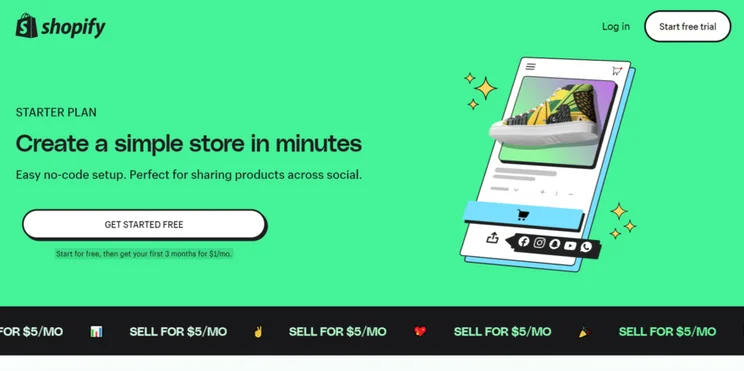
Shopify Starter homepage
Shopify Starter is ideal for side hustles and businesses looking to get started on social media. Source: Website Builder Expert

Can I Upgrade or Downgrade My Shopify Plan?

You can easily upgrade or downgrade your Shopify plan in your account settings. Click “Plan,” then “Change plan,” before deciding which plan you want to swap to.

If you’re upgrading your plan, the change is immediate and the fee is prorated based on the date you start the new plan. If you’re downgrading your Shopify plan, your new plan will update once your current billing cycle ends.

When choosing the right Shopify plan for your business, you need to consider key factors such as budget, your selling needs, team size, and targeted market.

Business need Recommended Shopify plan Plan benefits
Small budget Basic ($29/mo) Cheapest Shopify plan to build an online store
Sell on socials Starter ($5/mo) Low cost way to sell via socials, SMS, WhatsApp, and email
Large team Grow ($79/mo) Unlocks staff accounts to support with store management
International shipping Grow ($79/mo) Best shipping discount (up to 87%)
High-volume of sales Advanced ($299/mo) Lowest card rates and advanced sales tools
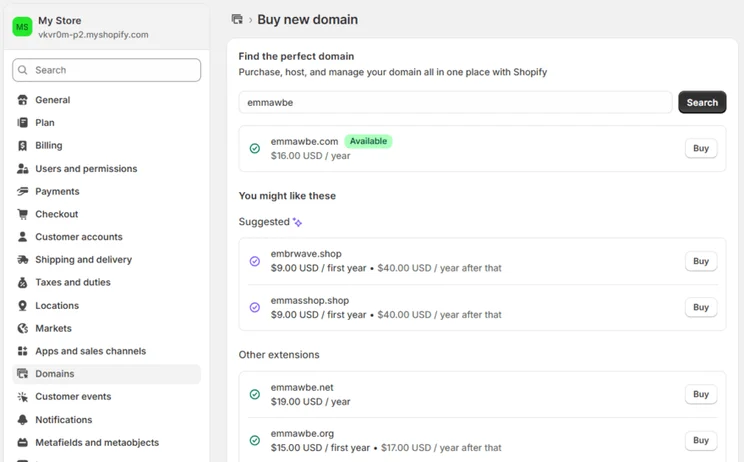
Selection of domain name options offered by Shopify in the domain settings page
I could explore domain name availability and pricing from my account. Source: Website Builder Expert

Shopify’s plans are expensive from the start, and there are additional costs to consider, such as premium templates and third-party apps. To put it simply, Shopify isn’t a cheap website builder.

Your overall spend with Shopify can increase because of:

  • Premium templates: Shopify’s premium themes range from $100 to $500 as a one-off cost
  • Paid apps: You can add functionality by paying for third-party features from Shopify’s app store (prices vary across the 8,000+ apps)
  • Domain name: This isn’t included with your Shopify plan (a standard .com domain through Shopify costs $16 per year)
  • Transaction fees and credit card rates: If you don’t use Shopify’s native payment gateway, Shopify Payments, each transaction will incur both third-party transaction fees and credit card rates (third-party fees only apply if you use a different payment gateway)

Shopify’s transaction fees and credit card rates can be seen in the table below:

Basic Grow Advanced
Online credit card rates 2.9% + $0.30/transaction 2.7% + $0.30/transaction 2.5% + $0.30/transaction
In-person credit card rates 2.6% + $0.10/transaction 2.5% + $0.10/transaction 2.4% + $0.10/transaction
Third-party transaction fees (without Shopify Payments) 2% 1% 0.6%

To keep your outgoings to a minimum, there are a few ways to save money with Shopify, from opting for a longer subscription to relying on AI design support:

  • Save 25% by signing up for an annual plan
  • Use Shopify Payments to avoid third-party transaction fees
  • Pick one of the 24 free templates instead of a premium theme (or use Shopify’s built-in AI theme generator)
  • Get your domain name from a cheaper domain registrar

Shopify’s plans are more expensive than Hostinger’s, it’s not as easy to use as Squarespace, and Shopify lacks the versatility of Wix. Despite Shopify being our leading ecommerce website builder, it won’t be the right fit for every online store.

Website builder Shopify Wix Squarespace Hostinger GoDaddy
Free plan or trial 3-day free trial Free plan 14-day free trial 14-day free trial Free plan
Starting price $29/mo $17/mo $16/mo $2.99/mo $9.99/mo
Cheapest ecommerce plan $29/mo $29/mo $16/mo $3.99/mo $20.99/mo

Our video review covers the top ecommerce builders in more detail so you can see why Shopify is our number one choice for online stores:

Through our research process, we carried out over 300 hours of analysis, data collection, and hands-on testing across seven primary categories:

  • Sales features (30%): We look at the ecommerce capabilities of a platform, from payment options to multichannel selling
  • Design features (15%): We review the templates and design options available for online stores
  • Help and support (15%): We test the available support channels and business resources
  • Website functionality (15%): We look at the range and quality of features, including blogging tools, AI, and SEO
  • Pricing (10%): We examine what you can get for your money with each plan
  • User experience (10%): We test the ecommerce builder ourselves to assess how easy they are to use
  • Reputation (5%): We compare each builder against its competitors and look at how each platform performs in the market

To determine whether Shopify’s plans are worth spending your money on, we specifically examine:

  • The quantity and quality of features available for the price you pay
  • The average cost of Shopify’s plans
  • Whether there’s a free trial or free plan available to test out the platform

Based on its performance in this category, Shopify received a pricing score of 3.4 out of 5 because of its expensive plans and short free trial.
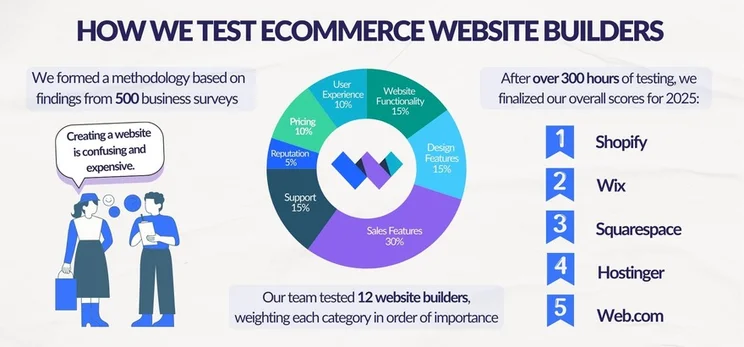
Graphic breaking down Website Builder Expert's ecommerce website builder testing into three steps: conducting business surveys to build a methodology, testing website builders, and finalizing scores

Shopify is the best ecommerce website builder in 2026 and it offers three core plans, ranging from $29 to $299 per month (billed annually).

Because of its expensive entry point for small businesses, Shopify is best for established online stores with extensive inventories. We recommend starting on the $29 per month Basic plan to access unlimited products and agentic commerce. Then, upgrade as your business grows to unlock advanced features, such as shipping insurance.

You can save 25% by paying for your Shopify subscription annually instead of monthly. For example, the Basic plan costs $39 per month, if billed monthly. This translates to $468 for the year. If you choose to be billed annually, it’s $29 per month, or $348 for the year. In this example, you’ll save $120 each year.

If you don’t use Shopify Payments, you’ll be charged a standard credit card rate, as well as third-party transaction fees. These third-party fees range from 0.6%–2%, depending on your Shopify plan. If you use Shopify Payments, you’ll only be charged a credit card rate per transaction.

If you’re looking to sell in person, you’ll need to pay and budget for a few features. Firstly, your Shopify plan — in-person selling is included with all core premium plans, ranging from $29 to $299 per month (billed annually). The second factor to consider is transaction fees, which will vary depending on your plan, payment method, and if you’re selling online or in a physical store.
Finally, you’ll need to pay for each Shopify POS Pro location. This is an additional $89 per month (billed annually) per location.

Shopify doesn’t have dedicated hosting plans, but hosting is included with its website builder subscription. Shopify’s premium plans range from $29 to $299 per month (billed annually).

If you want to create Shopify websites for other individuals or businesses, the rates you set will depend on your skill level, what you’re including in the package, and the time you spend working on the project. You can also choose to charge someone with an hourly rate or a set rate for the website as a whole.
On average, typical fees for a Shopify website range from $40 to $250 per hour.

Written By

Headshot of Emma Ryan

Emma is Deputy Editor of MVF’s B2B brands, specializing in website builders, ecommerce, marketing, and vibe coding. Emma combines her wealth of knowledge and years of hands-on testing with a passion for helping small businesses and website owners navigate the highs and lows of being online. Her work has been featured in Newsweek, Digiday, TechRound, and Industry Today.

More about

Reviewed By

Headshot of Ollie Simpson

After three years of refining his skills in data analysis, Oliver transitioned to a role as a researcher to help understand reader preferences, decision making factors, pain points, and needs when it comes to building an online presence.

Oliver’s professional journey started out as a researcher in law enforcement, where he developed strong analytical abilities. He later moved into operations, which strengthened his understanding of quantitative data.

Now, Oliver blends his quantitative analysis skills with qualitative research to explore both audience preferences and product nuances.

In his three years at Website Builder Expert, Oliver has used his skills to provide up to date, unbiased insights into the products we review, to help ensure the best possible recommendations for readers. Oliver regularly assesses and iterates our website builder research methodology, staying on top of industry trends, digging into platform features and UX, and prioritizing areas that matter most to business owners. This provides web builder and ecommerce rankings you can trust.

In 2025 alone, Oliver’s conducted over 100 hours of data collection across website builder and ecommerce testing, and investigated 283 individual areas in the ecommerce methodology. He’s overseen 54 individual user tests of website builders, to assess how easy they are to use, and compiled the data into clear ratings for each builder.

You’ll find Oliver’s research referenced across all of our key pages; our content team use it to determine the ranking orders of pages such as the Best Website Builders of 2025, or comparisons like Wix vs Squarespace. We don’t decide who “wins” on personal preference; Oliver’s thorough research clearly outlines which platforms are best for different user needs.

Equipped with a UX design diploma, Oliver translates complex research findings into actionable insights that facilitate informed decision-making.

More about

Popular topics

66 comments

Your email address will not be published. Required fields are marked *

  • Hennny

    how come prepare An asian wife your individual mail order spouse

    housing asiatische ladies

    wok cookware teleordering would-be brides major point characteristics, fallacies operating costs regarding wok cookware spousesmail order typically the most popular female are of severe encounters. this is a fact, And various, We believe that what makes them women too charming, very popular, and thus very pleasing. Thousands most typically associated with single people in the usa include eager in order to perfect wok cookware wife's comments, and also can help you with all you need. this, you will understand to get married to ladies by way of an oriental nation, so just why many females would you like to wed and also the, record the average joe asian kitchenware girls can, and exactly how unaffordable it is usually to find and get married an oriental star of the wedding.

    a great quantity eu men prefer marrying wok cookware the ladies as they quite simply obtain them sincerely permissive with love certain contemporary culture. it has been even though us everybody ought not date all their local kids considering a few may perhaps be quite independent and do not, nor comprehend courtship. but men, in his or her immediately turn, Want to take care of their soulmates and be chivalrous. well then, men of all ages begin looking for fernrrstliche teleshopping up and coming brides basically because they have contrary thoughts about working relationships and as well as social ethnic heritage generally speaking.

    world-wide weddings are common these types of mainly because each partner realise that employed cherish each other create a strong family and friends. normally, also, grownup effort and as well as draw hard earned money, and maybe a girl looks after boys and does household duties. notwithstanding, i am not saying that an hard anodized cookware daughter must be entirely reliant on her husbspousecause and grow might purely because your girlfriend job in addition have a fulltime her time and properly deal with wasted time rightfor my child. usa man world health organization get married catalog shopping oriental brides said within his / her ex's you must do everything to ensure they are happier, to, successively, should also give your very best to reciprocate.

    online dating sites come with provided us the established routine to be a part of the dating world utilizing oriental young women. a marriage concerning asian kitchenware along with dangerous man happen to be durable and satisfied and content. consequently, such a multitude of and also the visit a great asian kitchenware suit. in this article, You will all about about the actual cost of an wok cookware bride-to-be and secrets approaches secure your sweetheart process.

    in our time, it's not hard to fulfill new woman as quite a bit ways of doing which will. as an example, A lot of yank men prefer to find in order to oriental brides as around the web it gives quite to find possibilities soulmate an actual with no having posting one'sfamily. women readily available remote countries thirstily talk with european sexually ripe males because they would like to try u s of a's modern society and learn how to it nicer. hard anodized cookware brides are easy to be friends with and will certainly try new things and want to meet people who will offer you you the entire group challenging things, enjoy absolutely adore along with time and effort.

    tons hard anodized cookware could for the majority of, nonetheless,however it getting married to all of is different when considering downtown young women. the reasons? you can nature of the game with regards to, And there are plenty of that away from even more further.

    cookware mail order brides gives you: who definitely are cookware brides?

    nice of hard anodized cookware mail order brides to be is really undenying. your lady are the actual beautiful ladies to produce wedding ceremony in depends upon. And it is extremely comprehensible when hard anodized cookware women of all ages host the best features would have to be comfortable approximately these items. contemplate of the most dominant choices that come with wok cookware teleordering birdes-to-be.

    endless youth. ladies taken from south east asia are usually phenomenally sizzling in addition enjoyable. But if you desire an oriental wife, You would wish your wife's to be able to fabulous with georous as long as you possibly. effectively, all women made by this arena am aware plenty of keys that enables them to look at youth even inside their middle 50s!

    customer loyalty. Most men that will to you're wedding asian kitchenware people declare that their personal wives or girlfriends are the majority of trustworthy clients in the world. they are going to at hand you need appearing in good and bad time intervals. basically supporting and thus devoted are crucial in a romantic.

    Double eyelid. A double eyetop is merely a helpful eyewho has a anti-wrinkle the top of on. rather among asian kitchenware females, so,certainly girls and boys alike with this city suffer from mesmerizingly attractive vision. it is usually linked to gorgeousness, which is why so many women wish to have it.

    Obedient furthermore submissive component. some adult men would you like to get married asiatische mothers due to the fact brides unquestionably are submissive, timid, and then obedient. and although not all brides with this region are going to have such a personality, [url=https://www.crunchbase.com/organization/asiame]asiame[/url] It is not difficult to get one that might. wonderful be the top of the friends and make constantly options, marrying an cookware lady friend is the right thing to do.

    tiny body's. various everybody from in america who are looking for Asian womens to make marital want to purchase them on the fact young females from japan are hands down small plus attractive. absolutely yes, nearly all wedding brides within this region are considerably little.

    largest region in eastern medicine to select from a partner

    When we searching a partner, We might attempting some personality these can also be kindness, acceptance, ache, plus people positioning. most of asia is a region known for having kind of character because center using the society. yet, lots of cultures and therefore economies may possibly possibly stress a majority of these qualities certain. additional, usually there are asian countries that may appear to be the best posts to look through potential wife with regard to Westerners as well as,while residents, to be the north west sway are noticed powerfully consequently has produced local people a good deal open to crucial a marriage.

    fashionable streets or cities to buy a woman: Chongqing, Shanghai, with Beijing

    this particular fabled previous with regards to China is not only about customs, it's about the character of the feminine residents so there, as well.

    usually it's remember that not the same ethnic sets in china based online stores have in effect, major functionality, we are able showcase a couple traditional features. the eye shape of chinese a woman because of matrimony generally square or over, tender are probably almond sized, With a visible inborn eyelid retract, flowing hair should be dense and consequently dingy, along with complexion varies from glow wonderful to significantly tan.

    beach front in china based online stores encounter trim breast size alongside small sizes.

    nature attached to eastern women of all ages

    chinese language courses gals will be fluffy, from a motherly system, as differentiate household oneness loyalty. They can take place earmarked as it's a life thing not in order to show any feeling, But they can be hugely popular and delicate, mixing up it in relation to their hardworking flora and fauna.

    lady culture: 63.86 million

    a favorite villages to be able to woman: tokyo, japan, Kyoto, Osaka

    the particular "Kawaii" reasoning behind cuteness may be the first thing that concerns the human brain when you would imagine of japoneses ladies, however not the only feature that a lot of tends to create the actual of public could.

  • Richard Samuel

    I’d like to set up a website for a charitable fundraising project where people purchase bread from a selection of several different types each shown by a photo. They’d be paying for 6 deliveries sent to their children’s school. They’d provide their name, contact number and school where the bread was to be delivered to. They’d also have an option to have bread they’d additionally select delivered to a loved one at a seniors home. They would select their bread type bread, name of the recipient and name of the seniors home from a selection of participating seniors residences . They’d pay using Visa and other online payments providers. Do you recommend having a developer build the site? Which shopify plan would you recommend? It would be helpful if the fundraiser was alerted each time when a person signed up and paid. I look forward to your opinion.

    1 reply

    • Holly Choules
      Holly Choules

      Hi Richard,

      You shouldn't need a developer for this task - Shopify's plans can handle it.

      With Shopify's product listing tools, you can create a product page for the bread deliveries and add an appropriate product name, pricing, and photos. However, if you want to collect specific customer information (like the names of the school and participating senior residences), you'll need to look for app from Shopify's App Store that can provide this functionality. I suggest a "custom products" app to create new fields your customers can fill in.

      Shopify has a wide range of payment options available, which includes Visa. It also has a "Notifications" section in its dashboard where you can add recipients and send them a notification when an order is made.

      Shopify's cheapest plan is the best to start with. You could always upgrade if you find that you need more functionality as your website grows.

      Hope that helps!

      Best of luck,
      Holly

  • Ann

    Very helpful! Are postage fees calculated when someone makes a purchase?
    We're a small nonprofit and currently have a shop on our Wordpress site, and we don't need a domain name or host, but are thinking of integrating Shopify to make a better, more attractive experience for shoppers. Our current processor is through Stripe, so Shopify Payments would bypass Stripe, right? I want to make sure we don't get double-dipped with fees. Thanks!

    1 reply

    • Samuel Jagger
      Samuel Jagger

      Hi Ann! Thank you for your comment! If you integrate Shopify to your WordPress store than it will ask you to join Shopify Payments for free. Only one processor will process the transaction, so there is no worry of getting double-charged. If so, contact your bank to get it resolved. Hope this helps! All the best - Sam

  • Dina

    Still confused about transaction fees. Just want to be able to accept payment via Tap to Pay on my iPhone at craft shows. I know there is a fee for credit card transactions and the monthly fee. How much is the additional transaction fee if any?

    1 reply

    • Lucy Carney
      Lucy Carney

      Hi Dina,
      Thanks for your comment! I totally understand wanting to fully understand transaction fees. Accepting Tap to Pay payments on iPhone does come with aditional fees. According to Shopify's support, you can process up to 100 Tap to Pay on iPhone transactions per calendar month with no additional fees. After that, it'll charge $0.25 per transaction. You can read more on Shopify's website.
      I hope this has helped, have a great day!
      Lucy

  • Mat

    Hi,
    very helpful article.

    I still don't quite get two things:
    1. do I also have to pay for hosting or it is already included?
    2. in what currency is the transactional fee paid (USD oraz in the local currency of purchase)?

    1 reply

    • Emma Ryan
      Emma Ryan

      Hi Mat,
      Thank you for leaving a comment! Any website built on Shopify will be hosted on Shopify's servers. That being said, you'll need to purchase your own domain name which you can do through Shopify. As for transactional fees, it depends on the customer! If you receive a payment in your customer's local currency (and it differs to your website's primary currency), you'll be charged a currency conversion fee. The fee will automatically be applied to the customer's price unless you set the currency exchange manually - in that case, you'll have to pay the conversion fee. Of course, if you use Shopify Payments, you won't have to worry about any transaction fees! I hope that helps!
      Very best,
      Emma

  • JOhn

    This was an helpful page, I am investigating adding Shopify to a business site I have had for over 20 years
    I am hoping to gain more business

    1 reply

    • Samuel Jagger
      Samuel Jagger

      Hi John! Thank you for leaving a comment! Shopify is brilliant for starting an online store, as it does everything for you! If you are wanting to add Shopify to an existing site, you can do that through the Shopify Buy Button, a plugin by Shopify! It enables you to sell through Shopify without having to recreate your entire site on the platform. It's available through Wix, Squarespace, Weebly, and WordPress, so if your sites are built with any of them, you're halfway there! You will need to set up a Shopify account in order to activate it but once you do, you can start selling! Just follow the instruction given on the Shopify Buy Button page. I hope that helps, and good luck with your site! All the best - Sam

  • Akumu

    this helped me a LOT!!! Thank you

    1 reply

    • Samuel Jagger
      Samuel Jagger

      Hi Akumu! Thank you for leaving a comment! So glad we could help you. We love hearing from readers like you. All the best - Sam

  • Gabriel

    Hello, i just switched to the shopify platform and currently i'm using the stripe payment method and they have a 2% fee. On top of this fee does shopify add the 2.9% + 30 cents or i'm only charghe the 2%? Thank you!

    1 reply

    • Lucy Carney
      Lucy Carney

      Hi Gabriel,
      Thanks so much for your comment! Shopify charges its own transaction fees on top of your payment provider's processing fees, so you will encounter fees from both platforms, since they're separate. You can avoid Shopify's charges by using its in-house payment gateway, Shopify Payments.
      Hope this has helped!
      Best, Lucy

  • Alcante

    Hello my name is Al
    I'm a shoplifty plus plan subscriber, however when i decided to jump to that plan i didn't know what i was doing as I'm only making around 1 sale per month
    My question is what will happen f I downgrade to the Shopify basic plan?

    1 reply

    • Lucy Carney
      Lucy Carney

      Hi Al,
      Thanks so much for your comment! I'm sorry you've had this issue, from what you've described I definitely agree that the Shopify Plus plan isn't right for your needs. If you downgrade to the Shopify Basic plan you'll lose any of the Shopify Plus features you might be using, so I recommend disabling any of these before you downgrade. You'll need to check how long is left in your current subscription too. I would recommend contacting Shopify directly to make sure your downgrade is as smooth as possible.
      I hope this has helped!
      All the best,
      Lucy

  • C

    This article is very comprehensive and explained in a way that understanding it is a breeze. Thank you!

    1 reply

    • Zara Choudry
      Zara Choudry

      Hi!

      Thank you for taking the time to leave us a comment! We're delighted to hear that you found this article useful.

      Zara

  • Don Edi

    Very simple and details articles.

    1 reply

    • Lucy Carney
      Lucy Carney

      Hi Don,
      Thank you so much - glad you enjoyed it!
      Best, Lucy

  • Charles

    Thanks for the info, it was well written and covered almost everything I needed to know. The only info I've been having trouble finding is on refunds. How do refunds work if your using your trademark and custom designs; if that product gets returned? Is there an overall policy for Shopify or is it based on the app of the drop shipping distributor you're using? I'm speaking on product you customize on the Shopify platform. I'm just wondering what happens to that product. Thanks for the article, it really did help.

    1 reply

    • Jordan Glover
      Jordan Glover

      Hi Charles,
      This is a great question! If you're going to be selling customized products through Shopify, it's likely that you'll be using a dropshipping app such as Printful. Unfortunately, there isn't a one-size-fits-all rule with this, so you'll need to check the refund policy for the specific app you're using. Often, it will depend on the reason for the return. For example, Printful will offer refunds for faulty items under certain conditions, but if a customer chooses to return a product due to sizing, or simply because they don't want it anymore, it'll be up to you to foot the cost and submit an order for a new item, if you're offering exchanges. Printful accepts returns back to their facilities, or you can set a personalized returns address so all items come back to you. If you go for this latter option, however, you'll have to take responsibility for all elements of the return process.
      If you can't find the specific policy for your dropshipping app, or you're not sure what it means for your business, we recommend contacting the app's customer support services directly. They'll be able to give you the relevant guidance.
      I hope that helps!
      Jordan

  • C.

    This is the most comprehensive and expertly explained guide I’ve seen. It has helped tremendously. Thank you so much!

  • denise Lillian Clayton

    thank you, spelled out in layman's terms.

  • Pratibha

    Very nicely explained. Thankyou

  • Marc

    Thanks! It gave me the information I was looking for.

  • Sal

    Hey Erin, I think I can offer some insight. I've been selling on ebay for ~10 years. I think you'd be better off on other hosting domain sites to start with such as domain.com or bluehost. The cost is much lower to start with. Once you're ready to increas your costs to go with increase in sales, switch over to shopify. For shipping, create an account with a postal company (in Canada, Canada Post is probably the best option). Create the account and then download shipping tool software (ex for CP is E.M.S). You can also prepare the shipping labels directly on the postal website (its free also) or through sites like Shippo. You'll also need a payment method (credit card and bank accouny), a registered/verified email account (try to keep it organized by having diff accnts & passwords for sensitive info), a good black and white printer (laser monochrome is best and cheapest in my opinion) and the shipping details (dimension, weight, destination). You can order the packing label protectors from Canada Post for 100% free (just create an account). Its really easy but takes time to learn w/ first hand exp. Next year at this time youll be shipping your books while sipping a coffee and dancing to your favorite music ;) good luck hope this helps

  • Jimbob

    Any advice on how to use your system for a beginner please?

    1 reply

    • Hannah Whitfield
      Hannah Whitfield

      Hi there,

      Thanks for your comment! Shopify has loads of useful guides for beginners on its site, plus a really helpful support team who can walk you through the setup process for this.

      Hope that helps!

      Hannah

  • Sonia

    Good day I'd like to start online store don't know much about it but would like to know if you guys do it like set up a website and what do I need to start

    1 reply

  • Cherese

    Hello! This article was exactly what I needed because it answered all of my questions. I am more motivated now to start. I am truly looking forward to having a successful business! Thank you so much.

  • Dolf

    Good article giving me a first-time overview.

  • Erin

    Hi! Great article – thank you so much for writing all of this out. I had a couple of questions answered here that I couldn't find elsewhere.

    I'm leaning heavily towards using ShopifyLite – I have a website already that runs on WordPress.org and I just want to sell some of my paperback books through my site (I am a full-time author). What I haven't been able to find is how the shipping is handled. If I use ShopifyLite and someone buys one of my books through my site, how do I print a shipping label? How do I pay for the postage? Is all of that done through the Shopify program? I know that it's handled if I choose the $29 / mo option but I just don't think I'll sell enough paperbacks to justify $29 / month. I need help figuring out the postage part of things before I decide to do the free trial – I don't want to "start the clock" on the 14-day free trial until I've figured out all of the answers that I need.

    Thank you so much for your awesome article!

    1 reply

    • Hannah Whitfield
      Hannah Whitfield

      Hi Erin,

      Thanks for leaving a comment, and sorry for the delay in getting back to you. You should find that Shopify Lite works in much the same way as the other Shopify plans when it comes to inventory management and tracking - the core difference is just that you wouldn't have a Shopify storefront. Adding Shopify Lite to your existing WordPress site could be a great way to dip your toe in the water until you feel able to justify paying for the Basic Shopify plan. Hope that helps!

      Thanks,

      Hannah

  • A. Clayton

    Thank you so much for all the info and research! I feel it covered every aspect and wasnt left with any questions either! Thanks so much for taking the time to do all this!

  • Antoinette

    This is such a helpful review. Thank you!
    I am debating whether Shopify commerce site is the right for me for a UK based business. I am trying to ascertain the costs involved in the sales.
    Am I correct in thinking that if I go with a Shopify payment at Charge of 2.2% +20p I will be charged the same regardless of whether they pay with credit card or PayPal. Does this differ if they are international payments.
    I would love an online calculator to help me work this out!!! Is there anything like that?

    1 reply

    • Natasha Willett
      Natasha Willett

      Hi Antoinette,
      Welcome to the community and thank you for your question. Payments and transactions fees is something we hear time and time again as a huge factor when deciding which platform to use, so you are not alone in your concern. Lets break this down, yes that fee of 2.2% +20p is regardless of how your customer will pay. This fee however is only when you have used Shopify payment as your payment gateway. If you select to use this on your site it would be integrated to your checkout meaning it is super straightforward for your customers to pay by card from wherever they are in the world! Taking international payments through Shopify payments should not stop you.
      I haven't heard of an online transaction fee calculator, what a great idea, I'll reach out to to our tech team to see if there is a way to maybe develop something onsite!
      I hope this is has helped, all the best with your decision.
      Natasha.

  • Darnell Abbott

    Jeremy,

    Thank you for such a detailed explanation, very helpful. I am still struggling with the question of "owning" our web site. We are a bricks and mortar, 39 year old retail farm and garden supply business, with an outdated website. I have looked at different web site builders, and we are in the process of working with one now, but, have not payed our first installment yet. I have stalled as I realized I needed to ask the question: "What happens if we decide to not use you after our one year contract is finished". Answer: site gets dismantled. So, we have spent roughly $3000.00 or so (not including social media package, hosting, etc.), or adding ecommerce component, really just the design, and it is very boiler plate, that is not ours to keep if we want to move to another web platform. I feel like I need to own my website, with the designer keeping in mind that we will be adding the shopify capabilities at some point once info (or brochure) site is up and running. I am trying to understand if Shopify actually builds and designs websites.

    Any thoughts would be appreciated. Thank you in advance for your time.

    1 reply

    • Lucy Carney
      Lucy Carney

      Hi Darnell,
      Thanks for your comment, I'm so glad you found the article helpful. That's great that you're looking to get back online, and I understand your concerns. Shopify is a platform that allows you to create your own website, so you use it to build your online store, adding products and customizing your design. You don't need a designer to do this, as it is aimed at ordinary people being able to do it themselves. In regard to the issue of what happens to your website if you no longer want to stay with that provider, there are a few options. Most ecommerce website builders have apps and guides to help you migrate your website across from one builder to another. For example, you could use the Shopify app Cart2Cart to transfer your store to Shopify, or another example would be using BigCommerce's Catalog Transfer to transfer your site away from Shopify. All these apps should allow you to move your products, customers, reviews, etc. smoothly across from one to another.
      If you want to read more about this, here's Shopify's guide on how to migrate your store to their platform, and here's Cart2Cart's homepage plus their list of supported platforms that you can transfer between. Hopefully this will clear up any concerns of being stuck with one provider, as apps like these do make it as easy as possible to migrate your store. If you're not sure about Shopify, why not check out our comparison chart of the best ecommerce online store builders of 2018?
      Really hope that helps and best of luck!
      Thanks for reading,
      Lucy

  • Michael

    Hi! Very helpful information! For me time is money and so I always look for a product that works as advertised, with a minimum of fuss and with good support. That is what I found here. I recommend Shopify Pricing Table that was easily integrated into our site.

    1 reply

    • Fred Isaac
      Fred Isaac

      Thanks for the comment Michael, glad Shopify worked for you.

  • Gayle

    Thank you for the informative article. I'm just starting my Shopify ecommerce store - dropshipping - and while the credit card type fees are negligible in the long run, they do need to be accounted for and we need to know what to expect. Otherwise, we might be blindsided by a number of 'negligible fees' that actually add up.

    I understand from my emails with Shopify support and that if we use Shopify Pay as our gateway, we only pay on the $29 plan 2.9% + $.30 per transaction no matter what credit card the buyer uses or if they use PayPal. At least I think that's what I'm being told. Customer support is great and I received a lot of information but not in a way that isn't still leaving questions.

    Your article which is far more comprehensible than anything else I've found in trying to understand something that should be so plain and simple. I'm still not sure that what I understand is what I'll be charged.

    1 reply

    • charlie Carmichael
      charlie Carmichael

      Hi Gayle,

      Thanks for your comment.

      Yes we would always recommend you keep track of all your outgoing fees, no matter how small they may be individually. You are correct regarding the 2.9% + $0.30 for the $29 monthly plan, and that shouldn't change based on whether the buyer uses a credit card or PayPal. We're glad you found the article helpful and please feel free to share it on social media - you never know who else it could benefit!

      Thanks again,

      Charlie

  • Bill Driscoll

    Hi Jeremy - I was on the Shopify website. Can you explain the 1.2% + $.30: -4% when using an external payment gateway (like Paypal or Stripe)? What does the -4% mean? Also, does Shopify accept ACH payments (and how does it charge us)?

    Thanks!
    Bill

    1 reply

    • charlie Carmichael
      charlie Carmichael

      "Hi Bill,

      Thanks for your comment.

      I'm not sure where you've seen Shopify's external payment gateway fees at 1.2% or at 4%? I've just checked the Shopify pricing plans page and I can only see options at 2%, 1.0% and 0.5% which you can see here

      As for ACH, Shopify nor any of the other hosted platforms will have an option like that I'm afraid. ACH is something your payment gateway would use to settle your funds. However, the closest thing I can think of is an e-check payment. For example, the Authorize.net gateway allows customers to pay using an electronic check. But again the customer payment will first go to your payment gateway before it is settled to you.

      Hope this helps. Thanks,

      Charlie
      "

  • Terry

    Thank you for the great articles. Throughout my Shopify research, I have not been able to find adequate pricing info regarding the POS system. What I would like to know is that if I add the Shopify POS to a Shopify on-line store plan, do transaction fees apply if I use an external gateway for my retail sales in the store only? I have a real issue with paying out an extra percentage on my store-front sales, although it makes sense to have all my info tied together. As a small business owner it becomes cost-prohibitive to pay Shopify what would amount to an additional 1% + of my brick and mortar sales to tie the two together. (based on all the plan options and the excellent pricing I have with my external gateway). Hoping this question makes sense. Thank you.

    1 reply

    • Tom Watts
      Tom Watts

      Hi Terry,

      As far as I understand Shopify's ToS, you will have to pay transaction fees if using any third party payment gateway, even with Shopify POS.

      One way to avoid this is using 'Shopify Payments', the in-house payment gateway solution. Although I appreciate that you don't want to lose the favorable rates you have with your current supplier, it's potentially something to consider for overall convenience and 'tie it together' as you say.

      Having just spoken to Shopify via their online support chat, I was informed that "The same transaction fee rules apply to the POS as they do to online transactions. If you process a POS sale through your Shopify account your will incur the applicable transaction fees."

      So it looks like you'd incur the charges, Terry, if you stick with a third party gateway.

      I hope that clarifies things up a bit,
      - Tom

  • Kat

    Hi Jeremy
    I really liked the DETAILED review of Shopify as I am seriously reviewing my options and looking to Shopify. I have a question:

    I have already purchased hosting from GoDaddy and it is paid for another 2 years. I have had lots of problems with Linux and keep my site online, using Wordpress. My site is now offline due to some of those issues; probably some of this is my fault but I know not all...
    Do you know if I can use Shopify through my GoDaddy hosting or is Shopify the hosting plan?
    (obvious answer) Maybe you have a suggestion on how to consolidate that hosting investment.

    I like having some control - managing my website offline, experimenting with code snippets as I grow my site and then uploading updates. Wordpress was good but I did not feel I had enough control, so I was leaning to the Linux C-panel with GoDaddy. As I said it is all offline due to issues of frequent on/off GoDaddy servers system.

    Thanks again
    Kat

    1 reply

    • Tom Watts
      Tom Watts

      Hi Kat,

      Thanks for the positive feedback, good to know you found the review helpful.

      As for your hosting question: If you subscribe to Shopify then your ecommerce store will be hosted on the Shopify servers. This means you wouldn't be able to use your GoDaddy hosting. If you've got a domain with GoDaddy then you can connect this with your Shopify store easily enough (here's a step by step guide).

      It's the nature of website building platforms like Shopify, BigCommerce, Wix, etc to bundle their hosting with their product. It's just how it goes unfortunately. Likewise, while you can upload some custom HTML snippets to each, you can't work on them in an offline capacity, which - if important to you - may be a sticking point.

      It sounds to me like you're getting frustrated by the up-time or connectivity of GoDaddy's servers, so maybe it is time to test the waters a little bit? Why not have a read of our Shopify + BigCommerce reviews as both are well respected by online merchants and trusted by millions of entrepreneurs, like yourself!

      Both platforms also offer a free trial period so you can test them out without any financial risk to yourself.

      Hope that helps,
      - Tom

  • Marshymatters

    Wow. Thank you for such a well-written and thorough article. It is undoubtedly so appreciated.

  • Rob

    You've done a lot of good work. Decisions? Jeremy. Thankyou. Ill process this.Rob McPhail

    1 reply

    • Tom Watts
      Tom Watts

      Hi Rob,

      Glad you found the discussion informative.

      Thanks for reading,
      - Tom

  • Tom Watts
    Tom Watts

    Hi webdev,

    Thanks for sharing your thoughts but I'm sorry, I really have to disagree with you here.

    Shopify is far from a toy platform - it's one of the market leading ecommerce platforms in the world, powering over half a million stores.

    Magento 2 is a fine choice for large ecommerce businesses - as would be Shopify's own enterprise plan - but for our readers and the focus of this discussion, Shopify is easier to use than Magento, more intuitive and nowhere near as intimidating for new comers to eCommerce.

    Shopify is also extremely powerful + scalable as you can find out on this page: on this page.

    So while I take your point that Magento 2 is an excellent choice for large-scale online businesses, it really isn't appropriate or relevant in the context of our discussion.

    - Tom

  • webdev

    Shopify is a toy platform when compared to professional platforms like Magento 2.

    If you take your eCommerce business serious then the only choice is Magento 2.

    If you want to stay small time then Shopify clearly because not only will you be paying for those "extras" per month, your get a website that performs lousy, scales even worse and you never get full control over your own site.

  • Janet

    Jeremy,

    currently i am using squarespace...and i was advised to switch to Shopify....would you recommend it? if so Why?

    Thank you in advance :)

    1 reply

    • Tom Watts
      Tom Watts

      Hi Janet,

      You would only need to consider moving to Shopify from Squarespace if you wanted to build and run an ecommerce website and Squarespace did not offer the right features or functions for your site to grow.

      For a more in-depth discussion, I'd recommend having a quick look at this article comparing Shopify + Squarespace.

      Hope that helps,
      - Tom

  • Viginia Luther

    Thanks

  • shawn

    Jeremy,

    Great article, very detailed. I appreciate the information provided. For others who read this, there are a few things to keep inthe mind:
    1. The maximum 6% processing is nominal compared to earning. Remember, 6% of a $100 earned is $6.
    2. These transaction fees are business expenses, which as a necessary cost of business, can be claimed as tax offset at the end of the year. Consider it money in savings.
    3. Most importantly, keep focused. Your hosl is to sell your product to generate income
    It is far wiser to pay $6 to gain $94 than to loose the sale out of being too frugal.

    Great article! Thank you for your dedication to helping others.

    Honorably and Respectfully.
    Shawn

    1 reply

    • Jeremy
      Jeremy

      Hi Shawn,

      Thanks for adding to this discussion. I agree with you in principle. Focus on building a good and profitable business. Find the tool that gives you the best chance of succeeding, even if it costs a bit more than others. Of course, should perform adequate due diligence to ensure that the tools one use gives you the best return for the buck as well!

      Jeremy

  • Nik

    Hi Jeremy,
    I have a question regarding this that I cannot find the answer to or maybe I am just confused.

    If my site has Shopify Payments AS WELL AS PayPal and a customer uses the PayPal option, does Shopify charge the 2% on top of the PayPal fees? Or is this a non-issue as long as Shopify Payments is available?

    Thank you in advance as this question is driving me crazy...

    1 reply

    • Jeremy
      Jeremy

      Hi Nik,

      Yes, I think so - but best if you clarify this directly with a Shopify staff?

      The reason why Shopify doesn't charge you a transaction fee if Shopify Payment is used, is that Shopify gets a piece of the payment processing fee (which you have to pay anyway regardless of which payment processor you use), so they don't have to charge you a transaction fee.

      So if one of your customers uses your PayPal option, then Shopify won't benefit from that transaction.

      Having said that, my own view (and experience) is that it's still prudent to offer both Shopify Payment (Stripe) and PayPal payment options. Let your customers choose which one works better for them.

      Some shoppers might prefer using PayPal rather than credit cards. Perhaps they have unused balance in their PayPal account, or they just prefer the protection that PayPal offers.

      Studies have shown that offering more payment options lead to higher transaction success rates. It's one less reason for your shoppers to walk away!

      Jeremy

  • Ville

    Hi Jeremy,

    Sorry for this stupid question, but I still haven´t figured completely out how much it will cost to sell something at Shopify.

    So, in the Basic Plan there´s the credit card fee 2,9%+0,30 USD + 2% transaction fee (Shopify Payments not available) + Payment gateway (Stripe, PayPal) fees.

    All this will add up to 6-8%?

    1 reply

    • Jeremy
      Jeremy

      Hello Ville,

      Thanks for your comment.

      If you sell a product using Shopify's Basic plan and if Shopify Payment is not available, then the transaction fee can look something like this:

      2.9% + 0.30 USD (paid to your payment processors such as Stripe or PayPal) + 2% (transaction fee paid to Shopify)

      So in your example, the credit card processing fee is the same as the payment gateway fee. The payment gateway (Stripe, PayPal, etc) is the one that charges you credit card fees.

      Hope this helps clarify things.

      Jeremy

  • Ken Stahl

    Thank you very much for this review! Much appreciated, Jeremy!

    1 reply

    • Jeremy
      Jeremy

      Thanks for your feedback, Ken.

      Jeremy