PhotoShelter Review: Can It Grow Your Photography Business?

We may receive a commission from our partners if you click on a link and purchase a product or service on their website. Learn more

rob-binns
Written By
Updated on March 8, 2024

Not only is PhotoShelter one of the top website builders on the market (especially if you’re an artist), but it also offers a wealth of other services for visual creatives: including digital asset management for brands, secure image delivery for photographers, and a range of AI-driven and ecommerce-focused features.

For the purposes of this review, though, we’ll be focusing solely on PhotoShelter’s website building capabilities.

Below, we’re running the rule over PhotoShelter: looking at how easy its website-building tool is to use, whether it represents good value for money, and what kind of help and support is on offer – plus plenty more about PhotoShelter’s tools, features, and online selling functionality.

PhotoShelter is a photography website builder that allows you to create a crisp, clean, and customizable portfolio website.With PhotoShelter you can design, build, and then start selling through a unique portfolio website, that fits your personal and professional brand’s look and feel to a tee.

PhotoShelter free trial website screenshot
PhotoShelter is already relied on by 80,000 photographers.
Pros
  • Refreshingly affordable, with a 14-day free trial and paid plans starting from just $10/month (billed annually).
  • PhotoShelter’s cheapest paid plan is surprisingly feature-rich, offering almost all the functionality of PhotoShelter’s most expensive package.
  • Its templates are mobile-friendly and responsive, meaning they render well and are easy for your users to interact with on all types of devices.
  • Strong ecommerce capabilities allow you to list, sell, and accept payment for your art in 23 different currencies – although you’ll pay a fee to do so.
Cons
  • PhotoShelter only offers nine preset design templates to build your website’s look and feel around, which can feel creatively restrictive.
  • It’s not the easiest website builder to use: there’s no walkthrough when you first sign in, and its lack of drag-and-drop functionality makes it cumbersome to get to grips with.
  • There’s no phone support or live chat, and – beyond PhotoShelter’s helpful Support Center – the only way to seek assistance is by filling out a form on its website.
  • Not suitable for anyone who isn’t an artist or a photographer.
  • If you’re on the Basic plan, you’ll pay PhotoShelter 10% on every piece or art of photograph you sell through your website.

PhotoShelter is super simple to get started with. Just enter your name and email address, create a unique ID for your portfolio, and select, from a drop-down list, your main reason for setting up an account.

You’ll then be rushed straight into PhotoShelter’s site editor, where you can get editing.

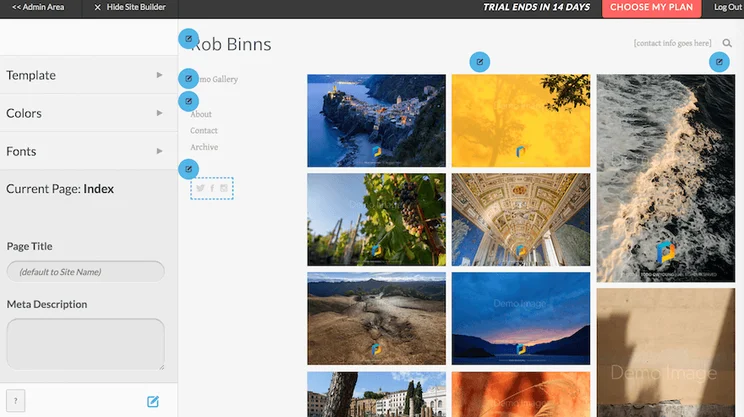
The builder generates a preset layout for you. This is nothing special – a standard layout displaying demo photos in a grid-like layout – but it is easy enough to replace the these with your own images, and to add text to each. Helpful blue circles signpost key areas of the builder, and help you get to grips with how the builder works.
PhotoShelter site editor screenshot
PhotoShelter doesn’t provide a walkthrough to acquaint you with its interface, although those blue circles are handy points of reference for newbies.

That said, we wouldn’t describe PhotoShelter as immediately intuitive. For starters, there’s no walkthrough to introduce you to the builder’s various features and layout. You’re left on your own to figure it all out for yourself.

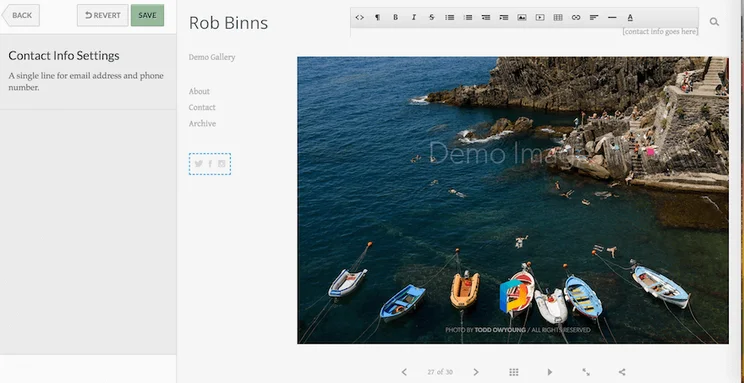
Secondly – and in contrast to leading website builders such as Wix or Squarespace – PhotoShelter doesn’t offer drag-and-drop functionality. This makes it difficult to gain as much creative control as you’d ideally like; leaving you restricted by the confines of PhotoShelter’s pre-existing HTML5 templates and architecture.
PhotoShelter site editor screenshot 2
In a website-building epoch where ease of use is the hottest commodity, PhotoShelter’s lack of drag-and-drop functionality feels like a glaring omission.

Still, being limited to these mobile-friendly templates isn’t such a bad thing – especially when they look as good as PhotoShelter’s do. We’d like to see a few more, though… for a website builder with PhotoShelter’s creative credentials and impressive ambitions, nine templates feels slender (especially when compared to the hundreds of templates Wix offers!)
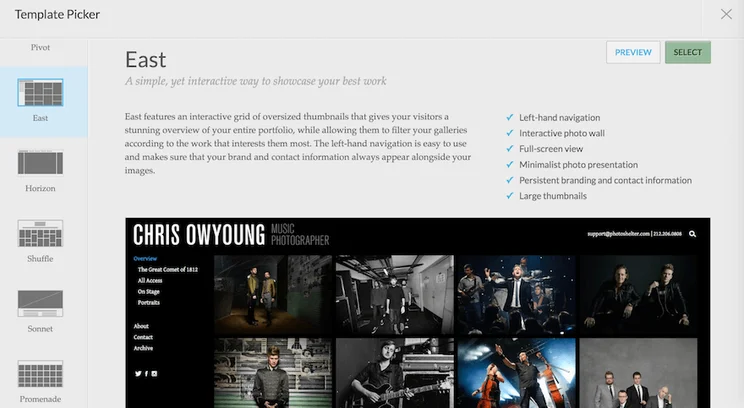
PhotoShelter East template screenshot
This template, East – which PhotoShelter describes as “a simple, yet interactive way to showcase your best work” – is one of just nine the website builder offers.

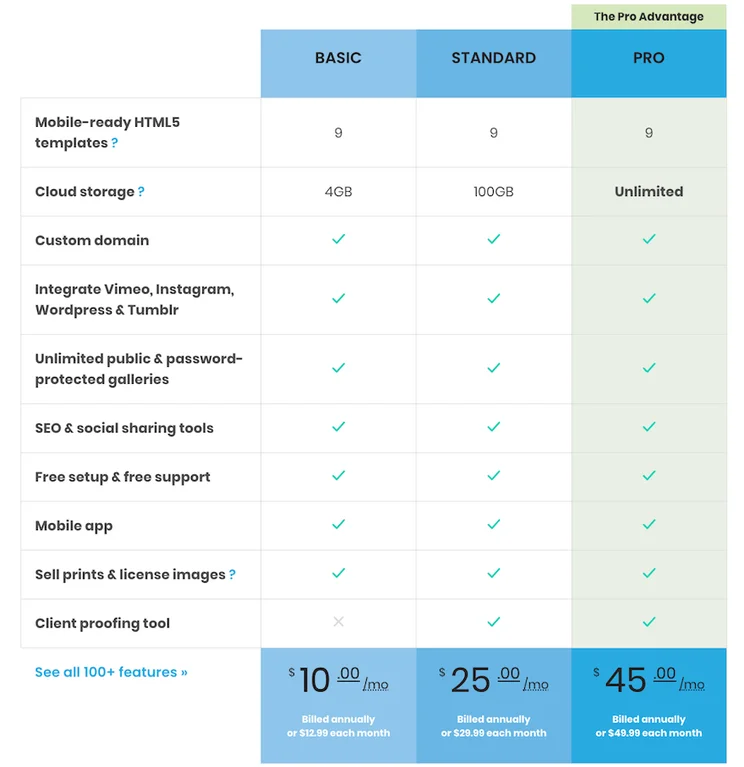
PhotoShelter comes with three pricing plans: Basic, Standard, and Pro, ranging from $10 to $45 per month (billed annually).

While most website builders offer tiered pricing plans – with each ascending plan unlocking more and more advanced features – PhotoShelter is notable in that all plans offer almost exactly the same set of features. The only difference? The amount of cloud storage each plan offers for hosting your all-important images.

  • PhotoShelter’s Basic ($10/month, billed annually; $12.99 billed month-to-month) plan offers 4GB of cloud storage.
  • The Standard ($25/month, billed annually; $29.99 billed month-to-month) provides 100GB.
  • The Pro ($45/month, billed annually; $49.99 billed month-to-month) plan serves up unlimited storage.

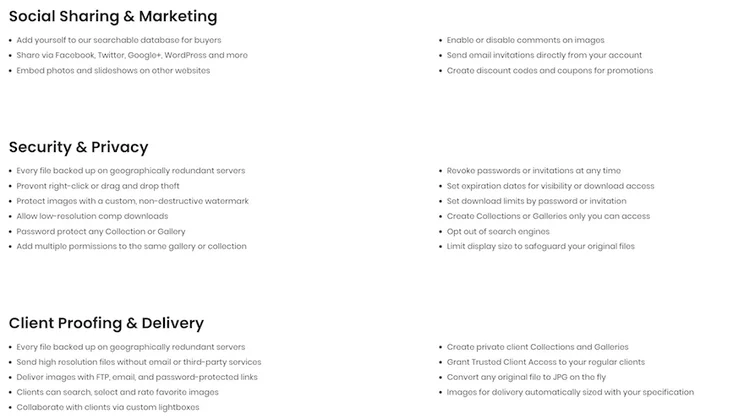
All plans give you access to PhotoShelter’s entire litany of features, with one exception: the Basic plan doesn’t come with PhotoShelter’s built-in client proofing tool.

You can also access PhotoShelter on a 14-day free trial – with no credit card required. This free trial grants you all the features you’d get with a paid PhotoShelter offering, with 4GB of storage for your images as you build. There are no setup fees.
PhotoShelter pricing plans screenshot
PhotoShelter’s paid plans start at just $10/month – when you select annual billing – and go up to $49.99/month when you purchase a month-to-month package.

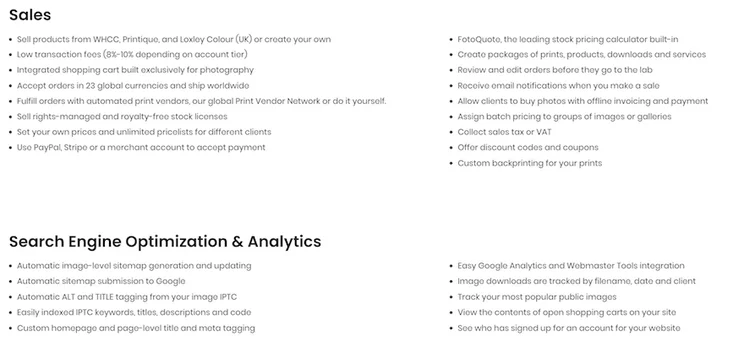
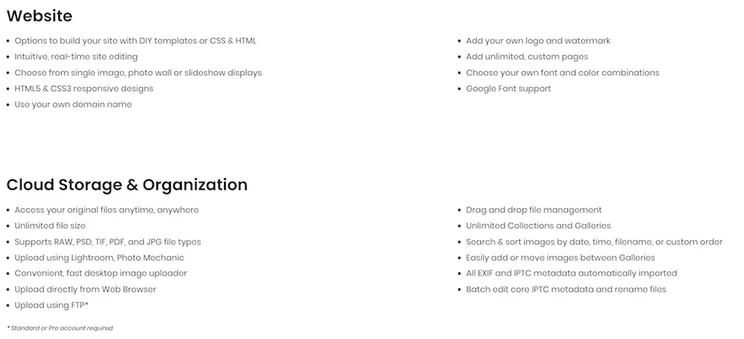
PhotoShelter comes with an impressive array of features, including:

  • Customizable, mobile-ready, responsive HTML5 templates to make your site pop
  • The ability to use your own domain name, and deliver photos via FTP, password-protected links, or quick zip files
  • Retina display-optimized images, and the ability to upload any image format – including PSD, RAW, PDF, JPG, and TIF.
  • Straightforward Vimeo, WordPress, Tumblr, and Instagram integration
  • Unlimited file size and site traffic
  • Lightboxes for image selection and client collaboration
  • Built-in SEO (Search Engine Optimization) and social media tools
  • Professional images security (such as watermarks) and site-wide image search and keyword capabilities
Looking to sell your photos or artwork online? Good news! All PhotoShelter’s plans come with built-in ecommerce functionality as standard.

That means you can not only showcase the fruits of your creative labors online, but sell them, too. You’ll just need your own merchant account – or Stripe, or PayPal – to ensure you can get paid (and in 23 different currencies, too). As for fulfillment, you can do this yourself, or take advantage of PhotoShelter’s simple integrations with WHCC, Printique, and Loxley Colour (UK) for a more hands-off approach.
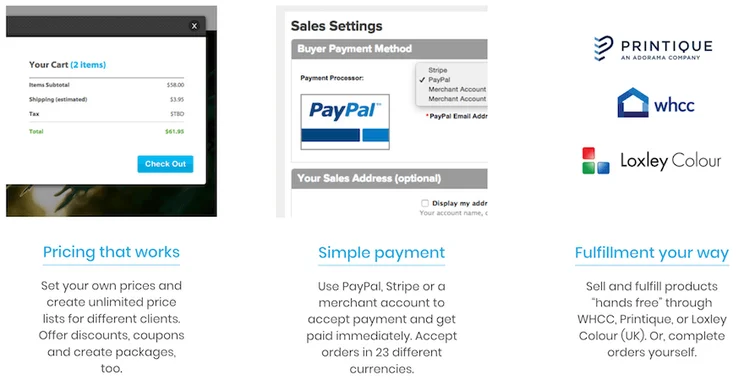
PhotoShelter ecommerce functionality screenshot
With PhotoShelter, you can set prices, sell your art online, fulfill orders with ease, and accept payment in up to 23 currencies.

All this talk of selling through PhotoShelter, however, begs the question – how much does it cost to do so?

Well, when you utilize PhotoShelter’s ecommerce features, all sales invoices will be subject to a transaction-level handling fee – charged on your next monthly billing cycle – and which varies depending on the plan you’ve selected:

  • Basic: 10%
  • Standard: 9%
  • Pro: 8%

So, if you’re planning on selling a lot through your PhotoShelter website, it makes sense to opt for the Pro plan – given that, with a sufficiently high sales volume, the percentage savings you’ll make will offset the higher month-to-month outlay of the subscription cost.

But for those turning to PhotoShelter more as a repository for their artwork – rather than for selling through it – the Basic plan should suffice.

PhotoShelter’s website promises “exceptional (live!) support” that’s “just a click away”. A bold claim – and one we were keen to look into.
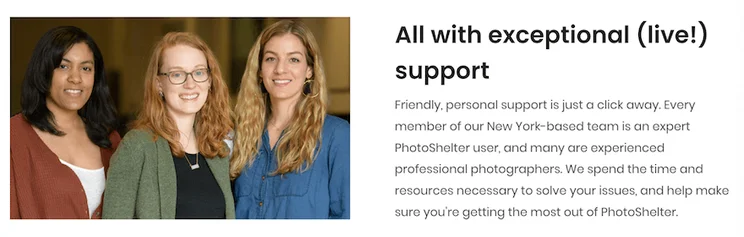
PhotoShelter help and support website screenshot
PhotoShelter’s website promises live, high-quality support, but the specifics of this were initially unclear to us. (As was the question of whether the people featured here are actually PhotoShelter employees…or simply actors in a stock image!)

In reality, PhotoShelter’s help and support isn’t terrible – but nor is it as comprehensive as the above copy suggests.

There’s no phone support, for example, and no live chat service either. To seek a resolution for your issue, you’ll instead need to get in touch with PhotoShelter’s team by submitting a request through a form located on its website.
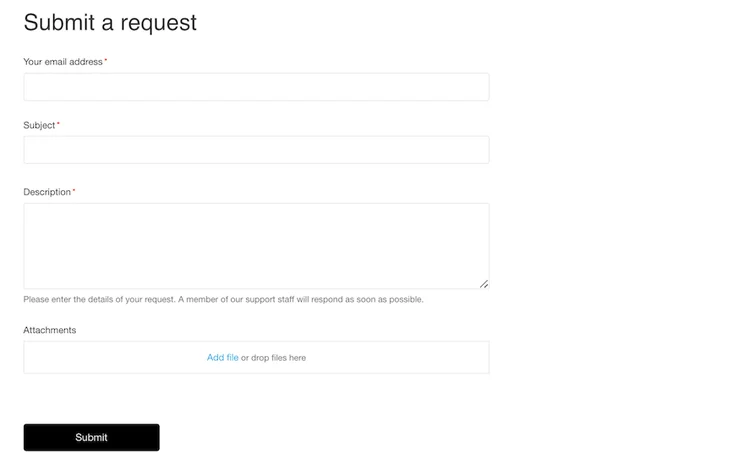
PhotoShelter request support webform screenshot
Need support from PhotoShelter that can’t be solved solo? You’ll need to submit this form on its website, with a description of your issue, to request advice.

We recommend this option for pressing or complex queries that need a tailored reply.

For more basic issues, PhotoShelter has a wide range of self-service support resources on its website, in the form of a Support Center. This includes articles on a huge breadth of topics relating – but not limited – to customizing, selling through, and optimizing your PhotoShelter website for search engines, as well as how to upload, share, and deliver photos.
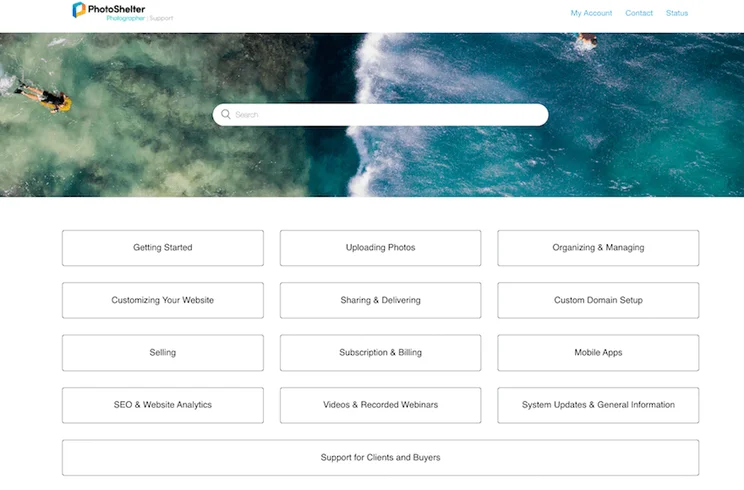
PhotoShelter Support Center screenshot
PhotoShelter’s Support Center contains a respectably robust plethora of self-service support articles, how-to guides, and FAQs.

Above, we’ve covered just about everything you need to know about PhotoShelter – well, as much as you can know without taking this photographer-oriented website builder for a spin yourself! The question is, should you give PhotoShelter a try?

Ultimately, PhotoShelter is a solid website builder for photographers and artists – just not really anyone else.

It’s relatively easy to use, given you don’t have to know code – although its lack of a walkthrough and complete absence of drag-and-drop functionality makes the user experience a cumbersome one to begin with. (Especially if you lack prior experience tinkering with a website builder or similar software.)

PhotoShelter’s help and support is also lackluster. Phone support is missing, and a live chat tool should be the absolute minimum (especially for a company whose website promises live support!)

Still, PhotoShelter isn’t without its benefits.

All its plans – not only its starting one, as is the case with many website builders – are affordable, and you can access PhotoShelter’s benefits for as little as $10/month. Plus, PhotoShelter doesn’t restrict its best features to its most expensive plans: a surprisingly and refreshingly egalitarian approach to pricing that lets even the most cash-strapped artists (and aren’t we all?) access the features they need. And the fact that PhotoShelter’s ecommerce capabilities aren’t restricted to the upper pricing tiers is a big bonus, too.

Our advice? That, if you’re an artist – and if you’ve already tried one or two website builders and still haven’t found the right one for you – give PhotoShelter a go. There’s a 14-day trial, so you have nothing to lose.

If you don’t like PhotoShelter, or if this is your first time website-building, you’ll be better off opting for a more accessible, user-friendly website builder such as Wix or Squarespace. (Squarespace, in particular, scores highly in our in-house research for its excellent design templates and visual pizzazz.)

For more information about these builders, our Wix review and Squarespace review are brilliant places to start. Alternatively, our guide to how to sell art online will give you everything you need to turn your image-selling dreams into lucrative reality – so go get started!

Written By

rob-binns

Hi, I’m Rob:

Hailing originally from West Yorkshire, but growing up in Wellington, New Zealand, I’ve written for brands and businesses all over the world – empowering everyone from solopreneurs and micro-businesses to enterprises to some of the ecommerce industry’s best-known brands: including Yahoo!, Ecwid, and Entrepreneur.

From foretelling the extinction of the high street ATM to attending PayExpo – Europe’s foremost payments conference – I immersed myself in the payments space, which left me with a love of small businesses that remains strong to this day.

It was that love that took me to Website Builder Expert, where I spent half a wonderful year as Content Manager in 2021. During that time, I researched and wrote a portfolio of articles focusing on the technology small businesses can harness to get online – then make an impact there. 

When I left Website Builder Expert, it was for a new adventure – one that’s taken me all the way Down Under. I’m now based in Melbourne, Australia, where I write freelance content.

Going forward, I’ll continue to bring my passion, profile, and personality to bear on my work here at WBE, and at large. My promise? To always keep the reader – be they an individual, a business, or something else entirely – at the heart of my approach.

You can find me on Linkedin here.Rob spent three years writing, editing, and strategising for renowned B2B comparison site Expert Market. With presences in the UK, USA, Canada, Germany, Australia, and Spain, Rob helped drive a wide range of niche content across industries and sectors. He also researched, ideated, and wrote content unpacking a wealth of technologies: including fleet management software, telephone systems, POS devices, and asset tracking.

Specifically, Rob delved into the payments space – crunching, comparing, and contrasting the range of ways for merchants to take credit and debit card payments. And then sharing this with his business audience – empowering them to sell with greater security, convenience, ease, and affordability.

Rob joined Website Builder Expert in 2021, where he took on the role of Content Manager. Besides testing the platforms we review, Rob also applied his excellent research and writing skills, extensive business knowledge, and general motivational attitude to create articles for the site and lead a team of writers to do the same.

Between dissecting the internet’s best ecommerce platforms to its most effective email marketing tools, Rob was in his element. He also mentored and managed several of WBE’s remarkable team members – helping them build the skills and mentality required to progress, grow, and excel in their roles, and get the best out of their prolific writing talents.

Rob left Website Builder Expert for new adventures across the world in Australia, where he now writes freelance content – continuing to share his expertise for Website Builder Expert’s articles, among other projects!

Rob’s commitment for the future is to empower his audience to make better, more effective decisions: whether that’s helping them pick the right platform to build their website with, the best hosting provider for their needs, or offering recommendations as to what – and how – to sell.

So drop him a line, or check out some of his articles below – and leave a comment there if you like what you see. He looks forward to continuing the conversation!

More about

19 comments

Your email address will not be published. Required fields are marked *

  • ronald

    do we get paid for the first 14 days do they have free apps to make your photos professional like other websites

    1 reply

    • Tom Watts
      Tom Watts

      Hi Ronald,

      Yes you get 14-day free trial with Photoshelter.

      However, from my experience, they don't have free apps to improve your photos.

      Why not check out our guide to the best photography website builders, it might prove handy.

      - Tom

  • Tanya Hamner

    Photoshelter doesn't have anyone working for them that knows about web building. They all pretend they know but they dont know anything. Im constintly asking for help and dont get anywhere with them. Very unsatisfied.

    3 replies

    • Jay

      Are you still with Photoshelter? Their themes are beautiful!

    • Barry Martin

      I agree.

    • Tom Watts
      Tom Watts

      Hey Tanya,

      Sounds like you've had a frustrating time, so thanks for sharing that with our readers.

      Have you tried any other website builders besides PhotoShelter?

      If you're concerned about the back-end support, then there a number of builders who offer excellent support for their users. We run over them in this comparison chart, take a look as it may solve your problems.

      Keep us posted on what you think,
      Tom

  • Leon

    Been with Photoshelter a couple years. Manage my site via their Lightroom Plugin which is very helpful except that it's been super buggy and Photoshelter doesn't seem to be in any rush to fix it. It's a big enough problem that I'll be shopping around for alternatives to Photoshelter soon.

    BTW, I sell a fair bit of stock online but Photoshelter only one image sold through Photoshelter. That's ok for me, as I wasn't counting on sales through PS, but it would have been nice. So if anyone thinking that people will find your images through PS be aware that my experience is that they won't. On the other hand, PS has been pretty handy for delivering images to my existing clients.

  • Dom

    As a long term PhotoShelter member I can tell you that their back-end photo management and delivery software remains competitive, but their attitude to the development of new front-end website templates has been appallingly unprofessional. It took them the best part of 2 years to develop a completely unstable platform which they now like to call "Lattice". It was in "Beta" for the best part of a year but they still had the audacity to charge people to use it. The opinions of paying customers are routinely dismissed by staff and management in arrogant fashion. Since late 2014 customers are no longer permitted to use the website forums to discuss the PhotoShelter service - it's that bad.

    1 reply

    • Rich

      I agree, and I've been a subscriber since 2009. Good back-end, horrible attitude toward subscribers (paying customers). The new Lattice is the final straw. Absolutely no watermarking is provided on very large images (that are not downloadable), meaning they are encouraging screen captures of non-watermarked images, thereby creating "orphans" with zero metadata and zero photographer identification or contact info. Seriously, I'm paying for this, and was opted in without knowing it? I opted out ASAP. Photoshelter Support responded to my complaint by saying that unobtrusive watermarking was "in the works" for large images, perhaps to be released in "a few months." This statement was made 4 months after the service was rolled out!!! I'm looking to drop Photoshelter. They take a significant "piece of the pie" for every online sale (in addition to merchant fees or Stripe fees) and they are becoming photographer hostile. The cost of using online print services or merchandise printing (e.g., EZPrint or CafePress) is more expensive through Photoshelter than if you go directly to those services. (So much for a "discount" for directing all of your business there. I guess Photoshelter must get a good cut of that as well.) Most of my sales are not via photoshelter. I create a custom rights package for customers, invoice them, and receive a check. No Photoshelter cut. And I don't need a Photoshelter website to do that. I also started with the highly touted "customize your own" website, then discovered that it was nearly impossible to upgrade, and changes are a major PITA now. I'll move on. I've had it. Oh, and I had to set up my own blog, on my own server. Wordpress. I linked it to the non-Photoshelter part of my website, on my own server.

      2 replies

      • Dom

        Yes - the lack of watermarking is a deal-breaker for anyone selling stock photography online. Photoshelter wanted a glossy marketing front-end to sell their service, and image security was simply incompatible with that shallow vision, so they never bothered to address the problem. PS seem to have abandoned their previous core customers, presumably because they see that professional photography is a shrinking, increasingly unprofitable business. Their own actions have not helped.

      • Jeremy
        Jeremy

        Hey Rich (and Dom),

        Thanks for sharing your views and experiences with our readers.

        Curious - aside from using PhotoShelter, have you considered other services that better meets your needs?

        I know there are a few other website builders (such as Squarespace) that allow you to deliver digital products, but admittedly they don't have tools geared towards more advanced photographer merchants.

        Would love to hear your thoughts!

        Jeremy

        1 reply

        • Dom

          Jeremy - if you want a photographic portfolio site then there are many options. If that is what I wanted I would simply customise a premium Wordpress theme at low cost. But to license images online requires a more specialised solution and there is not much choice. Whether the income justifies the additional expense is debatable.

  • Meghan

    Great review! Very helpful! I have one question about PhotoShelter. I'm very new to photography but would like to expand my client base, etc. I'm looking to find an easy photography website builder and also include a blog tab. Does PhotoShelter include an option to have a blog tab on the website I build? Thanks!

    1 reply

    • Jeremy
      Jeremy

      Hi Meghan,

      Yes I think the templates include a blogging function. If you checkout some of their templates, you'll see that their examples also have blogs built in!

      - Jeremy

  • Melanie

    Thank you so much for all the info and research, what a wonderful help!

    ~ mel

  • Gerry Murray

    Very impressed with your Website Builder information. I just have a couple of questions regarding Photoshelter. After you have signed up for say the Standard package can you upgrade or downgrade to another package?

    Also if you are not happy with Photoshelter can you simply leave immediately without any penalty fees? Or is there a fixed term you must abide to? For example 6 or 12 months?

    Many thanks.

    Gerry Murray.

    1 reply

    • Jeremy & Connie
      Jeremy & Connie

      Hi Gerry,

      I'm not 100% sure but I"m sure you can up/downgrade packages. That's a pretty standard practice across all website builders anyway. What you may want to clarify with their support / sales team is whether you can get some of your money back if you do decide to downgrade, or at least apply the extra amounts you paid to fund additional months of the lower plan.

      You are not tied down to any contracts, so you can go month to month, or pay on an annual basis. But based on their pricing page, once you have been billed for a payment, they don't offer refunds. So paying on a month to month basis to start, is safer if you are still unsure if you want to use them over the long term. They also offer 14 day trial periods.

      - Jeremy

  • chelsea paurus

    love your site it is so helpful

    1 reply

    • Jeremy & Connie
      Jeremy & Connie

      Thanks Chelsea! Glad you are finding our information helpful!

      - Jeremy