



- Hostinger vs GoDaddy: Find Your Builder
- Best for Pricing: GoDaddy
- Easiest To Use: Hostinger
- Best Website Features: GoDaddy
- Best AI Tools: Hostinger
- Best for Selling Online: Hostinger
- Best Designs: Hostinger
- Best Support: Hostinger
- How We Test Website Builders
- Final Verdict: Should You Use Hostinger or GoDaddy?
Hostinger and GoDaddy rank in our top five website builders in our most recent 2025 research, but which is the better option of the two? When comparing website builders, Hostinger is my top choice, offering a beginner-friendly experience, great AI tools, and affordable plans. But, to help you decide the right fit for your business, I’ll dig into each builder’s key features and pricing below.
- GoDaddy is better value for money and has a free plan
- You’ll need to upgrade your premium plan on both website builders to sell online
- Hostinger’s drag-and-drop editor is easier to use
- You can’t add extra functionality with either builder
- Hostinger has a growing suite of AI tools
- Get 24/7 customer support with GoDaddy and Hostinger
Hostinger vs GoDaddy: Find Your Builder
|
Overall rating
|
Today's best price
|
Free plan or free trial
|
Recommended for
|
||
|---|---|---|---|---|---|
|
Best Budget Builder
 |
Best Speedy Setup
 |
||||
|
Hostinger |
GoDaddy |
||||
|
4.2
|
4.1
|
||||
|
|
|||||
|
14-day free trial |
Free plan |
||||
|
Freelancers and budget-conscious users |
Tech novices and side hustlers |
Best for Pricing: GoDaddy
When it comes to pricing, Hostinger and GoDaddy are very affordable options, with starting prices under $10. However, GoDaddy is better value for money because of its free forever plan, cheap fees, and range of features you get with your subscription.
How Much Does GoDaddy Cost?
- GoDaddy’s pricing ranges from $9.99 to $20.99 per month (billed annually)
- GoDaddy offers three premium plans
- You’ll need the $20.99 per month Commerce plan to sell online
- Build your website with GoDaddy’s free plan
How Much Does Hostinger Cost?
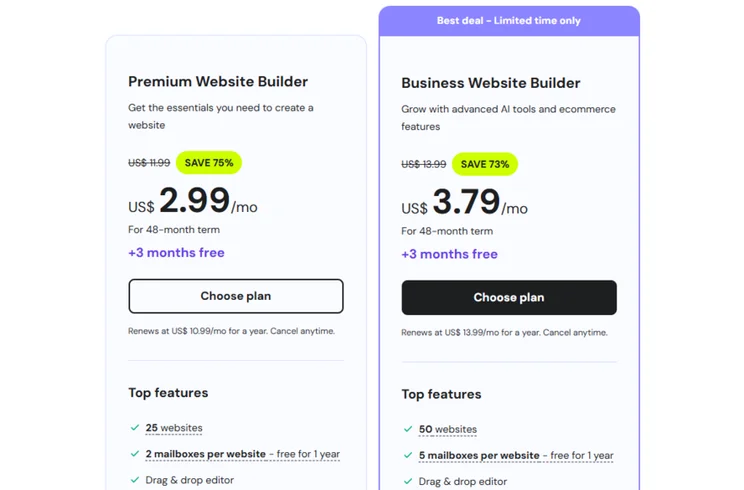
- Hostinger’s pricing ranges from $2.99 to $3.99 per month (for a 48-month term)
- You’ll need the $3.99 per month Business Website Builder plan to sell online
- Hostinger has a seven-day free trial (there’s no free plan)
- Hostinger’s renewal fees are steep – e.g., the $2.99 plan increases to $10.99

GoDaddy is better value for money
GoDaddy’s plans aren’t cheaper than Hostinger’s, but you can build a website for free with GoDaddy and test out its features before committing to a plan. Plus, with three premium plans to choose between, businesses have greater flexibility and room to grow with GoDaddy.
Easiest To Use: Hostinger
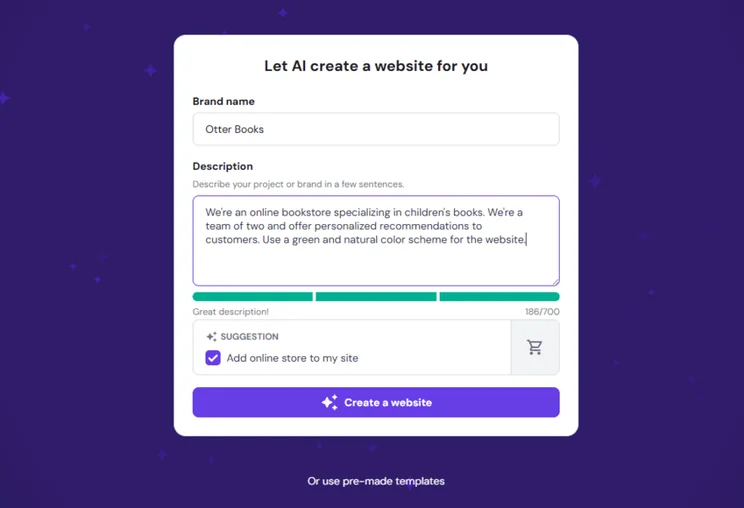
Hostinger is an easier website builder to use than GoDaddy. Hostinger’s setup process takes seconds thanks to its straightforward AI website builder, plus you get a personalized template out of it. All I had to do was fill out some basic information about my business and describe my brand for the AI prompt.
Once you’re in the editor, Hostinger uses the popular drag-and-drop style to make things easier. With a simplified sidebar of tools, I found myself getting into the swing of things almost instantly. Hostinger is really intuitive to use, and the design options and AI tools for content creation can help bring your site to life in minutes.
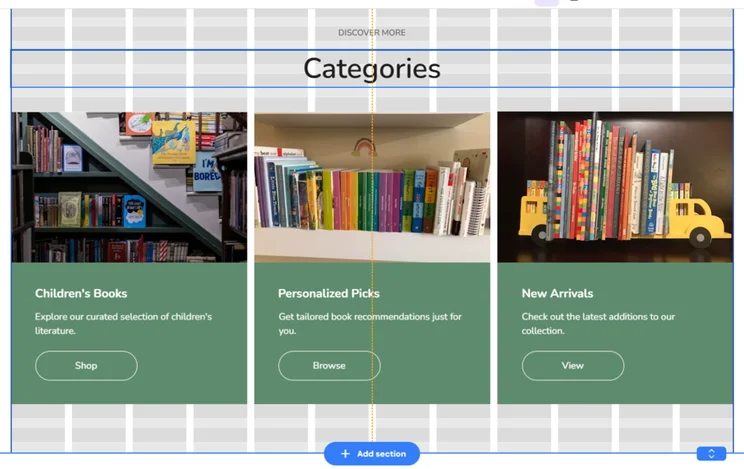
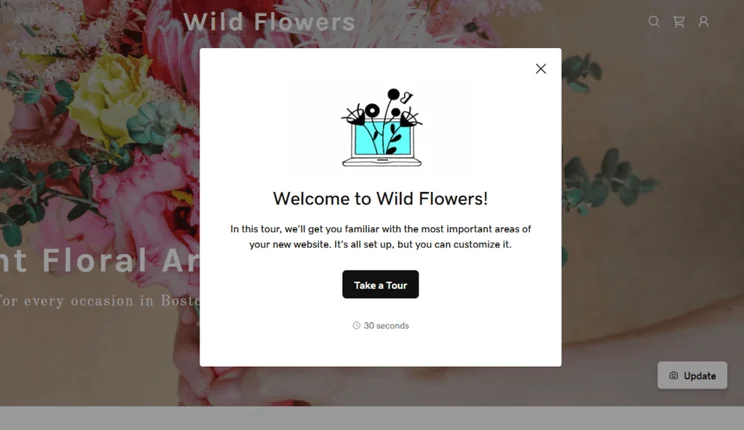
GoDaddy offers a great user experience as well, thanks to its speedy setup, basic editor, and focus on beginners. All in all, the onboarding process took seconds and I could publish my site in minutes if I didn’t want to make any extra changes. Although I do recommend taking some time to review your site’s content so you can add important information and target keywords.
GoDaddy doesn’t have a drag-and-drop editor, but you can stack sections on top of one another to build your pages. Some users might prefer more control, but I recommend picking GoDaddy if you want a hands-off approach. I don’t like GoDaddy’s design options as much as Hostinger’s, but it’s a good option if you want to build a simple site.

Hostinger is very beginner-friendly
Hostinger’s website builder is slightly more user-friendly than GoDaddy’s because of its drag-and-drop editor, AI tools, and intuitive navigation. That said, GoDaddy is still a good option for beginners.
Best Website Features: GoDaddy
Neither Hostinger nor GoDaddy are at the top of the pack when it comes to website features. If you’re looking for the best tools for your site, then Wix is my go-to choice by far. But, based on our testing, GoDaddy offers slightly better features than Hostinger – with emphasis on the slightly.
Both builders offer the basics, such as:
- A free custom domain name for the first year
- SEO tools
- Email marketing support
- Social media integration
- Blogging tools
- Mobile editing
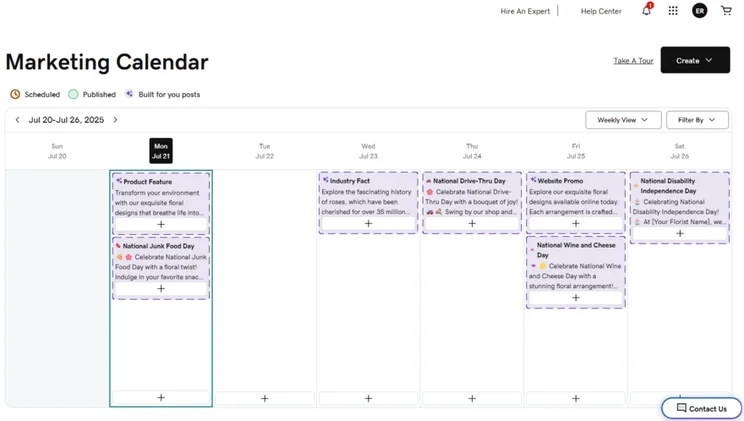
Unfortunately, Hostinger and GoDaddy also have no app markets, so you’re stuck with the built-in features you get through your plan. So, what gives GoDaddy the edge? It’s primarily GoDaddy’s booking tools, ad features, and the ability to create members only areas. Hostinger either lacks the functionality, or offers a very stripped-back version.
- Hostinger – After falling behind with no email marketing features, Hostinger has introduced Hostinger Reach, an AI-powered email marketing tool to help users create emails, manage campaigns, and engage with their audience.
- GoDaddy – GoDaddy launched GoDaddy Agency in April to help digital agencies connect with new leads and support their clients.
GoDaddy's features are slightly better
With GoDaddy, you get access to a greater range of website features, but you do need to upgrade to a premium plan to unlock them all. Despite having no app market, GoDaddy remains a top choice for beginners and small businesses because of its built-in tools, such as its social media calendar and post creator.
Best AI Tools: Hostinger
Hostinger and GoDaddy have some of the best AI website builders on the market, but did you know about their other AI tools? From content creation to AI assistants, I’ve listed the key AI features below:
Hostinger’s Key AI Tools 🔍
- AI website builder
- AI image generator
- AI writer
- AI blog generator
- AI SEO tools (including meta tag suggestions)
- AI logo maker
- AI product generator
- AI assistant, Kodee
- Hostinger Horizons (for creating web apps)
GoDaddy’s Key AI Tools 🔍
- AI website builder
- GoDaddy Airo
- Social post generator
- Social calendar
- GoDaddy Studio
- AI product descriptions
- AI domain search
- AI prompt library
- AI logo generator
Hostinger just launched its own AI-powered email marketing tool, Hostinger Reach. Previously, Hostinger lacked email marketing features to rival other major builders, such as GoDaddy, but the introduction of Hostinger Reach is a real upgrade. You can use AI to design email templates, customize newsletters, manage campaigns, and more.
Hostinger has a growing suite of AI tools
Hostinger offers a variety of AI tools to support personal sites and online stores. Plus, its suite of AI features continues to grow, with Hostinger Horizons and Hostinger Reach introduced this year.
Best for Selling Online: Hostinger
If you want to sell products online, you’ll need an ecommerce website builder. Hostinger and GoDaddy both offer a single ecommerce plan to help get your online store up and running. Pricing for these starts at $3.99 per month (Hostinger) and $20.99 per month (GoDaddy), so Hostinger is considerably more affordable for new businesses.
That said, Hostinger’s sales tools are quite simple and aren’t suitable for larger stores. These tools allow you to:
- Sell up to 1,000 products
- Offer appointments
- Product management tools
- 0% transaction fees
- 100+ payment methods
- Express checkout for Stripe users
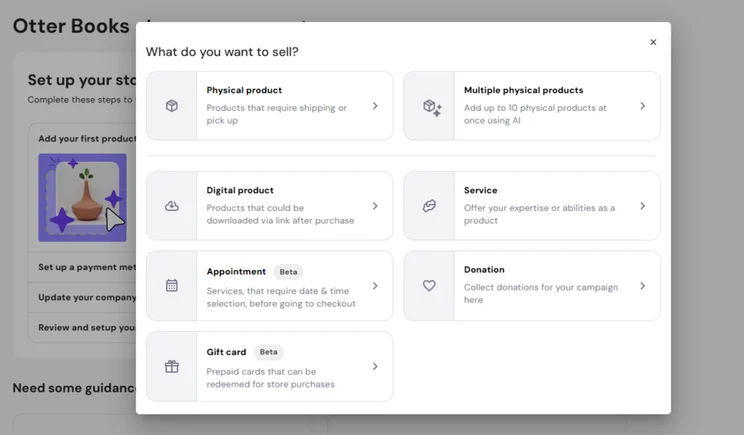
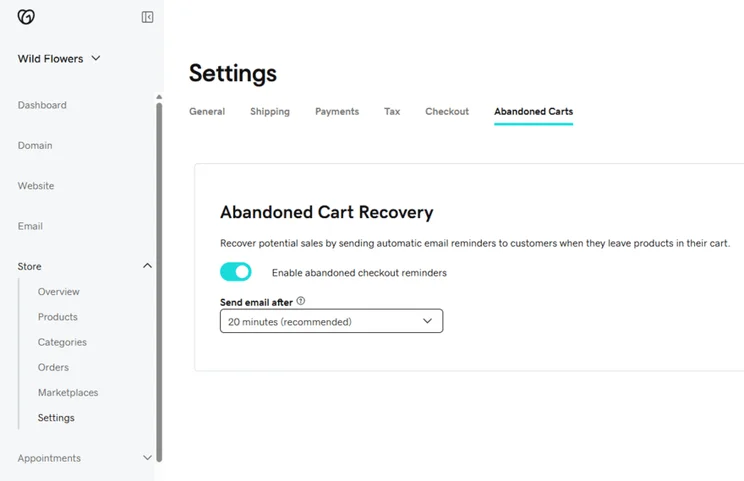
Similar to Hostinger, GoDaddy’s ecommerce functionality lacks the scalability of other major builders, like Shopify. GoDaddy’s ecommerce plan lets you:
- Sell unlimited products
- Offer appointments
- GoDaddy Payments
- POS integration for in-person selling
Hostinger is a better choice for small businesses
Hostinger’s ecommerce plan is incredibly affordable, making it a great option for side hustles and small businesses. You can only sell up to 1,000 products, but this will be more than enough for most new companies. That said, you’ll want to consider alternatives to Hostinger or GoDaddy when your business needs to expand.
Best Designs: Hostinger
Both Hostinger and GoDaddy encourage you to design your website with AI. However, the builders also offer professionally-designed templates if you aren’t keen to use AI. You’ll need to customize them further in the editor to add your brand assets and identity.
GoDaddy’s templates are fairly lackluster, but there are over 200 to choose from. You can filter these by industry or website type, such as “Photography” or “Restaurants & Food.”
In comparison, Hostinger has a smaller offering (around 150+ templates), but the design quality and variety is far superior to that of GoDaddy. There’s a greater choice of categories to filter by as well. For example, I could sort by industry, such as “Fashion” and “Real Estate,” or I could filter by style, such as “Modern” or “Creative.”
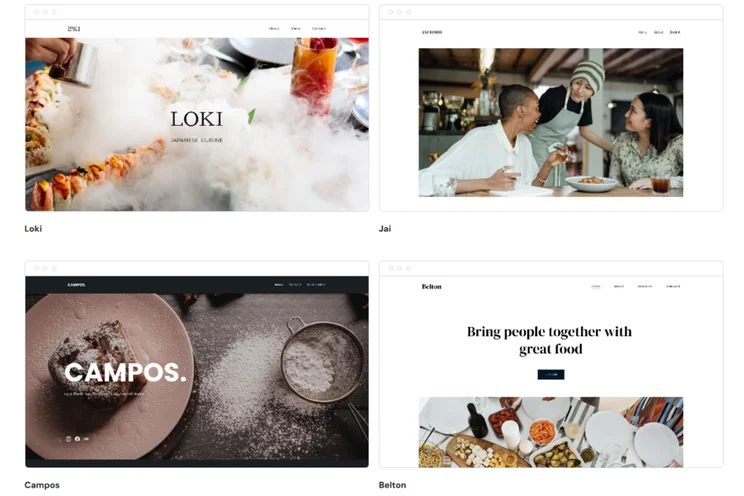
Hostinger's templates are more modern
If you don’t want a personalized AI-generated template, Hostinger’s themes are well-designed, sleek, and stylish. I could browse and preview options in the library, and Hostinger accommodates most major industries.
Best Support: Hostinger
For customer support options, Hostinger and GoDaddy are a little underwhelming, but Hostinger just takes the lead because of its responsiveness. Here’s what you can expect from both builders:
Hostinger’s Support 🤝
- 24/7 live chat
- AI-powered assistant, Kodee
- Hostinger Help Center
- Video tutorials (via Hostinger Academy)
- Editor help
GoDaddy’s Support 🤝
- 24/7 phone (call or WhatsApp)
- 24/7 live chat
- GoDaddy Help Center
- Community forum
- Video tutorials
- Expert support
- Interactive resources
When put side-by-side, you might think GoDaddy deserves the win here, instead of Hostinger. Both builders offer responsive AI-powered live chat channels and a variety of contact options. But, based on my testing, Hostinger’s knowledge center is far more detailed and thorough. It directed me to useful guides to answer my queries, whereas GoDaddy struggled to support me in the same way.
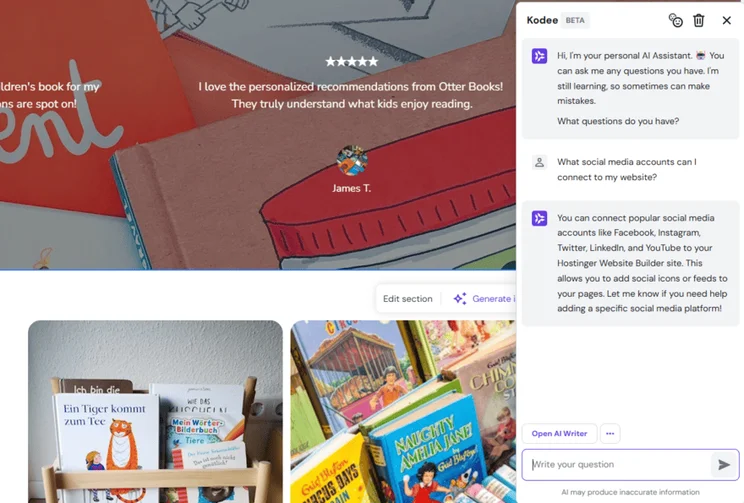
Hostinger's support is very responsive
Hostinger’s 24/7 support channels are responsive and genuinely helpful. And, in comparison to GoDaddy, Hostinger goes the extra mile when it comes to editing and designing your site. You can view your setup checklist at any time when in the editor, open Kodee to ask a direct question, or request a tour of the editor for extra assistance.
How We Test Website Builders
I’ve built websites with Hostinger and GoDaddy, meaning any insight or tips I share throughout this review have been shaped by my personal experience with the builder. We’ve also put each platform through our in-house research process – this helps us determine our rankings and recommendations.
Our research team has spent over 300 hours analyzing data across six core areas of investigation, including pricing and user experience. You can read more about our methodology below.
Our six core categories have unique weightings, contributing to an overall rating we award each website builder:
- Website Functionality: 30%
- Design Features: 25%
- Pricing: 15%
- User Experience: 15%
- Help and Support: 10%
- Reputation: 5%
Final Verdict: Should You Use Hostinger or GoDaddy?
It’s a close race between Hostinger and GoDaddy, but the builder you decide to sign up for will depend on your business and unique needs.
Based on my testing, Hostinger is the better option because of its AI tools, affordable plans, and beginner-friendly editor. GoDaddy, on the other hand, offers a simplified platform with great social media features.
If you’re still unsure, I recommend testing things out with Hostinger’s seven-day free trial or GoDaddy’s free plan. This will give you a chance to get familiar with each platform so you can find the perfect fit for your business.


0 comments