We’ve Recommended Four Easier Alternatives to WordPress

We may receive a commission from our partners if you click on a link and purchase a product or service on their website. Learn more

A smiling headshot Holly Choules
Written By
Updated on May 30, 2025

Used by millions of website owners worldwide, WordPress is a tried and tested way to get set up online. But is it the right fit for you? If you’re curious about how suitable alternatives stack up against one another, I recommend looking into website builders comparison piece.

Unlike WordPress, which requires some technical knowledge to use, website builders do all of the hard work for you. Wix, for instance, will set you up with everything you need to create a professional website, from industry-specific templates to powerful website features – sounds appealing, right?

To find the best alternative to WordPress for you, read on and learn about the four strongest contenders on the market.

WordPress (we’re referring to WordPress.org here) is a content management system that gives you more control over your website. However, you’ll also need a bit more technical know-how to use the platform. This includes changing your website’s coding to manipulate your overall design.
If the sound of coding makes you freak out, you can opt for a website builder instead. These all-in-one solutions handle the technical side of things for you, be it your website design, additional functionality, or payment methods. That’s why they’re a great option if you want to create a website without the pressure of needing additional technical expertise.

  • Best WordPress alternative overall

Overall, Wix is the best WordPress alternative based on our in-house testing. Unlike WordPress, on which you’ll need to source additional website features yourself, Wix comes with a range of built-in tools and templates to choose from. Additionally, you can use its drag-and-drop editor to customize your website without any coding.

Pros
  • Wix’s templates are suitable for a variety of industries, from art and illustration to schools and universities.
  • Wix has a large range of website features to choose from. You can create content with AI tools, add bookings or ecommerce functionality, and access numerous design tools.
  • Wix has a free plan, which is a great way to test out the builder before you choose a premium plan.
Cons
  • WordPress lets you change your website’s theme, but Wix doesn’t. Once you’ve published your Wix website, you won’t be able to change your design, so choose wisely.
  • In testing, some of our users found Wix’s features overwhelmingsince there were so many to choose from. This can also make it tricky to find what you’re looking for from the dashboard.
  • Wix’s more expensive plans do have a considerable price jump. The Business plan is $32/mo (billed annually), while the Business Elite plan jumps to $159/mo (billed annually).

Key Wix Features

If you have a WordPress website, you’re likely using a large number of plugins to ensure that your website does what you want it to. With Wix, you won’t need to rely on plugins since most of its key website features are already built in. These are some of Wix’s best features:

  • Ecommerce functionality – Need to sell products online? If so, Wix’s Core plan (and above) comes with built-in ecommerce features. You’ll unlock the ability to sell on socials, and the abandoned cart recovery tool that notifies users when they’ve left something in their cart.
  • Wix SEO – Even if you’re new to search engine optimization, Wix’s built-in tools can help you out with your SEO strategy. You can connect your website to Google Analytics and SEMrush, or follow the SEO setup checklist that guides you through the process.
  • Wix Bookings – With this scheduling tool, you can manage bookings directly from your website. However, if you need to accept payments for services, you will need to be on the Business plan or above.
  • AI tools – As you create your website, you’ll no doubt come across Wix’s AI tools. These include its AI site generator and AI content creation tools, which create unique text and imagery.
  • Wix App Market – Instead of plugins, Wix has apps that you can install onto your website if needed. At the time of writing, I saw over 500 apps on the store, with free and paid options to choose from. Some apps also offer free trials if you’d like to test them out before purchasing.
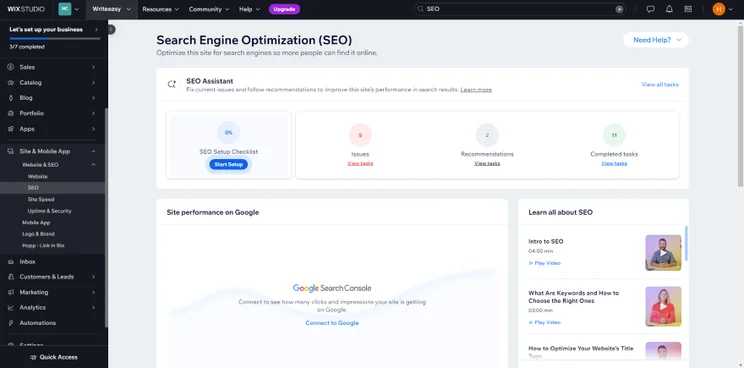
Screenshot of Shopify's SEO optimization dashboard featuring tools for site performance and setup checklist.
My Wix dashboard really had everything I needed. For instance, I could access SEO tools from one area of the dashboard, leading me to SEO help videos, website performance tracking via Google, and a link to my SEO setup checklist. Source: Website Builder Expert

On top of these features, Wix has an impressive selection of templates to choose from. In the Wix template library, we found a fitting design for every industry under the sun. We could also use the filters to narrow down your results, or use the search bar to look for something specific such as “health” or “real estate.”

However, we do recommend choosing your template carefully. Though you can easily change your theme on WordPress, Wix doesn’t let you change your template once you’ve hit publish. Keep that in mind and only opt for a template you’re 100% certain will fulfill your needs.

After choosing your template, you can customize your website however you please using Wix’s drag-and-drop editor. Even if you have limited technical experience, the editor makes it simple to add new elements to your page – such as videos, photos, and CTA buttons – and lets you tweak design features like font and color.
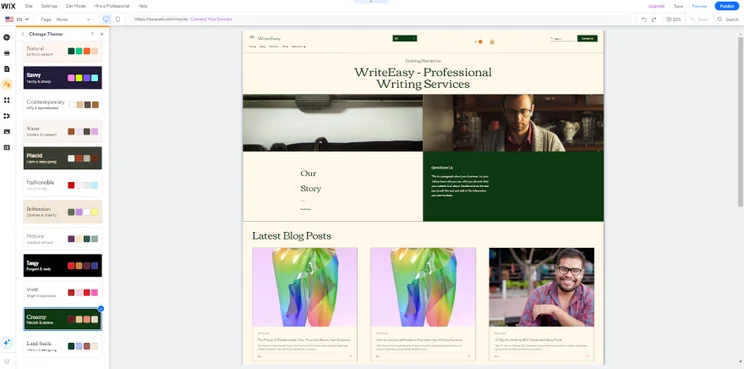
Screenshot of 'WriteEasy - Professional Writing Services' website homepage featuring a navigation menu, company logo, and the latest blog posts.
I wasn’t the biggest fan of the color scheme Wix ADI generated, but luckily, I had a range of new colors to choose from in the “Change Theme” tab. I opted for the “Creamy” theme for a pop of dark green. Source: Website Builder Expert

How Much Does Wix Cost?

When you start out, you can use Wix’s free plan to test the waters and see if it’s the right fit for you. However, we don’t recommend using this plan forever, since it comes with limited storage, places Wix ads on your site, and doesn’t allow you to add a custom domain.

That’s why I recommend upgrading to a premium plan! Wix’s pricing ranges from $17-$159 per month (billed annually) and all the plans come with storage space, marketing tools, and a free domain for one year. This is very different to WordPress, since Wix’s key features are included in the pricing and you won’t need to worry about hosting costs.

Though the most powerful plans are expensive, you can use Wix’s 14 day money-back guarantee as a safety net, or get 10% off your chosen plan with the code “TAKE10” at checkout.

How Easy Is It to Migrate from WordPress to Wix?

You can’t export an external website into your Wix account, so you will need to design your website again from Wix’s editor. Remember to download your website text, photos, and videos from WordPress before you switch, so you can easily upload them to your new site.

You can, however, import your WordPress blog to Wix from your dashboard, though drafts and scheduled posts will need to be manually copied over. During the process, your blog’s text, images, and videos will be sent over, alongside the categories you’ve assigned to each post.

  • For professional website designs

If WordPress’ premium themes don’t align with your needs, we recommend checking out Squarespace for its professionally-designed templates. This website builder is known for its eye-catching designs and accessible design tools, so you’ll get plenty of creative control while you design your ideal website.

Pros
  • Perfect for creative agencies or freelancers, Squarespace’s sleek designs will showcase your work in style. Even if you’re not in a creative industry, your chosen template will give your business a polished look.
  • Squarespace is effective if you want creative control over your design. Its Fluid Engine editor comes with plenty of ways to transform your website’s style.
  • Compared to competitors like Shopify, Squarespace’s plans are good value for money. They range between $16-$99/mo (billed annually).
Cons
  • Is ecommerce your priority? If so, we don’t recommend using Squarespace’s ecommerce plans for your store. Shopify is a better fit if you’re scaling up.
  • Squarespace does have an app store, but it only has around 40 apps to choose from – significantly fewer options than Shopify and Wix. Keep this in mind if you enjoy using WordPress for its thousands of plugins.
  • You can’t access a free plan with Squarespace. When your free trial runs out, you will need to purchase a premium plan to continue using it.

Squarespace is the easiest website builder on the market, which is great if you’re finding WordPress’ technical aspects tricky to navigate. 

Squarespace’s editor, Fluid Engine, keeps website creation streamlined. While giving it a spin, we could seamlessly drag-and-drop design elements onto the page and reorganize them via the gray grid overlay that keeps everything aligned.
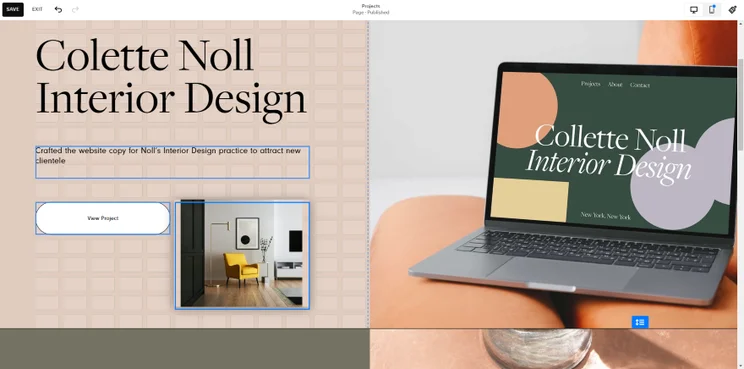
Screenshot of Colette Noll's Interior Design website showcasing portfolio and services.
I could easily add a new image to this website section. All I had to do was click “New Block,” upload my image of choice, and arrange it on the page using the gray grid overlay – it’s as simple as that. Source: Website Builder Expert

We couldn’t talk about Squarespace without mentioning its professionally-designed templates. You’ll find designs for a variety of industries, from weddings to travel, though they are most suitable for creative brands or freelancers.

The stylistic flair of these templates means you can professionally showcase your work and, at the same time, accurately represent your unique style online. 
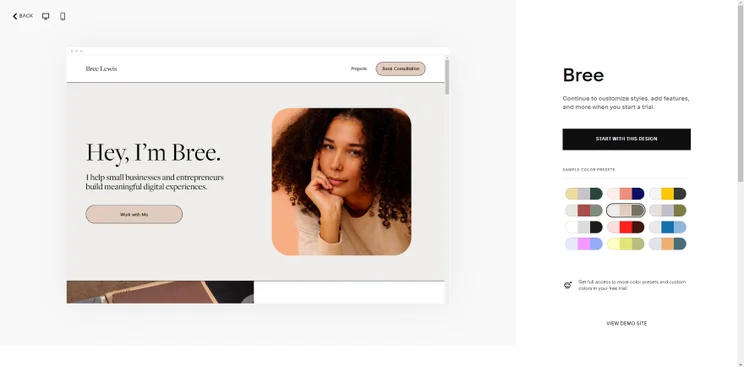
Bree, a digital consultant, smiling confidently in her professional profile image on a website.
Though you can use Squarespace Blueprint to generate a website design using AI, I decided to choose a template from the library instead. I liked “Bree” for its simplicity, sophisticated font, and calming color scheme. Source: Website Builder Expert

Additionally, if you’re paying a lot of money for your WordPress premium theme, Squarespace will help you save money. All of its templates are free, included in your plan, and come with an array of design features – a cost effective alternative!

How Much Does Squarespace Cost?

In comparison to Wix and Shopify, who have significant price increases in their plans, Squarespace’s pricing is great value for money. Costs range from $16-$99 per month (billed annually) and you can also use the 14-day free trial to give it a go first.

For a simple website or creative portfolio, the Basic plan, at $16 per month (billed annually), will be enough for your needs. This plan also includes ecommerce functionality after a recent update by Squarespace. However, no matter what plan you pick, you can save some cash by using our code “WBE10” at checkout for 10% off.

How Easy Is It to Migrate from WordPress to Squarespace

According to Squarespace’s website, you can only move two things over from WordPress to your new website: your domains and some of your website content. 

Unfortunately, you won’t be able to bring your website’s original design across, meaning that you’ll need to create an entirely new template on Squarespace. However, its eye-catching designs means you’ll likely find something that suits your business.

  •  For growing ecommerce websites

Of the WordPress alternatives on this list, Shopify is the only dedicated ecommerce website builder. Because of this, we recommend it if you’re a business owner who wants to scale up their online store and access its powerful, built-in sales features.

If you’re already using a WordPress plugin to run an existing online store, Shopify has all of its key features in one place so you won’t need to source anything externally.

Pros
  • If you’re aiming for ecommerce success, Shopify’s website builder is your best bet. Its powerful sales features are a good way to start scaling your store.
  • Have a large number of items to manage? If so, Shopify’s inventory management tools will help you keep your stock under control.
  • For safe transactions, Shopify protects you via advanced fraud protection and 2-step verification.
Cons
  • Shopify’s template choice is limited, with only 12 designs that are free to use.
  • Although Shopify has great built-in features for ecommerce, you may need to pay for additional apps from the App Store for different website functionality.
  • Shopify has a steep price increase between plans, ranging from $29-$299/mo (billed annually).

Key Shopify Features

If you only intend to sell a few products here and there, Shopify won’t be for you. This is because the platform’s powerful sales features are dedicated to large or growing businesses with huge inventories. Sound like your business? If so, these are the key features to take advantage of:

  • Point of sale Shopify POS lets you integrate your physical sales with your digital sales, and vice versa! If you connect the POS with your brick and mortar store, you can take in-person payments, information such as sales records, and sync your inventory across in-person and online operations, keeping it all in one place.
  • Payment options – Want to give your customers multiple ways to pay? With Shopify, you can accept different payment methods, or sign up to Shopify Payments to streamline the payment process for you.
  • Shipping options – On Shopify, you’ll have different couriers you can send your parcels through, like UPS and DHL Express, and a myriad of ways you can set up shipping costs, like free shipping or flat rates.
  • Abandoned cart recovery – When customers leave an item in their basket, you can notify them through an automated email. This notification may inspire them to go back to your online store and complete the purchase!
  • Shopify App Store – At the time of writing, Shopify’s app store has over 8,000 apps to choose from. Its free and paid apps span not only sales, but also marketing, store design, and other areas of website management.
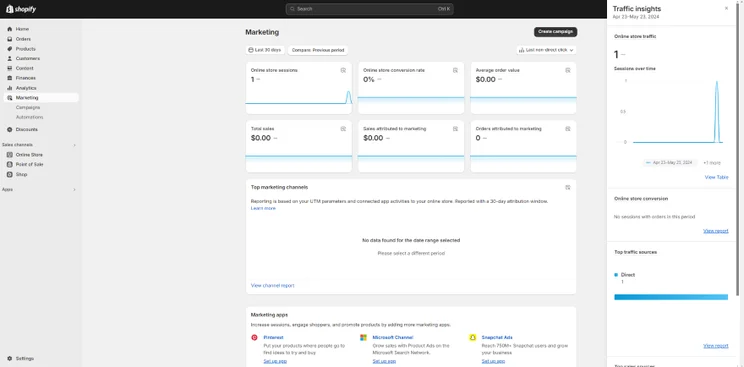
A screenshot of Shopify's ecommerce marketing dashboard displaying traffic insights, sales and conversion metrics on Shopify.
I recommend taking some time to explore your Shopify dashboard. I even found analytics graphs I could use to track my website’s traffic (which was currently at a resounding 1 session!) Source: Website Builder Expert

Shopify’s sales features are manageable from your dashboard, which makes it easier to keep your shop’s operations organized. We could use the dashboard to check our inventory, set up payment methods, and track our store’s analytics. If you’re finding it tiring to manage your WordPress website’s shop and its multiple plugins, Shopify will be easy in comparison.

For additional support in operating your store, you can use Shopify’s AI features too. Introduced in 2023, Shopify Magic writes SEO-friendly product descriptions for you through the power of AI, helping you reduce the time you spend creating product listings, especially if you have a large inventory to get through.
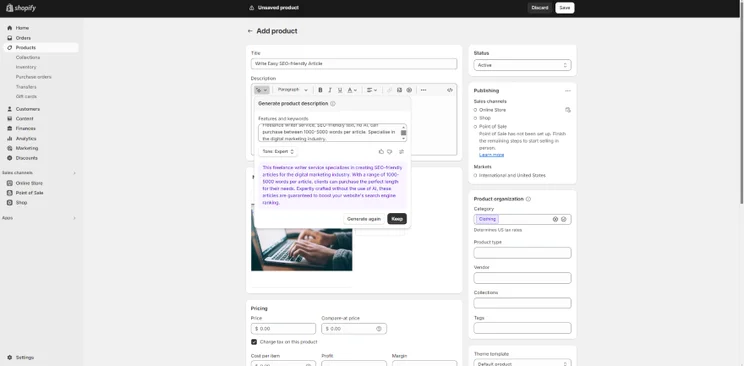
Screenshot of the Shopify dashboard highlighting the 'Add product' section with fields for product details.
I needed help writing a description for a service, so Shopify Magic came to my rescue. I typed in everything I wanted to include and it generated this new text for me! Source: Website Builder Expert

How Much Does Shopify Cost?

With Shopify’s pricing, its more advanced plans are expensive in comparison to other website builder plans on the market. Costs range from $29-$299 per month (billed annually) and there is a significant price leap between them.

Shopify does justify the price with its powerful sales features. All plans come with substantial discounts on your shipping costs, 24/7 chat support, the ability to integrate in-person sales with your online store, and international selling across three markets.

If you’re wary of the costs and still aren’t sure if Shopify’s right for you, we recommend Shopify’s three-day free trial. Be aware that it isn’t as long as other trials on the market, like Squarespace’s which lasts 14 days. But, if Shopify’s trial does win you over, you can also get your first month for $1.

How Easy Is It to Migrate from WordPress to Shopify

If you’re using WooCommerce, WordPress’ most popular ecommerce platform, you can export your products, customer data, and product reviews to Shopify. On the other hand, you can’t import your theme and will need to pick a new one.

To import your product data into your new Shopify website, you can create a CSV file from WooCommerce, edit it via Google Sheets, and import it into Shopify’s product CSV template.

  • For quick website set up times

Is time your biggest challenge? If WordPress is too complicated to run and you want to switch to a simpler, more streamlined platform, we recommend GoDaddy. This platform is simple to use thanks to its speedy AI website builder, straightforward editor, and reliable customer support.

Pros
  • GoDaddy ADI, its AI website generator, creates websites fast. When we tested it, we found it could create a new template in only 30 seconds.
  • Beginners will enjoy using GoDaddy because of its quick customer response times and helpful onboarding tutorials in the editor.
  • If saving money is important to you, GoDaddy’s pricing plans are great value and range between $9.99-$20.99/mo (billed annually).
Cons
  • The design conscious among us might not like GoDaddy ADI’s designs. In fact, these templates can look quite generic in comparison to other AI designs on the market.
  • We don’t recommend GoDaddy if you need advanced ecommerce functionality. Other builders, like Shopify, are better equipped to support growing online stores.
  • Though GoDaddy’s plans are brilliant value for money, the costs do rise at renewal. After your first year, you’ll need to pay between $16.99-$34.99/mo (billed annually).

Key GoDaddy Features

When you sign up with GoDaddy, you can dive straight into its AI website generator tool. You’ll be asked three key questions about your website so the tool can create a completely new design that’s personalized to your needs. Additionally, this process is extremely speedy, since it can create websites in 30 seconds flat. 
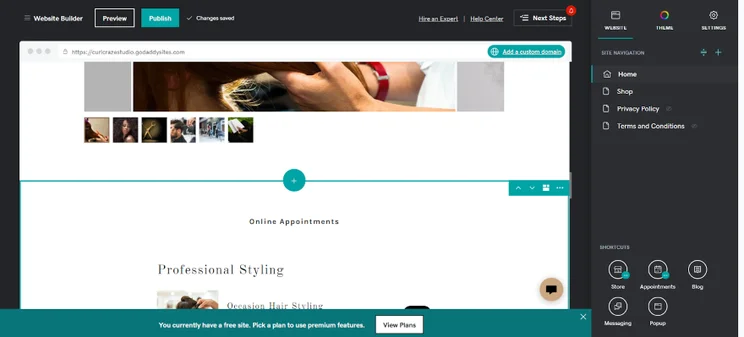
Screenshot of a GoDaddy Hairdressing website generated by its AI tool.
This time, I envisaged my GoDaddy test website for a hair salon. After answering GoDaddy’s questions, I was left with a professional website featuring everything I needed, from an appointments section to a gallery to showcase past work. Source: Website Builder Expert

This is far removed from WordPress websites and their lengthy setup process, since you won’t need any technical knowledge, nor will you have to look for external sources online to help you get started.

GoDaddy has everything you need in one place, including mini onboarding tutorials and a built-in website checklist that makes sure that everything is set up and covers topics from contact information to email marketing campaigns.

Think you’ll need additional support? If that’s a yes, GoDaddy also provides reliable help and support to users. When we encountered an issue with our website, we could head to the GoDaddy Help Center and use the automated chat box to find a solution. Response times were speedy, with the chatbot answering our question in under 10 seconds. 
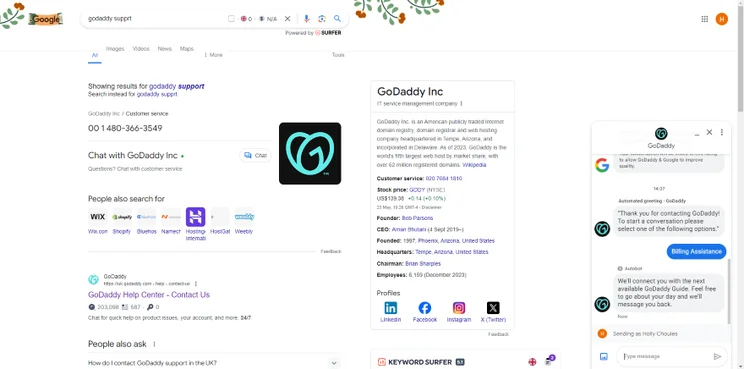
Screenshot of search results for GoDaddy support including contact methods, company information, and the live chat popup box at the bottom right.
I could even access GoDaddy’s support chat from Google search. The chat box linked me up with someone who could answer my question! Source: Website Builder Expert

How Much Does GoDaddy Cost?

Based on our in-house research, GoDaddy’s pricing is superb value for money. The three main plans cost between $9.99-$20.99 per month (billed annually), while there’s also a great free plan to test out its features beforehand. All in all, these prices are suitable for smaller businesses who want to run a professional page for less.

However, do note that the price of GoDaddy’s plans will increase after your first year. At renewal, you’ll be looking to spend between $16.99-$34.99 per month (billed annually).

Depending on your needs, you’ll need the Premium plan to access appointment bookings and the Commerce plan if you’re running an online store.

How Easy Is It to Migrate from WordPress to GoDaddy

Unfortunately, there’s no automatic way to migrate your WordPress website to GoDaddy. Instead, you’ll need to download and backup your WordPress files and manually move them into your new website. You can’t move your WordPress theme over either, so you’ll need to choose a fresh GoDaddy template or use GoDaddy ADI to generate a new design.

Still not sure which WordPress alternative is suitable for you? We’re here to help.

If you’re someone who wants to switch from WordPress to another platform, ask yourself these key questions first:

  • What do you like about WordPress? Is it the customization options, or thousands of plugins? Whatever it is, look for another platform that also has these features. For instance, you could opt for Shopify if you run an online store and like the look of the range of added functionality available through Shopify’s vast app store.
  • What do you dislike about WordPress? Now consider what WordPress lacks. If you’re tired of hunting for additional features from third-party websites, you could always choose Wix to access its built-in features instead.
  • What features do you need to keep? You won’t want to switch to a platform that doesn’t have the key features you need, so make sure your choice does what you need it to. For example, we wouldn’t choose GoDaddy if you want to keep a wide range of customization options.

When making a decision, you could also consider your pain points. These are the features to look for in a website builder, depending on your needs:

Wallet can’t stretch too far? Look for:

  • Affordable plans with a great range of features for the price
  • Free templates
  • Free extensions
  • Special offer deals
  • Low transaction fees on payments. I.e. The additional percentage of costs when someone buys an item from your website.

Need to sell products or services? Look for:

  • Scheduling tools to set up bookings with clients
  • Different payment methods, from digital wallets to debit and credit cards
  • Multiple shipping options
  • Inventory management tools

Limited time to set up? Look for:

  • An intuitive editor that’s easy to understand
  • AI website builder tools that quickly generate templates or website content
  • Pre-built templates
  • 24/7 help and support with speedy response times

Can’t make a decision still? Take our quick quiz to find a recommendation tailored to your needs.

What sort of website do you need?

Choose a Builder

To help you choose the best alternatives to WordPress, we put popular platforms to the test through our rigorous website builder research process. The research, which spanned over 200 hours of testing, led to the creation of six key criteria which are weighted based on their importance to users.

  1. Website features – 30%
  2. Design functionality – 25%
  3. User experience – 17%
  4. Value for money – 10%
  5. Help and support – 10%
  6. Customer score – 8%

After examining website builders in relation to this criteria, we can now recommend the top four options on the market based on your needs.

Wix, with its powerful website features and versatile template selection, is the best WordPress alternative overall. But is it the right fit for you? In fact, one of the other website builders we’ve covered could still be a suitable match:

  • Squarespace – Combining an impressive template selection with numerous customization options, Squarespace is ideal for design-conscious small businesses or creatives who want to showcase their work with flair.
  • Shopify – If running an online store is the top priority, Shopify is the best choice for you. The platform’s advanced inventory management tools, top sales features, and extensive app store are ideal for scaling online stores.
  • GoDaddy – Conscious of the time? If setting up quickly is your main priority, GoDaddy keeps website creation simple and fast. You can use its AI website generator to swiftly create your website, while its 24/7 help and support is readily available if you get stuck along the way.

Written By

A smiling headshot Holly Choules

Holly Choules is a Writer at Website Builder Expert with a background in researching and crafting engaging content for digital platforms. In previous roles, she has demonstrated her wordsmith skills by writing for public facing brands in a range of industries. After gaining hands-on experience using leading website builders, like Wix and WordPress, she is now keen to share her findings through informative, easy-to-follow articles that help small business owners get online and grow their presence.

Since joining the team in 2024 and transitioning into the tech sphere, Holly is passionate about applying her three years of content writing experience and upholding Website Builder Expert’s position as an authoritative source on website builders, ecommerce, and digital marketing.

You can read Holly’s articles below, or connect with her on LinkedIn.

More about

37 comments

Your email address will not be published. Required fields are marked *

  • ERNA RAFIQA

    I think among all the alternatives, weebly is the most simple.

  • Sam DuBois

    Thank you! I tried to sign up for your list and freebie, but you use Aweber, which has blacklisted me for years! I put a half dozen quite spammie emails into Spam ("Hurry, Last day for ___") and was forever and unforgivably condemned to their ship list... I have fought through to a human at Aweber twice, and both swore they could do nothing about it!
    Sad, but thus far and no farther!
    Thanks for the analyses,
    Sam

  • Tom Crawford

    Hate to have to levy some REALITY upon you, but WordPress is largely drop-and-drag now - with page builders (Elementor, Divi, Beaver), pre-designed blocks, templates and themes and a great many tutorial videos and courses available free on YouTube. .

  • Jim MacDiarmid

    I'm surprised you don't mention anything about Joomla in your comparisons.

    1 reply

    • Fred Isaac
      Fred Isaac

      Hi Jim,

      Is Joomla something you've used yourself?

      We're always looking for new tools to review.

      Fred

  • Henry

    Yes this article on website builders alternate to Wordpress is very helpful. QUESTION: Is wix or Squarespace suitable for building one-page scrolling websites with navigation links within the site? I mean rather than separate pages.

    1 reply

    • Fred Isaac
      Fred Isaac

      Hi Henry,

      Glad you found the piece helpful!

      Good question. I'm not 100% sure which builder would be better for the kind of site you have in mind. I'd recommend using the free trials available to experiment first.

      Wix has a very useful guide on creating a one-page site here: https://support.wix.com/en/article/creating-a-one-page-site

      Hope this helps.

  • BlazeDream

    Great article guys! Your list of powerful website builder options available was quite interesting and useful. Eager to read more interesting topics from your writers.

    1 reply

    • Tom Watts
      Tom Watts

      Hello BlazeDream,

      Really glad to hear you found the discussion such a helpful piece of content!

      If you want to stay up to date with the site, then you can subscribe to our email newsletter in the 'top tools' box just above the comments.

      Thanks for reading
      - Tom

      1 reply

      • BlazeDream

        Sure...Thank You!

        1 reply

        • Djaafer

          Thank you

  • Cedric

    Hello! I noticed you didn't mention which drop and drag website builder has the best mobile view. Also I wanted to know which one will allow you to build more than one website.

    1 reply

    • Jeremy
      Jeremy

      Hi Cedric,

      Have a look at this guide on mobile interfaces for drag and drop website builders.

      You can also build multiple sites within one user account. But if you want to subscribe to a paid plan, you will have to upgrade one website at a time.

      So for instance, you have 1 Wix account and within this account, you have 4 websites. You can upgrade each of the website one at a time.

      Jeremy

  • Donny Ball

    Thanks, Jeremy, for your excellent article, but I still have a couple of questions. We use Dreamhost for our website, which was built in 1999 (seriously) and we keep it semi-current using SeaMonkey's editor.

    Last year we added an ECWID shopping cart to replace the really difficult to use PayPal shopping cart system, which has helped, but a replacement website that's easy to change is what we really need. It seems that all of these site builders want to host us, when what I need is a program I can use to create the new site and replace my existing one.

    Is there a standalone site building program you recommend? How about an easy to use interface to put between me and Wordpress? (That seems like it would be an excellent tool for someone to develop.) Or should I just buy a copy of Wordpress for Dummies and start fresh?

    Any suggestions will be greatly appreciated.

    1 reply

    • Jeremy
      Jeremy

      Hi Donny,

      I think there are some drag and drop user interfaces for WordPress, but I haven't used them myself so I have no idea if they're good. But as far as I know, most WordPress users I know don't use these interfaces - maybe that's an indication that people rather bite the bullet to learn how to code or hire someone who does, rather than using these interfaces? I can't be completely sure, though.

      Using a hosted service really isn't terrible at all. If you are running an ecommerce store (sounds like you are since you are selling products?), platforms like Shopify is excellent. They're very scalable, and tons of tools for you to use. They have dedicated support teams so you can always reach out for dedicated help and they manage all the technical back end matters for you.

      Of course, if you prefer to have 100% control over everything including hosting and security, then something like WordPress will allow you to do that.

      Jeremy

  • Tarang

    Dear Jeremy,
    Your list it very interesting and really helpful for non technical website creator,
    all your suggestion like wix, weebly, shopify dont need html or other coding skill you can create website easily within few clicks also benefits are to choice ready to use design and no major thinking require for hosting provider selection etc.
    But in the other end wordpress become very huge, recently i find very interesting statistics for wordpress market share in website developer compare to other CMS, see https://blogs.perceptionsystem.com/infographic/wordpress-cms-in-2016/
    Year 2016 out of 100 domain in USA 20+ website build with wordpress...and as per wordpress community it will increase lots.

    1 reply

    • Jeremy
      Jeremy

      Hi Tarang,

      Interesting infographic - thanks for sharing.

      WordPress is very popular and will probably get even more popular. I'm not saying that it is a bad website building platform at all, as it is very powerful and flexible. But learning how to use WordPress proficiently is much more challenging than using a drag & drop website builder, such as the ones I listed above.

      So it all comes down to what you want to do. If you have the luxury of time and money and can afford to invest it into learning how to tackle all the technical aspects of running a website, or hire someone to do that for you, then by all means consider WordPress.

      We have are more in-depth discussion about that topic here.

      Wix, Squarespace, Weebly or Shopify are what we call DIY website builders, as you can do it all by yourself and not have to worry about most technical aspects of operating a website. So they are very user friendly and can get you off the ground in days, which can't be done if you are new to WordPress.

      So what's appropriate to a user is very dependent on the user him/herself!

      Jeremy

  • Gina

    I have to disagree with your list. If you want the best for your company, then you should really hire a developer unless you yourself know coding.

    1 reply

    • Jeremy
      Jeremy

      Hi Gina,

      Thanks for your comment and sharing your thoughts.

      Hiring an expert developer is always good, but it does have its challenges. Financial investment is just one of them.

      It's not a big problem if a company is well established already and is cash flowing to re-invest its profits into technology. But not all companies have that level of budget to commit, and not all companies are well established (yet).

      A lot of users are just starting out and just don't have that level of resource to get their websites off the ground.

      In such circumstance, I think our list above makes a lot of sense.

      No doubt, your comment is also valid, but I think that's more applicable for well established businesses.

      We have a full discussion of the cost of building a website that compares the cost of hiring a developer versus using a DIY website builder such as the ones I suggested above.

      I also wrote an article about the idea of hiring a designer / developer - when it's appropriate, and when it isn't appropriate. It's just my own view and what I would advise my friends and family if they were to ask me.

      Of course, every single person that's looking to build a website has different needs, motivations and resources.

      Thanks for adding to this discussion!

      Jeremy

  • Sarah Nikol

    Hey Jeremy,
    These are my first visit to your website.And I am so thankful to Google that redirects to your website page.I have many types of info that are solution to my problem.I really appreciate your article.Thanks a lot for sharing such a great article with an online community.
    With Regards,
    Sarah.

    1 reply

    • Jeremy
      Jeremy

      Thanks Sarah!

      Glad our discussion here is helpful to you!

      Jeremy

  • Aron

    Hey Jeremy,
    How are you ? I love you work it's very informative.
    I got a question for you. I want to set up a membership site where I can put video courses and have re-curring memberships.
    What would be my best option(s)?

    P.S I got no clues about coding ; )

    1 reply

    • Jeremy
      Jeremy

      Hey Aron,

      The web builders we listed above probably be suitable for your needs. When it comes to setting up a paid membership area to deliver courses, there are some good WordPress plugins (such as Wishlist) to help you do that.

      But if you don't know how to code, that really limits your ability to design or customize your WordPress site (unless you hire someone to help you).

      One option is to take a look at Sentry Login, which is a membership widget that can work with Wix, Squarespace and Weebly websites. This widget enables you to charge recurring membership fees and gate off content to paying members.

      But I haven't used them before so do test them out before committing.

      Also, keep in mind that since this widget is not built by Wix, Squarespace or Weebly, when the website builders make updates, Sentry Login has to ensure that its features will still be compatible. So there is a compatibility risk here.

      But they've been around for a few years, so I'm assuming that they're doing at least a good enough job to remain in business!

      Jeremy

      1 reply

      • Aron

        cheers

  • Mitch

    Nice article Jeremy. I think you can also look at it like this. Pictures and text - small website - upstart - no programming or graphics experience - then choose a website builder. A functioning business which requires functionality, flexibility, multiple editing points (memberships, ecommerce - custom) wordpress (or other programmers platforms).

    By the time you go through all the different limitations the builders limit you to you will soon come to realize that websites are much more than pictures and text. Start adding your own graphics/fonts/text and in many cases your site will start to look ordinary very quickly. Websites are a holistic thing and to build a descent custom site even on a website builder is not easy. Everything from servers to look/feel, functionality, backends, graphics etc.

    So if your business does become successful and you rely on the web to generate income you most likely will have to move to the more comprehensive WP or similar platform. There are strong reasons why businesses use wordpress and its much more than visuals. And for complexity vs flexibiity and customization it leads all other platforms behind. I believe this site is built on wordpress as well. Is this right Jeremy?

    1 reply

    • Jeremy
      Jeremy

      Hi Mitch,

      Thanks. I think there are a lot of valid points in your comment.

      I think a lot of times it's a bit of chicken and the egg. If one was to build an online business, I think using a drag & drop website builder is a good way to accelerate the process, to validate the business idea.

      For instance, if one was to spend a lot of resource (time and money) into building a WordPress website and the business doesn't work out for various reasons, then it's a huge disappointment. No doubt, if the person struggled with the steeper learning curve of using WP, then it becomes a skill that can be deployed again for another project.

      But if the person used a drag & drop website builder to quickly launch a website in less than a couple of days, and start deploying time to other aspects of the business (product development, marketing of the business, engaging with prospective customers), in my view that is a much better allocation of time (which is a limited resource for most entrepreneurs).

      So the idea here is to launch quickly, and iterate / adjust as you go along. I've seen a lot of cases where people get paralyzed with technology and stumbled with moving their businesses forward. With drag & drop web builders, technology is no longer a major obstacle.

      If a business idea proves out, and the business starts to grow and a person was able to generate some cash flow, then he/she can consider upgrading to a more sophisticated platform (such as WordPress).

      At the end of the day, my own view is that websites are just "tools". Most of the time, it will not make or break a business (unless you're trying to build some very specialized app or software).

      For instance, if a person wanted to sell a physical product (clothes, toys, etc), the business will not succeed or fail depending on which website builder is used. Know what I mean?

      Of course, there are a lot of positives with using WordPress (as you've highlighted and you're absolutely correct in your points).

      But my key message to people is not to let technology be a stumbling block. It doesn't have to be any more. If you're not great with technology, or don't have the time and money to figure things out, then pick a drag & drop web builder and just get started!

      Thanks for your comment though. This discussion is quite meaningful!

      Jeremy

  • Sam Lee

    Hi Jeremy,
    I am looking to build a website with one of the website builder that you have mentioned above. Based on your opinion, which one would meet my criteria the best?
    Requirements:
    1) Website is for an organization. It holds training classes in Hong Kong and Mainland China.
    2) Website language in English, Chinese in Traditional characters and Chinese in Simplified characters. If not all three are possible, then English plus one other Chinese character is fine.
    3) Function of membership, enrollment, and accepting payment.
    4) Articles , photos and videos will be posted.
    5) I have browsed the WIX website and found that it mentions their sites maybe blocked in China due to the The Great Firewall in China. Do you consider that a concern?

    Thank you for your advice in advance.

    Sam

    1 reply

    • Jeremy
      Jeremy

      Hi Sam,

      I think based on what you need, WordPress is a good option to test out. The main reason being that the drag and drop website builders I referenced above don't have paid membership gateways built into its core features yet.

      There are some good WordPress membership plugins out there, such as WishList, where you can create paid gateways so that only paying subscribers can log into the membership area.

      However, to use WordPress proficiently, you will need to be pretty decent with coding so you can make design, formatting, etc changes. Or else you'll have to hire a capable designer / coder to help you out.

      If WordPress is a bit too complex for you to set up, you can consider integrating a paid membership tool with some of the drag and drop website builders. Take a look at Sentry Login, which integrates with Wix, Squarespace, Weebly etc. They enable you to turn a drag and drop website builder into a paid membership website.

      I saw the note about certain parts of China won't be able to access certain Wix sites due to their firewall. If that is a major concern for you as the majority of your visitors are from China, take a look at using the other website builders. Reach out to their support team to confirm if they are aware of any potential issues.

      Good luck!

      Jeremy

      1 reply

      • Sam Lee

        Hi Jeremy,
        Thank you for your advice.

        Sam

  • Kb

    I'm glad this and some of your other posts came up easily in a few different Google searches. After days of researching ecommerce platforms your articles were the most comprehensive for a beginner but thorough for everyone to benefit. Thank you I actually have decided the best platform for my ecommerce needs. Your words gave me a starting place to sort out the unknown, I appreciate all the links to the more in depth info and the comparisons. I then went on cross referencing with other review sites and felt I could now make a thorough well researched decision. I ultimately ended up back here referencing your concise words to ensure I made the right choice.

    1 reply

    • Jeremy
      Jeremy

      Hi KB,

      Thanks for your feedback - glad our discussion here has been helpful to you.

      Do click on the social sharing buttons on the left side of the post to spread the word! I'd really appreciate that.

      Jeremy

  • Mary

    I am so glad I found this site! I've been reading and learning alot.

    Here's my dilemma: I built our business site about 6 years ago using Coffeecup's Web Editor for OSX, bought the software and there's no monthly fee. I've had to learn a bit of code to use it, but mostly by cut-and-paste. The problem is that our site is not mobile-friendly and Coffee Cup does not have a way to make it so except by rebuilding it from scratch using their Responsive Site Designer, which I'd have to purchase. If I'm going to rebuild it anyway, I'd rather use something easier as I don't find Coffeecup very user-friendly.

    So I've been reading your comparisons of the various website builders. I do want to have some control over coding, so I was leaning to Weebly, but then I read more about WordPress that I liked. Bottom line is I would rather avoid rebuilding at all.

    Is there a website builder that lets you import code or upload ftp files, or would that defeat the purpose of becoming mobile-friendly? Also, if I switch builders, I know I can point my domain name to the new site, but what about keeping the names of sub-pages? For instance, our site is 'www.burnhamguides.com, then we have pages for the different places that we lead kayak trips to, such as 'www.burnhamguides.com/everglades. Will I be able to keep all these names?

    Thank you for your advice!

    1 reply

    • Jeremy
      Jeremy

      Hi Mary,

      I haven't used Coffee Cup before, but I think it will be quite challenging to transport your codes from that platform, and have it work properly in other platforms.

      First of all, the drag and drop website builders that we've covered on our site don't have an import function for Coffee Cup, as all the platforms are coded differently, so the codes will not be compatible. But even with more flexible / advanced platforms such as WordPress, they have very specific code configurations, so if you want to make your previous codes work, you'll have to tweak / modify them to adapt them to WordPress standards. At least that's my own personal view and others may see things differently.

      Having said that, it might be worth while to give your site a refresh, either with WordPress or other website building platforms. Since you're not afraid of codes, WP might be a good option for you, and you'll be able to retain your URL structure (page address structure) as that's customizable with WordPress.

      If you are exploring a website builder that has mobile responsive templates, and allow you to customize the page URLs to match your previous website, take a look at Squarespace. Other advantages of using a hosted solution such a Squarespace is that they manage all the hosting, system updates / upgrades work for you. So you don't have to be your own IT system administrator. They also provide you with 24/7 support, so that's definitely helpful.

      We also have an article here comparing WordPress against Squarespace - you might find it helpful as well.

      Hope this is helpful!

      Jeremy

      1 reply

      • Mary

        Thank you so much, Jeremy! You're saving me a ton of time researching all this on my own (while trying to run a kayak business!). You mentioned Squarespace to retain my site's URL structure (thank you for that terminology, BTW!). Does Weebly allow that as well?

        1 reply

        • Jeremy
          Jeremy

          Mary - with Weebly, however you name your webpages is the way it will show up in your URL structure.

          So for instance, if your page name is "Kayaking in Vancouver", then the URL structure will be /kayaking-in-vancouver/

          There isn't the flexibility to customize it to say, "/vancouver/"

          Squarespace gives you this ability, to alter the URL structure of your pages.

          Jeremy

  • David

    WOW! I was really hoping to find a lot of comments here. I'm thinking mostly of using Weebly for it's simplicity, cost and support. I have been playing with WordPress on and off for a while now. I have even bought some themes. I purchased Elegant Themes and started using their DIVI theme but quickly found out that to make things look the way I wanted, I needed to learn some CSS and how to apply it and where in the theme.

    To me WordPress is like going to an all you can eat place that also offers an unlimited amount of premium dishes for extra $$'s and you just don't know where to start or exactly what you wan't and before you know it, you've broke your budget with lots of add-ons. But then the time and overhead to maintain it, is huge as well. (again, for people that aren't developers and already know what they are doing.

    I played with WIX, started building a site, decided I didn't like the way it was going and figured out I couldn't just change the theme. I'd have to start all over.

    I built a site in a very short period of time with Weebly for my mom and everyone I showed it to was impressed. I then changed the them and made some minor adjustments and in less than an hour had a completely new website.

    I'm not 100% sure yet that Weebly is the final answer for me. And that is why I am here. : )

    1 reply

    • Jeremy
      Jeremy

      Hey David,

      Thanks so much for your comment and I think you've hit a few of the key benefits and drawbacks of using WordPress. WordPress is a very powerful website building platform, but to use it effectively you do have to know a bit of codes, or work with a capable coder to get what you want.

      That's why the WordPress alternatives I've highlighted here are much easier to use, as you have also experienced.

      I think if you are comfortable with Weebly, then run with that option. But if you have a few hours, give Squarespace a try as they're a really good website builder to use as well and is much more polished than Weebly when it comes to design.

      We have a lot of dedicated discussions when it comes to comparing WordPress with drag and drop website builders here. I think you'll find them helpful!

      Jeremy