




While Wix might be our top-rated website builder, it won’t be the right fit for everyone. So, if you’re looking to transfer your domain away from Wix to the alternative website builder GoDaddy, we can help.
In this guide, we’ll share everything you need to know about how to transfer your Wix domain to GoDaddy in just a couple of steps.
Why Do I Need To Transfer My Domain?
There are a few reasons why transferring a domain name from one website builder or domain registrar to another might be a good idea, including affordability and convenience. Some perks of switching include:
- Saving money by switching to a registrar with more affordable plans
- Gaining flexibility by choosing a registrar with more flexible subscriptions
- Consolidating your domains under a single registrar, making them easier to manage and simplifying the renewals process if you have multiple domains
- Accessing better customer support or features (think of the transfer as a chance to upgrade)
- Eliminating risks or concerns you might have with your existing registrar by choosing a more reputable and secure registrar
How Can I Transfer My Domain From Wix to GoDaddy?
If you want to transfer your domain from Wix to GoDaddy, there are two steps to follow: get an authorization code from Wix, then make the switch to GoDaddy.
1. Get Your Authorization Code
Before you begin your domain transfer, you must unlock your domain name from Wix. This will free it up for its move to GoDaddy, but you’ll need an authorization code (or EPP code) from Wix first.
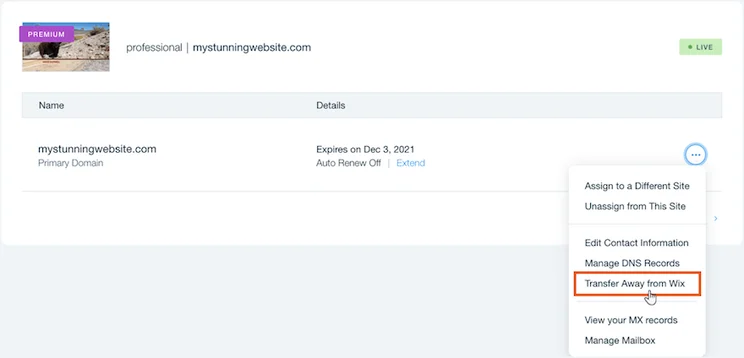
To get your authorization code, head to the Domains section in your Wix account, then click the three dots icon next to the domain you want to switch.
There’ll be a few options in the drop-down, but you’ll want to click “Transfer Away from Wix”. Review the information and confirm your request, then Wix will send your authorization code to your contact email address.
2. Transfer Your Domain to GoDaddy
To transfer your Wix domain to GoDaddy, log into your GoDaddy account and head to the transfers page.
If the domain has been successfully unlocked, following the steps we outlined above, you’ll see a green status bar when searching for your domain.
Next, enter your domain’s authorization code to continue. At this stage, you can choose to add domain protection for a fee, or simply confirm the transfer. That’s it!
While the steps above will transfer your domain from Wix to GoDaddy, you might have to wait between five and seven days for the transfer to officially complete.
Final Thoughts: Should You Switch From Wix to GoDaddy?
As you can see, transferring your domain from Wix to GoDaddy is an extremely simply process. After all, both builders are beginner-friendly and are respected domain registrars.
While Wix is our preferred domain registrar overall, with over 400 domain extensions and 24/7 support, both Wix and GoDaddy offer users flexibility when it comes to getting a domain name.


1 reply