





- Best Blog Website Builders: Comparison Table
- 1. Best for Monetizing Your Blog: Wix
- 2. Best Blogging Templates: Squarespace
- 3. Best for Beginner Bloggers: Hostinger
- 4. Best for Quick and Easy Blogging: GoDaddy
- 5. Best for Budget Blogging: Network Solutions
- 6. Best for Content-Heavy Blogs: WordPress.org
- Four Questions To Ask When Choosing a Blogging Platform
- How We Test
- Which Blogging Platform Is Right for Me?
Wix is the best blogging platform for 2026 because it offers the most versatile tools for SEO, management, and monetization in a single package. After 300 hours in-house website builder research, I’ve pulled together the six best options for bloggers.
I’ve checked and updated the information on this page to reflect the current small business climate online. I’ve put additional emphasis on specific website builder blogging features to highlight their key benefits in 2026, and reassessed each platform’s “best fors” accordingly so you can make the correct choice.
- Wix’s blog management tools will help you organize and make money from a large quantity of blog posts
- If you’re keen to tweak the look of your blog, Squarespace’s blog pages can be customized extensively
- You can start a blog for free with platforms like Wix, GoDaddy, and WordPress.org, but you’ll need to upgrade to a paid plan to fully monetize it
- Look for a builder with strong SEO features, since this is key to getting your content to appear in search results
- WordPress.org is best for content-heavy blogs, but it requires users to find and pay for separate hosting
Best Blog Website Builders: Comparison Table
Compare ratings, pricing, and features for the top six blogging platforms side-by-side in the table below to help you choose the best blog website builder for you:
|
Overall rating
|
Today's best price
|
Free plan or free trial
|
Blogging capabilities
|
||
|---|---|---|---|---|---|
|
BEST IN TEST
 |
 |
 |
 |
 |
 |
|
Wix |
Squarespace |
Hostinger |
GoDaddy |
Network Solutions |
WordPress.org |
|
4.9
|
4.5
|
4.2
|
4.0
|
3.9
|
4.1
|
|
|
$2.50 with code “BUILD50” |
||||
|
Free plan |
14-day free trial |
14-day free trial |
Free plan |
No free plan/trial |
Free to install |
|
Writer profiles, blogging templates, analytics, post-scheduling, archive, comments, and search feature |
Writer profiles, analytics, post-scheduling, archive and comments |
Writer profiles, display categories, AI Blog writing and SEO support, and post-scheduling |
Writer profiles, social sharing and scheduling posts |
Writer profiles, Scheduling tool, archive, comments, and search feature |
Completely customizable, high functionality with over 60,000 plugins |
Most blog websites fall under one of these three categories:
- Persuasive blogs that convince the reader to do something, whether buying a product or signing up for a newsletter. They’re usually attached to an existing online store or business.
- Informational blogs that provide valuable information to readers. They can have ads or affiliate links, but the primary goal is to inform.
- Entertainment blogs that are written for fans of a specific type of entertainment, like films, games, or TV shows. These types of blogs are often more of a hobby than a job, but they can still be monetized.
When assessing each website builder, you should think about the kind of blog you want to create. Does the builder you’re interested in have the tools you need to accomodate your blog type?
At Website Builder Expert, all of our recommendations are driven by our rigorous research methodology, which involves over 300 hours of data collected by our in-house research team. I’ve also tested each builder myself, collecting first-hand pictures and honest opinions to help you decide.
1. Best for Monetizing Your Blog: Wix
- Starting price: $17 per month (Save 10% with our code TAKE10)
- Read our full Wix Review
Wix is the best blogging platform for monetization due to its dedicated management dashboard and built-in Google AdSense integrations.
I recommend Wix’s blogging platform because of its range of expertly designed blogging templates and high level of in-editor customization.
Why Is Wix Good for Blogging?
The built-in Wix Blog integration includes professional management tools to search and organize large quantities of posts, similar to those offered by WordPress.
I also was impressed to see a range of pre-made templates for common blog posts, such as reviews and how-to guides. If you’re new to blogging or need help getting started, Wix’s templates feel much less intimidating than using a builder like Network Solutions, which sets you up with a blank page.
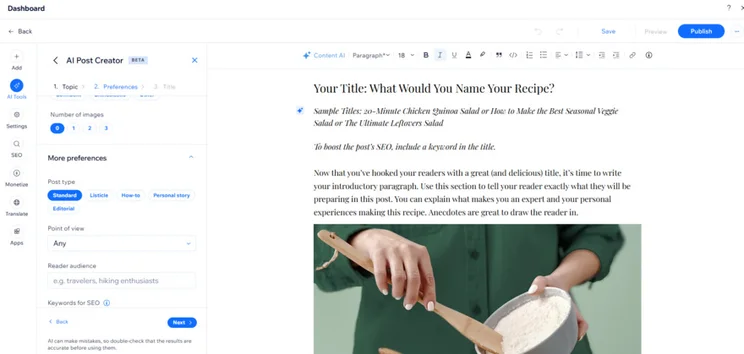
Wix also has plenty of AI tools to help you build a business blog, including the Wix AI Writer that generates blog post ideas, titles, and full-length posts up to 2,000 words.
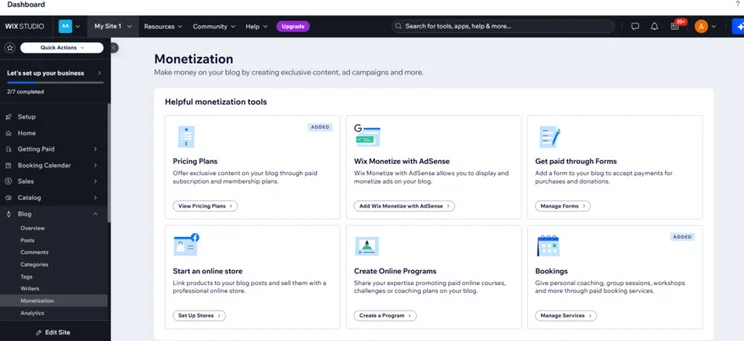
Wix provides dedicated tools for blog monetization, including Google AdSense, ecommerce integrations, and subscription plans. The dedicated blog monetization area in Wix’s back end makes it easy to get these set up quickly.
To top it off, Wix generates blog-specific reports that allow you to monitor different aspects of your posts’ performance, even down to the times of day that receive the highest traffic. These analytics can help you understand which content styles and schedules your audience responds to best, which in turn can influence your approach to monetization.
What Are the Drawbacks of Using Wix for Blogging?
While Wix is a strong all-rounder, some of our testers found the level of choice and functionality to be overwhelming. If you’re looking to create a simple blog and monetization isn’t a requirement, you’ll find Squarespace’s editor much more straightforward to use.
Who Do I Recommend Wix For?
Wix is our top website builder, and its versatility makes it suitable for many types of blogs. If you’re wondering whether to use it to build your blog, here are my recommendations:
| Suitable for… / Not suitable for… | |
|---|---|
| ✔️Ecommerce stores that want to add a blog to promote their products and demonstrate industry expertise | ❌Casual bloggers only needing basic functionality |
2. Best Blogging Templates: Squarespace
- Starting price: $19 per month (Save 10% with our code WBE10)
- Read our full Squarespace Review
Squarespace is the best platform for art blogs, offering professional templates and a category merge tool for organizing growing portfolios.
Squarespace’s AI website builder, Squarespace Blueprint can build you a unique template for your blog suited to your needs, if you can’t find a suitable premade theme.
Why Is Squarespace Good for Blogging?
Squarespace features a smooth drag-and-drop editor that’s designed for ease of use even for users with limited web design experience.
You can personalize your Squarespace blog posts with your own copy, images, and video snippets to build brand trust amid a rise in AI generated content. This is important in 2026, since 71% of consumers value personalized interactions.

The blog management tools found in Squarespace’s “Blog settings” area are powerful and user-friendly – the category merge tool will be particularly useful as your blog grows and you may want to change its organizational structure.
Squarespace supports audience engagement through built-in commenting systems and ‘Simple likes,’ which allow readers to interact with content without requiring an account login.
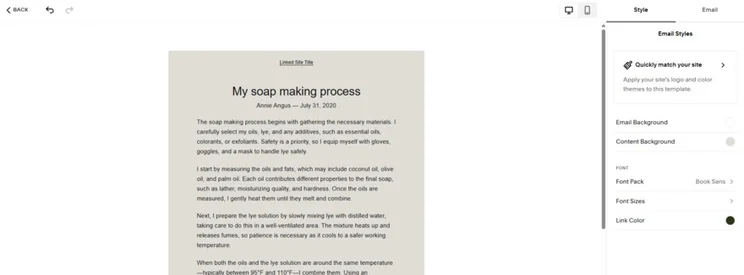
And when it comes to expanding, Squarespace’s SEO tools give you control over the meta title and description for individual posts. Meanwhile, with its email marketing tools, you’re able to automatically create an email campaign from your blog post to boost visibility.
What Are the Drawbacks of Using Squarespace for Blogging?
Squarespace doesn’t provide blog-specific analytics like Wix does, which makes it hard to measure how well your posts are doing and refine your overall growth and marketing strategy.
Squarespace doesn’t offer much SEO support or have an SEO dashboard, which makes it very easy to neglect important SEO tasks and limit your visibility online – one of the most common blogging mistakes. In testing, users reported a difficulty in finding the SEO tools they needed.
Our performance tests measured Squarespace as having the slowest page load speeds among the top six blogging platforms. Website load time is important for large blogs with media-heavy posts, especially if you’re aiming to make money blogging, since loading speed has a direct impact on ecommerce sales.
Who Do I Recommend Squarespace For?
Squarespace’s array of templates and design capabilities make it a great choice for bloggers wanting a high level of control over their designs. That said, it has some noticeable drawbacks:
| Suitable for… / Not suitable for… | |
|---|---|
| ✔️Creative or design focused blogs ✔️Blog posts to support your art business | ❌Users who want to add a blog to a complex or content-heavy site, due to site speed performance issues ❌Users who’ll want to get user support over the phone |
3. Best for Beginner Bloggers: Hostinger
- Starting price: $2.99 per month (48-month plan)
- Read our full Hostinger Review
Hostinger is the best choice for beginners because its AI-driven editor automates blog post generation, SEO metadata, and site setup. Even without a large marketing team, small businesses in 2026 can easily generate content for their website, saving them time, money, and resources in the process.
Hostinger also has the fastest loading speed of all the builders we tested, which means that it will be a reliable option for even the most content-heavy site, such as a small ecommerce store.
Why Is Hostinger Good for Blogging?
Hostinger’s AI writer automates blog creation by generating posts up to 2,000 words that include structured headings and relevant supporting images. Still, users are required to purchase AI credits after the first five image generations.
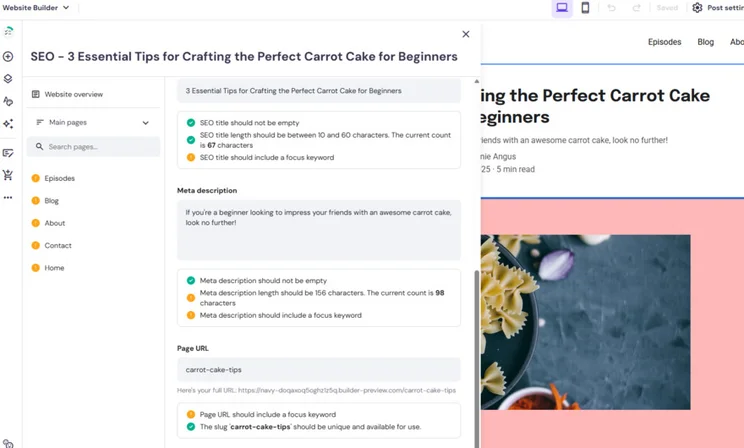
The AI support also streamlines SEO, providing in-depth guidance and checklists on best practices, suggesting primary keywords to target, and giving a preview of your post’s appearance in the search results – helping you to increase your visibility, even as a beginner.
Hostinger allows users to generate QR codes for individual blog posts, enabling mobile users to access content instantly from physical locations or social media. This is an efficient way to share your values or menu, helping you generate brand awareness and attract new customers.
Hostinger’s blog-specific analytics complement blog QR codes by showing your website’s traffic and helping you to understand where it’s coming from.
What Are the Drawbacks of Using Hostinger for Blogging?
Hostinger has no built-in social media advertising integrations or marketing tools, and you won’t be able to schedule your blog posts to go live on social media. If social media is, or is expected to be, a large part of your online presence, GoDaddy’s integrated social media tools make it a better option.
Also, Hostinger’s SEO features might be user friendly, but we found them to be lacking schema makeup and canonical tags – features you do get with both Wix and Squarespace. These help search engines to understand the content of your blog posts better and improve your chances of appearing in results pages.
Who Do I Recommend Hostinger For?
Hostinger has unique features that make it usable for bloggers of all abilities. However, it may not be the right option for you. Here are my recommendations:
| Suitable for… / Not suitable for… | |
|---|---|
| ✔️Novice bloggers who need a simple user experience ✔️Side-hustlers needing time-saving AI tools | ❌Those wanting to seriously scale their audience ❌Blogs attached to large ecommerce stores or bookings website |
4. Best for Quick and Easy Blogging: GoDaddy
- Starting price: $9.99 per month
- Read our full GoDaddy review
GoDaddy is the best platform for quick personal blog setup, offering the fastest time-to-publish in our tests.
It has a user-friendly interface that makes it easy to add text, images, and links, and format your post. It’s a fast and simple way to get online, and once you’re set up, it comes with some handy marketing tools as well.
Why Is GoDaddy Good for Blogging?
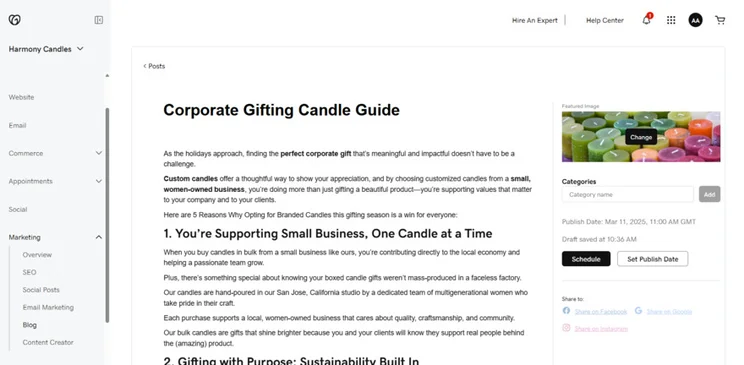
If you’re looking to ramp up your social presence, GoDaddy’s social media calendar and post planner will let you create and schedule emails, blog, and social media posts, and give a clear overview of your upcoming schedule. You can also organize your posts with categories.
GoDaddy’s blog has quick buttons to share your posts on social media and Google, and from the settings, you can add share buttons for X and Facebook, and a button to email your post automatically to subscribers.
What Are the Drawbacks of Using GoDaddy for Blogging?
GoDaddy’s AI writer doesn’t extend to blog posts, meaning you should use Wix or Hostinger if you require AI blog post generation.
On top of that, GoDaddy is limited for businesses that want to build brand awareness with their blog, since it doesn’t offer any blog-specific SEO. In fact, our research found it to have the weakest SEO out of all the builders on this list, lacking standard tools, such as multilingual support and robots.txt file editing.
And I also couldn’t add writer profiles or enable comments on my blog posts, which makes it difficult to showcase your expertise and foster engagement, which are two key factors that Google’s algorithm uses to dictate search engine visibility. I recommend Wix or WordPress over GoDaddy if you want to better highlight your expertise online.
GoDaddy’s also the only blogging platform on this list with no search feature in the back end, which will make managing a large quantity of blog posts challenging.
Who Do I Recommend GoDaddy For?
GoDaddy is one of my top choices for blogs because of its user-friendly interface and social media integrations. If you’re wondering whether it’s a good choice for you, read on:
| Suitable for… / Not suitable for… | |
|---|---|
| ✔️Users wanting to create a small, simple blog quickly ✔️Users wanting a blog to complement their social media presence | ❌Regularly updated blogs with multiple staff writers that aim to grow an engaged blogging audience ❌Bloggers catering to an international audience |
5. Best for Budget Blogging: Network Solutions
- Starting price: $4.99 per month
- Read our full Network Solutions review
Network Solutions (formerly Web.com) is the best value for money blogging platform on this list, starting from $4.99 per month, when billed annually. Network Solutions offers a solid range of features to support a basic blog, such as the ability to add multiple authors and scheduled posts.
Why Is Network Solutions Good for Blogging?
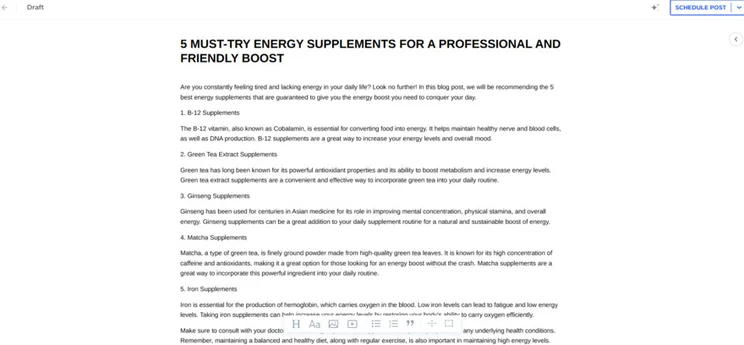
Network Solutions offers strong marketing tools to help you grow your blog online, such as a scheduling calendar (similar, albeit simpler, to GoDaddy’s) which will help you create an organized schedule to grow your blog online.
Network Solutions’ AI Writer can help you create SEO-friendly blog posts. When testing it, I had control over the keywords I wanted to target, and was able to choose from 12 languages – particularly useful if you’re targeting a global audience.
Web.com was acquired by Network Solutions in July 2025, hence the name change. Currently, the website builder’s interface and tools remain the same, just under the Network Solutions name.
What Are the Drawbacks of Using Network Solutions for Blogging?
Network Solutions doesn’t support blog categorization, meaning your posts can quickly get disorganized as they begin to grow in number, and your site visitors may struggle to locate them.
Since Network Solutions lacks paywall and advertising integrations, you also won’t be able to monetize your blog posts. If you’re looking to make money by blogging, you’re better off investing in Wix’s more expensive plan, since you may be able to earn the difference back.
Network Solutions markets itself as an AI powered website builder, but our testers found its AI Writer lacked the complexity of Wix’s, as it didn’t provide as many customization options or supporting images. During testing, the AI Writer’s multi-tone feature produced unnatural results.
Who Do I Recommend Network Solutions For?
Network Solutions’ low price point makes it an attractive option for many bloggers, but it comes with considerable limitations.
| Suitable for… / Not suitable for… | |
|---|---|
| ✔️Personal or casual blogs focused on a singular topic | ❌Design focused blogs and bloggers wanting to generate revenue from their posts |
6. Best for Content-Heavy Blogs: WordPress.org
- Starting price: from $1.99 per month (for hosting & setup via Bluehost)
- Read our full WordPress.org Review
WordPress.org is an open-source CMS providing limitless customization and multi-author management for content-heavy informational blogs.
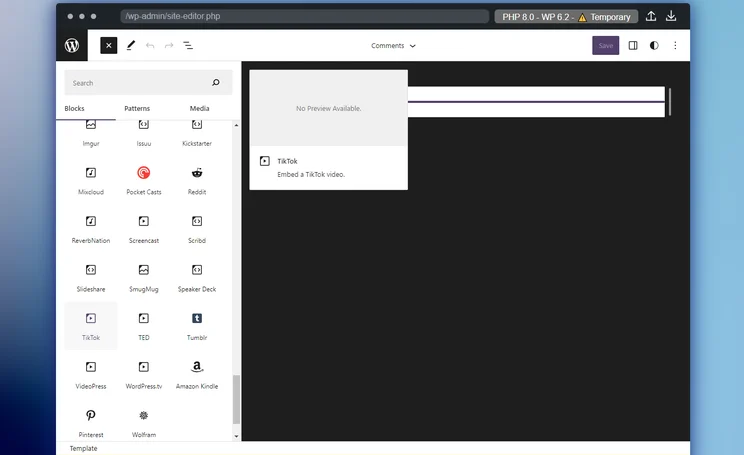
WordPress.org is open-source, meaning that anyone can download and edit it for free. This means that when you start your WordPress blog, your website will be endlessly moddable.
Why Is WordPress.org Good for Blogging?
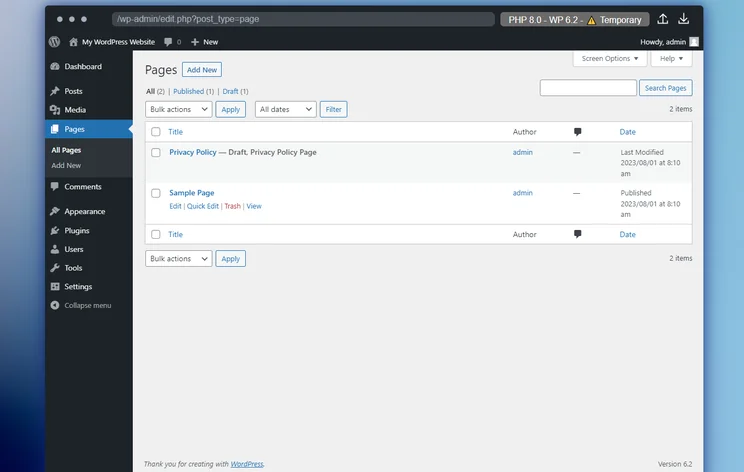
Once you’re over the learning curve, WordPress.org can be rewarding, especially for news and other informational blogs. The content management system lets you grant access to multiple authors to create and schedule hundreds of blog posts at a time, and set up RSS feeds.
Better yet, through its plugin library, you can add powerful SEO tools like Yoast and monetize your blog through affiliate marketing programs. While using WordPress.org is certainly more work than, say, Wix, it can yield powerful results for bloggers who want to produce lots of informational content with consistent upload schedules.
What Are the Drawbacks of Using WordPress for Blogging?
With WordPress.org, everything from design, integrations, marketing, monetization, and storage is all editable by you, either manually, or by installing extra plugins, such as drag-and-drop plugin Elementor.
Whereas other builders take care of things like hosting and security, you will have to organize that yourself too. WordPress.org itself recommends the web host Bluehost for this, and so do we, because of how well it performed in our WordPress hosting research.
Who Do I Recommend WordPress.org For?
WordPress.org is the original and most well-known blogging platform for a reason. Its levels of customization are unmatched, and it’s extremely powerful – if you know how to use it.
| Suitable for… | |
|---|---|
| Suitable for… | Not suitable for… |
| ✔️Experienced bloggers with a specific set of needs and requirements ✔️Bloggers looking to organize and keep track of a high quantity of posts spanning multiple categories | ❌New bloggers expecting a quick and easy setup with guidance ❌Bloggers on a budget, since plugin subscriptions can quickly add up |
WordPress.org requires manual management of security and hosting, whereas builders like Wix provide built-in security systems. If you don’t have a tech team or a strong understanding of cyber security, I’d recommend Wix or Squarespace for your blog instead of WordPress due to their built-in security systems.According to Proton’s Data Breach Observatory, small and mid-sized businesses accounted for 70.5% of data breaches in 2025, so keeping your website secure is of upmost importance in 2026. If you download an unpatched plugin by accident, you risk exposing your site’s data to cybercriminals.
Four Questions To Ask When Choosing a Blogging Platform
- Is the website builder suitable for my blog style? Remember to assess a builder’s template selection and customization options to make sure you can achieve your desired look.
- Do the built-in tools allow me to build my blog how I want to? Go through all of the features you’re looking for in a blog builder, be it scheduling tools, commenting, or private membership areas for gated content.
- Are there any marketing features to help me grow my blog’s audience? Check to see whether there are any marketing tools to help you reach more people, such as email marketing or social media integrations.
- Can I access key ways to monetize my blog? Make sure the website builder plan you’re interested in allows you to accept payments or make money from your site, if that’s your goal.
Short on time? Find the best platform for your art with our three-minute quiz.
What type of blog do you want?
Find Your BuilderHow We Test
To find the best blogging website builder, we conducted rigorous hands-on testing first. We tested our builders in five areas, which enabled us to make an accurate assessment of each platform and make sure that our recommendations can really accommodate bloggers’ needs.
We then weighted each of our testing categories uniquely to reflect the key priorities for blogging:
- Website functionality: 35% – AI, SEO, marketing, and blogging tools
- Design Features: 20% – the quality of the AI builder and templates
- Help and Support: 10% – the support options available
- Reputation: 5% – how popular the builder is and its online reviews
- Pricing: 15% – the pricing, value for money, and jump between plans
- User experience: 15% – how easy the builder is to use, tested by people like you
Website functionality is our heaviest weighted area, where we look into specific blogging features, such as blog monetization, engagement functions, and blog-specific SEO and analytics. This section also looks into areas outside the blog, such as SEO, apps, marketing, and storage space to decide how suitable the builder is for fitting unique user needs and growing and maintaining an audience.
Which Blogging Platform Is Right for Me?
Our testing confirms Wix is the most versatile blogging platform for monetization and management in 2026, offering tons of built-in blog features and powerful SEO tools to help you promote your content online.
If you’re looking for a quick and easy blog setup, Hostinger’s AI features provide support throughout the whole process. For bloggers on a budget who aren’t looking to generate revenue, Network Solutions is a great choice. And, if you want control over every aspect of your site, WordPress.org gives you modular control.
Now ready to start your blog? If so, check out our guide to how to write a blog post to get going.


1 reply
1 reply
1 reply
1 reply
1 reply
1 reply
1 reply
1 reply