


Wix and Hostinger are both featured in our best website builder list, taking the top and third spot, respectively. And, when compared side-by-side, Wix is the best website builder overall thanks to its user-friendly editor and quality features.
But, after hundreds of hours of testing and research, it’s clear both builders have something of value to offer to their users. Is Wix or Hostinger right for you and your business? I’ll dig into their editors, features, pricing, and more.
- Hostinger has cheaper starting prices but you get more features for the price you pay with Wix
- You can test out Wix’s builder and features with its free plan, whereas Hostinger has a seven-day free trial
- Hostinger’s drag-and-drop editor is easier to use than Wix’s
- Wix’s sales features are better equipped to support online stores – for example, Hostinger limits you to 1,000 products whereas Wix lets you sell up to 50,000 products
- Wix’s website features are the best we’ve tested, easily outperforming Hostinger
- Both Wix and Hostinger have AI website builders, but Wix’s AI tools are more comprehensive
- Both builders offer 24/7 support
Quick Comparison: Find Your Builder
If you’re short on time, you can get a quick overview of each builder’s key features in the table below:
|
Overall rating
|
Today's best price
|
Free plan or free trial
|
AI website builder
|
Standout features
|
Areas to improve
|
Recommended for
|
||
|---|---|---|---|---|---|---|---|---|
 |
 |
|||||||
|
Wix |
Hostinger |
|||||||
|
4.8
|
4.2
|
|||||||
|
|
||||||||
|
Free plan |
14-day free trial |
|||||||
|
|
|
|||||||
|
|
|||||||
|
|
|||||||
|
Businesses promoting their online presence |
Freelancers and budget-conscious users |
We’ve conducted over 300 hours of research, data analysis, and hands-on testing to accurately and fairly compare Wix vs Hostinger. This testing process forms the backbone of all our reviews, guides, and comparisons. Read more about our unique research methodology.
Best for Pricing: Wix
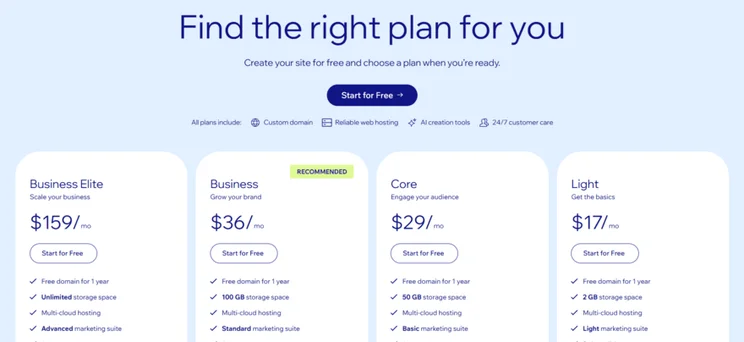
Wix just beats Hostinger when it comes to pricing and value for money. You get a lot of features for the price you pay, and Wix’s plans are relatively affordable for businesses. Wix’s pricing ranges from $17 to $159 per month (billed annually), split across four premium plans:
- Light – $17 per month
- Core – $29 per month
- Business – $36 per month
- Business Elite – $159 per month
You can get 10% off your Wix plan with the code “TAKE10” at checkout.
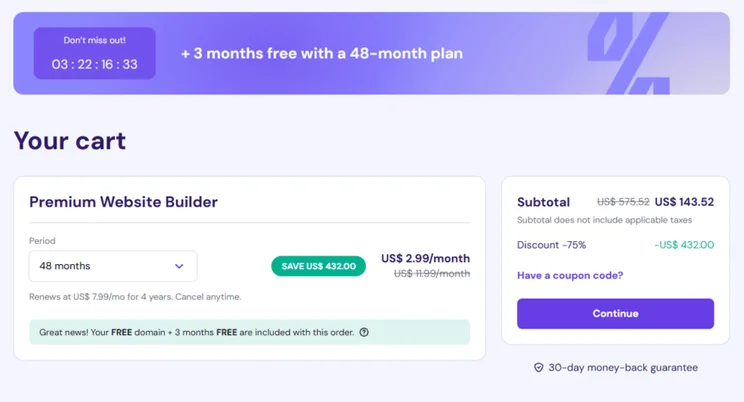
In comparison, Hostinger offers the cheapest starting prices out of all the builders I’ve tested, but it has a limited range of plans for users to choose between:
- Premium Website Builder – $2.99 per month
- Business Website Builder – $3.99 per month
Unfortunately, Hostinger’s pricing increases dramatically when your subscription renews. For example, the $2.99 per month plan jumps up to $10.99 per month after your initial subscription ends.
Wix also trumps Hostinger because it offers a free plan, which you can stay on forever. Hostinger, in comparison, only offers a seven-day free trial.

Wix is better value for money
While Hostinger’s plans are cheaper on paper, you get more for your money if you choose to pay for one of Wix’s premium plans. Plus, Wix has a free plan which provides a great opportunity for testing out Wix’s suite of features and design options.
Easiest To Use: Hostinger
Of the two, Hostinger is easier to use than Wix thanks to its beginner-friendly editor, AI tools, and simplified features. I’ll talk through each builder’s onboarding process, AI website builder, template options, and editor below:
Getting Set Up
When I first set up my account with Wix, it encouraged me to use the AI chatbot builder, which would create a personalized template and dashboard based on my responses. I answered a few basic questions about my business needs and goals, and I watched as Wix developed a site profile in real-time.
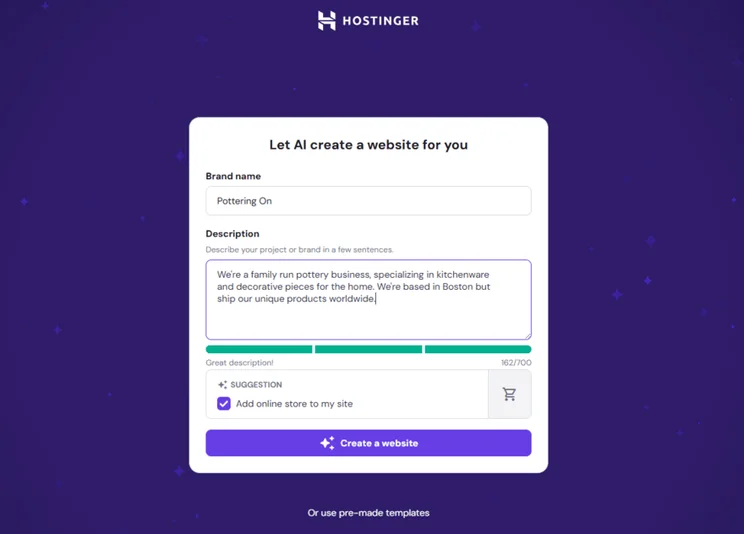
With Hostinger, the process is simplified with a quick form to fill out – I had to add my brand name, the business type, and a summary of my business so its AI builder could generate a relevant template.
Template Options
Despite both platforms guiding users toward their AI website builders, Wix and Hostinger also offer professionally designed templates. If you don’t want to go through the AI-building process, templates are the natural alternative, especially if you have no design experience.
Hostinger offers over 150 templates, categorized by industries, such as “Real estate” and “Wedding.” In comparison, Wix has a higher quantity of stylish templates, with over 2,000 free templates to choose from. Like with Hostinger, I could filter Wix’s template library by industry and website type.
Editing Your Site
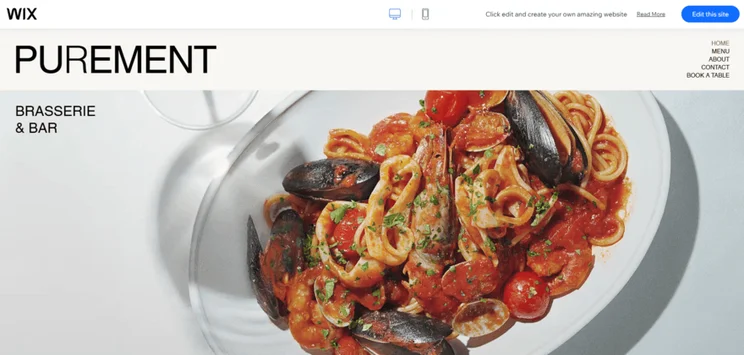
Wix and Hostinger give users tons of creative freedom with their drag-and-drop editors. I could move elements, such as images and buttons, to wherever I wanted on the page.
That said, Wix offers more editing tools and controls for both beginners and designers – while it’s still easy for novices to get to grips with, you might be paralyzed by choice and options. With Hostinger, you get the same flexibility, but with a simplified sidebar and fewer tools to learn, making it extremely easy to pick up.
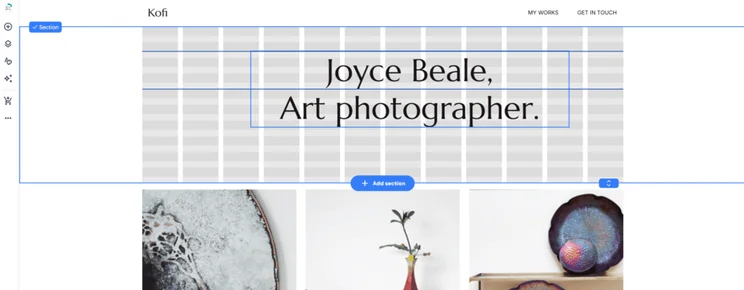

Hostinger's editor is very beginner-friendly
Both Wix and Hostinger provide professionally-designed templates and the popular drag-and-drop editor, making it easy to build a website from scratch without any experience. That said, Hostinger’s editor is simple and streamlined for beginners, whereas users might be overwhelmed by all that Wix has to offer.
Best for Selling Online: Wix
If you want to sell products online, you’ll need an appropriate website builder. Both Wix and Hostinger offer ecommerce functionality with select plans – pricing for these ecommerce plans starts at $29 per month (Wix) and $3.99 per month (Hostinger).
Hostinger’s sales features are fairly limited:
- Sell up to 1,000 products
- Manage your orders and inventory
- Offer appointments
- Accept online payments with 100+ payment methods – this has increased in the last year from 20+
- Charges 0% transaction fees
Hostinger is let down mostly by its lack of shipping options, multichannel integration, and small inventory size, meaning it’s not ideal for larger businesses.
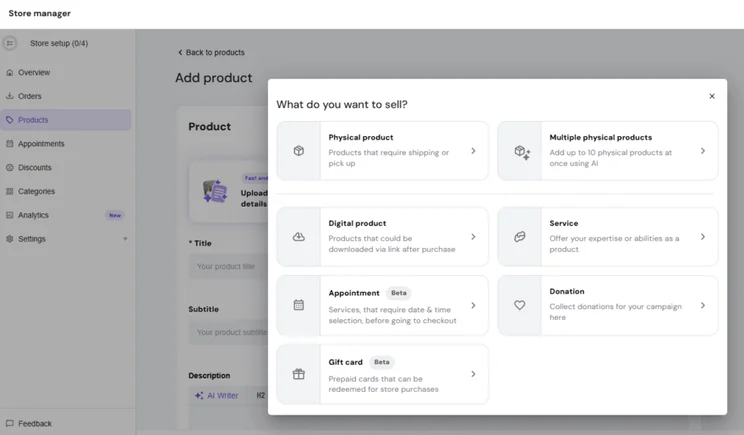
On the other hand, Wix is one of the best ecommerce website builders I’ve tested, coming second only to Shopify in our most recent 2025 rankings. With plenty of built-in sales features and a vast app market, merchants can expect the following Wix ecommerce tools:
- Sell up to 50,000 products – that’s 100 times more than Hostinger
- 70+ payment methods to choose from, including the native Wix Payments
- Abandoned cart recovery
- Discounts and loyalty programs
- Multichannel selling on social media and marketplaces
- Back-in-stock notifications
- Advanced shipping options
- Product reviews
- Charges 0% transaction fees
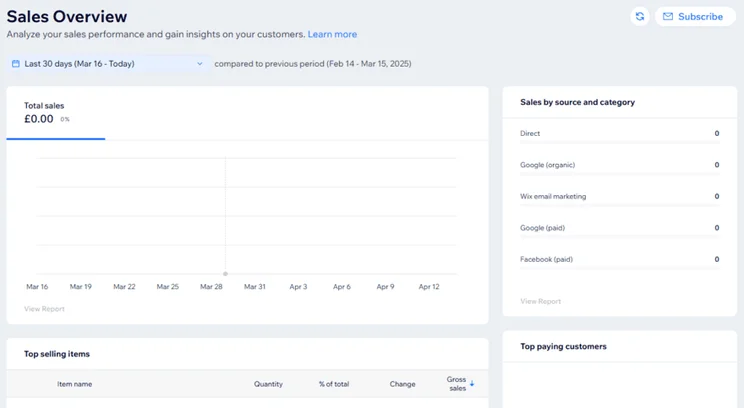
Wix is better for online stores
Ultimately, Wix offers better sales features and scalability for your online store to grow. It’s second only to Shopify in this year’s ecommerce builder rankings, making it a viable option for businesses looking to get online. Wix offers everything provided by Hostinger, and much more, such as the ability to sell on socials and advanced shipping capabilities.
Best Website Features: Wix
A key part of any website builder is its functionality and the features it can offer your business. After all, you need to be able to connect with your audience, get seen by search engines, and have the tools you need to grow online. Based on our research, I found that Wix has the best website features and functionality.
Wix and Hostinger are both excellent website builders – it really just depends on what matters most to you! In our research, we found Hostinger to be a bit easier to use since its builder is more streamlined, but that’s because it doesn’t have as many features as Wix. On the other hand, Wix stood out as the best for website functionality, hands down. It offers powerful SEO tools to help you get noticed, built-in email marketing, great booking features, and a massive app market. So, if you’re looking for a website builder that can fully support your business online, Wix is the way to go!

Email Marketing
When it comes to marketing, Wix outperforms Hostinger with ease since Wix provides email marketing as a built-in feature. Sadly, Hostinger has no built-in email marketing tools and (as I’ll discuss later on) has no app market to install a third-party integration, meaning it’s difficult to expand your reach and build a loyal following.
With Wix, I could use existing email templates to generate new campaigns or newsletters. When I first landed on the dashboard, Wix suggested a template to promote a new shop category, share news about my business, or send a general newsletter. I could then edit and design my email to my liking, or use AI to generate one from scratch.
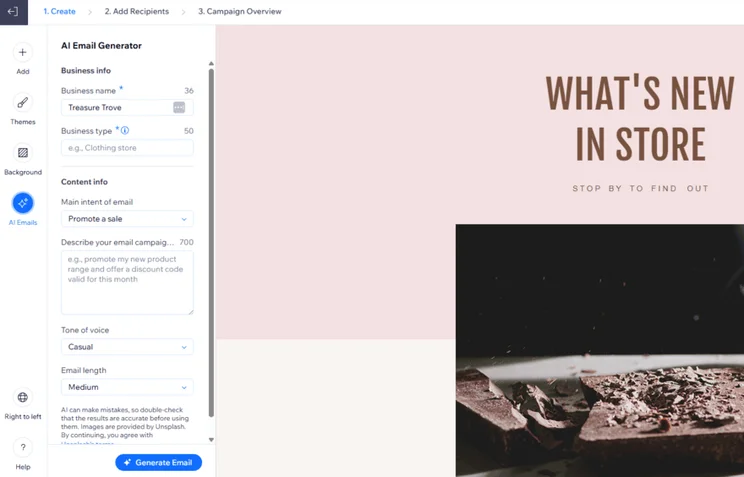
SEO
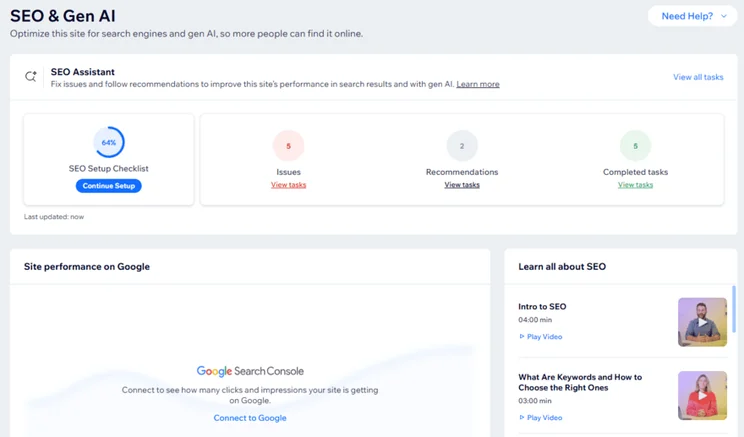
Wix’s SEO features are superior to Hostinger’s, supporting beginners and experienced builders as they work to improve their search engine rankings.
You can expect both builders to handle the SEO basics for you, such as optimizing your pages with metadata, but Wix goes the extra mile. I was particularly impressed by its Semrush integration for keyword support, and Wix’s personalized SEO checklist, which identified issues for me to fix.
In comparison, Hostinger’s SEO features seem to focus on beginner-level tips. It’ll give you SEO advice as you edit your pages and settings, which is really helpful, but these features are fairly standard and expected from website builders nowadays.
Apps
Wix beats Hostinger when it comes to third-party apps for one simple reason: Hostinger doesn’t have an app market. As a result, there’s no way for Hostinger users to add extra functionality to their site – the features Hostinger provides are the features you’re limited to.
In comparison, Wix has hundreds of apps to choose from, providing extra tools for your business to grow online with software that works best for you. For example, the Quickbooks Connector app helps automate your accounting.
Remember to budget accordingly when adding extra apps to your website. Some of the apps on Wix’s market are free to use or offer a free trial, but some will come with an additional fee to pay. The good news is you can pick and choose which apps to use, meaning you’ll only pay for what you actually want to use.
Wix's website features are unbeatable
Wix remains our top recommendation if you’re looking for the best all-in-one solution for your website and business thanks to its impressive range of built-in features. It’s a great starting point for new website owners, with helpful SEO guidance and marketing tools, but its large app market provides extra functionality to help your site grow.
Best AI Tools: Wix
Hostinger’s website builder offers a fairly comprehensive suite of AI tools for its users, which is why I often recommend its time-saving AI capabilities to beginners. That said, Wix’s AI tools offer more detailed business support and flexibility.
Hostinger might prioritize its AI features above other built-in functionality, such as email marketing, but Wix’s AI tools are more impactful and polished.
I’ve listed the key AI features you need to know about below, but I recommend checking out our list of the best AI website builders to see a complete breakdown of each platform’s AI tools:
Wix’s Key AI Tools 🔍
- AI website builder
- AI theme assistant
- AI text creator
- AI image creator + editor
- AI Business Launcher
- AI SEO assistant
- AI product support
- AI logo maker
- AI site-chat
- AI portfolio creator
- AI section generator
- AI email generator
- AI blogging tools
- AI business assistant, named Astro
Hostinger’s Key AI Tools 🔍
- AI website builder (+ an AI builder for WordPress)
- AI SEO tool
- AI product generator
- AI heatmaps
- AI writer
- AI page generator
- AI image generator
- AI logo maker
- AI blog generator
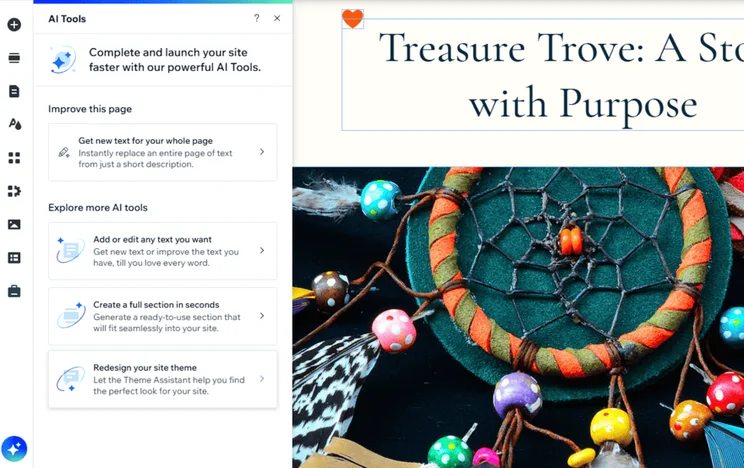
Wix provides a broad range of AI tools and support
Both Wix and Hostinger provide great AI builders and tools to help you save time and simplify processes. That said, Wix’s AI features are well-developed and the builder continues to announce new AI tools to support its websites.
Best Support: Wix
Wix has the best help and support features I’ve tested, helping you overcome roadblocks whether you’re taking your first steps online or navigating a complex issue years into owning a website.
Both Wix and Hostinger offer:
- Live chat – This is available 24/7 with Hostinger, but limited to weekdays with Wix
- Social media
- Help centers
- Tutorials and guidance
They differ slightly in that Hostinger has 24/7 email support, while Wix’s customer service provides 24/7 phone support and a specialized SEO Learning Hub. Wix also offers expert support, a community forum, and interactive online courses, helping it jump ahead of Hostinger in our comparison.

Wix has better customer service
You can expect 24/7 customer support from both Wix and Hostinger, but Wix provides a greater range of contact options, including phone support. I was also particularly impressed by Wix’s expert online courses and SEO Learning Hub, to help beginners and experienced business owners develop their SEO skills.
How We Test Website Builders
When comparing Wix and Hostinger, we use the data from our in-house research process to shape our recommendations. This methodology focuses on six core areas of investigation, which we’ve spent over 300 hours analyzing to determine our rankings:
- Website Functionality: 30%
- Design Features: 25%
- Pricing: 15%
- User Experience: 15%
- Help and Support: 10%
- Reputation: 5%
I’ve also conducted hands-on testing with both builders to provide unique and personal insights that users can relate to. This helps me write from a place of experience and honesty.
Final Verdict: Wix vs Hostinger
While Wix and Hostinger are two of our top three website builders, one of them has to come out on top, and it’s Wix that takes the crown. Not only does it offer users the best quality features, but it also provides great customization options and scalability for growing stores.
Here’s a quick reminder of who I recommend each builder for:
- Wix is the total package for online success, catering to a broad audience with its range of features, templates, and support options
- Hostinger is great for beginners looking for a speedy and user-friendly experience
See how Hostinger and Wix compare to one of our other top-rated website builders, Squarespace, in our Hostinger vs Wix vs Squarespace review.
I had an enjoyable time using both Wix and Hostinger during our 2025 testing. While I love the simplicity and ease of designing a website with Hostinger, thanks to its drag-and-drop editor and straightforward interface, it’s tough to beat Wix overall. The builder really offers everything you could need in a handy all-in-one package, from stunning templates to unparalled website features. Plus, Wix caters to a broader range of users, from blogs to online stores, whereas Hostinger’s functionality is a bit more limited.
That said, I highly recommend trying out Wix’s free plan and Hostinger’s free trial to see which builder you click with the most.


0 comments