

If you’re looking for a simple website builder, Site123 could be for you. Site123 is built for individuals and businesses that need a straightforward platform with minimal fuss. For this reason, we recommend it for hobbyists and personal sites.
In our recent round of research, Site123 scores a low 2.8 out of 5 due to its poor performance across the majority of our testing categories. It’s let down by its weak features and design functionality above all else, meaning you’d be better off with a more powerful website builder like Wix if you’re after advanced tools.
What Are the Pros and Cons of Site123?
But before we dive into everything Site123 has to offer – and where it falls short – let’s check out its pros and cons below:
Pros
✔️ Site123 offers impressive help and support, including 24/7 live chat and a helpful knowledge base
✔️ Mobile-responsive themes mean you can connect with your customers on channels that suit them best
✔️ The simple editor makes Site123 an incredible option for beginners or anyone that doesn’t need all of the bells and whistles of larger website builders
Cons
❌ Though Site123’s editor is simple, it lacks the familiar drag-and-drop functionality of other popular builders, like Wix, which limits you creatively
❌ For advanced features, including ecommerce functionality, you’ll need to upgrade to a higher plan
❌ There’s little variety between templates so you’ll struggle to create anything truly unique
❌ Site123’s free plan is underwhelming and restrictive – not only does it include ads, but you’ll be forced to upgrade quickly if you want access to more powerful features
Site123 Overview
Site123 is a website builder that focuses on ease and simplicity, allowing you to build a website in no time at all. Unfortunately, it has one of the lowest scores from our website builder research. Site123’s templates aren’t exciting and the customization options are limited, resulting in a very weak score for design.
However, Site123 does offer impressive 24/7 support with its live chat functionality, and its detailed knowledge base provides plenty of guides and tutorials to help you on your website builder journey. If you want to start selling, Site123 includes ecommerce features on select plans and you can easily integrate third-party apps to enhance your website.
But is Site123 the builder for you?
We put Site123 to the test with our rigorous research process, and ultimately gave the builder a score of 2.8 out of 5. We compared it to other top website builders in the market and analyzed everything from pricing and SEO to support and security.
Our testing focused on six core categories:
- Ease of use
- Customer satisfaction
- Website features
- Design functionality
- Value for money
- Help and support
We know that these are the features that matter the most to you, our readers, and we’ll take a closer look at each category in this article. But, if you’re short on time, you can get a quick overview of Site123’s performance in this table:
| Research Category | Site123's Rating /5 | Expert Insights |
| Ease of Use | 3.2 | Site123 is pretty beginner-friendly thanks to its quick onboarding and simple section-based editor, but your creative control is limited which can feel frustrating. |
| Customer Satisfaction | 2.7 | Site123 is the least popular website builder we tested, with only 54% of our testers saying they'd be happy to recommend it to others. |
| Website Features | 2.3 | Site123 covers the basics, such as social media integration and simple SEO tools, but you'll need to upgrade your plan for more advanced features, such as website analytics. |
| Design Functionality | 1.9 | Design isn't Site123's strong point. Its templates are dull and repetitive, and the basic editor means you'll struggle to create a unique website. |
| Value for Money | 3.4 | There's a free plan you can stay on as long as you'd like, but it's quite restrictive, so we recommend upgrading to one of Site123's five premium plans. The cheapest plan starts at $12.80 per month. |
| Help and Support | 4.3 | Site123 offers impressive help and support, including 24/7 live chat, email support, and a knowledge base. |
| Overall Rating | 2.8 | We recommend Site123 for personal websites due to its limitations when it comes to powerful features, design options, and customer satisfaction. |
Ease of Use
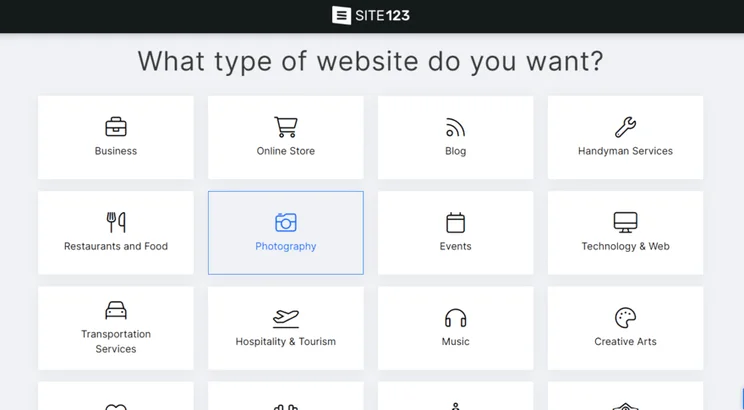
To sign up, Site123 took us through a three-step process. It first asked what type of website we wanted to create, including options for an online store, blog, photography website, and CV. We then simply had to add our website or store name and fill out a few personal details.
After that, it’s time to edit! Site123’s editor is section-based, meaning you can add new design elements above or below existing blocks, but you can’t drag and drop items wherever you want, like Wix. This does limit you creatively but makes setting up your website very simple!
Because of its simplicity during onboarding and editing, Site123 scores 3.2 out of 5 for its ease of use – seeing no real change since last year’s research.
While Site123 seemed pretty straightforward to us when testing, we made sure to speak to everyday people as well. We got a group of users to test Site123 and build a website from scratch before reporting back to us with feedback.
One participant enjoyed the experience, saying this about Site123:
“It’s good for people with no design experience who want a website up and running quickly.”
However, it won’t be a perfect fit for everyone, with another user struggling to connect with the builder:
“Site123 feels like it hasn’t kept up with consumers and has therefore become outdated in both function and design.”
There’s no doubt that Site123 is easy to use – though not quite as user-friendly as Wix and Squarespace – but its ease of use doesn’t always translate into satisfied customers.
Site123 scores 2.7 out of 5 for customer satisfaction, seeing a 25% drop in score since last year’s research which makes Site123 one of the least popular builders we’ve tested.
After our recent research, only 54% of participants said they’d be happy to recommend Site123 to someone looking to get online. While this isn’t the worst out of all the website builders we tested, it falls short of the top performer, Squarespace, which 92% of users would recommend to others.
To put it simply, Site123 can’t cater to as wide an audience as Wix, Squarespace, or Shopify. Instead, it focuses on its target audience – people who need a simple website as opposed to a complex site that needs specific features or integrations.More Information
- How to Build a Website: Everything you need to know about creating a website from scratch
- Wix vs Squarespace: Both of these builders came out on top in our ease of use research, but which one is the right fit for you?
Website Features
Site123 scores 2.3 out of 5 for its website features, putting it in similar territory to other low performers, such as IONOS and Jimdo. Site123’s plans cover the basic features you’ll need to set up and run a website, but you’ll struggle if you’re looking for a more long-term and scalable solution.
If this is the case, we’d recommend a builder like Wix or Squarespace since both platforms offer powerful built-in features to support growing businesses, especially on their high-end plans. For example, Wix’s Business Elite plan includes unlimited storage, while Site123’s top plan, Platinum, only includes 100 GB of storage.
You can start with Site123’s free plan which includes 250 MB storage, 250 MB bandwidth, and a subdomain. You’ll also have visible ads on your published site which can make your website appear less professional, so if you want to remove those and access advanced tools, such as website analytics, you’ll need to upgrade to one of the paid plans.
Here are just some of Site123’s key features:
- App market: To complement Site123’s built-in features, you can choose from a library of free and premium apps, such as Google Tag Manager and Hotjar
- Domains: Unlock a free domain name for one year if you upgrade to any of Site123’s paid plans
- Ecommerce: Accept 100 orders per month and credit card gateways with Site123’s Professional plan, or unlock 500 orders per month and advanced store features with the Gold plan
- Marketing & analytics: You’ll need to pay if you want access to email marketing tools or website analytics
- Security: Your website comes with a free SSL certificate, domain privacy protection, and the ability to password-protect your site, as well as an autosave and restore feature to protect your work
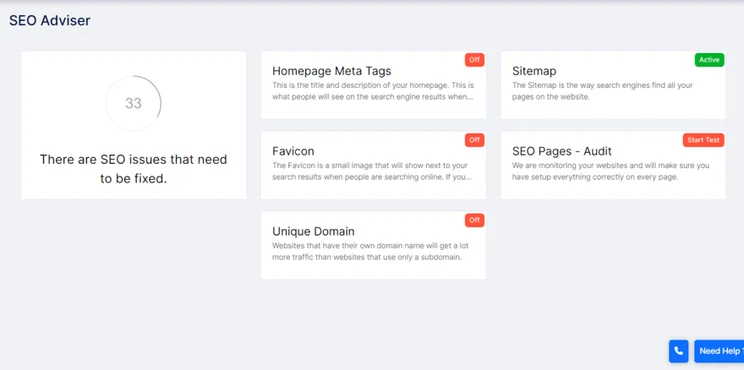
- SEO: Edit meta tags with Site123’s SEO Adviser or unlock advanced features when you subscribe to the Gold plan or above, such as optimization suggestions to help your website appear in search results
- Social media integration: Link your website and social media accounts together, including Facebook and Instagram
More Information
- Best Ecommerce Website Builders: If you want to sell online, check out our list of the best ecommerce website builders
- How to Make Your Website Secure: Tips and tricks to keep your website safe from harm
- SEO Basics 101: A beginner’s guide to search engine optimization
Design Functionality
Site123 really flops when it comes to design functionality, only scoring 1.9 out of 5 in our recent research. This is the lowest design score out of all the website builders we’ve tested this year.
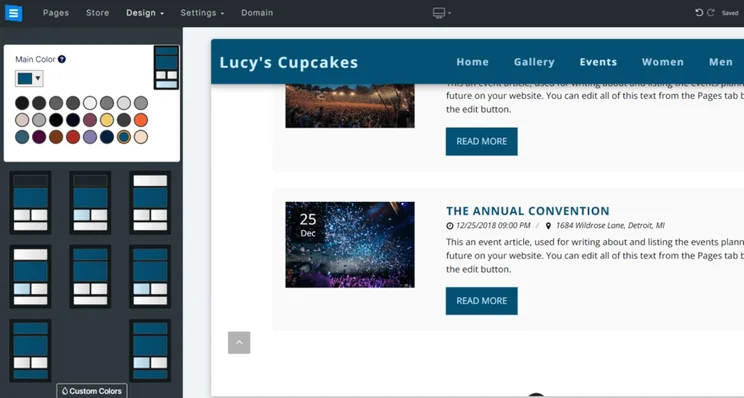
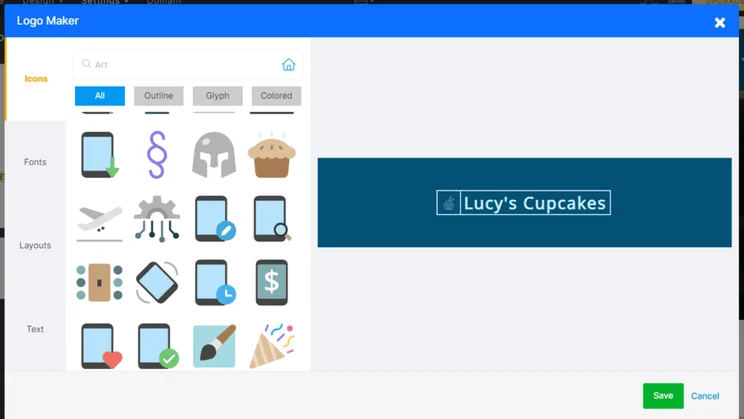
Surprisingly, there are hundreds of templates to choose from when building with Site123, broken down by categories such as “Music” and “Blog”. Despite lots of choices, these templates were a disappointment in testing – Site123’s designs are basic and lack the style and options of Squarespace, the best website builder for design.
And, when using the builder ourselves, we struggled to find unique designs. Everything looked pretty similar and repetitive, and with Site123’s simple editing tools, we couldn’t do much to the look of our test website.
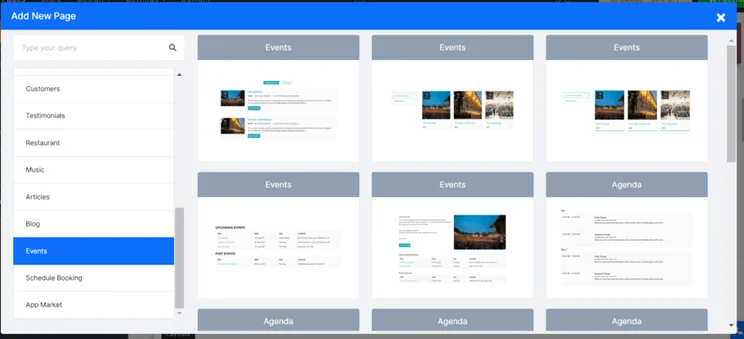
Your starter template will come with set pages built-in, such as a blog, but we could easily add new “pages” – pre-designed elements – to our test website. These are separated into 20 categories which we could browse, including the usual “Testimonials” and “Events”.
One participant in our user testing had this to say about their experience:
“You know what, I like Site123. It may be ugly but it’s super user-friendly. Everything was in the right place and I never felt stupid building it. Will your website look the best? Perhaps not. But honestly, I could add pretty much anything I wanted with very little resistance.”
While another user didn’t enjoy their experience designing with Site123:
“The lack of customization made me want to give up because you quickly realize you can’t do certain things.”
Thankfully, Site123 does offer mobile-responsive themes which is essential in this day and age. In 2023, almost 57% of all website traffic came from mobile phones, so it’s important your website is accessible across devices. You can keep an eye on your website’s layout and structure using the mobile preview tool in the editor.
Value for Money
Site123 saw a 17% drop in rating since last year’s research with a new value for money score of 3.4 out of 5. Prices have increased across the website builder industry, so our algorithm has adjusted to reflect the change.
At first glance, you’ll see a single paid plan alongside Site123’s free plan. But once we logged in to test Site123 for ourselves, we discovered four additional premium plans, resulting in six plans in total.
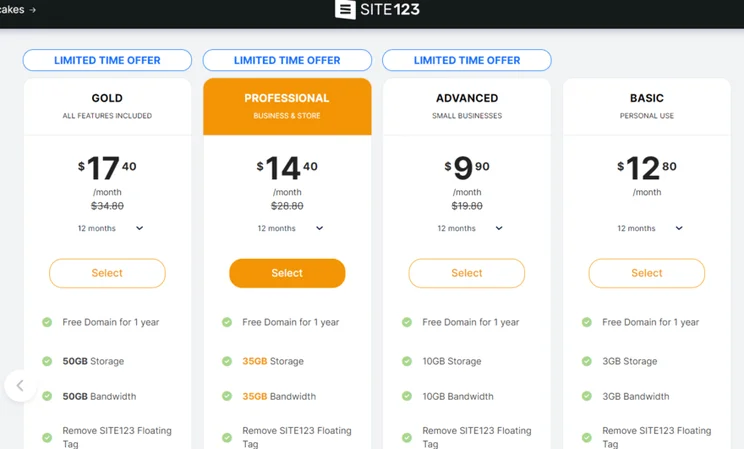
Here are the introductory prices for a 12-month term:
- Free: $0 per month
- Basic: $12.80 per month
- Advanced: $9.90 per month, usually $19.80 per month
- Professional: $14.40 per month, usually $28.80 per month
- Gold: $17.40 per month, usually $34.80 per month
- Platinum: $37.50 per month, usually $75 per month
As you’d expect, the longer you sign up, the cheaper your monthly bill. You can now choose between six different subscription lengths: three months, 12 months, 24 months, 36 months, 60 months, and 120 months.
Below is the breakdown of how much Site123 charges for each pricing plan, and the key features you can expect:
| Plan | 3 Months | 12 Months (Introductory Deal) | Key Features |
| Free | $0 | $0 | Includes Site123 ads on live site |
| Basic | $19/mo | $12.80/mo | Removes Site123 floating ads and gain a free domain for one year |
| Advanced | $28/mo | $9.90/mo | Includes mailing lists and removes all Site123 ads |
| Professional | $39/mo | $14.40/mo | Unlock website statistics and ecommerce features |
| Gold | $47/mo | $17.40/mo | Unlock store reviews, abandoned cart recovery, and advanced SEO Adviser tools |
| Platinum | $97.50/mo | $37.50/mo | Sell unlimited products |
But what do you get for your money? Which plan is best for your website’s needs?
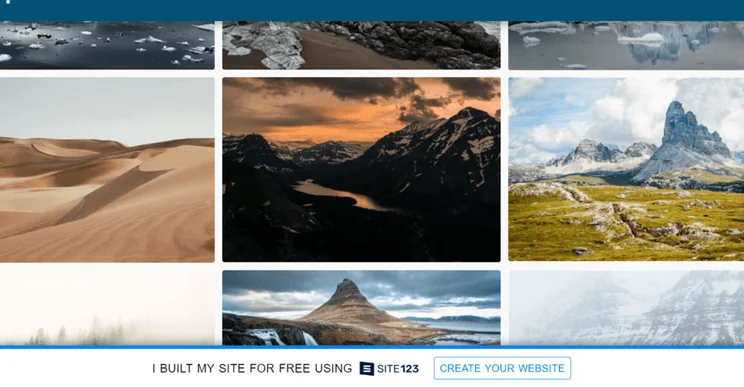
The Free plan includes two ads – a floating banner and a tag in the website footer. While the footer can easily be overlooked, the floating banner is pretty intrusive. To remove the floating banner, you’ll need to upgrade to any premium plan, but you’ll need to upgrade to the Advanced plan to remove the footer ad.
The Basic plan is recommended for personal sites due to its limited extras, while the Advanced and Professional plans are better for small or growing businesses. However, if you need to start selling, you’ll have to sign up for at least the Professional plan since this includes ecommerce features.
Still, you can give Site123 a go for yourself with its free plan – explore its features and website editor before committing to a premium plan.
Help and Support
We’ve already mentioned Site123’s straightforward editor, but did you know that you’ll also be supported with an onboarding tour after you first sign up? That’s right, Site123 will walk you through how everything works.
But, if you still need a helping hand, you can contact Site123’s customer support team via 24/7 live chat, send an email, or browse its knowledge base for answers. You can seek help from its community forum as well, or watch a video tutorial to walk you through a solution step-by-step.
We tried Site123’s live chat functionality for ourselves. The pop-up claims to respond to queries within two minutes – unfortunately, two minutes came and went without a response. In the end, it took about five to six minutes for a useful answer to come through, which isn’t too long of a wait!
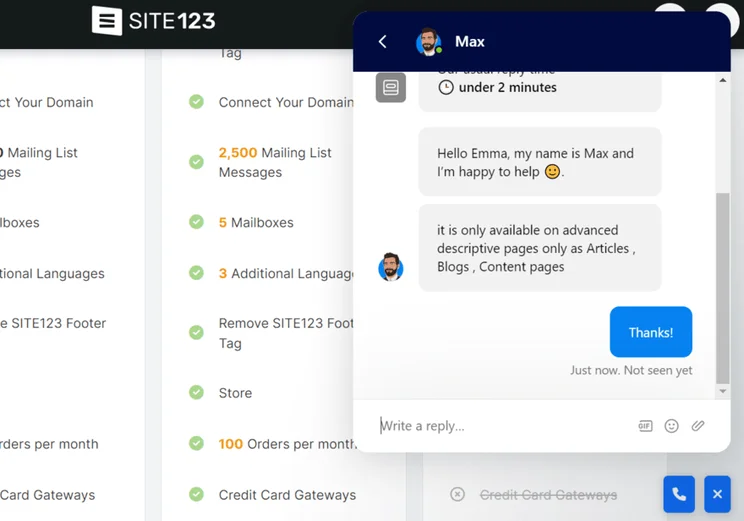
Still, Site123 performed well in our overall support research and scores 4.3 out of 5 for its help and support. This puts it just behind our top performers in this category, sharing second place with GoDaddy.
Who Should Use Site123?
What you need from a website builder, such as Site123, depends on the type of website or business you run.
Blogging
Site123 covers the very basics with its blogging features, including comments, scheduling tools, RSS feed, and social media integration. For anyone looking to add a blog to their website as an additional feature, this will be more than enough to get you going.
However, if a blog is the primary purpose of your website, we’d recommend alternatives, such as Wix, Squarespace, and WordPress.org, since they offer advanced blogging functionality, like archive features and blog analytics. For more information, check out our list of the best website builders for blogging.
Business
To put it simply, Site123 isn’t ideal for online stores. You can create a simple and basic-looking business site quickly, but you’ll struggle to create anything more substantial.
While Site123 may suit a small business purely looking to promote its brand online, we don’t recommend it for selling. This is because it lacks powerful ecommerce tools, such as automatic invoicing and payment tracking, making it difficult to sell products on a large scale. And the ecommerce tools it does offer are locked behind its higher premium plans, with pricing starting at $14.40 per month (billed annually).
Because of this, Site123 is more suitable for very small business sites with limited needs. If you want to sell more than a few products and truly grow online, you’ll want a more powerful solution like Shopify.
Personal
Site123 is best for building personal sites, thanks to its simplicity, responsive support, and affordable plans. You don’t need coding knowledge or years of technical experience, but Site123’s lack of design options will make it tricky to create anything unique.
So, if you’re looking to keep your website small and have no plans to scale a business, Site123’s limited capabilities won’t be an issue at all.
Site123 Review: Our Final Thoughts
Site123 is all about simplicity. It’s easy to use thanks to its in-editor support and section-based design, but it can be difficult to customize or build a complex site due to its limitations when it comes to features and functionality.
For this reason, Site123 scores an overall 2.8 out of 5 in our recent research, falling far behind the top website builders like Wix and Squarespace.
That being said, Site123 performed well in our help and support testing, providing responsive live chat and a detailed knowledge base.
So, if you’re a medium to large-sized company with hopes of scaling your business, it’s best to look elsewhere. But, if you want to build a personal site or simply want to share information about your business, Site123 could be the perfect fit for you.
Website Builder Expert aims to provide you with honest data. That’s why we conduct our own research and obtain direct, personal insight. Analyses and graphics in this article are based on authentic sources cross-validated by our in-house experts. We take great care to ensure the information we publish is reliable and accurate. However, WBE takes no responsibility for any inaccuracy in information supplied to us by users, research participants, or other entities.
Please note the insight contained within this article is for general information purposes only. We’re glad to answer any questions you may have about this article and its supporting research. Read more here and for further information, please contact Website Builder Expert directly via email at info@websitebuilderexpert.com.
Found This Guide Helpful?
Question – Did this guide benefit you? Leave a comment below.
Do you know anyone who can benefit from this guide? Send them this page or click on the share buttons below.
You’ll be helping us out by spreading the word about our website, and you’ll be helping others get online!


1 reply
1 reply
1 reply
1 reply
1 reply
1 reply
1 reply
1 reply