

Choosing the right website template goes beyond aesthetics; it’s about finding a layout that matches your content structure (e.g., portfolio grids vs. ecommerce product rows), provides a clean and enjoyable user experience, and is responsive across multiple devices.
With hundreds of free website templates, premium designs, and AI website builders out there, this guide will help you narrow down your options and choose the right template for your business and audience. We’ll explore customization options, template costs, and tips to help you find the perfect design.

Wix has over 2,000 free website templates
All of Wix’s templates are available for use from its free plan and can be customized in Wix’s editor.
- Website builders can offer free and premium templates (Wix’s 2,000+ templates are free to all users)
- Look for a template that matches your site’s business type, industry, and brand personality
- Use audience research to help you select a template, since your site must cater to their needs
- Make sure your chosen template can be optimized for mobile devices
- For a smooth website with good SEO, avoid cluttered designs or templates with lots of code
- Consider design best practices, such as accessibility and navigation, when choosing a template
7 Factors To Consider When Choosing Your Template
There are seven key factors to consider when choosing your template:
- What’s the purpose of your website?
- Have you researched your audience?
- Is the template mobile responsive?
- Are there built-in SEO optimizations?
- Do you need specific template features?
- Can you customize the template?
- Does the template fit your budget?
For this guide, I’ll be using Wix as an example. Of our favorite five website builders from our latest round of testing, not only is Wix our top recommendation, but it also offers the highest number of templates. With Wix, you can choose from over 2,000 free website templates, professionally designed for a wide range of industries and website types.
1. What’s the Purpose of Your Website?
Finding the perfect template is rare, so your business should prioritize designs that closely align with your website’s purpose. To pinpoint your purpose, think about:
- Your business goals (what will your website help you achieve? e.g. sell products, find new clients, increase bookings)
- The user journey (what actions do you want audiences to take on your website? e.g. fill in a contact form, checkout, enquire about a service)
- Your brand personality (what content will you share on your site? e.g. company photos, team videos, blog posts)
Once you understand your site’s purpose, it’s easier to select template features and a clear design aesthetic based on your requirements:
| Website purpose | Template features to look for | Ideal design style |
| Online store | html | Clean, organized, and trust-building |
| Portfolio / Creative site | html | Visual-heavy with minimal text |
| Service business (e.g., construction, salon) | html | Professional, minimal, and intuitive |
| Blog / Publication | html | Content-first and scannable |
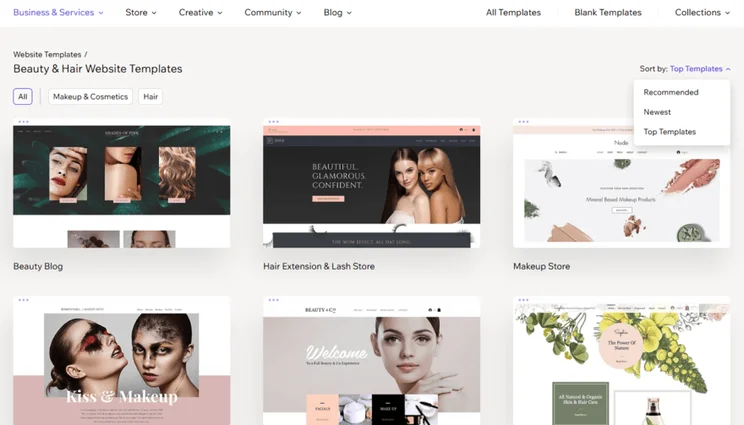
Wix lets you filter its template library for specific industries, making it easier to find a match. There are over 2,000 free templates to choose from, or you can select one of the 102 unique categories to find a specific theme.
I could also filter these categories to see the top options for each industry. The broader filters include categories such as “Health & Wellness,” “Professional CV,” and “Communities.”
You can preview templates before you start editing, and Wix provides a helpful description of recommended business types for each. I always recommend previewing and exploring your template fully before committing to it, so don’t skip out on this handy feature.
We tested the customization limits of five popular Wix templates, and while they all had varying designs, I could tweak every element if I wanted to, from the color scheme to the navigation bar.
2. Have You Researched Your Audience?
While it’s essential to consider your business needs when selecting a template, it must also cater to your audience who will be spending time on your website.
Do your research before selecting your website template. While you may personally love the green design of your website, your target audience might not. I recommend:
- Getting feedback from your existing customers about the user journey and your site’s navigation (if you don’t have a website yet, you can ask your target audience about the websites they use and what they like or dislike about them)
- Checking the accessibility of your chosen template – for example, is the text easy to read? Are the pages structured well already? Can you add alt text to the images?
- Assessing analytics and data to see if certain pages or designs trigger higher bounce rates
- Focusing on the desired action you want visitors to take, such as buying a product or signing up for a newsletter, and ensuring your template is equipped to direct users towards this
3. Is the Template Mobile Responsive?
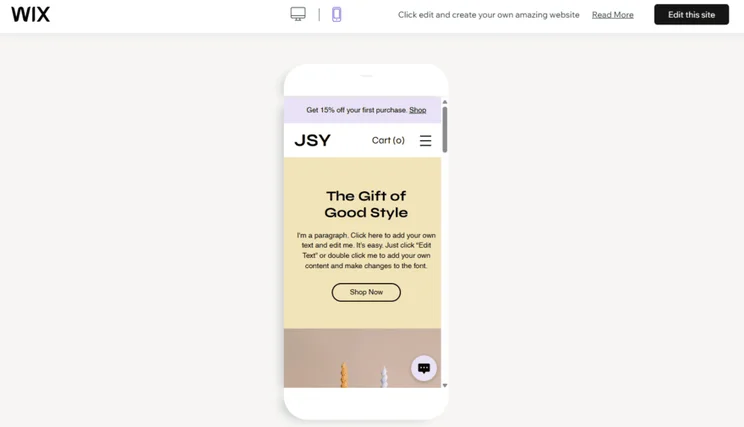
All of Wix’s 2,000+ templates are optimized for mobile, meaning your site’s design and content will be automatically adjusted for different device screens. You can toggle to test the mobile view when choosing a template initially, or when you’re in Wix’s editor.
According to Exploding Topics, over 64% of all website traffic in 2025 comes from phones, so your template must be able to adapt to these devices, or you risk missing out on engagement and sales.
Given its importance, most modern website builder templates are fully mobile-responsive by default, so it isn’t hard to find. However, if a template doesn’t support mobile optimization, avoid picking it for your website.
Wix’s templates adapt across devices
Wix’s 2,000+ templates automatically adjust depending on the visitor’s device, and you can preview each template for desktop and mobile users.
4. Are There Built-In SEO Optimizations?
A fast, clean, and well-coded template boosts your SEO rankings, whereas a messy or slow template negatively impacts Google visibility and user experience.
There are a few things to look out for if you want an SEO-friendly template:
✅ What to look for
- Well-structured pages – this makes it easier for search engines and visitors to navigate
- Headings to break up content (avoid walls of text!)
- Clean designs that aren’t bogged down with heavy code to help your website run smoothly and quickly
- Metadata and schema markup support
- Mobile optimization
❌ What to avoid
- Cluttered templates with lots of elements (this can add a lot of code to your site and slow things down)
- Unclear messaging – if your template design doesn’t match your business and brand identity, you’ll confuse search engines and visitors
5. Do You Need Specific Template Features?
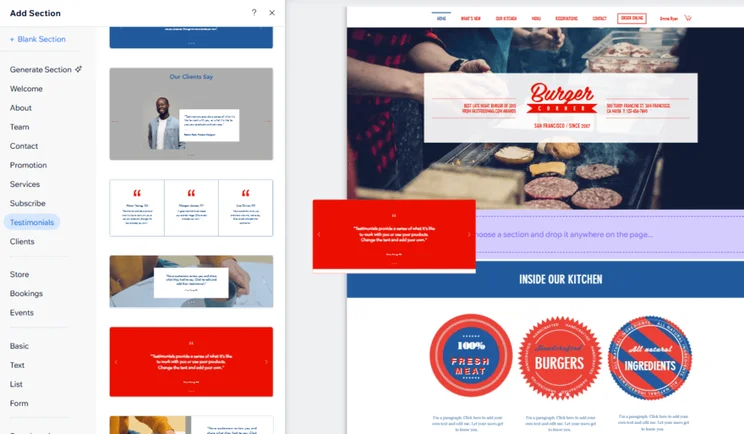
Depending on your target audience and the purpose of your website, you might be after specific features when choosing a template. A small business might want product pages and elements showcasing customer reviews – if you pick a template with these features already built in, you save yourself time from the start.
Thankfully, you can filter Wix’s template library to find a theme that caters to your specific industry – additional filters can then be applied to see the top options. These will have elements, sections, and functionality to support your goals, but everything can be customized in the editor.
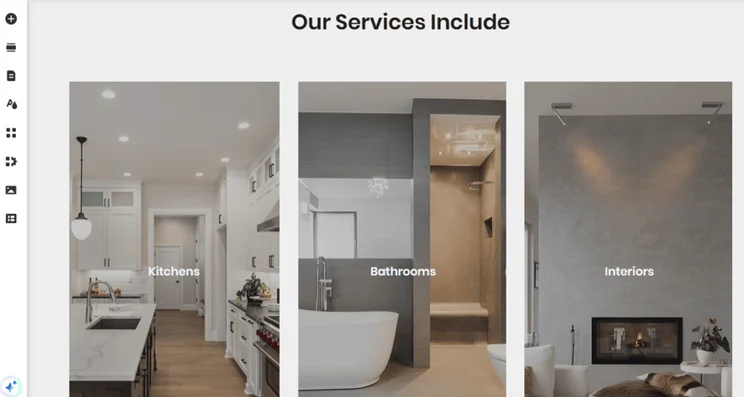
For example, Wix’s “Home Remodeling Company” template (a top template for the construction industry) includes call-to-action buttons, elements showcasing offered services, testimonials, trust seals, a contact form, and more.
Wix launched Wix Harmony in January 2026, an AI-powered tool that enables businesses to create a tailor-made site template and generate additional features as they go along.
Using natural language prompts, you can generate:
- Website pages
- Webpage sections
- Functional site elements like calendars, carts, and blog layouts
- Custom copy and images
6. Can You Customize the Template?
Your chosen template must be customizable, since it’ll enable you to design a website that best reflects your brand.
Look for low-effort, structurally compatible templates if you have limited time. But, if you’re not in a rush and you pick a builder with an easy-to-use editor, your chosen template doesn’t have to match your vision that closely, since you can customize it to suit your needs.
Key benefits of Wix’s template editor include:
- A drag-and-drop interface that gives you total creative control
- AI tools to generate text, images, and new sections
- No coding knowledge needed (but advanced customization is available)
- Template previews for desktop and mobile devices
- Automatically saved edits
One of Wix’s AI features, the AI Theme Assistant, offers personalized recommendations to help you customize elements like your template’s color scheme or font type. A tool like this helps you follow website design best practices and makes the whole process less daunting once you’ve chosen your website template.
With Wix, you can’t switch to a different template once your website is live. So, keep this in mind when choosing your site template at the start, and focus on the overall layout and structure to ensure they suit your business and audience. Don’t get caught up in the details – design tweaks can be made in Wix’s editor at any time.
7. Does the Template Fit Your Budget?
Some website builders offer a mix of free templates and premium options, with one-time price tags reaching up to $500. For those who aren’t looking to splurge on a template, all of Wix’s templates are free to use.
For small businesses and personal sites, Wix’s no-cost templates offer a great starting point, especially for those on a budget. It’s not always possible to hire a professional web designer or spend money on courses to learn how to code yourself.
By choosing a high-quality free template, you don’t have to break the bank to design your website.
When to Choose an AI-Generated Template
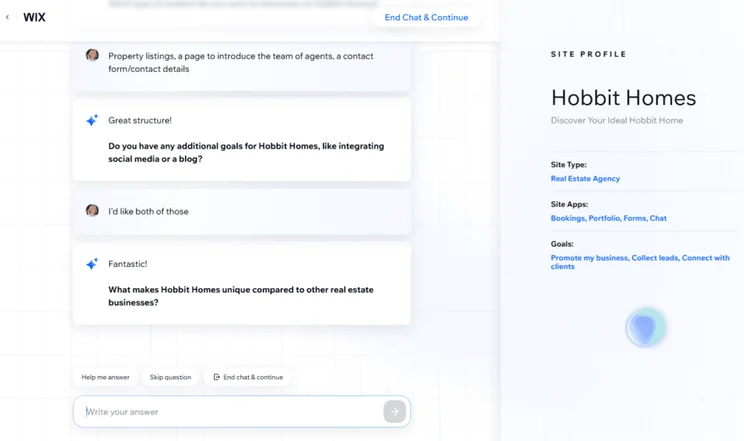
Use AI if you’re struggling to choose a template that suits your brand. Unlike pre-built site templates that have a generic, ‘cookie-cutter’ feel, AI-generated templates are unique, tailored to your preferences, and enable your business to stand out among the competition online.
For example, Wix’s AI website builder will ask a few questions about your website needs before generating a custom template for you. The whole process takes less than 10 minutes, and at the end, you’ll get a unique design that fits your specific business requirements.
You can see how easy it is to set up your website with AI in the following video:
Wix has the best AI website builder
Wix helps you design a custom template with its AI builder, based on your business and audience needs.
Next Steps for Choosing Your Website Template
Your website template sets the tone for your business, delivering a first impression for new visitors that needs to match your branding and vision. As discussed, choose the template that matches your needs the closest, and make any edits you need in the editor before publishing. Plus, you can continue to make tweaks to your website at any time, so it’s not now or never.
FAQs
Unlike free templates that have limited features, paid templates commonly offer more sophisticated designs, better customization options, and advanced functionality. That said, some website builders like Wix include high-quality templates with your subscription plan that are all responsive and professionally designed.
Yes, website builders like Wix automatically update its website templates so they’re aligned with modern SEO practices. However, you’re responsible for maintaining the quality of your content’s SEO, which includes keeping your content fresh, optimizing photos and videos, and updating page titles and meta descriptions.
To stop your website from looking generic, it’s important that your design is a reflection of your brand personality. When customizing your template, remember to:
- Add your own logos
- Use your brand’s colour palette
- Upload imagery or video content you’ve taken and edited yourself
- Make sure that your copy has a strong tone of voice


0 comments