


- Why Did I Choose Wix AI?
- Getting Started With Wix's AI Chatbot
- What Does Wix's AI Dashboard Include?
- Why Choose AI Over Wix's Templates?
- How To Customize Your AI-Generated Website Design
- Opening Wix's Editor
- How To Use Wix's AI Content Creation Tools
- How To Modify Colors and Fonts With Wix’s AI Theme Assistant
- Is Your Website Ready To Publish?
- Best Practices for Using Wix's AI Website Builder
- Should You Choose Wix's AI Website Builder?
Wix’s AI website builder can create a complete, customized website in under an hour using conversational prompts. The tool is free to use and generates both design and content automatically based on your business needs.
Based on this, Wix ranked number one in our 2025 AI website builder testing. I’ve tried out the AI builder for myself, using Wix’s free plan, to see just what it can do and how good it really is. I’ll walk you through the process below, step-by-step.

Create your site with Wix AI
Wix's AI builder is free to use, creating a customized dashboard and website to suit your needs and goals.
- Wix’s AI website builder generates a complete website in under 15 minutes
- Wix’s AI website builder is available from the free plan, but you’ll need to upgrade to remove ads
- The chatbot feels very natural and intuitive to use, but provide detailed prompts for the best results
- Wix’s AI tools can help you generate content, images, and suggest design changes
- Don’t publish your website without checking the AI-generated content
Why Did I Choose Wix AI?
Wix’s AI builder ranked number one in our 2025 testing, offering the most comprehensive AI tools, including automated content generation, design customization, and integrated business features.
I’ve tested a lot of website builders over the last few years, which means I’ve seen how Wix’s AI builder and tools have evolved over time, with three major AI tools, including Astro, launching this year alone. Not only could I use Wix’s AI builder for free, but its chatbot setup makes building a website incredibly easy.
- Prompt used: I want to build a video game review website
- Total time until I was happy to hit “Publish”: 1 hour
- AI tools used: AI chatbot, AI website builder, text creator, image creator, section creator, AI theme assistant
- Free to publish: Yes
- Would I recommend it?: Yes, the AI builder is great for beginners
See the Wix AI website builder in action in our video demo below:
Getting Started With Wix's AI Chatbot
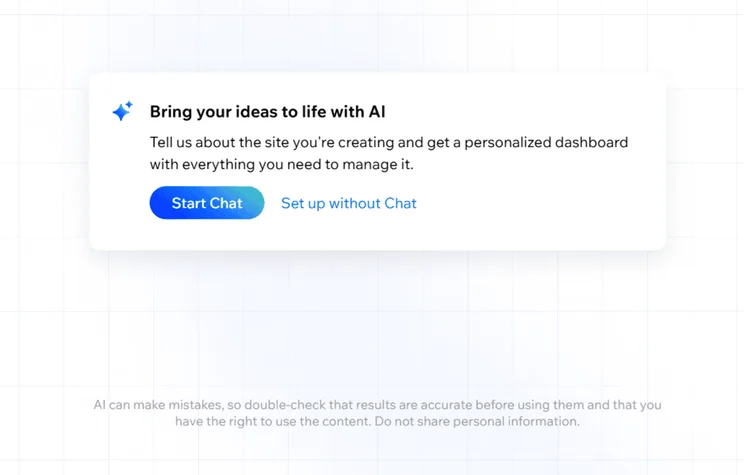
Wix’s AI chatbot asks four to five targeted questions about your site’s purpose, content type, goals, and unique selling points to create a personalized website template.
If you’re new to Wix, you’ll need to create an account – don’t worry, it’s free! Wix won’t ask for your credit card details when using its free website builder plan. Alternatively, you can choose one of Wix’s four premium plans. Wix’s pricing ranges from $17 to $159 per month (billed annually).
Wix Pricing: Breakdown
- Free ($0) – For trying Wix AI for free
- Light ($17) – For portfolios and personal sites
- Core ($29) – For small and growing online stores
- Business ($36) – For established businesses
- Business Elite ($159) – For large businesses with advanced needs
- Enterprise (Custom Plan) – For global brands and industry leaders
After signing up, I was presented with two options: building with Wix Studio (which caters to agencies and freelancers) or building with Wix Editor. For most users, I recommend clicking on “Create on Wix Editor.”
This takes you to Wix’s AI chatbot. You can choose to set up your site with or without the help of AI, but using the chatbot provides you with a personalized experience from the start. I said I wanted to create a site to share video game reviews, and the AI chatbot asked me the following questions:
- What’s the name of your video game review site?
- What type of content will you be featuring on GG Reviews?
- What are your additional goals for GG Reviews? (For example, do you want to build a community or monetize your content?)
- What would you say is your unique selling point for GG Reviews?
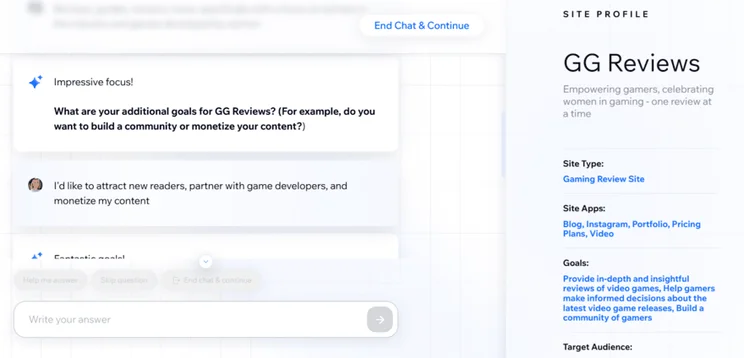
As you can see, the conversational chatbot is very reactive to your responses and information.
I’ve used Wix’s AI chatbot dozens of times now, and it’s always a unique experience, depending on the needs of your site or if you’re looking to build an online store. For example, during previous tests, I was asked if I had a specific audience or demographic in mind and what types of products I wanted to sell.
When answering the AI chatbot’s questions, be as detailed as possible. This helps Wix create a thorough site profile that is unique to you.
You can spend as long as you need at this stage, but it generally takes a few minutes to complete. During the conversation, the chatbot builds a personalized site profile to ensure your website has the apps and features you need. Once you’re ready, you can proceed to your custom dashboard.
Get a personalized experience
Wix's AI chatbot helps you set up your website and dashboard by making sure you have the relevant apps and tools at your fingertips.
What Does Wix's AI Dashboard Include?
After using the AI chatbot, I was directed to my personalized dashboard. Wix’s AI builder installs the apps you need, based on your responses, and generates relevant images and content. This makes the building process very quick and easy, since the bulk of the work is done for you.
My personalized dashboard for my gaming review site included a six-step setup process:
- Update your site type
- Connect a custom domain (optional; you’ll need to upgrade to a paid plan if you want this)
- Write your first blog post
- Design your website
- Get found on Google
- Discover Wix Enterprise
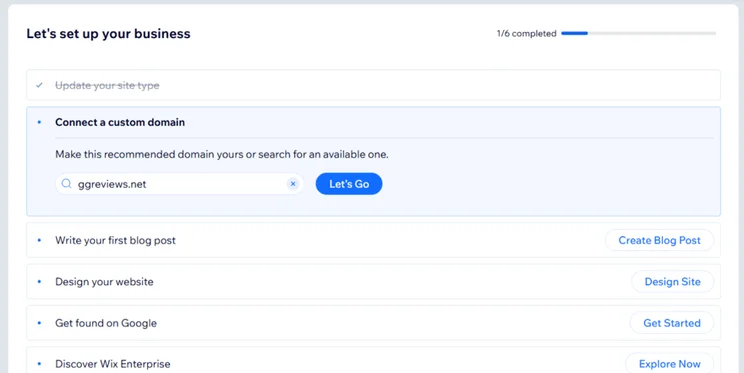
Completion of these tasks is tracked in your Wix dashboard. In addition to the onboarding checklist, Wix also personalized my sidebar navigation to include relevant features for my site, including a blog, video library, and pricing plans for memberships.
Why Choose AI Over Wix's Templates?
I clicked “Design Site” in my personalized dashboard to start tweaking my site’s appearance. While the AI chatbot helps customize your Wix experience, it doesn’t build a unique template for you until this stage.
Wix asks you how you’d like to design your website – with one of the free 2,000+ Wix templates or with the AI website builder. I chose AI to generate a design based on my custom site profile.
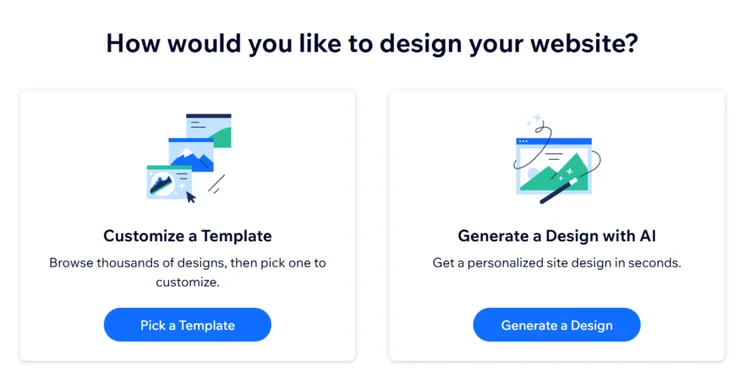
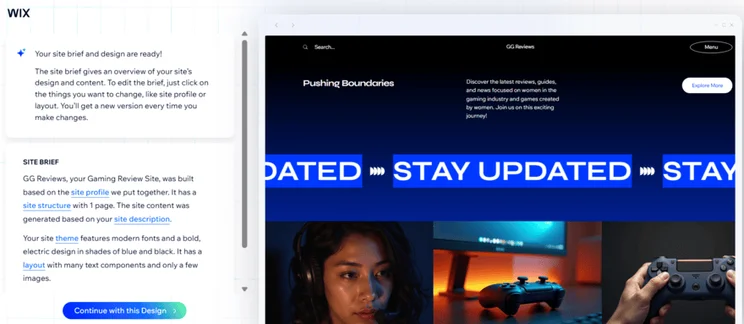
Information is pulled from the AI chatbot stage, helping the AI builder design and populate the site with relevant content and images. The initial brief Wix designed for me said:
“Your site theme features modern fonts and a bold, electric design in shades of blue and black. It has a layout with many text components and only a few images.”
As a starting point, I liked the look of it. It appeared modern and the images were very relevant for my video game review site, but I wanted to tweak it slightly.
How To Customize Your AI-Generated Website Design
You can modify five aspects of your AI-generated design: site profile, structure, description, theme, and layout. This can be done through conversational prompts, so you’re not stuck with the AI-generated template.
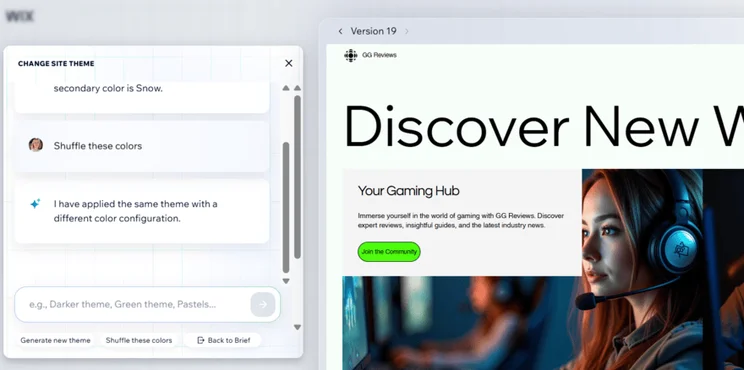
I clicked on “theme” and asked AI to lighten the site’s theme by using pastel colors instead. I didn’t really love the new design either, so I asked again for something different. For example, “Can you show me a neon pink theme?”. The AI builder updated colors, styles, designs, and images, just based on my requests. And, if I wasn’t sure what I wanted exactly, I could click “Generate new theme” to start from scratch or “Shuffle these colors” for a slight change.

Don’t be afraid to play around with your requests and try different things out. The builder is very conversational, like the initial chatbot experience, so it’s easy to go back and forth with new ideas. Once you’re happy, click “Continue with this Design” to lock it in and move on to the editor.
You can generate multiple designs when editing the site brief. Simply click through the versions at the top of the site preview to revert to something you like. However, be warned that Wix will only show you the previous five designs, so keep that in mind when making changes.
Opening Wix's Editor
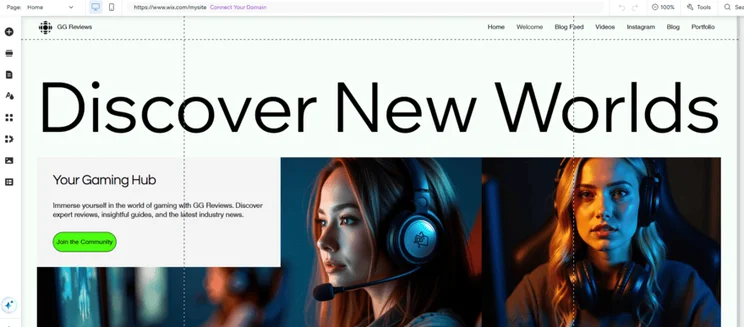
Given how much I could tweak my site’s AI-generated theme, I was pretty happy with what I ended up with. The design featured blog posts, video content, and social media links, ideal for my test gaming review site. Plus, Wix’s AI builder had reacted to my desire for softer colors, while still keeping it modern and edgy with the neon green.
Obviously, work is still needed, and it’s important to review what the AI builder has produced. Thankfully, I loaded into the editor very quickly once I confirmed the design.
How To Use Wix's AI Content Creation Tools
Wix provides three main AI content tools: a text creator for generating copy, an image creator for custom graphics, and an image editor for photo modifications.
Wix uses the popular drag-and-drop style for its editor, meaning you can move elements wherever you want on your site’s page. This makes Wix incredibly beginner-friendly, and I had no trouble editing my AI design once in the editor.
However, Wix does make it easier to tweak your site with its AI features:
- AI text creator – I could provide a prompt of what text I wanted or use AI to improve the existing text, such as by shortening the content or fixing the grammar
- AI image creator – Describe what you want to see, and Wix’s AI tool will create it in your chosen style (for example, I asked for “Video game controllers” in a “Fantasy” style)
- AI image editor – Use AI to edit your images, whether you want to add new objects to the photo, remove items, or improve the overall resolution
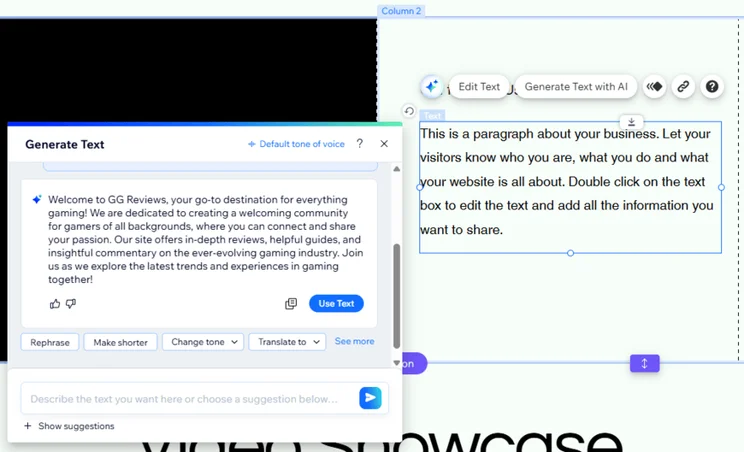
I asked Wix’s AI text creator to “Write a 4-sentence About section for GG Reviews, an excellent gaming review site. Mention providing a welcome community for all gamers and that the site provides reviews, guides, and commentary on the gaming industry.”
The AI-generated content covered my brief well, and I could tweak it with preset buttons, such as “Rephrase” or “Change tone”.
As a writer myself, I don’t think the generated result sounded as natural as a human creating the content, but it’s a really useful starting point if you’re not sure what to write.
How To Modify Colors and Fonts With Wix’s AI Theme Assistant
Wix introduced its AI theme assistant in September 2024, giving users more flexibility to change their site’s design. I found the feature by clicking the AI symbol in the editor’s sidebar – the icon looks like two blue sparkles. After clicking on the AI theme assistant, a collapsible sidebar appears to the right with three options:
- Change colors
- Suggest fonts
- Explore featured themes
I asked it to suggest new fonts for my site, to which it then asked me to describe the type of site I have. This felt a little unnecessary, given that the AI should be able to pull the information from my site profile – but the AI theme assistant is still in its testing phase.
The theme assistant opened up the settings for me to apply the font changes myself. However, the suggested font for my heading wasn’t available, and I’d love to see the theme assistant make these changes for you in the future.
Right now, the AI theme assistant feels more like a navigational tool, offering advice and recommendations about changing design elements yourself.
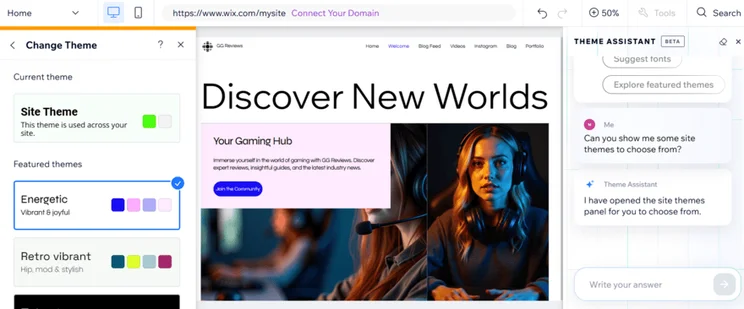
If you choose one of Wix’s professionally designed templates, you can’t swap it for another once your site has been published. With Wix’s AI theme assistant, you can tweak elements of your theme, such as font and color scheme, to give it a fresh look.
Is Your Website Ready To Publish?
At this point, I was ready to publish my test website. All in all, it probably took an hour to create my Wix site and design my pages.
I could continue to make final tweaks if I wanted to, with the help of additional Wix AI features, such as the AI section creator. And, if you’re setting up a store, you can use AI for ecommerce purposes, such as creating product descriptions.
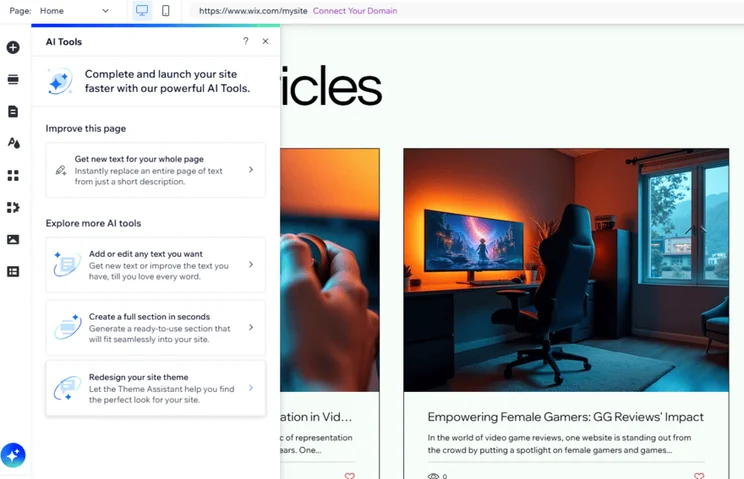
I could also easily drag new elements to these sections, such as social links, image galleries, and decorative art. So, while AI can manage the bulk of the design work, I recommend adding your own spin on things to make sure your site matches your vision.
I should point out here that at no stage during this process did Wix force me to sign up to a paid plan to continue. I was able to publish for free. I just can’t connect a custom domain, sell online, or remove ads from my site unless I choose to upgrade.➡️ You can view my test site by following this link. It’s a little rough around the edges, but it gives you a good idea of what the AI builder can produce!
Best Practices for Using Wix's AI Website Builder
If you’ve read this far, you should know how to use Wix’s AI website builder from start to finish. But here are a few top tips from me, based on my testing:
What Should You Do
✔️ Build your site with AI for a personalized experience
✔️ Use AI as a building block – let it populate your site with content and then make edits
✔️ Upgrade to a premium plan since Wix’s free plan includes ads and Wix branding in the domain name
What Should You Avoid
❌ Publishing without checking over AI-generated text or images for mistakes
❌ Relying on AI too often can dampen your site’s image and business reputation – AI could make your site appear less authentic
Should You Choose Wix's AI Website Builder?
Wix offers the most comprehensive AI toolkit, with six integrated features: chatbot setup, theme generation, text creation, image generation, section creation, and theme assistance.
Wix has been our top-performing website builder for ten years straight, and this is largely because the platform continues to evolve and improve its functionality.
So, should you use Wix’s AI builder and do I recommend it? Yes, Wix’s AI builder is ideal for beginners.
Learning how to use Wix’s AI builder will take no time at all, because of its intuitiveness and chatbot-style approach, and you can test it out for yourself using Wix’s free plan. Plus, Wix’s AI tools will continue to support you as you go on to design your pages, manage your business, and grow your site.
Start your Wix site for free
I've tested a lot of website builders and Wix's AI builder and tools are the best on the market, helping you start your site, edit text, and create new images.


0 comments