






Wix is the best ecommerce website builder for 2026, offering built-in tools to support with marketing, multichannel selling, and shipping products. We’ve analyzed 12 top ecommerce platforms across seven ecommerce-specific categories, and Wix excelled in multiple areas – most notably, its unbeatable site functionality for different industry types.
While Wix is our top choice, we’ll walk you through our recommendations one-by-one so you can see which ecommerce website builder suits your business the most.
- Best: Based on our testing, Wix is the best ecommerce website builder overall, offering quality tools to help businesses launch a brand from scratch
- Pricing: Ecommerce plans range from $3.99 to $299 per month (billed annually)
- Inventory: Shopify and Squarespace let you sell unlimited products across all plans
- Extra fees: Wix, Shopify, and GoDaddy charge transaction fees, whereas Squarespace (on select plans) and Hostinger charge 0% transaction fees
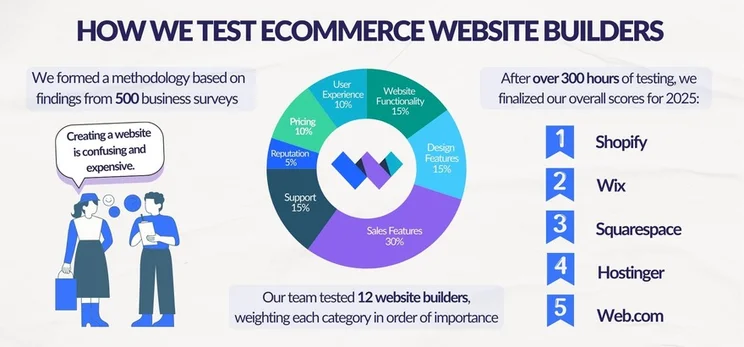
We combine independent analysis, data collection, and hands-on testing to determine the best ecommerce website builders. For this guide on our top five recommendations, we used seven key areas of investigation, weighted based on what matters the most to small businesses: sales features (30%), design features (15%), help and support (15%), website functionality (15%), pricing (10%), user experience (10%), and reputation (5%).
You can read more about our research process in the full methodology breakdown below.
How Do the Top Ecommerce Website Builders Compare?
To help you compare our top ecommerce website builders, see the table below to review them side-by-side:
|
Overall rating
|
Starting price
|
Transaction fees
|
Free custom domain
|
AI website builder
|
Payment gateways
|
Recommended for
|
||
|---|---|---|---|---|---|---|---|---|
 |
 |
 |
 |
 |
||||
|
Wix |
Shopify |
Squarespace |
Hostinger |
GoDaddy |
||||
|
4.8
|
4.8
|
4.7
|
4.2
|
4.0
|
||||
|
|
||||||||
|
2.9% + $0.30 |
2.9% + $0.30 |
0% – 2% |
0% |
2.7% + $0.30 |
||||
|
|
|
|
|
|
||||
|
|
|
|
|
|
||||
|
80+ |
100+ |
6 |
100+ |
3 |
||||
|
Businesses promoting their online presence |
Businesses who want to easily scale their store as they grow |
Creatives and service-based businesses |
Beginners and budget-conscious businesses |
Businesses using socials to drive traffic |
How Does the Pricing of the Best Ecommerce Platforms Compare?
Compare pricing of ecommerce plans for the builders on this list with the table below:
| Cheapest ecommerce plan (billed annually) | Renewal price | Free trial length | |
| Wix | $29/mo | Renews at the standard rate | Free plan / 14-day free trial |
| Shopify | $29/mo | Renews at the standard rate | 3 days |
| Squarespace | $19/mo | Renews at the standard rate | 14 days |
| Hostinger | $4.99/mo | Renews at $16.99/mo | 14 days |
| GoDaddy | $20.99/mo | Renews at $34.99/mo | Free plan |
- Hostinger has the cheapest ecommerce plan, at $4.99 per month when billed annually and $3.99 per month when paying for 48 months upfront.
- Wix and Shopify’s entry ecommerce plans are the same price, although Wix’s remain cheaper than Shopify’s as you upgrade.
Video Review of the Best Ecommerce Website Builders
Check out our video on the top ecommerce platforms for small businesses below:
1. Wix: For All-in-One Brand Building
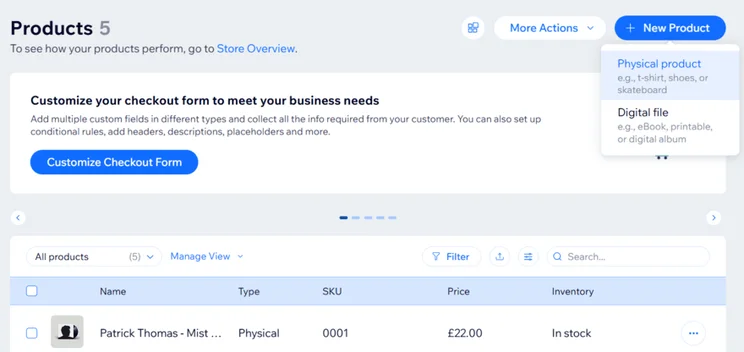
Wix is our overall winner because of its versatility for online stores. Wix is an all-in-one brand-building platform, best suited to small and medium businesses needing built-in marketing tools, free templates, and multichannel selling capabilities.
Wix’s key sales features are:
- Set up with Wix’s AI website builder or Wix Harmony
- Sell up to 50,000 products
- Built-in email marketing
- Multichannel selling
- Wix’s AI features, including an SEO Assistant, Theme Assistant (design support), and Adaptive Content (dynamic web experiences personalized to the user)
Wix launched Symphony by Wix in August, providing small businesses with a suite of specialized AI agents to support with goals and workflows. Symphony’s agents can execute tasks automatically, identify areas that need attention, and provide detailed updates.
For example, online stores can use these agents to calculate payroll, manage inventory, and generate social content.
How Much Does Wix Cost?
- Wix’s ecommerce pricing ranges from $29 to $159 per month (billed annually)
- Get 10% off your Wix plan with the code “TAKE10”
- 0% transaction fees and 2.9% +$0.30 processing fees (Wix Payments)
As you upgrade, Wix’s ecommerce plans are better value for money than Shopify’s, but Wix is not as cost-effective as other builders on this list, like Hostinger and Squarespace.
Wix has a beginner-friendly backend and a wide range of features to to support with setup, selling online, and marketing, which makes it the perfect brand-building ecommerce platform for small to medium businesses. Still, Wix’s 50,000 product limit and capped storage space make it less scalable than Shopify.

2. Shopify: Best for Scaling Your Store
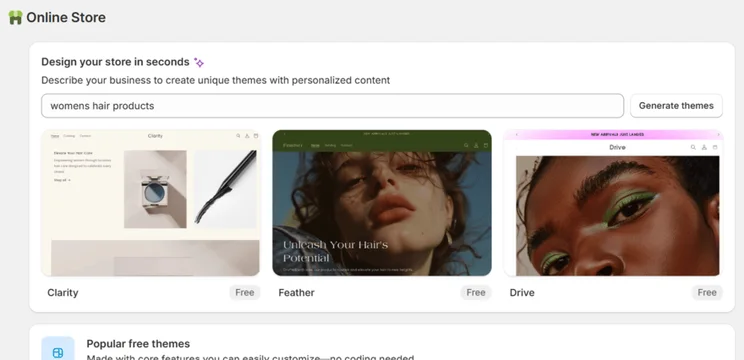
Shopify is our top choice for high-volume sellers, supporting growing businesses with its scalable plans and high-quality sales features, such as customizable checkout pages and agentic commerce support.
Shopify’s stand-out sales features include:
- Sell unlimited products
- 100+ payment processors and a native gateway, Shopify Payments, that eliminates transaction fees
- AI tools, including Shopify Magic (write product descriptions), Product Network (optimize sales), and Shopify Sidekick (AI assistant)
- Customizable checkout pages
- POS integration
- Agentic commerce dashboard to track sales across AI channels, such as ChatGPT
At the end of March, Shopify rolled out its agentic commerce features to help users sell their products directly in AI chatbot conversations, including ChatGPT, Gemini, Microsoft Copilot, and Google’s AI Mode:
- Agentic Storefronts: Manage all AI channels in one place with real-time inventory and pricing updates
- Agentic plan: Enables non-Shopify sellers to create a product catalogue and sell in AI chats for free
And, according to Shopify, AI-referred sessions to Shopify stores grew 197% since last year, with AI-referred shoppers converting 80% better than organic search shoppers.
How Much Does Shopify Cost?
- Shopify’s pricing ranges from $29 to $299 per month (billed annually)
- Three-day free trial
- First three months after the trial for just $1 per month
- No free plan
While Shopify is the most expensive option on this list, all of its plans let you sell unlimited products, whereas other builders, like Wix and Hostinger, have a set product limit.
- An online store subscription fee (from $29/mo on Shopify)
- A custom domain name ($10 to $20/year). Some platforms like Wix will include a year’s free custom domain upon signup
- Transaction fees (2.9% + $0.30 on Shopify’s Basic plan)
- Paid third-party apps
Shopify’s powerful sales features and innovative AI tools are market leading, and make the best choice for growing businesses with large inventories. Still, Shopify’s advanced tools come at a high cost (from $29/mo), so the platform isn’t suitable for casual sellers with small inventories.
3. Squarespace: For Selling Services
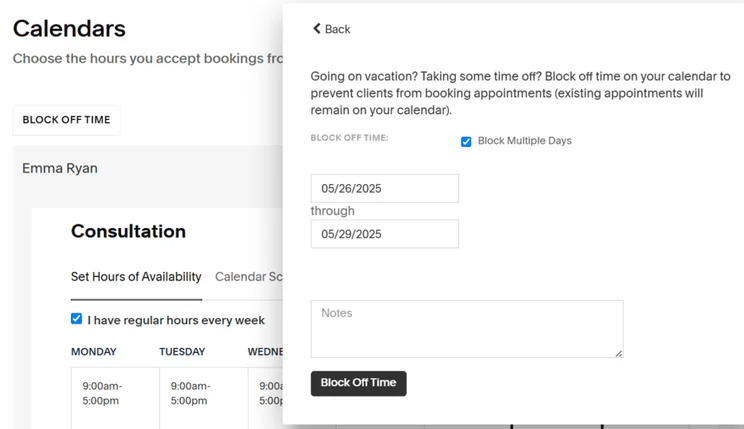
Squarespace is the best ecommerce builder for service-based businesses and creatives, offering advanced scheduling tools, aesthetic templates, and an easy-to-use interface.
Squarespace’s best sales features are:
- Blueprint AI Builder to set up in under 10 minutes through guided design and pre-made sections
- Built-in Acuity Scheduling tool to manage appointment bookings and availability
- Unlimited products and storage space on every Squarespace plan
- Drag-and-drop editor with high-quality prebuilt sections and elements for easy template customization
Squarespace added new tools in July to support businesses dropping limited product releases, such as one-of-a-kind products and exclusive bookings.
These new tools include a Reserved Cart functionality (with a countdown timer for urgency), inventory quantity limits, and low inventory badges on products.
How Much Does Squarespace Cost?
- Squarespace’s plans range from $19 to $99 per month (billed annually)
- Get 10% off all Squarespace plans with our code “WBE10”
Squarespace is great value for money since all of its plans support online selling, but I recommend upgrading to the Core plan ($29/mo) because it includes 0% transaction fees and the ability to offer discounts.
Every Squarespace plan has unlimited storage and product sales, giving you a lot of room to grow even from its cheapest $19-per-month option. Squarespace also has a market-leading Acuity Scheduling tool and an intuitive editor that’s suited to service-based businesses.
4. Hostinger: For Side Hustles
Hostinger is the most affordable ecommerce website builder for beginners and side hustles on this list (starting from $3.99/mo). It’s quick to get set up on Hostinger, although its basic sales features are limited, especially when compared to Shopify and Wix.
The standout sales features on Hostinger are:
- Sell up to 1,000 products on the Unlimited plan, or unlimited products on the Cloud Startup plan
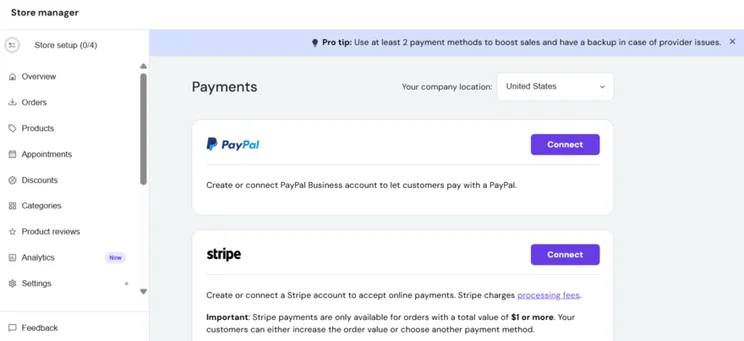
- 100+ payment methods, including popular options, such as Stripe, PayPal, and Apple Pay
- 0% transaction fees
- Suite of AI tools, including AI SEO support and product page generation
- Printful print on demand integration for hands-off order fulfilment and no dead stock
- Fastest site speed and loading times among the 12 major ecommerce builders tested
Hostinger announced its AI Website Builder in August, merging its previous website builder and vibe coding tool, Hostinger Horizons. The new builder gives businesses more scalability and AI support.
How Much Does Hostinger Cost?
- Hostinger’s ecommerce plans range from $3.99-$7.99 per month (48-month contract)
- 14-day free trial
- Save 10% with code “WBE” at checkout
Hostinger is the most affordable ecommerce builder in our analysis. Its two ecommerce plans provide a degree of scalability, along with AI business support.
Hostinger has an extremely beginner-friendly setup that provides the necessities for side hustlers on a budget to get a store up and running quickly. You can design things manually or rely on AI to help you get started, making Hostinger very accessible.
5. GoDaddy: For Social Media Promotion
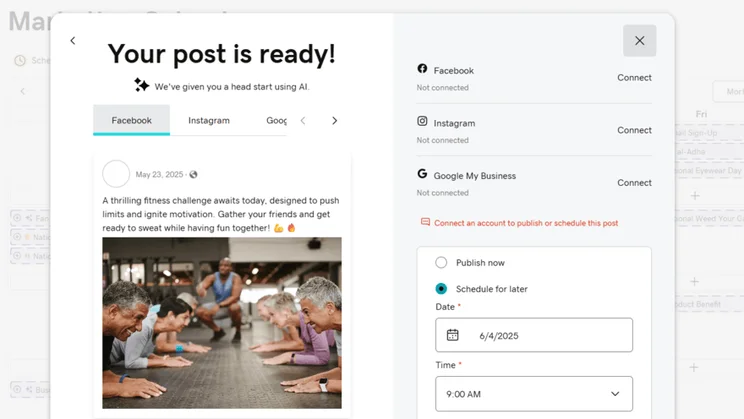
GoDaddy is the best ecommerce builder for businesses using social media to drive sales, offering an integrated social post generator and AI calendar to help you target customers effectively.
GoDaddy’s standout sales features include:
- Sell unlimited products
- AI social media post generator and calendar to help you grow an omnichannel presence that builds brand awareness
- Native bookings tool with multiple appointment options, calendar syncing, customer notification options, and ability to connect your events with social media platforms
- Simple editor designed for speed and simplicity, prioritizing setup time over advanced customization
- POS integration
This year, GoDaddy partnered with Cloudflare to help website owners and businesses gain visibility over how their content is crawled and used by AI. With this information to hand, SMBs can view and manage which AI crawlers have access to their site’s content.
How Much Does GoDaddy Cost?
- GoDaddy’s ecommerce plan costs $20.99 per month (billed annually)
The Commerce plan ($20.99/mo) is GoDaddy’s sole ecommerce plan, and it isn’t great value for money, since it lacks the functionality and customization of other competitors.
GoDaddy is a great option for beginners and businesses with a growing presence on social media. However, GoDaddy isn’t as powerful or as scalable as other ecommerce builders, such as Wix or Shopify due to its basic sales tools and fixed transaction fees. While I think you can find a better home for your business with another builder (for a slight increase in price), GoDaddy’s simplicity and affordability are ideal for more casual sellers.

How Do I Choose the Right Builder for Ecommerce Websites?
Choose an ecommerce builder based on three factors: business size, product volume, and required sales channels first.
I recommend considering the following factors when comparing ecommerce website builders:
- Business type – do you run a small, medium, or large business? Do you need a lot of inventory and storage space? What type of products do you need to sell?
- Budget – what are you willing to pay for your ecommerce website builder? Do you need room to grow and expand, and will prices increase dramatically as you upgrade? Are there additional costs to be aware of, such as apps or templates?
- Ease of use – do you feel comfortable building an online store? Is the backend dashboard intuitive and simple to navigate?
- Customer support – how easy is it to get in touch with customer service? All of our top-rated ecommerce builders offer live chat support, but phone support is only provided by Shopify, Wix, and GoDaddy.
- Selling options – do you want to sell via your website or across other channels, such as social media? Do you want to sell in-person? Are POS products available?
- The customer experience – what payment options are available? How can you enhance the sales funnel to deliver a positive experience? Are there features, such as email marketing, to help you engage with your target audience?
It can be easy to get overwhelmed when searching for an ecommerce website builder – there are so many features and pricing tiers to take in! Everyone will need different features, so create a must-have shortlist of tools you need to make filtering down your options easier. And look for platforms that give you the option to waive transaction fees – this will help you save on costs as your store grows. Finally, it sounds obvious, but always try a builder before paying for a plan; it’s the only way to know if you’ll be able to easily run your store day-to-day with that platform!

How Do We Test and Rank Ecommerce Platforms?
To bring you accurate and data-backed results, I test each builder thoroughly firsthand and pull from the 300+ hours of data collected by our in-house research team on 12 major ecommerce website builders.
Our research process encompasses 283 areas of investigation in total, divided between seven core categories. Each category is given a unique weighting to reflect what matters the most to online businesses looking to build a website:
- Sales Features (30%): We look at the ecommerce capabilities of a builder, from payment options to transaction fees.
- Design Features (15%): We review how many templates and design options cater to online stores.
- Help and Support (15%): We test the available support channels and resources for businesses provided by the ecommerce website builder.
- Website Functionality (15%): We look at the quality and quantity of a website builder’s functionality, such as blogging tools, AI, and SEO.
- Pricing (10%): We examine what you can get for your money with each available pricing plan, as well as checking whether there’s a free trial or free plan.
- User Experience (10%): We test every ecommerce website builder ourselves to assess their usability and accessibility.
- Reputation (5%): We look at how each ecommerce website builder performs against its competitors and within the wider market.
Final Verdict: Which Builder Is Right for Your Store?
Our winning ecommerce website builder for 2026 is Wix because of its built-in functionality, 24/7 AI-powered business assistant, and design options for online stores.
That said, the ecommerce website builder you choose will depend on the needs of your business. Is your business growing quickly? Look at Shopify. Need something budget-friendly? Consider Hostinger. Want to sell services? Squarespace would be my recommendation for you. Once you’ve chosen your builder, it’s time to build your online store. You can read our expert guides on how to sell online and how to accept payments to help you get started.


1 reply
1 reply
1 reply
1 reply
1 reply
1 reply
1 reply
1 reply