



- Quick Comparison: Which Is Best?
- Is Hostinger Cheaper Than Squarespace?
- Which Builder Is Easier To Use?
- Can You Sell Products With Hostinger or Squarespace?
- Does Squarespace Have Better Website Features?
- Do Squarespace and Hostinger Come With AI Tools?
- Which Builder Has the Best Customer Support?
- How We Test Website Builders
- Hostinger vs Squarespace: See Our Winner
After 300 hours of testing and research, Hostinger and Squarespace sit comfortably in our top three website builders for the year. But, if we compare the builders head-to-head, which comes out on top? Squarespace is the better option overall, offering stylish designs, a beginner-friendly editor, and scalability for online stores.
- Hostinger’s plans are cheaper, starting at just $2.99
- Both builders have an AI website builder
- Squarespace has the best designs and templates
- Both builders provide user-friendly drag-and-drop editors
- You can sell products with any Squarespace plan
- Hostinger and Squarespace offer 24/7 support
Quick Comparison: Which Is Best?
In a rush? Take a look at our side-by-side table to learn the key differences between Hostinger and Squarespace:
|
Overall rating
|
Today's best price
|
Free plan or free trial
|
AI website builder
|
Recommended for
|
||
|---|---|---|---|---|---|---|
|
Best for Beginners
 |
Best Budget Builder
 |
|||||
|
Squarespace |
Hostinger |
|||||
|
4.5
|
4.2
|
|||||
|
|
||||||
|
14-day free trial |
14-day free trial |
|||||
|
|
|
|||||
|
Creatives, portfolios and service-based businesses |
Freelancers and budget-conscious users |
Is Hostinger Cheaper Than Squarespace?
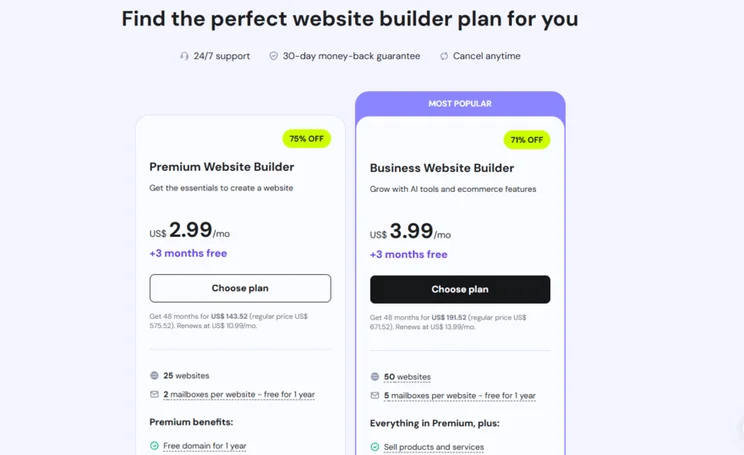
If you’re looking for the most cost-effective builder, Hostinger beats Squarespace when it comes to price. In fact, Hostinger is one of the cheapest website builders out there, with both of its plans costing just a few dollars per month.
How Much Does Hostinger Cost?
- Hostinger’s pricing ranges from $2.99 to $3.99 per month (for a 48-month term)
- There are two premium plans to choose between
- You’ll need the Business Website Builder plan to sell online
- Hostinger has a seven-day free trial to test out the platform
How Much Does Squarespace Cost?
- Squarespace’s pricing ranges from $19 to $99 per month (billed annually)
- There are four premium plans to choose between
- You can sell products and services with any Squarespace plan
- Test out the builder yourself with its 14-day free trial
- Get 10% off your plan with our code “WBE10”

Hostinger's plans are very cheap
Both Hostinger and Squarespace are pretty affordable, but Hostinger’s plans are incredibly cheap and budget-friendly. While there’s less flexibility and scalability with Hostinger’s two plans, they’re a great option for personal sites and small businesses looking to get online without breaking the bank.
Which Builder Is Easier To Use?
Squarespace is the easiest website builder I’ve tested, thanks to its drag-and-drop editor, stylish designs, and AI support when getting set up. However, it’s a close call between the two builders, with both providing impressive tools and editors for beginners.
Setting Up Your Site
Hostinger and Squarespace guide new users towards their AI website builders to help speed up the onboarding process. Hostinger uses a traditional AI prompt format, where you can describe your website or business in a few sentences and get a personalized template generated for you.
With Squarespace, I could use Blueprint AI, its AI-powered guided design process. This five-step journey gives you more control over how your site looks before you get into the editor. For example, I was asked to choose what pages to include, as well as pick a font type and color scheme to match my brand.
From my testing, Hostinger’s AI builder is quicker in general, but the time you spend with Squarespace’s Blueprint AI is really up to you. You can take half an hour looking through different design options or fonts if you want to, or click through the process in less than a minute. Alternatively, I could skip the AI builder altogether and choose one of Squarespace’s stunning templates.
With either platform, their AI builders are great for anyone short on time or unfamiliar with building a website. However you feel about AI, there’s no doubt that it makes getting online incredibly accessible and easy.

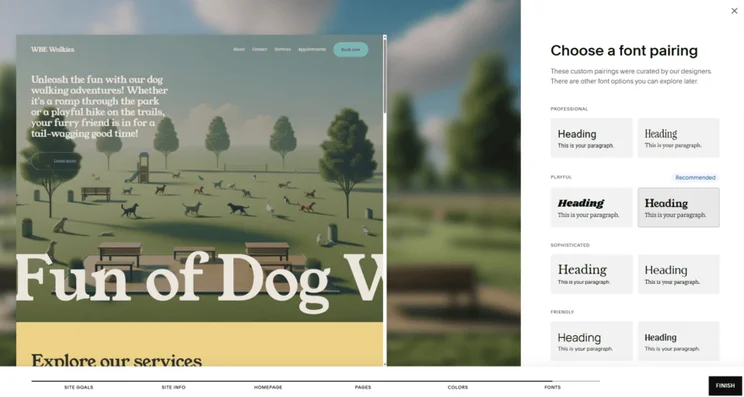
Both builders offer templates in addition to their AI website builders. Of the two, Squarespace’s templates are high-quality and unmatched, beating every other builder we tested in 2025 when it comes to design. You can choose from over 180 templates, covering a wide range of industries.
Using the Editor
Both builders have drag-and-drop editors – the most user-friendly way to build a website from scratch. Hostinger lets you drag items anywhere, whereas Squarespace has a grid framework in place to help you snap elements and sections together.
Hostinger is a better choice if you want total creative control, but I’d recommend using Squarespace if you’re a beginner. From my time with Squarespace, the editor is so intuitive and easy-to-understand, and you can take your pick from a library of stylish design elements. Just remember to save your work manually, since Squarespace doesn’t have an autosave feature.

Squarespace is best for beginners
It’s a pretty even fight, but Squarespace’s Blueprint AI and drag-and-drop editor are better for beginners than Hostinger. Personally, I find Squarespace’s builder more enjoyable to use and the editor feels very supportive with its grid overlay. Plus, the variety of trendy and modern designs makes it easy to pull together a professional-looking website with no experience.
Can You Sell Products With Hostinger or Squarespace?
We’ve tested the top ecommerce website builders for the year, with both Squarespace and Hostinger making our list of the top five. But, if we put them head-to-head, I’d recommend Squarespace for your online store.
Squarespace lets you sell products with any of its plans, giving you room to grow and expand your business. In comparison, Hostinger has a single ecommerce plan, so there’s limited scalability.
🛒 Selling With Squarespace
Here are some of the key Squarespace ecommerce features you can expect:
- Sell unlimited products on all plans
- Unlimited storage space
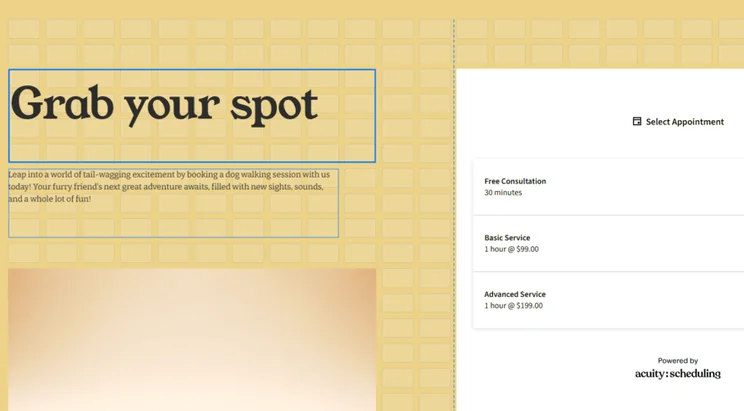
- Acuity Scheduling (to take bookings)
- Squarespace Payments (to centralize your finances and reduce processing fees)
- Abandoned cart recovery
- Shipping labels
- POS integration
- Create gift cards and discounts
- Set up product status labels
- Connect with socials, marketplaces, and Google Shopping
You can see a full breakdown of Squarespace’s ecommerce features in our video:
🛒 Selling With Hostinger
Hostinger’s ecommerce features aren’t as expansive as Squarespace’s:
- Sell up to 1,000 products
- Schedule and sell services online
- Unlimited storage
- 100+ payment methods
- Create gift cards and discounts
- Customize shipping options
- Product reviews
- Add suggested products
With Squarespace, the cheapest Basic plan has a transaction fee of 2%. This reduces to 0% once you upgrade to the Core, Plus, or Advanced plan. And, if you use Squarespace Payments, credit card rates start at 2.9% + $0.30 but reduce to 2.5% + $0.30, depending on your plan.Hostinger doesn’t charge any transaction fees, giving it a slight edge on Squarespace and keeping costs low. However, your chosen payment gateway could charge you per transaction.
Squarespace is better for online stores
Squarespace offers a great range of sales features and the scalability to support both new and growing online stores. And, its Acuity Scheduling tool is ideal for service-based businesses looking to manage and take bookings online.
Does Squarespace Have Better Website Features?
I wouldn’t say either builder excels when it comes to website features, but Hostinger and Squarespace provide you with the basics. If you’re looking for the best suite of built-in tools, Wix is actually your best bet, but Squarespace outperforms Hostinger in our testing.
➡️ See how the three compare in our Hostinger vs Wix vs Squarespace review!
You can expect the following features from Hostinger and Squarespace:
- A free custom domain for the first year
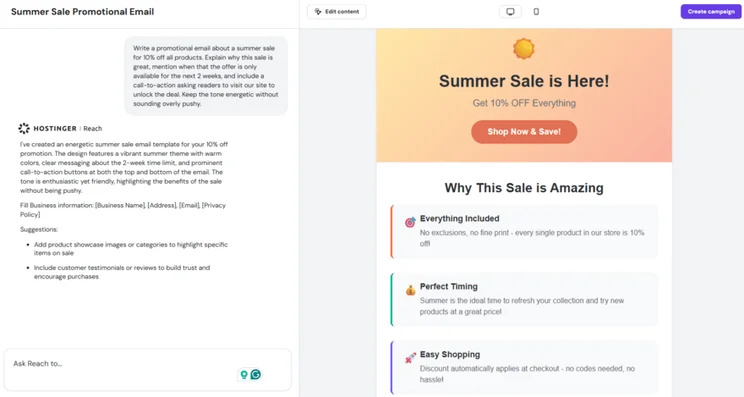
- Email marketing
- SEO tools
- Social media integration
- Blogging capabilities
- Analytics to monitor performance
- Free SSL certificates
- Your Squarespace Email Campaigns and Acuity Scheduling subscriptions can now be linked to help you engage with recent customers and personalize emails
- As of June 2025, Hostinger has launched its AI-powered email marketing tool, Hostinger Reach (previously, Hostinger lacked any email marketing support, so this is a great addition to the builder)
What Could Be Improved?
Squarespace and Hostinger both fall short when it comes to adding extra functionality to your site. Hostinger doesn’t have an app market with third-party integrations, so the built-in features are all that you get.
Squarespace does have an app library, named Squarespace Extensions, but it doesn’t match the scale of the app markets you get with other major builders, including Wix or Shopify. Squarespace Extensions provides access to over 40 integrations, which isn’t many, but you can connect with popular platforms, such as ShipStation, QuickBooks, Mailchimp, and Printify.
Squarespace offers more functionality
A large portion of Hostinger’s built-in functionality is only available if you upgrade to the Business Website Builder plan, whereas Squarespace’s best tools are available from its cheapest plan. Squarespace also gives users and merchants the ability to add third-party software to their site.
Do Squarespace and Hostinger Come With AI Tools?
Hostinger and Squarespace both sit in our list of the best AI website builders for 2026, offering beginner-friendly AI tools to help you design your site from scratch. However, when it comes to creating content with AI, Hostinger takes the lead.
Hostinger’s AI Tools 🔍
- AI website builder
- AI image generator
- AI writer
- AI blog generator
- AI SEO tools
- AI logo maker
- AI product generator
- AI assistant, Kodee
- Hostinger Horizons
- Hostinger Reach (email marketing)
Squarespace’s AI Tools 🔍
- AI website builder (Blueprint AI)
- Text generation
- AI blog posts
- Brand identity support
- AI SEO site descriptions
- AI video descriptions
- AI course descriptions
- AI proposals
- Business name generator
- Domain name generator
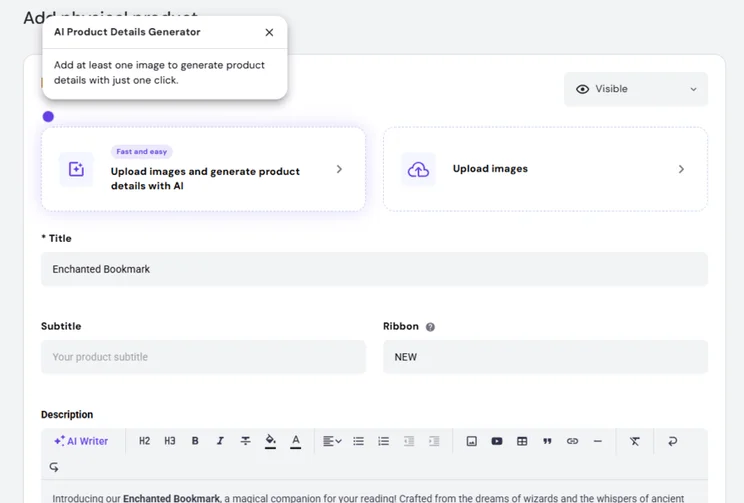
Hostinger has a growing suite of AI tools
While Squarespace’s AI website builder is arguably better than Hostinger’s brief form, Hostinger’s AI tools are some of the best we’ve tested. The platform prioritizes AI support for its users above most other areas, and Hostinger has introduced multiple new features, such as Horizons and Reach, in this year alone.
Which Builder Has the Best Customer Support?
Based on our most recent 2025 testing, Squarespace’s customer service is better than Hostinger’s. What helps give Squarespace the edge is its 24/7 email support, community forum, and the option to hire experts for help on topics such as SEO, scheduling, and online store setup.
You can expect the following support channels and resources from both builders:
- Live chat
- Social media (Instagram, YouTube, LinkedIn, Facebook, X)
- Help Center
Unfortunately, Hostinger and Squarespace lack phone support, so you’ll have to communicate with the customer service teams via messages only.
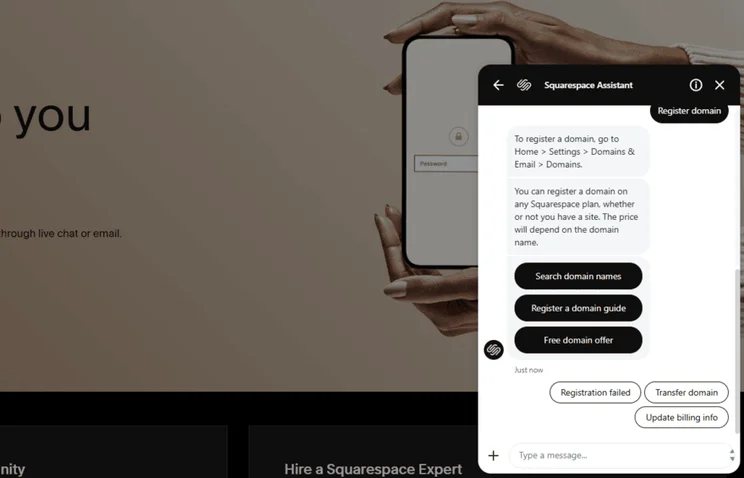
Squarespace offers expert support
Both builders provide responsive, 24/7 customer service, but Squarespace goes the extra mile by providing hands-on support from experts across a variety of topics. This is something that all of our top five website builders offer, apart from Hostinger.
How We Test Website Builders
I’ve spent over three years building websites and reviewing platforms, like Hostinger and Squarespace. As a team, we’ve carried out 300+ hours of analysis and hands-on testing to deliver accurate recommendations.
Our research process looks at key areas, such as pricing and website features. You can learn more about how we test website builders below:
When testing website builders, our focus is on six core areas of investigation:
- Website Functionality: 30%
- Design Features: 25%
- Pricing: 15%
- User Experience: 15%
- Help and Support: 10%
- Reputation: 5%
Each category has a unique weighting, depending on its importance to individuals and businesses looking to get online. We can then award a builder its overall rating, based on its scores across our research categories.
Hostinger vs Squarespace: See Our Winner
Hostinger and Squarespace are great choices for anyone looking to get online, but the right builder for you will depend on your site and business needs.
Based on our testing, Squarespace is the better choice overall, offering a user-friendly editor, modern templates, and great booking tools, whereas Hostinger shines with its affordable plans and AI tools.
No matter which builder you pick, I recommend checking out the free trials on offer to test out the features and editors for yourself.


0 comments