
- What is SmugMug?
- Pros and Cons of SmugMug
- Who is SmugMug Best For?
- How Easy is SmugMug to Use?
- How Does SmugMug Compare With Others?
- Can You Import From Flickr and Dropbox into Your SmugMug Site?
- SmugMug’s Tools and Features
- How Good are SmugMug’s Templates?
- What SmugMug Pricing Plan Should You Choose?
- How Good is SmugMug’s Help and Support?
- SmugMug Review: Summary
SmugMug is a niche website builder that specializes in photography websites and portfolios. With built-in features, such as unlimited photo storage, partnership with printing services, and ecommerce functionality, SmugMug is ideal for photographers looking to promote or sell their work online.
However, targeting a niche market does limit SmugMug’s audience and capabilities, which we discovered when testing the builder. But is it the right fit for you? We’ll review SmugMug’s ease of use, features, pricing, support, and more, to help you find out.
What is SmugMug?
While most website builders cater to a wide range of industries, online stores, blogs, and portfolios, SmugMug provides a comprehensive solution for photographers.
If you’re looking to create an online base for your photography, SmugMug has you covered, offering unlimited storage; integration with editing software; printing help; and security, so no one can take your images without permission.
We found that its website templates and editing options can be underwhelming – with only 26 template options to choose from. However, if you’re simply looking to showcase your art or sell your photography online, SmugMug does the job.
That being said, if you’re looking for the best photography website builders, we’d recommend Squarespace or Wix, since they’re great well-rounded options that also offer impressive features for photography sites, such as image-focused templates, with more scalable plans so you can guarantee you have all of the power, storage, and features you need as your website grows.
Pros and Cons of SmugMug
Pros
✔️ Image-focused templates built with photographers in mind
✔️ Built-in features and ecommerce tools, such as unlimited storage, to help you promote and sell your photography online
Cons
❌ Fewer templates than rival website builders – only 26 to choose from
❌ Customization tools are limited in comparison to others, like Wix, and the section-based editor restricts your creative control
❌ There’s no free plan and you’ll lose access to your account if you end your subscription early – and you won’t get a refund!
Who is SmugMug Best For?
SmugMug is a good choice of website builder for anyone who wants to showcase or even sell their visual work online. While the platform primarily targets photographers, it would be suitable for artists and designers as well.
SmugMug only offers portfolio templates with photography in mind, whereas market-leading website builders, such as Wix, provide hundreds of themes for a wide range of industries. SmugMug’s layouts vary, but they all use optimal settings to ensure that your images load quickly and are displayed beautifully.
It’s quick and easy to get started – whether you’re a professional photographer or want to share a gallery of photos with your family and friends. All you need to do is upload your images!
However, SmugMug doesn’t have a free plan, so we’d only recommend committing to the website builder if you’re fairly serious about your photography.
How Popular is SmugMug?
SmugMug is a private company, so it doesn’t make its numbers public. Still, its website makes a mention of “millions of customers”, so we can get a rough estimate.
Here’s how SmugMug’s daily stats compare with other photo hosting sites, according to data-gathering site HypeStat:
- Flickr: 1.7m daily unique visitors/20m daily page views
- SmugMug: 244k visitors/7.6m views
- IM Creator: 297k visitors/870k views
- 500px: 149k visitors/1.4m views
- Zenfolio: 61k visitors/300k views
Of course, it’s not a totally fair comparison since SmugMug is a portfolio website builder, whereas Flickr, is a community photo feed. You don’t have to choose one over the other – you can use both!
How Easy is SmugMug to Use?
When testing SmugMug, the signup process was relatively easy and swift, guiding us through a four-step process:
- Add your photos to SmugMug
- Personalize your site and gallery
- Control your photo security
- Get started with selling
First, SmugMug asked us to create our gallery – with the option to upload a profile and cover photo, as well as connect social media links so visitors can connect with you and your work across a variety of channels.
If you’re in a hurry and just want to get your work online, that’s really all you need to do! Unlike our best photography website builder, Squarespace, SmugMug has a default template that you can use to create a gallery almost instantly.
To tweak SmugMug’s “Classic” template or one of its other template choices, simply click “Customize Design” to start editing.
Now, the default template isn’t perfect. You won’t have total control over your site’s design – instead, you have to conform to SmugMug’s outdated-looking layout.
We even had trouble adding a simple profile or cover image that fit SmugMug’s requirements (which aren’t mentioned when uploading), so it might take some trial and error before you get things right.
To find what worked, we went to SmugMug’s Help Center and found that photos up to 500 mebibytes and four gigapixels would be accepted. For RAW files, the limit is 3GB per photo.
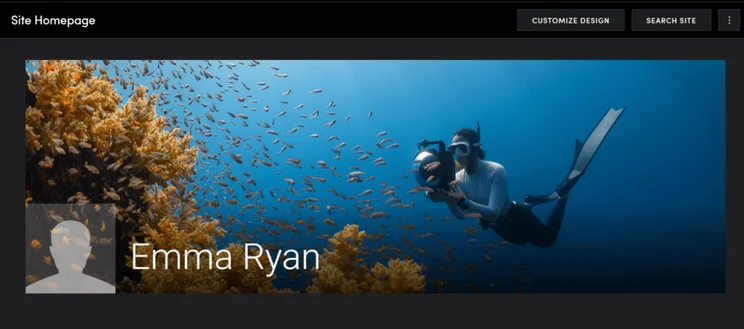
SmugMug uses “content blocks” to pad out your website, which you can drag onto your page to sit above or below an existing element. You can’t resize these blocks or reposition features within them – a far cry from the flexibility of Wix’s drag-and-drop editor or Squarespace’s high level of customization.
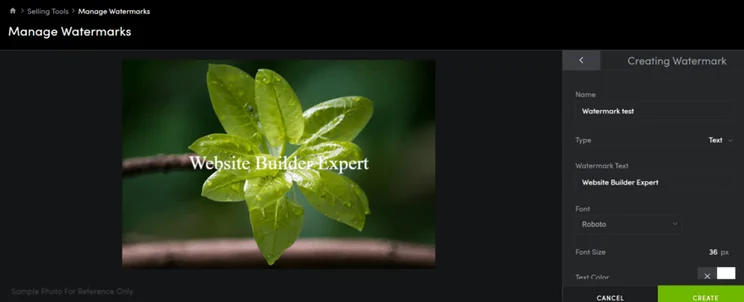
Once you’re happy with how your site looks, SmugMug encourages users to explore its security options – an important step to keep your work safe online. We could tweak these settings within each gallery, though we had trouble with the user interface where the pop-up settings would overflow beyond our screen’s view.
That said, the watermark creation tool was pretty neat and unique. It gave us lots of control over the formatting and we managed to add a watermark to an image in less than a minute.
The four-step onboarding process ends with setting your site up for selling. This is obviously only necessary if you want to make money from your photographs, but SmugMug guides you through reviewing products, offering downloads, and how to create an event.
After playing around with SmugMug’s editor and settings, we can confidently say it’s not the best builder if you’re looking for a stylish website. It’s better suited for photography portfolios and simple online galleries.
How Does SmugMug Compare With Others?
SmugMug caters to a particular market with its photography-focused website builder. If you want something specific and simple when it comes to features for your photography portfolio, SmugMug could be a good fit.
That said, its pricing puts it on par with leading builders, such as Squarespace and Wix, which both offer more well-rounded features and customization options. If you’re looking to scale your photography business, you could easily feel quite limited by SmugMug’s poor design options and lack of third-party apps.
Can You Import From Flickr and Dropbox into Your SmugMug Site?
If you already store and display your photos on the web, then SmugMug’s online import option can save you a lot of time and hassle.
This is just one of the several ways you can add photos to your SmugMug account. By letting you import directly from your online photo-hosting services, it bypasses the need to sort through photos on your computer first – or even store photos on your computer at all.
SmugMug currently supports the following photo-hosting services:
- Dropbox
- Adobe Lightroom
- Google Photos
- Flickr
- Amazon Drive
With one click, you link your SmugMug account with your existing photo-hosting account. After this, simply select the photos you want to import, and wait a minute or two while they’re copied into SmugMug. It’s secure, efficient, and easy.
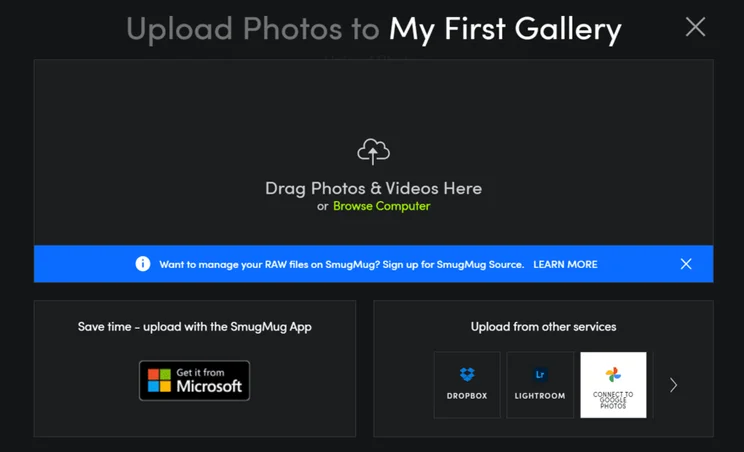
Once your images have been uploaded to your account, you can use SmugMug’s built-in file manager to organize them into galleries or folders, and even make basic edits to the images.
In addition to importing photos from existing services, you can also upload directly from your browser, mobile, tablet, or through SmugMug’s app. By offering so many innovative options to suit a range of customer needs and preferences, SmugMug shows it’s keeping up with the way photographers manage and store their photos.
How to Use SmugMug’s Adobe Lightroom Plugin
If you’re already using the popular Adobe Lightroom software, SmugMug’s free Adobe Lightroom plugin is ideal.
This added functionality to your SmugMug website lets you create and manage your SmugMug galleries within Lightroom itself – even while you’re offline. For example, you can compile and publish a gallery of wedding images before your clients have even left the venue!
While SmugMug’s capabilities are pretty beginner-friendly and simplistic, this Adobe Lightroom partnership really caters to professionals.
What type of website do you want to create?
Find Your BuilderSmugMug’s Tools and Features
SmugMug’s website features are pretty limited in nature, but they do focus on providing photographers with the tools needed to start sharing and selling their work online.
With no free plan, SmugMug’s Power plan is the cheapest option ($16 per month) and it includes the following features:
- Unlimited photo and video storage from the get-go
- Privacy controls to help you avoid theft of your photos online, such as custom display sizes and private galleries
- Integration with Adobe Lightroom to help you upload photos with ease and edit using the software you’re familiar with
- A custom domain to help your website appear professional to visitors, and allow clients to find you easily
You’ll need to upgrade to one of the higher plans – Portfolio or Pro – to unlock ecommerce capabilities, such as print lab integrations, custom photo packages, and sales statistics. You’ll also be able to add custom watermarks to your work and disable photo downloads, encouraging visitors to purchase the full-size, high-quality version of your image instead.
But that’s kind of it – SmugMug doesn’t have an app store for additional third-party integrations, and if you’re looking to do anything outside of promoting or selling photos online, SmugMug could feel restrictive pretty quickly.
How Good are SmugMug’s Templates?
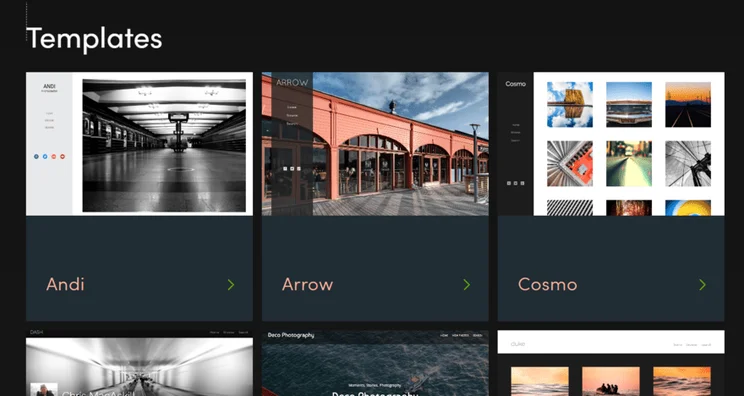
SmugMug currently offers 26 portfolio templates. While it is a specialist website builder, SmugMug’s theme choice is still weak when compared with Wix, which has a library of over 800 Wix templates to choose from.
We previously stated that SmugMug’s template choice and customization options would vary depending on your premium plan – this is no longer the case. All 26 templates and customization tools are available on every plan.
Unlike Wix, you can change your site’s template at any point! SmugMug even lets you save custom designs separately so you can swap them out with ease. This is especially useful if you want your site to look different for holidays or events.
SmugMug Template Customization
As we’ve already seen, SmugMug’s templates look decent but they’re pretty inflexible. You can change your site’s color palette, font choice, background, and general layout within the editor. This is what you’d expect from any website builder, so we wouldn’t say SmugMug’s editor stands out in particular.
You can move the blocks up or down on the page, but you can’t drag their edges or reposition your photos inside them.
If you want total control, you can build your website from scratch using HTML or CSS.
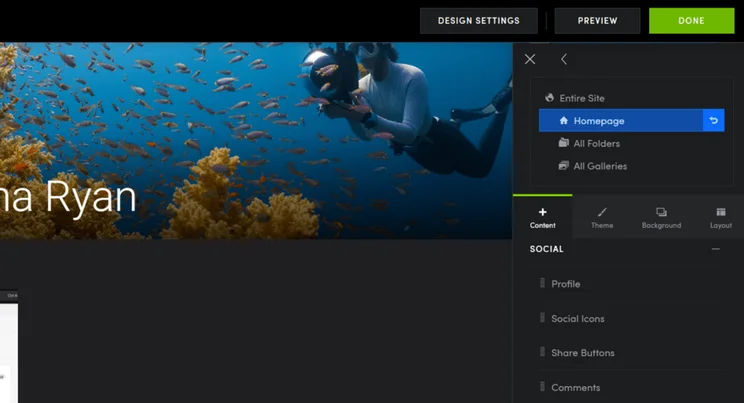
Will Your SmugMug Site Look Good on Mobiles?
SmugMug automatically optimizes your site for whatever screen it’s viewed on, so you don’t have to manually create a mobile-friendly version. This is pretty standard across the website builder industry, but it’s still worth mentioning since 57% of all website traffic comes from mobile devices, so it’s important to cater to these website visitors.
Where SmugMug differs from other website builders, like Wix, is its lack of a mobile preview mode. There’s no way to easily look at or edit your website for mobile users – you simply have to trust SmugMug’s promise to resize.
Of course, you can use your own mobile phone to look up your website and see how it performs on mobile devices, but this seems like a long-winded route when it should really be built into the builder.More Information
- Best Portfolio Website Templates: Get inspiration for your portfolio with these top templates
What SmugMug Pricing Plan Should You Choose?
SmugMug has three premium plans to choose from and they range from $16 per month to $54 per month. Since we last reviewed SmugMug, its pricing plans have nearly doubled in price, with its cheapest plan now costing $16 per month instead of $8.99 per month.
Take a look at SmugMug’s pricing below for a 12-month subscription:
- Power: $16 per month
- Portfolio: $34 per month
- Pro: $54 per month
The Power plan is best for personal use – think simple portfolios and online galleries where you want to showcase your work and little else. The Portfolio and Pro plan offer users access to ecommerce features, so you’ll need to upgrade to one of these if you want to sell your photography to customers.
One of the biggest issues with SmugMug’s pricing is that there’s no free plan. For example, Wix lets you create and publish as many portfolio sites as you want for free, for as long as you’d like – but with SmugMug, you’ve only got a two-week trial before you have to upgrade.
To be fair, this isn’t too dissimilar to Squarespace, so we wouldn’t say the lack of a free plan is a deal breaker. Just something to keep in mind if you’re budget-conscious.
As a recap, all three plans come with the following features:
- Unlimited photo storage – in comparison, Wix only provides unlimited storage on its highest-tier plan
- Wide range of upload options, including from the SmugMug app – this makes uploading on the go easy
- Advanced security features, including private galleries, to keep your work safe from theft online
- You can use a custom domain with any SmugMug plan, giving your site an added flair of professionalism
- Integrate with popular photo software, including Adobe Lightroom, Flickr, and Google Photos
For additional tools, such as custom watermarks or selling capabilities, you’ll have to subscribe to the Portfolio or Pro plan.
Is SmugMug Good Value for Money?
SmugMug’s Power plan starts at $16 per month and helps users store, showcase, and share photos. SmugMug’s Power plan ($16 per month) is a little lackluster when compared with Wix’s cheapest plan (also $16 per month), which is feature-rich. SmugMug’s Power plan only includes basic features like privacy settings and integration with Adobe Lightroom, whereas Wix’s Light plan offers marketing features to help you promote your website.
If you’re looking for an affordable option, having unlimited storage on SmugMug’s cheapest plan is really impressive! That said, we’d only recommend the Power plan for simple portfolios or personal sites.
For most, SmugMug’s Portfolio plan offers the best value for money, with pricing starting at $34 per month. It unlocks ecommerce capabilities; print lab integrations; and advanced privacy features, such as custom watermarks, and downloadable client galleries.
To sell custom photo packages and use SmugMug’s marketing features, you’ll want the most expensive plan, SmugMug Pro, which starts at $54 per month. While this plan is best for those looking to grow their photography business, you can get more bang for your buck with other website builders. For example, Squarespace’s most advanced plan (which includes ecommerce) costs $49 per month.
How Good is SmugMug’s Help and Support?
If you need a helping hand to get you started, or you hit a roadblock once your website is up and running, SmugMug offers plenty of help and support.
SmugMug’s Support Center is a searchable database of articles, divided into categories such as “Content Management”, “Selling Prints”, and “Privacy and Security”. When we tested the platform ourselves, the articles appeared to be very digestible and beginner-friendly.
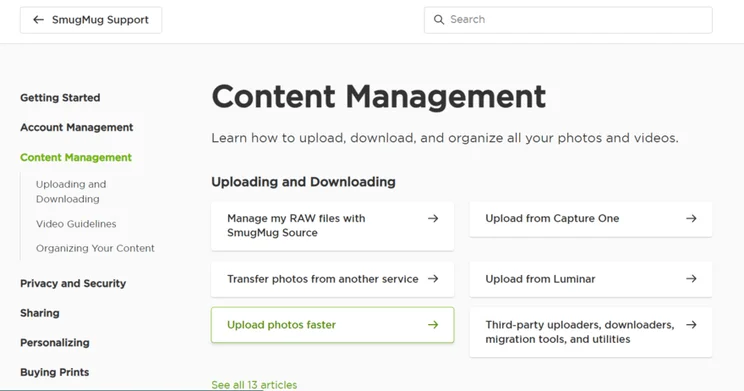
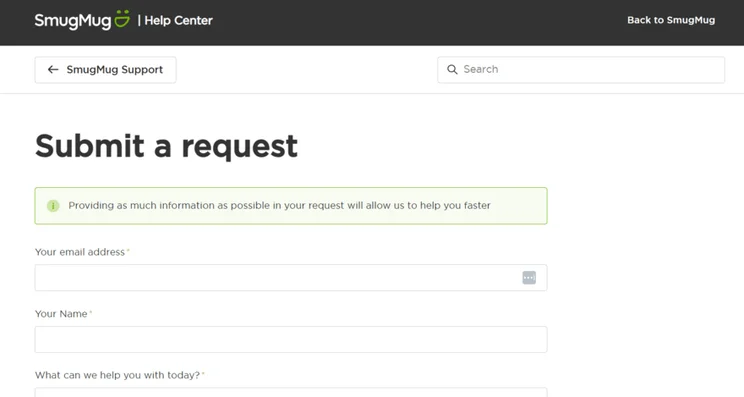
For direct help from SmugMug, its customer team – also known as “Heroes” – is available via email 24/7. All you need to do is fill out a simple form.
Despite advertising that you’ll receive feedback within a few hours, we were disappointed to see that SmugMug doesn’t offer a live chat functionality for immediate help. This is something a lot of other top website builders provide to customers and, without it, SmugMug seems behind the times because email is too clunky to feel like a helpful conversation.
SmugMug Review: Summary
If you’re looking to build a photography website or portfolio, SmugMug is a great choice thanks to its affordable plans and photography-focused features, such as unlimited storage, visual templates, and digital watermarks.
While its niche offering is SmugMug’s greatest strength, it’s also its downfall. For websites unrelated to photography or online stores, SmugMug’s restrictive plans and limited features can’t compete with other leading website builders, such as Wix and Squarespace. In fact, Squarespace is our top-rated website builder for photographers because of its stunning mobile-responsive templates and ease of use.
Like Squarespace, SmugMug offers a 14-day free trial, so you can give it a test run before subscribing to a premium plan. If you use SmugMug already, let us know what you think in the comments!


1 reply
1 reply
1 reply
1 reply
1 reply
1 reply
1 reply
1 reply
1 reply
1 reply
2 replies