
- What Are the Latest Squarespace Discount Codes?
- Can Students Save Money With Squarespace?
- Are There Any Other Types of Squarespace Offers?
- Offer Codes: Terms and Conditions
- How To Choose the Most Suitable Discount Code for You
- How To Apply Offer Codes at Checkout
- Squarespace Offer Codes: Time To Decide
Signing up for Squarespace? Hold that thought, because with the right promo code, you can save big on your new website builder. Squarespace often has an array of enticing promo codes and discounts, but how do you determine which deal is best for your needs?
I’ve analyzed the most popular Squarespace promo codes available right now and provide recommendations on how to choose the offer that will maximize your savings when building your site.
What Are the Latest Squarespace Discount Codes?

If you’re after a discount code when signing up for Squarespace, you’re in luck. Take a look at the table below for all of the discounts currently available:
| Discount type | Code/Verification | Discount | Conditions |
| Discount for our readers | WBE10 | 10% | Save 10% off your first subscription: new customers only, for annual plans |
| Student discount | Verification required | 50% | Valid for the first year on an annual plan, requires student status verification |
Using a promo code can help you save money right from the start when signing up to a website builder like Squarespace.
With our exclusive Website Builder Expert deal, you can simply enter the code WBE10 when you’re at checkout to get 10% off your plan. The table below shows the money you could save when using our promo code across each Squarespace plan:
| Plan | Monthly price (billed annually) | Discounted monthly price with 10% off code | Savings % |
| Basic | $16 | $14.40 | 10% |
| Core | $23 | $20.70 | 10% |
| Plus | $39 | $35.10 | 10% |
| Advanced | $99 | $89.10 | 10% |
Can Students Save Money With Squarespace?
Students building their first portfolio or online store can half the cost by verifying their status. That reduces your charge for the full first year with Squarespace, and all you need to do is provide your school email address to get a whopping 50% off your plan.
Are There Any Other Types of Squarespace Offers?
Even if you don’t use a discount code, there are still offers to take advantage of when signing up to Squarespace.
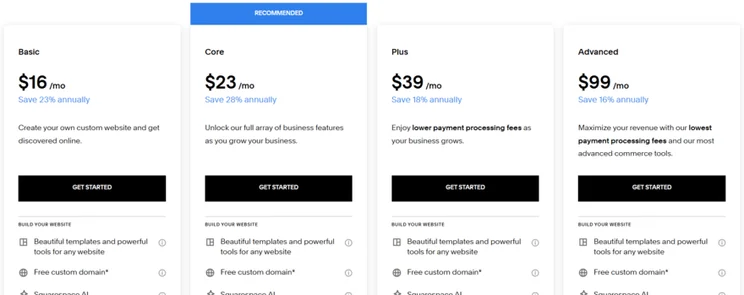
Naturally, many people who subscribe to a service prefer to go month-to-month since there’s less commitment. But, I recommend opting for an annual plan on Squarespace to save a decent chunk of money. You can save up to 28% when choosing an annual subscription over month-to-month.
Take a look at the discounts below:
| Plan | Monthly plan cost | Annual plan: monthly cost | Savings % |
| Basic | $21 | $16 | 23% |
| Core | $32 | $23 | 28% |
| Plus | $48 | $39 | 18% |
| Advanced | $119 | $99 | 16% |
With Squarespace’s cheapest Basic plan, there’s a 23% discount available for the annual payment, effectively reducing the monthly cost to $16.
All of Squarespace’s plans come with a 14-day free trial, so you can try before you buy. This can be a helpful starting point in the world of website building, especially if it’s your first foray into building your own site.
To read more about Squarespace’s different plans, check out our Squarespace pricing review for the full breakdown.
Offer Codes: Terms and Conditions
Each offer code typically comes with its own set of terms and conditions. For instance, you can’t claim the 50% off code if you’re not a student with a valid school email address.
Most codes also have expiration dates, so it’s worth checking to see how long they’re valid. Otherwise, you’ll likely be left disappointed when you get all the way to checkout only to find that the code has already expired.
With our WBE10 discount code, it’s valid for your first purchase or upgrade from the free trial, but you can’t use it continually to renew your plan. You’ll probably find it’s the same for any code you enter – it’s rare to have a recurring code to use every time a plan renews.
How To Choose the Most Suitable Discount Code for You
Currently, there are two promo codes available for Squarespace, and one of those is exclusive to students. This should make the choice simple. But, if more offers become available, how do you determine which discount fits your specific needs ? Here are some tips:
- Assess your budget and website goals – What plan are you signing up for? What features do you require? Which discount best aligns with your budget and site objectives?
- Check eligibility criteria carefully – Many Squarespace discounts are exclusive to first-time customers, students, and seasonal events, so make sure to verify a promo code’s terms before applying to ensure it’s valid for you.
- Compare subscription lengths – Some codes give higher percentages off yearly plans versus monthly, so I recommend weighing up the discount value against upfront costs to find your best fit.
- Look into combo deals – Occasionally, Squarespace pairs domain registration savings with website builder plan discounts for greater value. Keep an eye out!
- Read all expiration and usage rules – Promo codes may expire, allow one-time-use only, or have other restrictions, so check for limitations to avoid missing out on a discount altogether.
It’s best to keep these promo tips in mind when reviewing what works best for your website and budget needs. You want a Squarespace discount to give you the most bang for your buck, and saving strategically from the start gives you more flexibility down the line to purchase additional features or tools for your growing site.
How To Apply Offer Codes at Checkout
Applying your Squarespace offer code is pretty straightforward, whether you’re using our 10% code or getting a student discount. After choosing your desired plan, applying a promo code takes place at the checkout stage.You want the “Review Order” page, which comes after you’ve entered your address and bank information. Don’t worry, you won’t be charged until you’ve reviewed the entire order and had the chance to enter the code. Once you’ve entered the code, hit “Apply.”
For the student discount, you’ll need to verify your school email address before applying the code. Just be aware that some codes are one-time use, student-exclusive, or have other limitations. As mentioned previously, double check the terms before applying a Squarespace promo code to ensure you meet its eligibility criteria. Then get ready to build your sensational new website at a discounted rate.
Squarespace Offer Codes: Time To Decide
With a promo code to hand, Squarespace makes building a professional site accessible for most and very budget-friendly. Just remember to assess your website needs, compare offers, and apply the right code for you. Do that, and savings await.
To help you get started, read our guide on how to use Squarespace to help you launch an eye-catching Squarespace website that looks amazing and doesn’t damage your wallet.


1 reply
1 reply
1 reply
1 reply
1 reply
1 reply
1 reply
1 reply
1 reply
1 reply
1 reply