How To Build an Online Store: 8 Easy Steps

We may receive a commission from our partners if you click on a link and purchase a product or service on their website. Learn more

A smiling headshot Holly Choules
Written By
Updated on January 9, 2026

Ready to build an online store? This process isn’t as intimidating as it sounds. With numerous ecommerce website builders on the market, you can get set up in no time.

But where do you start? After spending over 300 hours testing and evaluating 12 leading ecommerce platforms during our March 2025 in-house research, we know how to get you started. Whether you need to sell a few products or have a large inventory to get through, this simple eight-step guide covers the ins and outs of creating an online store.

I’ve freshened up this article to reflect the ecommerce landscape in 2026. I’ve added more up-to-date information on social media, AI, and shipping, so you can sell online according to current best practices.

Short on time or prefer to listen? Our YouTube video covers all the key steps and considerations for setting up an online store:

Don’t rush into things just yet. Setting up your online store takes careful planning, so look into these three key steps first:

  1. Register your business as a distinct legal entity by registering for a business license. Do your research to make sure you stay on the right side of the law.
  2. Find your niche by conducting market research. You need to work out your specialty and see what you can offer buyers that other stores can’t.
  3. Decide your branding: To give your store a cohesive and recognizable design, your brand identity should be present in every part of your site, from your color scheme to your logo.

Screenshot of Byoma's online store front page with a hero image and "Shop now" button
Skincare brand Byoma offers a good example of memorable online store branding. The site's vibrant color scheme matches the bold colors found on its product packaging. Source: Online Builder Expert

With three in five business owners stating that they’re being impacted by labor shortages (Bank of America report), ecommerce website builders are a useful tool to have in this turbulent economic climate.
These platforms make it quick and easy to set up a store even if you have limited staff, and they also come with built-in selling, shipping, marketing, and AI tools so you can complete multiple tasks from one dashboard.

Ecommerce platforms help you build an online store without any coding or tech experience. For beginners, we’d recommend Shopify, Wix, or Squarespace – our top three website builders. If you’re on a budget, then check out Hostinger, our fourth-rated platform and one of the cheaper builders on the market.

Use the table below to compare your options:

0 of 0
Overall rating
Starting Price
Free custom domain
AI website builder
Transaction fees
Payment gateways
Recommended for
Wix logo black 2025
shopify
Squarespace logo black background
hostinger logo
GoDaddy logo

Wix

Shopify

Squarespace

Hostinger

GoDaddy

4.8
4.8
4.7
4.2
4.0

$18.99

$3.99/month

check
close
check
check
check
check
check
check
check
check

2.9% + $0.30

2.9% + $0.30

2%

0%

2.7% + $0.30

80+

100+

6

100+

3

Businesses promoting their online presence

Businesses who want to easily scale their store as they grow

Creatives and service-based businesses

Beginners and budget-conscious businesses

Businesses using socials to drive traffic

The platform you choose depends on your unique needs. For instance:

  • A fitness brand selling a high volume of gym wear would need a builder that can help them scale and comes with effective product management tools, like Shopify.
  • An entrepreneur selling as a side-hustle may need Hostinger’s time-saving AI tools to make running your business easier.

➡️Check out our guide of the best beginner ecommerce platforms in case you’re looking for a user-friendly journey.

Quote
💡 2026 Shopping Trends

With the rise of AI-powered shopping tools like ChatGPT’s Instant Checkout, an increasing number of shoppers are using AI search engines to directly find and purchase products in 2026. If you’re able to get your products shown in AI-generated search results, your store could benefit from increased sales.For this reason, I recommend looking into Shopify’s “Agentic Storefronts” feature if you’ve decided to build a store with the platform. Introduced during Shopify’s Winter 26’ Edition product update, this feature puts your products directly in front of users on ChatGPT, Perplexity, and Microsoft Copilot.

A smiling headshot Holly Choules
Holly Choules Senior Writer

Buying Guide: How To Choose the Right Ecommerce Platform

Other aspects to consider when choosing an ecommerce platform include:

  • Your expertise – If you’re new to ecommerce builders, look for strong help and support, speedy set-up times, integrated payment and shipping methods, and an intuitive interface with a drag-and-drop editor.
  • Your budget – If you have limited funds, look for low-cost plans that come with the key features you need, free online store templates, free ecommerce extensions, and reduced transaction fees.
  • Your time – If you need to set up quickly, look for pre-made templates, built-in sales tools, and speedy customer support response times.
  • Your item quantity – If you have a large number of items to sell, look for a plan that lets you sell unlimited products, has ecommerce inventory tools that help you manage a high volume of items, and product categories and filters.

For more top tips on how to choose the right ecommerce platform for you, refer to our video below:

Which Pricing Plan Is Best for Me?

The right pricing plan depends on what features you need. If you need more features, then you’ll have to upgrade to a more expensive plan.

We’ve looked at our four top-rated ecommerce platforms to give you an idea of how much you’ll be paying.

  • Shopify, Wix, and Squarespace have a number of plans to choose from.
  • Hostinger keeps it simple with just one ecommerce plan.

Your chosen builder needs to align with your current budget and leave room for your long-term growth plans, so examine each plan carefully before you make your final decision.

Refer to the table below to see what these four ecommerce platforms offer on the least expensive and most expensive plans:

Wix pricing Shopify pricing Squarespace pricing Hostinger pricing
Cheapest ecommerce plan Core plan at $29/mo (billed annually). Basic plan at $29/mo (billed annually). Basic plan at $16/mo (billed annually). Business Website Builder plan at $3.99/mo (for a 48-month term).
Key features on cheapest plan • Up to 50,000 products • Social media and marketplace selling • 5 website collaborators • 50 GB of storage • Customer accounts • POS • Abandoned cart recovery • Automatic discounts • Unlimited products • Shipping courier discounts of up to 77% • 10 inventory locations • Automatically localize your store in 3 markets • POS • Unlimited products • Checkout on domain • Customer accounts • Abandoned cart recovery • Invoices • Sell up to 500 products • 100+ payment methods • 0% transaction fees • Inventory management • AI generated product pages • Customizable checkout options • Appointments and bookings
Most expensive ecommerce plan Business Elite plan at $159/mo (billed annually). Advanced plan at $299/mo (billed annually). Advanced plan at $99/mo (billed annually). N/A (Single ecommerce plan; see above)
Key features on most expensive plan • 100 website collaborators • Unlimited storage • Data-driven reports • Automated sales tax on 500 transactions/ month • Advanced shipping options • 15 additional staff accounts • Shipping courier discounts of up to 88% • Custom analytics • 10x larger checkout capacity • Unlimited video storage • Low processing fees N/A (Single ecommerce plan; see above)

Can I Set Up an Online Store for Free?

Yes, there are free ecommerce platforms out there, but we wouldn’t recommend them in the long-term. Our research highlights Square Online as the best option, since it lets you set up and sell at no additional cost.

Square Online’s free ecommerce plan does, however, come with limitations. Most notably, you’ll have:

  • Website ads
  • A Square domain (e.g. www.onlinestore.square.site)

We don’t recommend this plan if you want to look professional online. It’s worth paying more for better control over your online store’s appearance.
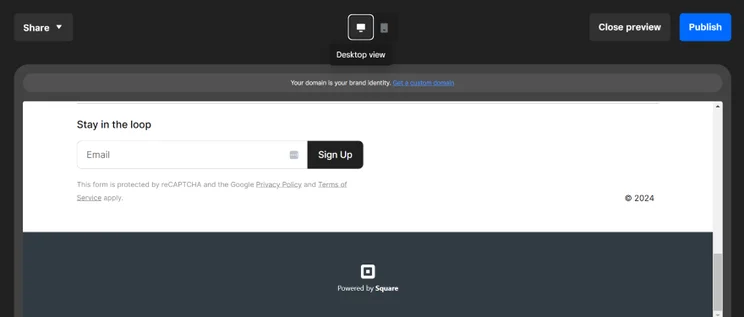
Screenshot of a preview of a Square Online website with a branded footer saying "Branded with Square"
If you publish a free online store on Square Online, you can't have a custom footer design. Instead, it'll show this default "Powered by Square" message. Source: Website Builder Expert

Which Additional Costs Should I Look Out For?

When you build an online store, you may come across additional costs. These include paid templates, paid apps, and add-ons like email marketing plans. 

Your total costs will depend on what features your website needs. For instance, if Wix doesn’t have a specific checkout tool, you may need to purchase an app to add this function to your store.

You will also come across processing fees for payments. If a user purchases an item through a bank like Visa, there’s a small processing fee per transaction – keep this in mind!

A domain is the unique URL internet users search for to access your website. 

Most website builders, such as Squarespace, include a free domain for your first year. However, you’ll be charged when your domain is renewed, with a price ranging from $20-$70 per year (billed annually).

For more options, you can also purchase a domain name from a domain name registrar. With Domain.com, for instance, a “.com” domain is only $11.99 for your first year, while a “.store” domain is $1.99 for your first year and rises to $79.99 per year after renewal. 
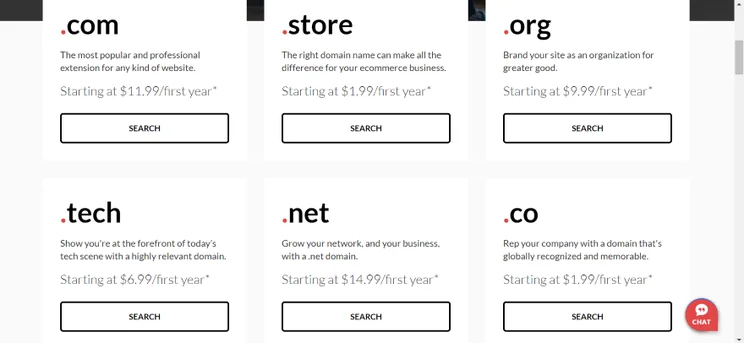
Screenshot of the different domains Domain.com offers with prices.
The great thing about domain registrars is that they offer different types of domain extensions. Though “.store” is best suited for ecommerce, Domain.com also offers “.net” and “.co” if that’s something you’d prefer. Source: Website Builder Expert

How Do I Create a Strong Domain?

A strong domain name is easy to remember. Here’s a famous example, with the domain in bold:

https://www.ebay.com

eBay, the famous auction site, has an instantly memorable domain name. Though your business won’t be as well known, you can still ensure your domain stands out with a catchy name.

As well as being memorable, your domain name should be easy to find. This means keeping it short, snappy, and simple. To reduce the chances of your domain name being misspelt, it’s best practice to avoid:

  • Hyphens
  • Numbers
  • Double letters

What if I Already Have a Domain?

If you already have a third-party domain name, you need to transfer it to the ecommerce builder you’re creating your online store with.

Most website builders have a dedicated domains tab in your settings, but we recommend referring to each platform’s help center for detailed information about transferring.

The power of web design shouldn’t be underestimated – it forms 94% of users’ first impressions. So, to make sure you impress, you need to wow them with a professional ecommerce template.

Thankfully, most website builders, like Wix and Shopify, offer beautiful free and paid templates for online stores. Here’s what to look for when choosing your design:

  • A user-friendly navigation bar is key – your main category pages should be logically organized, making it easy for users to find what they’re looking for.
  • Website search bars can help shoppers find the items they need.
  • Footers with useful information – this could include a “Contact Us” page, an “About Us” page, social media icons, and customer support links.
  • Product reviews for customers to share their experiences – they’re also social proof that you’re a real brand selling legitimate products.
  • Newsletter sign up form for building email lists – you could send email marketing campaigns to users, showcasing the latest products and company news.
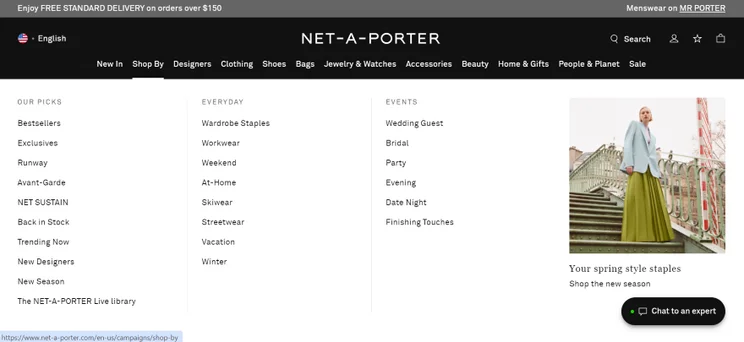
Screenshot of Net-a-Porter's navigation bar.
Net-A-Porter has a strong navigation bar. Its most popular categories run from left to right and clearly signposts what the company sells. Keep this in mind when creating your own bar. Source: Website Builder Expert

Once you’ve picked out a template, it’s time to customize your store and ensure that your design suits the unique branding of your business.

Most website builders have design tools you can tweak your design with. Aspects to change include your website’s color palette, font and text size, sections, embedded social media links, photos, and videos.

Here are a few pointers to make sure your website design is as professional as possible:

  • Use high-quality photos and videos to keep your website professional. Avoid blurriness, cluttered backgrounds, and inconsistent lighting.
  • Optimize your site speed by using free online compressing tools to reduce the file size of your images. This makes them smaller without impacting the quality.
  • Use a mobile-friendly design: During Cyber Week 2025, mobile was the preferred transaction channel and took up 57.5% of online sales. Website builders like Wix will let you tweak your mobile design from the editor.
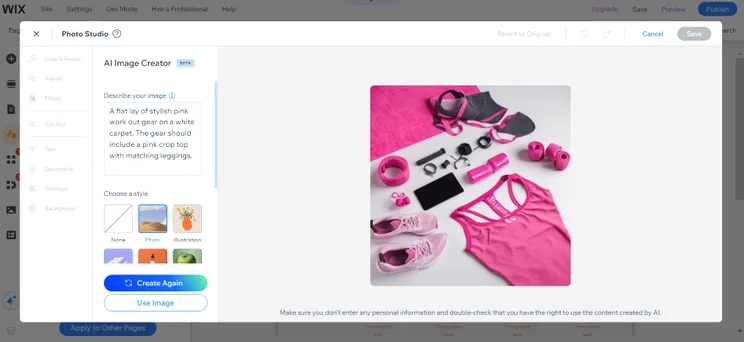
Screenshot of a gym wear photo generated by Wix's AI.
Editing my website’s design was easy with Wix. I could even generate a photo using its AI Image Creator, a great way to create additional content for your store if you need it. Source: Website Builder Expert

Before you upload your products, double-check the plan that you’re on. Your chosen builder and plan must cater to your store’s specific needs. Features to look for include:

  • How many products you can sell: Look for a plan that reflects how many items you’re selling (e.g. Wix lets you sell up to 50,000 products on the Core plan and above).
  • Shipping integrations: Ecommerce builders often come with built-in shipping integrations or apps that can speed up order fulfilment, helping you save labor costs and time. (e.g. Hostinger’s built-in Printful integration that enables you to sell products via print-on-demand).

Now that’s sorted, it’s time to start building your inventory. You need to consider these key points when uploading your products:

  • Pricing
  • An enticing product name that accurately describes what the item is
  • A clear product description including all of the key details buyers need to know
  • High-quality photos
  • The category page that items fit into so users can easily find the product on your website
  • Your product’s variants like size, color, or price differences
  • Weight (if it’s a physical item)

When uploading products, you also need to consider your SEO strategy (Search Engine Optimization). Include targeted keywords in your copy to ensure you’re visible on Google search.

A fitness brand selling sports apparel might include keywords like “gym clothes” or “workout clothes” in its product titles and descriptions. If you find keyword research difficult, think about what customers are searching for when looking for your product on Google.
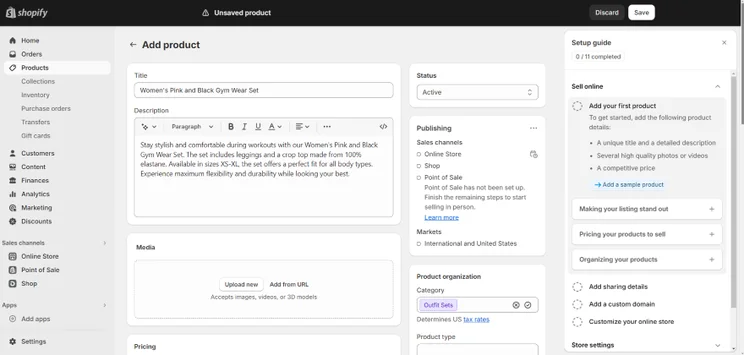
Screenshot of Shopify's AI generated copy.
Shopify’s AI tool wrote this product description for me. I clicked on the star icon, typed in my item’s key features, and was left with an SEO-friendly product description. It’s great if you struggle to write copy. Source: Website Builder Expert

Last of all, it’s important to consider visual searches. This is when a shopper makes a search using an image instead of a traditional, text-based query. For example, Google Lens enables users to search with an image and receive a list of related images in return. Your products could be found in these results!

To optimize your website for Google Lens and other kinds of visual searches. Make sure that your product imagery is eye-catching enough to stand out in a sea of images. Also, don’t forget to write alternative text that accurately describes what your photos are portraying (descriptive words are key!).

Google Lens search results showcasing multiple images of a white slogan t-shirt
When I looked up a T-Shirt on Google Lens, Google identified multiple image sources and which companies I could potentially buy my own one from. Source: Website Builder Expert

To encourage more sales, speedy and convenient checkouts are key. Your store should offer multiple payment options and make it easy for your customers to buy your products.

Payment gateways are the most common payment method online. This is when a bank like Visa, American Express, or Mastercard is integrated with your online store. When a customer buys an item, they may enter their card details into a payment gateway’s embedded checkout, or be redirected to its website.

Most website builders support the most popular payment gateways, such as Stripe and PayPal. But if you’re looking to go above and beyond, our testing found BigCommerce to offer the largest variety of payment gateways. The more options you give your customers at checkout, the more likely they are to convert.

Another common way to accept payments online is through digital wallets. This is one of the easiest ways to pay, and these wallets also come with built-in security features, so we recommend adding the ability to accept them to your online store. Similarly to payment gateways, many website builders allow you to integrate digital wallet payments with your online store.

What About All-in-One Payment Solutions?

If managing multiple payment gateways sounds stressful, some website builders have an all-in-one solution.

Shopify and Squarespace both have payment management tools with which you can accept all payments in one place, automatically integrating popular payment methods with your store. Here are the key differences between the two:
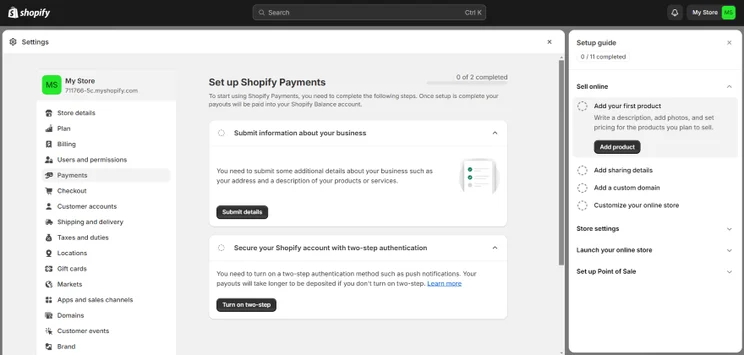
Screenshot of setting up Shopify Payments from the dashboard.
Shopify Payments is quick and easy to set up. I could conveniently connect with the feature from my dashboard so this method will save you time if you’re in a hurry. Source: Website Builder Expert

How Do I Keep My Payments Secure?

To keep online transactions secure, make sure the website builder you choose has an SSL certificate, two-step verification, secure customer login areas, and provides fraud detection. To ensure that your data (and that of your customers) is kept safe, read our website security checklist for further information.

Are There Any Fees for Using Online Payments?

With online payments, you’ll come across transaction fees and processing fees. 

You can sometimes avoid transaction fees on certain website builder plans. For instance, you can avoid Squarespace’s 2% transaction fee if you upgrade to the Core, Plus, or Advanced plan. Some platforms, such as Wix and Hostinger, don’t charge transaction fees on any plan.

Processing fees for online payments are unavoidable. These are the small fee payment gateways, like Visa, charge for handling the transaction. As an example, Squarespace Payments takes out 2.9% + 0.30¢ per transaction.

After sorting out your payments, you need to consider how to ship your products to customers. With fast, reliable shipping being the norm (like same-day delivery), being able to ship your goods quickly and efficiently is a non-negotiable.

Here are two steps you need to take beforehand:

  1. Establish your shipping origin address – This address must include where you’re shipping your products from. Make sure it’s up to date to ensure that all shipping rates and taxes are correct.
  2. Decide where you’re shipping to – You need to work out which countries and regions (zones) you’re shipping to. Different locations will alter the shipping costs of each delivery, so make sure you work out a rough estimate for each location first.
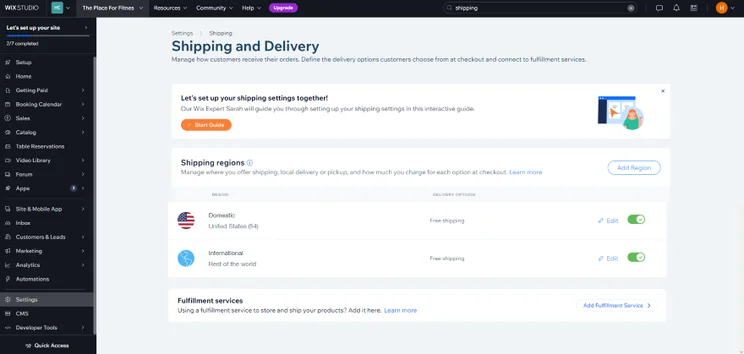
Screenshot of Wix's Shipping and Delivery section of the dashboard.
Wix’s shipping options are all in one place. I could add shipping regions and insert how much I’d like to charge for each destination. It’s a convenient system for shop owners who are new to delivery and its costs. Source: Website Builder Expert

You can pick out which couriers you’d like to use. The most popular couriers are USPS, FedEx, and DHL Express, which are options that most website builders offer.

For convenience, Shopify Shipping includes USPS, UPS, DHL Express, and FedEx by Shippo. You can also access shipping label discounts and see real-time rates.

To anticipate your buyers’ delivery needs, remember to give them as much choice at checkout as possible. For instance, a visitor may want to pay extra for express shipping so their parcel arrives within 1-2 days instead of 5-10 days.

What Shipping Options Should I Offer My Customers?

To entice customers to buy your goods, you should at least provide standard and express delivery options. On top of this, you can offer special shipping options to sweeten the deal, such as:

  • Free shipping on all orders or you could offer free shipping if a customer spends over a certain amount (e.g. free shipping for all orders over $80)
  • Flat rate shipping no matter the order – as an example, you could offer “$5 shipping for all orders” if the parcel is being delivered to a specific state
  • Buy online, pickup in-store so customers can order online and pick up their parcel in person – ideal if you have a brick-and-mortar store (you could also set up local-pick up at designated collection spots if you don’t have a physical store).

Wait a moment before you hit publish — there are a few things to double-check before you share your store with the world:

  1. What languages does your store support? If you’re selling to customers abroad, you should enable different languages. Some website builders, like Wix, support a range of languages.
  2. Is your checkout working? Test your ecommerce checkout pages before you go live. Make sure that payment methods and discounts work, the right shipping methods are available, and that all pricing is correct.
  3. Does your store look good on desktop, mobile, and different browsers? Users will access your website in different ways, so make sure your website looks great on all devices. Key browsers to check include Chrome, Firefox, and Safari, and Edge.
  4. Are your settings correct? Important settings include your currency, time zones, and contact details like your address, phone number, and email.

Remember, you must test out your online store before you go live to your customers. Look out for key errors (like typos and low-quality photos) and ensure your store looks professional to users.
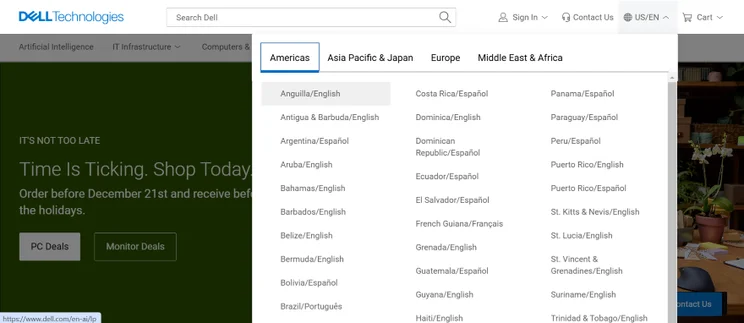
Screenshot of dropdown bar on Dell's front page allowing users to change languages
Some online stores, like Dell's, make it easy to switch languages on-site. In this case, visitors can use a responsive dropdown bar. Source: Website Builder Expert

When your online store is live, you’ll need to focus on attracting customers. Here’s four different ways that you can do so, and in turn increase your online sales:

  • Optimize your site: There are so many benefits of SEO for ecommerce, so it’s vital to keep SEO in mind with every new piece of on-page content you publish after your site is live.
  • Build a social media presence: Use platforms like TikTok, Instagram, and Facebook. Social media platforms can grow your business much faster than word of mouth.
  • Sync your products on socials: If you want to sell from additional touchpoints, you could also sync your store with platforms like TikTok and Instagram. Some website Builders like Shopify have built-in tools and apps that enable you to do this.
  • Utilize your email list: With a powerful email marketing strategy you can share updates, new products, and promotions directly with customers.
  • Localize your marketing: Promote your business locally with social media location tagging and partnering with local influencers and businesses.
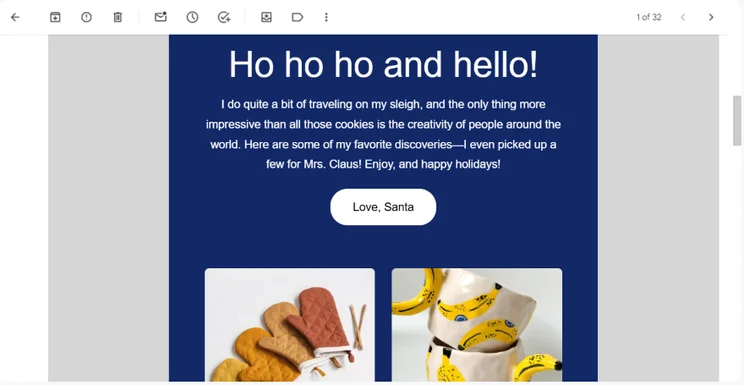
Screenshot of an etsy email from Santa showcasing different gift ideas.
You can get creative with your email marketing strategies. For instance, Etsy sent out an email from "Santa" offering gift recommendations from featured sellers. Source: Website Builder Expert

All of our recommendations are driven by data, not hunches. Our in-house research team put each ecommerce builder through a rigorous testing process which draws out their strengths and weaknesses.
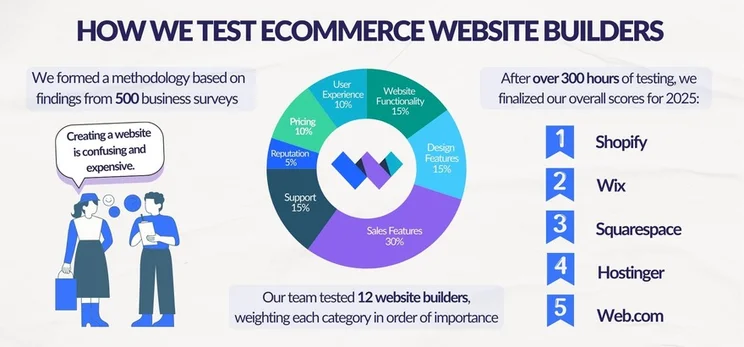
Graphic breaking down Website Builder Expert's ecommerce website builder testing into three steps: conducting business surveys to build a methodology, testing website builders, and finalizing scores

The research includes over 300 hours of data collection, split across seven key testing categories. These categories are based on what users are looking for in an ecommerce platform, and are weighted by their overall importance:

  • Sales Features: 30%
  • Website Functionality: 15%
  • Help and Support: 15%
  • Design Features: 15%
  • User Experience: 10%
  • Pricing: 10%
  • Reputation: 5%

Thanks to our small business surveys and market research, we know the criteria you value the most, and made sure this article covers these factors. Whether you need great design options or a plan that’s great value for money, we’ll point you in the right direction.

Thanks to these eight steps, you know how to set up an online store!

If there’s one thing you take away from this process, it’s this: put your website visitors at the center of everything you do. Whether you’re adding a range of shipping options to choose from or organizing your product categories, make sure buyers can access everything they need, from purchase to delivery.

Ready to pick your website builder? Read our guide to the best ecommerce builders and get set up today.

Written By

A smiling headshot Holly Choules

Holly Choules is a Writer at Website Builder Expert with a background in researching and crafting engaging content for digital platforms. In previous roles, she has demonstrated her wordsmith skills by writing for public facing brands in a range of industries. After gaining hands-on experience using leading website builders, like Wix and WordPress, she is now keen to share her findings through informative, easy-to-follow articles that help small business owners get online and grow their presence.

Since joining the team in 2024 and transitioning into the tech sphere, Holly is passionate about applying her three years of content writing experience and upholding Website Builder Expert’s position as an authoritative source on website builders, ecommerce, and digital marketing.

You can read Holly’s articles below, or connect with her on LinkedIn.

More about

100 comments

Your email address will not be published. Required fields are marked *

  • willie

    Hi plaese help me i want to know how to get pay online

    1 reply

    • Lucy Carney
      Lucy Carney

      Hi Willie,
      Thanks so much for your comment! You'll need to connect your own account that you want to receive payments into, and then provide a way for customers to pay you. The usual ways to accept online payments are to accept credit or debit card payments, use a processor such as PayPal, or use your platform's in-house gateway (for example, Shopify Payments or Wix Payments).
      I realize you'll need more details to get started, so here's our full guide on How to Accept Payments Online - I hope it helps!
      Best of luck with your business!
      Lucy

  • Masuz

    Thank you for sharing.

    1 reply

    • Samuel Jagger
      Samuel Jagger

      Hi Masuz! Thank you for leaving a comment! We're glad you enjoyed the article. All the best - Sam

  • Yusuf

    Very Impressive Idea. Could you tell me what is the first step to building up an online store

    1 reply

    • Jacqueline Renouard
      Jacqueline Renouard

      Hi Yusuf,
      It depends on what stage you are in the process of building your online store - it can be creating your brand or product, picking your ecommerce platform, designing your online store with your customer in mind. We hope this has helped you Yusuf!
      All the best,
      Jacqueline

  • Taylinn

    I want my own store online😁

    1 reply

    • Jordan Glover
      Jordan Glover

      Hi Taylinn,
      Thanks for your comment – we're super excited that you're getting ready to build your own online store! If you need any help, our guide above should have all the answers, but if you come up against any problems whilst you're building, make sure to shoot us a comment and we'll do our best to help you out.
      Good luck!
      Jordan

  • humaira umar

    very helpful,thanks for sharing this...

  • fizfy services

    Impressive post. Thanks for sharing. It will be really helpful for newbie.
    Keep posting..

  • Jessica Abenduchi

    Hey, Charlie! This blog is amazing, I’m going to go through and read all of your posts. ???? You’re doing a great job! Another fantastic article that is well laid out. – Jessica

  • Yannesi Siu

    Fantastic post, Thank you. It helps a lot.

  • Anjaneya

    Good, you have explained about online store in a clear way. Thanks!

  • Victoria Grace

    Hi, Jeremy
    It's a pleasure reading your articles. Keep up providing us with more and more great articles like this one.
    However, from my point of view, one of the most important aspects of a successful online store is an effective call to action. Inviting your visitors to purchase your product or service requires a straightforward and easy to fill checkout form.

  • Helloman

    For domain name, I prefer to buy it at another company. It happens all the time, Webhosting companies and Website builders are like your landlord, they can hold your Website hostage when the money issue or services get into some sort of disagreement. If your domain is hosted somewhere else, you can just ask that domain company to point your domain and move your Website to another webhosting co. in the future without much hassle.

  • sharon

    I am an SEO and have handled everything online over the years, but for my own e-comm start-up I too was considering getting a custom design and hiring an SEO Writer to do the marketing for me. However after reading your post I think I’ll try to do as much stuff as possible by myself, specially at the early stages of business development.

    1 reply

    • Charlie Carmichael
      Charlie Carmichael

      Hi Sharon,

      Thanks for your comment. We're glad to hear you found the article useful, best of luck with the business development!

      Thanks,

      Charlie

  • Helen

    Thank you for a really comprehensive guide to building an online store. You answered a lot of my questions in a really simple way. For the first time I actually feel I can achieve what I want to do. Thank you.

    1 reply

    • Lucy Carney
      Lucy Carney

      Hi Helen,
      Thank you for sharing your feedback. I'm glad you found it so helpful! Best of luck achieving your goals - feel free to share it if you think others would find it useful too.
      Thanks for reading,
      Lucy

  • Parth Desai

    Thanks for sharing and glad to see that you shared a really effective article with us.

  • Scott Ginsberg

    Cool post, thanks for publishing!

    Launching an ecommerce store from scratch depends on many factors. But you can be sure to go from zero to live in a way that suits your business best if you choose well
    For example, if you are an enterprise brand that's replatforming and getting into a new website.
    That means you likely have significant historical systems and high customization needs.

    In which case, Shopify may not be the best fit. You will want to build the site on your own using platforms like Magento or DemandWare. Both are worth a look for such a project, but only if your company has a strong dev team and enough capital to build and maintain a site on such a robust platform.

    Hope that’s useful for ya. Thanks!

  • Deepak

    Thank you. Nice article.
    By the way, if you want to build an online store at minimum cost then this link is really helpful - Cartment.

    1 reply

    • Fred Isaac
      Fred Isaac

      Thanks for the comment Deepak!

  • GolanManor

    Wow this site is awesome. The pricing, promotion and product selection is really great! Perhaps these products at Get It Im can complement your product line up. Something for mom? Your site is worth recommending to our growing followers.

    1 reply

    • Fred Isaac
      Fred Isaac

      Thanks for the comment!

  • rajvishah

    nice article.thank you so much for sharing with us.

    1 reply

    • Fred Isaac
      Fred Isaac

      Hi Rajvisha, thank you for the comment! Glad you like our content.

  • Alexandra

    Hi Jeremy

    Thank you for the wealth of knowledge in your article, its great.

    Are you able to shed some light or provide any links for me to find out how I can source someone else's products to sell? I would prefer to sell someone else's products and get them to ship the products. Is this possible?

    Any information will be great.

    1 reply

    • Fred Isaac
      Fred Isaac

      Hi Alexandra,

      Thank you for the comment, glad you found the article useful!

      It sounds to me like you're looking for information on dropshipping? Have a read of our guide and let me know if I'm right - https://www.websitebuilderexpert.com/building-online-stores/start-a-dropshipping-business/

      Hope it helps!

  • Maggie Tuczapska

    Amazing, and detailed content, thanks!

  • Stargee

    Hi Jeremy,

    You, sir, are AMAZING! I had fallen onto your e-commerce website building guidance article by Divine Intervention, last nigjt. I have been in a tight corner for many months because I cannot afford the multi thousands of dollars to pay for my online Home Decor-Brick a Brack boutique business website.

    Now, I am DELIGHTED to know that I don't NEED that "one-of-a-kind" website, which I had planned to have to start my passionate online boutique.

    I have read almost everything sine qua non I needed to know (about starting an online store) from your article - I am excited about such discovery. Nevertheless, I am clueless about building any websites. Therefore, I would like to know if you, personally, could build my e-commerce site for me because of your brilliant knowledge vis-a-vis this field.

    Jeremy, I have everyting ready (except the boutique website) to open the online store, including website domain name, written contents, goods/merchandises, and independent contractors... PLEASE, help me out with this matter.

    Jeremy, thank you for sharing such best kept secret business website general information with the public. I hope to hear from you, in a near future. Stay blessed!

    Stargee

    1 reply

    • Tom Watts
      Tom Watts

      Hi Stargee,

      Thanks for the lovely feedback, it really is good to hear that our content is proving useful to our readers!

      However, we don't run a website building service through WBE I'm afraid.

      If you would like some additional support then we have a 'how to build a boutique' guide which should help you get started!

      Best of luck - I'm sure you'll do great :)
      - Tom

  • Riyaz

    Hey Jeremy,

    You got a nice list of e-commerce development platforms here. Especially, the suggestions are very helpful as to how an entrepreneur should start an online business.

    Thanks for the great post!

    1 reply

    • Tom Watts
      Tom Watts

      Thanks Riyaz,

      Glad you found the discussion helpful.

      - Tom

  • Carol Taverna Jr

    Great article! Nice reminder not to sweat the details, just start! Thank you!

  • Zsolt

    Nice Content Jeremy.
    We prefer the wordpress plus wocommerce combination. Its is more customizable, and you need to pay just on time.
    Best regards
    Zsolt from Hungary

  • iamkarenschmidt

    I am really glad to see that you shared with us how to build an online store. That is really effective content.

    I want to say that image editing service will give you better conversion rate from your online store. Thanks a lot for sharing this nice content.

  • Amir

    Hi Jeremy,

    Thank you! I find your articles and blog very helpful!

    I have a question:

    What if inside the online store I want to put like a quizz to lead customers to the most suitable product for them? is that possible with wix or any of the simple ones (as I just want so sell few articles)?

    Thanks in advance!

    1 reply

    • Jeremy
      Jeremy

      Hello Amir,

      For Wix, you can create custom quizzes using one of their apps in their App Market. Just search for "quiz" in their App Market and you'll find it.

      Jeremy

  • Dino

    Hi I am someone who wants to launch an online shop and I found this article very helpful. I was just wondering about taxes and how can to settle it, could you write something about it? Thank you kindly

    1 reply

    • Jeremy
      Jeremy

      Hello Dino,

      The ecommerce builders listed above have built in tax calculation features that you can implement so you charge your customers the appropriate taxes. You'll have to configure the amount of taxes you need to charge, and remit them to the proper government agencies.

      So the online store builders have the tools available for you.

      Jeremy

  • Debbie Hill

    Let me ask you this... what if I am only interested in selling one type of product? I think my own on-line website would be good, but maybe I should be considering something else. Any suggestions would be greatly appreciated!

    Thanks,
    Debbie Hill

    1 reply

    • Jeremy
      Jeremy

      Hi Debbie,

      The ecommerce builders listed above could be used to sell only one product. Having said that, you probably don't need more advanced platforms such as Shopify or BigCommerce. So simpler builders such as Wix, Squarespace or Weebly can probably get the job done.

      Jeremy

  • Surinder

    Excellent article, Jeremy. Can we use these website to build a market place like Amazon with multiple sellers coming on-board? Thanks

    2 replies

    • Mahesh Solanki

      You can use woocommerce in wordpress to build marketplace.
      I have recently created for my client.

    • Jeremy
      Jeremy

      Hi Surinder,

      None of these ecommerce builders have the tools to enable you to build a marketplace. Try searching for "marketplace builders" and you should be able to find some options.

      Good luck!

      Jeremy

  • David

    Very good insights Jeremy. One important question though: when going online, we go global. It seems these builders have not thought about the multi-language support for these elements: buttons from the purchaser side, home page, products description, check-out, notifications and T&Cs. Any though or recommendation on this?
    Thanks

    1 reply

    • Jeremy
      Jeremy

      Hi David,

      There are a few premium apps within Shopify's App Store that can help turn your online store into multi-language store.

      BigCommerce will be introduce a multi-language function soon, too. Though I'm not sure when that will be released.

      For some of the other drag and drop website builders such as Wix, Squarespace and Weebly, we have more details here on how to help convert your website into multiple languages.

      Hope this helps.

      Jeremy

  • Oscar V.

    Good information Jeremy, thanks for it. I've spent couple hours looking for some websites like the mentioned in here. Just one question, what do you think about amazon web services for a online store?

    Thanks

    1 reply

    • Jeremy
      Jeremy

      Hey Oscar,

      I haven't used Amazon web services before, so I can't provide you with personal experiences. But I think they're just a hosting service so you need to layer in a website builder.

      All the ecommerce store builders highlighted above are "hosted" website builders. So they come with hosting services and maintain it for you, so you don't have to configure your hosting manually.

      If you use your own hosting service, it becomes a bit more technical. We have more discussions about that here.

      Jeremy

  • Aracely Ospina

    The blog is very good it is very informative, it make feel less concerned about starting my online store. I have being trying to start but I want to make sure I am doing the right thing and not ending up on many more debts and troubles. Thank you very much for all your advises.

    1 reply

    • Jeremy
      Jeremy

      Hello Aracely,

      Glad to hear that you're finding our discussions helpful! Best of luck on building your online store!

      Jeremy

  • Negin

    Hi
    Is shopify working well for europe too? or to aks it better, which e commerce do you recomend to sell in europ?
    Thanks

    1 reply

    • Jeremy
      Jeremy

      Hello Negin,

      Yes - Shopify does work well for merchants located in Europe. Here is a list of European payment processors that can be integrated with a Shopify store.

      You can use Shopify to set up your store even if you're located in Europe, and sell to global customers.

      Jeremy

  • Natasha

    I would recommend shopify too. It's pricing is fine. The good thing about it is that you can also create Facebook shop with that tool. I have built my first website on wix however. It was also great. I think wordpress is a bit to difficult for anyone not being familiar with html but if you do, it will pay off as buying only the domain won't charge you as much as both wix and shopify. If you are lacking time, choose shopify or wix.

    2 replies

    • John

      Shopify has definitely been the best choice I've made, its the easiest setup even a dummy like me can't mess it up.

      1 reply

      • jo

        how much does it cost?

    • Jeremy
      Jeremy

      Thanks for your input, Natasha.

      One tip for domain names it that you don't have to purchase it through a website building platform (such as Wix or Shopify). You can just purchase one through GoDaddy, then connect it to your website.

      Jeremy

  • Christine

    Hi, all of that sounds so exiting. I would love to start my online business and use Facebook, etc.
    My question, do I need to already have a product or service to sale? Can I find some things to sell online, what can I sell and where to find ideas on what to sell? Do I need a warehouse? Can I just have a virtual store and sell to costumers from an online store with online products?

    What can I sell? What is good to sell? Where to find something to sell without having to buy it first?

    Thank you so much. I am ready!!
    Christine :-)

    1 reply

    • Jeremy
      Jeremy

      Hey Christine,

      It definitely helps to have an idea before building a website. You can take a look at this guide on what to sell online.

      Also, Shopify has some great resources, such as this dropshipping guide, which you might find helpful!

      Jeremy

  • Queenie

    Hi Jeremy,

    I am newbie and interested to open an online store. However, I am facing problem with the sourcing of products to be sell in my store. I have done a lot of researches and realize that none of the e-commerce website builder provide sourcing services. Do you think that it would be an extra advantages for them if they provide sourcing service to customers?

    1 reply

    • Jeremy
      Jeremy

      Hey Queenie,

      That's always a challenge especially if you're not sure what you want to sell.

      There are various sources / guides online that will give you some ideas on how to source products. We do have a discussion about this topic here as well. Hope it will at least point you in the right direction.

      Jeremy

  • Jahne Rosch

    Nice!

  • Vinit shah

    Hi, Thanks for this amazing and informative article that help us a lot to start an online store and boost our business.

    1 reply

    • Jeremy
      Jeremy

      Hey Vinit,

      Thanks for letting us know. Glad we were able to be helpful to your business!

      Jeremy

  • varun sharma

    Jeremy,

    I love it how you find time to answer every comment. Your post is obviously insightful.

    1 reply

    • Jeremy
      Jeremy

      Thanks, Varun! I appreciate your comment.

      Jeremy

  • Noura

    Hello Jeremy. Thank you for such an informative article. I have been thinking of building my own online store for a while now. My question is, Shopify and these other online store builders are based in the U.S., right? I'm living in the United Arab Emirates, so I would guess these builders are not the right option for me?

    1 reply

    • Jeremy
      Jeremy

      Hi Noura,

      It should be fine as these ecommerce builders operate worldwide. If you can access their website, then you should be able to sign up for an account.

      The only thing is that you need to ensure that you can find a payment processor that can collect payments for you (since you live in UAE), and can be integrated with Shopify.

      Take a look at this page here. It seems that Shopify can integrate with a few payment processors that works with merchants based in UAE. So looks like you're in luck!

      Jeremy

  • Natalie Lozano

    I am stuck. I have a lot decided for my new store. Problem is tying to get product on my website to sell customers. Thank you.

    1 reply

    • Jeremy
      Jeremy

      Hey Natalie,

      It's easy to get stuck and become paralyzed with what to do next. What I'd suggest is take a look at our online store builder comparison table here, or take our Quiz here, and pick at least 2 ecommerce web builders to sign up to. They're free to test out, and just play around with them to see which one you are most comfortable with.

      All of the ecommerce builders we've suggested will allow you to upload products and to set up your online store.

      It's an investment in time, but well worth it to get things moving forward. I understand it can be a bit scary, but it will be well worth it!

      Jeremy

  • Leslie Cavin

    Hi Jeremy,
    Thank you for the post. Very interesting!!
    I was wondering what do you think of Big Cartel?
    I just started to make my own brand of jewellery, I am making them on the side as I am working full time.
    I need something easy to use with a really nice design and I wont need a thousand of pictures but enough to show 100 or 200 hundreads product maybe later on espacially as I'm doing different colour for each.
    Thank you in advance for your help! Have a good night
    Leslie

    1 reply

    • Jeremy
      Jeremy

      Hey Leslie,

      I haven't used Big Cartel before so I can't say if I like them or not.

      I do know that they have a 300 product limit and their theme / storefront design selection is very limited (I just checked and they only have 10 designs for you to choose from).

      For instance, Shopify has well over 100 designs for you to choose from. Shopify also offers you a fantastic ecosystem (such as Apps, Experts for hire) so when you are ready to scale up your business later on, these tools / services are available to you.

      Jeremy

  • Shelley Clennin

    Great read! VERY INSIGHTFUL! Thank you!

    1 reply

    • Jeremy
      Jeremy

      Thanks Shelley! Glad you found our discussions here helpful.

      Jeremy

  • Awais Jan

    Thank you for the post. I was searching something like this as I am new to the thought so its very helpful for me. The way you have described opening online store is brilliant and now everything is clear to me. I have a question in my mind, would these builders provide us an app for android and ios??

    1 reply

    • Jeremy
      Jeremy

      Hi Awais,

      Unfortunately, you will have to hire a developer to build a separate app for you.

      Most website builders now offer responsive designs, so your ecommerce store will look good on mobile devices when people are visiting your online store using a mobile web browser. However, if you want a completely separate, dedicated app, then you will have to construct it separately.

      I haven't seen any website builders that offer users the ability to build a separate Android or iOS app, yet.

      Jeremy

  • Maria Vazquez

    New to the thought of opening my own online business....just reading as much information as I can and this article has been the most helpful. Thank you so much!!

    1 reply

    • Jeremy
      Jeremy

      Hi Maria,

      Thanks for your comment and glad our discussions here are helpful!

      Jeremy

  • Stephen

    I have a question I have already built a website, and am trying to incorporate an online store function for potential customers can order products and services. However I want any store pages and parts to match the layout and background of the website to ensure a consistent approach throughout and when I've looked they are mentioning templates which I do not think would work to give a consistent approach. would you be able to tell me if there are ones that can allow the website design to flow through to the online store.

    1 reply

    • Jeremy
      Jeremy

      Hey Stephen,

      I'm guessing that the website builder you are using doesn't have ecommerce functions? Or else their online selling tools (such as product pages) should match your overall website design.

      If you are using an external ecommerce widget (such as Ecwid), then it will be more challenging to have the widget match your overall design. However, if you can edit HTML / CSS, you might be able to configure the external widget to mimic your overall site design.

      Alternatively, if synchronizing the design is critical, and that your current web builder doesn't offer ecommerce tools, then you can consider changing web builder platforms. We have some online store builders here that you can check out.

      Jeremy

      Jeremy

  • Emma

    I'm looking to add an online store to our website but where the items are free (so maybe it's not a store?!). We're a small nonprofit looking to be able to offer a handful of items and rather than just using an order form on google forms we wanted something that would look professional, is easy for the end user and also automatically set items as out of stock when appropriate.

    I don't mind paying, especially if it means we can customise the site with our own branding etc but I'm not sure paying for something like Shopify is the right way to go. Do you have any recommendations?

    1 reply

    • Jeremy
      Jeremy

      Hello Emma,

      You probably don't need an advanced ecommerce builder like Shopify. Maybe something simpler like Weebly or Wix will get the job done quite easily.

      To be honest, I'm not entirely sure if you can set your price to zero and give away your products using Weebly / Wix, but worth a try (they're free to sign up to test). You can easily set your inventory to zero (out of stock) and can also brand your website with your own logo / colors. That's not a problem at all.

      Good luck!

      Jeremy

  • Anjum Bashir

    Good Article. I am a beginner and wants to start online store. Margin is very low so I don't want to spend at all atleast in starting and can't share my tiny profits if any with shopify and others. I want everything free. Let's see now how you can guide us.

    1 reply

    • Jeremy
      Jeremy

      Hi Anjum,

      Thanks for your comment. Unfortunately, there isn't such a thing as "free lunch" so there will be a certain level of fees to get started if you want to set up a fully functional store. If an online store builder tells you that you can do everything for free, be careful about that as they have to make money someone to support their platform.

      If you want to minimize your cost, Shopify isn't a bad choice as long as you use their Shopify Payments to power your check out cart so there isn't any transaction fees.

      Their lowest plan is $29 per month, and you probably will have to aim to earn more than that if you want to build a viable business. Yes, it's probably tough at the beginning when you try to gain traction, but that's the norm when one is starting a new business. Keep in mind that when you start to sell more products, your monthly fee with Shopify will remain the same at $29 per month. So your profit margins will expand as your business grows.

      If you want to use good tools, you'll have to share some profits to access those tools. The good thing is that if those tools are not working out for you, you can always cancel them. At least give them a try.

      Jeremy

  • Brian Collins

    Jeremy,
    I currently sell on ebay and want to start building my own online store front without them. I own my domain name and sell clothing, accessories, toys and antiques. Over 3,000 items with average sales of 7k per month over the past 3 years. I read a few of your posts and want to get your opinion on which you think would work for me. Any guidance would be great.
    Brian

    1 reply

    • Jeremy
      Jeremy

      Hey Brian,

      Since you're running a higher volume business, I'd suggest you take a look at either Shopify or BigCommerce. Both are top notch ecommerce store builders, and will give you most of the tools you need to build an independent, successful online store.

      I think Shopify has a better platform and ecosystem (see our comparison between the two here), but BigCommerce offers you a full integration with eBay Marketplace. So in your case, it allows you to sync up your eBay store along with your ecommerce store (if you proceed with BigCommerce).

      Pay close attention to BigCommerce's pricing plans. Their structure is a bit different from what you'd normally expect, as the plan they "put you on" is determined by how much you sell, not by what you decide by yourself. I've highlighted the differences in our Shopify vs BigCommerce discussion (I've linked to this post in my sentence above).

      Good luck!

      Jeremy

  • Mercy

    Jeremy, thank you for posting this article, it has been a big help!

  • Michael

    Thank you for writing this article! It is VERY helpful and is exactly what I have been looking for!

    Happy New Year!

    1 reply

    • Jeremy
      Jeremy

      Thanks Michael! Happy New Year to you too!

      Jeremy

  • Mimi

    Very helpful article. Question - we drop shop products and have quantity price brackets. As I look at various templates available I haven't found any that offer the capability of quantiy pricing breaks. Are you aware of any? Thanks.

    1 reply

    • Jeremy
      Jeremy

      Thanks Mimi.

      Good question. I'm actually not sure which ecommerce builders offer this function. But if I were to guess, I'd suggest taking a look at Shopify or Bigcommerce. Even reach out to their support team to see if they offer that specific function.

      If not, have you considered using Product Variants instead? So instead of the classic variants set up (yellow shirt, green shirt, blue shirt), maybe test 10 units, 20 units, 30 units, etc. So once you get to a certain level (such as 50 units), you can lower the per unit price. So in a sense, your customers will have to buy a pre-determined set of units, instead of say 42 units. Does that make sense?

      Also, since you're in dropshipping, take a look at this "Ultimate Guide to Dropshipping" from Shopify. Maybe you'll find it helpful!

      Jeremy

  • Sunny

    Which of these have you found has the best inventory linkup with tools like PayPal Here or Square? I find that the shop building part is easy, but finding a service that works great online, but also links to a POS has been difficult. I am currently doing double inventories with PayPal Here inventory for POS and my online shop inventory.

    1 reply

    • Jeremy
      Jeremy

      Hi Sunny,

      I think Shopify here can really help you. Not only do they enable you to build a very comprehensive ecommerce website, you can also use their POS tools to power offline businesses. The best part is that they will power both your online and offline business, so you only have 1 single system to manage and all the inventory, payment, etc data are all synchronized.

      Here is more discussion about their POS system and how it can help you.

      Jeremy

  • VeeA

    Excellent article. One can get stuck in the research and development mode and, thus, loose sight of forest as you stare at the trees. Understand the key pros/cons of each platform and your needs (short and long term), test out a few platforms, then make a decision and start building your site. Get 80% done now and start selling, then tweak to get the 20% later.

    2 replies

    • Reg

      Thank you for this article it really helped to put things into perspective as far as where to start, which has been the most daunting part this far!

      1 reply

      • Jeremy
        Jeremy

        Thanks Reg! Glad our discussions here have been helpful to you in getting things going!

        Jeremy

        1 reply

        • Tony

          Good article. I have a question. I already have a massive customer base. I have a Facebook page with over 200,000 members who are all chomping at the bit to buy products from me. They have been asking me to set up an online store for a long time. So I really want to get it right first time.

          I will not be selling many products at first it will basically be 50 units every month (limited editions) this will hopefully generate interest and a want for the products by making them limited. Also I am new to business and don't want to bite of more than I can chew.

          Then because of demand I will in crease the amount later. I don't want to spend a great deal doing this as I will not be making hardly any money at first. Which webstore would you recommend for this, the best value for what I need or even a free one which maybe takes a small comission from each sale like EBay for example.

          Thanks

          1 reply

          • Jeremy
            Jeremy

            Hi Tony,

            I'd suggest you take a look at pure ecommerce builders such as Shopify or Bigcommerce.

            It sounds like you need a very strong platform that can scale up very quickly especially if you have 200,000 members. So I would highly suggest you take a look at those ecommerce builders.

            Both platforms can integrate with your Facebook page.

            We also have a discussion here comparing both Shopify and Bigcommerce - just in case you want to know how they compare with each other.

            Jeremy

    • Jeremy
      Jeremy

      Thanks VeeA! I absolutely agree. The key is to just get started. Testing and building is the best type of research one could do!

      - Jeremy