
Every minute, there are as many as 380 websites being made with website builders. That’s over six websites every single second!
With so many different websites out there, it makes sense to sort them all into many different ‘types’. Fortunately, website builder templates can help you create any of these types of sites quickly and efficiently.
When talking about all the different types of websites, you could write a list that goes on forever – but we’ve narrowed it down to the 13 most common instead.
The 13 most popular types of websites
- Blog – online journal or informational page that’s regularly updated.
- Business – generic website detailing all areas of a business.
- Brochure – one or two page-website displaying a company’s basic information.
- Crowdfunding – used for accepting ‘pledges’ and donations for any given cause.
- Ecommerce – website selling products or services.
- Educational – usually an interactive website with educational information on any given topic.
- Forum – a place for the sharing of user-generated content and voracious discussion and debate.
- Media or Entertainment – regularly updated content on current affairs, sports, and entertainment.
- Nonprofit – similar to business websites, but encouraging visitors to assist with any given cause.
- Personal – online resume displaying your work experience and kills.
- Portal – typically internal websites for schools or businesses where users log in to systems.
- Portfolio – online portfolio displaying your creative work.
- Static – an unchanging website ideal for conveying basic details or information.
1. Blog
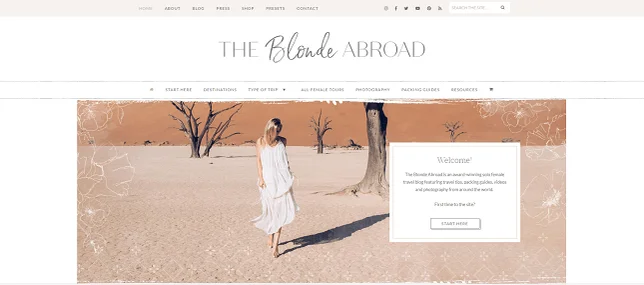
A blog is a website that’s regularly updated, run by one person or a small group, and is normally written in a laid-back style.
In terms of the content, when it comes to blogging, the world really is your oyster. Hell, there’s even a blog about oysters!
Even if your site won’t be a blog, it’s still a handy extra feature to add interest and authority to your site. Just make sure you’re committed to keeping it fresh and updated – like Kiki, the Californian traveler behind the award-winning blog The Blonde Abroad (pictured).
Not only does she regularly add new content – Kiki organizes her blog into different locations (Africa, Europe, Central America and more) and categories (including solo travel, female travel, and budget travel) – to appeal to different segments of her audience.
Make your blog easy to navigate, with categories allowing users to explore the blog content most relevant to their interests.
Find out more:
- The Best Blogging Platforms – Which is the best blogger?
- How to Start a Blog – The complete beginner’s guide.
- How to Start a WordPress Blog – WordPress knows best, but how does it work?
2. Business
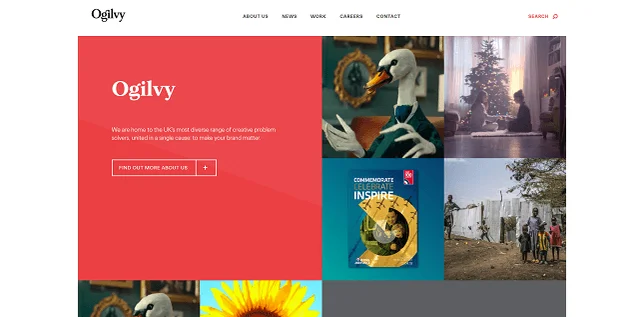
A business website is any kind of website that represents your business. Even small local businesses need a simple online presence (see ‘Brochure’ below) to be taken seriously in today’s digitally-minded world.
One business website we love is award-winning creative agency Ogilvy (pictured). The website uses broad splashes of colour, bold text, and imagery that hogs the limelight – exuding authority, and accurately reflecting the clout and weight the huge agency has amongst its target market.
A website is one of the easiest ways to show what your business is all about, and find those all-important new customers. Your website should have an about page, and details of how people can find you. After that, the sky’s the limit. Check out our ‘Ecommerce’ section below for businesses that plan to sell directly through their website.
Blend on-brand text, color and imagery to convey your business’s authority and expertise in the space.
Find out more:
- How to Build a Business Website – 8 easy steps to online success
- Best Small Business Website Builders – Which one is right for you?
- How to Make a Booking Website – A beginner-friendly guide to help you set up bookings and appointments
3. Brochure
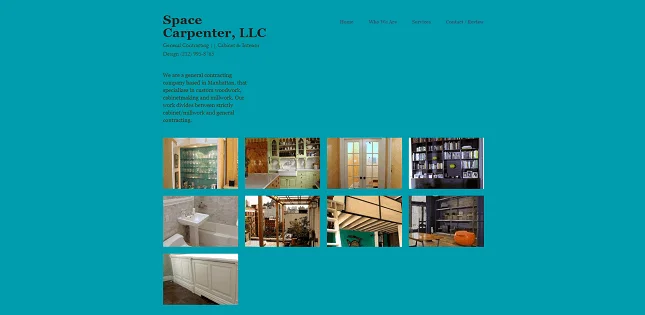
When categorizing websites by functionality, a ‘brochure’ website is the simplest type. Brochure websites typically only have a few pages, and are used by small businesses that need a simple online presence. They effectively act as an online brochure, giving an overview of what the business is, and how you can get in touch. The content on these websites is generally pretty ‘static’ – that’s to say it’s rarely updated.
For inspiration, check out impressive brochure website Space Carpenter, LLC (pictured) – a Manhattan-based general contracting company which uses images of its work, set against a background of vivid color, to draw attention to its portfolio.
Include images of your products and services in your brochure website to draw attention to your portfolio – and the projects you’re most proud of.
Find out more:
- Get inspiration from this shortlist of One Page Website Examples which prove you don’t need tons of pages for great web design!
- Compare the Best Business Website Builders
- Check out our pick of the best Informational Website Examples for inspiration!
4. Crowdfunding
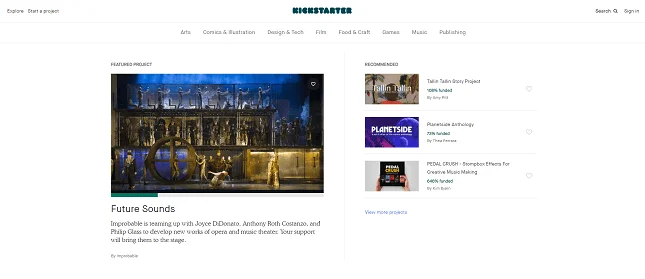
Crowdfunding is the modern way to fund your idea. From the sublime to the ridiculous, crowdfunding was the secret to bringing everything from fidget cubes to meat soap to market.
Crowdfunding websites work by taking ‘pledges’ of different amounts from lots of people, in order to hit the target amount needed to produce the product. Popular crowdfunding websites include Kickstarter (pictured) and Crowdcube.
Ensure your crowdfunding website makes it easy for users to create an account and start accepting donations.
5. Ecommerce
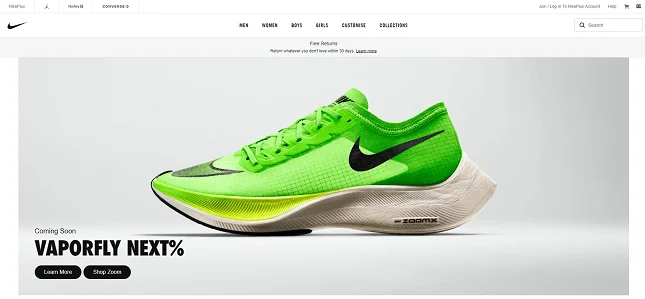
An ecommerce website is any website that directly sells a product or service. Not to be confused with a business website, with an ecommerce website you can add products or services into your cart, and pay for them through the site.
Ecommerce makes up an ever-increasing portion of sales in the US. And, for some good inspiration, look no further than one of the leading ecommerce brands in the world – Nike (pictured). Nike harnesses its bold, instantly recognizable typography – set against a background overflowing with aesthetically-pleasing white space – to build a strong brand, and encourage its site’s visitors to buy, buy, buy.
Harness white space and bold typography to draw attention to your ecommerce website’s products.
Find out more:
- Best Ecommerce Website Builders – Which platform should you sell with?
- Best Ecommerce Website Builders for Small Business – Sell today and start growing.
- Best Free Ecommerce Platforms – Save while selling online.
- Types of Ecommerce Businesses – Learn more about the industry trends.
6. Educational

The term ‘educational’ covers a broad range of websites.
Educational websites use any combination of games, articles, videos and images to educate their audience. These might be geared towards fun learning for children, or offer courses to adults, such as Coursera (pictured) and EdX.
We particularly love Coursera’s educational website. It uses bold CTA buttons to encourage conversations. And harnesses social proof – through featuring logos of its most prominent and relevant clients, including Google, Duke, and Imperial College London – to build trust and convey its expertise in the field.
Use social proof – such as logos of your top clients and customer testimonials – to engender trust and authority.
7. Forum
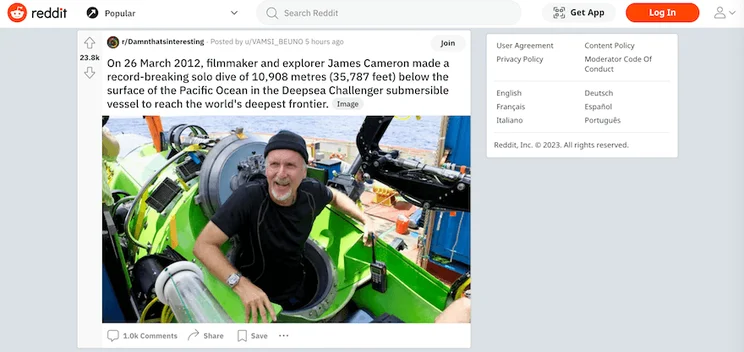
Forum websites are characterized by user-generated content – and serve as an online platform for discussion and information sharing.
Users can create new threads or topics – then start conversations by posting messages within those threads. Forum websites typically split their content out into different categories or sections, making it easier for users to navigate and find discussions relevant to them: and promoting a structured, organized environment.
The most famous example of a forum website is Reddit. The site aggregates social news and content – and provides its users with a place to submit content such as text posts, images, links, and videos, which other users can vote on. With its iconic logo and orange/white color scheme, Reddit’s immediately recognizable as both a forum website – and a powerful brand.
Make it easy for your forum websites users to start and contribute threads, and upload images and videos to stimulate conversation.
8. Media or Entertainment
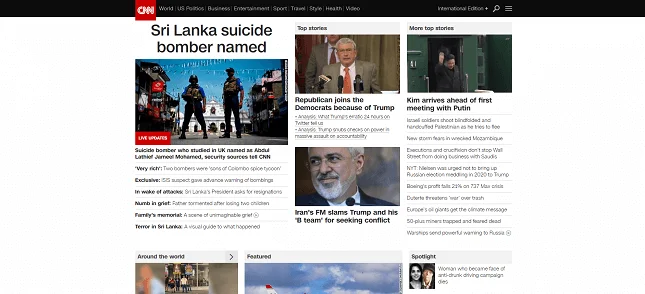
Media websites contain regularly updated content on current affairs, weather, sports and entertainment. News sites like CNN (pictured) and entertainment sites like ELLE both fall into this category. CNN is an especially excellent example of how to structure and organize the content of a media website: its layout and navigation makes it simple to locate the articles and galleries its users are most interested in.
The content on media sites is dynamic, meaning it’s updated regularly. Big media sites will publish multiple articles and videos every single day.
Post regularly – no one likes old news!
9. Nonprofit
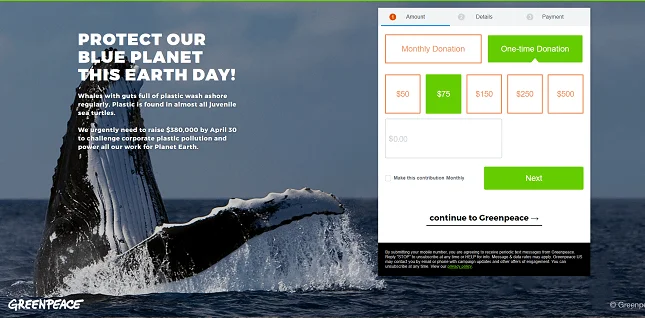
Nonprofits may not be classed as businesses in the same way, but they still need a website. These will generally be quite simple, outlining what the nonprofit is about and showing visitors how they can get involved, donate, or support in some other way.
Nonprofit websites like Greenpeace often also have a function to collect email addresses, and to create a database of people interested in keeping in touch with the organization through newsletters.
For more info about our top nonprofit website template picks, check out our top 10. We’ve also compiled the best nonprofit website examples and nonprofit web hosts in these handy articles.
Add a function to collect email addresses to your nonprofit’s websites, to cultivate an active, engaged community of followers.
10. Personal
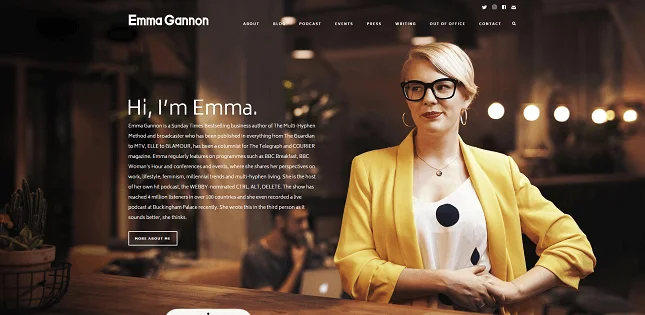
You might have heard the phrase ‘personal brand’ bandied around, and having a website can form a huge part of this. Personal websites allow you to post pictures, share thoughts, or treat your site like a digital CV. You can even launch a personal blog if you have updates to share. The choice is yours!
In the case of Emma Gannon‘s personal website (pictured) – a Sunday Times bestselling non-fiction author, award-winning novelist, podcaster & creator – it’s a case of ‘all of the above’.
Plus, her personal website is beautiful. Contained stylized imagery of her and utilizing parallax scrolling to create an immersive, engaging experience, Emma’s website draws you in – and encourages you to explore her life’s work contained within.
Plus, you don’t need to be a creative (see ‘Portfolio’ below) or a blogger (see ‘Blog’ above) to benefit from having your own website – and you don’t even need to spend any money making one.
Parallax scrolling is an excellent way of making your website stand out, and live long in the minds of your visitors’ memories.
Find out more:
- How to Make an Online Resume – Build your reputation online today.
- Best Resume Builder Websites – Create a killer resume online.
11. Portal
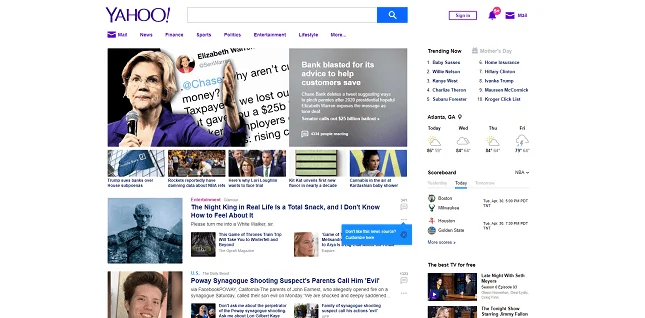
Portal websites, like Yahoo! (pictured), bring together information from lots of different sites and present them in one place. In Yahoo’s case, we’re big fans, in particular, of its top menu bar. It allows its users to search for the content they’re most interested in, sign in, view their latest notifications – and even access their email inbox in a click.
Web portals can be internal websites for organizations like schools, or for big businesses. It’s a centralized place to share news, training and updates, and for students or employees to access their emails and files. Users will need their own specific login to access these portals.
Make your portal website’s top menu bar easy to use, and pack it with useful features and functionality to add value for your users.
12. Portfolio
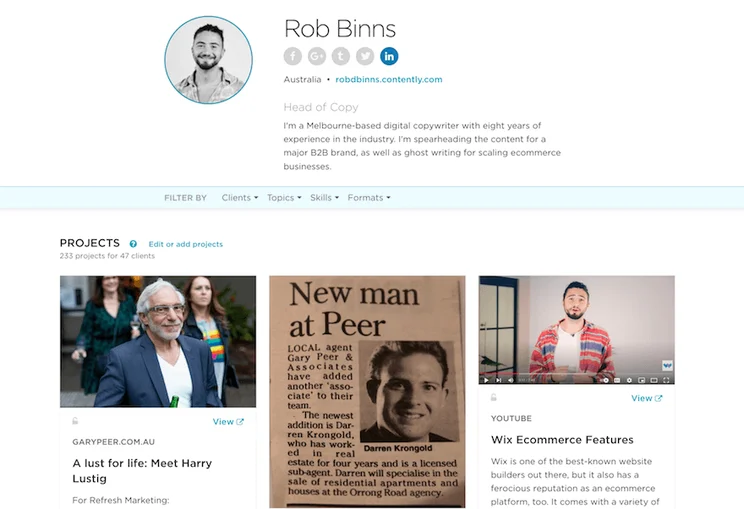
If you’re a writer, artist or designer, you’ll want to go one step further than a personal website – this is where a portfolio website can help.
These are a way for creatives to showcase their work to future employees, market themselves as freelancers, and generally get their name (and work) out into the big wide world.
I’ve actually made one of these types of websites myself! My website, Rob Binns’s Contently portfolio, showcases my range of copywriting and articles in a vertical view that makes it easy for the visitor to view an image and a brief description of each project – then click through to see it live.
Ensure it’s simple for your portfolio’s viewers to access the live links of your projects – and include both an image, and a short description, of each to entice them to learn more.
Find out more: Best Portfolio Website Builders
13. Static

The ‘static’ style of website is characterized by its fixed and unchanging content, providing information that remains constant over time.
Unlike dynamic websites – which allow for interactive features and real-time updates – static websites typically present predetermined content that doesn’t change based on user actions or inputs.
Static websites are often typically used for displaying basic information: such as business contact details, company profiles, or product descriptions.
One example of a static website (if a somewhat useless one!) is Staggering Beauty (pictured). It features nothing more than a large worm, set against a background of hallucinogenic color, that wiggles and shimmies in time with the movement of your cursor. (Warning: site contains flashing imagery, and isn’t suitable for anyone with epilepsy.)
The information on your static website doesn’t change. So making it beautiful to look at (and, in the case of Staggering Beauty, unforgettable to look at – is an excellent way of keeping it engaging.
Types of Websites: Summary
We’ve taken you on a whistle-stop tour of 13 of the most popular types of websites around today.
In the time it’s taken you to read this article, around 1,997 new websites have been created. If you’re yet to create yours, why wait? You can draw some inspiration from our picks:
The 13 most popular types of websites
- Blog. A regularly updated, casual stream of content.
- Business. A place for customers or clients to find more information about a business online.
- Brochure. A simple, informational site that’s particularly apt for small businesses.
- Crowdfunding. A fundraising site to help bring your ideas to life.
- Ecommerce. A site that sells a product or service directly.
- Educational. A website that’s made to help people learn things!
- Forum. A place for discussion, debate, and sharing user-generated content.
- Media or Entertainment. A site featuring regularly updated content on current events.
- Nonprofit. A site that makes it easier for visitors to support the organization.
- Personal. A site that functions as a portfolio, a CV, or just a space for your thoughts.
- Portal. An organized presentation of information from across the web.
- Portfolio. More in-depth than a personal website!
- Static. An unchanging website for evergreen information.
Is there a type of website you wish we’d covered? Let us know in the comments!
Find out more:
Popular Ways of Building Websites
Now you have an idea of the different types of websites available, let’s take a quick look at how they’re built.
When it comes to building a website, there are two different routes:
1. CMS
The first option is to build a website using a Content Management System (CMS), such as WordPress. You can do this yourself by downloading WordPress or another CMS system, buying a template, and building your site using code. You’ll need to pay for a domain name, and to host your website too.
There are advantages to building a site this way, but you’ll need some technical know-how to get you there. If you choose to enlist a web designer to build your site, this is the route they’ll probably choose.
2. Website Builder
Website builders are online platforms that let users create their own website based on a selection of templates. You don’t need to know how to code to use a website builder – they’re generally really easy to use, and you’ll pay a monthly fee to keep them going. They’re perfect for business websites, ecommerce websites, blogs and portfolios. More complex websites – think portals and media sites – will most likely need to be built with a CMS system.
Not all website builders were created equal, though. And if you’re going to commit to using one for your website, you’ll want to know it’s the best one for the job.
That’s where we can help.
We’ve carried out extensive research into website builders over the last few years. We paid for plans with all the biggest website builders, and got everyday people to use them and give us their feedback. We’ve compared features, and compared prices too. Read our guide to the best website builders to see what we found.


1 reply