
We’ve created a lot of online stores on a lot of platforms over the years, and Squarespace is one of our favorite ecommerce website builders. It’s an affordable entry into selling online and has unique, fully customizable templates for a range of online stores.
However, depending on your business goals and priorities, it might not be the best option. In this Squarespace ecommerce review, I’ll cover the ins and outs of its selling capabilities, from its sales features to its artful design templates. By the end, you’ll have all the info you need to decide whether you should start selling online with Squarespace.
Prefer to watch? Check out our YouTube video where we cover the pros and cons of selling on Squarespace:
- Squarespace is best for creative or service-based businesses
- You can sell online with any Squarespace plan – pricing starts at $19
- Blueprint AI, Squarespace’s AI builder, helps you set up your online store in minutes
- Create a memorable brand identity with Squarespace’s AI tools
- Businesses can contact Squarespace 24/7 for support
Squarespace’s Pricing
Squarespace updated its plans in July 2026, with four subscriptions that range from $19 to $99 per month (billed annually). You can sell on all four of these plans:
- Basic ($19) – For online portfolios and side hustles
- Core ($29) – For small businesses
- Plus ($49) – For growing online stores
- Advanced ($99) – For established businesses
Value for Money
Squarespace isn’t the most affordable ecommerce website builder on the market. Its two most expensive plans have seen a sharp increase in pricing, and the jump between plans adds an extra roadblock for businesses looking to scale.
What I will say is that Squarespace’s sales features are top notch, and we found them to be well worth the price. Plus, Squarespace’s plan structure means that you can sell online on its cheapest $19 per month plan, which charges transaction fees of 2.9% + 30¢. To give context, Shopify’s comparable plan, with the same transaction fees, costs $29 per month.
With Squarespace, you’ll also get a 14-day free trial before committing to a recurring payment.
Once you decide on your plan, you’ll receive a free domain for a year and can save up to 30% by paying annually, or you can save 10% on any plan when you use our code “WBE10” at checkout.
Sales Features
We’ve always been impressed by Squarespace’s comprehensive set of sales features, which is one of the reasons why it scored third place, just underneath Shopify and Wix, in our testing. Since its annual product showcase, Squarespace Refresh, in September 2024, this arsenal has only gotten stronger.
These are the standout features you’ll be able to use on all Squarespace plans:
- Sell unlimited products – there’s no limit to the number of items in your inventory
- Sell a range of products – you can sell services, gift cards, and digital downloads, in addition to physical products
- Abandoned cart recovery – customers who’ve left unpurchased items in their cart will receive emails reminding them to check out
- Flexible shipping options – Squarespace supports a variety of shipping options at checkout, such as pickup and local delivery. You can also configure “fulfillment profiles” for individuals or groups of products
- Collect and show product reviews – when this feature is enabled, review requests will be emailed to customers two weeks after their purchase
- Offer personalization with product forms – product forms enable your customers to make requests or leave instructions for a particular product. They appear at checkout and are fully customizable, and come in handy if you’re selling personalized items that require names or measurements
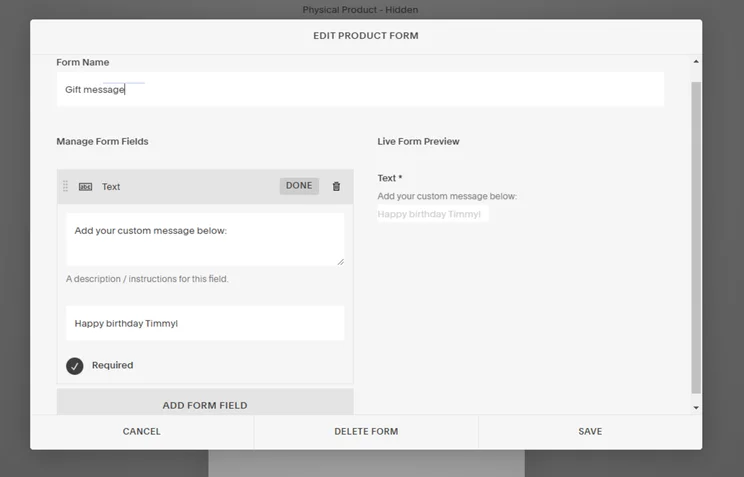
Abandoned cart recovery was previously only available on the $52 per month plan, so it’s great to see it now accessible at the lowest price point. However, the Basic plan still lacks many sales features necessary for serious growth, such as product discounts, ecommerce and conversion analytics, and Google Shopping visibility. If you’re looking to take selling seriously, I recommend looking into the Core plan, since you’ll be able to promote your store and continually optimize it for your customers by using analytics.

As you upgrade past the Basic plan, you’ll unlock even more sales features:
- Additional shipping options – carrier-calculated real-time shipping rates with UPS, USPS, and FedEx
- Advanced discounting – you can set discounts to be automatically applied to carts that meet the minimum criteria
- Product subscriptions – you’re able to offer discounted subscriptions for products that customers are likely to buy again, which is a great incentive for repeat purchases
- Upsell with add-ons – select up to six related items to show on each of your product pages
- Omnichannel integrations – linking your business’ Meta account will allow you to sell on Facebook and Instagram and promote your products with social media ads. Plus, you can also control how your product pages appear when shared to social media
Squarespace loses points for sales features because of its lack of localization for international markets. While it supports 31 currencies, your store will only be able to display one at any time, meaning that when international customers visit, they won’t see their local currency until checkout. This lack of transparency creates an unfamiliar shopping experience, which is a leading cause of cart abandonment. So, if you’re trying to expand into global markets, a builder like Shopify would be a better choice.
Building Your Squarespace Ecommerce Store
Other Squarespace ecommerce reviews might outline the basic facts, but my first-hand testing means I can answer your most important concerns. To get these answers, I created an online store using Squarespace. Here’s how it went:
The Initial Setup
Squarespace’s Blueprint AI is one of the most efficient AI builders we’ve tested, on par with Wix and Hostinger. It asked relevant questions about my brand personality, sector, and website pages – all important areas that should be considered before you create a website. While I had full freedom of choice, at every stage the AI Builder offered suggestions of what would work best for my website.
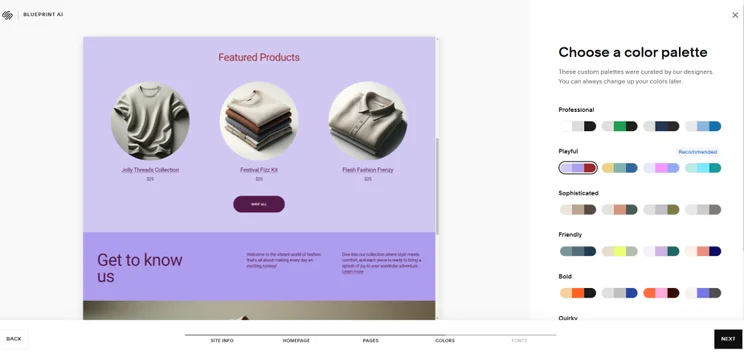
It took me around five minutes to complete Squarespace’s Blueprint AI setup, and I was left with a starting point that felt relevant to my business and provided all the necessary pages. Most importantly, its reflection of my brand’s personality and the store functions it added made the process of finetuning my ecommerce store feel like an exciting and achievable, rather than daunting, process.
Adding Products
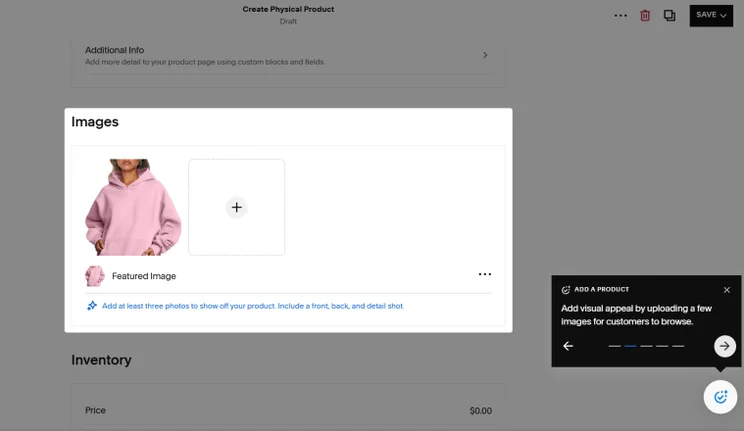
Squarespace was a firm favorite in our user tests, and after testing it myself, I can see exactly why. Its dashboard houses a store setup guide, which explains how to build an inventory and directed me to a simple, beginner-friendly product page. If you’re a beginner who’s considering using Squarespace for ecommerce, you’ll appreciate the detailed guidance Squarespace provides whenever you click on the blue circular pop-up. From product pages to SEO help, additional tips appeared as I progressed – brilliant for improving your product’s visibility in searches.
When it came time to write my product descriptions, I had a chance to test Squarespace’s AI copywriting capabilities. The writing tool gave me a vague choice between writing a pitch, a blurb, or a paragraph, but I found it difficult to understand which was suitable. In comparison, other ecommerce builders have AI copywriting tools, such as Shopify Magic, that use more specific ecommerce phrasing and so make it easier to choose the right option.” However, once the text had been generated by Squarespace’s AI, it was easy to modify its length and simplicity.
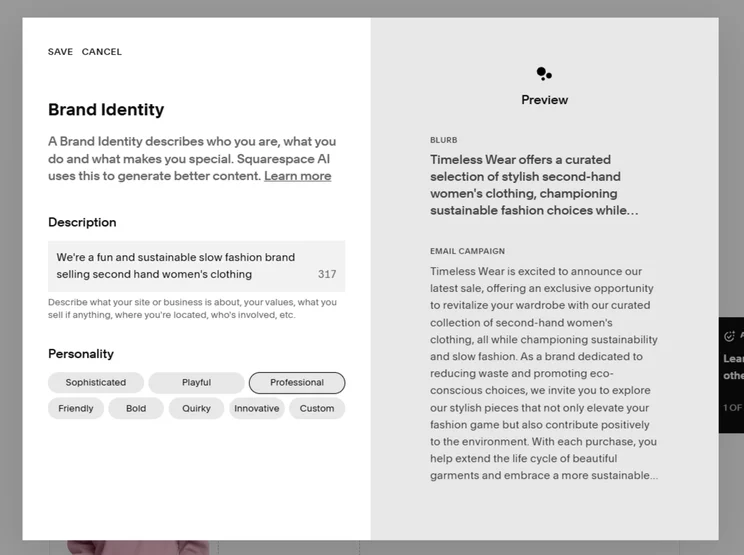
One aspect of Squarespace’s AI content generator that I particularly liked was its “Brand Identity” feature, which stores your brand description and tone of voice and uses this to shape all the AI-generated content across your site, making it feel tailored to your store and providing a level of consistency throughout your pages.
Squarespace’s App Market
When choosing a website builder, you should always explore its app market, which can provide additional functions for your store as it develops. This Squarespace ecommerce review is no exception and, at the time of writing, the app market – Squarespace Extensions – holds 47 plugins, which is very small compared to the 8,000 offered on Shopify’s app market.
That said, Squarespace Extensions is slowly growing, and its apps are well thought out and allow you to expand your ecommerce ventures in many directions. Having looked through each app, here are the most useful ways I’ve found that they can benefit ecommerce stores:
- Inventory management – these extensions keep track of incoming and outgoing orders and give accurate, real-time inventory tracking
- Print on demand – if you’re selling artwork and merchandise, you can use POD extensions to print your designs onto various products
- Dropshipping – these apps help you find products to sell on your store from third-party partners
- Additional sales avenues – these integrations allow you to sync your inventory to TikTok Shop, sell to other businesses as a wholesaler, and control your product feeds on platforms such as Google, Amazon, Facebook, and Instagram
- Shipping support – these apps connect you with carriers and smooth out the process of buying shipping labels
Squarespace’s Ecommerce Templates
Squarespace has a reputation as the reigning champion of sleek and stylish designs, so when I tested them myself, my expectations were high. True to form, every option maintains that trademark visual appeal.
45 of Squarespace’s 180 templates are designed with ecommerce in mind. Once you’ve selected “Online Stores” as your website type in the template gallery, you can easily whittle down your template choice by selecting from one of the 19 categories, which cover everything from fitness to podcasting to weddings.

When editing, I was pleased to see that each Squarespace online store template has a high level of customization, which means you can use one of its expert designs as a baseline and edit it to match your brand colors and style. Once you’re signed in to your Squarespace dashboard, you can change the fonts, colors, buttons, and even the margins of your website. We found Squarespace’s templates to outshine those of its competitors, providing the highest visual appeal and the best overall experience.
What’s even better is that Squarespace’s templates are interchangeable – unlike other builders, like Wix – so if you ever want to rebrand or simply feel the urge to switch up your store design with the seasons, you can download a new template and transfer your content over.
Squarespace’s email marketing templates are just as outstanding as its website designs, and are updated seasonally. In May 2025, it announced its summertime email templates to be launched within the next few months. Keep an eye out for these – they’re an engaging way to promote seasonal products and sales.
SEO
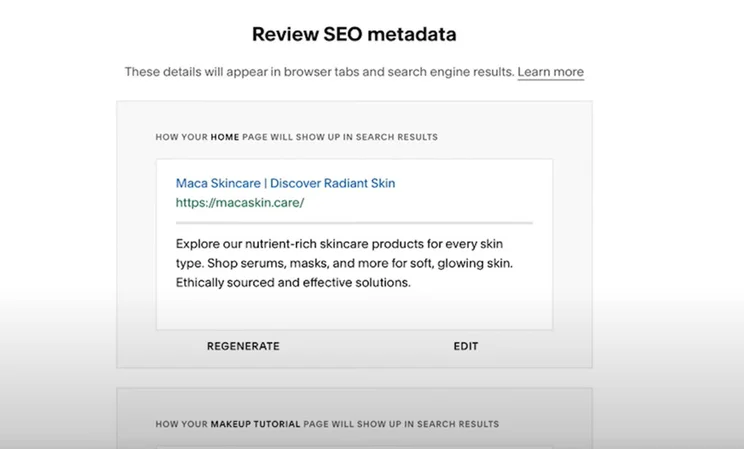
This Squarespace ecommerce review wouldn’t be complete without touching on its search engine optimization (SEO) tools, which increase your site’s visibility in the results pages of Google and other search engines. Squarespace’s native SEO features are impressive and, when used correctly, will help push your products to new customers and increase sales.
From the get-go, Squarespace’s ecommerce templates are designed with clear search engine friendly navigation. Squarespace also provides a helpful SEO checklist that indicates the key areas you should consider while building your website, and beyond.
You’ll have control over the following aspects of your website’s SEO:
- URLs, meta titles, and meta descriptions for all pages, including product pages – these are automatically set and can be modified at any time
- Your social image – how your content appears when shared on social media
- Page visibility – you can hide certain pages from appearing on search engines
- Translations – if you make use of Squarespace’s multilingual feature, translations are optimized for search engines
As of March 2025, Squarespace has added an AI SEO tool to provide search engine-friendly improvements for titles, descriptions, and image alt text.
User Support
Squarespace’s customer service is available 24/7 over email, AI chatbot, and social media. If you want to speak to a human in real-time, you can do so via live chat between 4am and 8pm EST, Monday to Friday.
However, Squarespace doesn’t offer support over the phone. This may be a deal breaker for some, but its other support channels – especially its live chat – are strong enough to feel like you aren’t really missing out. Plus, the plethora of webinars and video tutorials found in Squarespace’s Help Center can fill any gaps in human connection.
Squarespace Competitors
Squarespace is our top recommendation for visually driven businesses that need a stylish and unique website, thanks to its unmatched templates. However, it won’t be the right choice for every business.
- Shopify is a better option if you’re looking to expand your business and sell in multiple global markets, since it has the most impressive localized selling tools.
- Wix has the most impressive suite of marketing tools to help you spread the word about your products and boost ecommerce sales.
- If a large part of your business involves in person selling, Square Online offers a POS system that’s easy to integrate into your online store.
Here’s a side-by-side comparison of how Squarespace pans out among its competitors:
|
Overall rating
|
Starting price
|
Free plan or free trial
|
Number of templates
|
Standout features
|
Areas to improve
|
Recommended for
|
||
|---|---|---|---|---|---|---|---|---|
 |
 |
 |
 |
 |
||||
|
Squarespace |
Shopify |
Wix |
Hostinger |
GoDaddy |
||||
|
4.7
|
4.8
|
4.8
|
4.2
|
4.0
|
||||
|
|
||||||||
|
14-day free trial |
3-day free trial |
Free plan |
7-day free trial |
Free plan |
||||
|
150+ |
1,000+ |
2,000+ |
170+ |
200+ |
||||
|
|
|
|
|
||||
|
|
|
|
|
||||
|
Creatives and service-based businesses |
Businesses who want to easily scale their store as they grow |
Businesses promoting their online presence |
Beginners and budget-conscious businesses |
Businesses using socials to drive traffic |
How We Test Ecommerce Website Builders
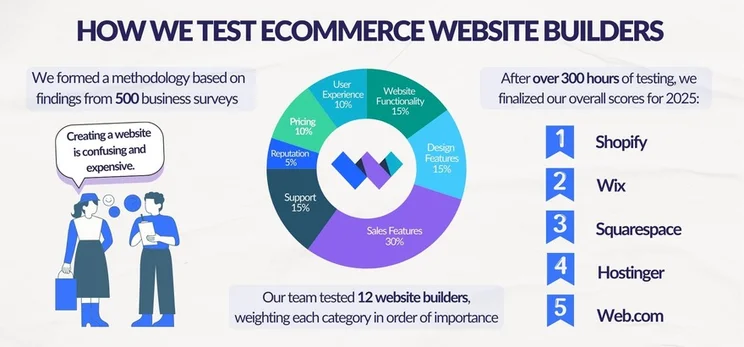
Here at Website Builder Expert, we provide data-driven recommendations to match you with the perfect website builder for your ecommerce journey. But how do we actually come to these conclusions?
Well, our in-house research team works off a unique methodology, which was formed by surveying 500 small businesses. This brought to light seven key areas to test our ecommerce builders against, each weighted based on level of importance:
- Sales features — 30%
- Website functionality — 15%
- Design features — 15%
- Help and support — 15%
- Pricing — 10%
- User experience — 10%
- Reputation — 5%
Sales features are undoubtably the most important consideration for ecommerce websites, so this is our most heavily weighted area.
- Multi-channel integration – Which additional sales channels can be linked to your site?
- Payment processing fees – Does the builder charge payment processing fees, or are they included in your subscription?
- Inventory – How many items can the builder hold in its inventory? How can you import products?
- Security – Does the builder offer inbuilt SSL certificated?
- Sales types – Which types of products can be sold, other than physical? Can you sell digital products, subscriptions, and services, for example?
Summary
My Squarespace ecommerce review should have answered the question: “Is Squarespace good for ecommerce?” The builder understands the importance of creating and maintaining a consistent brand voice and uses its AI features – from the Blueprint AI setup to its content generator – to help you solidify yours. On top of this, its ecommerce plans are reasonably priced and you won’t have to worry about losing profits through transaction fees.
This said, if you sell globally or plan to expand soon, Squarespace’s lack of localization features and international currencies will act as obstacles to your growth. In our latest round of ecommerce builder testing, the lack of these features is what caused it to fall below Shopify in our resulting ranking. If international business growth is a priority, Shopify is a great alternative.


1 reply
1 reply
1 reply
1 reply
1 reply
1 reply
1 reply
1 reply
1 reply
1 reply
2 replies
1 reply
1 reply
1 reply
1 reply
1 reply
1 reply
1 reply
1 reply
1 reply
1 reply
1 reply
1 reply
1 reply
1 reply
1 reply
1 reply
1 reply
1 reply
1 reply
1 reply
1 reply
1 reply
1 reply
1 reply
1 reply
1 reply
1 reply
1 reply
1 reply
1 reply
1 reply
1 reply
1 reply
1 reply
1 reply
1 reply
1 reply
1 reply
1 reply
1 reply
1 reply
1 reply
1 reply
1 reply
1 reply
2 replies
1 reply
1 reply
1 reply
1 reply
1 reply
1 reply
1 reply
1 reply
1 reply
1 reply
1 reply
2 replies
1 reply
1 reply
1 reply
1 reply
1 reply
1 reply
1 reply
1 reply
1 reply
1 reply
1 reply
1 reply
1 reply
1 reply
1 reply
1 reply
1 reply
1 reply
1 reply
2 replies
1 reply
1 reply
1 reply
1 reply
1 reply
1 reply
1 reply
1 reply
1 reply
1 reply
1 reply
1 reply
1 reply
1 reply
1 reply
1 reply
1 reply
1 reply
2 replies
2 replies
1 reply
1 reply
1 reply
2 replies
1 reply
1 reply
1 reply
1 reply
1 reply