
Interested in using Ucraft to design your website? Read on as we review the platform and explain exactly what makes Ucraft tick.
Much like its artsy name, Ucraft is a website builder that puts design at the forefront of everything it does. A sleek editor, useful features, and templates that let your images ‘pop’ are just a few things Ucraft brings to the table.
But before we get into all that, let’s back up. What actually is a website builder?A website builder is an online tool that lets anyone create their own website quickly, affordably, and without any coding knowledge.
Ucraft pros and cons
- Brilliant for sites that need their images to stand out
- Completely free plan available
- Free built-in security and analytics
- Not as easy to use as ‘pure’ drag-and-drop website builders or design assisted platforms
- Fewer features than other platforms like Wix or Squarespace
- Not ideal for complex websites with specific requirements
Join us as we break down how Ucraft stacks up in five key areas:
- Ease of Use
- Template Design
- Features
- Help and Support
- Pricing
Further Information
Ease of Use

Getting started with Ucraft is incredibly simple. Once you’ve picked which plan you’d like to start with – we’d recommend using the free plan to see what you think of Ucraft first – you’ll be asked to pick a template.
Ucraft’s templates are split into categories, making it super easy to find one relevant to you. They’ll come with built-in features specific to that industry, and (generally) a clean layout.
You can start on a blank canvas, but it’s easier to find a design you like and paint over the example content with your own masterpiece.
After choosing one, you enter the editor (as seen on the right). Here’s where the fun really starts.
You can add extra elements to your web pages – like contact forms, blogs, and newsletters – and edit their layout to fit your site’s design.
Unlike its rival Wix, Ucraft is a little trickier to edit. It works in sections, or ‘blocks’, where you stack elements on top of each other to create your web page. You can’t move anything, anywhere like you can on Wix – each element has to stay in its set section.
Once you’ve got your head around the editor, it’s actually pretty easy to use. That said, there’s a distinct lack of freedom, and you may find the editor a tad rigid.
Further Information
Template Design
Ucraft offers a choice of 63 templates in total. There isn’t a mountain of options available, but there’s still enough there to help take your website to new heights.
All Ucraft’s templates are fully mobile responsive, meaning they will automatically adjust to fit mobile and tablet screen sizes – you won’t have to edit a thing!
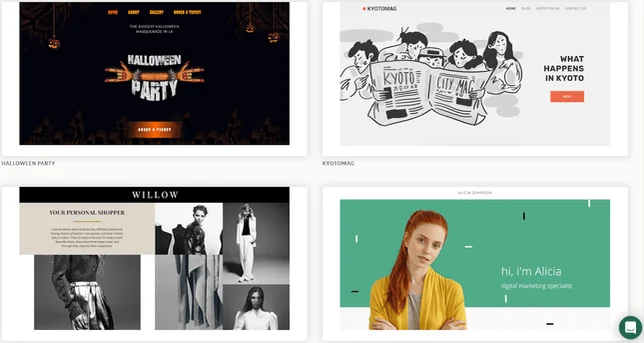
It also puts a lot of emphasis on photos, and lets them do the talking. As such, its templates favor websites with a lot of high-quality images.
If you’re struggling to choose a template, you can always preview the options available. In one click, you can browse each dummy website, envisaging how your content will look in its place, before making your decision.
Further Information
Features
Features are a strong point for Ucraft. Let’s start with some of its more standard offerings:
Ucraft’s Core Features
- Security: This comes in the form of an SSL certificate, which makes your website secure. You can tell if a site’s got one by looking for a little padlock icon next to its URL. SSL security doesn’t just help you process sensitive information safely – it also lets your visitors know you’re a reliable and credible site.
- Support: SEO, or Search Engine Optimization, is the process of making changes to your site to help it rank highly on search engines, like Google and Bing. Ucraft has its own dedicated SEO app that helps you with this.
- Analytics: Instead of knocking together its own, sub-par analytics tool, Ucraft lets you integrate your website with Google Analytics. This is useful for tracking everything from visitor rates to bounce rates (people leaving your site in a matter of seconds).
Staying true to its image-first approach, Ucraft also has features like image editing tools, video backgrounds, and social media integration.
That last one is important, as it means you can connect your website to any other social media you have. If you’re say, a photographer, and want to showcase your Instagram feed on your Ucraft website, you can!
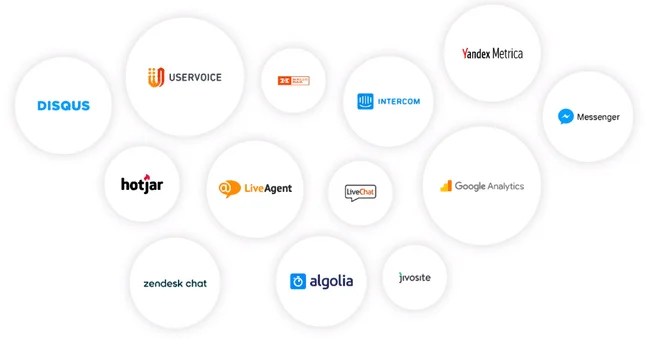
Something else Ucraft does well is third party integrations. It works seamlessly with apps like iTunes and Eventbrite, making it even more appealing if you’re in a creative field.
Last – but certainly not least – is Ucraft’s free logo maker. If you’re yet to sort out any branding, Ucraft can take care of the design for you. All you have to do is answer a few questions, and bam – you’ll have your very own logo.
What Features is Ucraft Missing?
It’s not all roses, though. As we mentioned, Ucraft may sell itself as a drag-and-drop builder, but it’s not pure drag-and-drop in the same way Wix is. It’s more similar to Squarespace or Weebly, where you build up your web pages section by section.
There’s also no members-only area, meaning you can’t hide certain parts of your site from the public – less than ideal if you want to have a sign-in customer area. If that’s going to be a deal breaker for you, we’d recommend checking out Wix.
You also have to pay for your domain from the off. This sounds normal, but it’s actually quite common for website builders to offer the first year free of charge.
Help & Support
Ucraft’s support team is undoubtedly helpful, but the ways in which you can get help are a little limited.
There are three ways of getting help from Ucraft: an FAQ section, a help center, and 24/7 live chat support.
- FAQs: What it says on the tin really. This is just a section of Ucraft’s website where you can browse commonly asked questions that may help solve your issue.
- Help Center: Think of this like an online library. It’s packed full of ‘how to’ guides that will detail exactly how to perform certain tasks in the Ucraft editor.
- Live Chat: Available 24/7, the live chat will be your go-to resource for almost anything and everything. It may take a few minutes to get a response, but staff are generally very knowledgeable and helpful.
Just like its features, Ucraft’s help and support is good, but not great. Unlike other platforms out there, it doesn’t go above and beyond. Most website builders will have phone and email support, on top of the help Ucraft provides.
Pricing
Ucraft has four plans, which range from completely free to $39/month.
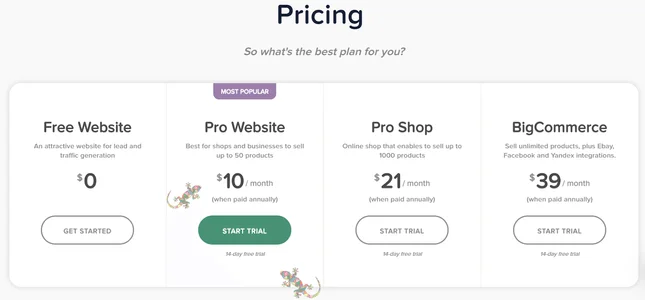
Below, we’ll run through each plan, tell you a little bit about it, and suggest who it’s for.
Free Website
You heard us right – this plan is 100% free! You’ll get access to all Ucraft’s basic features, as well as all the templates. However, as with most freebies, there is a catch.
Your domain name will have to end in .ucraft.com, which hardly looks professional. For this reason, we see this as a plan for those who need a personal website – like a blog or wedding site. It’s not really suitable for a business, or even a freelancer.
Pro Website
This plan will be the first step on the ladder for many businesses. More than just ditching the tacky Ucraft branding, you also get access to all of Ucraft’s apps and features.
This includes ecommerce. For $10/month, you can sell up to 50 different products. You can also translate your site into another language, making it multilingual.
We’d see the pro plan as being for small, service-based businesses. Someone like a barber, photographer, or personal trainer could benefit from the Pro Website plan.
Pro Shop
Here’s where you’ll be leaning more towards an online store, rather than just a website. Ucraft lets you sell up to 1,000 different products, and gives you the ability to edit invoices, reverse charge VAT, and enable discount coupons – all for $21/month.
It also comes with a handy store management app, to help keep your store ticking over. This plan is for ecommerce businesses who are either growing, or sell a limited number of products. Someone like an artist or professional photographer who sells prints will find this plan the most useful.
BigCommerce
Not to be confused with the ecommerce website builder, BigCommerce, this plan gives you everything Ucraft has to offer. The main differences between the BigCommerce plan and Pro Shop is that there’s no limit to the amount of products you can sell.
On top of that, you can sell across social media and marketplaces too, such as Facebook and eBay. This plan is for medium-sized ecommerce businesses who need a platform that can keep up with them.
Top Tip: If you’re looking for a pure ecommerce platform, you’re better off checking out Shopify. It’s purpose-built for online stores, and came top of our research as the best ecommerce platform.
Ucraft Website Builder Review: Conclusion
By now, you should have a pretty good idea of what Ucraft is and whether it’s right for you. To recap:
Ucraft is an image-centric website builder that comes with most standard features, along with a few cool integrations. We’d see Ucraft as a platform for creative individuals and industries, or small ecommerce businesses who need a simple website.
It’s free plan is a real draw, and you can sample any of its other plans as part of a 14-day free trial. To be honest, though, there are better website builders out there.
For example, Wix also has a free plan, a pure drag-and-drop editor, more features, better designed templates, and multiple ways to get support.
Likewise, if you need an online store, Shopify is a far more comprehensive platform. It’s designed specifically for ecommerce, and comes with dozens of powerful tools and features.
In short – Ucraft is for creative people who want to sell the odd product, but don’t need a powerful ecommerce solution.
Found our review helpful?
Did this guide help you decide whether Ucraft is right for you then help to get you started building your website? If so (or if not!) leave a comment below.
Do you know anyone who can benefit from this article? Click the share buttons below to send them this page.
You’ll be helping them, and helping us out by spreading the word about our website!
Website Builder Expert aims to provide you with honest data. That’s why we conduct our own research and obtain direct, personal insight. Click here for further information.


1 reply